Unknown user showing in user accounts - possibly compromised?

Gideetudee

New member
Local time
4:00 PM
Messages
9
Hi all,

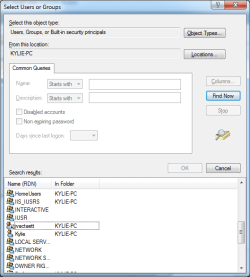
Hoping someone might be able to help. Recently, a few strange things have happened with the PC, which first started when I found I couldn't use the Backup & Recovery software in Windows 7. Whenever I clicked on one of the buttons with a shield, nothing would happen at all. I've looked around and just can't find the solution to this. However, today when trying to fix this, I've come across a new user account in the permissions section. The name is jvactaett - I certainly haven't made this! Does anyone have any ideas how this account has got there, and how I can remove it? It doesn't show in user accounts through Control Panel.

I've put a screenshot as well. To get there, I right clicked a hard drive and went to properties, Security, Add, advanced and then clicked Find Now.

I don't know if the two things above are linked or not...
Thanks!
 

Attachments
  • jvactaett.png
    jvactaett.png
    16.9 KB · Views: 101

My Computer My Computer

At a glance

Windows 7 Home Premium 64-bitIntel Core i5 2500KKingston DDR3 2GB x3NVIDIA GeForce 460
Computer type
PC/Desktop
Computer Manufacturer/Model Number
Dell
OS
Windows 7 Home Premium 64-bit
CPU
Intel Core i5 2500K
Motherboard
Gigabyte Z68A3-DP
Memory
Kingston DDR3 2GB x3
Graphics Card(s)
NVIDIA GeForce 460
Hard Drives
Samsung SSD 830 Series 250GB
WDC WD6400AAKS-75A7B2 ATA Device
Antivirus
ESET Antivirus
Browser
IE 10

My Computer My Computer

At a glance

Windows 7 Home Premium 64-bitIntel Core i5 2500KKingston DDR3 2GB x3NVIDIA GeForce 460
Computer type
PC/Desktop
Computer Manufacturer/Model Number
Dell
OS
Windows 7 Home Premium 64-bit
CPU
Intel Core i5 2500K
Motherboard
Gigabyte Z68A3-DP
Memory
Kingston DDR3 2GB x3
Graphics Card(s)
NVIDIA GeForce 460
Hard Drives
Samsung SSD 830 Series 250GB
WDC WD6400AAKS-75A7B2 ATA Device
Antivirus
ESET Antivirus
Browser
IE 10
"Disclaimer" : I am not a known malware removal person, But I have done a lot in my lifetime. Just not recognized. Therefor a malware removal assistant should assist you shortly, but until they do these are my thoughts:

That down arrow on the "unknown jvactaett" account means the account is disabled. So relax a little :)
You can delete the account several ways:

http://www.sevenforums.com/tutorials/181036-user-account-delete.html

Are you sure you never created it? This is your pc and your the only one who ever used it?


You state that sfc does not complete. We may need to do a http://www.sevenforums.com/tutorials/3413-repair-install.html but lets check some things out first.


I suggest doing the following:

Please use the Farbar Recovery Scan Tool
Download: http://www.bleepingcomputer.com/download/farbar-recovery-scan-tool/
Select the version that applies to your system.
Save it to your Desktop.

Double-click the downloaded file to run it.
When the tool opens click Yes to the disclaimer.

Press the Scan button.

The tool makes a log (FRST.txt) in the same directory from which the tool is run (Desktop).
Please provide the FRST.txt in your reply.

The first time the tool is run, it also makes another log: Addition.txt
Also post the Addition.txt in your reply.


Next, download the Farbar Service Scanner

http://www.bleepingcomputer.com/download/farbar-service-scanner/

Save to the Desktop
Make sure the following options are checked:
Internet Services
Windows Firewall
System Restore
Security Center
Windows Update
Windows Defender
Press: Scan
FSS creates a log, FSS.txt, on the Desktop.
Please provide the FSS.txt in your reply
 

My Computer My Computer

At a glance

Windows 10 ProAMD Ryzen 5 2400G Processor with Radeon RX Ve...G.SKILL Ripjaws V Series 16GB (2 x 8GB) 288-P...2047MB NVIDIA GeForce GTX 1060 6GB (EVGA)
Computer type
PC/Desktop
Computer Manufacturer/Model Number
Custom Built
OS
Windows 10 Pro
CPU
AMD Ryzen 5 2400G Processor with Radeon RX Vega 11 Graphics
Motherboard
ASRock X470 Master SLI/AC AM4 AMD Promontory X470 SATA 6Gb/s
Memory
G.SKILL Ripjaws V Series 16GB (2 x 8GB) 288-Pin DDR4 SDRAM D
Graphics Card(s)
2047MB NVIDIA GeForce GTX 1060 6GB (EVGA)
Sound Card
Motherboard Built in
Monitor(s) Displays
Acer R240HY bidx 23.8-Inch IPS HDMI DVI VGA (1920 x 1080) Wi
Screen Resolution
1920 x 1080
Hard Drives
1TB Sandisk SSD PLUS (Main drive)
500 GB Seagate 7200 RPM (Games)
500 GB Western Digital 7200 RPM (Virtual Machines)
PSU
CORSAIR TX Series TX650M 650W 80+ Gold Modular Power Supply
Case
CORSAIR CARBIDE SPEC-02 Mid-Tower Gaming Case, Red LED Fan
Cooling
220mm, two 120mm, and four 60mm fans
Keyboard
Wired Dell keyboard
Mouse
Wireless Logitech mouse
Internet Speed
250mb down, 30mb up
Antivirus
Panda Cloud Antivirus
Browser
Chrome-ish x64
Other Info
Your awesome for reading this.
Like andrew said, the account is disabled, so relax a little.

1. Boot in Safe Mode WITH NETWORKING How to: How to Enable Safe Mode in Windows 7 | PCWorld


2. Install Malwarebytes IN SAFE MODE!


3. During installation, it should say that the database is outdated, update it.


4. Run a "Full System Scan"


5. Post the report.txt file it makes here :)
 

My Computer My Computer

At a glance

Windows 7 Home Premium x64AMD FX 8350 - 4.8GHZ16 GB G.Skill 1866 cas 10GTX 770 Windforce
Computer type
PC/Desktop
Computer Manufacturer/Model Number
Dell
OS
Windows 7 Home Premium x64
CPU
AMD FX 8350 - 4.8GHZ
Motherboard
Gigabyte 990FXA-UD3 rev 4
Memory
16 GB G.Skill 1866 cas 10
Graphics Card(s)
GTX 770 Windforce
Monitor(s) Displays
x2 Dell 24' 1080p
Screen Resolution
x2 1080p
Hard Drives
64GB Sandisk SSD
1TB Seagate
PSU
Corsiar RM &50w
Case
Fractal R4 window
Cooling
H100i with sp120
Keyboard
G110
Mouse
Logitech G100s
Internet Speed
12d 3u
Antivirus
Avast!
Browser
Firefox
Hi Andrew,

Thanks for the response :)

100% positive that I, nor my wife, have ever created that account. Thing is, it doesn't appear in the user accounts at all. It's only if I go to security settings that I can see it. It's odd....

Anyway, I've attached all of those txt files, can you see anything untoward there?

"Disclaimer" : I am not a known malware removal person, But I have done a lot in my lifetime. Just not recognized. Therefor a malware removal assistant should assist you shortly, but until they do these are my thoughts:

That down arrow on the "unknown jvactaett" account means the account is disabled. So relax a little :)
You can delete the account several ways:

http://www.sevenforums.com/tutorials/181036-user-account-delete.html

Are you sure you never created it? This is your pc and your the only one who ever used it?


You state that sfc does not complete. We may need to do a http://www.sevenforums.com/tutorials/3413-repair-install.html but lets check some things out first.


I suggest doing the following:

Please use the Farbar Recovery Scan Tool
Download: Farbar Recovery Scan Tool Download
Select the version that applies to your system.
Save it to your Desktop.

Double-click the downloaded file to run it.
When the tool opens click Yes to the disclaimer.

Press the Scan button.

The tool makes a log (FRST.txt) in the same directory from which the tool is run (Desktop).
Please provide the FRST.txt in your reply.

The first time the tool is run, it also makes another log: Addition.txt
Also post the Addition.txt in your reply.


Next, download the Farbar Service Scanner

Farbar Service Scanner Download

Save to the Desktop
Make sure the following options are checked:
Internet Services
Windows Firewall
System Restore
Security Center
Windows Update
Windows Defender
Press: Scan
FSS creates a log, FSS.txt, on the Desktop.
Please provide the FSS.txt in your reply
 

Attachments

My Computer My Computer

At a glance

Windows 7 Home Premium 64-bitIntel Core i5 2500KKingston DDR3 2GB x3NVIDIA GeForce 460
Computer type
PC/Desktop
Computer Manufacturer/Model Number
Dell
OS
Windows 7 Home Premium 64-bit
CPU
Intel Core i5 2500K
Motherboard
Gigabyte Z68A3-DP
Memory
Kingston DDR3 2GB x3
Graphics Card(s)
NVIDIA GeForce 460
Hard Drives
Samsung SSD 830 Series 250GB
WDC WD6400AAKS-75A7B2 ATA Device
Antivirus
ESET Antivirus
Browser
IE 10
"Disclaimer" : I am not a known malware removal person, But I have done a lot in my lifetime. Just not recognized. These are my thoughts only and do not reflect seven forums. Always back up your data.

**Please answer all questions asked, it helps me help you.**

Hello Gideetudee:

Did you follow this guide I gave you on how to delete that jvactaett account? http://www.sevenforums.com/tutorials/181036-user-account-delete.html
You have a lot of toolbars, and I notice some files related to the zero access botnet on your system.
Please do the steps in order, rebooting after each step. This is important.

Lets get started:

1.) ** I know you said you could not backup your data using backup and restore, so I suggest Doing the following before proceeding: Go to start:orb:-computer. Double Click C, then users. Copy both your wifes and your account name to an external hard drive. This will backup all your data files such as pictures, documents etc.**

2.) Go to this guide here: http://www.sevenforums.com/tutorials/299-user-account-control-uac-change-notification-settings.html
Under option Two use the first option there to always have UAC notify you. Follow the directions there.

3.) I notice you have eset security installed. Did you pay for this software and install it on your system as your antivirus?
If so,
Please update it and run a full scan. Then please click this link to see instructions on how to attach the log to this forum. (Export the log as you would, but then upload it here instead.)

4.) Download Malwarebytes antimalware free version and at the last screen of the install there are 3 check boxes. Uncheck the top one where it states about running the free trial. Leave the other 2 boxes checked. Once it updates do a full scan with the product. Delete anything found. Upload the log in your reply please.


5.) Please download and install adw cleaner.

-Click the scan button, and then the clean button once it completes. This will then automatically restart your PC.
Once this happens, a log will appear on the next reboot. Save that log and upload it here as well.


6.) Please see these guides below so that we can run sfc before boot. Please be thorough when reading this and don't skim.

-*Create a repair cd : http://www.sevenforums.com/tutorials/2083-system-repair-disc-create.html?ltr=S

The cd should then load in your pc the next time your computer restarts. You may need to tell the computer you want to use the cd as a boot option. If you need help on this let me know.

-*Go to step 6 in this guide on how to run the sfc scan.
http://www.sevenforums.com/tutorials/139810-sfc-scannow-run-command-prompt-boot.html
Please post back the results of the sfc scan.


7.) I notice you have Java installed. I recommend uninstalling it. While the program itself is safe, it has multiple problems with backdoors and is commonly attacked, leading to infection. Most websites do not use it anymore. If after you remove it, and you visit a website that needs it to work, you can easily install it again from javas website.
I am sure you know how to uninstall a program but just in case here is a tutorial on that.
http://www.sevenforums.com/tutorials/77761-programs-features-uninstall-change-program.html
While you are in there, uninstall any other software you do not use, such as google earth, and any other software your wife and you do not use.

8.) Post back with your findings and We will see how it goes. We will then look into optimizing and securing your system.
 
Last edited:

My Computer My Computer

At a glance

Windows 10 ProAMD Ryzen 5 2400G Processor with Radeon RX Ve...G.SKILL Ripjaws V Series 16GB (2 x 8GB) 288-P...2047MB NVIDIA GeForce GTX 1060 6GB (EVGA)
Computer type
PC/Desktop
Computer Manufacturer/Model Number
Custom Built
OS
Windows 10 Pro
CPU
AMD Ryzen 5 2400G Processor with Radeon RX Vega 11 Graphics
Motherboard
ASRock X470 Master SLI/AC AM4 AMD Promontory X470 SATA 6Gb/s
Memory
G.SKILL Ripjaws V Series 16GB (2 x 8GB) 288-Pin DDR4 SDRAM D
Graphics Card(s)
2047MB NVIDIA GeForce GTX 1060 6GB (EVGA)
Sound Card
Motherboard Built in
Monitor(s) Displays
Acer R240HY bidx 23.8-Inch IPS HDMI DVI VGA (1920 x 1080) Wi
Screen Resolution
1920 x 1080
Hard Drives
1TB Sandisk SSD PLUS (Main drive)
500 GB Seagate 7200 RPM (Games)
500 GB Western Digital 7200 RPM (Virtual Machines)
PSU
CORSAIR TX Series TX650M 650W 80+ Gold Modular Power Supply
Case
CORSAIR CARBIDE SPEC-02 Mid-Tower Gaming Case, Red LED Fan
Cooling
220mm, two 120mm, and four 60mm fans
Keyboard
Wired Dell keyboard
Mouse
Wireless Logitech mouse
Internet Speed
250mb down, 30mb up
Antivirus
Panda Cloud Antivirus
Browser
Chrome-ish x64
Other Info
Your awesome for reading this.
Hi Andrew,

Thanks again for your help with this

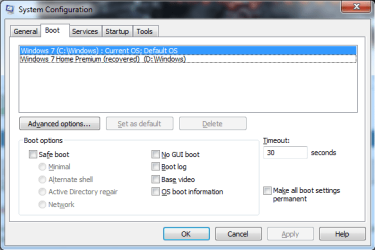
I've got as far as point 6, which is where i'm having an issue. When I start Windows with the repair cd, it says it's found errors. It then reboots, and I have the option of booting Win 7 as it is, or win 7 (recovered). If I boot the recovered version, it boots from my secondary hard drive, rather than my SSD....any ideas?! I will say that on that boot, backup does work
 

My Computer My Computer

At a glance

Windows 7 Home Premium 64-bitIntel Core i5 2500KKingston DDR3 2GB x3NVIDIA GeForce 460
Computer type
PC/Desktop
Computer Manufacturer/Model Number
Dell
OS
Windows 7 Home Premium 64-bit
CPU
Intel Core i5 2500K
Motherboard
Gigabyte Z68A3-DP
Memory
Kingston DDR3 2GB x3
Graphics Card(s)
NVIDIA GeForce 460
Hard Drives
Samsung SSD 830 Series 250GB
WDC WD6400AAKS-75A7B2 ATA Device
Antivirus
ESET Antivirus
Browser
IE 10
It looks like you did not answer some of my questions:

Did you follow this guide I gave you on how to delete that jvactaett account?

I notice you have eset security installed. Did you pay for this software and install it on your system as your antivirus?


Please answer these questions.

Also,

When you say step 6, do you mean my step 6 or the step 6 in the tutorial for running the sfc scan?
 

My Computer My Computer

At a glance

Windows 10 ProAMD Ryzen 5 2400G Processor with Radeon RX Ve...G.SKILL Ripjaws V Series 16GB (2 x 8GB) 288-P...2047MB NVIDIA GeForce GTX 1060 6GB (EVGA)
Computer type
PC/Desktop
Computer Manufacturer/Model Number
Custom Built
OS
Windows 10 Pro
CPU
AMD Ryzen 5 2400G Processor with Radeon RX Vega 11 Graphics
Motherboard
ASRock X470 Master SLI/AC AM4 AMD Promontory X470 SATA 6Gb/s
Memory
G.SKILL Ripjaws V Series 16GB (2 x 8GB) 288-Pin DDR4 SDRAM D
Graphics Card(s)
2047MB NVIDIA GeForce GTX 1060 6GB (EVGA)
Sound Card
Motherboard Built in
Monitor(s) Displays
Acer R240HY bidx 23.8-Inch IPS HDMI DVI VGA (1920 x 1080) Wi
Screen Resolution
1920 x 1080
Hard Drives
1TB Sandisk SSD PLUS (Main drive)
500 GB Seagate 7200 RPM (Games)
500 GB Western Digital 7200 RPM (Virtual Machines)
PSU
CORSAIR TX Series TX650M 650W 80+ Gold Modular Power Supply
Case
CORSAIR CARBIDE SPEC-02 Mid-Tower Gaming Case, Red LED Fan
Cooling
220mm, two 120mm, and four 60mm fans
Keyboard
Wired Dell keyboard
Mouse
Wireless Logitech mouse
Internet Speed
250mb down, 30mb up
Antivirus
Panda Cloud Antivirus
Browser
Chrome-ish x64
Other Info
Your awesome for reading this.
Hi Andrew,

Sorry, didn't have much time when I posted before. Let me answer in a little more detail

I've followed the guides, but the account doesn't seem to show up anywhere. It's a little puzzling to be honest. When I go in through User Accounts in the Control Panel, I find no mention of it, not even when I click on "Configure Advanced User profile properties". I can't find it anywhere, except how I mentioned above in going to security for a drive and looking there.

I have purchased ESET, and that is my main antivirus solution. It's been running on the PC for a couple of years now. Full ESET scan found one issue in the PC. Scan is attached

Malwarebytes and adwcleaner logs also attached - they each found a couple of things to clean as well.

In my last post, I was referring to point 6 on how to start sfc at bootup. I think the explanation above states what's happened - essentially, I've now got 2 OS to pick from whenever I boot. If I pick the recovered option, it boots from my old hard drive. If I pick the normal version, that's the one I'm running now. I want it to repair my OS on my SSD though :(

Sorry for the short reply last time - hopefully that's a little more comprehensive.

Thanks again for your time
 

Attachments

My Computer My Computer

At a glance

Windows 7 Home Premium 64-bitIntel Core i5 2500KKingston DDR3 2GB x3NVIDIA GeForce 460
Computer type
PC/Desktop
Computer Manufacturer/Model Number
Dell
OS
Windows 7 Home Premium 64-bit
CPU
Intel Core i5 2500K
Motherboard
Gigabyte Z68A3-DP
Memory
Kingston DDR3 2GB x3
Graphics Card(s)
NVIDIA GeForce 460
Hard Drives
Samsung SSD 830 Series 250GB
WDC WD6400AAKS-75A7B2 ATA Device
Antivirus
ESET Antivirus
Browser
IE 10
Hello Gideetudee,

Looking at your logs quick, I notice that you did hit clean and let adwcleaner clean the threats (There was a ton), but you did not tell malware bytes to do so.

Just like before, please do all the steps and answer all questions :) Thank you!


1.) Run a check for update in malwarebytes, and then run a full scan again. Remove everything found.

Then restart the pc.

How is your PC now after doing this? Probably running a little better and faster.

2.) I noticed you did full scan with eset and provided me a log as instructed above. However the log is not there. There are 2 of the adwcleaner. I think it was just a mistake. Thats okay.

3.) Do you know why you have 2 windows 7 partitions? What do you mean boot from old hard drive?

4.) Also TRY THIS if having issues running from the cd:

Tap f8 repeatably before windows loads, then choose repair your computer. Then follow the guide again on how to run sfc. Let me know if repair your computer is not an option.


Please post back with as much detail as possible. Let me know if you have any questions or need more explanation.

I will be back online on Monday.
Have a good day!
 
Last edited:

My Computer My Computer

At a glance

Windows 10 ProAMD Ryzen 5 2400G Processor with Radeon RX Ve...G.SKILL Ripjaws V Series 16GB (2 x 8GB) 288-P...2047MB NVIDIA GeForce GTX 1060 6GB (EVGA)
Computer type
PC/Desktop
Computer Manufacturer/Model Number
Custom Built
OS
Windows 10 Pro
CPU
AMD Ryzen 5 2400G Processor with Radeon RX Vega 11 Graphics
Motherboard
ASRock X470 Master SLI/AC AM4 AMD Promontory X470 SATA 6Gb/s
Memory
G.SKILL Ripjaws V Series 16GB (2 x 8GB) 288-Pin DDR4 SDRAM D
Graphics Card(s)
2047MB NVIDIA GeForce GTX 1060 6GB (EVGA)
Sound Card
Motherboard Built in
Monitor(s) Displays
Acer R240HY bidx 23.8-Inch IPS HDMI DVI VGA (1920 x 1080) Wi
Screen Resolution
1920 x 1080
Hard Drives
1TB Sandisk SSD PLUS (Main drive)
500 GB Seagate 7200 RPM (Games)
500 GB Western Digital 7200 RPM (Virtual Machines)
PSU
CORSAIR TX Series TX650M 650W 80+ Gold Modular Power Supply
Case
CORSAIR CARBIDE SPEC-02 Mid-Tower Gaming Case, Red LED Fan
Cooling
220mm, two 120mm, and four 60mm fans
Keyboard
Wired Dell keyboard
Mouse
Wireless Logitech mouse
Internet Speed
250mb down, 30mb up
Antivirus
Panda Cloud Antivirus
Browser
Chrome-ish x64
Other Info
Your awesome for reading this.
Hi Andrew,

I originally had a HDD, then bought an SSD. When I bought that, I just did a straight clone of the old hard drive to the new one, which is why I have the two drives. Now, I tend to install things like games and save pictures to the HDD. I can get it to boot from the cd - when I do, that's when I get the message about repairing the startup and restarting

Thanks :)
 

My Computer My Computer

At a glance

Windows 7 Home Premium 64-bitIntel Core i5 2500KKingston DDR3 2GB x3NVIDIA GeForce 460
Computer type
PC/Desktop
Computer Manufacturer/Model Number
Dell
OS
Windows 7 Home Premium 64-bit
CPU
Intel Core i5 2500K
Motherboard
Gigabyte Z68A3-DP
Memory
Kingston DDR3 2GB x3
Graphics Card(s)
NVIDIA GeForce 460
Hard Drives
Samsung SSD 830 Series 250GB
WDC WD6400AAKS-75A7B2 ATA Device
Antivirus
ESET Antivirus
Browser
IE 10
Remove the Hdd from your system, do it with just the SSD then. Also, I would not have 2 windows 7 installed on 2 different drives. Format the hdd and leave just data on it, not 2 actual windows installs on both drives.

It appears to me that you have windows 7 installed on both drives. If I am mistaken, my mistake.

Ether way remove the hdd and leave just the ssd in and follow the steps.
 

My Computer My Computer

At a glance

Windows 10 ProAMD Ryzen 5 2400G Processor with Radeon RX Ve...G.SKILL Ripjaws V Series 16GB (2 x 8GB) 288-P...2047MB NVIDIA GeForce GTX 1060 6GB (EVGA)
Computer type
PC/Desktop
Computer Manufacturer/Model Number
Custom Built
OS
Windows 10 Pro
CPU
AMD Ryzen 5 2400G Processor with Radeon RX Vega 11 Graphics
Motherboard
ASRock X470 Master SLI/AC AM4 AMD Promontory X470 SATA 6Gb/s
Memory
G.SKILL Ripjaws V Series 16GB (2 x 8GB) 288-Pin DDR4 SDRAM D
Graphics Card(s)
2047MB NVIDIA GeForce GTX 1060 6GB (EVGA)
Sound Card
Motherboard Built in
Monitor(s) Displays
Acer R240HY bidx 23.8-Inch IPS HDMI DVI VGA (1920 x 1080) Wi
Screen Resolution
1920 x 1080
Hard Drives
1TB Sandisk SSD PLUS (Main drive)
500 GB Seagate 7200 RPM (Games)
500 GB Western Digital 7200 RPM (Virtual Machines)
PSU
CORSAIR TX Series TX650M 650W 80+ Gold Modular Power Supply
Case
CORSAIR CARBIDE SPEC-02 Mid-Tower Gaming Case, Red LED Fan
Cooling
220mm, two 120mm, and four 60mm fans
Keyboard
Wired Dell keyboard
Mouse
Wireless Logitech mouse
Internet Speed
250mb down, 30mb up
Antivirus
Panda Cloud Antivirus
Browser
Chrome-ish x64
Other Info
Your awesome for reading this.
Hi Andrew,

I've finally gotten round to trying this by disconnecting the old hard drive... So, results:

If I run startup repair, it says no issues can be found.
If I try running the command line for sfc to run at startup, it says Windows Resource Protection could not start the repair service

I do indeed have win 7 installed on both - I don't have a disc as I did an electronic upgrade from Vista. I don't mind formatting the HDD, but I don't want to lose anything on it...how is the best way to do that?
 

My Computer My Computer

At a glance

Windows 7 Home Premium 64-bitIntel Core i5 2500KKingston DDR3 2GB x3NVIDIA GeForce 460
Computer type
PC/Desktop
Computer Manufacturer/Model Number
Dell
OS
Windows 7 Home Premium 64-bit
CPU
Intel Core i5 2500K
Motherboard
Gigabyte Z68A3-DP
Memory
Kingston DDR3 2GB x3
Graphics Card(s)
NVIDIA GeForce 460
Hard Drives
Samsung SSD 830 Series 250GB
WDC WD6400AAKS-75A7B2 ATA Device
Antivirus
ESET Antivirus
Browser
IE 10
As I have always stated, read each link I gave you in full before doing anything.


Ok, if the sfc scan is not able to start even before boot using the repair cd, etc. Then I suggest a repair install. A repair install will keep all your programs and files intact, reinstalling only windows. I do suggest a clean install though if you do not mind doing it. A clean install would start everything from scratch, which would be better. But if you do not want to go through the hassle then do a repair install. If you decide to do a clean install or a repair install, discconect the second mechanical drive from the system.

http://www.sevenforums.com/tutorials/3413-repair-install.html

http://www.sevenforums.com/tutorials/219487-clean-reinstall-factory-oem-windows-7-a.html


As for getting your files off the second mechanical drive:

If you have the hard drive connected, simply go to my computer, double click the drive and copy the files from it to the C drive. If you cloned the disk though like you said to the ssd, everything should already be on there. If space is not available, copy the files from the second mechanical drive to an external hard drive for example. Then format the drive.
 

My Computer My Computer

At a glance

Windows 10 ProAMD Ryzen 5 2400G Processor with Radeon RX Ve...G.SKILL Ripjaws V Series 16GB (2 x 8GB) 288-P...2047MB NVIDIA GeForce GTX 1060 6GB (EVGA)
Computer type
PC/Desktop
Computer Manufacturer/Model Number
Custom Built
OS
Windows 10 Pro
CPU
AMD Ryzen 5 2400G Processor with Radeon RX Vega 11 Graphics
Motherboard
ASRock X470 Master SLI/AC AM4 AMD Promontory X470 SATA 6Gb/s
Memory
G.SKILL Ripjaws V Series 16GB (2 x 8GB) 288-Pin DDR4 SDRAM D
Graphics Card(s)
2047MB NVIDIA GeForce GTX 1060 6GB (EVGA)
Sound Card
Motherboard Built in
Monitor(s) Displays
Acer R240HY bidx 23.8-Inch IPS HDMI DVI VGA (1920 x 1080) Wi
Screen Resolution
1920 x 1080
Hard Drives
1TB Sandisk SSD PLUS (Main drive)
500 GB Seagate 7200 RPM (Games)
500 GB Western Digital 7200 RPM (Virtual Machines)
PSU
CORSAIR TX Series TX650M 650W 80+ Gold Modular Power Supply
Case
CORSAIR CARBIDE SPEC-02 Mid-Tower Gaming Case, Red LED Fan
Cooling
220mm, two 120mm, and four 60mm fans
Keyboard
Wired Dell keyboard
Mouse
Wireless Logitech mouse
Internet Speed
250mb down, 30mb up
Antivirus
Panda Cloud Antivirus
Browser
Chrome-ish x64
Other Info
Your awesome for reading this.
Well - a repair install did the trick, things mostly seem to be back up and running! :)

Except....Windows Backup. This is odd, I've looked online but can't find anything that works. The shielded icons on the page don't work. It's the only screen that I've found this happening on....any ideas? I've recorded a screen capture to show what I mean, all I notice is that if the window is maximised and I click on one of them, it restores the window down a bit... the screen capture is too large in size to upload though, so not sure what to do with it

Anyway, if I should open a new thread let me know :) thank you so much for your help
 

My Computer My Computer

At a glance

Windows 7 Home Premium 64-bitIntel Core i5 2500KKingston DDR3 2GB x3NVIDIA GeForce 460
Computer type
PC/Desktop
Computer Manufacturer/Model Number
Dell
OS
Windows 7 Home Premium 64-bit
CPU
Intel Core i5 2500K
Motherboard
Gigabyte Z68A3-DP
Memory
Kingston DDR3 2GB x3
Graphics Card(s)
NVIDIA GeForce 460
Hard Drives
Samsung SSD 830 Series 250GB
WDC WD6400AAKS-75A7B2 ATA Device
Antivirus
ESET Antivirus
Browser
IE 10
Can you post the screen capture? You do not have to use windows backup if its giving you issues. Another one suggested here is this:

http://www.sevenforums.com/tutorials/73828-imaging-free-macrium.html?ltr=I

I use windows backup though and do not have any issues.

http://www.sevenforums.com/tutorials/663-backup-complete-computer-create-image-backup.html

http://www.sevenforums.com/tutorials/615-backup-user-system-files.html

Anyways, another way to back up your data is just doing a simple drag and drop to another drive. Meaning, highlighting the user folder on the drive and copying it to an external hard drive. This way all documents, pictures, music etc. (You get the idea) Its all on the external then.
 

My Computer My Computer

At a glance

Windows 10 ProAMD Ryzen 5 2400G Processor with Radeon RX Ve...G.SKILL Ripjaws V Series 16GB (2 x 8GB) 288-P...2047MB NVIDIA GeForce GTX 1060 6GB (EVGA)
Computer type
PC/Desktop
Computer Manufacturer/Model Number
Custom Built
OS
Windows 10 Pro
CPU
AMD Ryzen 5 2400G Processor with Radeon RX Vega 11 Graphics
Motherboard
ASRock X470 Master SLI/AC AM4 AMD Promontory X470 SATA 6Gb/s
Memory
G.SKILL Ripjaws V Series 16GB (2 x 8GB) 288-Pin DDR4 SDRAM D
Graphics Card(s)
2047MB NVIDIA GeForce GTX 1060 6GB (EVGA)
Sound Card
Motherboard Built in
Monitor(s) Displays
Acer R240HY bidx 23.8-Inch IPS HDMI DVI VGA (1920 x 1080) Wi
Screen Resolution
1920 x 1080
Hard Drives
1TB Sandisk SSD PLUS (Main drive)
500 GB Seagate 7200 RPM (Games)
500 GB Western Digital 7200 RPM (Virtual Machines)
PSU
CORSAIR TX Series TX650M 650W 80+ Gold Modular Power Supply
Case
CORSAIR CARBIDE SPEC-02 Mid-Tower Gaming Case, Red LED Fan
Cooling
220mm, two 120mm, and four 60mm fans
Keyboard
Wired Dell keyboard
Mouse
Wireless Logitech mouse
Internet Speed
250mb down, 30mb up
Antivirus
Panda Cloud Antivirus
Browser
Chrome-ish x64
Other Info
Your awesome for reading this.

My Computer My Computer

At a glance

Windows 7 Home Premium 64-bitIntel Core i5 2500KKingston DDR3 2GB x3NVIDIA GeForce 460
Computer type
PC/Desktop
Computer Manufacturer/Model Number
Dell
OS
Windows 7 Home Premium 64-bit
CPU
Intel Core i5 2500K
Motherboard
Gigabyte Z68A3-DP
Memory
Kingston DDR3 2GB x3
Graphics Card(s)
NVIDIA GeForce 460
Hard Drives
Samsung SSD 830 Series 250GB
WDC WD6400AAKS-75A7B2 ATA Device
Antivirus
ESET Antivirus
Browser
IE 10
1.) Do you have the backup drive connected?

2.) IF so, at that prompt click change backup settings. Choose the drive you then want to backup to. I suggest you format the drive your going to backup to first, and then do a backup.
 

My Computer My Computer

At a glance

Windows 10 ProAMD Ryzen 5 2400G Processor with Radeon RX Ve...G.SKILL Ripjaws V Series 16GB (2 x 8GB) 288-P...2047MB NVIDIA GeForce GTX 1060 6GB (EVGA)
Computer type
PC/Desktop
Computer Manufacturer/Model Number
Custom Built
OS
Windows 10 Pro
CPU
AMD Ryzen 5 2400G Processor with Radeon RX Vega 11 Graphics
Motherboard
ASRock X470 Master SLI/AC AM4 AMD Promontory X470 SATA 6Gb/s
Memory
G.SKILL Ripjaws V Series 16GB (2 x 8GB) 288-Pin DDR4 SDRAM D
Graphics Card(s)
2047MB NVIDIA GeForce GTX 1060 6GB (EVGA)
Sound Card
Motherboard Built in
Monitor(s) Displays
Acer R240HY bidx 23.8-Inch IPS HDMI DVI VGA (1920 x 1080) Wi
Screen Resolution
1920 x 1080
Hard Drives
1TB Sandisk SSD PLUS (Main drive)
500 GB Seagate 7200 RPM (Games)
500 GB Western Digital 7200 RPM (Virtual Machines)
PSU
CORSAIR TX Series TX650M 650W 80+ Gold Modular Power Supply
Case
CORSAIR CARBIDE SPEC-02 Mid-Tower Gaming Case, Red LED Fan
Cooling
220mm, two 120mm, and four 60mm fans
Keyboard
Wired Dell keyboard
Mouse
Wireless Logitech mouse
Internet Speed
250mb down, 30mb up
Antivirus
Panda Cloud Antivirus
Browser
Chrome-ish x64
Other Info
Your awesome for reading this.
Back
Top