Gideetudee
New member
- Local time
- 3:28 PM
- Messages
- 9
Hi all,
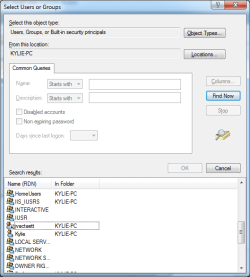
Hoping someone might be able to help. Recently, a few strange things have happened with the PC, which first started when I found I couldn't use the Backup & Recovery software in Windows 7. Whenever I clicked on one of the buttons with a shield, nothing would happen at all. I've looked around and just can't find the solution to this. However, today when trying to fix this, I've come across a new user account in the permissions section. The name is jvactaett - I certainly haven't made this! Does anyone have any ideas how this account has got there, and how I can remove it? It doesn't show in user accounts through Control Panel.
I've put a screenshot as well. To get there, I right clicked a hard drive and went to properties, Security, Add, advanced and then clicked Find Now.
I don't know if the two things above are linked or not...
Thanks!
Hoping someone might be able to help. Recently, a few strange things have happened with the PC, which first started when I found I couldn't use the Backup & Recovery software in Windows 7. Whenever I clicked on one of the buttons with a shield, nothing would happen at all. I've looked around and just can't find the solution to this. However, today when trying to fix this, I've come across a new user account in the permissions section. The name is jvactaett - I certainly haven't made this! Does anyone have any ideas how this account has got there, and how I can remove it? It doesn't show in user accounts through Control Panel.
I've put a screenshot as well. To get there, I right clicked a hard drive and went to properties, Security, Add, advanced and then clicked Find Now.
I don't know if the two things above are linked or not...
Thanks!
Attachments
My Computer
At a glance
Windows 7 Home Premium 64-bitIntel Core i5 2500KKingston DDR3 2GB x3NVIDIA GeForce 460
- Computer type
- PC/Desktop
- Computer Manufacturer/Model Number
- Dell
- OS
- Windows 7 Home Premium 64-bit
- CPU
- Intel Core i5 2500K
- Motherboard
- Gigabyte Z68A3-DP
- Memory
- Kingston DDR3 2GB x3
- Graphics Card(s)
- NVIDIA GeForce 460
- Hard Drives
- Samsung SSD 830 Series 250GB
WDC WD6400AAKS-75A7B2 ATA Device
- Antivirus
- ESET Antivirus
- Browser
- IE 10


 rb:-computer. Double Click C, then users. Copy both your wifes and your account name to an external hard drive. This will backup all your data files such as pictures, documents etc.**