Update enables additional capabilities for Windows - Broken

carwiz

New member
Guru
Gold Member
VIP
Local time
2:07 PM
Messages
4,148
Location
South Texas
I was browsing the Event Log and came across a new log name (or one I had never noticed) called GWX-Ins. At first, I was a little shaken since entries in it indicated it started from a task. I thought it was malware. Apparently, this is the operational log for the recent Windows Update that is supposed to add update notice features/enhancements. Well, it doesn't work for me. I checked the log and the thing has been bombing since it was installed. I uninstalled the update and thought I should post here to see if anyone else has similar events.

Update: After removing the update and rebooting, the GWX-Ins Log is no longer present.

This is the KB Article:
Update enables additional capabilities for Windows Update notifications in Windows 8.1 and Windows 7 SP1

Here's how it shows in the Event Log:
 

Attachments

  • GWX Errors.JPG
    GWX Errors.JPG
    85.3 KB · Views: 7
Last edited:

My Computer

Computer type
PC/Desktop
Computer Manufacturer/Model Number
Built 2/11/2011
OS
Windows 7 Pro-x64
CPU
i7-2600 3.4GHz - 3.8GHz Turbo
Motherboard
Intel DH67BL-B3
Memory
8Gb - 2x4GB, Muskin 991770 PC3-1333
Graphics Card(s)
Integrated Intel HD 2000
Sound Card
Integrated Intel 10.1 HD, RealTek ALC892
Monitor(s) Displays
Asus LCD VH222H, Haier HL24XSL2a
Screen Resolution
1920x1080, 1920x1080
Hard Drives
Crucial SSD C300-128Gb,
Western Digital WD5002AALX - 500Gb,
Western Digital WD7501AALS - 750Gb
PSU
Seasonic 650W 80+ Gold Modular
Case
Rosewill Defender
Cooling
Stock CPU, Four 120mm case fans, PCH fan added
Keyboard
Logitech EX100 Y-RBH94 Wireless
Mouse
Logitech EX100 M-RCE95 Wireless
Internet Speed
3.0/1.5 Mbs
Antivirus
Microsoft Security Essentials
Browser
Microsoft Internet Explorer 11
Other Info
Antec Veris Premier-Multimedia IR Station,
Cyber Accoustics-3602 Speakers,
AFT XM-5U Card Reader,
Hauppauge TV-HVR-2250,
Sony LX300 USB Turntable
I have the exact log as you with that update.

Take a look at this:
ek1express.PNG

This has been going on since the problems with patch Tuesdays last year. Machine seems to run okay, but I'm also getting numerous errors with MSE updating, it's running green and it also seems to be okay, windows updates shows everything is fine and dandy with installed updates, and history so, who or what do you believe?
 

My Computer

Computer type
PC/Desktop
Computer Manufacturer/Model Number
Gateway DX4831-01e (Mid-Tower Desktop)
OS
Originally Win 7 Hm Prem x64 Ver 6.1.7600 Build 7601-SP1 | Upgraded to Windows 10 December 14, 2019
CPU
Intel i3 530 2.93GHz, 2933MHz 2 Cores 4 Logical Processors
Motherboard
Gateway H57M01 133 megahertz
Memory
6GB of 1,333MHz DDR3 SDRAM
Graphics Card(s)
32MB Intel Graphics Media Accelerator HD IGChip
Sound Card
Realtek High Definition Audio
Monitor(s) Displays
Gateway HX2000 20inch TFT active matrix TN
Screen Resolution
1600 x 900 x 59 hertz
Hard Drives
WDC WD10EADS-00M2B0 [HDD] (1000.20 GB) -- drive 0,
HL-DT-ST DVDRAM GH41N [CD-ROM dr]
Four card readers, and Four USB 2.0
PSU
300watts.
Case
Mid-Tower Desktop
Cooling
Stock from Gateway
Keyboard
Natural Ergonomic Keyboard 4000, see Other Info
Mouse
Orig. Gateway wore out now using Insignia USB wired optical
Internet Speed
Vz FIOS 10ms png 57.64Mbps down 65.53Mbps up Speedtest.org
Antivirus
Zamana Anti-logger with Anti-malware, MSE, Windows Firewall,
Browser
IE11.0.9600.19399-Upd ver11.0.135, Firefox 68.0.1 x64
Other Info
System Specs by Belarc.

BIOS: American Megatrends Inc. P01-A0 11/17/2009

Replaced the MS 'Natural' Standard PS/2 Enhanced 101-102 Keyboard with a new Natural Ergonomic Keyboard 4000 on August 1st 2014.

Canon Pixma MG3222 Printer.

Updated to IE11 on 12102015 | Fios Quantum Router g1100

Additional AV: SpywareBlaster, manual Mbam, SAS
@ Carwiz: Same here, good catch. Uninstalling & hiding in 5... 4... 3... :p

EDIT: Clicking on the Event Log Online Help link opens to:
fubar-ms.JPG

You can't make this stuff up!
 
Last edited:

My Computer

Computer type
Laptop
Computer Manufacturer/Model Number
MSI PE60 6QE
OS
Win 10 Pro x64, Win 7 Pro x64
CPU
Intel Core i7-6700HQ Skylake
Motherboard
MSI MS-16J5
Memory
16gb Crucial DDR4
Graphics Card(s)
NVIDIA GeForce GTX 960M 2 GB
Screen Resolution
1920 x 1080
Hard Drives
Samsung 850 EVO 250 GB M.2 SSD (MZ-N5E250BW)
HGST 1TB @7200 RPM HTS721010A9E630
Case
Plastic
Keyboard
Got one...
Mouse
Yep, one of those too.
Internet Speed
FIOS 75/75
Antivirus
Defender
Browser
Chrome/FFox/Ex-PLODE-r/(L)Edge
Other Info
Defender, Custom Hosts, uBlock, regular backups w/ Macrium (Free)
Customer Experience Improvement Program (CEIP) stuff. The possibility of KB8035583 relating to which being a prime reason I haven't pushed this patch to any boxes yet. Thanks for the heads-up; I'll spread the word on what to look for. BTW, while researching it (& Urthboundmisfit's and others' KB3033929 problems) over the weekend, I found this posted in the MyDigitalLife forums (http://forums.mydigitallife.info/threads/47590-Windows-8-1-Hotfix-Repository?p=1011735&viewfull=1#post1011735):

Looks like these new functions will be enabled
----------
151 Get Windows 10
152 Get Windows 7 SP1
153 Get Windows 8.1
154 Show &Advertisements
155 Show &Compatibility Report
156 E&xit
157 Install &Now
158 &Version
159 &Help
160 &Reserve your free upgrade
161 Get to know &Windows 10
162 Go to Windows &Update
163 &Check your upgrade status
164 &Unreserve
165 &Get Windows 10
166 &Show reservation information
----------

haven't had a chance to devote more time to running down more info - kinda of waiting to see if the Patch Queen (Susan Bradley) will weigh in on the subject, in Shavlik's PatchManagement mailing list, on her blog, or in the Microsoft Answers Community forums...
 

My Computer

Computer Manufacturer/Model Number
Compaq Presario BQ472AA-ABA CQ5500Y
OS
Windows 7 Home Premium 64bit; Windows 7 Enterprise (x86VM)
CPU
AMD Sempron 140 2700 M~; 1Mb L2 Cache, 4M~ SysBus
Motherboard
M2N68-LA (Narra5); nVidia MCP61 chipset; Phoenix 5.58 BIOS
Memory
2.00 Gb
Graphics Card(s)
Integrated video (NVIDIA GeForce 6150SE nForce430)
Sound Card
Integrated audio,5.1 surround sound (Realtek 6.0.1.6196)
Monitor(s) Displays
Compaq S1922A & Polaroid FLM-3232
Screen Resolution
1366x768
Hard Drives
Multiple internal & external 500GB 7200RPM Serial ATA:
ST350041 8AS SCSI Disk Device
Hitachi HTS545050B9A USB Device
ST350032 0AS USB Device
And
WD My Book 1140 USB Device (2Tb)
PSU
Unknown---Compaq OEM currently in use
Case
Unknown---Compaq OEM currently installed
Cooling
Customized additions by user
Keyboard
Compaq USB keyboard
Mouse
Compaq optical mouse
Internet Speed
18ms PING, ~15.7Mbs Dwn, <1Mbs Up
Antivirus
Norton N360 v. 20.4.0.40
Browser
IE9 v. 9.00.8112.16421; Chrome v. 28.0.1500.72; Safari 5.1.7
@Tech77, Great find,TY +Rep added. :)
 

My Computer

Computer type
Laptop
Computer Manufacturer/Model Number
MSI PE60 6QE
OS
Win 10 Pro x64, Win 7 Pro x64
CPU
Intel Core i7-6700HQ Skylake
Motherboard
MSI MS-16J5
Memory
16gb Crucial DDR4
Graphics Card(s)
NVIDIA GeForce GTX 960M 2 GB
Screen Resolution
1920 x 1080
Hard Drives
Samsung 850 EVO 250 GB M.2 SSD (MZ-N5E250BW)
HGST 1TB @7200 RPM HTS721010A9E630
Case
Plastic
Keyboard
Got one...
Mouse
Yep, one of those too.
Internet Speed
FIOS 75/75
Antivirus
Defender
Browser
Chrome/FFox/Ex-PLODE-r/(L)Edge
Other Info
Defender, Custom Hosts, uBlock, regular backups w/ Macrium (Free)
You're very welcome, and many thanks for the rep. I'm monitoring all the boards on the topic of these problematic patches, but I'm gonna haul out the SDK tools & see if I can't figure something out as soon as I can (springtime yard work & dentist appt's have me busy for next few days, but I'm a persistent ol' codger...)
 

My Computer

Computer Manufacturer/Model Number
Compaq Presario BQ472AA-ABA CQ5500Y
OS
Windows 7 Home Premium 64bit; Windows 7 Enterprise (x86VM)
CPU
AMD Sempron 140 2700 M~; 1Mb L2 Cache, 4M~ SysBus
Motherboard
M2N68-LA (Narra5); nVidia MCP61 chipset; Phoenix 5.58 BIOS
Memory
2.00 Gb
Graphics Card(s)
Integrated video (NVIDIA GeForce 6150SE nForce430)
Sound Card
Integrated audio,5.1 surround sound (Realtek 6.0.1.6196)
Monitor(s) Displays
Compaq S1922A & Polaroid FLM-3232
Screen Resolution
1366x768
Hard Drives
Multiple internal & external 500GB 7200RPM Serial ATA:
ST350041 8AS SCSI Disk Device
Hitachi HTS545050B9A USB Device
ST350032 0AS USB Device
And
WD My Book 1140 USB Device (2Tb)
PSU
Unknown---Compaq OEM currently in use
Case
Unknown---Compaq OEM currently installed
Cooling
Customized additions by user
Keyboard
Compaq USB keyboard
Mouse
Compaq optical mouse
Internet Speed
18ms PING, ~15.7Mbs Dwn, <1Mbs Up
Antivirus
Norton N360 v. 20.4.0.40
Browser
IE9 v. 9.00.8112.16421; Chrome v. 28.0.1500.72; Safari 5.1.7
...kinda of waiting to see if the Patch Queen (Susan Bradley) will weigh in on the subject, in Shavlik's PatchManagement mailing list, on her blog, or in the Microsoft Answers Community forums...

So far I've only seen her weighing in on the dual-boot glitch re:KB3033929. The broken Update Cleanup logic on some user's boxes I've been looking at is probably way way way down in their priority list, if present at all. My thread with my solution @ M$ Answers:

I've successfully restored my system to a backup image (2/12/15) prior to the "March Patch Madness" described in my OP, uninstalled the troublesome KB2852386 that enables Update Cleanup and re-applied the March '15 patches, all now appear in Installed Updates, including KB's 3023607, 3035131 & 3031432.

Regards
Joe "UBM"
 

My Computer

Computer type
Laptop
Computer Manufacturer/Model Number
MSI PE60 6QE
OS
Win 10 Pro x64, Win 7 Pro x64
CPU
Intel Core i7-6700HQ Skylake
Motherboard
MSI MS-16J5
Memory
16gb Crucial DDR4
Graphics Card(s)
NVIDIA GeForce GTX 960M 2 GB
Screen Resolution
1920 x 1080
Hard Drives
Samsung 850 EVO 250 GB M.2 SSD (MZ-N5E250BW)
HGST 1TB @7200 RPM HTS721010A9E630
Case
Plastic
Keyboard
Got one...
Mouse
Yep, one of those too.
Internet Speed
FIOS 75/75
Antivirus
Defender
Browser
Chrome/FFox/Ex-PLODE-r/(L)Edge
Other Info
Defender, Custom Hosts, uBlock, regular backups w/ Macrium (Free)
Yep, I've replied to you in that thread (user Dogtamer, my industry nickname due to my troubleshooting skills - turning "tough dogs" into complacent puppies; someone already had the appellation when I signed up here). I came across that thread while researching KB3035583; I tend to be fairly wide-ranging in that kind of research. Susan's excited about testing the new Spartan browser (W 10 Build 10049, out today, @ least in the fast ring). Her first response is likely to be whether or not a support case has been opened w/ these ridiculous patches - have you considered that?
 

My Computer

Computer Manufacturer/Model Number
Compaq Presario BQ472AA-ABA CQ5500Y
OS
Windows 7 Home Premium 64bit; Windows 7 Enterprise (x86VM)
CPU
AMD Sempron 140 2700 M~; 1Mb L2 Cache, 4M~ SysBus
Motherboard
M2N68-LA (Narra5); nVidia MCP61 chipset; Phoenix 5.58 BIOS
Memory
2.00 Gb
Graphics Card(s)
Integrated video (NVIDIA GeForce 6150SE nForce430)
Sound Card
Integrated audio,5.1 surround sound (Realtek 6.0.1.6196)
Monitor(s) Displays
Compaq S1922A & Polaroid FLM-3232
Screen Resolution
1366x768
Hard Drives
Multiple internal & external 500GB 7200RPM Serial ATA:
ST350041 8AS SCSI Disk Device
Hitachi HTS545050B9A USB Device
ST350032 0AS USB Device
And
WD My Book 1140 USB Device (2Tb)
PSU
Unknown---Compaq OEM currently in use
Case
Unknown---Compaq OEM currently installed
Cooling
Customized additions by user
Keyboard
Compaq USB keyboard
Mouse
Compaq optical mouse
Internet Speed
18ms PING, ~15.7Mbs Dwn, <1Mbs Up
Antivirus
Norton N360 v. 20.4.0.40
Browser
IE9 v. 9.00.8112.16421; Chrome v. 28.0.1500.72; Safari 5.1.7
Pleased to meet you Dogtamer, I too am a persistent ol' codger though I have no formal training and consider myself an above average user at best... but I have a lot of free-time and a thirst for knowledge.

I was considering that ...I've been in contact via PM with a user @Bleepingcomputer with the same WUCleanup problems and his last reply (3/19) read in short: "But so far, no response from them (M$)..." Win 10 & Spartan (call me skeptical but I'm thinking ...sight-unseen of course... is just Ex-PLODE-r 12 re-branded with some bells n whistles) is top priority obviously, this WUC glitch not widespread (low priority) so I figured why even bother? I can live without WUC & can find superseded info here, thru Security Bulletins & MS Update Catalog easily enough and just uninstall old packages to save valuable SSD real estate... after verifying of course.

Thanks for the input, here, there & everywhere :p

Joe.
 

My Computer

Computer type
Laptop
Computer Manufacturer/Model Number
MSI PE60 6QE
OS
Win 10 Pro x64, Win 7 Pro x64
CPU
Intel Core i7-6700HQ Skylake
Motherboard
MSI MS-16J5
Memory
16gb Crucial DDR4
Graphics Card(s)
NVIDIA GeForce GTX 960M 2 GB
Screen Resolution
1920 x 1080
Hard Drives
Samsung 850 EVO 250 GB M.2 SSD (MZ-N5E250BW)
HGST 1TB @7200 RPM HTS721010A9E630
Case
Plastic
Keyboard
Got one...
Mouse
Yep, one of those too.
Internet Speed
FIOS 75/75
Antivirus
Defender
Browser
Chrome/FFox/Ex-PLODE-r/(L)Edge
Other Info
Defender, Custom Hosts, uBlock, regular backups w/ Macrium (Free)
I have not been able to find a cure. Any suggestions?
These KB's will not install.

Windows 7/64 Home Premium

KB 2952664
KB 3006137

--------------

Windows 7/64 Pro

KB 2994766
 

My Computer

Computer type
PC/Desktop
Computer Manufacturer/Model Number
Home made Desktop
OS
Windows 10 Pro. 64/ version 1709 Windows 7 Pro/64
CPU
Intel i7-6800K @ 4.3
Motherboard
ASUS X-99 Deluxe II
Memory
Corsair Platinum 16 gig @2400
Graphics Card(s)
EVGA GTX 1070 OC
Monitor(s) Displays
Asus 27" LED LCD/VE278Q
Screen Resolution
1920-1080 or 1280-720 HDMI
Hard Drives
INTEL SSD 730-240 Gb Sata 3.0/
PSU
EVGA Platium 1200W
Case
Phanteks Luxe Tempered Glass 8 fans/ one radiator
Cooling
XSPC/ Water Cooled CPU
Keyboard
Das 4 Professional
Mouse
Logitech M705/MX Anywhere 2-S
Internet Speed
100 mbits
Antivirus
Microsoft Security Essentials/ Malwarebytes Premium 3.0/ SAS
Browser
I.E. 11 default/Firefox/ ISP Time Warner Cable/Spectrum
Other Info
LG BluRay Burner/
Sound system-KLipsch-THX/
Icy Dock ssd Hot Swap bays.
I have the exact log as you with that update.

Take a look at this:
View attachment 354486

This has been going on since the problems with patch Tuesdays last year. Machine seems to run okay, but I'm also getting numerous errors with MSE updating, it's running green and it also seems to be okay, windows updates shows everything is fine and dandy with installed updates, and history so, who or what do you believe?
I have the same errors but it doesn't relate to the GWX problem. I think it started back in late 2014 and it appears to be a Gigabit driver issued by Microsoft. (Even though I have driver updates turned off!!!!) I tried a couple of simple things and I'm watching the logs to make sure it works. So far so good. I'll report back on what I tried later.
 

My Computer

Computer type
PC/Desktop
Computer Manufacturer/Model Number
Built 2/11/2011
OS
Windows 7 Pro-x64
CPU
i7-2600 3.4GHz - 3.8GHz Turbo
Motherboard
Intel DH67BL-B3
Memory
8Gb - 2x4GB, Muskin 991770 PC3-1333
Graphics Card(s)
Integrated Intel HD 2000
Sound Card
Integrated Intel 10.1 HD, RealTek ALC892
Monitor(s) Displays
Asus LCD VH222H, Haier HL24XSL2a
Screen Resolution
1920x1080, 1920x1080
Hard Drives
Crucial SSD C300-128Gb,
Western Digital WD5002AALX - 500Gb,
Western Digital WD7501AALS - 750Gb
PSU
Seasonic 650W 80+ Gold Modular
Case
Rosewill Defender
Cooling
Stock CPU, Four 120mm case fans, PCH fan added
Keyboard
Logitech EX100 Y-RBH94 Wireless
Mouse
Logitech EX100 M-RCE95 Wireless
Internet Speed
3.0/1.5 Mbs
Antivirus
Microsoft Security Essentials
Browser
Microsoft Internet Explorer 11
Other Info
Antec Veris Premier-Multimedia IR Station,
Cyber Accoustics-3602 Speakers,
AFT XM-5U Card Reader,
Hauppauge TV-HVR-2250,
Sony LX300 USB Turntable
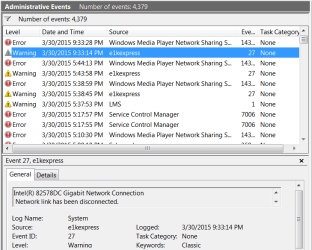
My apologies that I didn't differentiate between the two to make it clearer.

I stumbled upon this thread: http://www.sevenforums.com/windows-...035583-available-post3033960.html#post3033960 after I saw all the errors in my windows error reporting in sysinfo so, I'm checking in to repairing my windows updates. I'm going slow though like you in case it gets worse.


  • I ran the troubleshooter first and it said it had some problems finding all the updates,

  • Then I ran the MicrosoftFixit50123 and that didn't find any problems.

  • Next up would be SURT, then I do have MicrosoftFixit50202.msi and the stand alone Windows6.1-KB947821-v34-x64.msu updates package, but I think I may try a SFC and CHKDSK before I get that drastic.

  • There is even the old "last known good configuration" re-start to try.
Yes, report back, so will I.
 

My Computer

Computer type
PC/Desktop
Computer Manufacturer/Model Number
Gateway DX4831-01e (Mid-Tower Desktop)
OS
Originally Win 7 Hm Prem x64 Ver 6.1.7600 Build 7601-SP1 | Upgraded to Windows 10 December 14, 2019
CPU
Intel i3 530 2.93GHz, 2933MHz 2 Cores 4 Logical Processors
Motherboard
Gateway H57M01 133 megahertz
Memory
6GB of 1,333MHz DDR3 SDRAM
Graphics Card(s)
32MB Intel Graphics Media Accelerator HD IGChip
Sound Card
Realtek High Definition Audio
Monitor(s) Displays
Gateway HX2000 20inch TFT active matrix TN
Screen Resolution
1600 x 900 x 59 hertz
Hard Drives
WDC WD10EADS-00M2B0 [HDD] (1000.20 GB) -- drive 0,
HL-DT-ST DVDRAM GH41N [CD-ROM dr]
Four card readers, and Four USB 2.0
PSU
300watts.
Case
Mid-Tower Desktop
Cooling
Stock from Gateway
Keyboard
Natural Ergonomic Keyboard 4000, see Other Info
Mouse
Orig. Gateway wore out now using Insignia USB wired optical
Internet Speed
Vz FIOS 10ms png 57.64Mbps down 65.53Mbps up Speedtest.org
Antivirus
Zamana Anti-logger with Anti-malware, MSE, Windows Firewall,
Browser
IE11.0.9600.19399-Upd ver11.0.135, Firefox 68.0.1 x64
Other Info
System Specs by Belarc.

BIOS: American Megatrends Inc. P01-A0 11/17/2009

Replaced the MS 'Natural' Standard PS/2 Enhanced 101-102 Keyboard with a new Natural Ergonomic Keyboard 4000 on August 1st 2014.

Canon Pixma MG3222 Printer.

Updated to IE11 on 12102015 | Fios Quantum Router g1100

Additional AV: SpywareBlaster, manual Mbam, SAS
Ok, that post seems to relate to a different problem too. I think it would be better to work one problem at a time instead of trying to fix your problems with the shotgun approach. I'll hold off on the "e1kexpress" (Network Disconnected) warning fix because I don't know where you are now. :confused: Besides, it appears to be the least of your problems. ;)
 

My Computer

Computer type
PC/Desktop
Computer Manufacturer/Model Number
Built 2/11/2011
OS
Windows 7 Pro-x64
CPU
i7-2600 3.4GHz - 3.8GHz Turbo
Motherboard
Intel DH67BL-B3
Memory
8Gb - 2x4GB, Muskin 991770 PC3-1333
Graphics Card(s)
Integrated Intel HD 2000
Sound Card
Integrated Intel 10.1 HD, RealTek ALC892
Monitor(s) Displays
Asus LCD VH222H, Haier HL24XSL2a
Screen Resolution
1920x1080, 1920x1080
Hard Drives
Crucial SSD C300-128Gb,
Western Digital WD5002AALX - 500Gb,
Western Digital WD7501AALS - 750Gb
PSU
Seasonic 650W 80+ Gold Modular
Case
Rosewill Defender
Cooling
Stock CPU, Four 120mm case fans, PCH fan added
Keyboard
Logitech EX100 Y-RBH94 Wireless
Mouse
Logitech EX100 M-RCE95 Wireless
Internet Speed
3.0/1.5 Mbs
Antivirus
Microsoft Security Essentials
Browser
Microsoft Internet Explorer 11
Other Info
Antec Veris Premier-Multimedia IR Station,
Cyber Accoustics-3602 Speakers,
AFT XM-5U Card Reader,
Hauppauge TV-HVR-2250,
Sony LX300 USB Turntable
I haven't done anything since my last post, where do you think I should start?
 

My Computer

Computer type
PC/Desktop
Computer Manufacturer/Model Number
Gateway DX4831-01e (Mid-Tower Desktop)
OS
Originally Win 7 Hm Prem x64 Ver 6.1.7600 Build 7601-SP1 | Upgraded to Windows 10 December 14, 2019
CPU
Intel i3 530 2.93GHz, 2933MHz 2 Cores 4 Logical Processors
Motherboard
Gateway H57M01 133 megahertz
Memory
6GB of 1,333MHz DDR3 SDRAM
Graphics Card(s)
32MB Intel Graphics Media Accelerator HD IGChip
Sound Card
Realtek High Definition Audio
Monitor(s) Displays
Gateway HX2000 20inch TFT active matrix TN
Screen Resolution
1600 x 900 x 59 hertz
Hard Drives
WDC WD10EADS-00M2B0 [HDD] (1000.20 GB) -- drive 0,
HL-DT-ST DVDRAM GH41N [CD-ROM dr]
Four card readers, and Four USB 2.0
PSU
300watts.
Case
Mid-Tower Desktop
Cooling
Stock from Gateway
Keyboard
Natural Ergonomic Keyboard 4000, see Other Info
Mouse
Orig. Gateway wore out now using Insignia USB wired optical
Internet Speed
Vz FIOS 10ms png 57.64Mbps down 65.53Mbps up Speedtest.org
Antivirus
Zamana Anti-logger with Anti-malware, MSE, Windows Firewall,
Browser
IE11.0.9600.19399-Upd ver11.0.135, Firefox 68.0.1 x64
Other Info
System Specs by Belarc.

BIOS: American Megatrends Inc. P01-A0 11/17/2009

Replaced the MS 'Natural' Standard PS/2 Enhanced 101-102 Keyboard with a new Natural Ergonomic Keyboard 4000 on August 1st 2014.

Canon Pixma MG3222 Printer.

Updated to IE11 on 12102015 | Fios Quantum Router g1100

Additional AV: SpywareBlaster, manual Mbam, SAS
I haven't done anything since my last post, where do you think I should start?
Start with the update problem(s). That's the most critical. I have not had to work through any update problems so I can't help with that but the best thing to do is open a new thread with the details of THAT problem. Leave everything else out of the mix.
 

My Computer

Computer type
PC/Desktop
Computer Manufacturer/Model Number
Built 2/11/2011
OS
Windows 7 Pro-x64
CPU
i7-2600 3.4GHz - 3.8GHz Turbo
Motherboard
Intel DH67BL-B3
Memory
8Gb - 2x4GB, Muskin 991770 PC3-1333
Graphics Card(s)
Integrated Intel HD 2000
Sound Card
Integrated Intel 10.1 HD, RealTek ALC892
Monitor(s) Displays
Asus LCD VH222H, Haier HL24XSL2a
Screen Resolution
1920x1080, 1920x1080
Hard Drives
Crucial SSD C300-128Gb,
Western Digital WD5002AALX - 500Gb,
Western Digital WD7501AALS - 750Gb
PSU
Seasonic 650W 80+ Gold Modular
Case
Rosewill Defender
Cooling
Stock CPU, Four 120mm case fans, PCH fan added
Keyboard
Logitech EX100 Y-RBH94 Wireless
Mouse
Logitech EX100 M-RCE95 Wireless
Internet Speed
3.0/1.5 Mbs
Antivirus
Microsoft Security Essentials
Browser
Microsoft Internet Explorer 11
Other Info
Antec Veris Premier-Multimedia IR Station,
Cyber Accoustics-3602 Speakers,
AFT XM-5U Card Reader,
Hauppauge TV-HVR-2250,
Sony LX300 USB Turntable
These KB's will not install

I have not been able to find a cure. Any suggestions?
These KB's will not install.

Windows 7/64 Home Premium

KB 2952664
KB 3006137

--------------

Windows 7/64 Pro

KB 2994766

My ramblings:

Re: KB2952664 - is it possible that disabling Windows Gadgets would prevent this hotfix from installing? It was installed on my machine on 13th May 2014 so a nearly year ago!

https://support.microsoft.com/en-us/kb/2952664


Re: KB 3006137
https://support.microsoft.com/en-us/kb/3006137#more - seems to be a recommended update rather than a critical update. You could probably just hide it.

Windows 7/64 Pro
Re: KB 2994766 - no idea!
 

My Computer

Computer type
Laptop
Computer Manufacturer/Model Number
ASUS
OS
Microsoft Windows 7 Home Premium 64-bit 7601 Multiprocessor Free Service Pack 1
CPU
AMD C-60 APU with Radeon(tm) HD Graphics
Motherboard
ASUSTeK COMPUTER INC. X501U
Memory
4.00 GB
Graphics Card(s)
AMD Radeon HD 6290 Graphics
Sound Card
(1) AMD High Definition Audio Device (2) Realtek High Defi
Screen Resolution
1366 x 768 x 32 bits (4294967296 colors) @ 60 Hz
Hard Drives
Hitachi HTS545050A7E380 SATA Disk Device
Antivirus
Comodo CIS & FW, SecureAplus App Whitelisting, Threatfire
Browser
Cyberfox 64bit, Opera 64bit, Airfox
Other Info
Spy-The-Spy, HitmanPro.Alert, Norton Connect Safe, MJRegWatcher, BitDefender TrafficLight, Voodoo Shield, Zemana AntiMalware
I haven't done anything since my last post, where do you think I should start?
Start with the update problem(s). That's the most critical. I have not had to work through any update problems so I can't help with that but the best thing to do is open a new thread with the details of THAT problem. Leave everything else out of the mix.
I must have been reading your mind because I was thinking of doing just that.

I'll start a new thread, hopefully Noel can help. I'll post back with my thread link.
 

My Computer

Computer type
PC/Desktop
Computer Manufacturer/Model Number
Gateway DX4831-01e (Mid-Tower Desktop)
OS
Originally Win 7 Hm Prem x64 Ver 6.1.7600 Build 7601-SP1 | Upgraded to Windows 10 December 14, 2019
CPU
Intel i3 530 2.93GHz, 2933MHz 2 Cores 4 Logical Processors
Motherboard
Gateway H57M01 133 megahertz
Memory
6GB of 1,333MHz DDR3 SDRAM
Graphics Card(s)
32MB Intel Graphics Media Accelerator HD IGChip
Sound Card
Realtek High Definition Audio
Monitor(s) Displays
Gateway HX2000 20inch TFT active matrix TN
Screen Resolution
1600 x 900 x 59 hertz
Hard Drives
WDC WD10EADS-00M2B0 [HDD] (1000.20 GB) -- drive 0,
HL-DT-ST DVDRAM GH41N [CD-ROM dr]
Four card readers, and Four USB 2.0
PSU
300watts.
Case
Mid-Tower Desktop
Cooling
Stock from Gateway
Keyboard
Natural Ergonomic Keyboard 4000, see Other Info
Mouse
Orig. Gateway wore out now using Insignia USB wired optical
Internet Speed
Vz FIOS 10ms png 57.64Mbps down 65.53Mbps up Speedtest.org
Antivirus
Zamana Anti-logger with Anti-malware, MSE, Windows Firewall,
Browser
IE11.0.9600.19399-Upd ver11.0.135, Firefox 68.0.1 x64
Other Info
System Specs by Belarc.

BIOS: American Megatrends Inc. P01-A0 11/17/2009

Replaced the MS 'Natural' Standard PS/2 Enhanced 101-102 Keyboard with a new Natural Ergonomic Keyboard 4000 on August 1st 2014.

Canon Pixma MG3222 Printer.

Updated to IE11 on 12102015 | Fios Quantum Router g1100

Additional AV: SpywareBlaster, manual Mbam, SAS

My Computer

Computer type
PC/Desktop
Computer Manufacturer/Model Number
Gateway DX4831-01e (Mid-Tower Desktop)
OS
Originally Win 7 Hm Prem x64 Ver 6.1.7600 Build 7601-SP1 | Upgraded to Windows 10 December 14, 2019
CPU
Intel i3 530 2.93GHz, 2933MHz 2 Cores 4 Logical Processors
Motherboard
Gateway H57M01 133 megahertz
Memory
6GB of 1,333MHz DDR3 SDRAM
Graphics Card(s)
32MB Intel Graphics Media Accelerator HD IGChip
Sound Card
Realtek High Definition Audio
Monitor(s) Displays
Gateway HX2000 20inch TFT active matrix TN
Screen Resolution
1600 x 900 x 59 hertz
Hard Drives
WDC WD10EADS-00M2B0 [HDD] (1000.20 GB) -- drive 0,
HL-DT-ST DVDRAM GH41N [CD-ROM dr]
Four card readers, and Four USB 2.0
PSU
300watts.
Case
Mid-Tower Desktop
Cooling
Stock from Gateway
Keyboard
Natural Ergonomic Keyboard 4000, see Other Info
Mouse
Orig. Gateway wore out now using Insignia USB wired optical
Internet Speed
Vz FIOS 10ms png 57.64Mbps down 65.53Mbps up Speedtest.org
Antivirus
Zamana Anti-logger with Anti-malware, MSE, Windows Firewall,
Browser
IE11.0.9600.19399-Upd ver11.0.135, Firefox 68.0.1 x64
Other Info
System Specs by Belarc.

BIOS: American Megatrends Inc. P01-A0 11/17/2009

Replaced the MS 'Natural' Standard PS/2 Enhanced 101-102 Keyboard with a new Natural Ergonomic Keyboard 4000 on August 1st 2014.

Canon Pixma MG3222 Printer.

Updated to IE11 on 12102015 | Fios Quantum Router g1100

Additional AV: SpywareBlaster, manual Mbam, SAS

My Computer

Computer type
Laptop
Computer Manufacturer/Model Number
MSI PE60 6QE
OS
Win 10 Pro x64, Win 7 Pro x64
CPU
Intel Core i7-6700HQ Skylake
Motherboard
MSI MS-16J5
Memory
16gb Crucial DDR4
Graphics Card(s)
NVIDIA GeForce GTX 960M 2 GB
Screen Resolution
1920 x 1080
Hard Drives
Samsung 850 EVO 250 GB M.2 SSD (MZ-N5E250BW)
HGST 1TB @7200 RPM HTS721010A9E630
Case
Plastic
Keyboard
Got one...
Mouse
Yep, one of those too.
Internet Speed
FIOS 75/75
Antivirus
Defender
Browser
Chrome/FFox/Ex-PLODE-r/(L)Edge
Other Info
Defender, Custom Hosts, uBlock, regular backups w/ Macrium (Free)
I have not been able to find a cure. Any suggestions?
These KB's will not install.

Windows 7/64 Home Premium

KB 2952664
KB 3006137

--------------

Windows 7/64 Pro

KB 2994766

My ramblings:

Re: KB2952664 - is it possible that disabling Windows Gadgets would prevent this hotfix from installing? It was installed on my machine on 13th May 2014 so a nearly year ago!

https://support.microsoft.com/en-us/kb/2952664

That is an interesting hypothesis. I wonder if disabling gadgets would block all hotfixes related to windows 10 upgrade from being installed.
 
Last edited:

My Computer

Computer type
PC/Desktop
Computer Manufacturer/Model Number
Dell All in one Inspiron 2020
OS
W10 32 bit, XUbuntu 18.xx 64 bit
CPU
Intel(R) Celeron(R) CPU G1620T @ 2.40GHz, 2400 Mhz
Motherboard
Dell
Memory
4GB
Graphics Card(s)
Intel HD graphics
Sound Card
High Definition Audio Device
Monitor(s) Displays
20 inch Screen
Screen Resolution
W7=1280 x 720 & Linux Mint Xfce=1360 x 768
Hard Drives
500 GB hard drive
Keyboard
Usb
Mouse
Usb
Internet Speed
High-Speed
Antivirus
MSE
Browser
Main Browser Firefox
Other Info
I have done a clean install of Windows 7 using Dell re-installation disk (Dell sent me one). I also use Free Macrium reflect backup and restore.
Back
Top