Update Problem

ronnieg56

New member
Local time
2:45 AM
Messages
6
Running RC7100 since it was released with no real problems.

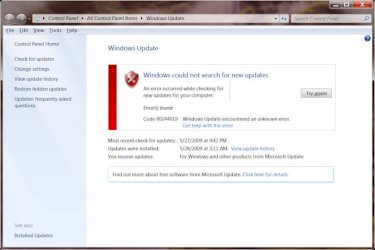
Now i get an error every time i try and access Windows update : "Windows Could Not Search for New Updates" code 82244019.

Also it would not let my Kaspersky AV update either.
 

Attachments

  • error.jpg
    error.jpg
    40.7 KB · Views: 29

My Computer

OS
Win7
Sounds like something is interfering with your internet connection. Disable any firewalls that may have been updated? Scanned for spyware/malware?
 

My Computer

Computer Manufacturer/Model Number
Custom Made
OS
Windows 7 Build 7600|16384- 64bit
CPU
AMD Phenom II X4 810 - 2.61ghz Deneb
Motherboard
Asus M4A79T Deluxe
Memory
4GB DDR3 Mushkin (1600 O.C. Rated)
Graphics Card(s)
ATI HD Radeon 4890 1GB
Sound Card
Realtek HD Onboard Audio
Monitor(s) Displays
AOC 912vwa-1
Screen Resolution
1440x900 (Max Monitor)
Hard Drives
10000RPM 150GB Western Digital Velociraptor
PSU
Corsair TSX750W
Case
Antec Nine Hundred
Cooling
Air Cooled
Keyboard
Logitech Elite
Mouse
Logitech MX518
Internet Speed
Comcast High-Speed (+Powerboost)
Thanks for the reply. I have scanned for any virus or malware, nothing. Same problem with firewall shut. This is strange since it just started on its own and how it also effects my Kaspersky Updates. Just those two though, I have other programs running that get their updates without problem such as weather program, etc.

I put the code into Google and there are messages that show Vista had had this problem was supposed to of been fixed, but that's all.
 

My Computer

OS
Win7
I don''t know what has changed this, but try going to Start > Rub, and type services.msc,

Scroll down until you see Windows Update, make sure its Started and set to enabled.

Do you recall installing any new software lately that may have caused the problem?

Also, have you made any changes in Group Policy?
 

My Computer

Computer Manufacturer/Model Number
Cheap $399.00 E-Machine
OS
Windows 7 Pro & Vista Home Premium
CPU
Athlon 64 3800+ (Orleans) 2.40GHz
Motherboard
Winfast
Memory
2GB DDR2 RAM DIMM
Graphics Card(s)
NVIDIA GeForce 8500 GT 512 MB memory HDMI out
Sound Card
creative X-Fi Exteme 7..1 channel
Monitor(s) Displays
Acer V223W 22" widescreen DVI
Screen Resolution
1680x1050
Hard Drives
WDC WD5 500GB
WDC WD25 250GB
PSU
OCZ 550 watt
Case
Gateway
Cooling
2 fans
Keyboard
Dell
Mouse
Sony Vaio
Internet Speed
18MB/s down - .72MB /s up

My Computer

Computer Manufacturer/Model Number
Dell XPS420
OS
Vista Ult 64 bit Seven Ult RTM x64
CPU
Intel Core2 Quad Q6600 2.40 gigahertz
Memory
Crucial Ballistix 4x2GB PC2 6400
Graphics Card(s)
NVIDIA GeForce 8600 GTS 256 MB
Sound Card
Creative SB X-Fi audio
Monitor(s) Displays
HP w2207 + HPvs15
Screen Resolution
1680x1050 + 1024x768
Hard Drives
2-WD5000AAKS-500 GB
WD5000AAV-500 GB external
Keyboard
Microsoft Comfort Curve
Mouse
MX Revolution
Other Info
Wacom Intuos 2 Graphics Tablet
Experience Index=5.5
Again, thanks for the replies.

The Windows Update Service is on Automatic and is Started, still get same error.

I will reboot into safe mode and do a system restore next.
 

My Computer

OS
Win7
I used a 5 day old restore point in safe mode and still have the same 2 problems.

Same error with windows update and it still wont let kaspersky update either.
 

My Computer

OS
Win7
try going to Start > Run, and type msconfig, click the Startup tab and remove all entries temporarily.

restart and give Windows Update another try.

Either way, if it works or nor, go back to msconfig and enable the anti-virus, spyware detection and/or personal firewall if you have one.

these are really the only thing necessary to run at startup.
 

My Computer

Computer Manufacturer/Model Number
Cheap $399.00 E-Machine
OS
Windows 7 Pro & Vista Home Premium
CPU
Athlon 64 3800+ (Orleans) 2.40GHz
Motherboard
Winfast
Memory
2GB DDR2 RAM DIMM
Graphics Card(s)
NVIDIA GeForce 8500 GT 512 MB memory HDMI out
Sound Card
creative X-Fi Exteme 7..1 channel
Monitor(s) Displays
Acer V223W 22" widescreen DVI
Screen Resolution
1680x1050
Hard Drives
WDC WD5 500GB
WDC WD25 250GB
PSU
OCZ 550 watt
Case
Gateway
Cooling
2 fans
Keyboard
Dell
Mouse
Sony Vaio
Internet Speed
18MB/s down - .72MB /s up
This sounds familiar.

In Internet Explorer, go to tools | internet options | connections | lan settings

and make sure nothing is checked. If one or more is, remove it and/or them. Hit ok a few times and close I.E.

Now update your Windows and AV. Enjoy.

If that didn't work, check if your dns settings are correct and also do a malware scan.
 
Last edited:

My Computer

Computer Manufacturer/Model Number
self built
OS
7600.20510 x86
CPU
P4 550 3.4 GHz HT running at 3.5 GHz
Motherboard
MSI PM8M3-V (MS-7211 v1.x) Micro-ATX mainboard
Memory
OCZ 2 GB(2x1GB) DDR400mHz running @ 414 mHz
Graphics Card(s)
HIS Radeon HD 3850 IceQ 3 Turbo HDMI Dual DL-DVI AGP
Sound Card
MOTU Traveler firewire studio interface 192 kHz 24 bit
Monitor(s) Displays
22" widescreen Acer X223W LCD, 17" Compaq P75 CRT
Screen Resolution
1680x1050 and 1280x1024
Hard Drives
SATA I x2 WD, 400 GB and 120 GB, SATA 2 WD Caviar Black 1 TB
PSU
350W generic
Case
Cybertronpc, it glows blue
Cooling
stock cpu fan, Ice-Q 3 gpu and system, many case fans
Keyboard
Logitch Classical Keyboard 200
Mouse
Logitech Mediaplay cordless
Internet Speed
1792/448 kbits/sec
Other Info
SATA II PCI fake RAID adapter, 1 GB Readyboost, original ATI Remote Wonder (even works with WMC perfectly), Logitech Rumblepad 2 game controller x2
I tried everything that everyone suggested and was still stuck with the same error.

Gave up. Formatted and reinstalled, all works again.

Thanks again!!!

--
rg56
 

My Computer

OS
Win7
Back
Top
