Update your Win 7 installation media

I hadn't previously changed the import code of 7updater to match the changes in updatepack command functions. Alerted to it by your test. Should be fixed in next version.

I created the command you specified (calling it SetupChipset.cmd)

The file has to be named setupcomplete.cmd or it won't work.
 

My Computers My Computers

System One System Two

  • Computer type
    PC/Desktop
    OS
    7 X64
    CPU
    i5 8400
    Motherboard
    gigabyte b365m ds3h
    Memory
    2x8gb 3200mhz
    Hard Drives
    various
    PSU
    pure power 11 400w cm
    Case
    Coolermaster
    Cooling
    cryorig m9i
  • Computer type
    PC/Desktop
    OS
    7x64
    CPU
    g5400
    Motherboard
    ga b365m ds3h
    Memory
    8gb ddr4 2400
    PSU
    xfx pro 450w
Last edited:

My Computers My Computers

System One System Two

  • Computer type
    PC/Desktop
    OS
    7 X64
    CPU
    i5 8400
    Motherboard
    gigabyte b365m ds3h
    Memory
    2x8gb 3200mhz
    Hard Drives
    various
    PSU
    pure power 11 400w cm
    Case
    Coolermaster
    Cooling
    cryorig m9i
  • Computer type
    PC/Desktop
    OS
    7x64
    CPU
    g5400
    Motherboard
    ga b365m ds3h
    Memory
    8gb ddr4 2400
    PSU
    xfx pro 450w
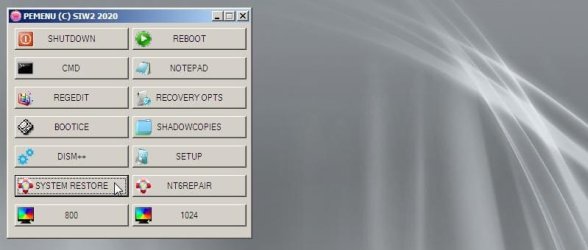
I am contemplating adding a little menu to the bootable wim files

menu1.jpg
 

My Computers My Computers

System One System Two

  • Computer type
    PC/Desktop
    OS
    7 X64
    CPU
    i5 8400
    Motherboard
    gigabyte b365m ds3h
    Memory
    2x8gb 3200mhz
    Hard Drives
    various
    PSU
    pure power 11 400w cm
    Case
    Coolermaster
    Cooling
    cryorig m9i
  • Computer type
    PC/Desktop
    OS
    7x64
    CPU
    g5400
    Motherboard
    ga b365m ds3h
    Memory
    8gb ddr4 2400
    PSU
    xfx pro 450w
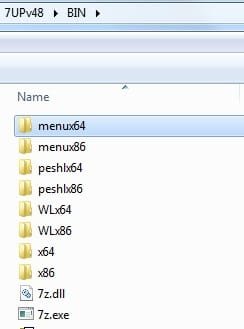
7UPv48 on first post.

If it is preferred without the above menu, delete menux64 and menux86 from the BIN folder.

binmenu.jpg
 
Last edited:

My Computers My Computers

System One System Two

  • Computer type
    PC/Desktop
    OS
    7 X64
    CPU
    i5 8400
    Motherboard
    gigabyte b365m ds3h
    Memory
    2x8gb 3200mhz
    Hard Drives
    various
    PSU
    pure power 11 400w cm
    Case
    Coolermaster
    Cooling
    cryorig m9i
  • Computer type
    PC/Desktop
    OS
    7x64
    CPU
    g5400
    Motherboard
    ga b365m ds3h
    Memory
    8gb ddr4 2400
    PSU
    xfx pro 450w
7UPv48 on first post.
Does this address the issue with \Imports not working?

If so, is there something unique to how 7UP places \Scripts into INSTALL.WIM that will work via 7UP, while not working via Integrate7?

As you may have seen from my post on this topic in the Integrate7 thread, I placed what I believed to be the proper items (including the correctly named SetupComplete.CMD) where they should be placed using Integrate7, and sure enough everything got copied to \Windows\Setup exactly as is supposed to happen using 7UP. And yet, the Intel Chipset INF Utility did not appear to get executed, because the three hardware items still showed as "other devices" in Device Manager. I had to manually run the utility myself post-install in order to correct this.

So, I ask again. Even if 7UPv48 now fixes \Imports, it seems that running of the SetupComplete.CMD is not occurring... at least with Integrate7. I hate to waste another hour running the new 7UP process only to discover once again that the Intel chipset utility is still not being invoked during the Win7 install.
 

My Computer My Computer

Computer type
PC/Desktop
Computer Manufacturer/Model Number
Home-built, two systems (1) and (2)
OS
Windows 7 Pro x64 (1), Win7 Pro X64 (2)
CPU
i5-3350p 3.1Ghz/6MB-cache (1); E8400 3.0Ghz/6MB-cache (2)
Motherboard
ASUS P8Z77-V Pro (1); ASUS P5Q3 (2)
Memory
8GB PC3-12800 DDR3 (1); 4GB PC3-10600 DDR3 (2)
Graphics Card(s)
ATI HD7750 (1), (see TV cards); ATI R7 250 (2)
Sound Card
Realtek ALC892 HD Audio (1); Realtek ALC1200 HD Audio (2)
Monitor(s) Displays
Eizo HD2441W LCD, Eizo S2433W (1); Eizo 24" S2433W (2)
Screen Resolution
1920x1200, 1920x1200 (1); 1920x1200 (2)
Hard Drives
(1) 1TB SATA-II (7200RPM), 2x2TB SATA-III (7200RPM), 250GB SATA-III (10000RPM) for OS; 2x2TB external USB 3.0

(2) 320GB SATA-II (7200RPM), 750GB SATA-II (7200RPM), 150GB SATA-II (10000RPM) for OS; 2TB external USB 3.0
PSU
Nesteq ECS-6001 600W (1); Nesteq ECS-5001 500W (2)
Case
Acousti-Case 360 (1) and (2)
Cooling
Noctua NH-U12P SE2 for CPU, 2x120mm case fans (1) and (2)
Keyboard
IBM PS/2 (1) and (2)
Mouse
Logitech MX Revolution wireless (1); Microsoft wired (2)
Internet Speed
100mbps down / 10mbps up
Antivirus
Microsoft Security Essentials; Malwarebyte Anti-Malware Pro
Browser
Firefox
Other Info
Ceton InfiniTV 4-tuner cablecard-enabled TV card as well as Hauppauge HVR-2250 OTA/ATSC 2-tuner TV card in (1), running under Win7 WMC
7UPDATERv48 copies the contents of the IMPORT folder to the mounted install.wim image.

If there is an $OEM$ folder in dvd\sources, Windows setup.exe routine copies the $OEM$\$$ contents to %windir%.

Either

sources\$oem$\$$\Setup\Scripts\SetupComplete.cmd

OR

%windir%\setup\scripts\SetupComplete.cmd.
 
Last edited:

My Computers My Computers

System One System Two

  • Computer type
    PC/Desktop
    OS
    7 X64
    CPU
    i5 8400
    Motherboard
    gigabyte b365m ds3h
    Memory
    2x8gb 3200mhz
    Hard Drives
    various
    PSU
    pure power 11 400w cm
    Case
    Coolermaster
    Cooling
    cryorig m9i
  • Computer type
    PC/Desktop
    OS
    7x64
    CPU
    g5400
    Motherboard
    ga b365m ds3h
    Memory
    8gb ddr4 2400
    PSU
    xfx pro 450w
create folders inside it Windows\Setup\Scripts\chipset . Create setupcomplete.cmd in the Scripts folder

setupcomplete.cmd
Code:
@echo off
 IF EXIST %windir%\Setup\Scripts\chipset\Setupchipset.exe (
%windir%\Setup\Scripts\chipset\Setupchipset.exe -s -noreboot
 )
7UPDATER will copy the windows folder from IMPORT into the mounted wim.
First, I confirm that the latest 7UPv48 now does copy the \Windows\Setup folder found in \Import into INSTALL.WIM, which eventually is duplicated in the installed Win7, becoming \Windows\Setup. So this issue is now fixed.

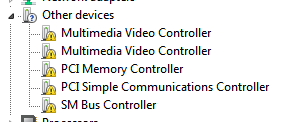
However I still see the three "other device" items in Device Manager.

0lNpKb.png


So it looks like either the SetupComplete.cmd isn't being run, or it is running but failing. Time for a test. Note that I simply created the cmd exactly as you prescribed.

So I decided to manually execute it, to see if it is coded properly and/or has some other issue the prevents it from accomplishing what I wanted.

So I reduced the cmd to simply "SetupChipset.exe -s -reboot" and invoked it with "run as administrator". And it opened up a command prompt window briefly which then closed. And no change in Device Manager.

I then tried just "SetupChipset.exe", and of course it launched. I canceled it.

I then tried "SetupChipset.exe /s", and this time it launched and started running quietly. Looks like /s might be the proper way to specify "silent mode". It ran for a few seconds and then presented a popup message with text complaining of an invalid signature, and did I want to run it anyway... so I said OK. This message doesn't occur when simply running the utility as a normally launched EXE, without the /s operand. I don't know why it should occur when /s is present.

Anyway, a few seconds later I got a second occurrence of the same popup message again complaining about the unauthorized signature. Once again I replied OK and it continued on.

And finally, a few seconds later, it completed. And when I looked in Device Manager now all three of those devices had vanished from "other devices". There were three devices originally, and I saw only two signature messages. Perhaps this relate to the two PCI devices, and the third SM device didn't trigger a signature issue. Don't know.

Bottom line: I'm speculating that the SetupComplete.CMD script actually did run, but failed... same as it does when I run it manually. This could be due to the -s operand instead of /s. But even when I use /s there now occurs two signature error messages requiring my OK to proceed, which do not occur when simply running the Intel utility externally as an EXE while Windows is up and operating.

It looks like this particular issue may simply not be appropriate for trying to get addressed automatically at Windows install by putting something in \Scripts. Not worth the fight. I will simply realize that the Intel chipset utility must be run after the Windows install is completed, as would be intuitively appropriate after reviewing Device Manager to look for problems, like this one.


I've already removed the five (of seven found by Windows Update after the install completes) "undesirable" MSU fixes I'd placed in \Hotfixes, as they are also deemed "undesirable" in the Integrate7 method.

And I will now remove the Intel Chipset INF Utility items from \Import, since it doesn't seem possible to get it to run totally silently and without some human intervention related to the signature issue, whatever is triggering it.

Otherwise, all the rest of my Z170 hardware and drivers is now completely addressed by how I've built both the 7UP and Intergrate7 tools. I think I finally have the completed Win7 install media from 7UP, both in bootable USB form as well as in ISO form (for use in Win7-VM). And furthermore, the bootable USB can be constructed to target either an MBR or GPT drive.

 

My Computer My Computer

Computer type
PC/Desktop
Computer Manufacturer/Model Number
Home-built, two systems (1) and (2)
OS
Windows 7 Pro x64 (1), Win7 Pro X64 (2)
CPU
i5-3350p 3.1Ghz/6MB-cache (1); E8400 3.0Ghz/6MB-cache (2)
Motherboard
ASUS P8Z77-V Pro (1); ASUS P5Q3 (2)
Memory
8GB PC3-12800 DDR3 (1); 4GB PC3-10600 DDR3 (2)
Graphics Card(s)
ATI HD7750 (1), (see TV cards); ATI R7 250 (2)
Sound Card
Realtek ALC892 HD Audio (1); Realtek ALC1200 HD Audio (2)
Monitor(s) Displays
Eizo HD2441W LCD, Eizo S2433W (1); Eizo 24" S2433W (2)
Screen Resolution
1920x1200, 1920x1200 (1); 1920x1200 (2)
Hard Drives
(1) 1TB SATA-II (7200RPM), 2x2TB SATA-III (7200RPM), 250GB SATA-III (10000RPM) for OS; 2x2TB external USB 3.0

(2) 320GB SATA-II (7200RPM), 750GB SATA-II (7200RPM), 150GB SATA-II (10000RPM) for OS; 2TB external USB 3.0
PSU
Nesteq ECS-6001 600W (1); Nesteq ECS-5001 500W (2)
Case
Acousti-Case 360 (1) and (2)
Cooling
Noctua NH-U12P SE2 for CPU, 2x120mm case fans (1) and (2)
Keyboard
IBM PS/2 (1) and (2)
Mouse
Logitech MX Revolution wireless (1); Microsoft wired (2)
Internet Speed
100mbps down / 10mbps up
Antivirus
Microsoft Security Essentials; Malwarebyte Anti-Malware Pro
Browser
Firefox
Other Info
Ceton InfiniTV 4-tuner cablecard-enabled TV card as well as Hauppauge HVR-2250 OTA/ATSC 2-tuner TV card in (1), running under Win7 WMC
dsperber
invalid signature
That might be the issue.

It can be run semi-automatically at first logon.

Pop a cmd file in the startup folder which points at wherever you put setupchipset.exe - for example on the root of the drive ( %systemdrive%\chipset\setupchipset.exe ) Something like this:

folder structure in IMPORT:

ProgramData\Microsoft\Windows\Start Menu\Programs\Startup\MY.CMD

chipset\the extracted chipset zip file stuff in here

chipset-folder-contents.jpg

MY.cmd something like this:
Code:
@ECHO OFF
IF EXIST %SYSTEMDRIVE%\chipset\setupchipset.exe (
 echo running setupchipset
 Start /wait %SYSTEMDRIVE%\chipset\setupchipset.exe
 RD /s /q "%SYSTEMDRIVE%\chipset"
  )
  
DEL "%~f0"
 
Last edited:

My Computers My Computers

System One System Two

  • Computer type
    PC/Desktop
    OS
    7 X64
    CPU
    i5 8400
    Motherboard
    gigabyte b365m ds3h
    Memory
    2x8gb 3200mhz
    Hard Drives
    various
    PSU
    pure power 11 400w cm
    Case
    Coolermaster
    Cooling
    cryorig m9i
  • Computer type
    PC/Desktop
    OS
    7x64
    CPU
    g5400
    Motherboard
    ga b365m ds3h
    Memory
    8gb ddr4 2400
    PSU
    xfx pro 450w
Tested the above - it works fine.
 

My Computers My Computers

System One System Two

  • Computer type
    PC/Desktop
    OS
    7 X64
    CPU
    i5 8400
    Motherboard
    gigabyte b365m ds3h
    Memory
    2x8gb 3200mhz
    Hard Drives
    various
    PSU
    pure power 11 400w cm
    Case
    Coolermaster
    Cooling
    cryorig m9i
  • Computer type
    PC/Desktop
    OS
    7x64
    CPU
    g5400
    Motherboard
    ga b365m ds3h
    Memory
    8gb ddr4 2400
    PSU
    xfx pro 450w
Tested the above - it works fine.
What works fine... using this \Imports approach to place something into the Start Menu that self-initiates at first-logon post-install and then deletes itself?

Looks to me that your new MY.CMD no longer runs "silently", but simply is a novel way to not accidentally overlook the need to run the chipset utility to address the Device Manager issue. Results in an auto-launch of SetupChipset.exe automatically at first Windows login, using this revised method so that it 100% guarantees running immediately on the first login to the newly installed Windows and never again.

And thus it is also "in the foreground", meaning it is just like a normal manual double-click launching of the program which produces the standard Intel program window, NEXT buttons, etc., so that there should be no "invalid signature" issue as unexpectedly seemed to be the case for me when I tried to run it in "silent mode".

Furthermore, this new approach should also work with Integrate7, and its own \Add-these-files-to-Windows folder (identical in concept to your \Import).

If I'm willing to face the reality that this program must be run in the foreground, manually launched, and that this new idea of yours is a clever way to "assist so as not to overlook" and also to "force running it in the foreground at first opportunity", seems perfectly fine to me. I will test it out myself.

Cute.
 

My Computer My Computer

Computer type
PC/Desktop
Computer Manufacturer/Model Number
Home-built, two systems (1) and (2)
OS
Windows 7 Pro x64 (1), Win7 Pro X64 (2)
CPU
i5-3350p 3.1Ghz/6MB-cache (1); E8400 3.0Ghz/6MB-cache (2)
Motherboard
ASUS P8Z77-V Pro (1); ASUS P5Q3 (2)
Memory
8GB PC3-12800 DDR3 (1); 4GB PC3-10600 DDR3 (2)
Graphics Card(s)
ATI HD7750 (1), (see TV cards); ATI R7 250 (2)
Sound Card
Realtek ALC892 HD Audio (1); Realtek ALC1200 HD Audio (2)
Monitor(s) Displays
Eizo HD2441W LCD, Eizo S2433W (1); Eizo 24" S2433W (2)
Screen Resolution
1920x1200, 1920x1200 (1); 1920x1200 (2)
Hard Drives
(1) 1TB SATA-II (7200RPM), 2x2TB SATA-III (7200RPM), 250GB SATA-III (10000RPM) for OS; 2x2TB external USB 3.0

(2) 320GB SATA-II (7200RPM), 750GB SATA-II (7200RPM), 150GB SATA-II (10000RPM) for OS; 2TB external USB 3.0
PSU
Nesteq ECS-6001 600W (1); Nesteq ECS-5001 500W (2)
Case
Acousti-Case 360 (1) and (2)
Cooling
Noctua NH-U12P SE2 for CPU, 2x120mm case fans (1) and (2)
Keyboard
IBM PS/2 (1) and (2)
Mouse
Logitech MX Revolution wireless (1); Microsoft wired (2)
Internet Speed
100mbps down / 10mbps up
Antivirus
Microsoft Security Essentials; Malwarebyte Anti-Malware Pro
Browser
Firefox
Other Info
Ceton InfiniTV 4-tuner cablecard-enabled TV card as well as Hauppauge HVR-2250 OTA/ATSC 2-tuner TV card in (1), running under Win7 WMC
For enthusiasts:
I have just applied the lowest updated image ( officially that is Home Prem for x64). At first oobe screen ( where it says Type your username ) press Ctrl+shift+f3 to reboot into audit mode. Used dism++ to cleanup. Then generalize and capture. Captured wim is much smaller at 2.74gb and seems to be working fine.

I can't think of a way to automate that. Geeks can have fun playing with it.
 

My Computers My Computers

System One System Two

  • Computer type
    PC/Desktop
    OS
    7 X64
    CPU
    i5 8400
    Motherboard
    gigabyte b365m ds3h
    Memory
    2x8gb 3200mhz
    Hard Drives
    various
    PSU
    pure power 11 400w cm
    Case
    Coolermaster
    Cooling
    cryorig m9i
  • Computer type
    PC/Desktop
    OS
    7x64
    CPU
    g5400
    Motherboard
    ga b365m ds3h
    Memory
    8gb ddr4 2400
    PSU
    xfx pro 450w
Hi SIW2. Do you happen to know if Simplex makes and update pack for win 8.1? I have one 8.1 machine here that I may need to reinstall one day. Thanks!
 

My Computer My Computer

Computer type
PC/Desktop
Computer Manufacturer/Model Number
custom
OS
windows 7 Pro 64 Bit
CPU
i5 4670K
Motherboard
Asus Max Hero 1150 socket
Memory
16GB DDR3@933mhz
Graphics Card(s)
Radeon R9 390 8192mb
Monitor(s) Displays
Dell U2415 x3
Screen Resolution
1920 (5760) x 1200 x3
Hard Drives
System: Kingston 128GB SSD

Installing to Samsung 860 EVO 500GB
WD Black 2 TB & 1 TB
PSU
Corsair CX750M
Cooling
Hyper 312
Internet Speed
50mbps
Only for win7 as far as I know. If I come across something else for 8.1 will let you know.
 

My Computers My Computers

System One System Two

  • Computer type
    PC/Desktop
    OS
    7 X64
    CPU
    i5 8400
    Motherboard
    gigabyte b365m ds3h
    Memory
    2x8gb 3200mhz
    Hard Drives
    various
    PSU
    pure power 11 400w cm
    Case
    Coolermaster
    Cooling
    cryorig m9i
  • Computer type
    PC/Desktop
    OS
    7x64
    CPU
    g5400
    Motherboard
    ga b365m ds3h
    Memory
    8gb ddr4 2400
    PSU
    xfx pro 450w
Only for win7 as far as I know. If I come across something else for 8.1 will let you know.


Truthfully, I doubt anyone is putting effort into 8.1, given it's short life and departure. I may not ever need to reinstall anyway. Thanks for any info.
 

My Computer My Computer

Computer type
PC/Desktop
Computer Manufacturer/Model Number
custom
OS
windows 7 Pro 64 Bit
CPU
i5 4670K
Motherboard
Asus Max Hero 1150 socket
Memory
16GB DDR3@933mhz
Graphics Card(s)
Radeon R9 390 8192mb
Monitor(s) Displays
Dell U2415 x3
Screen Resolution
1920 (5760) x 1200 x3
Hard Drives
System: Kingston 128GB SSD

Installing to Samsung 860 EVO 500GB
WD Black 2 TB & 1 TB
PSU
Corsair CX750M
Cooling
Hyper 312
Internet Speed
50mbps
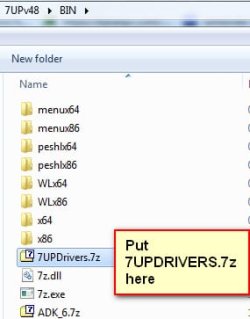
Extra drivers in the 7UPDRIVERS.7z pack

7UPDRIVERS.7z

To integrate them put them in the BIN folder


add-7updrivers-to-bin-folder.jpg
 

My Computers My Computers

System One System Two

  • Computer type
    PC/Desktop
    OS
    7 X64
    CPU
    i5 8400
    Motherboard
    gigabyte b365m ds3h
    Memory
    2x8gb 3200mhz
    Hard Drives
    various
    PSU
    pure power 11 400w cm
    Case
    Coolermaster
    Cooling
    cryorig m9i
  • Computer type
    PC/Desktop
    OS
    7x64
    CPU
    g5400
    Motherboard
    ga b365m ds3h
    Memory
    8gb ddr4 2400
    PSU
    xfx pro 450w
Is it possible o get fake updates?
 

My Computer My Computer

Computer type
Laptop
Computer Manufacturer/Model Number
Hewlett-Packard Presario C700 Notebook PC F.08
OS
Windows 7 Home 32 bit
CPU
1.47 gigahertz Intel Pentium Dual T2310
Motherboard
Hewlett-Packard 30D9 83.19
Memory
2gb
Graphics Card(s)
Integrated
Sound Card
Integrated
Monitor(s) Displays
Built-in
Screen Resolution
1600x900
Hard Drives
WDC WD3200BEKT-00PVMT0 [Hard drive] (320.07 GB) -- drive 0, s/n WD-WX11AC050066, rev 01.01A01, SMART Status: Healthy
Internet Speed
15mbps
Antivirus
Windows defender
Browser
Google chrome

My Computer My Computer

Computer type
PC/Desktop
OS
Windows 7 Professional x64
CPU
9900KS
Motherboard
ASRock Z390M Pro4
Memory
32GB DDR4
Graphics Card(s)
GeForce GT 640
Sound Card
Renkforce MX 0103USB
Hard Drives
Samsung 850 EVO Basic 250GB
Cooling
Be Quiet! shadow rock lp and one case fan.
Mouse
Logitech MX Anywhere 2S
Internet Speed
~80mb/s down, 15mb/s up
Browser
mostly Chrome
Last edited:

My Computers My Computers

System One System Two

  • Computer type
    PC/Desktop
    OS
    7 X64
    CPU
    i5 8400
    Motherboard
    gigabyte b365m ds3h
    Memory
    2x8gb 3200mhz
    Hard Drives
    various
    PSU
    pure power 11 400w cm
    Case
    Coolermaster
    Cooling
    cryorig m9i
  • Computer type
    PC/Desktop
    OS
    7x64
    CPU
    g5400
    Motherboard
    ga b365m ds3h
    Memory
    8gb ddr4 2400
    PSU
    xfx pro 450w
Good Morning to all, & congrats to you , SIW2 , for your tool.

For enthusiasts:
I have just applied the lowest updated image ( officially that is Home Prem for x64). At first oobe screen ( where it says Type your username ) press Ctrl+shift+f3 to reboot into audit mode. Used dism++ to cleanup. Then generalize and capture. Captured wim is much smaller at 2.74gb and seems to be working fine.

I can't think of a way to automate that. Geeks can have fun playing with it.

May be , this refers to this process described in simplix thread on OSZone.net (in russian) where Vanadiy777, Kamyshoviy and Makc1968 talk about deleting all 'Manifest' and 'backup' in 'Windows\SxS' folder from 'install.wim' using GimageX page902 , page903 and page904.

Makc1968 who tried few day ago did also boot on WinPE to do this. Is that mandatory ?
 

My Computer My Computer

Computer type
Laptop
Computer Manufacturer/Model Number
Dell Inspiron 9400 / Precision M4800
OS
WinXP x86 Pro - Win7 Ultimate x86 / Win10 Pro x64
CPU
Dual Core T5500 / i7 4810MQ
Memory
4GB / 24GB
Graphics Card(s)
Intel 945ME / intel HD 4600 - NVIDIA Quadro K1100M
Monitor(s) Displays
Iiyama prolite 22'' - 27''
Back
Top