create folders inside it Windows\Setup\Scripts\chipset . Create setupcomplete.cmd in the Scripts folder
setupcomplete.cmd
Code:
@echo off
 IF EXIST %windir%\Setup\Scripts\chipset\Setupchipset.exe (
%windir%\Setup\Scripts\chipset\Setupchipset.exe -s -noreboot
 )
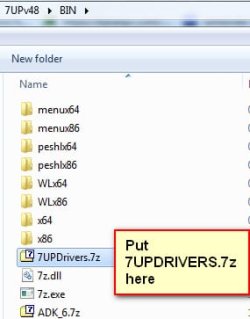
7UPDATER will copy the windows folder from IMPORT into the mounted wim.
First, I confirm that the latest 7UPv48 now does copy the \Windows\Setup folder found in \Import into INSTALL.WIM, which eventually is duplicated in the installed Win7, becoming \Windows\Setup. So this issue is now fixed.
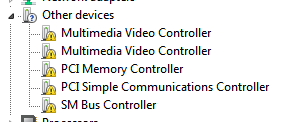
However I still see the three "other device" items in Device Manager.
So it looks like either the SetupComplete.cmd isn't being run, or it is running but failing. Time for a test. Note that I simply created the cmd exactly as you prescribed.
So I decided to manually execute it, to see if it is coded properly and/or has some other issue the prevents it from accomplishing what I wanted.
So I reduced the cmd to simply "SetupChipset.exe -s -reboot" and invoked it with "run as administrator". And it opened up a command prompt window briefly which then closed. And no change in Device Manager.
I then tried just "SetupChipset.exe", and of course it launched. I canceled it.
I then tried "SetupChipset.exe /s", and this time it launched and started running quietly. Looks like /s might be the proper way to specify "silent mode". It ran for a few seconds and then presented a popup message with text complaining of an invalid signature, and did I want to run it anyway... so I said OK. This message doesn't occur when simply running the utility as a normally launched EXE, without the /s operand. I don't know why it should occur when /s is present.
Anyway, a few seconds later I got a second occurrence of the same popup message again complaining about the unauthorized signature. Once again I replied OK and it continued on.
And finally, a few seconds later, it completed. And when I looked in Device Manager now all three of those devices had vanished from "other devices". There were three devices originally, and I saw only two signature messages. Perhaps this relate to the two PCI devices, and the third SM device didn't trigger a signature issue. Don't know.
Bottom line: I'm speculating that the SetupComplete.CMD script actually did run, but failed... same as it does when I run it manually. This could be due to the -s operand instead of /s. But even when I use /s there now occurs two signature error messages requiring my OK to proceed, which do not occur when simply running the Intel utility externally as an EXE while Windows is up and operating.
It looks like this particular issue may simply not be appropriate for trying to get addressed automatically at Windows install by putting something in \Scripts. Not worth the fight. I will simply realize that the Intel chipset utility must be run after the Windows install is completed, as would be intuitively appropriate after reviewing Device Manager to look for problems, like this one.
I've already removed the five (of seven found by Windows Update after the install completes) "undesirable" MSU fixes I'd placed in \Hotfixes, as they are also deemed "undesirable" in the Integrate7 method.
And I will now remove the Intel Chipset INF Utility items from \Import, since it doesn't seem possible to get it to run totally silently and without some human intervention related to the signature issue, whatever is triggering it.
Otherwise, all the rest of my Z170 hardware and drivers is now completely addressed by how I've built both the 7UP and Intergrate7 tools. I think I finally have the completed Win7 install media from 7UP, both in bootable USB form as well as in ISO form (for use in Win7-VM). And furthermore, the bootable USB can be constructed to target either an MBR or GPT drive.