Update your Win 7 installation media

It isn't just clicking a cmd file. The user would need to select the wim, then the images need to be dispalyed. The user the needs to select the image to mount. Then a mount point has to be selected, it has to be a suitable point, and checks need to be made for any other mounted images.Or it could autocreate a new point, but that doesn't let the user select - which might be useful if e.g. running out of space in current directory, and so on.


Use dism++ it has a very obvious UI.
 

My Computers My Computers

System One System Two

  • Computer type
    PC/Desktop
    OS
    7 X64
    CPU
    i5 8400
    Motherboard
    gigabyte b365m ds3h
    Memory
    2x8gb 3200mhz
    Hard Drives
    various
    PSU
    pure power 11 400w cm
    Case
    Coolermaster
    Cooling
    cryorig m9i
  • Computer type
    PC/Desktop
    OS
    7x64
    CPU
    g5400
    Motherboard
    ga b365m ds3h
    Memory
    8gb ddr4 2400
    PSU
    xfx pro 450w
I have no idea what I was doing wrong the first time, but I have managed to integrate the Simplix pack no problem now, so I had no need to mess about adding cab files etc. Thanks to anyone that helped.

After installing the updated Windows 7 x64 in a VM today, Windows Update said these 5 hotfixes were needed:

KB947821 (this is gigantic, 538 MB)
KB2676562 (6.54 MB)
KB2813347 (4.31 MB)
KB2952664 (6.92 MB)
KB3123479 (205 KB)

All are MSU files so, I will add these to the folder "7UPv50\UPDATES\Installx64" and see what happens on the next install in a VM. :-)

EDIT: the above was true on Windows 7 Ultimate x64, but on the Enterprise edition, no hotfixes were required after integrating the Simplix pack using 7updater. It's probably the only time I have installed Windows and seen a green shield in Windows Update lol.


Just to let you know simplix has been updated to Version 20.3.12. I don't believe your script will use this file.

It does. It works. Just put UpdatePack7R2-20.3.12.exe in the 7UPv50 folder (not in a sub-folder!)

Cheers folks.
 
Last edited:

My Computer My Computer

Computer type
PC/Desktop
OS
Windows 10 x64
Hello everyone, noob here. Hope you are all healthy and busy.

Went through these 77 pages and my head's totally spinning! :rolleyes:
So before I dive into the deep end ... don't suppose this will work on a H370 / Coffee Lake board?
( ... I know I will need a discrete gpu card though )
Comments welcome.
 

My Computer My Computer

Computer type
PC/Desktop
OS
Windows 7 Pro x64
You won't necessarily need a discrete gpu. Second post on this thread. HD630 drivers
 

My Computers My Computers

System One System Two

  • Computer type
    PC/Desktop
    OS
    7 X64
    CPU
    i5 8400
    Motherboard
    gigabyte b365m ds3h
    Memory
    2x8gb 3200mhz
    Hard Drives
    various
    PSU
    pure power 11 400w cm
    Case
    Coolermaster
    Cooling
    cryorig m9i
  • Computer type
    PC/Desktop
    OS
    7x64
    CPU
    g5400
    Motherboard
    ga b365m ds3h
    Memory
    8gb ddr4 2400
    PSU
    xfx pro 450w
Thank you SIW2 ... will see if that gets me past that dreaded "you are missing a silly driver" dialog box ... though for that 630 driver pack, which particular files do you think should be included in the folders?


At least for the nvme's it is just like 3 files, though that post#2 rar has a lot of stuff in it ... don't suppose it's just dumping the "graphics" folder into your 7up drivers folder is it? :confused:
 

My Computer My Computer

Computer type
PC/Desktop
OS
Windows 7 Pro x64
hy!

I want to ask if you know any method to remove some bloatware from Win7 install disk to fit on single layer DVD. So I want to remove e.g Windows Defender from install disk, not only disable it after installaton!
 

My Computer My Computer

Computer type
PC/Desktop
OS
Windows 7 Ultimate x64
atamo,

Single layer DVD is 4.7 GB
Windows 7 is 3.1 GB
It fits!
Not sure about removing Defender and as you call it "bloatware". PM SIW2; is the one to ask!
 

My Computer My Computer

Computer type
PC/Desktop
Computer Manufacturer/Model Number
HP Desktop & Compaq Laptop
OS
Win 10 x64, Linux Lite, Win 7 x64, BlackArch, & Kali
Hard Drives
Samsung 850 Pro 256Gb,
Hitachi HDD 1Tb,
Crucial MX SSD 250Gb
Segate 3Tb USB 3.0 Ext. Backup HDD
Internet Speed
150Mbps dn, 20Mbps up
Antivirus
Avast Free, Malwarebytes Anti-Exploit & Anti-Ransomware
Browser
Firefox, Chrome, Opera, & VPN

My Computers My Computers

System One System Two

  • Computer type
    PC/Desktop
    OS
    7 X64
    CPU
    i5 8400
    Motherboard
    gigabyte b365m ds3h
    Memory
    2x8gb 3200mhz
    Hard Drives
    various
    PSU
    pure power 11 400w cm
    Case
    Coolermaster
    Cooling
    cryorig m9i
  • Computer type
    PC/Desktop
    OS
    7x64
    CPU
    g5400
    Motherboard
    ga b365m ds3h
    Memory
    8gb ddr4 2400
    PSU
    xfx pro 450w
Hi I use this app every few months when there's an update and I'm just wondering if anyone knows if there is something like it for windows 8.1???? I have had a look but can't seem to find anything.
 

My Computer My Computer

Computer type
PC/Desktop
OS
windows 10 64 bit
hey there, i'm trying to do a fresh install onto a ADATA XPG SX8200 M.2-2280 NVME in a ASRock B450M PRO4, i've followed the steps in the first post and created the iso but every time i run the installation it cancels at 51% and gives error code 0x80070570 "windows cannot install required files, the file may be corrupt or missing"

does anyone know what i'm doing wrong?
 

My Computer My Computer

Computer type
PC/Desktop
OS
7 64
at what point do you get the message?

Is it when setup is trying to extract the files from the wim? "expanding files"

Sounds like there is something corrupt in the image.


You could try applying the image instead of using windows setup.

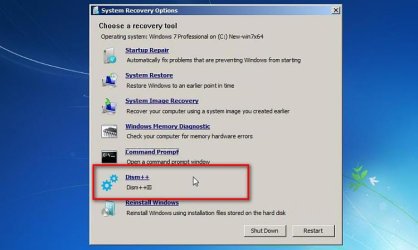
Dism++ can be used to apply an image to a partition. You will find it under "repair your computer"

Ok when it tells you there is less than 5gb of scratch. You don't need much for this .

If that doesn't work, then you will need to build the installation media again. Turn off av and anything else that could interfere with the build process.

recopts-dism++.jpg
 
Last edited:

My Computers My Computers

System One System Two

  • Computer type
    PC/Desktop
    OS
    7 X64
    CPU
    i5 8400
    Motherboard
    gigabyte b365m ds3h
    Memory
    2x8gb 3200mhz
    Hard Drives
    various
    PSU
    pure power 11 400w cm
    Case
    Coolermaster
    Cooling
    cryorig m9i
  • Computer type
    PC/Desktop
    OS
    7x64
    CPU
    g5400
    Motherboard
    ga b365m ds3h
    Memory
    8gb ddr4 2400
    PSU
    xfx pro 450w
Yes it's when the setup is "expanding files", happens every time at 51%


Just tried applying the image using dism++ and errored too - "Error: The handle is invalid" - this happened while it was accessing 'windows\system32\driverstore\filerepository\prnca00g.inf_amd64_neutral_6f76b14b2912fa55\amd64\CNB7UKCA.ICM'


I'll build the iso again with avast turned off, just a few questions to make sure I'm doing this all right, sorry if they're stupid this is my first time doing this - once an installation has failed is it fine to just try to reinstall again I don't need to format the ssd or anything like that?


And these are all the steps I'm taking - is this correct?:


unzip 7UPv50 to c:
place UPDATEPACK7R2+.exe in 7up folder
place 7UPDRIVERS.7z in the bin folder
extract X17-59465.iso to desktop folder 'EXTRACTED-ISO'

run 7updaterv50.cmd as admin
point it to the extracted X17-59465.iso folder 'EXTRACTED-ISO'

'the operation was completed successfully'
unmount boot.wim
update all editions
use iso-create.cmd on the 'EXTRACTED-ISO' folder to create 7601_17514_en-US_x64.iso

create bootable USB with rufus from 7601_17514_en-US_x64.iso - usb formatted to fat32
partition scheme GPT / target system UEFI (non CSM)


edit: rebuilt the iso, gave the same error again at 51% when the setup is "expanding files"
 
Last edited:

My Computer My Computer

Computer type
PC/Desktop
OS
7 64
Format the partition before applying the new image. Quick format is fine.

Desktop might be a long path. Probably best to extract iso to the root of the partition, e.g. c:\extracted-iso,

install.wim will be over 4gb with updates integrated. How did you fit it on fat32 usb stick?

Maybe try it without integrating the extra driver pack to save abit of time.
 

My Computers My Computers

System One System Two

  • Computer type
    PC/Desktop
    OS
    7 X64
    CPU
    i5 8400
    Motherboard
    gigabyte b365m ds3h
    Memory
    2x8gb 3200mhz
    Hard Drives
    various
    PSU
    pure power 11 400w cm
    Case
    Coolermaster
    Cooling
    cryorig m9i
  • Computer type
    PC/Desktop
    OS
    7x64
    CPU
    g5400
    Motherboard
    ga b365m ds3h
    Memory
    8gb ddr4 2400
    PSU
    xfx pro 450w
All sorted now cheers! Turns out I had a corrupted win7 iso, just grabbed a new one, repeated the steps and worked like a charm, thanks very much mate!
 

My Computer My Computer

Computer type
PC/Desktop
OS
7 64
:-)
 

My Computers My Computers

System One System Two

  • Computer type
    PC/Desktop
    OS
    7 X64
    CPU
    i5 8400
    Motherboard
    gigabyte b365m ds3h
    Memory
    2x8gb 3200mhz
    Hard Drives
    various
    PSU
    pure power 11 400w cm
    Case
    Coolermaster
    Cooling
    cryorig m9i
  • Computer type
    PC/Desktop
    OS
    7x64
    CPU
    g5400
    Motherboard
    ga b365m ds3h
    Memory
    8gb ddr4 2400
    PSU
    xfx pro 450w
Simplix new update pack 05/20/15:

Added KB4538483-v1.2-x86-x64 (replace KB4538483-x86-x64)
Added KB4552940-x86-x64 (replace KB4532945-x86-x64)
Added KB4555449-x86-x64 (replace KB4550738-x86-x64)
Added KB4556836-x86-x64 with disabling telemetry and processor verification (replaces KB4550964-x86-x64)
The following updates are removed: KB2716513-x86-x64, KB2884256-x86-x64, KB2920188-v7-x64, KB3000483-x86-x64, KB3020393-x86-x64, KB3140245-x86-x64, KB4054998-x86-x64
 
Last edited:

My Computers My Computers

System One System Two

  • Computer type
    PC/Desktop
    OS
    7 X64
    CPU
    i5 8400
    Motherboard
    gigabyte b365m ds3h
    Memory
    2x8gb 3200mhz
    Hard Drives
    various
    PSU
    pure power 11 400w cm
    Case
    Coolermaster
    Cooling
    cryorig m9i
  • Computer type
    PC/Desktop
    OS
    7x64
    CPU
    g5400
    Motherboard
    ga b365m ds3h
    Memory
    8gb ddr4 2400
    PSU
    xfx pro 450w
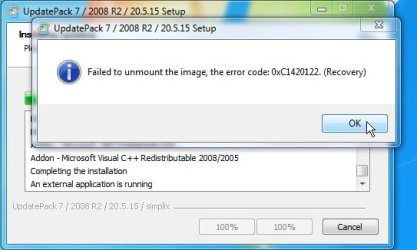
I am working on a fix for the change that has been made to the simplix updatepack. It automatically mounts winre, which interferes with the final commands before unmounting the edition image.


2020-05-18_001638.jpg
 
Last edited:

My Computers My Computers

System One System Two

  • Computer type
    PC/Desktop
    OS
    7 X64
    CPU
    i5 8400
    Motherboard
    gigabyte b365m ds3h
    Memory
    2x8gb 3200mhz
    Hard Drives
    various
    PSU
    pure power 11 400w cm
    Case
    Coolermaster
    Cooling
    cryorig m9i
  • Computer type
    PC/Desktop
    OS
    7x64
    CPU
    g5400
    Motherboard
    ga b365m ds3h
    Memory
    8gb ddr4 2400
    PSU
    xfx pro 450w
7UPv51 on first post. Workaround for changed functions of Simplix
 

My Computers My Computers

System One System Two

  • Computer type
    PC/Desktop
    OS
    7 X64
    CPU
    i5 8400
    Motherboard
    gigabyte b365m ds3h
    Memory
    2x8gb 3200mhz
    Hard Drives
    various
    PSU
    pure power 11 400w cm
    Case
    Coolermaster
    Cooling
    cryorig m9i
  • Computer type
    PC/Desktop
    OS
    7x64
    CPU
    g5400
    Motherboard
    ga b365m ds3h
    Memory
    8gb ddr4 2400
    PSU
    xfx pro 450w
I am working on a fix for the change that has been made to the simplix updatepack. It automatically mounts winre, which interferes with the final commands before unmounting the edition image.


View attachment 411843
Did you attach a picture? Looks like the forum software issue has returned. This is how it looks to me using Firefox (note that I am "attaching" my own screenshot as you did, rather than pointing to an external image site via URL):
 

Attachments

  • No-JPG.jpg
    No-JPG.jpg
    37.6 KB · Views: 0

My Computer My Computer

Computer type
PC/Desktop
Computer Manufacturer/Model Number
Home-built, two systems (1) and (2)
OS
Windows 7 Pro x64 (1), Win7 Pro X64 (2)
CPU
i5-3350p 3.1Ghz/6MB-cache (1); E8400 3.0Ghz/6MB-cache (2)
Motherboard
ASUS P8Z77-V Pro (1); ASUS P5Q3 (2)
Memory
8GB PC3-12800 DDR3 (1); 4GB PC3-10600 DDR3 (2)
Graphics Card(s)
ATI HD7750 (1), (see TV cards); ATI R7 250 (2)
Sound Card
Realtek ALC892 HD Audio (1); Realtek ALC1200 HD Audio (2)
Monitor(s) Displays
Eizo HD2441W LCD, Eizo S2433W (1); Eizo 24" S2433W (2)
Screen Resolution
1920x1200, 1920x1200 (1); 1920x1200 (2)
Hard Drives
(1) 1TB SATA-II (7200RPM), 2x2TB SATA-III (7200RPM), 250GB SATA-III (10000RPM) for OS; 2x2TB external USB 3.0

(2) 320GB SATA-II (7200RPM), 750GB SATA-II (7200RPM), 150GB SATA-II (10000RPM) for OS; 2TB external USB 3.0
PSU
Nesteq ECS-6001 600W (1); Nesteq ECS-5001 500W (2)
Case
Acousti-Case 360 (1) and (2)
Cooling
Noctua NH-U12P SE2 for CPU, 2x120mm case fans (1) and (2)
Keyboard
IBM PS/2 (1) and (2)
Mouse
Logitech MX Revolution wireless (1); Microsoft wired (2)
Internet Speed
100mbps down / 10mbps up
Antivirus
Microsoft Security Essentials; Malwarebyte Anti-Malware Pro
Browser
Firefox
Other Info
Ceton InfiniTV 4-tuner cablecard-enabled TV card as well as Hauppauge HVR-2250 OTA/ATSC 2-tuner TV card in (1), running under Win7 WMC
Yes, there is a picture on post 777. I can see it in firefox.
 

My Computers My Computers

System One System Two

  • Computer type
    PC/Desktop
    OS
    7 X64
    CPU
    i5 8400
    Motherboard
    gigabyte b365m ds3h
    Memory
    2x8gb 3200mhz
    Hard Drives
    various
    PSU
    pure power 11 400w cm
    Case
    Coolermaster
    Cooling
    cryorig m9i
  • Computer type
    PC/Desktop
    OS
    7x64
    CPU
    g5400
    Motherboard
    ga b365m ds3h
    Memory
    8gb ddr4 2400
    PSU
    xfx pro 450w
Back
Top