Update your Win 7 installation media

7UPv57 on first post. Added winntsetup and replaced notepad for bootable wims.

If you don't want the menu and extra tools, you can just change the line 19 in 7updater.cmd

From:
set domenu=Y

to:
set domenu=N
 

My Computers My Computers

System One System Two

  • Computer type
    PC/Desktop
    OS
    7 X64
    CPU
    i5 8400
    Motherboard
    gigabyte b365m ds3h
    Memory
    2x8gb 3200mhz
    Hard Drives
    various
    PSU
    pure power 11 400w cm
    Case
    Coolermaster
    Cooling
    cryorig m9i
  • Computer type
    PC/Desktop
    OS
    7x64
    CPU
    g5400
    Motherboard
    ga b365m ds3h
    Memory
    8gb ddr4 2400
    PSU
    xfx pro 450w
Okay update: I got Windows 7 installed with the media disc you provided. No freezing at all over the last day or so.

This has been a lifesaver.. One of the best things that's happened in quite some time. As Windows 10 would not work. If I did not find a solution I would have to sell new PC and buy an older Windows 7 machine

You should have a donation link. As I'd like to contribute to your hard work, I'm sure others would as well. You may possibly want to sell this on eBay. Perhaps not so much for the money but I'm sure there are many other people that would like to continue to use Windows 7. I'm sure I'm not alone.

I suppose many upgrade due to security patches. But it looks like 0patch.com, will provide you with patches for any exploits and such. I wouldn't mind sending a donation or to charity. Just let me know and thanks again for solving my Windows 7 conundrum.

Best regards,
Brian
 

My Computer My Computer

Computer type
PC/Desktop
Computer Manufacturer/Model Number
custom build
OS
Windows 7 ultimate
CPU
AMD
I have a asus dark hero 570x and a 5900x.
Im trying to install windows 7. I tried my old usb wins7 disk i made back in 2016 and it didnt work.
So I followed your guide and i get the same problem of being stuck on the “starting windows” the windows picture is always glowing, so its not frozen.
I tried using the usb stick on my old system; 6700k and z270 asus sabertooth and it works.
Is there another way to get this to work? Or asus 570x isn’t compatible?
 

My Computer My Computer

Computer type
PC/Desktop
Computer Manufacturer/Model Number
Custom
OS
Windows 7 Ultimate 64bit
CPU
6700k
Motherboard
asus z170 sabertooth
Memory
g.skill 16gb 3200
Graphics Card(s)
evga 1070 gtx
Sound Card
jds labs element2 amp/dac
Monitor(s) Displays
acer predator 27" 1440p 165hz
Screen Resolution
1440p
Hard Drives
wd black sn750 1tb ssd
vector180 1tb ssd
sandisk plus 240gb ssd
wd black 1.5tb hdd
PSU
corsair 850ax
Case
corsair 760t
Cooling
corsair h115i
Keyboard
corsair k95 platinum
Mouse
logitech g900
Internet Speed
200mpbs
Other Info
lots of ML140 and ML120 fans
You will need to integrate the drivers for ryzen into install.wim

[Solution] Win 7/Win8.1 x64 Ryzen APU Video driver(Update 2020.12.01 Vulkan/OpenCL API support!)

AMD_AM4_X399_TRX40_Drivers_B6_Win7_8.1_SHA256.7z — Yandex.Disk

Non-WHQL-Radeon-Software-Adrenalin-2020-20.11.3-Win7-64Bit-Nov30.7z — Yandex.Disk


You can use the win7 install.wim you already updated and integrate them using dism++.
DISM++


You don't need the sha2 patch if you have already updated the wim using simplix.

Then copy the updated win7 install.wim into win10 installation media sources folder ( delete the existing win10 sources\install.wim or install.esd first ).

win10_20h2_v2_english_x64.iso

Some asus mobo need a bios update. Update the latest bios first.
BIOS setting: turn on CSM first, disable fast boot.

x570 motherboard recommendations for ryzen 5000 series & windows 7 - 2
 

My Computers My Computers

System One System Two

  • Computer type
    PC/Desktop
    OS
    7 X64
    CPU
    i5 8400
    Motherboard
    gigabyte b365m ds3h
    Memory
    2x8gb 3200mhz
    Hard Drives
    various
    PSU
    pure power 11 400w cm
    Case
    Coolermaster
    Cooling
    cryorig m9i
  • Computer type
    PC/Desktop
    OS
    7x64
    CPU
    g5400
    Motherboard
    ga b365m ds3h
    Memory
    8gb ddr4 2400
    PSU
    xfx pro 450w
Another way is to use your old system to APPLY ( not install) the windows 7 image to the disk you are going to use on the new machine.

Note you will still need to integrate the ryzen drivers into the applied image, which can be done with dism++

Then transfer the disk to the new machine.
 

My Computers My Computers

System One System Two

  • Computer type
    PC/Desktop
    OS
    7 X64
    CPU
    i5 8400
    Motherboard
    gigabyte b365m ds3h
    Memory
    2x8gb 3200mhz
    Hard Drives
    various
    PSU
    pure power 11 400w cm
    Case
    Coolermaster
    Cooling
    cryorig m9i
  • Computer type
    PC/Desktop
    OS
    7x64
    CPU
    g5400
    Motherboard
    ga b365m ds3h
    Memory
    8gb ddr4 2400
    PSU
    xfx pro 450w
Hey SIW2,

Thanks for the quick reply. I have another concern. I tried going through your guide again but adding simplix, framenet, AMD and etc. I noticed after using 7updaterv57 and unmounting I press Y to update files that were found but I noticed when its installging 196 files or whatever. majority of them say "error - an error occurred. driver package could not be installed." Also at the bottom It shows Error: 5, Access is denied 0 file(s) copied.

Forgot to mention after unmounting. The EXTRACTED-ISO folder size becomes 412mb from 5GB. What happened there?
 
Last edited:

My Computer My Computer

Computer type
PC/Desktop
Computer Manufacturer/Model Number
Custom
OS
Windows 7 Ultimate 64bit
CPU
6700k
Motherboard
asus z170 sabertooth
Memory
g.skill 16gb 3200
Graphics Card(s)
evga 1070 gtx
Sound Card
jds labs element2 amp/dac
Monitor(s) Displays
acer predator 27" 1440p 165hz
Screen Resolution
1440p
Hard Drives
wd black sn750 1tb ssd
vector180 1tb ssd
sandisk plus 240gb ssd
wd black 1.5tb hdd
PSU
corsair 850ax
Case
corsair 760t
Cooling
corsair h115i
Keyboard
corsair k95 platinum
Mouse
logitech g900
Internet Speed
200mpbs
Other Info
lots of ML140 and ML120 fans
That message could be becuase you had something mounted already .

run dism++ and it should find any stray mounts.

The EXTRACTED-ISO folder size becomes 412mb from 5GB.

Yes it could be about 5gb when updates have been included
 
Last edited:

My Computers My Computers

System One System Two

  • Computer type
    PC/Desktop
    OS
    7 X64
    CPU
    i5 8400
    Motherboard
    gigabyte b365m ds3h
    Memory
    2x8gb 3200mhz
    Hard Drives
    various
    PSU
    pure power 11 400w cm
    Case
    Coolermaster
    Cooling
    cryorig m9i
  • Computer type
    PC/Desktop
    OS
    7x64
    CPU
    g5400
    Motherboard
    ga b365m ds3h
    Memory
    8gb ddr4 2400
    PSU
    xfx pro 450w
I redid the usb flash drive with the steps from your guide. Was able to go pass the windows icon and get to the PEMENU. My usb mouse and keyboard isnt working now. I thought we installed the usb drivers?
 

My Computer My Computer

Computer type
PC/Desktop
Computer Manufacturer/Model Number
Custom
OS
Windows 7 Ultimate 64bit
CPU
6700k
Motherboard
asus z170 sabertooth
Memory
g.skill 16gb 3200
Graphics Card(s)
evga 1070 gtx
Sound Card
jds labs element2 amp/dac
Monitor(s) Displays
acer predator 27" 1440p 165hz
Screen Resolution
1440p
Hard Drives
wd black sn750 1tb ssd
vector180 1tb ssd
sandisk plus 240gb ssd
wd black 1.5tb hdd
PSU
corsair 850ax
Case
corsair 760t
Cooling
corsair h115i
Keyboard
corsair k95 platinum
Mouse
logitech g900
Internet Speed
200mpbs
Other Info
lots of ML140 and ML120 fans

My Computers My Computers

System One System Two

  • Computer type
    PC/Desktop
    OS
    7 X64
    CPU
    i5 8400
    Motherboard
    gigabyte b365m ds3h
    Memory
    2x8gb 3200mhz
    Hard Drives
    various
    PSU
    pure power 11 400w cm
    Case
    Coolermaster
    Cooling
    cryorig m9i
  • Computer type
    PC/Desktop
    OS
    7x64
    CPU
    g5400
    Motherboard
    ga b365m ds3h
    Memory
    8gb ddr4 2400
    PSU
    xfx pro 450w
SIW2, I'll start by saying 'Thank you' for all you've done to put this utility together... Working to update my hardware somewhat with a used 7700k, Asus Maximus IX Hero and a new Samsung 970 Evo, I've created myself a little mess.

I tested updating my image with your process last week and was able to successfully install to both a spare SSD and an NVME in a pcie slot on my 4770k and Asus z87-Plus via usb keyboard/mouse (while preserving my existing Win 7 on a separate detached drive).

The new board/proc arrived, I got everything setup but the setup will not load the usb or nvme drivers. I had supplanted my old board and Win 7 OS in an 'step child' case (for rollback/reference), so I used it to created another 7UPDATE image this morning adding the entire 7UPDRIVERS.7z to the mix this time. I still can't get a mouse/keyboard unless I tell the bios to 'emulate legacy' but then I get stopped by setup telling me to browse for drivers.

I'm not sure what I'm missing...
 

My Computer My Computer

Computer type
PC/Desktop
Computer Manufacturer/Model Number
Custom
OS
Windows 7 Enterprise x64
CPU
i7-4770k
Motherboard
Asus
Memory
DDR3
Graphics Card(s)
GTX 1080
Hard Drives
SSD
hello. im having a huge problem. i have a windows 10 home machine. i managed to install win7 on that machine alongside windows 10 (i hate windows 10). as soon as i did that my original windows 10 became unbootable. i was still able to login to the new windows 7 installation but was missing alot of drivers. during the process of manually looking for drivers online and patching the windows 7 install the device became unusable and now windows 7 will not boot. i tried to reinstall windows 7 again but i am unsuccessful. it gives me the unable to load efi boot file message.

UEFI:
ufi 2.7; PI 1.6
Aptio setup utility by american trends
version 2.20.1271
no cms option in uefi but there is a secure boot option i tried both enabled and disabled.

RUFUS SETUP WINDOWS 7:
partion scheme gpt
target system uefi
formatted ntfs

the windows 7 install i ran thru the latest 7UPv57 updater with simplex patches, drivers i received from the manufacturer and the end product is over 4gb so that has to be formatted as ntfs on the USB bootable.

when i boot into usb drive i get the following right from the get go:
widows failed to start
file \EFI\Microsoft\Boot\BCD
status: 0x000000d
info : an error occured while attempting to read the boot configuration


so i figured i would just reinstall windows 10 because thats what the device came with and figured it would take it no problem.

i go thru the windows 10 setup after selecting language , time and keyboard. setup runs and the machine reboots and i get the following error:

ive tried using the following win 10 versions via bootable usb created with rufus formatted via fat32.

RUFUS SETUP WINDOWS 10:
partion scheme gpt
target system uefi
formatted fat32

VERSIONS:
Win10_1903_V1_English_x64
Win10_20H2_v2_English_x64

windows failed to start status : 0xc00000e
and it asks for a windows installation disk to repair.

any tips on how i get get windows 7 loaded or worst case scenario stay with windows 10? or what im doing wrong?

also i have about 10 different os on the boot menu now from trying to install over and over. they fail to install but appear in the boot menu.
 

My Computer My Computer

Computer type
PC/Desktop
OS
win10 64 home
SIW2, I'll start by saying 'Thank you' for all you've done to put this utility together... Working to update my hardware somewhat with a used 7700k, Asus Maximus IX Hero and a new Samsung 970 Evo, I've created myself a little mess.

I tested updating my image with your process last week and was able to successfully install to both a spare SSD and an NVME in a pcie slot on my 4770k and Asus z87-Plus via usb keyboard/mouse (while preserving my existing Win 7 on a separate detached drive).

The new board/proc arrived, I got everything setup but the setup will not load the usb or nvme drivers. I had supplanted my old board and Win 7 OS in an 'step child' case (for rollback/reference), so I used it to created another 7UPDATE image this morning adding the entire 7UPDRIVERS.7z to the mix this time. I still can't get a mouse/keyboard unless I tell the bios to 'emulate legacy' but then I get stopped by setup telling me to browse for drivers.

I'm not sure what I'm missing...


Try this and see if it works. 17514x64v26.iso
 
Last edited:

My Computers My Computers

System One System Two

  • Computer type
    PC/Desktop
    OS
    7 X64
    CPU
    i5 8400
    Motherboard
    gigabyte b365m ds3h
    Memory
    2x8gb 3200mhz
    Hard Drives
    various
    PSU
    pure power 11 400w cm
    Case
    Coolermaster
    Cooling
    cryorig m9i
  • Computer type
    PC/Desktop
    OS
    7x64
    CPU
    g5400
    Motherboard
    ga b365m ds3h
    Memory
    8gb ddr4 2400
    PSU
    xfx pro 450w
Try this and see if it works. 17514x64v25.iso

That did the trick! Thank you for all these utilities, images and descriptive posts helping people throughout the forums... I've picked up good bit from you over the last few weeks and it's much appreciated!
 

My Computer My Computer

Computer type
PC/Desktop
Computer Manufacturer/Model Number
Custom
OS
Windows 7 Enterprise x64
CPU
i7-4770k
Motherboard
Asus
Memory
DDR3
Graphics Card(s)
GTX 1080
Hard Drives
SSD
Paul Black, "To burn the ISO to a USB you can either use: Rufus 2.18 or hRufus 2.18 Portable." It might be my school firewall, however, I got 404s on both those URLs.
 

My Computer My Computer

Computer type
PC/Desktop
Computer Manufacturer/Model Number
Antec desktop; Acer Aspire laptops
OS
Windows 7 Professional 64-bit
CPU
Desktop i5; Acers i5 & i7
Memory
desktop 16GB; 1 Acer 8GB & 1 Acer 16GB
Hard Drives
1TB split into 2 equal partitions [OS and data] usable by RJS
Internet Speed
AT&T DSL
Browser
FF, GChrome, msIE
Other Info
Windows 7 Firewall, Emsisoft AM/AV, MSE [scan-only], SpywareBlaster, Ruiware/BillP combine
21.2.10 on first post
 

My Computers My Computers

System One System Two

  • Computer type
    PC/Desktop
    OS
    7 X64
    CPU
    i5 8400
    Motherboard
    gigabyte b365m ds3h
    Memory
    2x8gb 3200mhz
    Hard Drives
    various
    PSU
    pure power 11 400w cm
    Case
    Coolermaster
    Cooling
    cryorig m9i
  • Computer type
    PC/Desktop
    OS
    7x64
    CPU
    g5400
    Motherboard
    ga b365m ds3h
    Memory
    8gb ddr4 2400
    PSU
    xfx pro 450w
How do you add a language pack? I just put the language pack folder into /LANGPACKS/Bootx86 and /Installx86 but then in the blue screen when I type "Y" it gave me an error 84 and the second time error 87. Should I just copy the lp.cab file inside my language folder into those two folders? Instructions are not very clear.

edit: nevermind, I think this is too complicated for me. It gave me an error in the end and it didn't create a new iso so I guess it didn't work.thank you anyway.
 
Last edited:

My Computer My Computer

Computer type
PC/Desktop
OS
Windows 7 Ultimate x86
If you put the big lp.cab ( ususally over 100mb depending on the language) into the Langpacks\boot folder, then of course it will error.


Do you have the correct langpacks?


The packs are different for boot.wim and install.wim.

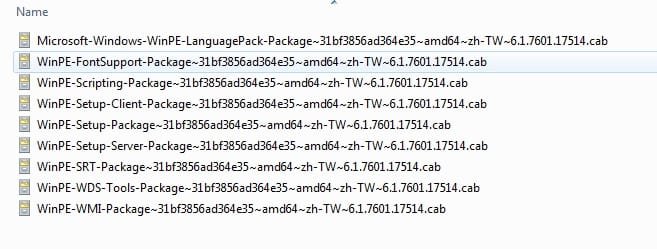
for example, these are the possible winpe langpacks for zh-tw winpe (boot.wim). They are not all required. If you dont need the extra fonts, in most cases just the setup and srt cabs will do.

zh-tw-langpacks-winpe.jpg

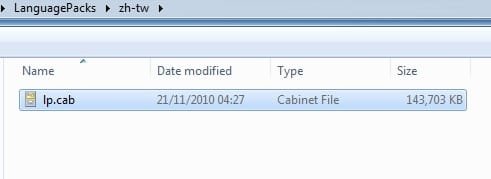
The lp.cab for install wim ( Microsoft-Windows-Client-Refresh-LanguagePack-Package ) is much bigger and cant be integated into boot.wim.

zh-tw-langpacks-installwim.jpg
 
Last edited:

My Computers My Computers

System One System Two

  • Computer type
    PC/Desktop
    OS
    7 X64
    CPU
    i5 8400
    Motherboard
    gigabyte b365m ds3h
    Memory
    2x8gb 3200mhz
    Hard Drives
    various
    PSU
    pure power 11 400w cm
    Case
    Coolermaster
    Cooling
    cryorig m9i
  • Computer type
    PC/Desktop
    OS
    7x64
    CPU
    g5400
    Motherboard
    ga b365m ds3h
    Memory
    8gb ddr4 2400
    PSU
    xfx pro 450w
If you tell us which language, we can advise which packs to add and where, we might even be able to point you to them.

Or if you are very lucky, we might just have the installation media in the language you want.
 

My Computers My Computers

System One System Two

  • Computer type
    PC/Desktop
    OS
    7 X64
    CPU
    i5 8400
    Motherboard
    gigabyte b365m ds3h
    Memory
    2x8gb 3200mhz
    Hard Drives
    various
    PSU
    pure power 11 400w cm
    Case
    Coolermaster
    Cooling
    cryorig m9i
  • Computer type
    PC/Desktop
    OS
    7x64
    CPU
    g5400
    Motherboard
    ga b365m ds3h
    Memory
    8gb ddr4 2400
    PSU
    xfx pro 450w
I think you should add that info in the 1st post. I think it will help future people.

I think I can install the lp.cab after installation, if I can't put it automatically.

I'm looking for the pt-pt pack. Portuguese European not Brazilian.
 

My Computer My Computer

Computer type
PC/Desktop
OS
Windows 7 Ultimate x86
Back
Top