Update your Win 7 installation media

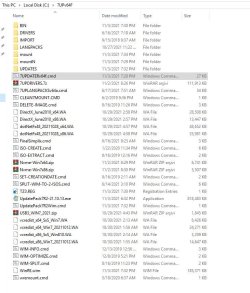
For usb3 and nvme disks, do we need to put these files in the 7UPv64F folder?

They are already included. No need to add them.

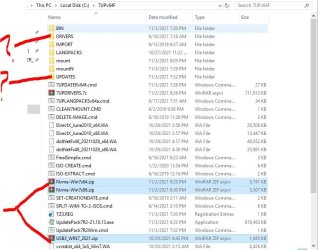
The big 7UPDRIVERS.7z pack is not already included because most people dont need it. If you know there is something in that big pack that you want, then you can extract it and put it in the Drivers\installx64 folder.
 

My Computers My Computers

System One System Two

  • Computer type
    PC/Desktop
    OS
    7 X64
    CPU
    i5 8400
    Motherboard
    gigabyte b365m ds3h
    Memory
    2x8gb 3200mhz
    Hard Drives
    various
    PSU
    pure power 11 400w cm
    Case
    Coolermaster
    Cooling
    cryorig m9i
  • Computer type
    PC/Desktop
    OS
    7x64
    CPU
    g5400
    Motherboard
    ga b365m ds3h
    Memory
    8gb ddr4 2400
    PSU
    xfx pro 450w
Zaten dahil edilmişler. Onları eklemeye gerek yok.

Büyük 7UPDRIVERS.7z paketi zaten dahil değil çünkü çoğu insan buna ihtiyaç duymuyor. O büyük pakette istediğiniz bir şey olduğunu biliyorsanız, onu çıkarabilir ve Drivers\installx64 klasörüne koyabilirsiniz.

thanks. There is no special driver I want, I just asked so that the win7 iso file does not cause problems with usb3 and nvme disks.
 

My Computers My Computers

System One System Two

  • OS
    win 10 64bit
  • Computer type
    PC/Desktop
im working on a 32 bit laptop,
to create my windows 7 64 bit usb bootable drive.
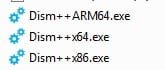
how do i use dism++ when its 64 bit program,
or do I have to keep swapping out hard drives
 

My Computers My Computers

System One System Two

  • Computer type
    PC/Desktop
    Computer Manufacturer/Model Number
    Lenovo - IdeaCentre 5i Desktop - Intel Core i5 - 8GB Memory - 1TB Hard Drive -
    OS
    windows 10 pro 64 bit
    CPU
    Intel(R) core(TM) i5-10400 CPU @ 2.90GHz
    Motherboard
    lenovo 370 A
    Memory
    Micron 8.00 GB
    Graphics Card(s)
    Intel(R) UHD Graphics 630 / Nvidia GeForce GT 1030
    Sound Card
    built in Intel corp
    Hard Drives
    Seagate sata - 1 terabyte /
  • Computer type
    PC/Desktop
    System Manufacturer/Model Number
    Dell OptiPlex 7020
    OS
    win 7 /win 10 dual boot
    CPU
    intel core i5 4570 (3.2Ghz)
    Memory
    32 Gb
    Graphics Card(s)
    Intel HD Graphics 4600
    Monitor(s) Displays
    Dell
    Hard Drives
    SSD 512Gb

My Computers My Computers

System One System Two

  • Computer type
    PC/Desktop
    OS
    7 X64
    CPU
    i5 8400
    Motherboard
    gigabyte b365m ds3h
    Memory
    2x8gb 3200mhz
    Hard Drives
    various
    PSU
    pure power 11 400w cm
    Case
    Coolermaster
    Cooling
    cryorig m9i
  • Computer type
    PC/Desktop
    OS
    7x64
    CPU
    g5400
    Motherboard
    ga b365m ds3h
    Memory
    8gb ddr4 2400
    PSU
    xfx pro 450w
thanks. There is no special driver I want, I just asked so that the win7 iso file does not cause problems with usb3 and nvme disks.


TLDR: There are risks in reinstalling Win7 if using newer hardware.

Here is my fairly recent experience with the reinstallation of Windows 7 from scratch using an iso file. Take it with a grain of salt if you like. My ASUS custom-built system is from 2009 and Win7 was just introduced (AFAIK).

Everything installed quite quickly using my USB2.I used my older HDDs which were about a year newer than my current build, so the HDD tech didn't change. This is key because I used a new quasi hybrid HDD (more on that later) which I purchased in January of 2020. My mobo is the same as the site Admin here, Brink had back then.

After my system made a final reboot using Win7 SP2. My HDDs (3 in total) were all recognized as hot swappable. I didn't like that because all but the C (Primary Windows drive) could be [accidently] ejected like a USB drive.

I then proceeded to install from ASUS' website the ATA driver and while the drives were no longer hot swappable after, they now were erroneously listed as SSD, except the ancient HDD that I had. I did everything I could to try to change that, but no. It was not an issue I thought. However, I was wrong.

I started getting random crashes, explorer errors, and even the BSOD. I troubleshooted for a long time becoming more frustrated. I mean, I never had this issue before. I even installed a known working factory image of my system going back to 2015 and the result was the same—crashing and HDDs listed as SSDs when they weren't.

I finally determined the culprit was the ASUS driver. I uninstalled it, and I am using the native Win7 driver. I'm glad in a way never to have installed an actual SSD because God only knows how unstable my Win7 would be.

 

My Computer My Computer

Computer type
PC/Desktop
Computer Manufacturer/Model Number
Asus P6X58D-E, Lenovo
OS
Windows 7, Windows 10 Pro
CPU
Intel Core i7 930
Motherboard
Asus X58 P6X58D-E
Memory
G.SKILL F3-12800CL9T-6GBNQ 6GB DDR3 3X2GB DDR3-1600 CL 9-9-9
Graphics Card(s)
ATI Radeon HD 5700
Hard Drives
Seagate Barracuda 1TB x2 SATA3 6GB/S 7200RPM 64MB
WD 1TB SATA3
PSU
Coolermaster Silent Pro 700W Modular Power Supply
- - - Updated - - -

hi, how do i save all this to the usb bootable drive to install windows 7,
i loaded the install.wim from the usb drive
anyone able to help ?
thanks again I really appreciate all you guys do

- - - Updated - - -

Help please , I used Dism++ and after i updated my original iso with updates and drivers , when i unmounted it , it deleted it,
what did i do wrong, i updated it , added drivers, saved it , unmounted it
 
Last edited:

My Computers My Computers

System One System Two

  • Computer type
    PC/Desktop
    Computer Manufacturer/Model Number
    Lenovo - IdeaCentre 5i Desktop - Intel Core i5 - 8GB Memory - 1TB Hard Drive -
    OS
    windows 10 pro 64 bit
    CPU
    Intel(R) core(TM) i5-10400 CPU @ 2.90GHz
    Motherboard
    lenovo 370 A
    Memory
    Micron 8.00 GB
    Graphics Card(s)
    Intel(R) UHD Graphics 630 / Nvidia GeForce GT 1030
    Sound Card
    built in Intel corp
    Hard Drives
    Seagate sata - 1 terabyte /
  • Computer type
    PC/Desktop
    System Manufacturer/Model Number
    Dell OptiPlex 7020
    OS
    win 7 /win 10 dual boot
    CPU
    intel core i5 4570 (3.2Ghz)
    Memory
    32 Gb
    Graphics Card(s)
    Intel HD Graphics 4600
    Monitor(s) Displays
    Dell
    Hard Drives
    SSD 512Gb
I extracted my iso to my usb drive, i used 7updater with newest 7upv64E,i then created iso from 7updater, then I used Dism++x64 10.1.1002.1I used the install.wim from the USB flash drive to add updates and drivers , the usb drive is 32 gb drive , I clicked save image and it said not enough disk space, there is 28 gb space left, how do i get this all on my usb drive so i can boot with it, any help really appreciated thanks
 

My Computers My Computers

System One System Two

  • Computer type
    PC/Desktop
    Computer Manufacturer/Model Number
    Lenovo - IdeaCentre 5i Desktop - Intel Core i5 - 8GB Memory - 1TB Hard Drive -
    OS
    windows 10 pro 64 bit
    CPU
    Intel(R) core(TM) i5-10400 CPU @ 2.90GHz
    Motherboard
    lenovo 370 A
    Memory
    Micron 8.00 GB
    Graphics Card(s)
    Intel(R) UHD Graphics 630 / Nvidia GeForce GT 1030
    Sound Card
    built in Intel corp
    Hard Drives
    Seagate sata - 1 terabyte /
  • Computer type
    PC/Desktop
    System Manufacturer/Model Number
    Dell OptiPlex 7020
    OS
    win 7 /win 10 dual boot
    CPU
    intel core i5 4570 (3.2Ghz)
    Memory
    32 Gb
    Graphics Card(s)
    Intel HD Graphics 4600
    Monitor(s) Displays
    Dell
    Hard Drives
    SSD 512Gb
It is best to update wim files on a Hard drive, not on a usb stick.

On the first post, it says
3. Copy and paste your windows 7 SP1 installation media to a hard drive.
(Or use ISO-EXTRACT.cmd to extract your windows 7 SP1 iso file.)

I will adjust the first post and try to make it more obvious.

The installation media can be copied to usb stick after it has been updated.

Note: If the usb stick is formatted as Fat32 the maximum size for an individual file is 4gb.

Therefore if your install.wim is larger than 4gb after it has been updated, you can split it.
 

My Computers My Computers

System One System Two

  • Computer type
    PC/Desktop
    OS
    7 X64
    CPU
    i5 8400
    Motherboard
    gigabyte b365m ds3h
    Memory
    2x8gb 3200mhz
    Hard Drives
    various
    PSU
    pure power 11 400w cm
    Case
    Coolermaster
    Cooling
    cryorig m9i
  • Computer type
    PC/Desktop
    OS
    7x64
    CPU
    g5400
    Motherboard
    ga b365m ds3h
    Memory
    8gb ddr4 2400
    PSU
    xfx pro 450w
okay tyvm,
I really appreciate all your help,
will start over again now, hopefully it all goes good,
found the post to split wim from you #624 and 626
thanks

- - - Updated - - -


i cant create an image file, tried Dism++ , and 7update, will not let me ,any ideas ?

If the installation media can be copied to usb stick after it has been updated. How do i do that ? Rufus ?

Can i do that if i haven't created an image ?

pictures of actual paht used in iso maker for dism++ would be appreciated

Thanks
 
Last edited:

My Computers My Computers

System One System Two

  • Computer type
    PC/Desktop
    Computer Manufacturer/Model Number
    Lenovo - IdeaCentre 5i Desktop - Intel Core i5 - 8GB Memory - 1TB Hard Drive -
    OS
    windows 10 pro 64 bit
    CPU
    Intel(R) core(TM) i5-10400 CPU @ 2.90GHz
    Motherboard
    lenovo 370 A
    Memory
    Micron 8.00 GB
    Graphics Card(s)
    Intel(R) UHD Graphics 630 / Nvidia GeForce GT 1030
    Sound Card
    built in Intel corp
    Hard Drives
    Seagate sata - 1 terabyte /
  • Computer type
    PC/Desktop
    System Manufacturer/Model Number
    Dell OptiPlex 7020
    OS
    win 7 /win 10 dual boot
    CPU
    intel core i5 4570 (3.2Ghz)
    Memory
    32 Gb
    Graphics Card(s)
    Intel HD Graphics 4600
    Monitor(s) Displays
    Dell
    Hard Drives
    SSD 512Gb
If you use dism++ to create an iso, browse to the parent folder of the installation media.

So, if you extracted the iso contents to a folder called EXTRACTED-ISO, then that is the path for dism++.

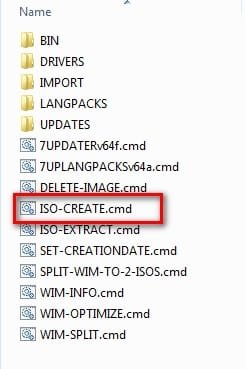
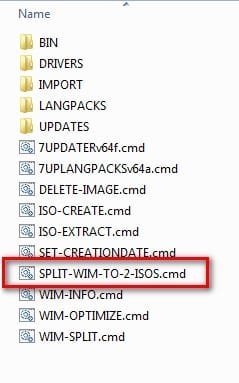
There is an iso maker included in 7UP.

iso-create.jpg

There is also the ability to split into 2 iso files if your install.wim is large.

split-wim-to-2-isos.jpg
 

My Computers My Computers

System One System Two

  • Computer type
    PC/Desktop
    OS
    7 X64
    CPU
    i5 8400
    Motherboard
    gigabyte b365m ds3h
    Memory
    2x8gb 3200mhz
    Hard Drives
    various
    PSU
    pure power 11 400w cm
    Case
    Coolermaster
    Cooling
    cryorig m9i
  • Computer type
    PC/Desktop
    OS
    7x64
    CPU
    g5400
    Motherboard
    ga b365m ds3h
    Memory
    8gb ddr4 2400
    PSU
    xfx pro 450w
Thanks SIW2,
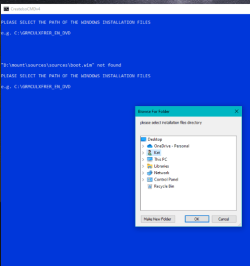
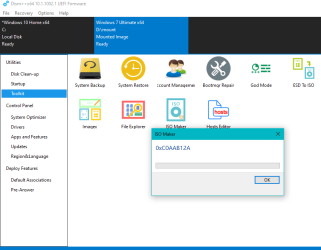
My install.wim is only 2.8 gb, tried iso create but it kept giving me this error.
D:\mount\sources\sources\boot.wim# not found
D:\mount is the folder I extracted the iso to.
I see it's sources 2 times, but that's not what I put in.
Unable to change it, for some reason.or don't know how.
Dism++ maybe cuz I directed the folder to d:\mount
And the iso generation path to a blank folder.

I'll try again tomorrow nite, after work, and put in here the error codes it gives me.
I just remember it was 0x********

Thanks I really do appreciate all you do.
 

My Computers My Computers

System One System Two

  • Computer type
    PC/Desktop
    Computer Manufacturer/Model Number
    Lenovo - IdeaCentre 5i Desktop - Intel Core i5 - 8GB Memory - 1TB Hard Drive -
    OS
    windows 10 pro 64 bit
    CPU
    Intel(R) core(TM) i5-10400 CPU @ 2.90GHz
    Motherboard
    lenovo 370 A
    Memory
    Micron 8.00 GB
    Graphics Card(s)
    Intel(R) UHD Graphics 630 / Nvidia GeForce GT 1030
    Sound Card
    built in Intel corp
    Hard Drives
    Seagate sata - 1 terabyte /
  • Computer type
    PC/Desktop
    System Manufacturer/Model Number
    Dell OptiPlex 7020
    OS
    win 7 /win 10 dual boot
    CPU
    intel core i5 4570 (3.2Ghz)
    Memory
    32 Gb
    Graphics Card(s)
    Intel HD Graphics 4600
    Monitor(s) Displays
    Dell
    Hard Drives
    SSD 512Gb
That sounds odd.
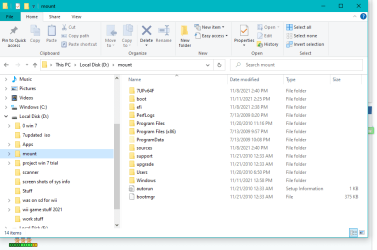
Post a screenshot of the contents of the folder you extracted the iso into.
 
Last edited:

My Computers My Computers

System One System Two

  • Computer type
    PC/Desktop
    OS
    7 X64
    CPU
    i5 8400
    Motherboard
    gigabyte b365m ds3h
    Memory
    2x8gb 3200mhz
    Hard Drives
    various
    PSU
    pure power 11 400w cm
    Case
    Coolermaster
    Cooling
    cryorig m9i
  • Computer type
    PC/Desktop
    OS
    7x64
    CPU
    g5400
    Motherboard
    ga b365m ds3h
    Memory
    8gb ddr4 2400
    PSU
    xfx pro 450w
okay
used iso create in 7update
got the sources , sources , error Capture 7update  iso create1.PNG

- - - Updated - - -

heres the folder folder extracted too.PNG
 

My Computers My Computers

System One System Two

  • Computer type
    PC/Desktop
    Computer Manufacturer/Model Number
    Lenovo - IdeaCentre 5i Desktop - Intel Core i5 - 8GB Memory - 1TB Hard Drive -
    OS
    windows 10 pro 64 bit
    CPU
    Intel(R) core(TM) i5-10400 CPU @ 2.90GHz
    Motherboard
    lenovo 370 A
    Memory
    Micron 8.00 GB
    Graphics Card(s)
    Intel(R) UHD Graphics 630 / Nvidia GeForce GT 1030
    Sound Card
    built in Intel corp
    Hard Drives
    Seagate sata - 1 terabyte /
  • Computer type
    PC/Desktop
    System Manufacturer/Model Number
    Dell OptiPlex 7020
    OS
    win 7 /win 10 dual boot
    CPU
    intel core i5 4570 (3.2Ghz)
    Memory
    32 Gb
    Graphics Card(s)
    Intel HD Graphics 4600
    Monitor(s) Displays
    Dell
    Hard Drives
    SSD 512Gb
That is strange.

Why is 7UPv64F folder inside the same folder ?

Move 7UPv64F to the root of the partition, so you have D:\7UPv64F

Is boot.wim in D:\mount\sources ?
 
Last edited:

My Computers My Computers

System One System Two

  • Computer type
    PC/Desktop
    OS
    7 X64
    CPU
    i5 8400
    Motherboard
    gigabyte b365m ds3h
    Memory
    2x8gb 3200mhz
    Hard Drives
    various
    PSU
    pure power 11 400w cm
    Case
    Coolermaster
    Cooling
    cryorig m9i
  • Computer type
    PC/Desktop
    OS
    7x64
    CPU
    g5400
    Motherboard
    ga b365m ds3h
    Memory
    8gb ddr4 2400
    PSU
    xfx pro 450w
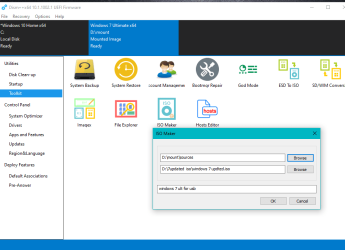
then using dism i get this

dism to source folder.PNG

after that get this dism error code.PNG

- - - Updated - - -

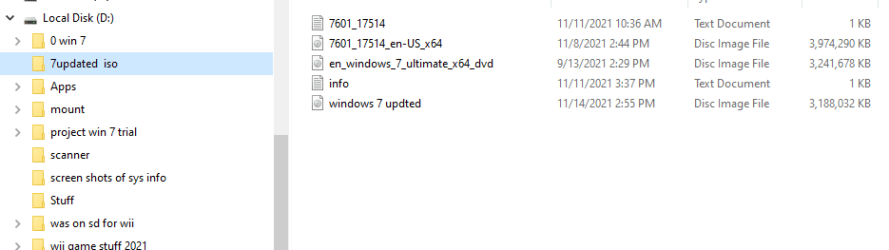
if i use extracted install folder it gives me a little iso ,
the bottom one is the new one which is only 3.4 mb
dism bottom image for creat.PNG

- - - Updated - - -

SIW2
do i have to start all over again , or can i start from somewhere else ?
tyvvvm
 

My Computers My Computers

System One System Two

  • Computer type
    PC/Desktop
    Computer Manufacturer/Model Number
    Lenovo - IdeaCentre 5i Desktop - Intel Core i5 - 8GB Memory - 1TB Hard Drive -
    OS
    windows 10 pro 64 bit
    CPU
    Intel(R) core(TM) i5-10400 CPU @ 2.90GHz
    Motherboard
    lenovo 370 A
    Memory
    Micron 8.00 GB
    Graphics Card(s)
    Intel(R) UHD Graphics 630 / Nvidia GeForce GT 1030
    Sound Card
    built in Intel corp
    Hard Drives
    Seagate sata - 1 terabyte /
  • Computer type
    PC/Desktop
    System Manufacturer/Model Number
    Dell OptiPlex 7020
    OS
    win 7 /win 10 dual boot
    CPU
    intel core i5 4570 (3.2Ghz)
    Memory
    32 Gb
    Graphics Card(s)
    Intel HD Graphics 4600
    Monitor(s) Displays
    Dell
    Hard Drives
    SSD 512Gb
if i use extracted install folder it gives me a little iso ,
the bottom one is the new one which is only 3.4 mb

From the dism++ photo you can see there is an image mounted.

Save the image and then unmount it.
After that you should be able to create an iso from the extracted iso folder.
 

My Computers My Computers

System One System Two

  • Computer type
    PC/Desktop
    OS
    7 X64
    CPU
    i5 8400
    Motherboard
    gigabyte b365m ds3h
    Memory
    2x8gb 3200mhz
    Hard Drives
    various
    PSU
    pure power 11 400w cm
    Case
    Coolermaster
    Cooling
    cryorig m9i
  • Computer type
    PC/Desktop
    OS
    7x64
    CPU
    g5400
    Motherboard
    ga b365m ds3h
    Memory
    8gb ddr4 2400
    PSU
    xfx pro 450w
okay will try that ,
let ya know what happens
tyvvvm

- - - Updated - - -

SIW2

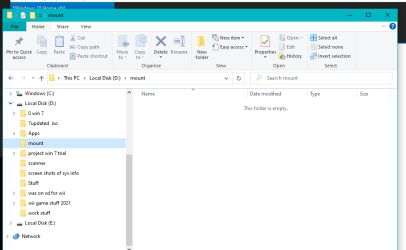
saved then unmounted it deleted the whole thing ,
now what did i do wrong please
saved then unmounted.PNG

Is boot.wim in D:\mount\sources ? yes
and okay i will the Move 7UPv64F to the root of the partition, so you have D:\7UPv64F
 

My Computers My Computers

System One System Two

  • Computer type
    PC/Desktop
    Computer Manufacturer/Model Number
    Lenovo - IdeaCentre 5i Desktop - Intel Core i5 - 8GB Memory - 1TB Hard Drive -
    OS
    windows 10 pro 64 bit
    CPU
    Intel(R) core(TM) i5-10400 CPU @ 2.90GHz
    Motherboard
    lenovo 370 A
    Memory
    Micron 8.00 GB
    Graphics Card(s)
    Intel(R) UHD Graphics 630 / Nvidia GeForce GT 1030
    Sound Card
    built in Intel corp
    Hard Drives
    Seagate sata - 1 terabyte /
  • Computer type
    PC/Desktop
    System Manufacturer/Model Number
    Dell OptiPlex 7020
    OS
    win 7 /win 10 dual boot
    CPU
    intel core i5 4570 (3.2Ghz)
    Memory
    32 Gb
    Graphics Card(s)
    Intel HD Graphics 4600
    Monitor(s) Displays
    Dell
    Hard Drives
    SSD 512Gb
That is correct. a wim image must be mounted to an empty folder. When it is saved, the changes are saved to the original install.wim .

When the image is unmounted, obviously the folder used for mounting is empty again.

Where is the folder which contains the wim file you mounted?
 

My Computers My Computers

System One System Two

  • Computer type
    PC/Desktop
    OS
    7 X64
    CPU
    i5 8400
    Motherboard
    gigabyte b365m ds3h
    Memory
    2x8gb 3200mhz
    Hard Drives
    various
    PSU
    pure power 11 400w cm
    Case
    Coolermaster
    Cooling
    cryorig m9i
  • Computer type
    PC/Desktop
    OS
    7x64
    CPU
    g5400
    Motherboard
    ga b365m ds3h
    Memory
    8gb ddr4 2400
    PSU
    xfx pro 450w
SIW2
that was in mount folder ,
boot.wim in D:\mount\sources ? yes
so isn't that where it should of been ?
okay well going to start all over again
I hope I understand it all this time. only thing not sure about is dism++
let ya know what happens
thanks for all you do for us that are that knowledgeable.
 

My Computers My Computers

System One System Two

  • Computer type
    PC/Desktop
    Computer Manufacturer/Model Number
    Lenovo - IdeaCentre 5i Desktop - Intel Core i5 - 8GB Memory - 1TB Hard Drive -
    OS
    windows 10 pro 64 bit
    CPU
    Intel(R) core(TM) i5-10400 CPU @ 2.90GHz
    Motherboard
    lenovo 370 A
    Memory
    Micron 8.00 GB
    Graphics Card(s)
    Intel(R) UHD Graphics 630 / Nvidia GeForce GT 1030
    Sound Card
    built in Intel corp
    Hard Drives
    Seagate sata - 1 terabyte /
  • Computer type
    PC/Desktop
    System Manufacturer/Model Number
    Dell OptiPlex 7020
    OS
    win 7 /win 10 dual boot
    CPU
    intel core i5 4570 (3.2Ghz)
    Memory
    32 Gb
    Graphics Card(s)
    Intel HD Graphics 4600
    Monitor(s) Displays
    Dell
    Hard Drives
    SSD 512Gb
Back
Top