Update your Win 7 installation media

Is the media ready for HP 800 G3/Intel HD Graphics 530?
or Intel HD Graphics 530 driver needs being integrated first before Windows 7 install.

I tried the media on the HP, got black screen before "install now". could see mouse cursor moving on the black screen. hence, I stopped, thought the media might need adding Intel HD Graphics 530 driver.

Thanks,
 

My Computers My Computers

System One System Two

  • Computer type
    PC/Desktop
    Computer Manufacturer/Model Number
    HP Elite 800 G5
    OS
    Windows 7 Pro 64-bit
    CPU
    I7-9700
    Memory
    32 GB
  • Computer type
    Laptop
    System Manufacturer/Model Number
    ASUS UX305C
    OS
    Windows 7 Pro 64-bit
I've made some progress. I disabled "map SATA controller under VMD" in the bios and the SATA ports became visible. I still can't install any driver for the RAID controller. The hardware ID is PCI\VEN_8086&DEV_467F&SUBSYS_86941013. Anyone have any ideas on a driver for it?

The best I can do at this point is to setup a RAID 1 under Windows disk management. When I boot up Win10, I have to import the disks in disk management to use them. And have to do the same thing when booting back to Win7.
 

My Computers My Computers

System One System Two

  • Computer type
    PC/Desktop
    Computer Manufacturer/Model Number
    Asus
    OS
    Win7 Pro x64
    CPU
    I7-12700F
    Motherboard
    Asus Prime Z690-P WiFi
    Memory
    64 GB DDR5 G.Skill Ripjaws
    Graphics Card(s)
    Zotac Twin Edge GeForce RTX 3060 Ti
    Hard Drives
    Boot: WD Black SN770 1 TB M.2-2280 NVME
    RAID: WD Blue 1 TB x 2 setup as RAID 1
    Data Storage: Seagate 500 GB
    Browser
    Firefox, Chrome, IE, Edge
  • Computer type
    PC/Desktop
I ran the process to update my Win 7 SP1 in posts 529 and 530 using the folder provided in post 1 (7UPx64I). I had to extract the ISO used to install Win 7 and it went through the whole process although the screens and questions varied significantly in some cases from the images provided. At the end, it said the process was successful. I assume that I have to burn an ISO to disc (as before) and boot it to install the updated version. However, where is that file? In the Extracted ISO folder, all the files show the 2010 date and there's no ISO within the folder. The original ISO also shows the original date and the size hasn't changed.

Edit: Well, I think I found the problem with the dates. The time/date is set to synchronize with a internet location. However, I'm having problems with being able to acess websites on the internet. As a result, the time of the system is (was) set to 2010.

Now, how do I procede to implement the update process?
 
Last edited:

My Computer My Computer

Computer type
Laptop
Computer Manufacturer/Model Number
Dell M6500 Precision Work Station
OS
Windows 7 Pro SP1 64 bit
Memory
8 GB
Screen Resolution
1920x
Internet Speed
30 Mbps
Antivirus
Norton Security
Browser
IE 11
It is normal.

the install.wim and boot.wim will be larger than the original.

you could create an iso if you wish using ISO-CREATE.cmd

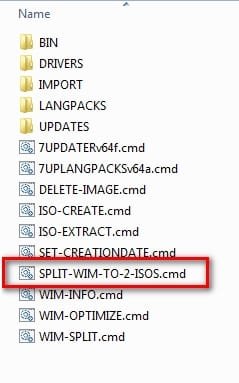
it wont fit on a single regular dvd. That is why there is SPLIT-WIM-TO-2-ISOS.cmd which creates 2 iso files, which you can burn to 2 regular dvds.


split-wim-to-2-isos.jpg

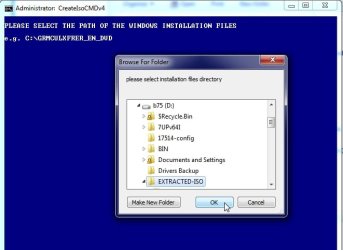
split-wim-to-2dvd-1.jpg


it creates 2 iso files DVD1andDVD2.jpg burn each iso to a dvd.


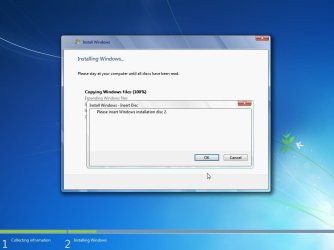
Then boot DVD1 and setup will prompt to insert the second dvd when it wants it.

win7-span-dvd.jpg

- - - Updated - - -


*******************************************************************************************


Most people prefer to use usb stick.

The simple way is to format a usb stick to fat32 with windows disk management or any decent 3rd party partition manager, and mark the partition active.

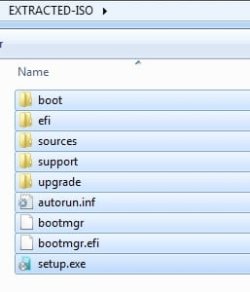
Then copy the contents of EXTRACTED-ISO folder onto the usb stick.

contents-to-usb.jpg

Install.wim will be larger than the fat32 filesize limit.

That is why there is WIM-SPLIT.cmd, so install.wim can split before copying to usb stick.
 
Last edited:

My Computers My Computers

System One System Two

  • Computer type
    PC/Desktop
    OS
    7 X64
    CPU
    i5 8400
    Motherboard
    gigabyte b365m ds3h
    Memory
    2x8gb 3200mhz
    Hard Drives
    various
    PSU
    pure power 11 400w cm
    Case
    Coolermaster
    Cooling
    cryorig m9i
  • Computer type
    PC/Desktop
    OS
    7x64
    CPU
    g5400
    Motherboard
    ga b365m ds3h
    Memory
    8gb ddr4 2400
    PSU
    xfx pro 450w
Thanks SIW2- I thought I would need all those folders but wasn't quite sure. I'll be burning to disc since I often transfer files from one system to the other using the couple of USB sticks I have (Too tight to buy another. LOL). I'll let you know how it comes out.
 

My Computer My Computer

Computer type
Laptop
Computer Manufacturer/Model Number
Dell M6500 Precision Work Station
OS
Windows 7 Pro SP1 64 bit
Memory
8 GB
Screen Resolution
1920x
Internet Speed
30 Mbps
Antivirus
Norton Security
Browser
IE 11
SIW2

Does your program modify two *.wim files (install.wim and boot.wim) only. while other files stay intact?

If so, every time I prepare a USB stick, can I skip format procedure, just copy the two *.wim files into source folder of existing USB stick. (for 1st time, it's requested to format USB stick. but later after that, no need to re-do)


It is normal.

the install.wim and boot.wim will be larger than the original.
 

My Computers My Computers

System One System Two

  • Computer type
    PC/Desktop
    Computer Manufacturer/Model Number
    HP Elite 800 G5
    OS
    Windows 7 Pro 64-bit
    CPU
    I7-9700
    Memory
    32 GB
  • Computer type
    Laptop
    System Manufacturer/Model Number
    ASUS UX305C
    OS
    Windows 7 Pro 64-bit
only the install.wim is split.

can I skip format procedure, just copy the two *.wim files into source folder of existing USB stick. (for 1st time, it's requested to format USB stick. but later after that, no need to re-do)

yes

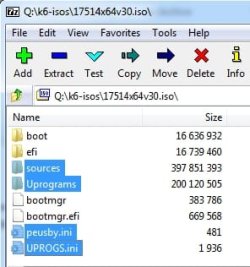
or you could also copy the contents of this iso onto your usb stick so you have the fancy boot.wim and the programs in the Uprograms folder in your installation media

17514x64v30.iso

copy the highlighted folders and files onto your installation usb stick. When is asks if you want to overwrite boot.wim on the usb stick say yes.

17514v30.jpg
 

My Computers My Computers

System One System Two

  • Computer type
    PC/Desktop
    OS
    7 X64
    CPU
    i5 8400
    Motherboard
    gigabyte b365m ds3h
    Memory
    2x8gb 3200mhz
    Hard Drives
    various
    PSU
    pure power 11 400w cm
    Case
    Coolermaster
    Cooling
    cryorig m9i
  • Computer type
    PC/Desktop
    OS
    7x64
    CPU
    g5400
    Motherboard
    ga b365m ds3h
    Memory
    8gb ddr4 2400
    PSU
    xfx pro 450w
Thanks,

the procedure is clearer. can save some format.
 

My Computers My Computers

System One System Two

  • Computer type
    PC/Desktop
    Computer Manufacturer/Model Number
    HP Elite 800 G5
    OS
    Windows 7 Pro 64-bit
    CPU
    I7-9700
    Memory
    32 GB
  • Computer type
    Laptop
    System Manufacturer/Model Number
    ASUS UX305C
    OS
    Windows 7 Pro 64-bit
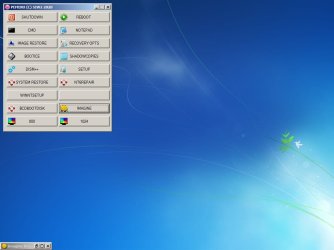
Okay SIW2- I followed your instructions and burned two discs. I inserted the first one and rebooted. After it said Windows files were being loaded, it went to the Desktop. The only thing it did was provide a PEMENU (C) SIW2 2020 image with a bunch of choices. That's was just sitting on the screen and nothing else happening. It never asked for the second disc. I think the problem might be that when I created the ISO, I saved it on my hard drive in a folder not associated with the 7UP........ folder. When I ran the splitter, it wouldn't recognize that image. Do I need to move it to the Extracted.............iso folder? Strange thing is that all the files it generated start with 7601.
 

My Computer My Computer

Computer type
Laptop
Computer Manufacturer/Model Number
Dell M6500 Precision Work Station
OS
Windows 7 Pro SP1 64 bit
Memory
8 GB
Screen Resolution
1920x
Internet Speed
30 Mbps
Antivirus
Norton Security
Browser
IE 11
That's was just sitting on the screen and nothing else happening.

you need to run setup.exe Click the button on the pemenu that says SETUP
 
Last edited:

My Computers My Computers

System One System Two

  • Computer type
    PC/Desktop
    OS
    7 X64
    CPU
    i5 8400
    Motherboard
    gigabyte b365m ds3h
    Memory
    2x8gb 3200mhz
    Hard Drives
    various
    PSU
    pure power 11 400w cm
    Case
    Coolermaster
    Cooling
    cryorig m9i
  • Computer type
    PC/Desktop
    OS
    7x64
    CPU
    g5400
    Motherboard
    ga b365m ds3h
    Memory
    8gb ddr4 2400
    PSU
    xfx pro 450w
I had done that and it stopped and I can't remember this morning what it said. I'll reproduce it shortly. I think the problem is that the file it split is not the ISO with the updates that it created and couldn't see when I tried to split it. I think it actually split the original SP1 ISO which is in the Extracted ISO folder.

Edit: I sometimes need a smart pill. I'm in the process of trying to install as I did last night. One thing right off the bat is that last night I selected Upgrade instead of Custom when I had to make a choice. Duh! I'm not upgrading. This morning I chose Custom and it's going through the process. We'll see what happens.

- - - Updated - - -

It got all done but it never asked for the second ISO disc. In updates, there are three, 2023 updates- kb3138612, kb2864202 and kb2534111. The other update is from 2010. Not sure if that's all there is supposed to be more.

- - - Updated - - -

Phew! Now it's saying there are 169 updates available. I thought those were included when going through the ISO process.
 

My Computer My Computer

Computer type
Laptop
Computer Manufacturer/Model Number
Dell M6500 Precision Work Station
OS
Windows 7 Pro SP1 64 bit
Memory
8 GB
Screen Resolution
1920x
Internet Speed
30 Mbps
Antivirus
Norton Security
Browser
IE 11
Please read the first post.

If you did NOT include the UpdatePack7R2-date.exe in the 7UPv64I folder, then only drivers ( plus a couple of updates needed for the drivers and kb3138612 ) will be integrated.

Therefore the install.wim will only increase in size slightly and does not need to be split. That is why it all fits on one dvd.


*********************************************************************************************************
*********************************************************************************************************

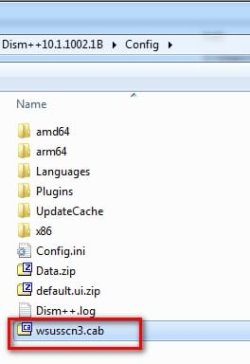
An alternative way to get the rest of the updates after installating windows 7 is to use dism++.

download-Dism++10.1.1002.1B.zip

download-wsusscn3_476c45753d48d180f41138fd4031b2b3.cab

The wsusscn3_476c45753d48d180f41138fd4031b2b3.cab can be downloaded, placed in the dism++ Config folder and RENAMED TO wsusscn3.cab

dism++-wsusscn3.cab.jpg

an internet connection is needed for dism++ to download the updates.
 
Last edited:

My Computers My Computers

System One System Two

  • Computer type
    PC/Desktop
    OS
    7 X64
    CPU
    i5 8400
    Motherboard
    gigabyte b365m ds3h
    Memory
    2x8gb 3200mhz
    Hard Drives
    various
    PSU
    pure power 11 400w cm
    Case
    Coolermaster
    Cooling
    cryorig m9i
  • Computer type
    PC/Desktop
    OS
    7x64
    CPU
    g5400
    Motherboard
    ga b365m ds3h
    Memory
    8gb ddr4 2400
    PSU
    xfx pro 450w
The original posts you pointed me to didn't mention the pack. How do i actually install the updates using dism++ after I've downloaded all those files? I apologize for not looking around in this very long thread.

Edit: I was looking to download those files and when I opened Firefox, the system locked up. Long story short, I never clicked to install all those 169 updates but, for some reason, they started to install. I went to reboot my system and it said it was installing update 22 of 162 (while I was typing, it was up to update 33). Going to be interesting to see where this goes.

- - - Updated - - -

I ended up installing the updates from Windows Updates. Didn't take a lot of time- a beer and cigar and dinner at a local mexican restaurant.

Many thanks to SIW2 for his knowledge and perserverance.
 
Last edited:

My Computer My Computer

Computer type
Laptop
Computer Manufacturer/Model Number
Dell M6500 Precision Work Station
OS
Windows 7 Pro SP1 64 bit
Memory
8 GB
Screen Resolution
1920x
Internet Speed
30 Mbps
Antivirus
Norton Security
Browser
IE 11
when I run Windows 7 install, latest .WA files (.Net4.8) and Simplix updatepack7R2 were integrated.

now update Windows 7. I run updatepack7R2, obtained UpdatePack7R2-23.4.11.exe. then simply run it.

If I add new .WA files (dotNetFx48_20230214_x64.WA) into the fold of UpdatePack7R2-23.4.11.exe, will UpdatePack7R2-23.4.11.exe do .WA update too? or it will do Windows 7 update only?

I did test, couldn't see .WA update (still .Net4.8. no .Net 4.8.4614.10 something) when running UpdatePack7R2-23.4.11.

Any better way to run .WA update? (If Offline Installer, is still .NET Framework 4.8/4.81)

Thanks,


Place the .WA files in the C:\7UPv64 folder and the Simplix updatepack7R2.exe will integrate them for you:
 
Last edited:

My Computers My Computers

System One System Two

  • Computer type
    PC/Desktop
    Computer Manufacturer/Model Number
    HP Elite 800 G5
    OS
    Windows 7 Pro 64-bit
    CPU
    I7-9700
    Memory
    32 GB
  • Computer type
    Laptop
    System Manufacturer/Model Number
    ASUS UX305C
    OS
    Windows 7 Pro 64-bit
windows update > click "Installed Updates" at bottom left.

then you can see the kb numbers and the date it was installed.

installed-updates.jpg
 

My Computers My Computers

System One System Two

  • Computer type
    PC/Desktop
    OS
    7 X64
    CPU
    i5 8400
    Motherboard
    gigabyte b365m ds3h
    Memory
    2x8gb 3200mhz
    Hard Drives
    various
    PSU
    pure power 11 400w cm
    Case
    Coolermaster
    Cooling
    cryorig m9i
  • Computer type
    PC/Desktop
    OS
    7x64
    CPU
    g5400
    Motherboard
    ga b365m ds3h
    Memory
    8gb ddr4 2400
    PSU
    xfx pro 450w
Update

Rename the downloaded pack(830MB) to "++--" and run it as admin. This way works. my 1st try was using plain file name and failing.
Make sure the addons are in the same folder and the path to the folder is as simple as possible(no fancy symbols, spaces, etc.).

I got help from MDL.

~~~~~~~~~~~~~~~~~~~~~~~~~~~~~~~~~~~~~~~~~~~~~~~~~~~~~~~~~~~~~~~~~~~~

yes,

I saw the updated. but .WA stays 4.8. I was expecting it to get updated too.

If I add new .WA files (dotNetFx48_20230214_x64.WA) into the fold of UpdatePack7R2-23.4.11.exe, how to make it to do .WA update?

I have this issue, because of the HP install media/ HP_RECOVERY.
I am unable to integrate the media with your install media into one. It's easier to run HP media to install HP PC, then later run UpdatePack7R2-23.4.11.exe to update Windows 7. it's my wish to do update .WA same time.
 
Last edited:

My Computers My Computers

System One System Two

  • Computer type
    PC/Desktop
    Computer Manufacturer/Model Number
    HP Elite 800 G5
    OS
    Windows 7 Pro 64-bit
    CPU
    I7-9700
    Memory
    32 GB
  • Computer type
    Laptop
    System Manufacturer/Model Number
    ASUS UX305C
    OS
    Windows 7 Pro 64-bit
I dont know, ask simplix.
 

My Computers My Computers

System One System Two

  • Computer type
    PC/Desktop
    OS
    7 X64
    CPU
    i5 8400
    Motherboard
    gigabyte b365m ds3h
    Memory
    2x8gb 3200mhz
    Hard Drives
    various
    PSU
    pure power 11 400w cm
    Case
    Coolermaster
    Cooling
    cryorig m9i
  • Computer type
    PC/Desktop
    OS
    7x64
    CPU
    g5400
    Motherboard
    ga b365m ds3h
    Memory
    8gb ddr4 2400
    PSU
    xfx pro 450w
What's the significance of .net framework 4.8.4614.10? I have 3 Win 7 systems and it's not on any of them. I can't actually find a version of that unless it's a developer pack or something. Some guy posted ad nauseum all over the internet about installing it.
 

My Computer My Computer

Computer type
Laptop
Computer Manufacturer/Model Number
Dell M6500 Precision Work Station
OS
Windows 7 Pro SP1 64 bit
Memory
8 GB
Screen Resolution
1920x
Internet Speed
30 Mbps
Antivirus
Norton Security
Browser
IE 11
7UPv64J on first post
Changelog - updated wimlib bcdbootdisk.wcs dism++ and winntsetup
 

My Computers My Computers

System One System Two

  • Computer type
    PC/Desktop
    OS
    7 X64
    CPU
    i5 8400
    Motherboard
    gigabyte b365m ds3h
    Memory
    2x8gb 3200mhz
    Hard Drives
    various
    PSU
    pure power 11 400w cm
    Case
    Coolermaster
    Cooling
    cryorig m9i
  • Computer type
    PC/Desktop
    OS
    7x64
    CPU
    g5400
    Motherboard
    ga b365m ds3h
    Memory
    8gb ddr4 2400
    PSU
    xfx pro 450w
7UPv64L on first post . Minor adjustments to the optional enhanced menu for bootable wims

- - - Updated - - -

pemenu2.jpg
 
Last edited:

My Computers My Computers

System One System Two

  • Computer type
    PC/Desktop
    OS
    7 X64
    CPU
    i5 8400
    Motherboard
    gigabyte b365m ds3h
    Memory
    2x8gb 3200mhz
    Hard Drives
    various
    PSU
    pure power 11 400w cm
    Case
    Coolermaster
    Cooling
    cryorig m9i
  • Computer type
    PC/Desktop
    OS
    7x64
    CPU
    g5400
    Motherboard
    ga b365m ds3h
    Memory
    8gb ddr4 2400
    PSU
    xfx pro 450w
Back
Top