
Solved Updates causing Windows boot failure

tonyb959

New member
Local time
4:40 PM
Messages
5
Having troubles with windows update, basically it updates all hunky dory, then Windows fails to start. I get startup recovery and the only thing that gets it working again is system restore.

Less basically:

From the beginning then, Windows updated automatically, but on the restart I had the options for startup repair, or start windows normally. Starting normally just loops it back to this page. I used the fix automatically option, but that failed, so I used system restore to get it back up and running and disabled automatic updates.

I waited until the March updates were released in the hope that a fix had been issued, but it's still occurring. Weirdly it seems to update fine, it goes through the usual restart/configure etc routine and loads to the desktop, and even restarts ok if I do that straight away. But if I use it for a little while and then restart, I'm dragged back to startup repair. Figured something on my system was broken, so I ran SFC, which found unfixable errors. Whether that's connected or not I couldn't say. But it prompted me to try a repair install with the Windows DVD that came with my system. SFC log is attached.

This failed, with the error "This version of System Recovery Options is not compatible with the version of Windows you are trying to repair. Try using a recovery disc that is compatible with this version of Windows”. My installed version is 64bit home premium, as is the DVD, so I'm stumped on that one also. Some googling suggests that it's something to do with AHCI drivers not being loaded, but the fixes for that were beyond my competence level. Registry editing is not my thing. *edit* Also noticed from one of the tutorials that I can't do a repair install with OEM Windows, probably explains that problem.

I've narrowed it down to one of the updates in the picture 'Insupdates.png'. Sorry, I know that's probably not as helpful as knowing the exact one, but it takes a little time for the problem to manifest.

So my questions are; can I safely reinstall Windows from the DVD if I need to? Would that even fix it? Better yet, is there a way to fix this without having to reinstall?

Many thanks in advance.
 

Attachments
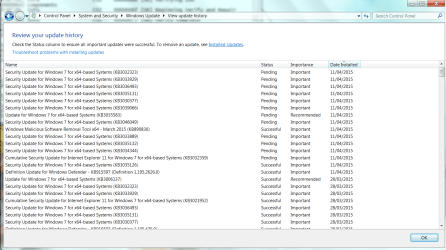
  • Insupdates.png
    Insupdates.png
    224.2 KB · Views: 3
  • sfcdetails3.txt
    sfcdetails3.txt
    165.9 KB · Views: 2
Last edited:

My Computer

Computer type
PC/Desktop
Computer Manufacturer/Model Number
Custom build
OS
Windows 7 Home Premium 64bit
CPU
I5 4440
Motherboard
Gigabyte Z87M-D3H
Memory
1x8GB
Graphics Card(s)
Sapphire R7 260X
Hard Drives
223GB KINGSTON SV300S37A240G SCSI Disk Device (SSD)

2794GB Western Digital WDC WD30EZRX-00SPEB0 SCSI Disk Device (SATA)
Antivirus
Avast
Browser
Chrome
When Windows Updates cause unbootable Win7, System Restore to before they were done and then install them in small groups or singly to isolate the problem update. If it won't install start a Support case on Windows Update website which offers free email support.

You may need to make a new System Repair Disk or obtain media for your licensed version as discussed in Step 1 of Clean Reinstall Windows 7.

You can do a Repair Install on Factory OEM, you just need retail installation media for your version and not the Recovery disks.

But if you haven't done one yet then I'd opt for the vastly superior Clean Reinstall Windows 7. Everything needed is in the blue link to get and keep and perfect install.
 
Yeah, I figured a clean reinstall would be the best option, though I'd have liked to avoid it. This makes me sad.

Any idea what caused this problem, or is it just one of those things? First time I've ever had something break so badly in Windows, perhaps I'm just lucky.
 
Last edited:

My Computer

Computer type
PC/Desktop
Computer Manufacturer/Model Number
Custom build
OS
Windows 7 Home Premium 64bit
CPU
I5 4440
Motherboard
Gigabyte Z87M-D3H
Memory
1x8GB
Graphics Card(s)
Sapphire R7 260X
Hard Drives
223GB KINGSTON SV300S37A240G SCSI Disk Device (SSD)

2794GB Western Digital WDC WD30EZRX-00SPEB0 SCSI Disk Device (SATA)
Antivirus
Avast
Browser
Chrome
I'm having same problem last night in my lappy .,
What i did last night after this stupid update, login with safe mode then i have Windows 7 OEM files in my hard drives partition, trying to install and it was about to done almost 95% nd then during last reboot for apply registry settings it suddenly shut down nd same old problem keep restarting nd just for 5 to 7 seconds, now m going made now I can't even unable to login with safe mode it keep asking me for restart to appy changes nd thus it's keep looping ... I don't know what to do now, i have bootable windows flash drive too but unable to repair through it, my lapy just ignores it nd asking for similar repair disc [emoji36]

Help me guys what to do
 

My Computer

OS
Windows 7 (32 bit)
Well you need to be able to boot a disk to System Recovery Options in order to System Restore, or if that fails to rescue your files via Copy & Paste - in Windows Recovery Console to do a Clean Reinstall Windows 7.

I understand that your lappies refuse to start but please realize that the failure to boot a disk is almost always a user failure. If it won't respond to holding down the one-time BIOS Boot Menu key at startup, then try entering BIOS setup to set the CD, DVD or flash stick drive first to boot. If none of these work, reset the BIOS to defaults and try again.

You can burn a System Repair Disk on another PC of the same bit version, or obtain Win7 installation media (which includes the repair console) as discussed in Step 1 of Clean Reinstall Windows 7.

No need to to be upset about needing to reinstall when you have the factory install because that is the worst install one can possibly have to begin with, and if you follow the tutorial steps above you will have the best install of an OS in the world. Over 1.3 million others have used that tutorial without a single complaint or problem!

So calm down, if you want to try to repair we will get you through it. If you want to reinstall you'll have the best OS install of all your friends. Keep us posted on your progress and focus on the tasks at hand and steps in blue link tutorials.
 
Thax mate for replying in quick time., i'll going to do it sure[emoji106]
 

My Computer

OS
Windows 7 (32 bit)
Before I go ahead and do the reinstall, you're sure using the OEM disc will be ok? It's a proper Microsoft issued disc, no factory bloatware funny business. I'd feel more comfortable using that than torrenting an ISO image.
 

My Computer

Computer type
PC/Desktop
Computer Manufacturer/Model Number
Custom build
OS
Windows 7 Home Premium 64bit
CPU
I5 4440
Motherboard
Gigabyte Z87M-D3H
Memory
1x8GB
Graphics Card(s)
Sapphire R7 260X
Hard Drives
223GB KINGSTON SV300S37A240G SCSI Disk Device (SSD)

2794GB Western Digital WDC WD30EZRX-00SPEB0 SCSI Disk Device (SATA)
Antivirus
Avast
Browser
Chrome
A proper Microsoft Windows 7 OEM DVD will work just fine.
At least they do for me.
 

My Computer

Computer type
PC/Desktop
Computer Manufacturer/Model Number
Home made Desktop
OS
Windows 10 Pro. 64/ version 1709 Windows 7 Pro/64
CPU
Intel i7-6800K @ 4.3
Motherboard
ASUS X-99 Deluxe II
Memory
Corsair Platinum 16 gig @2400
Graphics Card(s)
EVGA GTX 1070 OC
Monitor(s) Displays
Asus 27" LED LCD/VE278Q
Screen Resolution
1920-1080 or 1280-720 HDMI
Hard Drives
INTEL SSD 730-240 Gb Sata 3.0/
PSU
EVGA Platium 1200W
Case
Phanteks Luxe Tempered Glass 8 fans/ one radiator
Cooling
XSPC/ Water Cooled CPU
Keyboard
Das 4 Professional
Mouse
Logitech M705/MX Anywhere 2-S
Internet Speed
100 mbits
Antivirus
Microsoft Security Essentials/ Malwarebytes Premium 3.0/ SAS
Browser
I.E. 11 default/Firefox/ ISP Time Warner Cable/Spectrum
Other Info
LG BluRay Burner/
Sound system-KLipsch-THX/
Icy Dock ssd Hot Swap bays.
Smashing, in that case I'll get cracking, once my back up is complete. Just to be sure, disconnecting my secondary hdd is still recommended? Would badness ensue if I left it attached?
 

My Computer

Computer type
PC/Desktop
Computer Manufacturer/Model Number
Custom build
OS
Windows 7 Home Premium 64bit
CPU
I5 4440
Motherboard
Gigabyte Z87M-D3H
Memory
1x8GB
Graphics Card(s)
Sapphire R7 260X
Hard Drives
223GB KINGSTON SV300S37A240G SCSI Disk Device (SSD)

2794GB Western Digital WDC WD30EZRX-00SPEB0 SCSI Disk Device (SATA)
Antivirus
Avast
Browser
Chrome
All done, unplugged second HDD and it was redetected with no problems. That was a relief, as getting Windows to recognise it the first time around was a major faff. Thank you for the help and tutorials, took a lot of the fear out of it.

*walks away grumbling about how bloody annoying forgetting the firefox sync password is while desperately trying to remember all those saved passwords...*
 

My Computer

Computer type
PC/Desktop
Computer Manufacturer/Model Number
Custom build
OS
Windows 7 Home Premium 64bit
CPU
I5 4440
Motherboard
Gigabyte Z87M-D3H
Memory
1x8GB
Graphics Card(s)
Sapphire R7 260X
Hard Drives
223GB KINGSTON SV300S37A240G SCSI Disk Device (SSD)

2794GB Western Digital WDC WD30EZRX-00SPEB0 SCSI Disk Device (SATA)
Antivirus
Avast
Browser
Chrome
I keep my Firefox sync password and log on information in a Notepad file in my OneDrive Documents. This puts it available anywhere in the world where I am from my PC or any other. It's not really worth stealing, but you can always password any file by zipping it up with 7Zip with a password.
 
Thnx guys., all of u're very supportive, i did as u mentioned install win_7 OEM version, but still my lappy keep restarting., does it Hardware failure or what, now i have to go for check up this shit or have to buy new one[emoji845]
Thnx once again
 

My Computer

OS
Windows 7 (32 bit)
Did you follow the steps closely in Clean Reinstall Windows 7 - particularly how drivers are best handled in Win7 -
so you know you have a perfect install?

Did you delete all partitions during the booted install?

Did you Enable hardware auto-updating via Windows Update (Steps 3 and 6) the install all Important and Optional Updates with restarts until there are no more offered?

Have you reset the BIOS to defaults, or checked your PC's SUpport Downloads webpage for a newer BIOS update that might itself correct the problem? Clear CMOS - 3 Ways to Clear the CMOS - Reset BIOS

If the original problem was caused by Updates, did this same problem start in the new install during Updates or exactly at what step? Please describe the problem precisely.
 
Thnx @gregrocker

M completely pissed of now.,
Can u tell ne if I clean install Ubuntu over windows so I lost all of my hard drive partition
Lyk I have
C: windows
D: other
E: other
F: other

I just want to delete C drive and clean install Ubuntu there so my all other drives D, E & F will lost data ???

Thnx mate .,
Nd ha i think i have some hardware issue too.,
 

My Computer

OS
Windows 7 (32 bit)
This is not a Linux forum although we have some who can help you with Linux here. I understand you need to know if your data will be safe if you reinstall Linux onto the C Windows partition. Normally it would be with a Windows reinstall.

However your data should always be backed up externally because the hard drive can fail at any time. If you value it then I would back it up to external USB following Copy & Paste - in Windows Recovery Console or a Linux disk like Peppermint3 - Create Live CD/DVD/USB To Use For Emergency Backup - Windows 7 Forums . The author of that last tutorial can also help you with Linux questions in the tutorial thread's Comments section.

You can test your hardware following the Troubleshooting Steps for Windows 7.
 
M about to find my problem & it's quite awkward too,

As I start my lappy and as it's about to start if I move it or touch lil bit, it gets off & again restart, may b its hardware problem too and i checked it multiple times so I found it., m going to check out this tomorrow., and u all guys are really very supportive, I'm really thankful to u guys b'coz I got more support here then Hp's forum.,

I'll report my laptops status.
 

My Computer

OS
Windows 7 (32 bit)
Does that battery work?

If not do you have a short or loose plug in the power adapter port on the side of the laptop? This would be the most obvious cause of it losing power if that is what is happening.
 
Back
Top