Upgrading to SSD

RobL700

New member
Local time
7:23 AM
Messages
22
Hi im looking for some advice, i want to upgrade to an SSD in my laptop and i was wondering how much of a difference it would make to my system, i am running Windows 7 64bit on an Intel i7 620m with 4Gb DDR3 RAM (You can see the full system specs on my profile).

Currently it takes around 40/45 seconds to be fully booted and usable, can anyone give me an idea of what that would be using an SSD drive instead of the current 5400rpm hard drive i currently have?

Any help would be much appreciated, thanks,
Rob
 

My Computer

Computer Manufacturer/Model Number
Sienna 700
OS
Windows 7 Ultimate x64
CPU
Intel i7 620m @2.67GHz
Memory
8Gb DDR3 @ 1600MHz
Graphics Card(s)
Intergrated
Sound Card
Intergrated
Screen Resolution
1366x768
Hard Drives
Samsung 830 128Gb SSD
Internet Speed
65-68Mbps
You'll see some gain in boot speed, but that shouldn't be a real consideration for your purchase. Too many people get hung up on boot speed. If your speed drops to 20-30 seconds...is that really a big deal?

You're disk access speeds will be much better. If that's a problem for you now, or you think your currently drive is slow...then upgrade. If not, and you are happy with the laptop's performance, in terms of disk access...you won't get your money's worth.
 

My Computer

OS
Windows 7 Ultimate x64 SP1
CPU
Intel Core i7-2600
Motherboard
Gigabyte GA-P67A-UD3P-B3
Memory
12 GB Patriot Extreme DDR3-1333
Graphics Card(s)
Nvidia GTX 470
Monitor(s) Displays
Dell UltraSharp 2209WA
Hard Drives
OCZ Agility3 240 GB, WD5001AALS, WD7501AALS
PSU
OCZ ModStream 700W
Case
CoolerMaster HAF 912 Advanced
Cooling
CoolerMaster Hyper 212 Plus
Thanks for the reply, and no im not too fussed about boot speed, would be great to boot up in 20 seconds but thats not too important really. It would be good however to load up photos to Photoshop a bit quicker, especially the larger ones, infact, loading Photoshop itself faster would be good. I was considering buying one hoping that it would decrease the tie i spend waiting for files to load, photos to load and applications to load up etc... 20 seconds off the boot time would be great but not quite the top of my list, so would an SSD improve my laptops performance in all these areas?
 

My Computer

Computer Manufacturer/Model Number
Sienna 700
OS
Windows 7 Ultimate x64
CPU
Intel i7 620m @2.67GHz
Memory
8Gb DDR3 @ 1600MHz
Graphics Card(s)
Intergrated
Sound Card
Intergrated
Screen Resolution
1366x768
Hard Drives
Samsung 830 128Gb SSD
Internet Speed
65-68Mbps
It sounds like you're overthinking this decision. It will greatly speed up disk access, as compared to your 5400 rpm drive. Anything that is slow due to disk access, will get a boost in performance. I'd imagine loading Photoshop and large graphics files will be faster, but the actual rendering and batch processing applied to the files would still focus on processor and memory. Just focus on disk access, and you'll have your answer.
 

My Computer

OS
Windows 7 Ultimate x64 SP1
CPU
Intel Core i7-2600
Motherboard
Gigabyte GA-P67A-UD3P-B3
Memory
12 GB Patriot Extreme DDR3-1333
Graphics Card(s)
Nvidia GTX 470
Monitor(s) Displays
Dell UltraSharp 2209WA
Hard Drives
OCZ Agility3 240 GB, WD5001AALS, WD7501AALS
PSU
OCZ ModStream 700W
Case
CoolerMaster HAF 912 Advanced
Cooling
CoolerMaster Hyper 212 Plus
Due to the small size of the drives, you probably wont store photos on them. BUT a clean install of photoshop launches in 1.5 seconds off my intel SSD, and that should say a lot right there. (I've since slowed it down some with fonts and plugins but is still in the range of 3-5 seconds).

Every single thing you launch or load (I put gameson the SSD) it's virtually instantanious and makes our machine feel like it's 10x faster. Actual work like transcoding video wont be much if any faster of course :D

I think my boot time is about 25 seconds with 15 or more in the BIOS. Windows sometimes boots so fast that the USB keyboard isn't quite active yet at the password screen so that's about as fast as you can get windows to boot (Now if youwere using an instant start BIOS you could eliminate that first 15+ seconds as well... someday)
 

My Computer

Computer Manufacturer/Model Number
Scratch built
OS
Windows 7 x64 Ultimate
CPU
i7 960
Motherboard
Asus P6X58D
Memory
12 Gig Corsair Dominator
Graphics Card(s)
Nvidia 480
Sound Card
Maudio Delta 44 + breakout box
Monitor(s) Displays
Dell UltraSharp U2410 24in and Samsung 21 dual monitors
Screen Resolution
1920x1200 and 1280x1024
Hard Drives
Primary: Intel X-25M G2 160G SSD
Secondary: Segate baracuda 1.0 TB
HDs in AHCI mode.
PSU
Corasair TX850
Case
Cooler Master HAF
Cooling
Corsair H50
Keyboard
Logitech G15 + N52 game pad
Mouse
Logitech MX518
Internet Speed
15kbs down 4.5kbps up
Other Info
WEI 7.6
CPU & RAM 7.6
Graphics 7.9
Hard disk 7.7
It depends.

I'm with Deaconfrost on this one ( there's a first time for everything - LOL ).

A lot of people seem to be misled by the published figures and the couple of improvements they see.

You would expect a few seconds of your boot time and opeining large apps. may be noticeably quicker, too.

That gives the illusion evrything 10x faster .

Unfortunately, SD's are not good at small random access - the kind of thing windows does all the time. In fact they can be 4x slower than a good spinner.

If you are doing a lot of work with very large files - photshopping is a good example , or complex high def video stuff - then you maybe think it worth the price.

For general faffing -( which is what 99% of people do ) - it's not worth it just for a few secs off boot ime.
 

My Computers

System One System Two

  • Computer type
    PC/Desktop
    OS
    7 X64
    CPU
    i5 8400
    Motherboard
    gigabyte b365m ds3h
    Memory
    2x8gb 3200mhz
    Hard Drives
    various
    PSU
    pure power 11 400w cm
    Case
    Coolermaster
    Cooling
    cryorig m9i
  • Computer type
    PC/Desktop
    OS
    7x64
    CPU
    g5400
    Motherboard
    ga b365m ds3h
    Memory
    8gb ddr4 2400
    PSU
    xfx pro 450w
Okay well i won't go rushing into decisions, i'll think about whether the perfomance increase is worth the money. I probably wouldn't store photos on an SSD if i had one, well not many at least, the majority of them would probably go to a non sysytem network drive once i had finished editing etc. And i understand that once i have the photos/videos/music etc open it is more so down to the processor and the SSD's work is done. So i'll think about it and if the improvement will be owrthwhile for me, thanks for the replies.
 

My Computer

Computer Manufacturer/Model Number
Sienna 700
OS
Windows 7 Ultimate x64
CPU
Intel i7 620m @2.67GHz
Memory
8Gb DDR3 @ 1600MHz
Graphics Card(s)
Intergrated
Sound Card
Intergrated
Screen Resolution
1366x768
Hard Drives
Samsung 830 128Gb SSD
Internet Speed
65-68Mbps
That's another point to consider. If you are opening and editing the files from other sources, such as network drivers or externals, you won't notice any difference.
 

My Computer

OS
Windows 7 Ultimate x64 SP1
CPU
Intel Core i7-2600
Motherboard
Gigabyte GA-P67A-UD3P-B3
Memory
12 GB Patriot Extreme DDR3-1333
Graphics Card(s)
Nvidia GTX 470
Monitor(s) Displays
Dell UltraSharp 2209WA
Hard Drives
OCZ Agility3 240 GB, WD5001AALS, WD7501AALS
PSU
OCZ ModStream 700W
Case
CoolerMaster HAF 912 Advanced
Cooling
CoolerMaster Hyper 212 Plus
I know, normally i load them to the laptop, do what i need to do, then send them to a network drive :)
 

My Computer

Computer Manufacturer/Model Number
Sienna 700
OS
Windows 7 Ultimate x64
CPU
Intel i7 620m @2.67GHz
Memory
8Gb DDR3 @ 1600MHz
Graphics Card(s)
Intergrated
Sound Card
Intergrated
Screen Resolution
1366x768
Hard Drives
Samsung 830 128Gb SSD
Internet Speed
65-68Mbps
Don't let anyone put you off - if you really want one - and you can find a good deal - go for it.

You may find it also helps with battery life.

Last time I looked they were 30x ( or more ) the price per gb of a good spineer.
 

My Computers

System One System Two

  • Computer type
    PC/Desktop
    OS
    7 X64
    CPU
    i5 8400
    Motherboard
    gigabyte b365m ds3h
    Memory
    2x8gb 3200mhz
    Hard Drives
    various
    PSU
    pure power 11 400w cm
    Case
    Coolermaster
    Cooling
    cryorig m9i
  • Computer type
    PC/Desktop
    OS
    7x64
    CPU
    g5400
    Motherboard
    ga b365m ds3h
    Memory
    8gb ddr4 2400
    PSU
    xfx pro 450w
Good point. I'm not trying to sound like I'm down on SSDs. I run a 64 GB Crucial RealSSD in my work laptop, and a 128 GB of the same model in my tower.
 

My Computer

OS
Windows 7 Ultimate x64 SP1
CPU
Intel Core i7-2600
Motherboard
Gigabyte GA-P67A-UD3P-B3
Memory
12 GB Patriot Extreme DDR3-1333
Graphics Card(s)
Nvidia GTX 470
Monitor(s) Displays
Dell UltraSharp 2209WA
Hard Drives
OCZ Agility3 240 GB, WD5001AALS, WD7501AALS
PSU
OCZ ModStream 700W
Case
CoolerMaster HAF 912 Advanced
Cooling
CoolerMaster Hyper 212 Plus
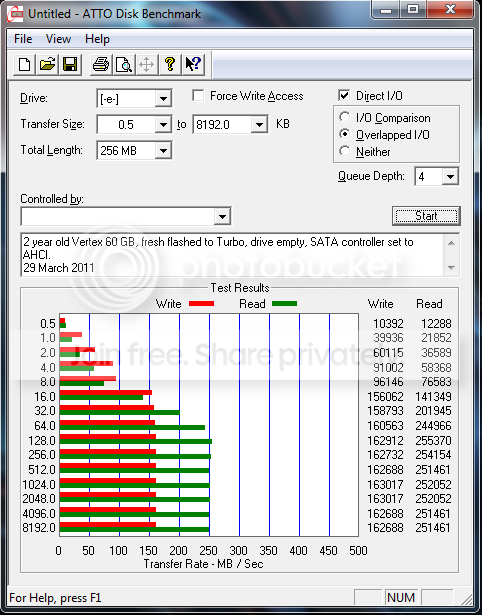
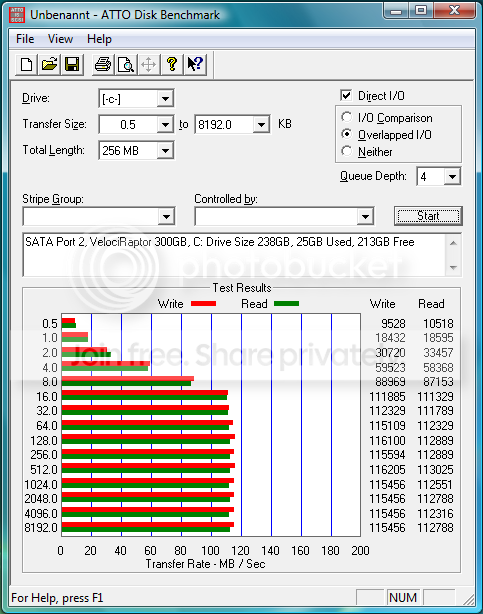
My PC and laptop both have boot SSDs. When W7 starts to load after the bios post finishes, I have a usable system in 13 seconds. Click "Shutdown" and the machine is off in 4 seconds. My Core 2 Quad Q9650 and Core 2 Duo T9900 help with that. :D I would go SSD just for the snappy responsiveness of programs/games and the system as a whole. As stated before, transcoding audio/video and working with Photoshop stuff won't be that much more quicker on an SSD, other than loading times, than an HDD. The bottle neck there might be your CPU. An SSD won't actually help the CPU work any faster, but getting data on & off the SSD will be a lot faster. Just for comparison, when benching with ATTO, my Vertex Turbo and Callisto Deluxe outshine my 10,000 rpm Velociraptor.

ATTO-VertexflashedtoTurboAHCImode.png


ATTOMushkinCallistoDeluxe240GBwithW764.png


DriveCVelociRaptor300GB.png
 

My Computer

Computer Manufacturer/Model Number
PC: Self Configured, Laptop: Acer 8935G
OS
SSDs: Windows 7 HP 64, HDDs: Vista HP 64
CPU
PC: Intel Q9650, Laptop: Intel T9900
Motherboard
PC: Asus P5Q-SE, Laptop: Acer
Memory
PC: 8 GB, Laptop: 8 GB
Graphics Card(s)
PC: Gigabyte GeForce GTX-280, Laptop: ATI HD4670
Hard Drives
PC: SSD, OCZ Vertzex 60 GB
PC: HDD, WD VelociRaptor 300 GB
PC: HDD, Seagate Baracuda 250 GB?
Laptop: SSD, Mushkin Callisto Deluxe 240 GB
Laptop: HDD, WD Caviar Black 500 GB
Hi there

I would tend to disagree about Photoshop - especially if you are proceessing large professional quality RAW files from professional type DSLR's. If you want A4 or A3 size quality prints too then an SSD will process this MUCH faster.

Putting the SCRATCH files on SSD's will speed the whole process up especially if you are dealing with large images that have LOTS of layers.

For small images that can be totally managed in memory (i.e don't need a lot of intermediate stuff saved to DISK either as scratch data or as paging) I agree an SSD won't yield any performance gain -- but anytime you need to do a fair amount of Disk I/O then an SSD pays dividends IN SPADES.

Cheers
jimbo
 

My Computer

Computer type
PC/Desktop
Computer Manufacturer/Model Number
Custom built, several laptops HP/ASUS
OS
Linux CENTOS 7 / various Windows OS'es and servers
CPU
Intel i7 Intel i5
Memory
8GB, 16GB
Graphics Card(s)
On Motherboard
Sound Card
Realtek HD audio
Monitor(s) Displays
Apple Cinema display, Samsung LCD
Screen Resolution
1920 X 1080
Hard Drives
4 X 1TB SATA
Mouse
Toshiba wireless laser
Internet Speed
> 20MB up
Thanks for the replies and advice, i think I will buy one, maybe just a 64Gb :)
Thanks, Rob
 

My Computer

Computer Manufacturer/Model Number
Sienna 700
OS
Windows 7 Ultimate x64
CPU
Intel i7 620m @2.67GHz
Memory
8Gb DDR3 @ 1600MHz
Graphics Card(s)
Intergrated
Sound Card
Intergrated
Screen Resolution
1366x768
Hard Drives
Samsung 830 128Gb SSD
Internet Speed
65-68Mbps
Back
Top