
You are using an out of date browser. It may not display this or other websites correctly.
You should upgrade or use an alternative browser.
You should upgrade or use an alternative browser.
urgent help with hard disk doing wrong . please
- Thread starter Edi77
- Start date

- Local time
- 4:25 PM
- Messages
- 5,915
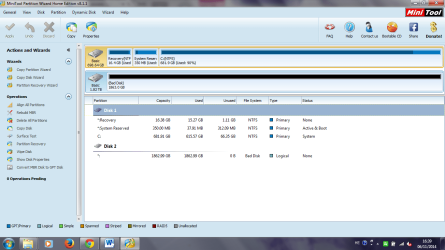
As I suspected you are seeing something outside your system. Your external drive and My cloud seem to be interconnected in some inexplicable way. I have no idea whatsoever about it and so can't visualise or advise anything.
My Computer
- OS
- Windows 7 Home Premium 32 bit
Just tried to copy there but stopped immediately. But the quick smart test take very long - over 30 min and didn't finish yet. what should I do with?
My Computer
- Computer type
- PC/Desktop
- Computer Manufacturer/Model Number
- sony
- OS
- windows 7 premium 64bit
- Memory
- 4.00 gb
- Antivirus
- norton
- Browser
- google chrumo
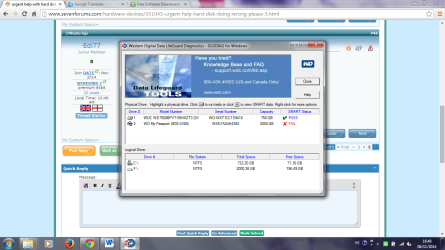
It is very strange that it recognizes an old connection WD hard drive that very long ago its not in use (and not working at all)
My Computer
- Computer type
- PC/Desktop
- Computer Manufacturer/Model Number
- sony
- OS
- windows 7 premium 64bit
- Memory
- 4.00 gb
- Antivirus
- norton
- Browser
- google chrumo
- Local time
- 4:25 PM
- Messages
- 5,915
Just as an analogy:
Most Western Digital drives come with an obnoxious Smartware.When Smartware is installed on the computer, that smartware and external drive are interconnected in someway which modifies the behaviour of the external drive. When that connection is broken and you try to use that external drive on another computer, that external drive is not going to behave the same way as would other normal external drives. Is it faulty? Unless I know in what way Smartware has altered the behaviour, I won't be able to give a solution to undo that and make it behave as a normal external drive on the other computer.
In the sameway here, when that connection is broken and you do the tests I can't say whether that truly reflects the state of the external drive.The periodic appearance and disappearance makes me feel that there is indeed an interdependency of some sort..
Wait to see if someone else has truly understood your My cloud connection and your system and give any advice. There may be many users using cloud.
Most Western Digital drives come with an obnoxious Smartware.When Smartware is installed on the computer, that smartware and external drive are interconnected in someway which modifies the behaviour of the external drive. When that connection is broken and you try to use that external drive on another computer, that external drive is not going to behave the same way as would other normal external drives. Is it faulty? Unless I know in what way Smartware has altered the behaviour, I won't be able to give a solution to undo that and make it behave as a normal external drive on the other computer.
In the sameway here, when that connection is broken and you do the tests I can't say whether that truly reflects the state of the external drive.The periodic appearance and disappearance makes me feel that there is indeed an interdependency of some sort..
Wait to see if someone else has truly understood your My cloud connection and your system and give any advice. There may be many users using cloud.
My Computer
- OS
- Windows 7 Home Premium 32 bit
I am not using the cloud. I don't have it now. Just tried it and remove it from the computer.
My Computer
- Computer type
- PC/Desktop
- Computer Manufacturer/Model Number
- sony
- OS
- windows 7 premium 64bit
- Memory
- 4.00 gb
- Antivirus
- norton
- Browser
- google chrumo
- Local time
- 4:25 PM
- Messages
- 5,915
My dear friend,
I just made a quick run-thorough on Western Digital My Cloud.
It has only one 2TB cloud drive WDBCTL0020HWT. The My cloud Windows application is intended to run with only the My cloud drives.
Your 2TB My Passport Ultra is definitely not a cloud drive. That being the case, I do not understand how and why you installed it and ran it on your Passport Ultra.
It is quite possible that that application - intended for use with only My cloud drives - could have made some irreversible changes on that non-designated drive. Just uninstalling that my cloud application may not reverse the changes made in the external drive and your problem/s may be directly attributable to this.
I would advise you to take up the matter with WD Technical Support and check what best could be done.
In this my concluding post on this thread, I am sorry to state,
You have not stated your problem clearly to start with, saying you have been trying My cloud application on your Passport Ultra and encountering these problem/s. Only in post #38 you came out with My cloud for the first time even though much before, it was pointed out that the data you see seems to be coming from elsewhere. This thread would have come to an long back but for that and we wouldn't have wasted this much time on this..
Good luck in your endeavour to get your passport back.
I just made a quick run-thorough on Western Digital My Cloud.
It has only one 2TB cloud drive WDBCTL0020HWT. The My cloud Windows application is intended to run with only the My cloud drives.
Your 2TB My Passport Ultra is definitely not a cloud drive. That being the case, I do not understand how and why you installed it and ran it on your Passport Ultra.
It is quite possible that that application - intended for use with only My cloud drives - could have made some irreversible changes on that non-designated drive. Just uninstalling that my cloud application may not reverse the changes made in the external drive and your problem/s may be directly attributable to this.
I would advise you to take up the matter with WD Technical Support and check what best could be done.
In this my concluding post on this thread, I am sorry to state,
You have not stated your problem clearly to start with, saying you have been trying My cloud application on your Passport Ultra and encountering these problem/s. Only in post #38 you came out with My cloud for the first time even though much before, it was pointed out that the data you see seems to be coming from elsewhere. This thread would have come to an long back but for that and we wouldn't have wasted this much time on this..
Good luck in your endeavour to get your passport back.
My Computer
- OS
- Windows 7 Home Premium 32 bit

- Local time
- 5:55 AM
- Messages
- 408
The WD Smartware is just a program; it's a back up software, created by Western Digital providing many different option on how, when and where to back up your files. Not every product of WD comes with the WD Smartware and it is not obligatory to use. If a person doesn't want to use it that's perfectly normal of a preference. This software can also be used with other hard drives, not just WD ones.
Basically, the WD Smartware doesn't have anything to do with the drive in the interrelation mentioned above. It's just a back up software and doesn't change hard drive's behavior.
And the My Cloud has been connected once so it's doubtfully a factor.
This problem you're having Edi is quite confusing and it's really difficult like this to determine what's the cause or how to fix it (if it can be fixed). This would require a more professional and technical, with all the tools needed, look.
All I can tell you for sure is that summarizing the symptoms: drive appears and disappears periodically, files seen, access denied, analyzing programs give out the drive as “bad”; I could conclude that more or less this hard drive is failing. Slowly, but surely. To why this is happening, one would need more precise observation to answer this question.
My advice would be to stop experimenting and trying to figure out what you can do or how to copy the files yourself. You may be damaging the drive unintentionally and accidentally more!
Your files, all the photos, videos and other information you have, is right there, on the drive, we've seen that; they can hopefully be extracted, but it would be better done by a specialist.
Take it to a professional to take further advice and your most secure way to get your information back is to take it to a Data Recovery company. Here I'm pasting a list of WD's Data Recovery partners, you could take a look at them:
WD Support / Data Recovery Partners
Afterwards you could check if you could RMA you hard drive fro a new one, right here:
WD Support / Warranty Services / Warranty Check for End User
And this is how to RMA it if it's still in warranty:
WD Support / Warranty Services / End User / Worldwide Warranty Policy and Limitations
I hope you manage to recover your files!
Best of luck!
CK_WD
Basically, the WD Smartware doesn't have anything to do with the drive in the interrelation mentioned above. It's just a back up software and doesn't change hard drive's behavior.
And the My Cloud has been connected once so it's doubtfully a factor.
This problem you're having Edi is quite confusing and it's really difficult like this to determine what's the cause or how to fix it (if it can be fixed). This would require a more professional and technical, with all the tools needed, look.
All I can tell you for sure is that summarizing the symptoms: drive appears and disappears periodically, files seen, access denied, analyzing programs give out the drive as “bad”; I could conclude that more or less this hard drive is failing. Slowly, but surely. To why this is happening, one would need more precise observation to answer this question.
My advice would be to stop experimenting and trying to figure out what you can do or how to copy the files yourself. You may be damaging the drive unintentionally and accidentally more!
Your files, all the photos, videos and other information you have, is right there, on the drive, we've seen that; they can hopefully be extracted, but it would be better done by a specialist.
Take it to a professional to take further advice and your most secure way to get your information back is to take it to a Data Recovery company. Here I'm pasting a list of WD's Data Recovery partners, you could take a look at them:
WD Support / Data Recovery Partners
Afterwards you could check if you could RMA you hard drive fro a new one, right here:
WD Support / Warranty Services / Warranty Check for End User
And this is how to RMA it if it's still in warranty:
WD Support / Warranty Services / End User / Worldwide Warranty Policy and Limitations
I hope you manage to recover your files!
Best of luck!
CK_WD
My Computer
- Computer type
- PC/Desktop
- OS
- Windows 7 Home Premium x64
- Local time
- 5:55 AM
- Messages
- 408
@Jumanji, I would agree with your last paragraph, problem wasn't stated very well, though, no matter what the problem is caused by, the drive he wrote originally for, is damaged and needs data extraction and professional attention.
So thank you for trying together to answer this thread!
Cheers!
CK_WD
So thank you for trying together to answer this thread!
Cheers!
CK_WD
My Computer
- Computer type
- PC/Desktop
- OS
- Windows 7 Home Premium x64
Similar threads
- Replies
- 2
- Views
- 3K
- Replies
- 3
- Views
- 26K

- Replies
- 5
- Views
- 4K

- Replies
- 5
- Views
- 3K
