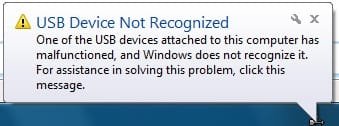
USB device not recognized - Help!

jp2134

New member
Local time
5:53 PM
Messages
2
I'm recieving the following error "USB device not recognized". I have attempted many fix recommendations I have seen posted aroun the internet with no luck. My usb ports were working fine previously with xp and vista installed on my system. I installed windows 7 and they were working fine until the very first update for windows 7 was installed. Since the update I have been unable to use any usb products(printer, iphone, etc...) other than my mouse and keyboard. I have attempted to uninstall the update. I have also attempted to install windows xp, vista, and windows 7 and have had no luck with any version.

I don't know what information I could provide that would assist anyone in helping me. If I need more info posted, please let me know. I would greatly appreciate any help provided.

Motherboard - EVGA Nforce 650i Ultra
All drivers are up to date
Bios was updated also
 

Attachments
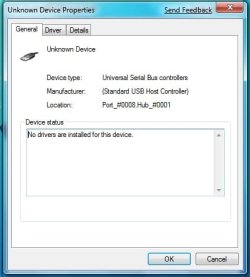
  • Unknown Device Properties.jpg
    Unknown Device Properties.jpg
    21.8 KB · Views: 949
  • USB-device not recognized.jpg
    USB-device not recognized.jpg
    10.8 KB · Views: 692

My Computer My Computer

OS
Windows 7
Have you installed all of your nForce chipset drivers with the latest ones available for Vista.
 

My Computer My Computer

Computer Manufacturer/Model Number
Home Brew
OS
Windows 7 Ultimate Vista Ultimate x64
CPU
Core 2 Duo E8500 3.16Ghz @ 3.8Ghz
Motherboard
eVGA 750i FTW
Memory
2x2Gigs Patriot PC2-6400 LL
Graphics Card(s)
Inno3D GeForce GTX260 216 SP
Monitor(s) Displays
ASUS VW222U 22" 2ms Response time
Screen Resolution
1680x1050
Hard Drives
SATA 150GB
SATA II 250GB
USB IDE 750GB Ext.
PSU
HYTEC 600W & Thermaltake 650W Toughpower Power Exp
Case
Thermaltake Armor LCS (Liquid Cooling System)
Cooling
Liquid Cooling System
Keyboard
Logitech G15 Gaming Keyboard
Mouse
Logitech G9 Gaming Mouse
Thanks Mr Grim, I forgot to mention that info. All drivers are up to date. I'm going crazy because i can't even install my previous version of windows to get the usb working again.
 

My Computer My Computer

OS
Windows 7
If you say it was working when you first installed you could try a repair install which will install windows again but you don't have to install all your programs again, check out the tutorial.

subscribed.gif
post_old.gif
Repair Install

If you need to install a previous version of Windows you make a new partition to install on http://www.sevenforums.com/tutorials/2674-partition-volume-create-new.html

Here is another tutorial for a fresh install http://www.sevenforums.com/tutorials/1649-clean-install-windows-7-beta.html
 

My Computer My Computer

Computer Manufacturer/Model Number
Home Brew
OS
Windows 7 Ultimate Vista Ultimate x64
CPU
Core 2 Duo E8500 3.16Ghz @ 3.8Ghz
Motherboard
eVGA 750i FTW
Memory
2x2Gigs Patriot PC2-6400 LL
Graphics Card(s)
Inno3D GeForce GTX260 216 SP
Monitor(s) Displays
ASUS VW222U 22" 2ms Response time
Screen Resolution
1680x1050
Hard Drives
SATA 150GB
SATA II 250GB
USB IDE 750GB Ext.
PSU
HYTEC 600W & Thermaltake 650W Toughpower Power Exp
Case
Thermaltake Armor LCS (Liquid Cooling System)
Cooling
Liquid Cooling System
Keyboard
Logitech G15 Gaming Keyboard
Mouse
Logitech G9 Gaming Mouse
I had a similar issue with RC1. After the 1st set of updates, all of my thumb drives were no longer recognized although my external USB drive was still working fine.

I unistalled all of the "test Windows 7 updates) in the KB97042n series and then rebooted and allofasudden my thumb drives were recognized again.

One curiousity about uninstalling the updates is that the very first test update (KB970419) cannot be installed. OH WELL!
 

My Computer My Computer

OS
Windows 7 RC1
Device Driver can't be installed

I have Windows7 RC1 (32) installed. From the beginning my Hama USB Hub Card Reader worked fine. Suddenly it is not recognized and installation from its FirmwareCD cannot be made. Of course-its Bluetooth, IRD USUB and Card slots don not work either. System says: Device Driver Could not be installed.
I uninstalled it, uninstalled and re-installed any USB device. No change. What shall I do?
 

My Computer My Computer

Computer Manufacturer/Model Number
ACPI x86-based PC Manufacturer
OS
Windows7
CPU
Intel(R) Celeron(R) 2.66GHz
Motherboard
FOXCON SiS-661
Memory
2048MB
Graphics Card(s)
ASUS AH3650 Series
Sound Card
onboard
Hard Drives
Hitachi HDS721616PLAT80 ATA
ST3120026A ATA Device
usb prob

I have Windows7 RC1 (32) installed. From the beginning my Hama USB Hub Card Reader worked fine. Suddenly it is not recognized and installation from its FirmwareCD cannot be made. Of course-its Bluetooth, IRD USUB and Card slots don not work either. System says: Device Driver Could not be installed.
I uninstalled it, uninstalled and re-installed any USB device. No change. What shall I do?

Hi and welcome to sevenforums

Was this a clean Install? were the drivers from the mfr?

Ken
 

My Computer My Computer

Computer Manufacturer/Model Number
HP Pavillion dv-7 1005 Tx
OS
Win 8 Release candidate 8400
CPU
[email protected]
Memory
4 gigs
Graphics Card(s)
Nvidia 9600M
Sound Card
HD built-in
Monitor(s) Displays
17" Wxga
Screen Resolution
1440x900
Cooling
none
Internet Speed
45Mb down 5Mb up
It was an 100% clear installation. But maybe the driver itself is damaged. I need to test it with another PC. Anyway, the installation of the software for this device also does not finsish. It stops at about 90% with a message that the instalation could not be finished because the device was not recognized.
 

My Computer My Computer

Computer Manufacturer/Model Number
ACPI x86-based PC Manufacturer
OS
Windows7
CPU
Intel(R) Celeron(R) 2.66GHz
Motherboard
FOXCON SiS-661
Memory
2048MB
Graphics Card(s)
ASUS AH3650 Series
Sound Card
onboard
Hard Drives
Hitachi HDS721616PLAT80 ATA
ST3120026A ATA Device
Make sure your Motherbored bios is up-to-date. gl
 

My Computer My Computer

Computer Manufacturer/Model Number
ME
OS
Windows 7 Ultimate 32-bit
CPU
P4 Northwood 3.0 Ghz @ 3.4 Ghz (512kb Cache :( )
Motherboard
Abit IC7-G
Memory
PC-3200 (3.0) 2x512 Kingston 2x1024 Corsair
Graphics Card(s)
Sapphire HD 3850 512mb DDR3 !AGP! Catalyst 9.9 HOTFIX
Sound Card
Onbored
Monitor(s) Displays
Viewsonic G220fb
Screen Resolution
1600x1200
Hard Drives
(2) 3.5 Seagate 74 GB Raid-0 , 1 WD Raptor 10k 150 GB, (2) Seagate 300 GB
PSU
650w Antec
Case
Mid tower
Cooling
Air.
Keyboard
PS2 Generic
Mouse
MX 518
Internet Speed
ComCrap
Other Info
This computer will become a good second computer until the time comes to buy a new computer.
This is driving me mad... I have the same issue.
Clean installation of W7 RC1 x86, was fine for a few days, now just over and over and over again, i get this "USB Device not Recognized"...

I have 6 usb ports, only 2 are used, and it recognizes my Keyboard and Mouse by name, and they function properly.

In my device manager I show 7 Universal Serial Bus Controllers
Standard Enchanced PCI to USB Host Controller
Standard OpenHCD USB Host Controller
3 Unknown Devices
USB Composite Device
2 USB Root Hubs

I don't care if the unknown devices ever work, to tell the truth...
How do i get rid of the alerts popping up all the time? :D
 

My Computer My Computer

OS
Windows 7 RC1 x86
usb prob

This is driving me mad... I have the same issue.
Clean installation of W7 RC1 x86, was fine for a few days, now just over and over and over again, i get this "USB Device not Recognized"...

I have 6 usb ports, only 2 are used, and it recognizes my Keyboard and Mouse by name, and they function properly.

In my device manager I show 7 Universal Serial Bus Controllers
Standard Enchanced PCI to USB Host Controller
Standard OpenHCD USB Host Controller
3 Unknown Devices
USB Composite Device
2 USB Root Hubs

I don't care if the unknown devices ever work, to tell the truth...
How do i get rid of the alerts popping up all the time? :D

Try disabling or un-installing the unknown controller but make sure its not you keyboard or mouse. That would be a major problem

Hope this helps

Ken
 

My Computer My Computer

Computer Manufacturer/Model Number
HP Pavillion dv-7 1005 Tx
OS
Win 8 Release candidate 8400
CPU
[email protected]
Memory
4 gigs
Graphics Card(s)
Nvidia 9600M
Sound Card
HD built-in
Monitor(s) Displays
17" Wxga
Screen Resolution
1440x900
Cooling
none
Internet Speed
45Mb down 5Mb up
Yeah I tried the disabling and uninstalling it just comes right back makes me think it is either my keyboard or mouse. I'll do more troubleshooting tomorrow. :(
 

My Computer My Computer

OS
Windows 7 RC1 x86
I don't care if the unknown devices ever work, to tell the truth...
How do i get rid of the alerts popping up all the time? :D

You're right, if the unknown devices not working doesn't bother you, then go to device manger, then properties for the not working device, then on the advanced tab check the box that says 'Don't tell me about USB errors'.
 

My Computer My Computer

OS
W7
I had the same issue on my laptop under win 7 64 bits.I fixed bu turning off the laptop, removing the battery and unplugging it from the wall.
apparently it's a known issue on the net weither it is under xp or 7.
hope this fixes your troubles.
good luck
 

My Computer My Computer

Computer Manufacturer/Model Number
Sony FW21M
OS
windows vista
CPU
Intel Core 2 Duo P8600
Memory
4 GB
i am encountering the same problem.
i am using Windows 7 Ultimate x64 RTM.
i have a Western Digital MyBook Essential 1TB and a Western Digital MyPassport 120GB.

both of them are detected at first.
when i try to copy files from 1TB to my 120GB, it suddenly stops or does not respond.
until when i got o Device Manager and it now displays it is an Unknown Device.
my only way to get them detected again is to do a restart.

but same problem wil occur when i try to copy files again.
i hopes this gets reported to Windows 7 team

i already tried to update my mobo bios and tried to reinstal USB root hub drivers but same problem.'
my machine is Acer M5640

any more ideas?


Note: this problem does not occur when i was using Vista Ultimate x64
 

My Computer My Computer

Computer Manufacturer/Model Number
Acer M5640
OS
Windows 7 Ultimate RTM
CPU
Intel Core 2 Duo E4600
Motherboard
Acer MCP-7030
Memory
4GB
Same problem someone help us g*d d**n it
 

My Computer My Computer

Computer Manufacturer/Model Number
hp pavilion dv8301nr
OS
windows 7 7600 rtm
CPU
adm turion 64-ml34
Motherboard
ati
Memory
1.256
Graphics Card(s)
ati express 200m 128 ded/128 shar = 256
Hard Drives
80gig internal maxtor
USB Device not recognized - Windows

If you are receiving the error - Device Unknown - USB device not recognized on any version of Windows.

Unplug the computer from the mains for a minute or two. :sarc::o:D

This will reset the motherboard and fix the problem.
 

My Computer My Computer

OS
Windows 7
If you are receiving the error - Device Unknown - USB device not recognized on any version of Windows.

Unplug the computer from the mains for a minute or two. :sarc::o:D

This will reset the motherboard and fix the problem.


This DOES fix the problem however, its not a permanent fix.
While syncing my ipod, the computer freezes and the USB becomes disabled.
Another fix is disabling my USB 2.0 device, which fixes the problem however, components run at the USB1.1 speed @ 12mbits/sec... gay.
 

My Computer My Computer

OS
W7
CPU
Duo 2.13
Motherboard
MSI 975x
Memory
2
another thing to consider...

I NEVER had this problem with WinXP. Anyone else in the same boat?
 

My Computer My Computer

OS
W7
CPU
Duo 2.13
Motherboard
MSI 975x
Memory
2
I found this thread as I have the same USB issue. And guess what, just yesterday I had been searching for a fix for the iTunes sync/freeze issue! So I think the two are related.

See my post at the bottom of this for how I fixed that one:
iPod touch will not sync in Windows 7 - AVForums.com

I'm thinking there is a USB issue on 64-bit Win7, maybe with certain motherboards (I'm also on an nVidia chipset).

Cheers,
Phil

P.S. I also had no probs under 32-bit XP
 

My Computer My Computer

OS
Windows 7 64-bit
Back
Top