
USB Driver - General Fix for Problems

General Fix for USB Driver Problems

I recommend using a wired mouse and keyboard, removing all USB devices and in the section where it says Uninstall all the faded entries. take that as reading uninstall everything USB, if you cannot get hold of a wired mouse then you will have to follow the tutorial as written.

After going through this tutorial You may need to reinstall some USB device drivers!!

After a USB device is installed and then removed Windows hides the driver, this first part makes all hidden drivers visible.


1. Unplug all USB devices except mouse and keyboard.


2. Click on Start orb, :orb: Type Advanced System settings in the search box and Click on View Advanced System Settings to go there.


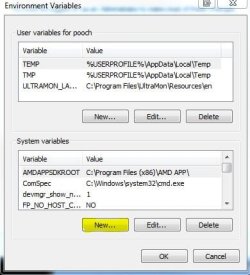
3. Click on Advanced tab, Click on Environment Variables.


Tutorial 1.JPG


4. Under the window "System variables" Click on New.

Tutorial 2.JPG


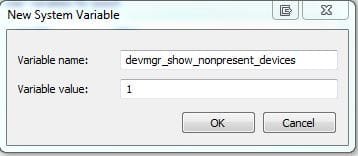
5. Type devmgr_show_nonpresent_devices as the variable name and type 1 as the value.

Tutorial 3.JPG


6. Click OK 3 times to close the windows.


7. Click on Start orb, :orb: Type Device Manager in the search box and Click on Device Manager in the list to go there.


8. Click on View, then Show hidden devices.


Tutorial 4.JPG


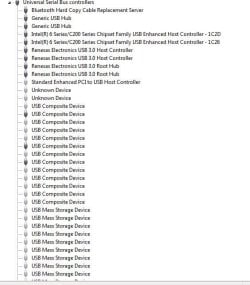
9. You will now notice that you have a list of USB devices and that some lines appear to be faded. Uninstall all the faded entries.

Capture.JPG


The INFCACHE.1 file is used to store information about USB drivers, the information in this file may have become corrupted and may cause windows to load the wrong driver or cause a driver not found message to be generated.
Deleting this file will force windows to generate a new INFCACHE.1 file.


1. Right Click on Start orb :orb: and Click on Open Windows Explorer.


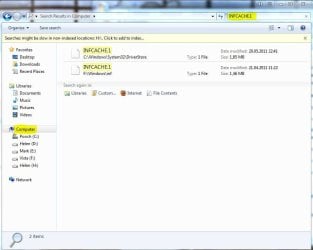
2. Select Computer in the navigation pane, and search for INFCACHE.1

Tutorial 5.JPG


3. Right Click on the file INFCACHE.1 (if you have more instances of Windows installed only do this for INFCACHE.1 C:\Windows\System32\Driver Store)


4. Click on Properties, Click on Security tab, Click on Edit, Click on Add.
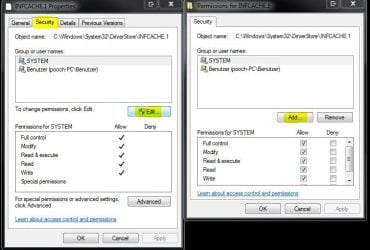

Tutorial 6.JPG


5. Type Administrators in the window with the blinking cursor, Click OK.
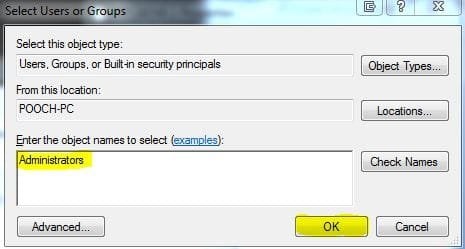

Tutorial 7.JPG


6. Delete the INFCACHE.1 file.


7. Connect a USB device, but not the one you were having trouble with this will make a new INFCACHE.1


8. New Start the PC and try your device again.


NOTE... It may, in a few cases be necessary to go through this Tutorial two or even three times to get this to work.
 
Last edited by a moderator:
General Fix for USB Driver Problems

hi pooch
i am extremely new to all this android barely understand windows anyhow using win7 home prem and have this Chinese made tablet A1CS X220 TABLET 10.2" ANDROID 2.2, WIFI, MIFI, HDMI, 1080P, GPS WITH CAM
aka flytouch / superpad etc ..problem i read in forums to install launcher pro to enable usb debugging done that but it went all wrong tablet wont work and ended up reset factory reset button combos etc
now it loads but infotm has problem and have no clue how to fix so i thought to hook it to my laptop way long story short ended up on your site found it really nice the way you explain things want to know how to connect to tablet through windows basically like in the days hirens boot cd you could load tools and mess around in the c root can i do that with tablet if yes how i mean it has two usb ports i micro sd port i need hirens boot application but for tablet have written to the seller for stock rom not holding my breath could you please offer advice help maybe

sweet
 
Last edited:

My Computer

Computer type
PC/Desktop
Computer Manufacturer/Model Number
Acer 4820TG
OS
Win 7 64bit Home Prem
CPU
i5
Memory
4Gb
Same Problem And Every Work But Error in One Step Pls Help
 

Attachments

  • Capture.JPG
    Capture.JPG
    23.1 KB · Views: 3,957

My Computer

Computer type
Laptop
Computer Manufacturer/Model Number
HP
OS
Windows 7 Ultimate 64 Bit
The answer looks obvious, you need admin rights to make changes. Are you logged in a account with admin rights?
 

My Computer

Computer type
PC/Desktop
Computer Manufacturer/Model Number
Less is more
OS
Windows 7 Ultimate x64 SP1
CPU
Core i7 2600k (4.6GHz)
Motherboard
ASUS P8Z68 Deluxe (3603)
Memory
16GB G.SKILL Ares 1600MHz
Graphics Card(s)
MSI R6970 Lightning
Sound Card
Asus Xonar Essence ST (UNi drivers 1.41)
Monitor(s) Displays
Samsung P2570, CrossOver 27Q LED-P
Screen Resolution
1920*1080, 2560*1440
Hard Drives
256GB OCZ Vector, 2x Hitachi 4TB (7K4000), Hitachi 3TB (7K3000 & 5K3000)
PSU
Seasonic X750
Case
Lian-Li PC-P80N
Cooling
NZXT HAVIK 140 (2x GELID Wing12PL Push/Pull)
Keyboard
CM Storm Trigger (Brown Switch)
Mouse
Logitech G400
Internet Speed
55Mbps/10Mbps
Other Info
Speakers - Klipsch ProMedia 2.1
Headphones - Sennheiser HD595
Router - ASUS RT-N66U
Webcam - Logitech C910
yes i have only one account so there not a matter of admin as theres only 1 account it will be admin...
 

My Computer

Computer type
Laptop
Computer Manufacturer/Model Number
HP
OS
Windows 7 Ultimate 64 Bit
@Pooch:
Same problem. I read all the tutorial well and did the works and also restarted the PC after merging the "take_ownership* reg file but again couldn't delete that infcache.1 file because privilege permission!
 

My Computer

Computer type
PC/Desktop
OS
windows 7 32-bit
CPU
Intel(R) Core(TM) i3-2120 CPU @ 3.30GHz
Motherboard
Gigabyte Technology Co., Ltd. P61A-D3
Memory
4.00 GB
Graphics Card(s)
NVIDIA GeForce GTS 450
Sound Card
(1) NVIDIA High Definition Audio (2) NVIDIA Virtual Audio
Monitor(s) Displays
Samsung
Hard Drives
ST500DM002-1BC142 ATA Device
Internet Speed
1 Mbps
Antivirus
KIS 2013
Browser
chrome
Hello Kurdman,

You might see if you may be able to use the free program Unlocker or FileASSASSIN to delete the file.

Hope this helps, :)
Shawn
 

My Computer

Computer type
PC/Desktop
Computer Manufacturer/Model Number
Self built custom
OS
64-bit Windows 11 Pro for Workstations
CPU
Intel i7-8700K OC'd to 5 GHz
Motherboard
ASUS ROG Maximus XI Formula Z390
Memory
64 GB (4x16GB) G.SKILL TridentZ RGB DDR4 3600 MHz
Graphics Card(s)
ASUS ROG-STRIX-GTX1080TI-O11G-GAMING
Sound Card
Integrated
Monitor(s) Displays
2 x Samsung Odyssey G7 27"
Screen Resolution
2560x1440
Hard Drives
1TB Samsung 990 PRO M.2,
4TB Samsung 990 PRO PRO M.2,
TerraMaster F8 SSD Plus NAS
PSU
Seasonic Prime Titanium 850W
Case
Thermaltake Core P3
Cooling
Corsair Hydro H115i
Keyboard
Logitech wireless K800
Mouse
Logitech MX Master 4
Internet Speed
2 Gb/s Download and 100 Mb/s Upload
Antivirus
Malwarebyte Anti-Malware Premium
Browser
Google Chrome
Other Info
Logitech Z625 speaker system,
Logitech BRIO 4K Pro webcam,
HP Color LaserJet Pro MFP M477fdn,
APC SMART-UPS RT 1000 XL - SURT1000XLI,
Galaxy S23 Plus phone
Hello Shawn,
Thank you for your post:). The first link worked but the second not. Anyway I could to delete that file. But when I deleted that file and again attached the webcam to USB port again that not recognizing message appeared. That means that this solution doesn't work (at least for me).
 

My Computer

Computer type
PC/Desktop
OS
windows 7 32-bit
CPU
Intel(R) Core(TM) i3-2120 CPU @ 3.30GHz
Motherboard
Gigabyte Technology Co., Ltd. P61A-D3
Memory
4.00 GB
Graphics Card(s)
NVIDIA GeForce GTS 450
Sound Card
(1) NVIDIA High Definition Audio (2) NVIDIA Virtual Audio
Monitor(s) Displays
Samsung
Hard Drives
ST500DM002-1BC142 ATA Device
Internet Speed
1 Mbps
Antivirus
KIS 2013
Browser
chrome

My Computer

Computer type
PC/Desktop
Computer Manufacturer/Model Number
Self built custom
OS
64-bit Windows 11 Pro for Workstations
CPU
Intel i7-8700K OC'd to 5 GHz
Motherboard
ASUS ROG Maximus XI Formula Z390
Memory
64 GB (4x16GB) G.SKILL TridentZ RGB DDR4 3600 MHz
Graphics Card(s)
ASUS ROG-STRIX-GTX1080TI-O11G-GAMING
Sound Card
Integrated
Monitor(s) Displays
2 x Samsung Odyssey G7 27"
Screen Resolution
2560x1440
Hard Drives
1TB Samsung 990 PRO M.2,
4TB Samsung 990 PRO PRO M.2,
TerraMaster F8 SSD Plus NAS
PSU
Seasonic Prime Titanium 850W
Case
Thermaltake Core P3
Cooling
Corsair Hydro H115i
Keyboard
Logitech wireless K800
Mouse
Logitech MX Master 4
Internet Speed
2 Gb/s Download and 100 Mb/s Upload
Antivirus
Malwarebyte Anti-Malware Premium
Browser
Google Chrome
Other Info
Logitech Z625 speaker system,
Logitech BRIO 4K Pro webcam,
HP Color LaserJet Pro MFP M477fdn,
APC SMART-UPS RT 1000 XL - SURT1000XLI,
Galaxy S23 Plus phone
INFACHE problem

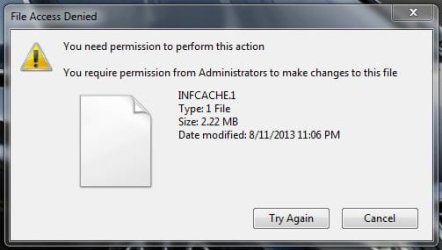
I have tried to delete the infache folder but failed because it requires permission from admin to make change. how do i solve it ? Thank you
 

My Computer

Computer type
Laptop
OS
windows 7
Hello hza, and welcome to Seven Forums.

Are you logged in to an administrator account?

If so, then you might also see if you may be able to use the free program Unlocker to delete the file.

Hope this helps, :)
Shawn
 

My Computer

Computer type
PC/Desktop
Computer Manufacturer/Model Number
Self built custom
OS
64-bit Windows 11 Pro for Workstations
CPU
Intel i7-8700K OC'd to 5 GHz
Motherboard
ASUS ROG Maximus XI Formula Z390
Memory
64 GB (4x16GB) G.SKILL TridentZ RGB DDR4 3600 MHz
Graphics Card(s)
ASUS ROG-STRIX-GTX1080TI-O11G-GAMING
Sound Card
Integrated
Monitor(s) Displays
2 x Samsung Odyssey G7 27"
Screen Resolution
2560x1440
Hard Drives
1TB Samsung 990 PRO M.2,
4TB Samsung 990 PRO PRO M.2,
TerraMaster F8 SSD Plus NAS
PSU
Seasonic Prime Titanium 850W
Case
Thermaltake Core P3
Cooling
Corsair Hydro H115i
Keyboard
Logitech wireless K800
Mouse
Logitech MX Master 4
Internet Speed
2 Gb/s Download and 100 Mb/s Upload
Antivirus
Malwarebyte Anti-Malware Premium
Browser
Google Chrome
Other Info
Logitech Z625 speaker system,
Logitech BRIO 4K Pro webcam,
HP Color LaserJet Pro MFP M477fdn,
APC SMART-UPS RT 1000 XL - SURT1000XLI,
Galaxy S23 Plus phone
Hi everyone

I cant succeed to delete the faded USB driers. They remain in the same place. help on what can I do please.
 

My Computer

Computer type
Laptop
Computer Manufacturer/Model Number
HP ProBook 4520s
OS
Windows 7 Ultimate 64bit
CPU
core i3 M370 @ 2.40Ghz
Memory
3 GB RAM
Graphics Card(s)
intel
Hard Drives
320 GB Samsung
Antivirus
Malwarebytes
Browser
Google Chrome
useless this whole forum!:p No one explains the easy way for a common man, No way except to repair the problem with IT technician!
 

My Computer

Computer type
PC/Desktop
OS
Windows 7 Familial 64-bit
Hi Welcome to Seven Forums .. Perhaps if you start a new Thread and explain the problems you have some one just might offer to help you ... :)
 

My Computer

Computer Manufacturer/Model Number
W530-3630QM1
OS
windows 7 home 64bit
CPU
INTEL-CORE I7
Memory
16GB
Hard Drives
750GB
Browser
Chrome
Hello,

I've followed the steps in pooch's tutorial to no avail. There's still something wrong in my USB drivers.

- I cannot install a new mouse (works fine in another computer) due to driver error.

- When I plug a Bluetooth dongle, it works fine but there are 3 "Bluetooth Peripheral Device" warnings in "Other Devices" and many entries in Human Interface Devices. Without the dongle, there are only 2 entries.

- If I uninstall the 3 warnings above, when I unplug the Bluetooth dongle, there's a message "Installing Device Driver Software"

- INFCACHE.1 has always the same size - in my case 1769KB.

ACER laptop, Win 7 home Premium,

Thanks!
 

My Computer

Computer type
Laptop
Computer Manufacturer/Model Number
Acer V3-571-6652
OS
Microsoft Windows 7 Home Premium 64-bit 7601 Multiprocessor Free Service Pack 1
CPU
Intel(R) Core(TM) i3-2370M CPU @ 2.40GHz
Motherboard
Acer VA50_HC_HR
Memory
4GB
Graphics Card(s)
-
Sound Card
-
Case
Cooler Master
Hi guys,

I was having problem with my logitech keyboard. My wireless mouse was working fine, but was not able to connect to keyboard receiver.

i did exact same way your instructions above. My problem has been solved. TVM.
 

My Computer

Computer type
PC/Desktop
OS
windows 7
Perfect!

Followed your instructions to the "t" and it FINALLY cleared up my USB problem! Thanks!
 

My Computer

Computer type
PC/Desktop
OS
W7 Ult x64
Fixed some devices but not all

Hi there,

Thanks for this tutorial it was very clear and easy to follow. I had an interesting variation though:

After I had deleted the INFCACHE file it did not return when I plugged in a previously functioning USB device. In fact none of my devices worked. So what I had to do was shutdown, plug in the devices that I wanted to use and then restart the computer. Upon restart the INFCACHE file was there and my previous devices were working. Not bad. But unfortunately, while this fixed a portable hard drive that was not working, it didn't fix the external sound card that I REALLY need to have working.
Should I just keep repeating the process?

Many thanks in advance ;)
 

My Computer

Computer type
Laptop
Computer Manufacturer/Model Number
HP
OS
Windows 7 Home Premium x64
CPU
AMD Phenom II N620 Dual-Core Processor 2.80 GHz
Memory
4 GM Ram
I'm a bit confused as to exactly which USB devices need to be deleted. The original post said just the faded ones, while Pooch's reply to CAGW, all the drivers are highlighted in yellow, and Pooch says to get rid of all of them. I'm a bit reluctant to do this as my mouse is wireless and so relies on USB drivers. Can someone please explain exactly what to do?

Florio
 

My Computer

OS
Windows 7 Home Premium 64bit
Procure a wired mouse, as was strongly recommended in the beginning of the article. It will load automatically after you reboot or you can plug it in after you have deleted the potentially offending input devices.
 

My Computer

Computer type
PC/Desktop
Computer Manufacturer/Model Number
Dell & custom Asus
OS
Windows 7 Ultimate x64, Windows 7 Home Premium 32bit
CPU
Intel quads
Motherboard
Asus & Dell proprietary
Memory
8 gigs per
Graphics Card(s)
ATI & Nvidia
Hard Drives
a number of Crucial & Samsung SSDs
Antivirus
Microsoft with WFC
Browser
Firefox
My PC not recognising any Android phones

Dear Pooh, I read your article many times. I have a problem. My PC just does not recognise any Android phones. Tried step by step what you have written in your article and was successful in carrying out all the tasks suggested by you. In the end, my PC recognised all USB gadgets except my HTC Android phone which was my main problem as all other gadgets were earlier also being recognised. There is nothing wrong with my phone as I tried 3 other Android phones but they are just not recognised by the PC. Had lots of hope from your very informative article but got disappointed in the end. Whenever the Android is connected, it shows HTC MTP Device Failed. Attaching the message file for your viewing. Kindly help me. I have been trying to sort out this problem for the last 4 days but in vain. If Mr. Pooh is not there on the scene, can anyone help me?
Thanks & Regards.
Colonel Narender Singh (Retd)
 

Attachments

  • Capture.PNG
    Capture.PNG
    95.8 KB · Views: 1,954

My Computer

Computer type
PC/Desktop
Computer Manufacturer/Model Number
HP
OS
Windows 7 32 Bit Professional
CPU
Intel(R) Pentium(R) CPU [email protected]
Motherboard
Intel Corporation DH61HO
Memory
Installed 8 GB 3.41 GB Usable
Graphics Card(s)
Don't Know
Hard Drives
500 GB
Antivirus
ESET Security
Browser
IE9 and Google Chrome
Back
Top