Used diskpart-clean command on sd card? Help

Alright, Ive just about given up ):
Nothing is working, it must be unrecoverable. But thank you all for your help, i appreciate it
 

My Computer My Computer

Computer type
Laptop
OS
windows 7 home premium 32 bit
If you have decided not to seek a Professional Data Recovery Service:

Do this.

FAT32 format your SD card with Windows Disk Management or MiniTools Partition Wizard after creating a new volume.. Do only a Quick Format That will leave most other sectors untouched.

After quick formatting, run PhotoRec/ZAR. Now that the configuration is right, there is an outside chance they will pick up the data - if it had not been wiped out completely - and retrieve your photos. As carwiz rightly pointed out earlier these programs can retrieve the data even after formatting.

If that happens well and good.
 

My Computer My Computer

OS
Windows 7 Home Premium 32 bit
No, No, No! Do NOT use Windows to format a camera card. You could loose up to the first 120MB of data and kill any chance of recovering pictures. If you did that already, chances are that your pictures are gone forever.
 

My Computer My Computer

Computer type
PC/Desktop
Computer Manufacturer/Model Number
Built 2/11/2011
OS
Windows 7 Pro-x64
CPU
i7-2600 3.4GHz - 3.8GHz Turbo
Motherboard
Intel DH67BL-B3
Memory
8Gb - 2x4GB, Muskin 991770 PC3-1333
Graphics Card(s)
Integrated Intel HD 2000
Sound Card
Integrated Intel 10.1 HD, RealTek ALC892
Monitor(s) Displays
Asus LCD VH222H, Haier HL24XSL2a
Screen Resolution
1920x1080, 1920x1080
Hard Drives
Crucial SSD C300-128Gb,
Western Digital WD5002AALX - 500Gb,
Western Digital WD7501AALS - 750Gb
PSU
Seasonic 650W 80+ Gold Modular
Case
Rosewill Defender
Cooling
Stock CPU, Four 120mm case fans, PCH fan added
Keyboard
Logitech EX100 Y-RBH94 Wireless
Mouse
Logitech EX100 M-RCE95 Wireless
Internet Speed
3.0/1.5 Mbs
Antivirus
Microsoft Security Essentials
Browser
Microsoft Internet Explorer 11
Other Info
Antec Veris Premier-Multimedia IR Station,
Cyber Accoustics-3602 Speakers,
AFT XM-5U Card Reader,
Hauppauge TV-HVR-2250,
Sony LX300 USB Turntable
The OP had already created a new partition after performing a disk clean as per post #1.I presume the OP just stopped short of formatting it

"From there i ended up using clean command and created a primary partition"

Doing a quick format is going to write the filesystem to the first sector of the partition and perhaps a few handful of sectors succeeding it. Of course the data in these few sectors will be lost. Not a great price if the OP could recover most of the data and photos.

Something is better than nothing ( if it works out :D) unless you have any alternate plan/s to retrieve all data without losing even a bit.

Or do you think the OP should straightaway seek professional recovery?
 

My Computer My Computer

OS
Windows 7 Home Premium 32 bit
I missed that. The clean wouldn't hurt the data but the partition creation might. That's where Windows could write up to 120MB on the drive. Depending on the size of the pictures, that will pretty much overwrite them and could wreck the camera's ability to format the card again. I don't know of any camera card that has a volume label. I wish the OP got here sooner. :(

A quick format with the card in the camera should have been the first step. All digital cameras I know of have that capability or a way to initialize the card for the camera's specific format.

Someone will have to examine the card with specialized software now and see if any of the picture files can be extracted. I have some pretty powerful software that may do it but I'm not turning it loose to a casual user. It's too dangerous.

The best bet now is, as you say, professional recovery.
 

My Computer My Computer

Computer type
PC/Desktop
Computer Manufacturer/Model Number
Built 2/11/2011
OS
Windows 7 Pro-x64
CPU
i7-2600 3.4GHz - 3.8GHz Turbo
Motherboard
Intel DH67BL-B3
Memory
8Gb - 2x4GB, Muskin 991770 PC3-1333
Graphics Card(s)
Integrated Intel HD 2000
Sound Card
Integrated Intel 10.1 HD, RealTek ALC892
Monitor(s) Displays
Asus LCD VH222H, Haier HL24XSL2a
Screen Resolution
1920x1080, 1920x1080
Hard Drives
Crucial SSD C300-128Gb,
Western Digital WD5002AALX - 500Gb,
Western Digital WD7501AALS - 750Gb
PSU
Seasonic 650W 80+ Gold Modular
Case
Rosewill Defender
Cooling
Stock CPU, Four 120mm case fans, PCH fan added
Keyboard
Logitech EX100 Y-RBH94 Wireless
Mouse
Logitech EX100 M-RCE95 Wireless
Internet Speed
3.0/1.5 Mbs
Antivirus
Microsoft Security Essentials
Browser
Microsoft Internet Explorer 11
Other Info
Antec Veris Premier-Multimedia IR Station,
Cyber Accoustics-3602 Speakers,
AFT XM-5U Card Reader,
Hauppauge TV-HVR-2250,
Sony LX300 USB Turntable
My experiment formatting a 1 GB SD card as FAT16 in the camera, FAT16 in Windows Disk Management, and FAT32 in WIndows Disk Management indicates the following results.

FAT16 formatted in my Kodak Camera: Writes FAT related data into first 522 sectors.The OP will not lose any existing user data (photographs) since the first 2047 sectors have already been zeroed by diskpart clean.. (user data from sector 522 to 2047 has already been lost irrecoverably)

FAT16 formatted in WDM: Writes FAT related data into first 527 sectors. Again the OP will not lose any existing user data (photographs) since the first 2047 sectors have already been zeroed by diskpart clean.. (user data from sector 527 to 2047 has already been lost irrecoverably)

FAT32 formatted in WDM:Writes FAT related data into first 8200 sectors. OP is likely to lose any existing user data in sectors 2048 to 8200 and this works out roughly 3MB.

So carwiz is partly right when he said FAT32 formatting will wipe out 120MB data. Well that prompted me to do this experiment and yes there will be a data loss of around 3MB and not 120 MB in this case with a 1GB Card. ( Fortunately I had a 1GB spare card for my camera.)

So the OP may format the drive as FAT16 either in the camera - if OP's camera formats as FAT16 - or format the SD card in FAT16 in Windows Disk Management. Either way no user data that exists - if it exists - will be lost.

I presume that PhotoRec as well as ZAR refused to do a real scan due to some configuration change that had taken place on insertion to a mac.

I also presume by providing some sort of right configuration as a properly FAT16 formatted SD Card, these programs may do the job.

So my recommendation is the OP should do this as the last attempt should he/she decides not to hand the job over to a Professional Recovery Service.
 

My Computer My Computer

OS
Windows 7 Home Premium 32 bit
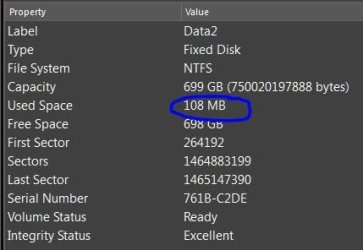
Well to be clear, I said up to 120MB. ;) And you didn't perform the same operations. How much was used when you assigned a partition? (As noted by OP)

On a clean Fixed Disk I just did, it's 108MB.
 

Attachments

  • Disk Partition.JPG
    Disk Partition.JPG
    21.8 KB · Views: 12

My Computer My Computer

Computer type
PC/Desktop
Computer Manufacturer/Model Number
Built 2/11/2011
OS
Windows 7 Pro-x64
CPU
i7-2600 3.4GHz - 3.8GHz Turbo
Motherboard
Intel DH67BL-B3
Memory
8Gb - 2x4GB, Muskin 991770 PC3-1333
Graphics Card(s)
Integrated Intel HD 2000
Sound Card
Integrated Intel 10.1 HD, RealTek ALC892
Monitor(s) Displays
Asus LCD VH222H, Haier HL24XSL2a
Screen Resolution
1920x1080, 1920x1080
Hard Drives
Crucial SSD C300-128Gb,
Western Digital WD5002AALX - 500Gb,
Western Digital WD7501AALS - 750Gb
PSU
Seasonic 650W 80+ Gold Modular
Case
Rosewill Defender
Cooling
Stock CPU, Four 120mm case fans, PCH fan added
Keyboard
Logitech EX100 Y-RBH94 Wireless
Mouse
Logitech EX100 M-RCE95 Wireless
Internet Speed
3.0/1.5 Mbs
Antivirus
Microsoft Security Essentials
Browser
Microsoft Internet Explorer 11
Other Info
Antec Veris Premier-Multimedia IR Station,
Cyber Accoustics-3602 Speakers,
AFT XM-5U Card Reader,
Hauppauge TV-HVR-2250,
Sony LX300 USB Turntable
:) What do you mean by saying " you did not perform the same operations"? You used an obnoxiously large Fixed Disk. Nobody is going to put a 700GB SD card in his camera.:geek:

My aim was to find out what FAT related data is written on a 1GB SD card a) when it is formatted as FAT16 (I used my Kodak camera to format it) and b) when formatted as FAT16 in WDM and c) when formatted as FAT32 in WDM

The procedure adopted:

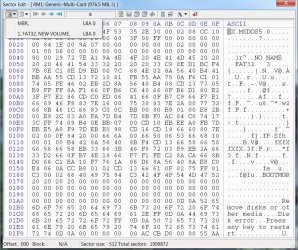
In all the above three cases using bootice I wrote FF to all the 1999871 sectors so that I can observe what all sectors have changed after formatting.

a) FAT16 formatted by my KODAK camera:

[A5-5-2015 5-10-04 PM.jpg

Sector 0 (MBR) and sector 245 (VBR) had FAT data. All sectors in between remained FF - not changed.
Sectors 246-767 total 522 sectors were all 00 (Changed from FF to 00) All the rest remained FF.

These 522 sectors I presume are the reserved sectors where the user files are indexed as and when a user data file is added.

Comment:

By diskpart clean the OP had already zeroed the first 2047 sectors,

So by performing this FAT16 format the OP is not going to lose any other user data other than what he/she had lost already from 768 to 2047.

b.) FAT16 formatted by Windows Disk Management:
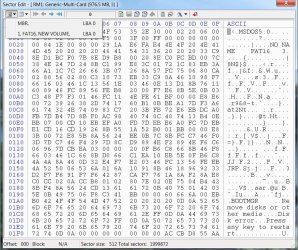
B5-5-2015 5-48-17 PM.jpg

This is almost similar to the last case except here the MBR and VBR are clubbed in Sector 0.

Sector 1 -527 - total 526 sectors were all 00. (Changed from FF to 00) Again these are the reserved sectors where FAT will write the index as and when a user data is added.

Sectors 528-1999871 remained unchanged at FF.

Comment:

By diskpart clean the OP had already zeroed the first 2047 sectors,

So by performing this FAT16 format The OP is not going to lose any other user data other than what he/she had lost already from 528 to 2047.

c) FAT32 formatted by Windows Disk Management:( I can't format it FAT32 in my camera, it only formats it as FAT16 :))

C5-5-2015 6-08-39 PM.jpg

Here again MBR and VBR are clubbed into Sector 0.

Sectors 1,2,7,and 12 also had FAT32 related data.

Sectors 3-5 and 8-11 were 00 (Changed from FF)

Sectors 13-8199 had also changed to 00 from FF, Again these are the reserved sectors.

Sectors 8200- 199821 remained unchanged at FF

Comment:

If the OP's camera had originally formatted the 1GB card in FAT16 (where the reserved sectors ended in the region of 767 -let us take it as 750) by formatting it as FAT32 in Windows the OP would have lost any user data from 2047 to 8200 sectors. At 512 bytes/sector it works out to 3175KB or 3.175 MB.

It is good that you brought in this loss factor that made me to have a relook at it by this experiment.A loss is a loss however small it is and so I stand to correct that the OP should format the drive as FAT16.:)

Whether he does it on his/her camera or in WDM is immaterial, Either way there will be no fresh loss of data.

Good that the OP hadn't returned till now and I saved my skin through you.;)
 
Last edited:

My Computer My Computer

OS
Windows 7 Home Premium 32 bit
Back
Top