Solved User Accounts

Hi again, I did run the ADWCleaner but on the request to reboot the PC would not shut down (although it has taken a little longer than usual just lately) so I did it with the power switch, on boot-up I had a black screen for a long tome before the OP System loaded, anyway I tried to run the JRT program as administrator & it would not start, the message was 7-Zip Internal Error Code 105, I also tried opening the prog and running it from the DT and got the same message.
Regards Robert.
 

Attachments

My Computer

Computer type
PC/Desktop
Computer Manufacturer/Model Number
Local built machine
OS
Windows7 Pro SP1 64 bit
CPU
Intel i3 550
Motherboard
Gigabyte GAH55M-S2H
Memory
Slot A0' 4096Mb x Slot A2' 4096Mb Kingston ddr3
Graphics Card(s)
Palit Ge Force GTS450
Sound Card
Realtek HD Audio
Monitor(s) Displays
Samsung SyncMaster [Monitor] (22.0"vis, s/n H9XQ
Screen Resolution
1680 X 1050
Hard Drives
1 x 256 Gb SSD Win7 op system
1 x 500 Gb Storage drive
1 x Tb Gb Photo storage drive
PSU
ATX 750w
Case
Local shop supplied
Cooling
Artic Cooling Freezer7 Pro
Keyboard
Dell
Mouse
M' Soft Intli mouse
Internet Speed
34 down and 12 up
Antivirus
Avast free + Comodo free firewall
Browser
Chrome
Other Info
Power Unit 750 w
Brother B & W laser printer
Scan on one Browser . Either
3133y8w.png
or on
5b5jza.png
or
4l6ro8.png


On
3133y8w.png

Hold down Control and click on ESET Online Scanner to open ESET OnlineScan in a new window
Click the
30jij2b.png
button
Check YES, I accept the Terms of Use.
Click the Start button.
Accept any security warnings from your browser.
Under scan settings, check "Scan Archives" and "Remove found threats"
Click Advanced settings and select the following:
° Scan potentially unwanted applications
° Scan for potentially unsafe applications
° Enable Anti-Stealth technology
ESET will then download updates for itself, install itself, and begin scanning your computer. Please be patient as this can take some time.
When the scan completes, click List Threats
Click Export, and save the file to your desktop using a unique name, such as ESETScan. Include the contents of this report in your next reply.
Click the Back button.
Click the Finish button.


On
5b5jza.png
or
4l6ro8.png

Click on esetsmartinstaller_enu.exe to download the ESET Smart Installer. Save it to your desktop.
Right click on
2wohcn4.png
choose
mawket.jpg
on your desktop
Check YES, I accept the Terms of Use.
Click the Start button.
Accept any security warnings from your browser.
Under scan settings, check "Scan Archives" and "Remove found threats"
Click Advanced settings and select the following:
° Scan potentially unwanted applications
° Scan for potentially unsafe applications
° Enable Anti-Stealth technology
ESET will then download updates for itself, install itself, and begin scanning your computer. Please be patient as this can take some time.
When the scan completes, click List Threats
Click Export, and save the file to your desktop using a unique name, such as ESETScan. Include the contents of this report in your next reply.
Click the Back button.
Click the Finish button.
 

My Computer

Computer Manufacturer/Model Number
Custom Built
OS
Windows 7 Ultimate 32-Bit & Windows 7 Ultimate 64-Bit
CPU
Intel Core i7 CPU 950 @ 3.07GHz
Motherboard
ASUS P6T DELUXE V2
Memory
OCZ 6GB (3 x 2GB) 240-Pin DDR3 SDRAM DDR3 1600 OCZ3X1600R2
Graphics Card(s)
ATI Radeon HD 5700 Series
Sound Card
OnBoard
Hard Drives
WD6400AACS-00M3B0 (640GB SATA )
PSU
CORSAIR 850w
Case
NZXT LEXA
Cooling
Intel Stock Heatsink Fan
Keyboard
Microsoft Wireless Laser Keyboard 7000
Mouse
Microsoft Wireless Laser Mouse 7000
Delete the JRT . And Redownload JRT and try to run it again after the Eset Scan .
 

My Computer

Computer Manufacturer/Model Number
Custom Built
OS
Windows 7 Ultimate 32-Bit & Windows 7 Ultimate 64-Bit
CPU
Intel Core i7 CPU 950 @ 3.07GHz
Motherboard
ASUS P6T DELUXE V2
Memory
OCZ 6GB (3 x 2GB) 240-Pin DDR3 SDRAM DDR3 1600 OCZ3X1600R2
Graphics Card(s)
ATI Radeon HD 5700 Series
Sound Card
OnBoard
Hard Drives
WD6400AACS-00M3B0 (640GB SATA )
PSU
CORSAIR 850w
Case
NZXT LEXA
Cooling
Intel Stock Heatsink Fan
Keyboard
Microsoft Wireless Laser Keyboard 7000
Mouse
Microsoft Wireless Laser Mouse 7000
Hi, I downloaded E-set for Chrome as that is the browser I use although I do have Internet Explorer to use when needed. All other browsers I have tried should have been uninstalled.
I clicked "Run as Admin" checked E-set's terms of use and clicked start, then I got the message that I need administrator permissions for installation.
So I downloaded the JRT again and got the same Error Code 105 again. (Back with you tomorrow) :-) Regards Robert.
 

My Computer

Computer type
PC/Desktop
Computer Manufacturer/Model Number
Local built machine
OS
Windows7 Pro SP1 64 bit
CPU
Intel i3 550
Motherboard
Gigabyte GAH55M-S2H
Memory
Slot A0' 4096Mb x Slot A2' 4096Mb Kingston ddr3
Graphics Card(s)
Palit Ge Force GTS450
Sound Card
Realtek HD Audio
Monitor(s) Displays
Samsung SyncMaster [Monitor] (22.0"vis, s/n H9XQ
Screen Resolution
1680 X 1050
Hard Drives
1 x 256 Gb SSD Win7 op system
1 x 500 Gb Storage drive
1 x Tb Gb Photo storage drive
PSU
ATX 750w
Case
Local shop supplied
Cooling
Artic Cooling Freezer7 Pro
Keyboard
Dell
Mouse
M' Soft Intli mouse
Internet Speed
34 down and 12 up
Antivirus
Avast free + Comodo free firewall
Browser
Chrome
Other Info
Power Unit 750 w
Brother B & W laser printer
Try with Safe Mode with Networking
 

My Computer

Computer Manufacturer/Model Number
Custom Built
OS
Windows 7 Ultimate 32-Bit & Windows 7 Ultimate 64-Bit
CPU
Intel Core i7 CPU 950 @ 3.07GHz
Motherboard
ASUS P6T DELUXE V2
Memory
OCZ 6GB (3 x 2GB) 240-Pin DDR3 SDRAM DDR3 1600 OCZ3X1600R2
Graphics Card(s)
ATI Radeon HD 5700 Series
Sound Card
OnBoard
Hard Drives
WD6400AACS-00M3B0 (640GB SATA )
PSU
CORSAIR 850w
Case
NZXT LEXA
Cooling
Intel Stock Heatsink Fan
Keyboard
Microsoft Wireless Laser Keyboard 7000
Mouse
Microsoft Wireless Laser Mouse 7000
Hi VistaKing, Unfortunately the PC would not shut down last night, I tried a reboot and as the PC booted I only got a Black screen after 10 mins I turned off the power.
This morning the PC started but I had no functions .i.e no start button or other any other icon functioned, after a reboot I managed to get the "Advanced boot Options" and started with last good config, otherwise you probably would not have heared from me again :-) so I will do as you suggest and try Safe Mode and see if the programs you have sent work, before we go for the shopping :-) back later in the day regards Robert
 

My Computer

Computer type
PC/Desktop
Computer Manufacturer/Model Number
Local built machine
OS
Windows7 Pro SP1 64 bit
CPU
Intel i3 550
Motherboard
Gigabyte GAH55M-S2H
Memory
Slot A0' 4096Mb x Slot A2' 4096Mb Kingston ddr3
Graphics Card(s)
Palit Ge Force GTS450
Sound Card
Realtek HD Audio
Monitor(s) Displays
Samsung SyncMaster [Monitor] (22.0"vis, s/n H9XQ
Screen Resolution
1680 X 1050
Hard Drives
1 x 256 Gb SSD Win7 op system
1 x 500 Gb Storage drive
1 x Tb Gb Photo storage drive
PSU
ATX 750w
Case
Local shop supplied
Cooling
Artic Cooling Freezer7 Pro
Keyboard
Dell
Mouse
M' Soft Intli mouse
Internet Speed
34 down and 12 up
Antivirus
Avast free + Comodo free firewall
Browser
Chrome
Other Info
Power Unit 750 w
Brother B & W laser printer
Managed to run JRT in safe mode, Adw will still not work due to no admin permissions, the PC is freezing a lot & the buttons on the task bar stop working so I have to keep rebooting.
Had a look at the Events Log and it is all red & Yellow :cry: anyway back later, regards Robert.
 

Attachments

My Computer

Computer type
PC/Desktop
Computer Manufacturer/Model Number
Local built machine
OS
Windows7 Pro SP1 64 bit
CPU
Intel i3 550
Motherboard
Gigabyte GAH55M-S2H
Memory
Slot A0' 4096Mb x Slot A2' 4096Mb Kingston ddr3
Graphics Card(s)
Palit Ge Force GTS450
Sound Card
Realtek HD Audio
Monitor(s) Displays
Samsung SyncMaster [Monitor] (22.0"vis, s/n H9XQ
Screen Resolution
1680 X 1050
Hard Drives
1 x 256 Gb SSD Win7 op system
1 x 500 Gb Storage drive
1 x Tb Gb Photo storage drive
PSU
ATX 750w
Case
Local shop supplied
Cooling
Artic Cooling Freezer7 Pro
Keyboard
Dell
Mouse
M' Soft Intli mouse
Internet Speed
34 down and 12 up
Antivirus
Avast free + Comodo free firewall
Browser
Chrome
Other Info
Power Unit 750 w
Brother B & W laser printer
Delete the old FRST.exe and the old FRST.txt and Redownload a new copy on post #17 and run it and upload the new FRST.txt
 

My Computer

Computer Manufacturer/Model Number
Custom Built
OS
Windows 7 Ultimate 32-Bit & Windows 7 Ultimate 64-Bit
CPU
Intel Core i7 CPU 950 @ 3.07GHz
Motherboard
ASUS P6T DELUXE V2
Memory
OCZ 6GB (3 x 2GB) 240-Pin DDR3 SDRAM DDR3 1600 OCZ3X1600R2
Graphics Card(s)
ATI Radeon HD 5700 Series
Sound Card
OnBoard
Hard Drives
WD6400AACS-00M3B0 (640GB SATA )
PSU
CORSAIR 850w
Case
NZXT LEXA
Cooling
Intel Stock Heatsink Fan
Keyboard
Microsoft Wireless Laser Keyboard 7000
Mouse
Microsoft Wireless Laser Mouse 7000
Hope this helps.
 

Attachments

My Computer

Computer type
PC/Desktop
Computer Manufacturer/Model Number
Local built machine
OS
Windows7 Pro SP1 64 bit
CPU
Intel i3 550
Motherboard
Gigabyte GAH55M-S2H
Memory
Slot A0' 4096Mb x Slot A2' 4096Mb Kingston ddr3
Graphics Card(s)
Palit Ge Force GTS450
Sound Card
Realtek HD Audio
Monitor(s) Displays
Samsung SyncMaster [Monitor] (22.0"vis, s/n H9XQ
Screen Resolution
1680 X 1050
Hard Drives
1 x 256 Gb SSD Win7 op system
1 x 500 Gb Storage drive
1 x Tb Gb Photo storage drive
PSU
ATX 750w
Case
Local shop supplied
Cooling
Artic Cooling Freezer7 Pro
Keyboard
Dell
Mouse
M' Soft Intli mouse
Internet Speed
34 down and 12 up
Antivirus
Avast free + Comodo free firewall
Browser
Chrome
Other Info
Power Unit 750 w
Brother B & W laser printer
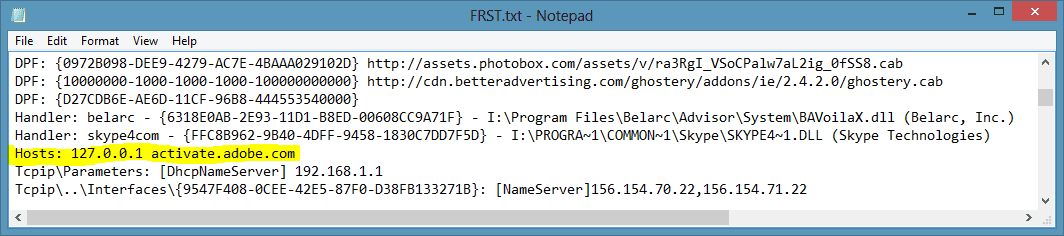
I'm seeing this activate.adobe.com ? Uninstall of the adobe software . That is by passing the activation server for adobe software
 

My Computer

Computer Manufacturer/Model Number
Custom Built
OS
Windows 7 Ultimate 32-Bit & Windows 7 Ultimate 64-Bit
CPU
Intel Core i7 CPU 950 @ 3.07GHz
Motherboard
ASUS P6T DELUXE V2
Memory
OCZ 6GB (3 x 2GB) 240-Pin DDR3 SDRAM DDR3 1600 OCZ3X1600R2
Graphics Card(s)
ATI Radeon HD 5700 Series
Sound Card
OnBoard
Hard Drives
WD6400AACS-00M3B0 (640GB SATA )
PSU
CORSAIR 850w
Case
NZXT LEXA
Cooling
Intel Stock Heatsink Fan
Keyboard
Microsoft Wireless Laser Keyboard 7000
Mouse
Microsoft Wireless Laser Mouse 7000
Hi again, Uninstall of the adobe software . > That is by passing the activation server for adobe software ? sorry I din't understand that bit.
When I open "Programs and features" I have 4 Adobe programs showing Adobe Air,Adobe flash player 11 active X, and Adobe flash player 11 plugin, Adobe Reader and Adobe shock-wave player 11.6 not sure what they are all for, but BBC I-player prompted me to install one of them in order to work.
When I try to uninstall Adobe Air nothing happens, and I can't use my Uninstall programs because I am not the Administrator,
I think we need a prog like HJT to delete the strings, regards Robert.
 

My Computer

Computer type
PC/Desktop
Computer Manufacturer/Model Number
Local built machine
OS
Windows7 Pro SP1 64 bit
CPU
Intel i3 550
Motherboard
Gigabyte GAH55M-S2H
Memory
Slot A0' 4096Mb x Slot A2' 4096Mb Kingston ddr3
Graphics Card(s)
Palit Ge Force GTS450
Sound Card
Realtek HD Audio
Monitor(s) Displays
Samsung SyncMaster [Monitor] (22.0"vis, s/n H9XQ
Screen Resolution
1680 X 1050
Hard Drives
1 x 256 Gb SSD Win7 op system
1 x 500 Gb Storage drive
1 x Tb Gb Photo storage drive
PSU
ATX 750w
Case
Local shop supplied
Cooling
Artic Cooling Freezer7 Pro
Keyboard
Dell
Mouse
M' Soft Intli mouse
Internet Speed
34 down and 12 up
Antivirus
Avast free + Comodo free firewall
Browser
Chrome
Other Info
Power Unit 750 w
Brother B & W laser printer
Copy and paste the code below into Notepad. To open Notepad, click on :orb: . Inside
2nqbqes.png
type notepad and then press <ENTER> button .

Code:
@Echo off
pushd\windows\system32\drivers\etc
attrib -h -s -r hosts
echo 127.0.0.1 localhost>HOSTS
attrib +r +h +s hosts
popd
ipconfig /release
ipconfig /renew
ipconfig /flushdns
netsh winsock reset all
netsh int ip reset all
cls
echo Script finished.
pause
del %0

In Notepad, click File and then Save. Type reset.bat inside file name section . Change Save as Type to All Files, and then save the file to your desktop. After the file is saved, right click on the RESET.bat choose
mawket.jpg
. Once it's finished running, restart your computer.
 

My Computer

Computer Manufacturer/Model Number
Custom Built
OS
Windows 7 Ultimate 32-Bit & Windows 7 Ultimate 64-Bit
CPU
Intel Core i7 CPU 950 @ 3.07GHz
Motherboard
ASUS P6T DELUXE V2
Memory
OCZ 6GB (3 x 2GB) 240-Pin DDR3 SDRAM DDR3 1600 OCZ3X1600R2
Graphics Card(s)
ATI Radeon HD 5700 Series
Sound Card
OnBoard
Hard Drives
WD6400AACS-00M3B0 (640GB SATA )
PSU
CORSAIR 850w
Case
NZXT LEXA
Cooling
Intel Stock Heatsink Fan
Keyboard
Microsoft Wireless Laser Keyboard 7000
Mouse
Microsoft Wireless Laser Mouse 7000
activate.adobe.com, I'v looked for it and cannot see it in the FRST file, if I saw the HKEY or path I might be able to find it using regedit and delete it from there.
 

My Computer

Computer type
PC/Desktop
Computer Manufacturer/Model Number
Local built machine
OS
Windows7 Pro SP1 64 bit
CPU
Intel i3 550
Motherboard
Gigabyte GAH55M-S2H
Memory
Slot A0' 4096Mb x Slot A2' 4096Mb Kingston ddr3
Graphics Card(s)
Palit Ge Force GTS450
Sound Card
Realtek HD Audio
Monitor(s) Displays
Samsung SyncMaster [Monitor] (22.0"vis, s/n H9XQ
Screen Resolution
1680 X 1050
Hard Drives
1 x 256 Gb SSD Win7 op system
1 x 500 Gb Storage drive
1 x Tb Gb Photo storage drive
PSU
ATX 750w
Case
Local shop supplied
Cooling
Artic Cooling Freezer7 Pro
Keyboard
Dell
Mouse
M' Soft Intli mouse
Internet Speed
34 down and 12 up
Antivirus
Avast free + Comodo free firewall
Browser
Chrome
Other Info
Power Unit 750 w
Brother B & W laser printer
The Adobe.com is inside your Hosts file . Did you to Post 32
 

My Computer

Computer Manufacturer/Model Number
Custom Built
OS
Windows 7 Ultimate 32-Bit & Windows 7 Ultimate 64-Bit
CPU
Intel Core i7 CPU 950 @ 3.07GHz
Motherboard
ASUS P6T DELUXE V2
Memory
OCZ 6GB (3 x 2GB) 240-Pin DDR3 SDRAM DDR3 1600 OCZ3X1600R2
Graphics Card(s)
ATI Radeon HD 5700 Series
Sound Card
OnBoard
Hard Drives
WD6400AACS-00M3B0 (640GB SATA )
PSU
CORSAIR 850w
Case
NZXT LEXA
Cooling
Intel Stock Heatsink Fan
Keyboard
Microsoft Wireless Laser Keyboard 7000
Mouse
Microsoft Wireless Laser Mouse 7000
It's right there (highlighted):

Capture.PNG
 

My Computer

Computer type
PC/Desktop
Computer Manufacturer/Model Number
Dwarf Dwf/11/2012 r09/2013
OS
Windows 8.1 Pro RTM x64
CPU
Intel Core-i5-3570K 4-core @ 3.4GHz (Ivy Bridge) (OC 4.4GHz)
Motherboard
ASRock Z77 Extreme4-M
Memory
4 x 4GB DDR3-1600 Corsair Vengeance CMZ8GX3M2A1600C9B (16GB)
Graphics Card(s)
MSI GeForce GTX770 Gaming OC 2GB
Sound Card
Realtek High Definition on board solution (ALC 898)
Monitor(s) Displays
ViewSonic VA1912w Widescreen (VGA)
Screen Resolution
1440x900
Hard Drives
OCZ Agility 3 SSD 120GB SATA III x2 (RAID 0)
Samsung HD501LJ 500GB SATA II x2
Hitachi HDS721010CLA332 1TB SATA II
Iomega 1.5TB Ext USB 2.0
WD 2.0TB Ext USB 3.0
PSU
XFX Pro Series 850W Semi-Modular
Case
Gigabyte IF233
Cooling
1 x 120mm Front Inlet 1 x 120mm Rear Exhaust
Keyboard
Microsoft Comfort Curve Keyboard 3000 (USB)
Mouse
Microsoft Comfort Mouse 3000 for Business (USB)
Internet Speed
NetGear DG834Gv3 ADSL Modem/Router (Ethernet) ~4.0 Mb/s (O2)
Antivirus
Avast! 8.0.1497
Browser
IE 11
Other Info
Optical Drive: HL-DT-ST BD-RE BH10LS30 SATA Bluray
Lexmark S305 Printer/Scanner/Copier (USB)
WEI Score: 8.1/8.1/8.5/8.5/8.25
Asus Eee PC 1011PX Netbook (Windows 7 x86 Starter)
Hi Guys
having trouble getting back to you, the PC will not shut down now but will start in safe mode, after some time I got it to start normally and can use the site at the moment, as I said earlier on the welcome screen is also a Administrator log-in icon, I have tried that but I can't register my email as the keyboard is not English and the @ will not show in my email address.
I did the process as in post 32 but the PC would not reboot neither would any of the task bar buttons work, I had to use the power switch.

Ps... Just tried again and after running the reset, I again clicked on Restart and the PC would not shut down, I used the reboot button on the PC which gave a black screen for several mins then it started loading windows.
If its any help the link "Change User Account Control Settings" in Control >Panel Home < does not work, its as though something is stopping me from making any changes.
Re the hosts file, do I have to find it and remove the Activate.Adobe.com prog, instructions how would be helpful, bareing in mind I can't use the uninstall programs as I am not logged in as Administrator
 
Last edited:

My Computer

Computer type
PC/Desktop
Computer Manufacturer/Model Number
Local built machine
OS
Windows7 Pro SP1 64 bit
CPU
Intel i3 550
Motherboard
Gigabyte GAH55M-S2H
Memory
Slot A0' 4096Mb x Slot A2' 4096Mb Kingston ddr3
Graphics Card(s)
Palit Ge Force GTS450
Sound Card
Realtek HD Audio
Monitor(s) Displays
Samsung SyncMaster [Monitor] (22.0"vis, s/n H9XQ
Screen Resolution
1680 X 1050
Hard Drives
1 x 256 Gb SSD Win7 op system
1 x 500 Gb Storage drive
1 x Tb Gb Photo storage drive
PSU
ATX 750w
Case
Local shop supplied
Cooling
Artic Cooling Freezer7 Pro
Keyboard
Dell
Mouse
M' Soft Intli mouse
Internet Speed
34 down and 12 up
Antivirus
Avast free + Comodo free firewall
Browser
Chrome
Other Info
Power Unit 750 w
Brother B & W laser printer
Try this


Copy and paste the code below into Notepad. To open Notepad, click on :orb: . Inside
2nqbqes.png
type notepad and then press <ENTER> button .

Code:
@Echo off
pushd\windows\system32\drivers\etc
attrib -h -s -r hosts
echo 127.0.0.1 localhost>HOSTS
attrib +r +h +s hosts
popd
ipconfig /release
ipconfig /renew
ipconfig /flushdns
netsh winsock reset all
netsh int ip reset all
cls
echo Script finished.
pause
del %0

In Notepad, click File and then Save. Type reset.bat inside file name section . Change Save as Type to All Files, and then save the file to your desktop. After the file is saved, right click on the RESET.bat choose
mawket.jpg
. Once it's finished running, restart your computer. Check to see if your Internet connection is restored.
 

My Computer

Computer Manufacturer/Model Number
Custom Built
OS
Windows 7 Ultimate 32-Bit & Windows 7 Ultimate 64-Bit
CPU
Intel Core i7 CPU 950 @ 3.07GHz
Motherboard
ASUS P6T DELUXE V2
Memory
OCZ 6GB (3 x 2GB) 240-Pin DDR3 SDRAM DDR3 1600 OCZ3X1600R2
Graphics Card(s)
ATI Radeon HD 5700 Series
Sound Card
OnBoard
Hard Drives
WD6400AACS-00M3B0 (640GB SATA )
PSU
CORSAIR 850w
Case
NZXT LEXA
Cooling
Intel Stock Heatsink Fan
Keyboard
Microsoft Wireless Laser Keyboard 7000
Mouse
Microsoft Wireless Laser Mouse 7000
Hi again, I have run the latest reset.bat file and as the last time the PC would not reboot and after the shutting down screen had been showing or buffering for 5 mins I realized that it was not going to shut down so I used the reset button on the PC which started the reboot, but again after the black screen had been showing for a good 5 mins I pressed Ctl Alt +Del and the Windows Error Recovery screen came on and I clicked "Normal Start and the PC loaded windows.
There does not seem to be a prob with the Internet connection just the shut down and start up, and the original prob of not being allowed to use my programs because I am not a Administrator, Regards Robert.
 

My Computer

Computer type
PC/Desktop
Computer Manufacturer/Model Number
Local built machine
OS
Windows7 Pro SP1 64 bit
CPU
Intel i3 550
Motherboard
Gigabyte GAH55M-S2H
Memory
Slot A0' 4096Mb x Slot A2' 4096Mb Kingston ddr3
Graphics Card(s)
Palit Ge Force GTS450
Sound Card
Realtek HD Audio
Monitor(s) Displays
Samsung SyncMaster [Monitor] (22.0"vis, s/n H9XQ
Screen Resolution
1680 X 1050
Hard Drives
1 x 256 Gb SSD Win7 op system
1 x 500 Gb Storage drive
1 x Tb Gb Photo storage drive
PSU
ATX 750w
Case
Local shop supplied
Cooling
Artic Cooling Freezer7 Pro
Keyboard
Dell
Mouse
M' Soft Intli mouse
Internet Speed
34 down and 12 up
Antivirus
Avast free + Comodo free firewall
Browser
Chrome
Other Info
Power Unit 750 w
Brother B & W laser printer
What account are you logged in now ?

Do post 11 in the builtin Administrator account . The account " Administrator "
 

My Computer

Computer Manufacturer/Model Number
Custom Built
OS
Windows 7 Ultimate 32-Bit & Windows 7 Ultimate 64-Bit
CPU
Intel Core i7 CPU 950 @ 3.07GHz
Motherboard
ASUS P6T DELUXE V2
Memory
OCZ 6GB (3 x 2GB) 240-Pin DDR3 SDRAM DDR3 1600 OCZ3X1600R2
Graphics Card(s)
ATI Radeon HD 5700 Series
Sound Card
OnBoard
Hard Drives
WD6400AACS-00M3B0 (640GB SATA )
PSU
CORSAIR 850w
Case
NZXT LEXA
Cooling
Intel Stock Heatsink Fan
Keyboard
Microsoft Wireless Laser Keyboard 7000
Mouse
Microsoft Wireless Laser Mouse 7000
Hi, just done that again, there was no Check Names button on the Admin Properties Box, after adding my name the Error stated "Error while attempting to save properties for group administrators on computer Black Bess". Thanks Robert.
Ps just found "Check Names" in Select Users" but the result was the same error
 

My Computer

Computer type
PC/Desktop
Computer Manufacturer/Model Number
Local built machine
OS
Windows7 Pro SP1 64 bit
CPU
Intel i3 550
Motherboard
Gigabyte GAH55M-S2H
Memory
Slot A0' 4096Mb x Slot A2' 4096Mb Kingston ddr3
Graphics Card(s)
Palit Ge Force GTS450
Sound Card
Realtek HD Audio
Monitor(s) Displays
Samsung SyncMaster [Monitor] (22.0"vis, s/n H9XQ
Screen Resolution
1680 X 1050
Hard Drives
1 x 256 Gb SSD Win7 op system
1 x 500 Gb Storage drive
1 x Tb Gb Photo storage drive
PSU
ATX 750w
Case
Local shop supplied
Cooling
Artic Cooling Freezer7 Pro
Keyboard
Dell
Mouse
M' Soft Intli mouse
Internet Speed
34 down and 12 up
Antivirus
Avast free + Comodo free firewall
Browser
Chrome
Other Info
Power Unit 750 w
Brother B & W laser printer
Back
Top