User Folders - Change Default Location

How to Change the Default Location of User Folders in Windows 7 and Windows 8

   Information
This will show you how to change (move) the default location of your account's C:\Users\(user-name) folders to another location of your choice instead in Windows 7 and Windows 8, and still have access to the user folder from the Start Menu (Windows 7 only) location.

   Tip
If you are just wanting to save HDD space, then you might consider this below to be able to access the files from your libraries with the files actually located where you like instead. This way you will not have to worry about any potential issues that come with moving user folder locations. For example, whatever partition you move your user folders to will now be included in a system image in Windows 7 and Windows 8.

  • Create a new folder at any location you want.
  • Move any files you want into the new folder.
  • Include the new folder into a library (Windows 7 or Windows 8) of your choice.
  • If you like, you can also set the new folder to be the default save to location (Windows 7 or Windows 8) for the library as well.
   Warning
If you change the default location of your Favorites folder in Windows 8 or 8.1, your Favorites in Internet Explorer will no longer be available until you move your Favorites back to the default "C:\Users\(user-name)" location.


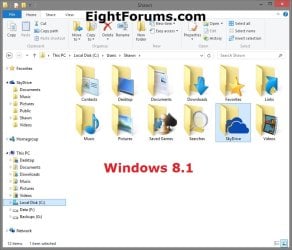
EXAMPLE: User Folders
NOTE: This is at the default C:\Users\(user-name) location.
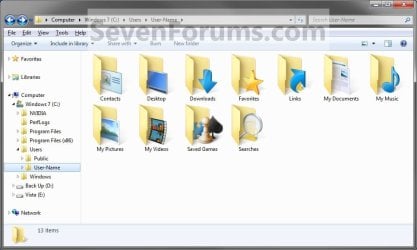
Example1.jpg

Windows_8.1.jpg


OPTION ONE

To Change Main User Profile Folder Location


1. For how, see:
http://www.sevenforums.com/tutorials/87555-user-profile-change-default-location.html

OR

How to Relocate User Profiles to another Partition or Disk in Windows 8


OPTION TWO

To Change User Folders Location from within User Profile Folder


1. If you a part of a homegroup, then you will need to change the homegroup settings to no longer share the user folder (ex: My Music) that you want to move first by unchecking the folder and clicking on Save Changes. (see screenshot below)
NOTE: This is so the user folder (ex: My Music) will not be shared on the homegroup anymore.
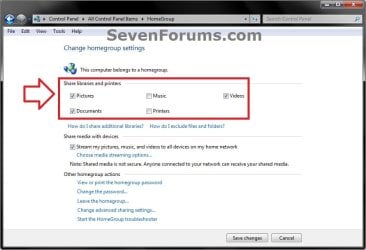
Homegroup.jpg
2. In Windows Explorer, navigate to where (ex: D: drive) you want to move the default user folder (ex: My Music) location to.

3. Create a New Folder by right clicking or press and hold on a empty space in the main window there, and click/tap on New and Folder. Name the new folder without spaces (ex: "Music" for My Music) for the user folder that you want to move there. (See screenshots below)
NOTE: The name that you type in for the new folder will be what you see as the user folder name in the Start Menu (shell:UsersFilesFolder) location when finished with all of these steps. It would be best to use the same name as the user folder to avoid confusion.
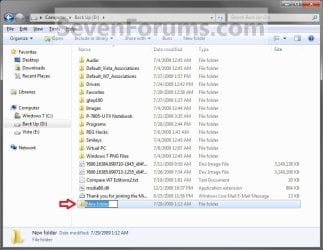
Rename1.jpg

Rename2.jpg

4. Close this window. (See screenshots above)

5. Press the Windows+R keys to open the Run dialog, type shell:UsersFilesFolder, and press enter.
NOTE: This will open your C:\Users\(user-name) folder.

6. Right click or press and hold on a user folder (ex: My Music, My Documents, My Pictures, etc.....) that you want to move the default location for, and click/tap on Properties. (See screenshot below)
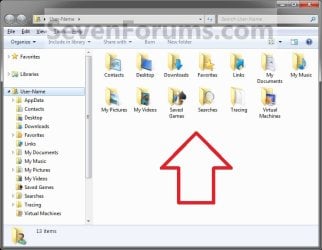
Right_Click_On_A_User_Folder.jpg
7. Click/tap on the Location tab, and Move button. (See screenshot below)
Properties1.jpg
8. Navigate to the same location as in step 2 and 3 above, then select the renamed new folder (ex: Music), and click/tap on the Select Folder button. (See screenshot below)
Properties2.jpg
9. Click/tap on OK. (See screenshot below)
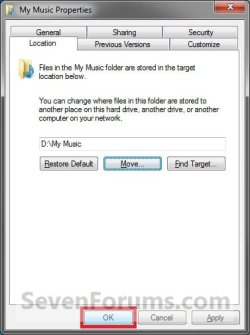
Properties3.jpg
10. Click/tap on Yes. (See screenshot below)
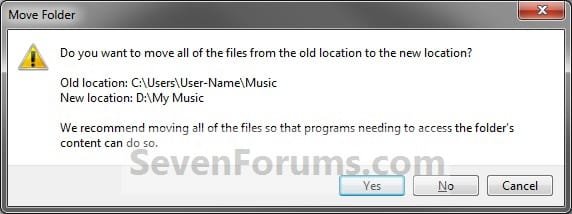
Properties4.jpg
11. After a few seconds when the location has been changed, the Properties window (screenshot under step 9) will then close.

12. Check back at the C:\Users\(user-name) location to make sure that the old user folder (ex: My Music) that you moved is no longer there. If it is, then make sure that the contents of the folder were moved to the new location, and delete it. (See screenshot below)
NOTE: If you are unable to delete the folder, then restart the computer and try again.
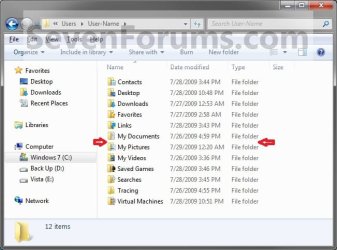
Finished2.jpg
13. You will notice that the folder at the shell:UsersFilesFolder location and the new location (ex: D drive) you moved the user folder to, now has the default user folder (ex: My Music) icon. (See screenshot below)
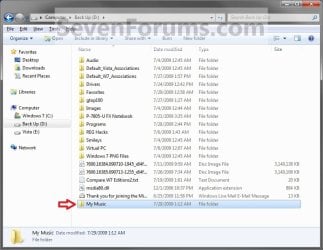
NOTE: The Start Menu in Windows 7 now opens the user folder from the new location (ex: D: drive) that you moved the user folder to.
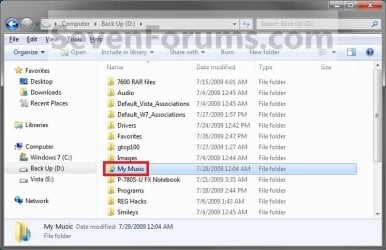
Finished.jpg
14. If you a part of a homegroup, then you can now change the homegroup settings back to share the user folder (ex: My Music) again if you like by checking the folder, and click/tap on Save Changes. (see screenshot below)
Homegroup.jpg
   Tip
If you wanted to restore the default location of the user folder, then see:

How to Restore the Default Location of User Folders in Windows 7 and Windows 8


That's it,
Shawn


Last edited:
  • Like
Reactions: Lee
Just to make sure I did this right, are the music, pictures and video folders suppose to still be under my c:\user?

Hello KBZ,

Sorry, but no you shouldn't have the user folders listed anymore at the C:\User\(user-name) location once it has been moved.

Since you do, then it looks like the WARNING under step 9 in OPTION ONE of this tutorial happened to you. You can fix this, be restoring the default locations of the user folders, and moving them again being careful of the warning.

Well darn it. All of the "my" folders moved properly. Where did the folder without "my" come from?

I did click on yes for the move and these are just empty folders. Can I just delete them? My files and folders and all point to my d: drive now and even downloads (I moved that too) auto save to d:\downloads.
 

My Computer

Computer Manufacturer/Model Number
HP G60 120US Laptop
OS
7 home premium 64 bit
CPU
AMD Turion X2 64 bit 2 ghz
Motherboard
Whatever HP puts inside
Memory
3 gig
Graphics Card(s)
NVIDIA GeForce 8200M G
Sound Card
Conexent High Definition SmartAudio 221
Monitor(s) Displays
One attached to the laptop
Screen Resolution
1366X768
Hard Drives
Hitachi HTS543225L9A300 ATA 232 gb
Keyboard
attached
Mouse
touch pad attached
As a test you can delete them to see if you have any problems with them deleted.

Be sure to leave them in the Recycle Bin for a day or so until you have confirmed that you have no issues with them deleted. This way you could easily just restore them if you do have a issue with them being deleted.
 

My Computer

Computer type
PC/Desktop
Computer Manufacturer/Model Number
Self built custom
OS
64-bit Windows 11 Pro for Workstations
CPU
Intel i7-8700K OC'd to 5 GHz
Motherboard
ASUS ROG Maximus XI Formula Z390
Memory
64 GB (4x16GB) G.SKILL TridentZ RGB DDR4 3600 MHz
Graphics Card(s)
ASUS ROG-STRIX-GTX1080TI-O11G-GAMING
Sound Card
Integrated
Monitor(s) Displays
2 x Samsung Odyssey G7 27"
Screen Resolution
2560x1440
Hard Drives
1TB Samsung 990 PRO M.2,
4TB Samsung 990 PRO PRO M.2,
TerraMaster F8 SSD Plus NAS
PSU
Seasonic Prime Titanium 850W
Case
Thermaltake Core P3
Cooling
Corsair Hydro H115i
Keyboard
Logitech wireless K800
Mouse
Logitech MX Master 4
Internet Speed
2 Gb/s Download and 100 Mb/s Upload
Antivirus
Malwarebyte Anti-Malware Premium
Browser
Google Chrome
Other Info
Logitech Z625 speaker system,
Logitech BRIO 4K Pro webcam,
HP Color LaserJet Pro MFP M477fdn,
APC SMART-UPS RT 1000 XL - SURT1000XLI,
Galaxy S23 Plus phone
If I did mess it up wouldn't I have a "my videos" folder in both places instead of "my videos" on the d: drive and a videos folder in my user folder? Just trying to figure out where the video, pictures and music folders came from.

Thanks for all your help.

I'm getting confused, I did answer yes to step 9 on every folder, these 3 folders were empty but I said yes anyway. The folder in my user profile do not have the "my" so what happened here. I'm thinking that if I do the other tutorial that the folders without "my" will still be in my user profile, no?
 

My Computer

Computer Manufacturer/Model Number
HP G60 120US Laptop
OS
7 home premium 64 bit
CPU
AMD Turion X2 64 bit 2 ghz
Motherboard
Whatever HP puts inside
Memory
3 gig
Graphics Card(s)
NVIDIA GeForce 8200M G
Sound Card
Conexent High Definition SmartAudio 221
Monitor(s) Displays
One attached to the laptop
Screen Resolution
1366X768
Hard Drives
Hitachi HTS543225L9A300 ATA 232 gb
Keyboard
attached
Mouse
touch pad attached
No, you would only have the "My" part of the folder name for the folder that is set or moved as the actual user folder in use by Windows.

The ones without "My" and the icon on the folder are no longer the in use folder.


I'm not sure where you may (if) have gone wrong, but restoring the default locations and starting over would be best to get rid of them.
 

My Computer

Computer type
PC/Desktop
Computer Manufacturer/Model Number
Self built custom
OS
64-bit Windows 11 Pro for Workstations
CPU
Intel i7-8700K OC'd to 5 GHz
Motherboard
ASUS ROG Maximus XI Formula Z390
Memory
64 GB (4x16GB) G.SKILL TridentZ RGB DDR4 3600 MHz
Graphics Card(s)
ASUS ROG-STRIX-GTX1080TI-O11G-GAMING
Sound Card
Integrated
Monitor(s) Displays
2 x Samsung Odyssey G7 27"
Screen Resolution
2560x1440
Hard Drives
1TB Samsung 990 PRO M.2,
4TB Samsung 990 PRO PRO M.2,
TerraMaster F8 SSD Plus NAS
PSU
Seasonic Prime Titanium 850W
Case
Thermaltake Core P3
Cooling
Corsair Hydro H115i
Keyboard
Logitech wireless K800
Mouse
Logitech MX Master 4
Internet Speed
2 Gb/s Download and 100 Mb/s Upload
Antivirus
Malwarebyte Anti-Malware Premium
Browser
Google Chrome
Other Info
Logitech Z625 speaker system,
Logitech BRIO 4K Pro webcam,
HP Color LaserJet Pro MFP M477fdn,
APC SMART-UPS RT 1000 XL - SURT1000XLI,
Galaxy S23 Plus phone
You need to look at the snippet I posted, the folders in my user profile that had files in them "my documents" and "downloads" do not have a folder in my user profile anymore the folders "my pictures", "my music" and "my videos" were empty folder and moved fine but now there is a "pictures", "music" and "vidoes" folder in my user profile.

Does this have anything to do with the fact that the folder were empty as the folders that had files in them don't have a "document" or 'downloads" folder in my user profile?

I'm just trying to avoid having to go thru the same process and ending up with same result again.

Thanks
 

My Computer

Computer Manufacturer/Model Number
HP G60 120US Laptop
OS
7 home premium 64 bit
CPU
AMD Turion X2 64 bit 2 ghz
Motherboard
Whatever HP puts inside
Memory
3 gig
Graphics Card(s)
NVIDIA GeForce 8200M G
Sound Card
Conexent High Definition SmartAudio 221
Monitor(s) Displays
One attached to the laptop
Screen Resolution
1366X768
Hard Drives
Hitachi HTS543225L9A300 ATA 232 gb
Keyboard
attached
Mouse
touch pad attached
Well I'm not really following the tutorial (the one for putting everything back) since this is a fresh install I"m just going to start all over again tonight. I don't understand as I followed all of the directions to a T and why it didn't happen with folders that had files in them and did with empty ones is beyond me.

Thanks for your help. Hope I don't botch it up or get the same results next time.
 
Last edited:

My Computer

Computer Manufacturer/Model Number
HP G60 120US Laptop
OS
7 home premium 64 bit
CPU
AMD Turion X2 64 bit 2 ghz
Motherboard
Whatever HP puts inside
Memory
3 gig
Graphics Card(s)
NVIDIA GeForce 8200M G
Sound Card
Conexent High Definition SmartAudio 221
Monitor(s) Displays
One attached to the laptop
Screen Resolution
1366X768
Hard Drives
Hitachi HTS543225L9A300 ATA 232 gb
Keyboard
attached
Mouse
touch pad attached
KBZ,

I did look at you screenshot.

No, it has nothing to do if they were empty or not originally when moved. You have the plain yellow user folders Music, Pictures, and Videos without the "My" now because something went wrong or a mistake was made while moving them leaving you with duplicates there like in the warning under step 9.


I understand what you are saying, and not wanting to do this if it's just going to happen again. If you restore the default locations and move them again afterwards, then you should no longer have the duplicates afterwards. Give it a try to see. :)
 

My Computer

Computer type
PC/Desktop
Computer Manufacturer/Model Number
Self built custom
OS
64-bit Windows 11 Pro for Workstations
CPU
Intel i7-8700K OC'd to 5 GHz
Motherboard
ASUS ROG Maximus XI Formula Z390
Memory
64 GB (4x16GB) G.SKILL TridentZ RGB DDR4 3600 MHz
Graphics Card(s)
ASUS ROG-STRIX-GTX1080TI-O11G-GAMING
Sound Card
Integrated
Monitor(s) Displays
2 x Samsung Odyssey G7 27"
Screen Resolution
2560x1440
Hard Drives
1TB Samsung 990 PRO M.2,
4TB Samsung 990 PRO PRO M.2,
TerraMaster F8 SSD Plus NAS
PSU
Seasonic Prime Titanium 850W
Case
Thermaltake Core P3
Cooling
Corsair Hydro H115i
Keyboard
Logitech wireless K800
Mouse
Logitech MX Master 4
Internet Speed
2 Gb/s Download and 100 Mb/s Upload
Antivirus
Malwarebyte Anti-Malware Premium
Browser
Google Chrome
Other Info
Logitech Z625 speaker system,
Logitech BRIO 4K Pro webcam,
HP Color LaserJet Pro MFP M477fdn,
APC SMART-UPS RT 1000 XL - SURT1000XLI,
Galaxy S23 Plus phone
Hi, sorry for being so dense lol. Thanks for all your help. Since it was a new/reinstall I just started over with a new user. It's all good now.
 

My Computer

Computer Manufacturer/Model Number
HP G60 120US Laptop
OS
7 home premium 64 bit
CPU
AMD Turion X2 64 bit 2 ghz
Motherboard
Whatever HP puts inside
Memory
3 gig
Graphics Card(s)
NVIDIA GeForce 8200M G
Sound Card
Conexent High Definition SmartAudio 221
Monitor(s) Displays
One attached to the laptop
Screen Resolution
1366X768
Hard Drives
Hitachi HTS543225L9A300 ATA 232 gb
Keyboard
attached
Mouse
touch pad attached
No problem KBZ. I'm happy to hear that you got it sorted out. :)
 

My Computer

Computer type
PC/Desktop
Computer Manufacturer/Model Number
Self built custom
OS
64-bit Windows 11 Pro for Workstations
CPU
Intel i7-8700K OC'd to 5 GHz
Motherboard
ASUS ROG Maximus XI Formula Z390
Memory
64 GB (4x16GB) G.SKILL TridentZ RGB DDR4 3600 MHz
Graphics Card(s)
ASUS ROG-STRIX-GTX1080TI-O11G-GAMING
Sound Card
Integrated
Monitor(s) Displays
2 x Samsung Odyssey G7 27"
Screen Resolution
2560x1440
Hard Drives
1TB Samsung 990 PRO M.2,
4TB Samsung 990 PRO PRO M.2,
TerraMaster F8 SSD Plus NAS
PSU
Seasonic Prime Titanium 850W
Case
Thermaltake Core P3
Cooling
Corsair Hydro H115i
Keyboard
Logitech wireless K800
Mouse
Logitech MX Master 4
Internet Speed
2 Gb/s Download and 100 Mb/s Upload
Antivirus
Malwarebyte Anti-Malware Premium
Browser
Google Chrome
Other Info
Logitech Z625 speaker system,
Logitech BRIO 4K Pro webcam,
HP Color LaserJet Pro MFP M477fdn,
APC SMART-UPS RT 1000 XL - SURT1000XLI,
Galaxy S23 Plus phone
Now if it hadn't been a new install would I have been all right to make a new user and start over to get it right and then delete the old user? I just don't like messing with the registry.
 

My Computer

Computer Manufacturer/Model Number
HP G60 120US Laptop
OS
7 home premium 64 bit
CPU
AMD Turion X2 64 bit 2 ghz
Motherboard
Whatever HP puts inside
Memory
3 gig
Graphics Card(s)
NVIDIA GeForce 8200M G
Sound Card
Conexent High Definition SmartAudio 221
Monitor(s) Displays
One attached to the laptop
Screen Resolution
1366X768
Hard Drives
Hitachi HTS543225L9A300 ATA 232 gb
Keyboard
attached
Mouse
touch pad attached
Sure that would have worked as well.
 

My Computer

Computer type
PC/Desktop
Computer Manufacturer/Model Number
Self built custom
OS
64-bit Windows 11 Pro for Workstations
CPU
Intel i7-8700K OC'd to 5 GHz
Motherboard
ASUS ROG Maximus XI Formula Z390
Memory
64 GB (4x16GB) G.SKILL TridentZ RGB DDR4 3600 MHz
Graphics Card(s)
ASUS ROG-STRIX-GTX1080TI-O11G-GAMING
Sound Card
Integrated
Monitor(s) Displays
2 x Samsung Odyssey G7 27"
Screen Resolution
2560x1440
Hard Drives
1TB Samsung 990 PRO M.2,
4TB Samsung 990 PRO PRO M.2,
TerraMaster F8 SSD Plus NAS
PSU
Seasonic Prime Titanium 850W
Case
Thermaltake Core P3
Cooling
Corsair Hydro H115i
Keyboard
Logitech wireless K800
Mouse
Logitech MX Master 4
Internet Speed
2 Gb/s Download and 100 Mb/s Upload
Antivirus
Malwarebyte Anti-Malware Premium
Browser
Google Chrome
Other Info
Logitech Z625 speaker system,
Logitech BRIO 4K Pro webcam,
HP Color LaserJet Pro MFP M477fdn,
APC SMART-UPS RT 1000 XL - SURT1000XLI,
Galaxy S23 Plus phone
Ok. I am running Windows Vista Ultimate 64-bit. I did the procedure where you right click on the documents folder and click the location tab and move the folder. That worked flawlessly.

My problem is that I administrate more than one user at my house. I am the only one with adm rights. So I was able to change the default location for my own folder, but when it came time to applying the same method to the other user's folder, I could not do it.

When I right click the other user's "Documents" folder, I see all the tabs except the most important one for this method; which is the location tab. Why is this? Because of this I cannot re-default any of the crucial Document folders to the D: drive.

I clicked on the security tab and I saw that I only had read & execute rights, so I gave my account full control and I still don't see the location tab. I attempted this method with UAC turned off and still did not see the location tab. What is creating the issue here? How come I cannot change the default location of other user's documents folders?

Do I have to do the right click move method only in safe mode? Do I have to be logged in as the actual user (which defeats the purpose of being an administrator)?

I also have one more question. Is there an easy way to make an answer file to have the Users folder defaulted to the D: drive right from the install routine?

I have tried Vlite, which is the Vista version of nlite. vLite - Windows Vista configuration tool

Nlite allowed this option and created an easy interface to create an answer file for you for Windows XP installs, but the default location option for the Users folder is not in the newer Vlite.
 
Last edited by a moderator:

My Computer

OS
Windows Vista 64 bit
Hello DJmixmaster2000, and welcome to Seven Forums.

Yes, you will need to be logged in as the user that you wanted to move the user folders of to be able to move them using Option Two in this tutorial.

For new user accounts created afterwards in your current installation, you could do Option Two in the tutorial below to move the user profile folder to a new location.

http://www.sevenforums.com/tutorials/87555-user-profile-change-default-location.html

The tutorial below can help show you how to create user acccounts at another location during Windows 7 installation.

http://www.sevenforums.com/tutorial...reate-move-during-windows-7-installation.html

Hope this helps,
Shawn
 

My Computer

Computer type
PC/Desktop
Computer Manufacturer/Model Number
Self built custom
OS
64-bit Windows 11 Pro for Workstations
CPU
Intel i7-8700K OC'd to 5 GHz
Motherboard
ASUS ROG Maximus XI Formula Z390
Memory
64 GB (4x16GB) G.SKILL TridentZ RGB DDR4 3600 MHz
Graphics Card(s)
ASUS ROG-STRIX-GTX1080TI-O11G-GAMING
Sound Card
Integrated
Monitor(s) Displays
2 x Samsung Odyssey G7 27"
Screen Resolution
2560x1440
Hard Drives
1TB Samsung 990 PRO M.2,
4TB Samsung 990 PRO PRO M.2,
TerraMaster F8 SSD Plus NAS
PSU
Seasonic Prime Titanium 850W
Case
Thermaltake Core P3
Cooling
Corsair Hydro H115i
Keyboard
Logitech wireless K800
Mouse
Logitech MX Master 4
Internet Speed
2 Gb/s Download and 100 Mb/s Upload
Antivirus
Malwarebyte Anti-Malware Premium
Browser
Google Chrome
Other Info
Logitech Z625 speaker system,
Logitech BRIO 4K Pro webcam,
HP Color LaserJet Pro MFP M477fdn,
APC SMART-UPS RT 1000 XL - SURT1000XLI,
Galaxy S23 Plus phone
Last edited by a moderator:

My Computer

Computer Manufacturer/Model Number
Fujitsu X9525
OS
Genuine Windows 7 Ultimate x64
CPU
Intel Core 2 Duo P8700 @ 2.53GHz
Memory
4 G DDR2
Graphics Card(s)
nVidia GeForce 9200M GS
Sound Card
Realtek HD
Monitor(s) Displays
WSXGA 15,4"
Screen Resolution
1680X1050
Hard Drives
WD WD5000BEVT 500G
Mouse
Logitech M555b Bluetooth
Internet Speed
VDSL2 16Mbs / 2Mbs
Shawn:

Will this technique work equally well to move hidden folders such as the app data folder?

I didnt read every response, but does this change all the folder mappings inside of Win7 to the new location as well?
 

My Computer

Computer Manufacturer/Model Number
Homebrew PC - "Alpha_Dawg"
OS
Windows 7 Ultimate 64 bit Steve Ballmer Signature Edition
CPU
Intel Core 2 Quad - Q9550 - 2.83GHz stock - OC'd to 3.6GHz
Motherboard
Gigabyte EP45-UD3P
Memory
4GB DDR2 800MHz (PC6400) OCZ Reaper
Graphics Card(s)
Nvidia GE Force 8800 GTS
Sound Card
Asus Xonar DX
Monitor(s) Displays
Samsung SyncMaster 2333HD
Screen Resolution
1920 x 1080
Hard Drives
WD Caviar Black 750GB - 7200RPM - 32MB cache
WD Caviar Green 1.5TB - 5400RPM - 64MB cache
WD Caviar Green 2.0TB - 5400RPM - 64MB cache
PSU
PC Power & Cooling Silencer 750
Case
Gigabyte 3D Aurora
Cooling
Case is Air - 5ea. 120mm fans (mix of Arctic and Xigmatec)
Keyboard
MS Natural Wireless KB
Mouse
MS Wireless Mouse
Internet Speed
50 mbps down/5 mbps up
Other Info
AVerMedia - AVerTVHD G2 Dual Tuner Card
Hello Darryl,

Moving the user folders will also change the mappings for it in the registry so that anything that references them will be sent to the new location.

Sorry, but Option Two will not work with AppData since it does not have a Location tab in it's properties page to allow moving it the same way. It's not recommended to move the AppData folder unless moving the entire user profile folder which includes that AppData folder though.
 

My Computer

Computer type
PC/Desktop
Computer Manufacturer/Model Number
Self built custom
OS
64-bit Windows 11 Pro for Workstations
CPU
Intel i7-8700K OC'd to 5 GHz
Motherboard
ASUS ROG Maximus XI Formula Z390
Memory
64 GB (4x16GB) G.SKILL TridentZ RGB DDR4 3600 MHz
Graphics Card(s)
ASUS ROG-STRIX-GTX1080TI-O11G-GAMING
Sound Card
Integrated
Monitor(s) Displays
2 x Samsung Odyssey G7 27"
Screen Resolution
2560x1440
Hard Drives
1TB Samsung 990 PRO M.2,
4TB Samsung 990 PRO PRO M.2,
TerraMaster F8 SSD Plus NAS
PSU
Seasonic Prime Titanium 850W
Case
Thermaltake Core P3
Cooling
Corsair Hydro H115i
Keyboard
Logitech wireless K800
Mouse
Logitech MX Master 4
Internet Speed
2 Gb/s Download and 100 Mb/s Upload
Antivirus
Malwarebyte Anti-Malware Premium
Browser
Google Chrome
Other Info
Logitech Z625 speaker system,
Logitech BRIO 4K Pro webcam,
HP Color LaserJet Pro MFP M477fdn,
APC SMART-UPS RT 1000 XL - SURT1000XLI,
Galaxy S23 Plus phone
Not sure if I fully got the intended message...

Can I move entire users folder including app data folder by using option 1, or is the app data folder just not realistically moveable?
 

My Computer

Computer Manufacturer/Model Number
Homebrew PC - "Alpha_Dawg"
OS
Windows 7 Ultimate 64 bit Steve Ballmer Signature Edition
CPU
Intel Core 2 Quad - Q9550 - 2.83GHz stock - OC'd to 3.6GHz
Motherboard
Gigabyte EP45-UD3P
Memory
4GB DDR2 800MHz (PC6400) OCZ Reaper
Graphics Card(s)
Nvidia GE Force 8800 GTS
Sound Card
Asus Xonar DX
Monitor(s) Displays
Samsung SyncMaster 2333HD
Screen Resolution
1920 x 1080
Hard Drives
WD Caviar Black 750GB - 7200RPM - 32MB cache
WD Caviar Green 1.5TB - 5400RPM - 64MB cache
WD Caviar Green 2.0TB - 5400RPM - 64MB cache
PSU
PC Power & Cooling Silencer 750
Case
Gigabyte 3D Aurora
Cooling
Case is Air - 5ea. 120mm fans (mix of Arctic and Xigmatec)
Keyboard
MS Natural Wireless KB
Mouse
MS Wireless Mouse
Internet Speed
50 mbps down/5 mbps up
Other Info
AVerMedia - AVerTVHD G2 Dual Tuner Card
Sorry Darryl,

That would be yes to using Option One to move the entire user profile folder if you really wanted to moved the AppData folder.

However, I personally wouldn't recommend to move the user profile folder unless it's for a new user account after doing Option One, or if you did it while installing Windows 7 as outlined here. When moving the user profile folder of an existing user account, there may be unknown items (ex: installed programs) that could break.
 

My Computer

Computer type
PC/Desktop
Computer Manufacturer/Model Number
Self built custom
OS
64-bit Windows 11 Pro for Workstations
CPU
Intel i7-8700K OC'd to 5 GHz
Motherboard
ASUS ROG Maximus XI Formula Z390
Memory
64 GB (4x16GB) G.SKILL TridentZ RGB DDR4 3600 MHz
Graphics Card(s)
ASUS ROG-STRIX-GTX1080TI-O11G-GAMING
Sound Card
Integrated
Monitor(s) Displays
2 x Samsung Odyssey G7 27"
Screen Resolution
2560x1440
Hard Drives
1TB Samsung 990 PRO M.2,
4TB Samsung 990 PRO PRO M.2,
TerraMaster F8 SSD Plus NAS
PSU
Seasonic Prime Titanium 850W
Case
Thermaltake Core P3
Cooling
Corsair Hydro H115i
Keyboard
Logitech wireless K800
Mouse
Logitech MX Master 4
Internet Speed
2 Gb/s Download and 100 Mb/s Upload
Antivirus
Malwarebyte Anti-Malware Premium
Browser
Google Chrome
Other Info
Logitech Z625 speaker system,
Logitech BRIO 4K Pro webcam,
HP Color LaserJet Pro MFP M477fdn,
APC SMART-UPS RT 1000 XL - SURT1000XLI,
Galaxy S23 Plus phone
I agree... For now Im just going to move the big folders (docs, pics, vids, etc) off my existing boot drive over to spare storage on a 2.5TB drive.

Im prepping for the move to an SSD, so Im looking to move stuff off my boot drive, then remove infrequently used apps and all games... then I will image that over to an SSD and reinstall the games and other apps. Everything is setup just the way I like it and I cant afford to spend time reinstalling everything right now, so Im taking the easy way out!
 

My Computer

Computer Manufacturer/Model Number
Homebrew PC - "Alpha_Dawg"
OS
Windows 7 Ultimate 64 bit Steve Ballmer Signature Edition
CPU
Intel Core 2 Quad - Q9550 - 2.83GHz stock - OC'd to 3.6GHz
Motherboard
Gigabyte EP45-UD3P
Memory
4GB DDR2 800MHz (PC6400) OCZ Reaper
Graphics Card(s)
Nvidia GE Force 8800 GTS
Sound Card
Asus Xonar DX
Monitor(s) Displays
Samsung SyncMaster 2333HD
Screen Resolution
1920 x 1080
Hard Drives
WD Caviar Black 750GB - 7200RPM - 32MB cache
WD Caviar Green 1.5TB - 5400RPM - 64MB cache
WD Caviar Green 2.0TB - 5400RPM - 64MB cache
PSU
PC Power & Cooling Silencer 750
Case
Gigabyte 3D Aurora
Cooling
Case is Air - 5ea. 120mm fans (mix of Arctic and Xigmatec)
Keyboard
MS Natural Wireless KB
Mouse
MS Wireless Mouse
Internet Speed
50 mbps down/5 mbps up
Other Info
AVerMedia - AVerTVHD G2 Dual Tuner Card
I hope it goes smoothly. :)
 

My Computer

Computer type
PC/Desktop
Computer Manufacturer/Model Number
Self built custom
OS
64-bit Windows 11 Pro for Workstations
CPU
Intel i7-8700K OC'd to 5 GHz
Motherboard
ASUS ROG Maximus XI Formula Z390
Memory
64 GB (4x16GB) G.SKILL TridentZ RGB DDR4 3600 MHz
Graphics Card(s)
ASUS ROG-STRIX-GTX1080TI-O11G-GAMING
Sound Card
Integrated
Monitor(s) Displays
2 x Samsung Odyssey G7 27"
Screen Resolution
2560x1440
Hard Drives
1TB Samsung 990 PRO M.2,
4TB Samsung 990 PRO PRO M.2,
TerraMaster F8 SSD Plus NAS
PSU
Seasonic Prime Titanium 850W
Case
Thermaltake Core P3
Cooling
Corsair Hydro H115i
Keyboard
Logitech wireless K800
Mouse
Logitech MX Master 4
Internet Speed
2 Gb/s Download and 100 Mb/s Upload
Antivirus
Malwarebyte Anti-Malware Premium
Browser
Google Chrome
Other Info
Logitech Z625 speaker system,
Logitech BRIO 4K Pro webcam,
HP Color LaserJet Pro MFP M477fdn,
APC SMART-UPS RT 1000 XL - SURT1000XLI,
Galaxy S23 Plus phone
Back
Top