User Folders - Change Default Location

How to Change the Default Location of User Folders in Windows 7 and Windows 8

   Information
This will show you how to change (move) the default location of your account's C:\Users\(user-name) folders to another location of your choice instead in Windows 7 and Windows 8, and still have access to the user folder from the Start Menu (Windows 7 only) location.

   Tip
If you are just wanting to save HDD space, then you might consider this below to be able to access the files from your libraries with the files actually located where you like instead. This way you will not have to worry about any potential issues that come with moving user folder locations. For example, whatever partition you move your user folders to will now be included in a system image in Windows 7 and Windows 8.

  • Create a new folder at any location you want.
  • Move any files you want into the new folder.
  • Include the new folder into a library (Windows 7 or Windows 8) of your choice.
  • If you like, you can also set the new folder to be the default save to location (Windows 7 or Windows 8) for the library as well.
   Warning
If you change the default location of your Favorites folder in Windows 8 or 8.1, your Favorites in Internet Explorer will no longer be available until you move your Favorites back to the default "C:\Users\(user-name)" location.


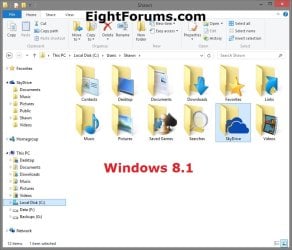
EXAMPLE: User Folders
NOTE: This is at the default C:\Users\(user-name) location.
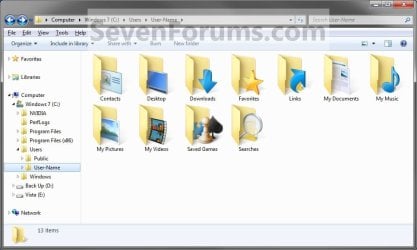
Example1.jpg

Windows_8.1.jpg


OPTION ONE

To Change Main User Profile Folder Location


1. For how, see:
http://www.sevenforums.com/tutorials/87555-user-profile-change-default-location.html

OR

How to Relocate User Profiles to another Partition or Disk in Windows 8


OPTION TWO

To Change User Folders Location from within User Profile Folder


1. If you a part of a homegroup, then you will need to change the homegroup settings to no longer share the user folder (ex: My Music) that you want to move first by unchecking the folder and clicking on Save Changes. (see screenshot below)
NOTE: This is so the user folder (ex: My Music) will not be shared on the homegroup anymore.
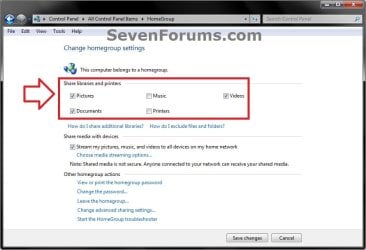
Homegroup.jpg
2. In Windows Explorer, navigate to where (ex: D: drive) you want to move the default user folder (ex: My Music) location to.

3. Create a New Folder by right clicking or press and hold on a empty space in the main window there, and click/tap on New and Folder. Name the new folder without spaces (ex: "Music" for My Music) for the user folder that you want to move there. (See screenshots below)
NOTE: The name that you type in for the new folder will be what you see as the user folder name in the Start Menu (shell:UsersFilesFolder) location when finished with all of these steps. It would be best to use the same name as the user folder to avoid confusion.
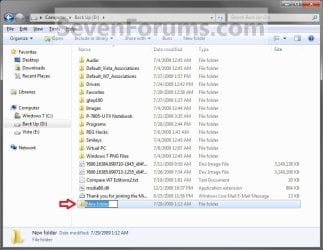
Rename1.jpg

Rename2.jpg

4. Close this window. (See screenshots above)

5. Press the Windows+R keys to open the Run dialog, type shell:UsersFilesFolder, and press enter.
NOTE: This will open your C:\Users\(user-name) folder.

6. Right click or press and hold on a user folder (ex: My Music, My Documents, My Pictures, etc.....) that you want to move the default location for, and click/tap on Properties. (See screenshot below)
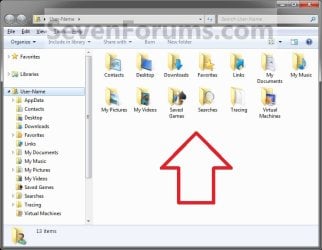
Right_Click_On_A_User_Folder.jpg
7. Click/tap on the Location tab, and Move button. (See screenshot below)
Properties1.jpg
8. Navigate to the same location as in step 2 and 3 above, then select the renamed new folder (ex: Music), and click/tap on the Select Folder button. (See screenshot below)
Properties2.jpg
9. Click/tap on OK. (See screenshot below)
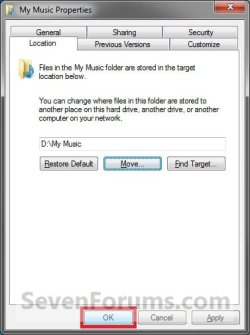
Properties3.jpg
10. Click/tap on Yes. (See screenshot below)
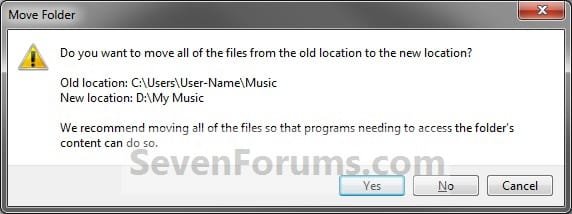
Properties4.jpg
11. After a few seconds when the location has been changed, the Properties window (screenshot under step 9) will then close.

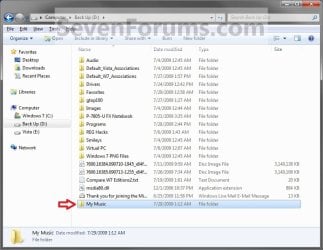
12. Check back at the C:\Users\(user-name) location to make sure that the old user folder (ex: My Music) that you moved is no longer there. If it is, then make sure that the contents of the folder were moved to the new location, and delete it. (See screenshot below)
NOTE: If you are unable to delete the folder, then restart the computer and try again.
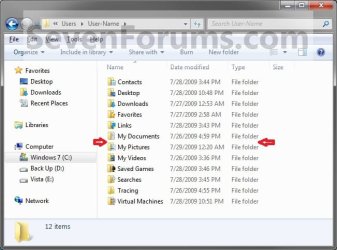
Finished2.jpg
13. You will notice that the folder at the shell:UsersFilesFolder location and the new location (ex: D drive) you moved the user folder to, now has the default user folder (ex: My Music) icon. (See screenshot below)
NOTE: The Start Menu in Windows 7 now opens the user folder from the new location (ex: D: drive) that you moved the user folder to.
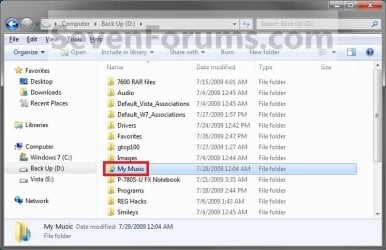
Finished.jpg
14. If you a part of a homegroup, then you can now change the homegroup settings back to share the user folder (ex: My Music) again if you like by checking the folder, and click/tap on Save Changes. (see screenshot below)
Homegroup.jpg
   Tip
If you wanted to restore the default location of the user folder, then see:

How to Restore the Default Location of User Folders in Windows 7 and Windows 8


That's it,
Shawn


Last edited:
  • Like
Reactions: Lee
Thank you whs and Brink,

My Libraries are set exactly how I was hoping they would be. It was easy with your help and assistance. Thank you very much. :D

whs, I like the idea of of keeping the system folder listed in the Library. It keeps me alert as to what an app writes into the system folder.

You're most welcome Techron. I'm glad that we were able to help. :)
 
Last edited:

My Computer

Computer type
PC/Desktop
Computer Manufacturer/Model Number
Self built custom
OS
64-bit Windows 11 Pro for Workstations
CPU
Intel i7-8700K OC'd to 5 GHz
Motherboard
ASUS ROG Maximus XI Formula Z390
Memory
64 GB (4x16GB) G.SKILL TridentZ RGB DDR4 3600 MHz
Graphics Card(s)
ASUS ROG-STRIX-GTX1080TI-O11G-GAMING
Sound Card
Integrated
Monitor(s) Displays
2 x Samsung Odyssey G7 27"
Screen Resolution
2560x1440
Hard Drives
1TB Samsung 990 PRO M.2,
4TB Samsung 990 PRO PRO M.2,
TerraMaster F8 SSD Plus NAS
PSU
Seasonic Prime Titanium 850W
Case
Thermaltake Core P3
Cooling
Corsair Hydro H115i
Keyboard
Logitech wireless K800
Mouse
Logitech MX Master 4
Internet Speed
2 Gb/s Download and 100 Mb/s Upload
Antivirus
Malwarebyte Anti-Malware Premium
Browser
Google Chrome
Other Info
Logitech Z625 speaker system,
Logitech BRIO 4K Pro webcam,
HP Color LaserJet Pro MFP M477fdn,
APC SMART-UPS RT 1000 XL - SURT1000XLI,
Galaxy S23 Plus phone
Tried clicking on the Rep button to send my "mahalo" and "aloha" your way but informed I need to spread the aloha around. Learning more about this forum everyday. Much thanks.
 

My Computer

Computer Manufacturer/Model Number
HP Pavilion Elite 9280t
OS
Windows 7
CPU
Intel Core i7 CPU 920
Memory
9GB DDR3
Graphics Card(s)
ATI Radeon 4650
Monitor(s) Displays
Samsung 24"
Screen Resolution
1776 x 1000
Hard Drives
600GB & 1.5TB
Internet Speed
Verizon Fios
Tried clicking on the Rep button to send my "mahalo" and "aloha" your way but informed I need to spread the aloha around. Learning more about this forum everyday. Much thanks.
No Problem. We are happy to see a happy camper. :)
 

My Computer

Computer Manufacturer/Model Number
HP, Dell, Gateway, Toshiba - 4 laptops and 2 desktops
OS
Vista, Windows7, Mint Mate, Zorin, Windows 8
CPU
from 1.6GHz Duo to i7
Monitor(s) Displays
2x HP w2207
Hard Drives
5x HDD, 7x SSD, 12x Externals
Keyboard
with trackball - no mices
Mouse
Trackball mice
Internet Speed
DSL 6000
:ditto:

Yep. :)
 

My Computer

Computer type
PC/Desktop
Computer Manufacturer/Model Number
Self built custom
OS
64-bit Windows 11 Pro for Workstations
CPU
Intel i7-8700K OC'd to 5 GHz
Motherboard
ASUS ROG Maximus XI Formula Z390
Memory
64 GB (4x16GB) G.SKILL TridentZ RGB DDR4 3600 MHz
Graphics Card(s)
ASUS ROG-STRIX-GTX1080TI-O11G-GAMING
Sound Card
Integrated
Monitor(s) Displays
2 x Samsung Odyssey G7 27"
Screen Resolution
2560x1440
Hard Drives
1TB Samsung 990 PRO M.2,
4TB Samsung 990 PRO PRO M.2,
TerraMaster F8 SSD Plus NAS
PSU
Seasonic Prime Titanium 850W
Case
Thermaltake Core P3
Cooling
Corsair Hydro H115i
Keyboard
Logitech wireless K800
Mouse
Logitech MX Master 4
Internet Speed
2 Gb/s Download and 100 Mb/s Upload
Antivirus
Malwarebyte Anti-Malware Premium
Browser
Google Chrome
Other Info
Logitech Z625 speaker system,
Logitech BRIO 4K Pro webcam,
HP Color LaserJet Pro MFP M477fdn,
APC SMART-UPS RT 1000 XL - SURT1000XLI,
Galaxy S23 Plus phone
If I move a default folder to another drive and drag and drop a file into the relocated default folder will the system make a copy (like in usb drives) or will the file simply be moved (as it should)? If it makes a copy, is there a way to change that behavior per folder so the system actually moves the file,? I know that a move equals to copy-delete and I don't want to make a right click or use the SHIFT key :)

BTW is there a global way to disable the copy of files into a different drive so the files are moved instead?
 

My Computer

Computer Manufacturer/Model Number
Me!!!
OS
Windows 7 Ultimate 32bit.
CPU
Intel Core2Duo 2.4
Motherboard
Intel DG965WGH
Memory
Kingston 1GB
Graphics Card(s)
ATI Radeon HD4670
Monitor(s) Displays
Old CRT's RULE!!!
Screen Resolution
1024x768
Hard Drives
2 Seagate Barracudas

1) 160GB OS
2) 1.5TB files and pagefile
PSU
stock (300W?)
Case
cheap case
Cooling
stock fan
Keyboard
Genius klp0210
Mouse
Logitech M-BZ96C
Internet Speed
512K :(

My Computer

Computer type
PC/Desktop
Computer Manufacturer/Model Number
Self built custom
OS
64-bit Windows 11 Pro for Workstations
CPU
Intel i7-8700K OC'd to 5 GHz
Motherboard
ASUS ROG Maximus XI Formula Z390
Memory
64 GB (4x16GB) G.SKILL TridentZ RGB DDR4 3600 MHz
Graphics Card(s)
ASUS ROG-STRIX-GTX1080TI-O11G-GAMING
Sound Card
Integrated
Monitor(s) Displays
2 x Samsung Odyssey G7 27"
Screen Resolution
2560x1440
Hard Drives
1TB Samsung 990 PRO M.2,
4TB Samsung 990 PRO PRO M.2,
TerraMaster F8 SSD Plus NAS
PSU
Seasonic Prime Titanium 850W
Case
Thermaltake Core P3
Cooling
Corsair Hydro H115i
Keyboard
Logitech wireless K800
Mouse
Logitech MX Master 4
Internet Speed
2 Gb/s Download and 100 Mb/s Upload
Antivirus
Malwarebyte Anti-Malware Premium
Browser
Google Chrome
Other Info
Logitech Z625 speaker system,
Logitech BRIO 4K Pro webcam,
HP Color LaserJet Pro MFP M477fdn,
APC SMART-UPS RT 1000 XL - SURT1000XLI,
Galaxy S23 Plus phone
If I move a default folder to another drive and drag and drop a file into the relocated default folder will the system make a copy (like in usb drives) or will the file simply be moved (as it should)? If it makes a copy, is there a way to change that behavior per folder so the system actually moves the file,? I know that a move equals to copy-delete and I don't want to make a right click or use the SHIFT key :)

BTW is there a global way to disable the copy of files into a different drive so the files are moved instead?
In general it is not a good idea to 'move' important data - especially to external drives. Too often files get lost during the move operation.

It is better to copy files and once you made sure that the data arrived at the new location, then you delete the original file.
 

My Computer

Computer Manufacturer/Model Number
HP, Dell, Gateway, Toshiba - 4 laptops and 2 desktops
OS
Vista, Windows7, Mint Mate, Zorin, Windows 8
CPU
from 1.6GHz Duo to i7
Monitor(s) Displays
2x HP w2207
Hard Drives
5x HDD, 7x SSD, 12x Externals
Keyboard
with trackball - no mices
Mouse
Trackball mice
Internet Speed
DSL 6000
Ok, It's good to know the file will be moved without right clicks ;) or SHIFTs before I do this.

@WHS I'm not moving files to external drives, the problem is that I want to use another internal hard drive for user folders so I'm not as concerned that something may go wrong as with external drives.

Thanks.
 
Last edited:

My Computer

Computer Manufacturer/Model Number
Me!!!
OS
Windows 7 Ultimate 32bit.
CPU
Intel Core2Duo 2.4
Motherboard
Intel DG965WGH
Memory
Kingston 1GB
Graphics Card(s)
ATI Radeon HD4670
Monitor(s) Displays
Old CRT's RULE!!!
Screen Resolution
1024x768
Hard Drives
2 Seagate Barracudas

1) 160GB OS
2) 1.5TB files and pagefile
PSU
stock (300W?)
Case
cheap case
Cooling
stock fan
Keyboard
Genius klp0210
Mouse
Logitech M-BZ96C
Internet Speed
512K :(
hello brink... thank you for your awesome awesome tutorial, this is kungfupanda from SEA, indonesia. : peace:


i'd like to ask, is it possible to move desktop folder also...? not only my music, pictures, etc, but also desktop?


second, im about to do a clean windows install. But im kinda confused whether to use this user folders tutorial or the user profile move during installation tutorial....


I'd like to ask your advice...


I notice that if i use the "user profile move", then my D partition will become system partition also.


While if i use this "user folders location change tutorial", my D partition will be just D


My main consideration is that, im using imaging software (macrium free), and i'd like to backup only my C (windows 7) system drive. I don't want to full backup D, because its too much data not enough space for my external HDD.


so the question is, if i use the user profile move during installation tutorial, will I have to backup D drive when i use image too (since it's system drive), in order to make the image backup/recovery runs smoothly.


What's the pros and cons to the 2 methods...?


so sorry and many thank you's


:cheers:
 

My Computer

Computer type
Laptop
Computer Manufacturer/Model Number
Asus K43S
OS
windows 7 home premium 64bit
CPU
Intel Core i3-2330m
Memory
6 Gib 10600 DDR3 RAM
Graphics Card(s)
Radeon 6730
Monitor(s) Displays
Generic PnP Monitor
Hard Drives
Intel SSD 330 Series 120 Gb
Seagate Momentus 750 Gb
Internet Speed
Slow, lol
Antivirus
KIS 2013
Hello kungfupanda,

To move the Desktop folder, you could use the tutorial below instead since this is for an existing user account. :)

http://www.sevenforums.com/tutorials/87555-user-profile-change-default-location.html

However, if you move the profile to another drive, it will need to be included in any image backup as well.

If this is about space issues on your C: drive, then you might consider having what you want in folders on another drive, then include the folders in libraries of your choice.

Hope this helps,
Shawn
 

My Computer

Computer type
PC/Desktop
Computer Manufacturer/Model Number
Self built custom
OS
64-bit Windows 11 Pro for Workstations
CPU
Intel i7-8700K OC'd to 5 GHz
Motherboard
ASUS ROG Maximus XI Formula Z390
Memory
64 GB (4x16GB) G.SKILL TridentZ RGB DDR4 3600 MHz
Graphics Card(s)
ASUS ROG-STRIX-GTX1080TI-O11G-GAMING
Sound Card
Integrated
Monitor(s) Displays
2 x Samsung Odyssey G7 27"
Screen Resolution
2560x1440
Hard Drives
1TB Samsung 990 PRO M.2,
4TB Samsung 990 PRO PRO M.2,
TerraMaster F8 SSD Plus NAS
PSU
Seasonic Prime Titanium 850W
Case
Thermaltake Core P3
Cooling
Corsair Hydro H115i
Keyboard
Logitech wireless K800
Mouse
Logitech MX Master 4
Internet Speed
2 Gb/s Download and 100 Mb/s Upload
Antivirus
Malwarebyte Anti-Malware Premium
Browser
Google Chrome
Other Info
Logitech Z625 speaker system,
Logitech BRIO 4K Pro webcam,
HP Color LaserJet Pro MFP M477fdn,
APC SMART-UPS RT 1000 XL - SURT1000XLI,
Galaxy S23 Plus phone
Hello kungfupanda,

To move the Desktop folder, you could use the tutorial below instead since this is for an existing user account. :)

http://www.sevenforums.com/tutorials/87555-user-profile-change-default-location.html

However, if you move the profile to another drive, it will need to be included in any image backup as well.

If this is about space issues on your C: drive, then you might consider having what you want in folders on another drive, then include the folders in libraries of your choice.

Hope this helps,
Shawn


Hi Shawn,


umm... thank you for your answer... it really helps, since im going to do clean windows install...

however, there is one issue im still not clear yet...


so... if i only move to D the below folders

my documents
my pictures
my music
my videos

i can just use this user folders change tutorial... and the system will only be on C drive,


however.., i can't move desktop folder using this tutorial.

if i move desktop folders to D, then the D drive would become system drive...?
and i have to use User Profile - Change Default Location tutorial, and cannot use this tutorial to move desktop folders...?


did i get it right...?


If i did, is there a safe way to move desktop folder to D without moving the user profile/system with it...


thank you,,,,


Fajar
 

My Computer

Computer type
Laptop
Computer Manufacturer/Model Number
Asus K43S
OS
windows 7 home premium 64bit
CPU
Intel Core i3-2330m
Memory
6 Gib 10600 DDR3 RAM
Graphics Card(s)
Radeon 6730
Monitor(s) Displays
Generic PnP Monitor
Hard Drives
Intel SSD 330 Series 120 Gb
Seagate Momentus 750 Gb
Internet Speed
Slow, lol
Antivirus
KIS 2013
Fajar,

Sorry. Since you wanted to do a clean install, then you would want to use the user profile move during installation tutorial to be able to move the entire user profile to D. This would be the only way to move Desktop to D. :)
 

My Computer

Computer type
PC/Desktop
Computer Manufacturer/Model Number
Self built custom
OS
64-bit Windows 11 Pro for Workstations
CPU
Intel i7-8700K OC'd to 5 GHz
Motherboard
ASUS ROG Maximus XI Formula Z390
Memory
64 GB (4x16GB) G.SKILL TridentZ RGB DDR4 3600 MHz
Graphics Card(s)
ASUS ROG-STRIX-GTX1080TI-O11G-GAMING
Sound Card
Integrated
Monitor(s) Displays
2 x Samsung Odyssey G7 27"
Screen Resolution
2560x1440
Hard Drives
1TB Samsung 990 PRO M.2,
4TB Samsung 990 PRO PRO M.2,
TerraMaster F8 SSD Plus NAS
PSU
Seasonic Prime Titanium 850W
Case
Thermaltake Core P3
Cooling
Corsair Hydro H115i
Keyboard
Logitech wireless K800
Mouse
Logitech MX Master 4
Internet Speed
2 Gb/s Download and 100 Mb/s Upload
Antivirus
Malwarebyte Anti-Malware Premium
Browser
Google Chrome
Other Info
Logitech Z625 speaker system,
Logitech BRIO 4K Pro webcam,
HP Color LaserJet Pro MFP M477fdn,
APC SMART-UPS RT 1000 XL - SURT1000XLI,
Galaxy S23 Plus phone
Fajar,

Sorry. Since you wanted to do a clean install, then you would want to use the user profile move during installation tutorial to be able to move the entire user profile to D. This would be the only way to move Desktop to D. :)


i see... oh.... okay... that is the only way to move desktop to D. :). Thank you for the answer.


sorry if i seem like dumb / repeating a question.....


my last question is,
Despite it being the only way to move desktop to D, if i move the desktop to D.... the cons is that, i have to image D too using macrium, since it's a system...?


Am i getting it right...? :D


If that so, i think i'd rather move my docs/video/musics/picts only using this user folders tutorial.

Also... I'd like to ask, from what i can infer from your posts on this thread and the user profile create move, it seems like, you sort of recommend to do the user profile move, than user folders move...


Is there any stuff I should be aware of, if i decide to use the user folders tutorial instead..?


thank you,


Fajar
 

My Computer

Computer type
Laptop
Computer Manufacturer/Model Number
Asus K43S
OS
windows 7 home premium 64bit
CPU
Intel Core i3-2330m
Memory
6 Gib 10600 DDR3 RAM
Graphics Card(s)
Radeon 6730
Monitor(s) Displays
Generic PnP Monitor
Hard Drives
Intel SSD 330 Series 120 Gb
Seagate Momentus 750 Gb
Internet Speed
Slow, lol
Antivirus
KIS 2013
Fajar,

Yep, if you move your user profile to D in order to also have your Desktop moved to D, then you would need to include D in a image backup since it's now part of Windows 7.


My personal recommendation is to create new folders on D for your docs/video/musics/picts etc..., then include the folders in the appropriate library instead. This way this is stored on D with you being able to view them all in the libraries. Plus, you do not have to include D in the image backup.
 

My Computer

Computer type
PC/Desktop
Computer Manufacturer/Model Number
Self built custom
OS
64-bit Windows 11 Pro for Workstations
CPU
Intel i7-8700K OC'd to 5 GHz
Motherboard
ASUS ROG Maximus XI Formula Z390
Memory
64 GB (4x16GB) G.SKILL TridentZ RGB DDR4 3600 MHz
Graphics Card(s)
ASUS ROG-STRIX-GTX1080TI-O11G-GAMING
Sound Card
Integrated
Monitor(s) Displays
2 x Samsung Odyssey G7 27"
Screen Resolution
2560x1440
Hard Drives
1TB Samsung 990 PRO M.2,
4TB Samsung 990 PRO PRO M.2,
TerraMaster F8 SSD Plus NAS
PSU
Seasonic Prime Titanium 850W
Case
Thermaltake Core P3
Cooling
Corsair Hydro H115i
Keyboard
Logitech wireless K800
Mouse
Logitech MX Master 4
Internet Speed
2 Gb/s Download and 100 Mb/s Upload
Antivirus
Malwarebyte Anti-Malware Premium
Browser
Google Chrome
Other Info
Logitech Z625 speaker system,
Logitech BRIO 4K Pro webcam,
HP Color LaserJet Pro MFP M477fdn,
APC SMART-UPS RT 1000 XL - SURT1000XLI,
Galaxy S23 Plus phone
Fajar,

Yep, if you move your user profile to D in order to also have your Desktop moved to D, then you would need to include D in a image backup since it's now part of Windows 7.


My personal recommendation is to create new folders on D for your docs/video/musics/picts etc..., then include the folders in the appropriate library instead. This way this is stored on D with you being able to view them all in the libraries. Plus, you do not have to include D in the image backup.


Hi Shawn, as always, thank you for the answer, advice, and being okay with the way i contact you >___<


will including folders in appropriate library makes it green color? how to make it green folder?


thank youuuu....
.

:beer:


ps: i contacted you the way i did because i wanna do it right the first time since im clean installing windows anw.


:cheers:
 
Last edited:

My Computer

Computer type
Laptop
Computer Manufacturer/Model Number
Asus K43S
OS
windows 7 home premium 64bit
CPU
Intel Core i3-2330m
Memory
6 Gib 10600 DDR3 RAM
Graphics Card(s)
Radeon 6730
Monitor(s) Displays
Generic PnP Monitor
Hard Drives
Intel SSD 330 Series 120 Gb
Seagate Momentus 750 Gb
Internet Speed
Slow, lol
Antivirus
KIS 2013
Fajar,

You're most welcome.

No, it will be a normal folder on D, but you would access that folder through your library instead though.
 

My Computer

Computer type
PC/Desktop
Computer Manufacturer/Model Number
Self built custom
OS
64-bit Windows 11 Pro for Workstations
CPU
Intel i7-8700K OC'd to 5 GHz
Motherboard
ASUS ROG Maximus XI Formula Z390
Memory
64 GB (4x16GB) G.SKILL TridentZ RGB DDR4 3600 MHz
Graphics Card(s)
ASUS ROG-STRIX-GTX1080TI-O11G-GAMING
Sound Card
Integrated
Monitor(s) Displays
2 x Samsung Odyssey G7 27"
Screen Resolution
2560x1440
Hard Drives
1TB Samsung 990 PRO M.2,
4TB Samsung 990 PRO PRO M.2,
TerraMaster F8 SSD Plus NAS
PSU
Seasonic Prime Titanium 850W
Case
Thermaltake Core P3
Cooling
Corsair Hydro H115i
Keyboard
Logitech wireless K800
Mouse
Logitech MX Master 4
Internet Speed
2 Gb/s Download and 100 Mb/s Upload
Antivirus
Malwarebyte Anti-Malware Premium
Browser
Google Chrome
Other Info
Logitech Z625 speaker system,
Logitech BRIO 4K Pro webcam,
HP Color LaserJet Pro MFP M477fdn,
APC SMART-UPS RT 1000 XL - SURT1000XLI,
Galaxy S23 Plus phone
Fajar,

You're most welcome.

No, it will be a normal folder on D, but you would access that folder through your library instead though.


Dear brink.... thank you for your answer...


My last question is.... will moving my music folder to D partition have potential of creating a problem with iTunes...?


particularly the folder "automatically add to iTunes" that itunes created on installation...


thank youuuuuuuuu


:beer:
 

My Computer

Computer type
Laptop
Computer Manufacturer/Model Number
Asus K43S
OS
windows 7 home premium 64bit
CPU
Intel Core i3-2330m
Memory
6 Gib 10600 DDR3 RAM
Graphics Card(s)
Radeon 6730
Monitor(s) Displays
Generic PnP Monitor
Hard Drives
Intel SSD 330 Series 120 Gb
Seagate Momentus 750 Gb
Internet Speed
Slow, lol
Antivirus
KIS 2013
If you create a new folder say "Music" on D and include it in the say Music library, then you are not moving any folders.

You would just need to check to make sure that iTunes is set to look in say the Music library for files to play though.
 

My Computer

Computer type
PC/Desktop
Computer Manufacturer/Model Number
Self built custom
OS
64-bit Windows 11 Pro for Workstations
CPU
Intel i7-8700K OC'd to 5 GHz
Motherboard
ASUS ROG Maximus XI Formula Z390
Memory
64 GB (4x16GB) G.SKILL TridentZ RGB DDR4 3600 MHz
Graphics Card(s)
ASUS ROG-STRIX-GTX1080TI-O11G-GAMING
Sound Card
Integrated
Monitor(s) Displays
2 x Samsung Odyssey G7 27"
Screen Resolution
2560x1440
Hard Drives
1TB Samsung 990 PRO M.2,
4TB Samsung 990 PRO PRO M.2,
TerraMaster F8 SSD Plus NAS
PSU
Seasonic Prime Titanium 850W
Case
Thermaltake Core P3
Cooling
Corsair Hydro H115i
Keyboard
Logitech wireless K800
Mouse
Logitech MX Master 4
Internet Speed
2 Gb/s Download and 100 Mb/s Upload
Antivirus
Malwarebyte Anti-Malware Premium
Browser
Google Chrome
Other Info
Logitech Z625 speaker system,
Logitech BRIO 4K Pro webcam,
HP Color LaserJet Pro MFP M477fdn,
APC SMART-UPS RT 1000 XL - SURT1000XLI,
Galaxy S23 Plus phone
If you create a new folder say "Music" on D and include it in the say Music library, then you are not moving any folders.

You would just need to check to make sure that iTunes is set to look in say the Music library for files to play though.


Brink...


thanks a lot.


glad you could help


hehe peace: :D
 

My Computer

Computer type
Laptop
Computer Manufacturer/Model Number
Asus K43S
OS
windows 7 home premium 64bit
CPU
Intel Core i3-2330m
Memory
6 Gib 10600 DDR3 RAM
Graphics Card(s)
Radeon 6730
Monitor(s) Displays
Generic PnP Monitor
Hard Drives
Intel SSD 330 Series 120 Gb
Seagate Momentus 750 Gb
Internet Speed
Slow, lol
Antivirus
KIS 2013
You're most welcome Fajar. :)
 

My Computer

Computer type
PC/Desktop
Computer Manufacturer/Model Number
Self built custom
OS
64-bit Windows 11 Pro for Workstations
CPU
Intel i7-8700K OC'd to 5 GHz
Motherboard
ASUS ROG Maximus XI Formula Z390
Memory
64 GB (4x16GB) G.SKILL TridentZ RGB DDR4 3600 MHz
Graphics Card(s)
ASUS ROG-STRIX-GTX1080TI-O11G-GAMING
Sound Card
Integrated
Monitor(s) Displays
2 x Samsung Odyssey G7 27"
Screen Resolution
2560x1440
Hard Drives
1TB Samsung 990 PRO M.2,
4TB Samsung 990 PRO PRO M.2,
TerraMaster F8 SSD Plus NAS
PSU
Seasonic Prime Titanium 850W
Case
Thermaltake Core P3
Cooling
Corsair Hydro H115i
Keyboard
Logitech wireless K800
Mouse
Logitech MX Master 4
Internet Speed
2 Gb/s Download and 100 Mb/s Upload
Antivirus
Malwarebyte Anti-Malware Premium
Browser
Google Chrome
Other Info
Logitech Z625 speaker system,
Logitech BRIO 4K Pro webcam,
HP Color LaserJet Pro MFP M477fdn,
APC SMART-UPS RT 1000 XL - SURT1000XLI,
Galaxy S23 Plus phone
Back
Top