
You are using an out of date browser. It may not display this or other websites correctly.
You should upgrade or use an alternative browser.
You should upgrade or use an alternative browser.
User Permissions Standard user
- Thread starter Namenone
- Start date

Don t you see the other user there, too?
My Computer
- Computer type
- PC/Desktop
- Computer Manufacturer/Model Number
- Dell XPS 420
- OS
- Windows 10, Home Clean Install
- CPU
- Intel Core2 processsor Q8200(2.33Ghz 1333FSB) Quad Core Tech
- Motherboard
- Dell
- Memory
- 6 gb
- Graphics Card(s)
- ATI Radeon 256MB HD3650
- Sound Card
- Intergrated 7.1 Channel Audio
- Monitor(s) Displays
- Dell SP2009W 20"
- Hard Drives
- 640 GB Serial ATA Hard drive
- Cooling
- Fan
- Keyboard
- Dell USB Keyboard
- Mouse
- Dell Premium Optical USB
- Internet Speed
- DSL 2.85
Ok there are 3 users. There is the administrator account your account and the other users account.
Make a system restore point, just in case.
Then make sure that your account has full priviledge.
Then go to the other user and limit as you see fit.
This should be a very basic and simple procedure. I have given it to many others and it always worked. However, the last time you tried something went wrong. Maybe, it was me or maybe you or maybe a malfunction in the computer. So I just want to suggest, when you do it this time, if you are doing the same as the last time, you may not want to try. I want to further suggest that if something does go wrong, System Restore is suppose to work but if it does not it will be difficult to access those folders. So you may want to back the folders up first.
Make a system restore point, just in case.
Then make sure that your account has full priviledge.
Then go to the other user and limit as you see fit.
This should be a very basic and simple procedure. I have given it to many others and it always worked. However, the last time you tried something went wrong. Maybe, it was me or maybe you or maybe a malfunction in the computer. So I just want to suggest, when you do it this time, if you are doing the same as the last time, you may not want to try. I want to further suggest that if something does go wrong, System Restore is suppose to work but if it does not it will be difficult to access those folders. So you may want to back the folders up first.
My Computer
- Computer type
- PC/Desktop
- Computer Manufacturer/Model Number
- Dell XPS 420
- OS
- Windows 10, Home Clean Install
- CPU
- Intel Core2 processsor Q8200(2.33Ghz 1333FSB) Quad Core Tech
- Motherboard
- Dell
- Memory
- 6 gb
- Graphics Card(s)
- ATI Radeon 256MB HD3650
- Sound Card
- Intergrated 7.1 Channel Audio
- Monitor(s) Displays
- Dell SP2009W 20"
- Hard Drives
- 640 GB Serial ATA Hard drive
- Cooling
- Fan
- Keyboard
- Dell USB Keyboard
- Mouse
- Dell Premium Optical USB
- Internet Speed
- DSL 2.85
Hey just noticed a problem. ( i wil lget back to the user permissions when i get back home, but i just wanted to ask you about htis)
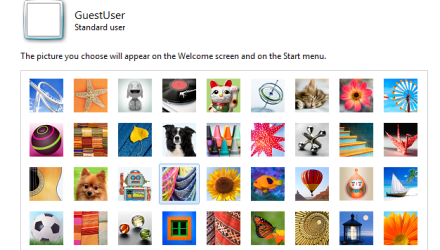
Since i done the system restore the previous time ive noticed some problems, For example, On Windows live messenger i cannot change my display picture from the default one, i can see some of the different display pictures to pick but it wont change when i press it. Also, when i click on someones name to start a conversation it hangs for a minute or two, And ive noticed that when i manage user accounts on windows 7 i cannot change my display plcture for the login screen, it stays blank. I know this isnt a huge problem, but its a brand new laptop and was just wondering if you know the cause of this? Its been happening since the system restore.
Since i done the system restore the previous time ive noticed some problems, For example, On Windows live messenger i cannot change my display picture from the default one, i can see some of the different display pictures to pick but it wont change when i press it. Also, when i click on someones name to start a conversation it hangs for a minute or two, And ive noticed that when i manage user accounts on windows 7 i cannot change my display plcture for the login screen, it stays blank. I know this isnt a huge problem, but its a brand new laptop and was just wondering if you know the cause of this? Its been happening since the system restore.
Attachments
My Computer
- OS
- Windows 7
I dont know the answer, but I truly doubt that it is system restore. I have used it myself on many ocassions and have given that advice to many and a problem has never been reported. On some ocassions it has been reported that SR did not solve the problem but that is it.
I did notice that all the problems are related to pictures, there is some other corruption at work, here. When you get back we may be able to fix it with a SFC system file check.
Sorry that you are having problems with a new computer.
I did notice that all the problems are related to pictures, there is some other corruption at work, here. When you get back we may be able to fix it with a SFC system file check.
Sorry that you are having problems with a new computer.
My Computer
- Computer type
- PC/Desktop
- Computer Manufacturer/Model Number
- Dell XPS 420
- OS
- Windows 10, Home Clean Install
- CPU
- Intel Core2 processsor Q8200(2.33Ghz 1333FSB) Quad Core Tech
- Motherboard
- Dell
- Memory
- 6 gb
- Graphics Card(s)
- ATI Radeon 256MB HD3650
- Sound Card
- Intergrated 7.1 Channel Audio
- Monitor(s) Displays
- Dell SP2009W 20"
- Hard Drives
- 640 GB Serial ATA Hard drive
- Cooling
- Fan
- Keyboard
- Dell USB Keyboard
- Mouse
- Dell Premium Optical USB
- Internet Speed
- DSL 2.85
Ok thanks! Im home now and ive just noticed that when i press start and try to search something, nothing comes up, when i click on see more results i get the following error.
Windows cannot access the specified device, path, or file. You may not have the appropriate permissions to access the item.
I dont know why this is still happening, i did do a system restore before and havent changed any permissions since.
And when i try to change permissions for C:\Users, i get access is denied. Should i do a system restore again, or can this be fixed?
Note that my folders under user have a lock icon next to them.
Thanks so much for the help.
Windows cannot access the specified device, path, or file. You may not have the appropriate permissions to access the item.
I dont know why this is still happening, i did do a system restore before and havent changed any permissions since.
And when i try to change permissions for C:\Users, i get access is denied. Should i do a system restore again, or can this be fixed?
Note that my folders under user have a lock icon next to them.
Thanks so much for the help.
My Computer
- OS
- Windows 7
I do not understand this either, after the System Restore you had access and everything worked well. Now all that has changed. I do not know what changes you made when we tried to adjust the permissions on the folders. What folder did you try to change permisison on? Hopefully, it was just a personal document.
My Computer
- Computer type
- PC/Desktop
- Computer Manufacturer/Model Number
- Dell XPS 420
- OS
- Windows 10, Home Clean Install
- CPU
- Intel Core2 processsor Q8200(2.33Ghz 1333FSB) Quad Core Tech
- Motherboard
- Dell
- Memory
- 6 gb
- Graphics Card(s)
- ATI Radeon 256MB HD3650
- Sound Card
- Intergrated 7.1 Channel Audio
- Monitor(s) Displays
- Dell SP2009W 20"
- Hard Drives
- 640 GB Serial ATA Hard drive
- Cooling
- Fan
- Keyboard
- Dell USB Keyboard
- Mouse
- Dell Premium Optical USB
- Internet Speed
- DSL 2.85
Go back to a point that you know that everything worked. Hopefully it will work, again this time, but doubtful
Last edited:
My Computer
- Computer type
- PC/Desktop
- Computer Manufacturer/Model Number
- Dell XPS 420
- OS
- Windows 10, Home Clean Install
- CPU
- Intel Core2 processsor Q8200(2.33Ghz 1333FSB) Quad Core Tech
- Motherboard
- Dell
- Memory
- 6 gb
- Graphics Card(s)
- ATI Radeon 256MB HD3650
- Sound Card
- Intergrated 7.1 Channel Audio
- Monitor(s) Displays
- Dell SP2009W 20"
- Hard Drives
- 640 GB Serial ATA Hard drive
- Cooling
- Fan
- Keyboard
- Dell USB Keyboard
- Mouse
- Dell Premium Optical USB
- Internet Speed
- DSL 2.85

MacGyvr
Banned
System Restore does not change all file permissions back to the way they were before a change was made. Remember that System Restore only affects system files, not user files, so if permissions were changed on user folders, they will not be repaired by a System Restore, unfortunately. The user will need to create a new account for themselves and delete their current account to even come close to fixing this problem, and even that probably won't do it. The best course of action at this point is a full wipe and reinstall of the OS.
My Computer
- Computer Manufacturer/Model Number
- Custom
- OS
- Windows 7 Ultimate RTM (Technet)
- CPU
- 3.00 gigahertz Intel Core2 Duo E8400
- Motherboard
- ASUSTeK Computer INC. P5K/EPU Rev 1.xx
- Memory
- 4GB
- Graphics Card(s)
- ATI Radeon X1950 Pro
- Sound Card
- Built in HD Audio
- Monitor(s) Displays
- 22" Gateway LCD
- Screen Resolution
- 1920 x 1200
- Hard Drives
- ST3160023A [Hard drive] (160.04 GB) -- drive 0, rev 8.01, ST3500630AS [Hard drive] (500.11 GB) -- drive 2, rev 3.AAK
ST3500630AS [Hard drive] (500.11 GB) -- drive 1, rev 3.AAK
- Keyboard
- Logitech G11
- Mouse
- Microsoft Wireless Laser Mouse 5000
- Internet Speed
- 13.44 Mbps
MacGyvr
Banned
VERY doubtful at this point. You will waste much more time trying to fix it than you will doing a reinstall. User folder permissions are very particular and each folder can have subtle differences. If you made a change at the top level, you'll never get them all back the way they should be and the results will be unpredictable at best.
My Computer
- Computer Manufacturer/Model Number
- Custom
- OS
- Windows 7 Ultimate RTM (Technet)
- CPU
- 3.00 gigahertz Intel Core2 Duo E8400
- Motherboard
- ASUSTeK Computer INC. P5K/EPU Rev 1.xx
- Memory
- 4GB
- Graphics Card(s)
- ATI Radeon X1950 Pro
- Sound Card
- Built in HD Audio
- Monitor(s) Displays
- 22" Gateway LCD
- Screen Resolution
- 1920 x 1200
- Hard Drives
- ST3160023A [Hard drive] (160.04 GB) -- drive 0, rev 8.01, ST3500630AS [Hard drive] (500.11 GB) -- drive 2, rev 3.AAK
ST3500630AS [Hard drive] (500.11 GB) -- drive 1, rev 3.AAK
- Keyboard
- Logitech G11
- Mouse
- Microsoft Wireless Laser Mouse 5000
- Internet Speed
- 13.44 Mbps
Fixed it.
You need to go into the top-level folder's Properties, Security, Advanced, Change Permissions, then check the box "Replace all child object permissions with inheritable permissions from this object".
You need to go into the top-level folder's Properties, Security, Advanced, Change Permissions, then check the box "Replace all child object permissions with inheritable permissions from this object".
My Computer
- OS
- Windows 7
Good
This is what we do. It seems that you made a potentially serious mistake when trying to change permissions. It is my opinion that it might be better not to try to change the permisiions. We do not want a big problem when trying to solve a small one. Of course it is your decision and you have my prior instructions. The decison is up to you.
This is what we do. It seems that you made a potentially serious mistake when trying to change permissions. It is my opinion that it might be better not to try to change the permisiions. We do not want a big problem when trying to solve a small one. Of course it is your decision and you have my prior instructions. The decison is up to you.
My Computer
- Computer type
- PC/Desktop
- Computer Manufacturer/Model Number
- Dell XPS 420
- OS
- Windows 10, Home Clean Install
- CPU
- Intel Core2 processsor Q8200(2.33Ghz 1333FSB) Quad Core Tech
- Motherboard
- Dell
- Memory
- 6 gb
- Graphics Card(s)
- ATI Radeon 256MB HD3650
- Sound Card
- Intergrated 7.1 Channel Audio
- Monitor(s) Displays
- Dell SP2009W 20"
- Hard Drives
- 640 GB Serial ATA Hard drive
- Cooling
- Fan
- Keyboard
- Dell USB Keyboard
- Mouse
- Dell Premium Optical USB
- Internet Speed
- DSL 2.85
Thanks for such great help, im going to do a fresh OS install as im getting a few random errors plus i have alot of preinstalled junk on here from sony. So when thats done ill come here and get back to you..
Thank you so much for the help so far, i've never seen such good help on any forum.
Thank you so much for the help so far, i've never seen such good help on any forum.
My Computer
- OS
- Windows 7
We wish you luck and thanks for the kind words
My Computer
- Computer type
- PC/Desktop
- Computer Manufacturer/Model Number
- Dell XPS 420
- OS
- Windows 10, Home Clean Install
- CPU
- Intel Core2 processsor Q8200(2.33Ghz 1333FSB) Quad Core Tech
- Motherboard
- Dell
- Memory
- 6 gb
- Graphics Card(s)
- ATI Radeon 256MB HD3650
- Sound Card
- Intergrated 7.1 Channel Audio
- Monitor(s) Displays
- Dell SP2009W 20"
- Hard Drives
- 640 GB Serial ATA Hard drive
- Cooling
- Fan
- Keyboard
- Dell USB Keyboard
- Mouse
- Dell Premium Optical USB
- Internet Speed
- DSL 2.85
Similar threads
- Replies
- 6
- Views
- 4K
- Replies
- 3
- Views
- 1K

- Replies
- 3
- Views
- 3K

- Replies
- 2
- Views
- 5K