User Profile - Change Default Location

How to Change the Default Location of a User Profile in Vista and Windows 7


   Information
A user profile is the main C:\Users\(user-name) folder of a user account that contains all of the account's settings, shortcuts, information, and user folders (ex: My Music) with the files in them.

This will show you how to Move the default location of a user profile in Windows 7 and Vista to another location of your choice so it will be stored and used from the new location instead.

This can be handy if you are low on free space on your C: drive.

You must be logged in as an administrator to be able to do the steps in this tutorial.

   Warning
Before doing this, you should create a system image to be safe. This way you can do a system image recovery to undo any mistake you might make in the instructions below that could result in the user profile you are moving, or Windows, to no longer work.
   Note
The drive or partition that you move the user profile folder(s) to, will now be included in a system image if created since it will now be considered a system drive.
   Tip
If you are just wanting to save HDD space from the files in your user folders, then you might consider this below to be able to access the files from your libraries with the files actually located where you like instead. This way you will not have to worry about any potential issues that come with moving user folder locations.


OPTION ONE

For Already Existing User Accounts


   Warning
Some of the programs you have installed may not work properly after moving your user profile folder since they are still looking for their information in the user profile folder's original AppData folder location which of course no longer exists.

If you have this problem afterwards, then you may be able to uninstall and reinstall these programs, or use OPTION TWO in the tutorial to create a new user account and create new shortcuts for the programs to fix this.


Method One

To Change the Default Location of an Existing User Profile


1. Log on to the user account that you want to move. In Windows Explorer, navigate to it's C:\Users\(user-name) folder, right click on the user folder, click on Share with and Nobody.

2. Log off.

3. Log on to an administrator account that you are not moving it's user folder for.
NOTE: If you do not have another administrator account to use, then you will need to create a new account first and log in to it. When done with the tutorial, you can delete the new account.

4. In Windows Explorer, navigate to the C:\Users\(user-name) folder (ex: C:\Users\User account to move) that you want to move. Right click on it and click on Copy. (see screenshot below)
Step1.jpg
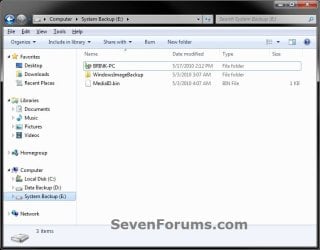
5. In Windows Explorer, navigate to the new location (ex: E: drive) that you want to move the C:\Users\(user-name) folder to. Right click on a empty space in the main window (middle), and click on Paste. (see screenshot below)
NOTE: This should be another internal hard drive or partition.
Step2.jpg
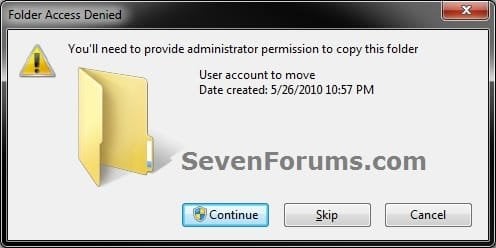
6. If prompted, click on Continue. (see screenshot below)
Step3-UAC.jpg
7. If prompted by UAC, then click on Yes (Windows 7) or Continue (Vista).

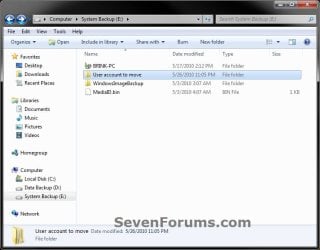
8. The C:\Users\(user-name) folder (step 4) is now copied over to the new location (ex: E:\User account to move). You can close Windows Explorer. (see screenshot below)
Step4.jpg
9. Open the Start Menu, then type regedit in the search box and press enter.

10. If prompted by UAC, then click on Yes (Windows 7) or Continue (Vista).

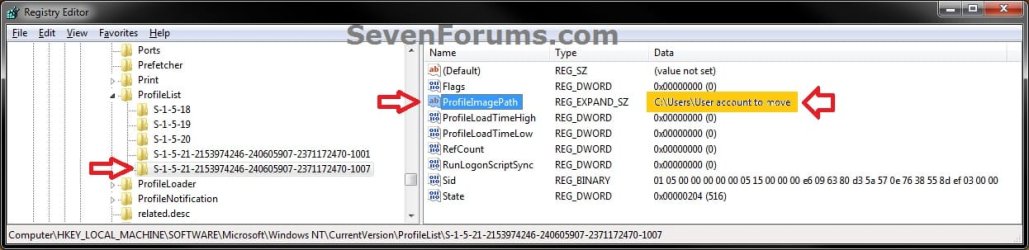
11. In regedit, navigate to the location below. (see screenshot below)

Code:
HKEY_LOCAL_MACHINE\SOFTWARE\Microsoft\Windows NT\CurrentVersion\ProfileList
Step5.jpg
12. In the left pane under the Profilelist key, select and look at each S-1-5 key with the long number until you see the user account name and path (step 3) that you want to move in the value Data column of ProfileImagePath in the right pane. When the correct user name is found, right click on ProfileImagePath, and click on Modify. (see screenshot above)

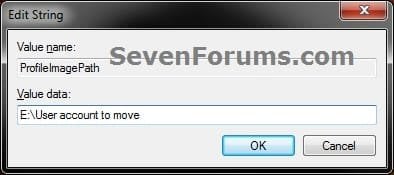
13. Type in the full path of the location (ex: E:\User account to move) that you copied the user profile folder to in step 7, and click on OK. (see screenshot below)
Step6.jpg
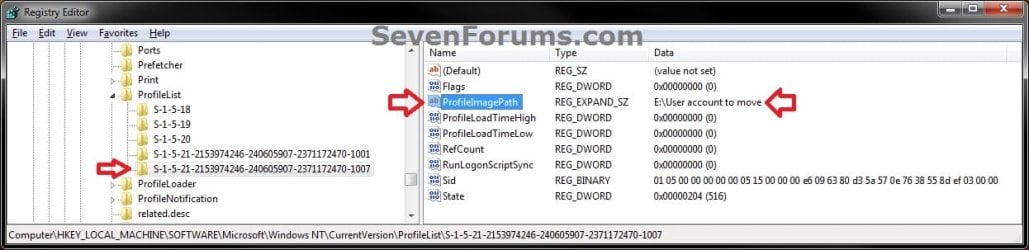
14. Regedit will now look similiar to this with the new location now. Close regedit. (see screenshot below)
Step7.jpg
15. To Verify that the User Profile has been Moved Successfully
A) Log off or Switch User, then log in to the user account that you moved the user profile folder of.

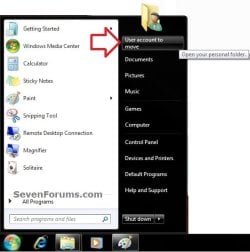
B) Open the Start Menu and open the user profile folder from this location. (see screenshot below)
Log-in-1.jpg
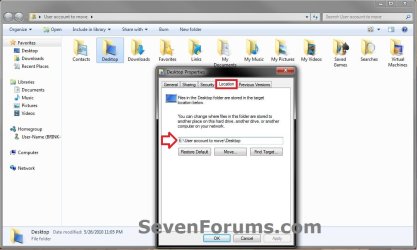
C) Right click on one of the user folders (ex: Desktop), click on Properties, and click on the Location tab. (see screenshot below)
Log-in-2.jpg
D) You should see the new location (ex: E:\User account to move\Desktop) from step 8 as the now new default location. Click on OK. (see screenshot above)
16. To Delete the User Profile from the Old Location
NOTE: Once you have verified (step 15) that the moved user profile has been moved successfully, you can now safely delete the user profile folder from the old location (ex: C:\Users\User account to move) from step 4.
A) Log off of the user account that you moved if you are logged into it from step 15.

B) Log on to an administrator account that you did not move it's user folder for.

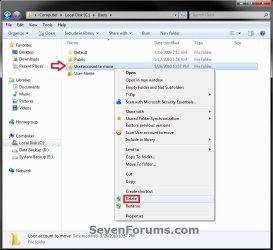
C) In Windows Explorer, navigate to the old C:\Users\(user-name) folder (ex: C:\Users\User account to move) that you had copied (step 4). Right click on it and click on Delete. (see screenshot below)
Delete-1_UAC.jpg
D) If prompted by UAC, then click on Yes (Windows 7) or Continue (Vista).

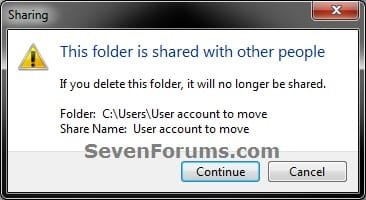
E) If prompted, click on Continue. (see screenshot below)
Delete-2.jpg
F) You can now empty the Recycle Bin to finish deleting the old user profile folder from the old location.
NOTE: You will need to approve emptying the Recycle Bin.
17. The existing user profile folder has now been completely moved to the new default location where Windows 7 or Vista will now run it from when logged on to it.


Method Two

To Restore the Existing User Profile's Default Location


1. Repeat OPTION ONE, but move the new default User Profile folder (ex: E:\User account to move) and registry entries back to the original C:\Users folder location (ex: C:\Users\User account to move).


OPTION TWO

For All New User Accounts Created


   Note
This will change where all newly created user accounts will have their user profile folder created at in a default location of your choice instead of the old default C:\Users location.

Thank you to Alain for pointing this out.

1. To Change the Default User Profile Location of New User Accounts
A) Open the Start Menu, then type regedit in the search box and press enter.
B) If prompted by UAC, then click on Yes (Windows 7) or Continue (Vista).

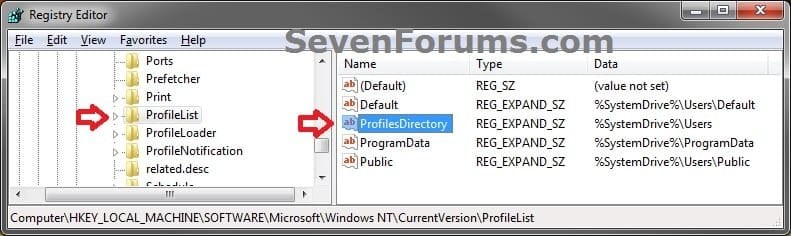
C) In regedit, navigate to the location below. (see screenshot below)

Code:
HKEY_LOCAL_MACHINE\SOFTWARE\Microsoft\Windows NT\CurrentVersion\ProfileList
New-1.jpg
D) In the right pane of ProfileList, right click on ProfilesDirectory and click on Modify. (see screenshot above)

E) Type in the full path (ex: E:\Users) of where you want new user accounts to be created at, and click on OK. (see screenshot below)
New-2.jpg
F) The registry will now look similar to this. (see screenshot below)
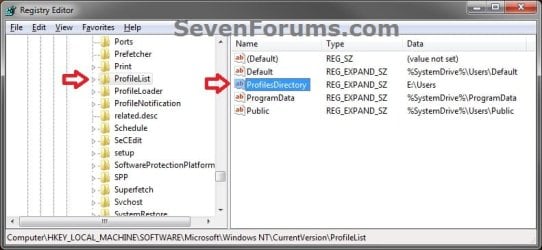
New-3.jpg
G) When you create a new user account, it's user profile folder will now be created at the location you specified in step 1E.
2. To Restore the Default User Profile Location of New User Accounts
A) Repeat step 1, but type %SystemDrive%\Users at step 1E instead.
NOTE: This step only changes the user profile folder location of any newly created user accounts back to this default location, and not any existing user accounts.

B) If you wish to change an already existing new account's user profile folder location, then you will need to do Method Two in OPTION ONE above to change it back to C:\Users.
3. Close regedit.

That's it,
Shawn


Last edited:
RHE,

I would recommend to do the system image recovery to go back before you moved the user profile to undo this to see if the error message goes away afterwards.

Personally, it would be best to have folders on say E: included in a library instead of moving user folders.
 

My Computer

Computer type
PC/Desktop
Computer Manufacturer/Model Number
Self built custom
OS
64-bit Windows 11 Pro for Workstations
CPU
Intel i7-8700K OC'd to 5 GHz
Motherboard
ASUS ROG Maximus XI Formula Z390
Memory
64 GB (4x16GB) G.SKILL TridentZ RGB DDR4 3600 MHz
Graphics Card(s)
ASUS ROG-STRIX-GTX1080TI-O11G-GAMING
Sound Card
Integrated
Monitor(s) Displays
2 x Samsung Odyssey G7 27"
Screen Resolution
2560x1440
Hard Drives
1TB Samsung 990 PRO M.2,
4TB Samsung 990 PRO PRO M.2,
TerraMaster F8 SSD Plus NAS
PSU
Seasonic Prime Titanium 850W
Case
Thermaltake Core P3
Cooling
Corsair Hydro H115i
Keyboard
Logitech wireless K800
Mouse
Logitech MX Master 4
Internet Speed
2 Gb/s Download and 100 Mb/s Upload
Antivirus
Malwarebyte Anti-Malware Premium
Browser
Google Chrome
Other Info
Logitech Z625 speaker system,
Logitech BRIO 4K Pro webcam,
HP Color LaserJet Pro MFP M477fdn,
APC SMART-UPS RT 1000 XL - SURT1000XLI,
Galaxy S23 Plus phone
Hi Brink,

Thank you for making this information available.

I followed your instructions exactly but two files still remain open in the 'Downloads' folder even after restarting the computer. The files are 'M4-Capture.exe' and 'M4-Service.exe'. What is keeping them open and how can I close them so they can be deleted without doing any damage?
 

My Computer

Computer Manufacturer/Model Number
Dell Inspiron 1720
OS
Windows 7 Home Premium 32 bit SP1
CPU
Intel T5250
Motherboard
Dell OUK437
Memory
4gb
Graphics Card(s)
Nvdia GeForce 8400M GS
Sound Card
Sigma Tel High Definition Audio CODEC
Hard Drives
2 3tb Seagate GoFlex Desktops
1 1tb Seagate Free Agent
Mouse
Logitech M305
Internet Speed
Free Wi-Fi provided to residents of building, too slow!
Hello Richie, and welcome to Seven Forums.

After Googling a bit, those files appear to be for the program Mikogo. You might see if the instructions in the PDF file below from Mikogo can help stop them so that you could delete them. They claim this issue will be fixed in a newer version of the program though.

http://www.mikogo.com/downloads/mikogo-m4service.pdf


If not, then you could try using the free program Unlocker on them to delete them.
 

My Computer

Computer type
PC/Desktop
Computer Manufacturer/Model Number
Self built custom
OS
64-bit Windows 11 Pro for Workstations
CPU
Intel i7-8700K OC'd to 5 GHz
Motherboard
ASUS ROG Maximus XI Formula Z390
Memory
64 GB (4x16GB) G.SKILL TridentZ RGB DDR4 3600 MHz
Graphics Card(s)
ASUS ROG-STRIX-GTX1080TI-O11G-GAMING
Sound Card
Integrated
Monitor(s) Displays
2 x Samsung Odyssey G7 27"
Screen Resolution
2560x1440
Hard Drives
1TB Samsung 990 PRO M.2,
4TB Samsung 990 PRO PRO M.2,
TerraMaster F8 SSD Plus NAS
PSU
Seasonic Prime Titanium 850W
Case
Thermaltake Core P3
Cooling
Corsair Hydro H115i
Keyboard
Logitech wireless K800
Mouse
Logitech MX Master 4
Internet Speed
2 Gb/s Download and 100 Mb/s Upload
Antivirus
Malwarebyte Anti-Malware Premium
Browser
Google Chrome
Other Info
Logitech Z625 speaker system,
Logitech BRIO 4K Pro webcam,
HP Color LaserJet Pro MFP M477fdn,
APC SMART-UPS RT 1000 XL - SURT1000XLI,
Galaxy S23 Plus phone
Thank you

Thanks Brink. I shoulda, coulda, woulda thought of that myself.

Richie
 

My Computer

Computer Manufacturer/Model Number
Dell Inspiron 1720
OS
Windows 7 Home Premium 32 bit SP1
CPU
Intel T5250
Motherboard
Dell OUK437
Memory
4gb
Graphics Card(s)
Nvdia GeForce 8400M GS
Sound Card
Sigma Tel High Definition Audio CODEC
Hard Drives
2 3tb Seagate GoFlex Desktops
1 1tb Seagate Free Agent
Mouse
Logitech M305
Internet Speed
Free Wi-Fi provided to residents of building, too slow!
Nar, that's what we're here for. You're most welcome Richie. :)
 

My Computer

Computer type
PC/Desktop
Computer Manufacturer/Model Number
Self built custom
OS
64-bit Windows 11 Pro for Workstations
CPU
Intel i7-8700K OC'd to 5 GHz
Motherboard
ASUS ROG Maximus XI Formula Z390
Memory
64 GB (4x16GB) G.SKILL TridentZ RGB DDR4 3600 MHz
Graphics Card(s)
ASUS ROG-STRIX-GTX1080TI-O11G-GAMING
Sound Card
Integrated
Monitor(s) Displays
2 x Samsung Odyssey G7 27"
Screen Resolution
2560x1440
Hard Drives
1TB Samsung 990 PRO M.2,
4TB Samsung 990 PRO PRO M.2,
TerraMaster F8 SSD Plus NAS
PSU
Seasonic Prime Titanium 850W
Case
Thermaltake Core P3
Cooling
Corsair Hydro H115i
Keyboard
Logitech wireless K800
Mouse
Logitech MX Master 4
Internet Speed
2 Gb/s Download and 100 Mb/s Upload
Antivirus
Malwarebyte Anti-Malware Premium
Browser
Google Chrome
Other Info
Logitech Z625 speaker system,
Logitech BRIO 4K Pro webcam,
HP Color LaserJet Pro MFP M477fdn,
APC SMART-UPS RT 1000 XL - SURT1000XLI,
Galaxy S23 Plus phone
Change default location of C:\Users\Public

Hi Brink,

I semi-successfully changed my user profile to an external disk. There are some problems since some programs still use C:\Users\Richard\Appdata. I will discuss this issue in another posting.

Now I would like to move C:\Users\Public to the same external disk, however, the Public folder is not included as a ProfileImagePath as described in this thread. How can I move C:\Users\Public to H:\Users\Public and have it be used by the Windows Media Center? I already created the folders and transferred the files.

Thanks,

Richard Rein
 

My Computer

Computer Manufacturer/Model Number
Dell Inspiron 1720
OS
Windows 7 Home Premium 32 bit SP1
CPU
Intel T5250
Motherboard
Dell OUK437
Memory
4gb
Graphics Card(s)
Nvdia GeForce 8400M GS
Sound Card
Sigma Tel High Definition Audio CODEC
Hard Drives
2 3tb Seagate GoFlex Desktops
1 1tb Seagate Free Agent
Mouse
Logitech M305
Internet Speed
Free Wi-Fi provided to residents of building, too slow!
Hello Richard,

The Public folder is a shared folder by all users on the computer. It is highly recommended to not move it. Doing so, will break all shares, and may not work in Windows Media Center any more.

Instead of moving your user profiles and Public folder, and possible messing your installation up, you might consider to create new folders on the external drive, then include those new folders in libraries of your choice. You could even set a new folder to be the default save to location of a library. This way everything is saved in the the new folders on the external drive, but your user folders and Public folders are still on C without the risk of messing up their junction piont links.
 

My Computer

Computer type
PC/Desktop
Computer Manufacturer/Model Number
Self built custom
OS
64-bit Windows 11 Pro for Workstations
CPU
Intel i7-8700K OC'd to 5 GHz
Motherboard
ASUS ROG Maximus XI Formula Z390
Memory
64 GB (4x16GB) G.SKILL TridentZ RGB DDR4 3600 MHz
Graphics Card(s)
ASUS ROG-STRIX-GTX1080TI-O11G-GAMING
Sound Card
Integrated
Monitor(s) Displays
2 x Samsung Odyssey G7 27"
Screen Resolution
2560x1440
Hard Drives
1TB Samsung 990 PRO M.2,
4TB Samsung 990 PRO PRO M.2,
TerraMaster F8 SSD Plus NAS
PSU
Seasonic Prime Titanium 850W
Case
Thermaltake Core P3
Cooling
Corsair Hydro H115i
Keyboard
Logitech wireless K800
Mouse
Logitech MX Master 4
Internet Speed
2 Gb/s Download and 100 Mb/s Upload
Antivirus
Malwarebyte Anti-Malware Premium
Browser
Google Chrome
Other Info
Logitech Z625 speaker system,
Logitech BRIO 4K Pro webcam,
HP Color LaserJet Pro MFP M477fdn,
APC SMART-UPS RT 1000 XL - SURT1000XLI,
Galaxy S23 Plus phone
Hi Brink,

My only objective is to have Windows Media Center use the external drive for Recorded TV. How would I go about this or is it even possible?

Richard Rein
 

My Computer

Computer Manufacturer/Model Number
Dell Inspiron 1720
OS
Windows 7 Home Premium 32 bit SP1
CPU
Intel T5250
Motherboard
Dell OUK437
Memory
4gb
Graphics Card(s)
Nvdia GeForce 8400M GS
Sound Card
Sigma Tel High Definition Audio CODEC
Hard Drives
2 3tb Seagate GoFlex Desktops
1 1tb Seagate Free Agent
Mouse
Logitech M305
Internet Speed
Free Wi-Fi provided to residents of building, too slow!
You should be able to just add the folder to the Windows Media Center library for this. I'm not real familiar with WMC, but this may help with that.

Open Windows Media Center and browse to Tasks > TV > Recorder > Recorder Storage. Click the (+) or (-) sign next to Record on drive to select the external HDD. When selected, click on Save.

If not, then you might create a new thread in the Media Center forum for this. I'm sure that someone that knows more about WMC show be able to help shortly afterwards.

Hope this helps.
 

My Computer

Computer type
PC/Desktop
Computer Manufacturer/Model Number
Self built custom
OS
64-bit Windows 11 Pro for Workstations
CPU
Intel i7-8700K OC'd to 5 GHz
Motherboard
ASUS ROG Maximus XI Formula Z390
Memory
64 GB (4x16GB) G.SKILL TridentZ RGB DDR4 3600 MHz
Graphics Card(s)
ASUS ROG-STRIX-GTX1080TI-O11G-GAMING
Sound Card
Integrated
Monitor(s) Displays
2 x Samsung Odyssey G7 27"
Screen Resolution
2560x1440
Hard Drives
1TB Samsung 990 PRO M.2,
4TB Samsung 990 PRO PRO M.2,
TerraMaster F8 SSD Plus NAS
PSU
Seasonic Prime Titanium 850W
Case
Thermaltake Core P3
Cooling
Corsair Hydro H115i
Keyboard
Logitech wireless K800
Mouse
Logitech MX Master 4
Internet Speed
2 Gb/s Download and 100 Mb/s Upload
Antivirus
Malwarebyte Anti-Malware Premium
Browser
Google Chrome
Other Info
Logitech Z625 speaker system,
Logitech BRIO 4K Pro webcam,
HP Color LaserJet Pro MFP M477fdn,
APC SMART-UPS RT 1000 XL - SURT1000XLI,
Galaxy S23 Plus phone
Thanks Brink. That was easy enough.

Richard
 

My Computer

Computer Manufacturer/Model Number
Dell Inspiron 1720
OS
Windows 7 Home Premium 32 bit SP1
CPU
Intel T5250
Motherboard
Dell OUK437
Memory
4gb
Graphics Card(s)
Nvdia GeForce 8400M GS
Sound Card
Sigma Tel High Definition Audio CODEC
Hard Drives
2 3tb Seagate GoFlex Desktops
1 1tb Seagate Free Agent
Mouse
Logitech M305
Internet Speed
Free Wi-Fi provided to residents of building, too slow!
You're most welcome. :)
 

My Computer

Computer type
PC/Desktop
Computer Manufacturer/Model Number
Self built custom
OS
64-bit Windows 11 Pro for Workstations
CPU
Intel i7-8700K OC'd to 5 GHz
Motherboard
ASUS ROG Maximus XI Formula Z390
Memory
64 GB (4x16GB) G.SKILL TridentZ RGB DDR4 3600 MHz
Graphics Card(s)
ASUS ROG-STRIX-GTX1080TI-O11G-GAMING
Sound Card
Integrated
Monitor(s) Displays
2 x Samsung Odyssey G7 27"
Screen Resolution
2560x1440
Hard Drives
1TB Samsung 990 PRO M.2,
4TB Samsung 990 PRO PRO M.2,
TerraMaster F8 SSD Plus NAS
PSU
Seasonic Prime Titanium 850W
Case
Thermaltake Core P3
Cooling
Corsair Hydro H115i
Keyboard
Logitech wireless K800
Mouse
Logitech MX Master 4
Internet Speed
2 Gb/s Download and 100 Mb/s Upload
Antivirus
Malwarebyte Anti-Malware Premium
Browser
Google Chrome
Other Info
Logitech Z625 speaker system,
Logitech BRIO 4K Pro webcam,
HP Color LaserJet Pro MFP M477fdn,
APC SMART-UPS RT 1000 XL - SURT1000XLI,
Galaxy S23 Plus phone
I was able to do "Method 1" up untill Step 15 where you delete the Folder in the original location. When I try to delete it, the message "This action can't be completed because the folder or a file in it is open in another program" pops up. When I click in one of the User Folders and check the properties of the folders there, they all points towards the newly created one. Will I run into any trouble by not deleting the original folder? Is it because this is the default administrator? When I compared pictures on Step 15 method 1, I saw that mine had a lock on the folder while the tutorial's did not.

Option 2 worked fine for me and now any user I make gets automatically put in D, which is the new partition.
 
Last edited:

My Computer

OS
Windows 7 32 bit
I originally had the same problem. Some programs continue to use the 'old' folder, most specifically 'C:\Users\Your name\Appdata...' until told not to do so. I had to modify Windows Media Center (see above) and Google Desktop to use my alternate location. Imgburn is still using it on my computer. I sent them an email for more information. You should make these changes to make it easier to backup the files. Backing up the remaining files on both drives (partitions) can be a pain in the ass. I moved my default profile to a different drive (H).

Richard Rein
 

My Computer

Computer Manufacturer/Model Number
Dell Inspiron 1720
OS
Windows 7 Home Premium 32 bit SP1
CPU
Intel T5250
Motherboard
Dell OUK437
Memory
4gb
Graphics Card(s)
Nvdia GeForce 8400M GS
Sound Card
Sigma Tel High Definition Audio CODEC
Hard Drives
2 3tb Seagate GoFlex Desktops
1 1tb Seagate Free Agent
Mouse
Logitech M305
Internet Speed
Free Wi-Fi provided to residents of building, too slow!
@Brink, are you a programmer? I've been looking for a software which performs this kind of action via a GUI, like TweakUI does on WinXP. Unfortunately, nothing that I've been researching so far matches my needs. =/

'The Ultimate Windows Tweaker' by The Windows Club is a fine tool, but it doesn't attend the same needs as the old TweakUI users had. And that's one of the features, for example.

If you got time to spare, would it be possible to do such thing at least to the 'User Profile' folders?

Thanks and regards.


(PS: Yay! My 1st post! \o/)
 
Last edited:

My Computer

OS
Windows 7 Ultimate x32 SP1 (still)
Hello Komedia, and welcome to Seven Forums.

Sorry, but I'm not a programmer. I can do some scripting, but nothing on the level that would be required for that. :(
 

My Computer

Computer type
PC/Desktop
Computer Manufacturer/Model Number
Self built custom
OS
64-bit Windows 11 Pro for Workstations
CPU
Intel i7-8700K OC'd to 5 GHz
Motherboard
ASUS ROG Maximus XI Formula Z390
Memory
64 GB (4x16GB) G.SKILL TridentZ RGB DDR4 3600 MHz
Graphics Card(s)
ASUS ROG-STRIX-GTX1080TI-O11G-GAMING
Sound Card
Integrated
Monitor(s) Displays
2 x Samsung Odyssey G7 27"
Screen Resolution
2560x1440
Hard Drives
1TB Samsung 990 PRO M.2,
4TB Samsung 990 PRO PRO M.2,
TerraMaster F8 SSD Plus NAS
PSU
Seasonic Prime Titanium 850W
Case
Thermaltake Core P3
Cooling
Corsair Hydro H115i
Keyboard
Logitech wireless K800
Mouse
Logitech MX Master 4
Internet Speed
2 Gb/s Download and 100 Mb/s Upload
Antivirus
Malwarebyte Anti-Malware Premium
Browser
Google Chrome
Other Info
Logitech Z625 speaker system,
Logitech BRIO 4K Pro webcam,
HP Color LaserJet Pro MFP M477fdn,
APC SMART-UPS RT 1000 XL - SURT1000XLI,
Galaxy S23 Plus phone
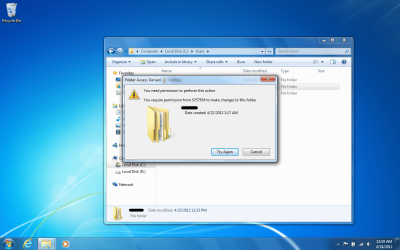
Thank you very much. it all worked except that my computer keeps telling me that it's not possible to delete the old folder in C because it needs System permission. What should I do? I removed the password of the account I've been trying to delete its old User file, logged off then logged on to the account I've created to move that account's User folder but it still wouldn't work!

anybody? :( little help!
I changed the permissions of that user file to full control by the new account I created. Whenever I try to delete it says to get permission from the same account I'm using (the new one that I only created to change the location of that user file from C to D)
why is it asking for permission from the account I'm using? that doesn't make any sense o.O
 

Attachments

  • Permission.png
    Permission.png
    190.6 KB · Views: 409
Last edited:

My Computer

OS
Windows 7 Ultimate
Hello iwind, and welcome to Seven Forums.

Do you have any program that may still be saving to the C: location by default? If so, you would need to change the program's settings to use the new D: location instead.

Do you have any folders or files in the C:\Users\(user-name) location set to be shared by any other users or homegroup? If so, then you would need to set them to be shared by "Nobody" first, then see if you may be able to delete it.

Hope this helps for now,
Shawn
 

My Computer

Computer type
PC/Desktop
Computer Manufacturer/Model Number
Self built custom
OS
64-bit Windows 11 Pro for Workstations
CPU
Intel i7-8700K OC'd to 5 GHz
Motherboard
ASUS ROG Maximus XI Formula Z390
Memory
64 GB (4x16GB) G.SKILL TridentZ RGB DDR4 3600 MHz
Graphics Card(s)
ASUS ROG-STRIX-GTX1080TI-O11G-GAMING
Sound Card
Integrated
Monitor(s) Displays
2 x Samsung Odyssey G7 27"
Screen Resolution
2560x1440
Hard Drives
1TB Samsung 990 PRO M.2,
4TB Samsung 990 PRO PRO M.2,
TerraMaster F8 SSD Plus NAS
PSU
Seasonic Prime Titanium 850W
Case
Thermaltake Core P3
Cooling
Corsair Hydro H115i
Keyboard
Logitech wireless K800
Mouse
Logitech MX Master 4
Internet Speed
2 Gb/s Download and 100 Mb/s Upload
Antivirus
Malwarebyte Anti-Malware Premium
Browser
Google Chrome
Other Info
Logitech Z625 speaker system,
Logitech BRIO 4K Pro webcam,
HP Color LaserJet Pro MFP M477fdn,
APC SMART-UPS RT 1000 XL - SURT1000XLI,
Galaxy S23 Plus phone
Thought this was going to be easy ... did copy form C:\user\name
to E:\user\name

When i try paste I get error:

error.jpg
 
Last edited:

My Computer

Computer type
PC/Desktop
Computer Manufacturer/Model Number
custom build
OS
W7 64 bit ultimate
CPU
i5 3570 3.4G Ivybridge
Motherboard
ASUS P8Z77-V LE
Memory
16GB Ram – Corsair XMS
Graphics Card(s)
MSI GTX G650 Hawk - Frzr II
Sound Card
on-mobo
Monitor(s) Displays
26" Samsung digital
Hard Drives
OS on SSD – Crucial M4 120GB
programme & data on 1TB HDD (Caviar Black)
Pics & video on 1TB HDD (Caviar Black)
PSU
Cooler Master M2 Silent Pro PSU
Case
Fractal R3 case
Cooling
Coolermaster Hper 212 EVO + Artic silver paste
Internet Speed
3MB
Antivirus
KIS

My Computer

Computer type
PC/Desktop
Computer Manufacturer/Model Number
Self built custom
OS
64-bit Windows 11 Pro for Workstations
CPU
Intel i7-8700K OC'd to 5 GHz
Motherboard
ASUS ROG Maximus XI Formula Z390
Memory
64 GB (4x16GB) G.SKILL TridentZ RGB DDR4 3600 MHz
Graphics Card(s)
ASUS ROG-STRIX-GTX1080TI-O11G-GAMING
Sound Card
Integrated
Monitor(s) Displays
2 x Samsung Odyssey G7 27"
Screen Resolution
2560x1440
Hard Drives
1TB Samsung 990 PRO M.2,
4TB Samsung 990 PRO PRO M.2,
TerraMaster F8 SSD Plus NAS
PSU
Seasonic Prime Titanium 850W
Case
Thermaltake Core P3
Cooling
Corsair Hydro H115i
Keyboard
Logitech wireless K800
Mouse
Logitech MX Master 4
Internet Speed
2 Gb/s Download and 100 Mb/s Upload
Antivirus
Malwarebyte Anti-Malware Premium
Browser
Google Chrome
Other Info
Logitech Z625 speaker system,
Logitech BRIO 4K Pro webcam,
HP Color LaserJet Pro MFP M477fdn,
APC SMART-UPS RT 1000 XL - SURT1000XLI,
Galaxy S23 Plus phone

My Computer

Computer type
PC/Desktop
Computer Manufacturer/Model Number
custom build
OS
W7 64 bit ultimate
CPU
i5 3570 3.4G Ivybridge
Motherboard
ASUS P8Z77-V LE
Memory
16GB Ram – Corsair XMS
Graphics Card(s)
MSI GTX G650 Hawk - Frzr II
Sound Card
on-mobo
Monitor(s) Displays
26" Samsung digital
Hard Drives
OS on SSD – Crucial M4 120GB
programme & data on 1TB HDD (Caviar Black)
Pics & video on 1TB HDD (Caviar Black)
PSU
Cooler Master M2 Silent Pro PSU
Case
Fractal R3 case
Cooling
Coolermaster Hper 212 EVO + Artic silver paste
Internet Speed
3MB
Antivirus
KIS
Back
Top