
User Profile Service failed the logon. User profile cannot be loaded.

Fix "The User Profile Service failed the logon. User profile cannot be loaded." Error in Windows 7

   Information
A user profile is a collection of settings that make the computer look and work the way you want it to for a user account. It contains the account's settings for desktop backgrounds, screen savers, pointer preferences, sound settings, and other features. User profiles ensure that your personal preferences are used whenever you sign in to Windows.

A user profile is different from a user account, which you use to sign in to Windows. Each user account has at least one user profile associated with it.

This tutorial will show you how to fix when you log on to Windows 7 using a temporary profile, and get the following error message:

The User Profile Service failed the logon. User profile cannot be loaded.

This tutorial was updated from our Vista Forums tutorial created 02-10-2008:
The User Profile Service failed the logon. User profile cannot be loaded. - Vista Forums

For additional details on this user profile error, see also:
Error message: "The User Profile Service failed the logon. User profile cannot be loaded

   Note
Known Causes:
  • The C:\Users\(user-name) user profile folder was manually deleted instead of properly deleting the user account through User Accounts in the Control Panel. A user profile that is manually deleted does not remove the security identifier (SID) from the profile list in the registry. Since the SID is still present, Windows 7 will still try to load the profile by using the ProfileImagePath that points to a nonexistent path. Therefore, the profile cannot be loaded.
  • The C:\Users\(user-name) user profile folder itself was manually renamed, instead of using the proper method in this tutorial.
  • An unknown issue with the user profile entering into a backup state occurred.
  • Corrupted user profile.
  • Occasionally, Windows 7 might not read your user profile correctly, for example, if your antivirus software is scanning your computer while you try to log on. Try restarting your computer and logging on with your user account again to resolve the issue before following the options below.


In Preparation:

Log On to an Administrator Account


NOTE: You must be logged on to another administrator account using either step below before you will be able to move on to either OPTION ONEor OPTION TWO below.
1. To Log on to another Administrator account.
NOTE: If you do not have another Administrator account, then proceed to step 2.
A) Log off, and log on to an available administrator account that doesn't have this error.

B) Go to either OPTION ONEor OPTION TWO below for what you would like to do.
OR

2. To Boot into "Safe Mode" and Use the built-in Administrator account
A) Using your "retail" Windows 7 installation disc or a created system repair disc, boot into Safe Mode.

B) Do either step C or D below depending if Safe Mode booted into the built-in Administrator account by default or not.
NOTE: If this user account with the user profile error was the only administrator account you had created or enabled, then Safe Mode may automatically boot into the built-in Administrator account.

C) If Safe Mode did not boot into the built-in Administrator account by default, then enable the built-in Administrator account, log off in Safe Mode, and log on to the built-in Administrator account to logon to that account in Safe Mode.

D) If Safe Mode did boot into the built-in Administrator account by default, then go to either OPTION ONE or OPTION TWO below for what you would like to do.
OR

3. To Enable the Built-in Administrator account at Boot
A) For how, see: How to Enable the Built-in Elevated "Administrator" Account from WinRE

B) When enabled, log in to the built-in Administrator account, and go to either OPTION ONE or OPTION TWO below for what you would like to do


OPTION ONE

To Fix the User Account Profile


1. Before starting, it is highly recommended that you create a system restore point in case you make a mistake while in the registry. This way you will easily be able to do a system restore to use the created restore point to undo the mistake.

2. Open the Start Menu, type regedit in the search box, and press Enter.

3. If prompted by UAC, then click on Yes.

4. In regedit, navigate to the location below. (see screenshot below step 5A)
Code:
HKEY_LOCAL_MACHINE\SOFTWARE\Microsoft\Windows NT\CurrentVersion\ProfileList
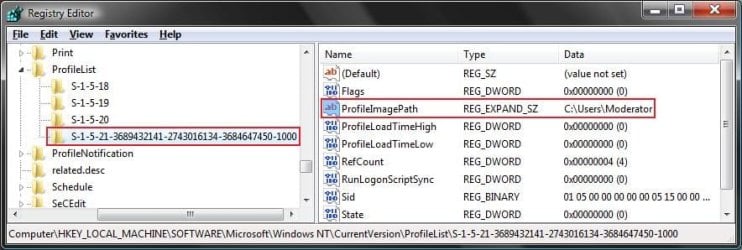
5. In the left pane, click on a S-1-5 (SID) key with a long number.
A) In the right pane of the selected S-1-5 (SID) key, look at the Data value of ProfileImagePath to see if it is the user account (ex: Moderator) with the error.
SID_Reg.jpg
B) If not, then repeat steps 5 and 5A until you have the correct S-1-5 (SID) key with a long number selected.

C) If it is, then continue on to step 6 or step 7 depending on if you have either one or two S-1-5 (SID) keys listed with the exact same long number. One without .bak, and one with .bak at the end.
6. If you have Two S-1-5 (SID) keys with the Same Long Numbers
NOTE: This is if you have two S-1-5 folders (SID key) with the exact same long numbers, but the second one has .bak at the end of the long numbers and the first one doesn't.
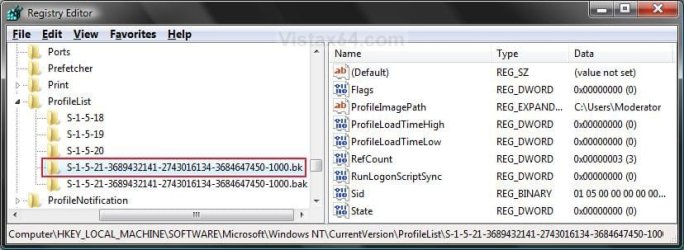
A) In the left pane, right click on the first (top) S-1-5..... folder (SID key) that does not have .bak at the end of the numbers and click Rename. (see screenshot below)
Repair.jpg
B) Add .bk to the end of the numbers. (see screenshot below)
Repair_bk.jpg
C) In the left pane, right click on the second S-1-5..... folder (SID key) with .bak at the end of the numbers and click Rename. (see screenshot below step 6B)

D) Remove only .bak from the end of the numbers and press Enter. (see screenshot below step 6B)

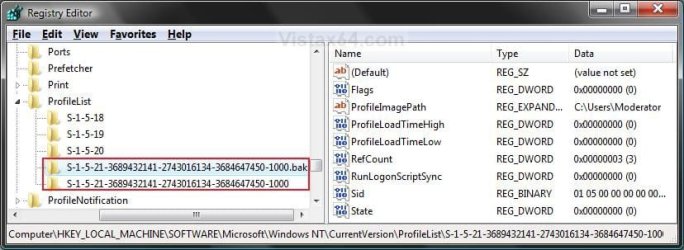
E) Now go back and Rename the first one with .bk to .bak now at the end of the numbers and press Enter. (see screenshot below)
Repar_bak.jpg
F) Go to step 8.
7. If you have Only One S-1-5 (SID) key with .bak
NOTE: This is if you have only one S-1-5 folder (SID key) with long numbers and ended with .bak.
A) In the left pane, right click on the S-1-5..... folder (SID key) with .bak at the end of the numbers and click Rename. (see screenshot below step 7B)

B) Remove only .bak at the end of the numbers and press Enter. (see screenshot below and below step 10)
Repair_Reg2.jpg
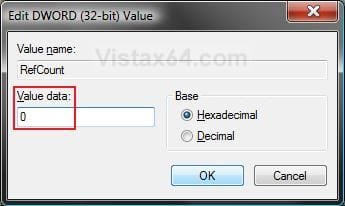
8. In the right pane of the one without .bak now, right click on RefCount and click on Modify. (see screenshot below step 10)
NOTE: If you do not have RefCount, then right click on a empty space in the right pane and click New and DWORD (32 bit) Value, then type RefCount and press Enter. This value for this entry will reset and return back to the original value after you have restarted the computer and logged on to the account.
A) Type 0 (number) and click on OK. (see screenshot below)
Modify_RefCount.jpg
9. In the right pane of the one without .bak now, right click on State and click on Modify. (see screenshot below step 10)
NOTE: This value for this entry will reset and return back to the original value after you have restarted the computer and logged on to the account.
A) Type 0 (number) and click on OK. (see screenshot below)
Modify_State.jpg
10. The registry will now look like this for the one without .bak now. (see screenshot below)
Repair_Reg2.jpg
11. Close regedit, and restart the computer.

12. See if you are able to log on to the use account now without getting this error.

   Tip
If this still does not help, then either try:


OPTION TWO

To Delete the User Account and Create a New User Account


NOTE: This option is only if you do not care about losing the user account with this error and possibly all contents of it's C:\Users\(user-name) user profile folder. Your programs will still be installed and unaffected.
1. Before starting, it is highly recommended that you create a system restore point in case you make a mistake while in the registry. This way you will easily be able to do a system restore to use the created restore point to undo the mistake.

2. Create a new user account that is the same type (standard or administrator) as the user account with this error.

3. If you are able to, you could copy the contents of the user folders from the old user account's C:\Users\(user-name) user profile folder with the error into the new account's (step 2) C:\Users\(user-name) user profile folder. Be sure to also copy any shortcuts in the Start Menu from the old user account into the new user account as well.

4. In User Accounts from the Control Panel, delete the user account with the error.

5. Open the Start Menu, type regedit in the search box, and press Enter.

6. If prompted by UAC, then click on Yes.

7. In regedit, navigate to the location below. (see screenshot below step 8A)
Code:
HKEY_LOCAL_MACHINE\SOFTWARE\Microsoft\Windows NT\CurrentVersion\ProfileList
8. In the left pane, click on a S-1-5 (SID) key with a long number.
A) In the right pane of the selected S-1-5 (SID) key, look at the Data value of ProfileImagePath to see if it is the user account (ex: Moderator) with the error.
SID_Reg.jpg
B) If not, then repeat steps 8 and 8A until you have the correct S-1-5 (SID) key with a long number selected.

C) If it is, then continue on to step 9.
9. Right click on the selected SID key with the long number, and click on Delete.

10. Click on Yes to confirm deletion. (see screenshot below)
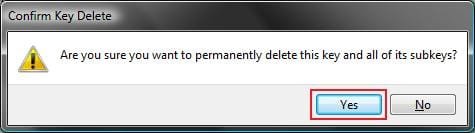
Confirm.jpg
11. If there is another SID key directly below the selected SID key (step 9) with the exact same long number with .bak at the end, then right click on this same SID key with .bak on it, and click on Delete. (see screenshot below)
Repair.jpg

A) Click on Yes to confirm deletion. (see screenshot below)
Confirm.jpg
12. When finished, close regedit.

13. Restart the computer, and log on to your new account.


That's it,
Shawn


Last edited:
You're most welcome okisland, and welcome to Seven Forums. I'm glad it was able to help. :)
 

My Computer My Computer

At a glance

64-bit Windows 11 Pro for WorkstationsIntel i7-8700K OC'd to 5 GHz64 GB (4x16GB) G.SKILL TridentZ RGB DDR4 3600...ASUS ROG-STRIX-GTX1080TI-O11G-GAMING
Computer type
PC/Desktop
Computer Manufacturer/Model Number
Self built custom
OS
64-bit Windows 11 Pro for Workstations
CPU
Intel i7-8700K OC'd to 5 GHz
Motherboard
ASUS ROG Maximus XI Formula Z390
Memory
64 GB (4x16GB) G.SKILL TridentZ RGB DDR4 3600 MHz
Graphics Card(s)
ASUS ROG-STRIX-GTX1080TI-O11G-GAMING
Sound Card
Integrated
Monitor(s) Displays
2 x Samsung Odyssey G7 27"
Screen Resolution
2560x1440
Hard Drives
1TB Samsung 990 PRO M.2,
4TB Samsung 990 PRO PRO M.2,
TerraMaster F8 SSD Plus NAS
PSU
Seasonic Prime Titanium 850W
Case
Thermaltake Core P3
Cooling
Corsair Hydro H115i
Keyboard
Logitech wireless K800
Mouse
Logitech MX Master 4
Internet Speed
2 Gb/s Download and 100 Mb/s Upload
Antivirus
Malwarebyte Anti-Malware Premium
Browser
Google Chrome
Other Info
Logitech Z625 speaker system,
Logitech BRIO 4K Pro webcam,
HP Color LaserJet Pro MFP M477fdn,
APC SMART-UPS RT 1000 XL - SURT1000XLI,
Galaxy S23 Plus phone
I had problem login in to my User Account. I pressed F8 key before the windows logo was displayed and I was taken into the SAFE MODE. After logging in at SAFE MODE I followed the process as stated with REGEIT and so on...to final step 9, and after I restarted my computer I was able to successfully Log Into my User Account. I'm currently backing all my pictures to my Seagate hard-drive just in case.

Thank You! Great Program Advice :D
 

My Computer My Computer

At a glance

Windows 7intel core 364 bit
Computer type
PC/Desktop
Computer Manufacturer/Model Number
Dell
OS
Windows 7
CPU
intel core 3
Graphics Card(s)
64 bit
Hard Drives
650 GB
Antivirus
AVG Free
Browser
Internet Explorer
You're most welcome Orlando, and welcome to Seven Forums. I'm glad it was able to help. :)
 

My Computer My Computer

At a glance

64-bit Windows 11 Pro for WorkstationsIntel i7-8700K OC'd to 5 GHz64 GB (4x16GB) G.SKILL TridentZ RGB DDR4 3600...ASUS ROG-STRIX-GTX1080TI-O11G-GAMING
Computer type
PC/Desktop
Computer Manufacturer/Model Number
Self built custom
OS
64-bit Windows 11 Pro for Workstations
CPU
Intel i7-8700K OC'd to 5 GHz
Motherboard
ASUS ROG Maximus XI Formula Z390
Memory
64 GB (4x16GB) G.SKILL TridentZ RGB DDR4 3600 MHz
Graphics Card(s)
ASUS ROG-STRIX-GTX1080TI-O11G-GAMING
Sound Card
Integrated
Monitor(s) Displays
2 x Samsung Odyssey G7 27"
Screen Resolution
2560x1440
Hard Drives
1TB Samsung 990 PRO M.2,
4TB Samsung 990 PRO PRO M.2,
TerraMaster F8 SSD Plus NAS
PSU
Seasonic Prime Titanium 850W
Case
Thermaltake Core P3
Cooling
Corsair Hydro H115i
Keyboard
Logitech wireless K800
Mouse
Logitech MX Master 4
Internet Speed
2 Gb/s Download and 100 Mb/s Upload
Antivirus
Malwarebyte Anti-Malware Premium
Browser
Google Chrome
Other Info
Logitech Z625 speaker system,
Logitech BRIO 4K Pro webcam,
HP Color LaserJet Pro MFP M477fdn,
APC SMART-UPS RT 1000 XL - SURT1000XLI,
Galaxy S23 Plus phone
Hi,
I also get this message when i try to logon, but i can logon to myu account in safe mode, so i suspect the account itself is not corrupted bit it isnt read properly. I have had the problem before and rebooting used to fix it but doesnt anymore. Anyone have an idea?
 

My Computer My Computer

At a glance

windows 7 professional 64 bitintel core2 duo
Computer type
Laptop
Computer Manufacturer/Model Number
hp elitebook 8530w
OS
windows 7 professional 64 bit
CPU
intel core2 duo
Antivirus
avg 2012
Browser
Firefox
Hello bassmit, and welcome to Seven Forums.

If you haven't already, you might see if you may be able to use step 3 in the "In Preparation" section at the top to log in to the built-in Administrator, to then hopefully be able to do the rest of the tutorial afterwards. :)
 

My Computer My Computer

At a glance

64-bit Windows 11 Pro for WorkstationsIntel i7-8700K OC'd to 5 GHz64 GB (4x16GB) G.SKILL TridentZ RGB DDR4 3600...ASUS ROG-STRIX-GTX1080TI-O11G-GAMING
Computer type
PC/Desktop
Computer Manufacturer/Model Number
Self built custom
OS
64-bit Windows 11 Pro for Workstations
CPU
Intel i7-8700K OC'd to 5 GHz
Motherboard
ASUS ROG Maximus XI Formula Z390
Memory
64 GB (4x16GB) G.SKILL TridentZ RGB DDR4 3600 MHz
Graphics Card(s)
ASUS ROG-STRIX-GTX1080TI-O11G-GAMING
Sound Card
Integrated
Monitor(s) Displays
2 x Samsung Odyssey G7 27"
Screen Resolution
2560x1440
Hard Drives
1TB Samsung 990 PRO M.2,
4TB Samsung 990 PRO PRO M.2,
TerraMaster F8 SSD Plus NAS
PSU
Seasonic Prime Titanium 850W
Case
Thermaltake Core P3
Cooling
Corsair Hydro H115i
Keyboard
Logitech wireless K800
Mouse
Logitech MX Master 4
Internet Speed
2 Gb/s Download and 100 Mb/s Upload
Antivirus
Malwarebyte Anti-Malware Premium
Browser
Google Chrome
Other Info
Logitech Z625 speaker system,
Logitech BRIO 4K Pro webcam,
HP Color LaserJet Pro MFP M477fdn,
APC SMART-UPS RT 1000 XL - SURT1000XLI,
Galaxy S23 Plus phone
i am faced with similar error..

unfortunately i went a bit berserk.. there were two keys one with the .bak and one with no .bak with similar name.
i unfortunately deleted both and tried to login the user but got above prompt.. "User Profile Service failed the logon. User profile cannot be loaded." ..

the background situation :
this machine is joined to a domain. and one user profile went on temporary mode. i.e. all his work on desktop was not there after reboot. so i went and deleted the above two keys.

now new users on that domain can login to that machine but that problamitc user cant . he gets the above error. User Profile Service failed the logon. User profile cannot be loaded...

now what to do ?
 

My Computer My Computer

At a glance

Windows 7 Ultimate x64E65508GB DDR2
Computer type
PC/Desktop
Computer Manufacturer/Model Number
Dell 755
OS
Windows 7 Ultimate x64
CPU
E6550
Motherboard
Stock Q35 Chipset Based
Memory
8GB DDR2
Hard Drives
1TB
Keyboard
Microsoft Comfort 2000
Mouse
Microsoft
Antivirus
None
Browser
FireFox
Hello Plumpf,

Oops.

You might see if doing a system restore using a restore point dated before this happened may be able to fix it, or at least get you back to square one to be able to do the tutorial.

Hope this helps, :)
Shawn
 

My Computer My Computer

At a glance

64-bit Windows 11 Pro for WorkstationsIntel i7-8700K OC'd to 5 GHz64 GB (4x16GB) G.SKILL TridentZ RGB DDR4 3600...ASUS ROG-STRIX-GTX1080TI-O11G-GAMING
Computer type
PC/Desktop
Computer Manufacturer/Model Number
Self built custom
OS
64-bit Windows 11 Pro for Workstations
CPU
Intel i7-8700K OC'd to 5 GHz
Motherboard
ASUS ROG Maximus XI Formula Z390
Memory
64 GB (4x16GB) G.SKILL TridentZ RGB DDR4 3600 MHz
Graphics Card(s)
ASUS ROG-STRIX-GTX1080TI-O11G-GAMING
Sound Card
Integrated
Monitor(s) Displays
2 x Samsung Odyssey G7 27"
Screen Resolution
2560x1440
Hard Drives
1TB Samsung 990 PRO M.2,
4TB Samsung 990 PRO PRO M.2,
TerraMaster F8 SSD Plus NAS
PSU
Seasonic Prime Titanium 850W
Case
Thermaltake Core P3
Cooling
Corsair Hydro H115i
Keyboard
Logitech wireless K800
Mouse
Logitech MX Master 4
Internet Speed
2 Gb/s Download and 100 Mb/s Upload
Antivirus
Malwarebyte Anti-Malware Premium
Browser
Google Chrome
Other Info
Logitech Z625 speaker system,
Logitech BRIO 4K Pro webcam,
HP Color LaserJet Pro MFP M477fdn,
APC SMART-UPS RT 1000 XL - SURT1000XLI,
Galaxy S23 Plus phone
i am faced with similar error..

unfortunately i went a bit berserk.. there were two keys one with the .bak and one with no .bak with similar name.
i unfortunately deleted both and tried to login the user but got above prompt.. "User Profile Service failed the logon. User profile cannot be loaded." ..

the background situation :
this machine is joined to a domain. and one user profile went on temporary mode. i.e. all his work on desktop was not there after reboot. so i went and deleted the above two keys.

now new users on that domain can login to that machine but that problamitc user cant . he gets the above error. User Profile Service failed the logon. User profile cannot be loaded...

now what to do ?

Just to update that the issue is resolved now.

I just restarted the system and that particular affected user 3 able to login successfully.

I had not restarted the system earlier.
 

My Computer My Computer

At a glance

Windows 7 Ultimate x64E65508GB DDR2
Computer type
PC/Desktop
Computer Manufacturer/Model Number
Dell 755
OS
Windows 7 Ultimate x64
CPU
E6550
Motherboard
Stock Q35 Chipset Based
Memory
8GB DDR2
Hard Drives
1TB
Keyboard
Microsoft Comfort 2000
Mouse
Microsoft
Antivirus
None
Browser
FireFox
Great news. :)
 

My Computer My Computer

At a glance

64-bit Windows 11 Pro for WorkstationsIntel i7-8700K OC'd to 5 GHz64 GB (4x16GB) G.SKILL TridentZ RGB DDR4 3600...ASUS ROG-STRIX-GTX1080TI-O11G-GAMING
Computer type
PC/Desktop
Computer Manufacturer/Model Number
Self built custom
OS
64-bit Windows 11 Pro for Workstations
CPU
Intel i7-8700K OC'd to 5 GHz
Motherboard
ASUS ROG Maximus XI Formula Z390
Memory
64 GB (4x16GB) G.SKILL TridentZ RGB DDR4 3600 MHz
Graphics Card(s)
ASUS ROG-STRIX-GTX1080TI-O11G-GAMING
Sound Card
Integrated
Monitor(s) Displays
2 x Samsung Odyssey G7 27"
Screen Resolution
2560x1440
Hard Drives
1TB Samsung 990 PRO M.2,
4TB Samsung 990 PRO PRO M.2,
TerraMaster F8 SSD Plus NAS
PSU
Seasonic Prime Titanium 850W
Case
Thermaltake Core P3
Cooling
Corsair Hydro H115i
Keyboard
Logitech wireless K800
Mouse
Logitech MX Master 4
Internet Speed
2 Gb/s Download and 100 Mb/s Upload
Antivirus
Malwarebyte Anti-Malware Premium
Browser
Google Chrome
Other Info
Logitech Z625 speaker system,
Logitech BRIO 4K Pro webcam,
HP Color LaserJet Pro MFP M477fdn,
APC SMART-UPS RT 1000 XL - SURT1000XLI,
Galaxy S23 Plus phone
Thanks Brink. This fix solved my login issue.
This is the second time it has happened to me. The first, after spending some days attempting to fix the problem (and not having found your tutorial), required me to create a new user account and transfer all the data across. This worked fine, albeit time consuming, but when faced with that again I can't say i was too excited.

Has there been any investigation, apart from the known causes listed at the start, into how or why this is happening, or how to avoid it occurring? It looks like alot of users are affected. In my case, it has happened more than once.
It does not appear to be malware/spam related, more a design issue with Windows.
From that, can user accounts be bypassed somewhat. I still run XP on my home computer (this one is a work laptop) and no accounts have been set, just what is set by default. No password to log in, no different profiles, nothing. Never once has a problem like this been encountered in, what, 10-12 years. Here we are 3-4 years into Win 7/8 and is seems to be happening to many people more than once.
 

My Computer My Computer

At a glance

Windows 8.1 ProAMD A6-3410MX APU8 GBAMD Radeon 6600M
Computer type
Laptop
Computer Manufacturer/Model Number
HP
OS
Windows 8.1 Pro
CPU
AMD A6-3410MX APU
Memory
8 GB
Graphics Card(s)
AMD Radeon 6600M
Hard Drives
681 GB WDC WD7500BPVT-60HXZ
Antivirus
AVG
Browser
Firefox
Hello Gary, and welcome to Seven Forums.

From what I've seen so far, this is mostly caused by either corruption caused by unlimited unknowns, or by something the user did.

Usually if it is happening often, it may be best to do a clean install of Windows.
 

My Computer My Computer

At a glance

64-bit Windows 11 Pro for WorkstationsIntel i7-8700K OC'd to 5 GHz64 GB (4x16GB) G.SKILL TridentZ RGB DDR4 3600...ASUS ROG-STRIX-GTX1080TI-O11G-GAMING
Computer type
PC/Desktop
Computer Manufacturer/Model Number
Self built custom
OS
64-bit Windows 11 Pro for Workstations
CPU
Intel i7-8700K OC'd to 5 GHz
Motherboard
ASUS ROG Maximus XI Formula Z390
Memory
64 GB (4x16GB) G.SKILL TridentZ RGB DDR4 3600 MHz
Graphics Card(s)
ASUS ROG-STRIX-GTX1080TI-O11G-GAMING
Sound Card
Integrated
Monitor(s) Displays
2 x Samsung Odyssey G7 27"
Screen Resolution
2560x1440
Hard Drives
1TB Samsung 990 PRO M.2,
4TB Samsung 990 PRO PRO M.2,
TerraMaster F8 SSD Plus NAS
PSU
Seasonic Prime Titanium 850W
Case
Thermaltake Core P3
Cooling
Corsair Hydro H115i
Keyboard
Logitech wireless K800
Mouse
Logitech MX Master 4
Internet Speed
2 Gb/s Download and 100 Mb/s Upload
Antivirus
Malwarebyte Anti-Malware Premium
Browser
Google Chrome
Other Info
Logitech Z625 speaker system,
Logitech BRIO 4K Pro webcam,
HP Color LaserJet Pro MFP M477fdn,
APC SMART-UPS RT 1000 XL - SURT1000XLI,
Galaxy S23 Plus phone
I'm very curious to know what other causes may lead to this happening. I read the 'known causes' section, but I'd like to know what falls under the category of causing profile corruption in the first place.

I ask because I've had a recent influx of customers just within the past couple months who are bringing me this exact issue and it's almost always solvable by this awesome write up.

Could it be a windows update maybe?
 

My Computer My Computer

At a glance

Windows 7 64
Computer type
PC/Desktop
OS
Windows 7 64
Hello Bascotie,

There's just to many causes and unknown reasons for why to nail it down to anything specific.

With that said, I noticed a lot of them are from something going wrong with moving user folders, improperly renaming the user profile folder, and corruption from something.

Hope this helps some, :)
Shawn
 

My Computer My Computer

At a glance

64-bit Windows 11 Pro for WorkstationsIntel i7-8700K OC'd to 5 GHz64 GB (4x16GB) G.SKILL TridentZ RGB DDR4 3600...ASUS ROG-STRIX-GTX1080TI-O11G-GAMING
Computer type
PC/Desktop
Computer Manufacturer/Model Number
Self built custom
OS
64-bit Windows 11 Pro for Workstations
CPU
Intel i7-8700K OC'd to 5 GHz
Motherboard
ASUS ROG Maximus XI Formula Z390
Memory
64 GB (4x16GB) G.SKILL TridentZ RGB DDR4 3600 MHz
Graphics Card(s)
ASUS ROG-STRIX-GTX1080TI-O11G-GAMING
Sound Card
Integrated
Monitor(s) Displays
2 x Samsung Odyssey G7 27"
Screen Resolution
2560x1440
Hard Drives
1TB Samsung 990 PRO M.2,
4TB Samsung 990 PRO PRO M.2,
TerraMaster F8 SSD Plus NAS
PSU
Seasonic Prime Titanium 850W
Case
Thermaltake Core P3
Cooling
Corsair Hydro H115i
Keyboard
Logitech wireless K800
Mouse
Logitech MX Master 4
Internet Speed
2 Gb/s Download and 100 Mb/s Upload
Antivirus
Malwarebyte Anti-Malware Premium
Browser
Google Chrome
Other Info
Logitech Z625 speaker system,
Logitech BRIO 4K Pro webcam,
HP Color LaserJet Pro MFP M477fdn,
APC SMART-UPS RT 1000 XL - SURT1000XLI,
Galaxy S23 Plus phone
Hello Bascotie,

There's just to many causes and unknown reasons for why to nail it down to anything specific.

With that said, I noticed a lot of them are from something going wrong with moving user folders, improperly renaming the user profile folder, and corruption from something.

Hope this helps some, :)
Shawn

I can live with that for now :) Thanks!
 

My Computer My Computer

At a glance

Windows 7 64
Computer type
PC/Desktop
OS
Windows 7 64
Anytime. :)
 

My Computer My Computer

At a glance

64-bit Windows 11 Pro for WorkstationsIntel i7-8700K OC'd to 5 GHz64 GB (4x16GB) G.SKILL TridentZ RGB DDR4 3600...ASUS ROG-STRIX-GTX1080TI-O11G-GAMING
Computer type
PC/Desktop
Computer Manufacturer/Model Number
Self built custom
OS
64-bit Windows 11 Pro for Workstations
CPU
Intel i7-8700K OC'd to 5 GHz
Motherboard
ASUS ROG Maximus XI Formula Z390
Memory
64 GB (4x16GB) G.SKILL TridentZ RGB DDR4 3600 MHz
Graphics Card(s)
ASUS ROG-STRIX-GTX1080TI-O11G-GAMING
Sound Card
Integrated
Monitor(s) Displays
2 x Samsung Odyssey G7 27"
Screen Resolution
2560x1440
Hard Drives
1TB Samsung 990 PRO M.2,
4TB Samsung 990 PRO PRO M.2,
TerraMaster F8 SSD Plus NAS
PSU
Seasonic Prime Titanium 850W
Case
Thermaltake Core P3
Cooling
Corsair Hydro H115i
Keyboard
Logitech wireless K800
Mouse
Logitech MX Master 4
Internet Speed
2 Gb/s Download and 100 Mb/s Upload
Antivirus
Malwarebyte Anti-Malware Premium
Browser
Google Chrome
Other Info
Logitech Z625 speaker system,
Logitech BRIO 4K Pro webcam,
HP Color LaserJet Pro MFP M477fdn,
APC SMART-UPS RT 1000 XL - SURT1000XLI,
Galaxy S23 Plus phone
Perfect!!

I had this issue, followed the information provided ie .bak etc and wallah, it worked..

Thank you soooooooooo much for your help, if I did not come here or did not have this info I would of spent bucks to get it sorted.

Thank you thank you thank you Shawn... It was a great help.
 

My Computer My Computer

At a glance

Windows vista
Computer type
PC/Desktop
OS
Windows vista
You're most welcome Notabluff, and welcome to Seven Forums. I'm glad it was able to help. :)
 

My Computer My Computer

At a glance

64-bit Windows 11 Pro for WorkstationsIntel i7-8700K OC'd to 5 GHz64 GB (4x16GB) G.SKILL TridentZ RGB DDR4 3600...ASUS ROG-STRIX-GTX1080TI-O11G-GAMING
Computer type
PC/Desktop
Computer Manufacturer/Model Number
Self built custom
OS
64-bit Windows 11 Pro for Workstations
CPU
Intel i7-8700K OC'd to 5 GHz
Motherboard
ASUS ROG Maximus XI Formula Z390
Memory
64 GB (4x16GB) G.SKILL TridentZ RGB DDR4 3600 MHz
Graphics Card(s)
ASUS ROG-STRIX-GTX1080TI-O11G-GAMING
Sound Card
Integrated
Monitor(s) Displays
2 x Samsung Odyssey G7 27"
Screen Resolution
2560x1440
Hard Drives
1TB Samsung 990 PRO M.2,
4TB Samsung 990 PRO PRO M.2,
TerraMaster F8 SSD Plus NAS
PSU
Seasonic Prime Titanium 850W
Case
Thermaltake Core P3
Cooling
Corsair Hydro H115i
Keyboard
Logitech wireless K800
Mouse
Logitech MX Master 4
Internet Speed
2 Gb/s Download and 100 Mb/s Upload
Antivirus
Malwarebyte Anti-Malware Premium
Browser
Google Chrome
Other Info
Logitech Z625 speaker system,
Logitech BRIO 4K Pro webcam,
HP Color LaserJet Pro MFP M477fdn,
APC SMART-UPS RT 1000 XL - SURT1000XLI,
Galaxy S23 Plus phone
Tried this tutorial with no luck

I am exhausted trying to reset my administrator credentials and password. I can't make any changes to the computer because the pop up asks me if I want to make changes (the right user profile/icon is shown) and asks for my password. I did not change my password. I may have screwed up changing a user profile. Following this tutorial, windows won't let me change the file name(s) to delete or add the .bk or .bak extensions. In this regedit view, there are three users/profiles (with the long numbers): me (dad), my daughter (Carrie) and a C:users temp. There are only two users for this computer. I as the administrator and my daughter as a user. She no longer uses it. I can log into her account and can connect to internet and access some programs, etc. When I try to switch user to me (Dad), I get the login failure message. I tried to access the built in administrator but cannot boot into safe mode.
When I first purchased the computer (2012) new, I created a system repair disc and system recovery disk set as recommended. When I load these, files and folders are there but they do not run the boot or other menus. When I try to open the boot folder (on system repair disc), I get the windows can't open this file message and prompts me to download a "7zip" file. When I do this, windows asks me if I want to run the file (click yes) then asks for a password to make changes to this computer. Password will not work. HELP! I am at my wits end!
 

My Computer My Computer

At a glance

windows 7 home premium 64 bitintel core I36 gb
Computer type
PC/Desktop
Computer Manufacturer/Model Number
Dell Inspiron i620
OS
windows 7 home premium 64 bit
CPU
intel core I3
Memory
6 gb
Antivirus
AVG free
Browser
Firefox
Hello Moegs, and welcome to Seven Forums.

It may be time to consider to reinstall Windows. :(
 

My Computer My Computer

At a glance

64-bit Windows 11 Pro for WorkstationsIntel i7-8700K OC'd to 5 GHz64 GB (4x16GB) G.SKILL TridentZ RGB DDR4 3600...ASUS ROG-STRIX-GTX1080TI-O11G-GAMING
Computer type
PC/Desktop
Computer Manufacturer/Model Number
Self built custom
OS
64-bit Windows 11 Pro for Workstations
CPU
Intel i7-8700K OC'd to 5 GHz
Motherboard
ASUS ROG Maximus XI Formula Z390
Memory
64 GB (4x16GB) G.SKILL TridentZ RGB DDR4 3600 MHz
Graphics Card(s)
ASUS ROG-STRIX-GTX1080TI-O11G-GAMING
Sound Card
Integrated
Monitor(s) Displays
2 x Samsung Odyssey G7 27"
Screen Resolution
2560x1440
Hard Drives
1TB Samsung 990 PRO M.2,
4TB Samsung 990 PRO PRO M.2,
TerraMaster F8 SSD Plus NAS
PSU
Seasonic Prime Titanium 850W
Case
Thermaltake Core P3
Cooling
Corsair Hydro H115i
Keyboard
Logitech wireless K800
Mouse
Logitech MX Master 4
Internet Speed
2 Gb/s Download and 100 Mb/s Upload
Antivirus
Malwarebyte Anti-Malware Premium
Browser
Google Chrome
Other Info
Logitech Z625 speaker system,
Logitech BRIO 4K Pro webcam,
HP Color LaserJet Pro MFP M477fdn,
APC SMART-UPS RT 1000 XL - SURT1000XLI,
Galaxy S23 Plus phone
@Moegs: Maybe there is still a way out short of reinstalling. This was my post in this forum of June last year:

"For over a year I had the same problem. Tried everything. Eventually I also found this blog which says something comparable, and it did the trick:

# 9 Posted By Brock Sampson
10/8/09 3:50 AM
After many hours of also fighting this, I have done ALL of the above steps including deleting windows live (since it is not used anyway).....
Also my primary admin and secondary standard user account would log on just fine and when I created another standard user account for my sister it would never log on from the initial creation of it....I really dont know
if the above steps helped or not b/c after doing the above suggestions and deleting the new account and creating it yet again it would still not log on....But what did fnally work for me was to turn off all security,
firewalls and UAC, then creating a new admin acct...SUCCESS! the secondary admin account logged on fine... ( of course I did not want anyone else to have admin access), I then changed it back to a standard user and
reenabled all security, firewalls, and UAC and the account still logs on fine...with proper security/credentials....Hopefully anyone having the same problem will try this and save themselves hours of frustration like I had!

Good Luck!
Go Team Venture! "(end of quote)
 

My Computer My Computer

At a glance

Windows 7 Professional 32bit
OS
Windows 7 Professional 32bit
Back
Top