Videos hogging CPU?

nhdiesel

New member
Local time
3:01 PM
Messages
8
I'm using a Lenovo Ideapad Y550 with the following specs:

32 bit Win 7 Home premium
Intel Core 2 Duo T6600 2.2 ghz
4gb Ram
NVidia GeForce GT 240M video card

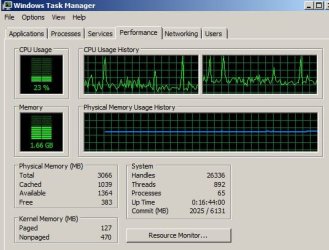
When I play videos, every 20-30 seconds the videos freeze for a second or two. The audio keeps going fine. I started Task Manager and watched the performance, and when this happens the CPU maxes out to 100%. In between these spikes the CPU usually stays between 20-40%. This happens even when the video is playing in a window (not full screen).

Any suggestions on where to start? I already fixed the setting to cure the video freezes during full screen mode, so this is a different problem than that common one.

EDIT: I just experimented and watched the CPU usage with the video off, and there are still spikes every several several seconds. The spikes don't hit 100%, but they go up to around 80-90%, up from 5-10% between the spikes. So apparently its not just a video issue. The spikes are so quick that I can't see them show up on the CPU usage under Processes.

Jim
 

My Computer

OS
Windows 7
I forgot about the snipping tool in Win7. Here is a shot while watching a Netflix video.

cpu.JPG

Jim
 

My Computer

OS
Windows 7
This may be a Latency/Driver problem. Run the DPC Latency Checker and see whether you get any red bars. If yes, we'll have to find the driver that is the culprit.
 

My Computer

Computer Manufacturer/Model Number
HP, Dell, Gateway, Toshiba - 4 laptops and 2 desktops
OS
Vista, Windows7, Mint Mate, Zorin, Windows 8
CPU
from 1.6GHz Duo to i7
Monitor(s) Displays
2x HP w2207
Hard Drives
5x HDD, 7x SSD, 12x Externals
Keyboard
with trackball - no mices
Mouse
Trackball mice
Internet Speed
DSL 6000
I'm using a Lenovo Ideapad Y550 with the following specs:

32 bit Win 7 Home premium
Intel Core 2 Duo T6600 2.2 ghz
4gb Ram
NVidia GeForce GT 240M video card

When I play videos, every 20-30 seconds the videos freeze for a second or two. The audio keeps going fine. I started Task Manager and watched the performance, and when this happens the CPU maxes out to 100%. In between these spikes the CPU usually stays between 20-40%. This happens even when the video is playing in a window (not full screen).

Any suggestions on where to start? I already fixed the setting to cure the video freezes during full screen mode, so this is a different problem than that common one.

EDIT: I just experimented and watched the CPU usage with the video off, and there are still spikes every several several seconds. The spikes don't hit 100%, but they go up to around 80-90%, up from 5-10% between the spikes. So apparently its not just a video issue. The spikes are so quick that I can't see them show up on the CPU usage under Processes.

Jim
Did you install any codec packs?
 

My Computer

Computer type
PC/Desktop
Computer Manufacturer/Model Number
Custom Build
OS
Windows 10 Pro x64, Arch Linux
CPU
Intel Core 2 Quad Q8200 OC'd 3.08GHz
Motherboard
Asus Rampage formula LGA775
Memory
8GB DDR2 900Mhz
Graphics Card(s)
MSI GT730 2GB GDDR5 (Kepler)
Sound Card
Supreme FX2
Monitor(s) Displays
Samsung LS22F350 LED
Screen Resolution
1080P
Hard Drives
Kingston SSDNow UV400 120GB, 500GB Hitachi, 2TB Samsung, 500GB Seagate FreeAgent, 640GB Samsung, 160GB Toshiba (Arch)
PSU
AeroCool 500W Bronze
Cooling
Cooler Master V6 + 3X fans
Keyboard
Prolink keyboard
Mouse
Logitech M705
Internet Speed
1MiB/s
Browser
Chrome Beta
what sort of program are you using while watching? WMP12?,MPC?VLC?
 

My Computer

OS
window's 7
CPU
core 2 quad
Motherboard
gigabyte
Memory
2gb corsair
Graphics Card(s)
ati hd4850
Monitor(s) Displays
lg
Screen Resolution
1600 X 900
Case
power logic
Other Info
none of the spec above is accurate
Thanks to all who responded. It appears the culprit was a Firefox add-on called "move media player 7" Yes, that's typed exactly as the name appears. I don't know where this came from, as I don't recall installing it. It may have come packaged with something. Its disabled for now and videos are playing smoothly. I'll continue to experiment and make sure, but i have run a couple hours worth of Netflix TV episodes without any problems.

Jim
 

My Computer

OS
Windows 7
glad you find the culprit.. feel free to ask again mate:)
 

My Computer

OS
window's 7
CPU
core 2 quad
Motherboard
gigabyte
Memory
2gb corsair
Graphics Card(s)
ati hd4850
Monitor(s) Displays
lg
Screen Resolution
1600 X 900
Case
power logic
Other Info
none of the spec above is accurate
Hey!
I also have bad lagging issue, very recently.
I watch videos fullscreen with VLC player, every now and then image stops for 2-3 secs, but audio keeps on going.
Same with streaming with chrome, and with Firefox (even though FireFox is less 'intense').
My video card is HD5770 with a quad-core 2.6Ghz.
Any ideas?

p.s. I ran the DPC latency checker and had a couple of red bars. (like 5 at beggining and 5 later on.)
 

My Computer

Computer Manufacturer/Model Number
p6230y
OS
Win 7 - 64 bit
CPU
Phenom II X4-810
Motherboard
shitty Foxconn/HP crap (if only i knew that earlier :P)
Memory
8GB
Graphics Card(s)
XFX HD5770
Sound Card
stock
Monitor(s) Displays
ViewSonic 19"
Hard Drives
Stock Seagate 7200.11 (750GB)
+WD20EARS!
PSU
Fatal1ty - 550W
Case
HP...
Cooling
Stock
Back
Top