W7 irritations

Robbie77

New member
Local time
11:35 PM
Messages
45
Location
Munich, Germany
Next W7 irritations--
1-- I don't find an Automatic Updates on/off option---is that not available in W7---as in XP Security Center? As I've just done a new install of W7--I'm being over-run with updates--without the option of Custom install. Also-after Updates are installed, instead of after a reboot as in XP, where you can get on with things immediately----It takes an age as Windows is reconfigured --3 phases-- before I can return to my work. Example, --I turn off the Computer, but it wants to install Updates be fore shutting down--ok--but when I next turn on the PC it goes through the reconfiguring ritual!! That isn't an improvement over XP---everything is very much slower. Any way of speeding that up?

2 I installed my 4 in 1 Printer --HP Officejet 4500 G510nz,-- but--this time all the install phases info---came up in German language! I have the same Region/Language Settings as on my XP PC---that install info was in English--but I can't get it in English with W7--and the whole thing is now only in German--and no Language select option----strange!! Have tried various combinations but no luck with getting it to run in English.
 

My Computer

Computer type
PC/Desktop
Computer Manufacturer/Model Number
Fujitsu-Siemens --Esprimo P
OS
Windows 7 Ultimate SP1 x64 build 7601
CPU
2.8 Intel Pentium D 820
Motherboard
Fujitsu Siemens D2151-A1 S26361-D2151-A1
Memory
2 Gb
Graphics Card(s)
Intel GMA 950 onboard Graphics
Hard Drives
Seagate 80Gb
Antivirus
AVG Free2014
Browser
IE10
Hi Robbie, welcome to the Seven Forums.
  1. See this tutorial for Windows Update settings: http://www.sevenforums.com/tutorials/2797-windows-update-settings-change.html
  2. Your location seems to be Germany, I suspect you have downloaded the installer from HP's German site. Happens to me often also living in Germany when I do not pay attention when downloading drivers and software. Here's the link for downloading English drivers and software for your printer. Notice that you need to uninstall the printer, it's drivers and software completely before reinstalling, otherwise there might be some German elements left even after reinstalling.
Kari
 

My Computer

Computer type
Laptop
Computer Manufacturer/Model Number
HP ENVY 17-1150eg
OS
Windows 10 Pro x64 EN-GB
CPU
1.6 GHz Intel Core i7-720QM Processor
Memory
6 GB
Graphics Card(s)
ATI Mobility Radeon HD 5850 Graphics
Sound Card
Beats sound system with integrated subwoofer
Monitor(s) Displays
17" laptop display, 22" LED and 32" Full HD TV through HDMI
Screen Resolution
1600*900 (1), 1920*1080 (2&3)
Hard Drives
Internal: 2 x 500 GB SATA Hard Disk Drive 7200 rpm
External: 2TB for backups, 3TB USB3 network drive for media
Cooling
As Envy runs a bit warm, I have it on a Cooler Master pad
Keyboard
Logitech diNovo Media Desktop Laser (bluetooth)
Mouse
Logitech Performance Mouse MX
Internet Speed
50/10 Mbps VDSL
Antivirus
Windows Defender 4.3.9431.0
Browser
Maxthon 3.5.2., IE11

My Computer

Computer type
PC/Desktop
Computer Manufacturer/Model Number
Lenovo IdeaCenter 450
OS
Windows 10 Pro X64
CPU
Intel Quad Core i7-4770 @ 3.4Ghz
Memory
16.0GB PC3-12800 DDR3 SDRAM 1600 MHz
Graphics Card(s)
Intel Integrated HD Graphics
Sound Card
Realtek HD Audio
Monitor(s) Displays
HP 22" LCD
Screen Resolution
1680 x 1050
Hard Drives
250GB Samsung EVO SATA-3 SSD
2TB Seagate ST2000DM001 SATA-2
1.5TB Seagate ST3150041AS SATA
Keyboard
Dell USB
Mouse
Lenovo USB
Internet Speed
Cable via Road Runner 3MB Upload, 30MB Download
Antivirus
Windows Defender, MBAM Pro, MBAE
Browser
Seamonkey
Other Info
UEFI/GPT
PLDS DVD-RW DH16AERSH
@robbie;

For Item #1, go to control panel, windows update, and in the left pane select Change Settings. Once there, you'll find Important Updates pull down. There you can select your update preference.

For Item #2, someone else will need to chime in.

Hope that helps.

Regards;

Sarris
 

My Computer

Computer type
PC/Desktop
Computer Manufacturer/Model Number
Gateway DX4860
OS
Windows 7 Professional x64
CPU
Intel I5 2320 @ 3.0 HHz
Motherboard
Gateway / Acer
Memory
32 GB DDR3
Graphics Card(s)
Asus Nvidia 440 GT & Zotac Nvidia 610 GT
Sound Card
Realtek HDA
Monitor(s) Displays
(2) Asus VW246H 24" (16:9) & (1) Asus VB198 19" (4:3)
Screen Resolution
5120 Total x 1080
Hard Drives
WD 1.5 TB WD15EARX-22P
PSU
Basiq 650
Case
Gateway Tower
Cooling
(3) Case Fans
Keyboard
1. Saitek Eclipse 2. Focus FK8200
Mouse
Logitech M510
Internet Speed
90 mbps DL / 10 mbps UL (usually 110.5/11.5)
Antivirus
SuperAntiSpyware Pro, MalwareBytes Pro, MSE
Browser
1. Palemoon x64 2. IE 11
Other Info
USB 3.0 Card
Hi Kari --Sarris,
Thank you both for your informative input.
Kari--the Printer install was done from the Device CD---no downloading---that#s what I find puzzling as nothing different was done as with the XP install!

I'll get back to you both on success or otherwise on both topics
Robbie
 

My Computer

Computer type
PC/Desktop
Computer Manufacturer/Model Number
Fujitsu-Siemens --Esprimo P
OS
Windows 7 Ultimate SP1 x64 build 7601
CPU
2.8 Intel Pentium D 820
Motherboard
Fujitsu Siemens D2151-A1 S26361-D2151-A1
Memory
2 Gb
Graphics Card(s)
Intel GMA 950 onboard Graphics
Hard Drives
Seagate 80Gb
Antivirus
AVG Free2014
Browser
IE10
Kari--the Printer install was done from the Device CD---no downloading---that#s what I find puzzling as nothing different was done as with the XP install!
Windows 7 is more specific with region settings. This has also happened to me.

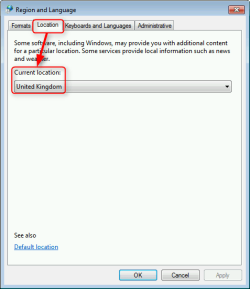
The installer checks the computer location from regional settings. Your issue should be gone if you change the location to United Kingdom, I assume it's showing Germany at the moment.

2014-01-21_18h45_18.png

Kari
 

My Computer

Computer type
Laptop
Computer Manufacturer/Model Number
HP ENVY 17-1150eg
OS
Windows 10 Pro x64 EN-GB
CPU
1.6 GHz Intel Core i7-720QM Processor
Memory
6 GB
Graphics Card(s)
ATI Mobility Radeon HD 5850 Graphics
Sound Card
Beats sound system with integrated subwoofer
Monitor(s) Displays
17" laptop display, 22" LED and 32" Full HD TV through HDMI
Screen Resolution
1600*900 (1), 1920*1080 (2&3)
Hard Drives
Internal: 2 x 500 GB SATA Hard Disk Drive 7200 rpm
External: 2TB for backups, 3TB USB3 network drive for media
Cooling
As Envy runs a bit warm, I have it on a Cooler Master pad
Keyboard
Logitech diNovo Media Desktop Laser (bluetooth)
Mouse
Logitech Performance Mouse MX
Internet Speed
50/10 Mbps VDSL
Antivirus
Windows Defender 4.3.9431.0
Browser
Maxthon 3.5.2., IE11
Kari,
I have got it sorted, but, I don't know how! I uninstalled the printer--redid the settings but changed none--the reinstall came up in English this time...ok--however my German Keyboard changed to English format when typing!- I have exactly the same settings on my XP PC and that Keyboard stays as German---weird or what.
This is what I have----

XP W7
Regional Options Region & Languages

Formats Tab Formats Tab
English (United Kingdom) English (United Kingdom)

Location United Kingdom Location United Kingdom
Text Serv. & Input Languages
Language Details Settings Keyboards & Languages (change language)

Default Input Language General Tab
Default Input Language
English (UK) United Kingdom English (UK) United Kindom

Languages Tab
Installed Services Installed Services
EN English (UK) DE German, Germany
Keyboard Keyboard
|_ German |_German
|_United Kingdom EN English (United Kingdom)
Keyboard
|_ United Kingdom
Advance Tab both boxes unchecked


Why the 2 systems should operate differently I can't figure

Robbie
 

My Computer

Computer type
PC/Desktop
Computer Manufacturer/Model Number
Fujitsu-Siemens --Esprimo P
OS
Windows 7 Ultimate SP1 x64 build 7601
CPU
2.8 Intel Pentium D 820
Motherboard
Fujitsu Siemens D2151-A1 S26361-D2151-A1
Memory
2 Gb
Graphics Card(s)
Intel GMA 950 onboard Graphics
Hard Drives
Seagate 80Gb
Antivirus
AVG Free2014
Browser
IE10
Kari --Sorry---don't know what happened to the format of my last reply-I did the two systems side by side-- this is how it should have looked!

XP
Regional Options

Formats tab
English (United Kingdom

Location United Kingdom

Text Serevices & Input Languages tab
Language -Details -Settings

Default Input language
English (UK) United Kingdom

Languages Tab
Installed Services
EN English (UK)
Keyboard
|_German
|_United Kingdom
Advance tab both boxes unchecked

Windows 7
Region & Languages Formats tab
English (United Kingdom)

Location United Kingdom

Keyboards & Languages tab--click change languages)

General tab Default Input Language

English (UK) United Kingdom

Languages Tab Installed Services
DE German, Germany
Keyboard
|_German
|_United Kingdom

Why the systems don't react the same settings in the same way I don't know. I don't have the Keyboard language problem in XP!
 

My Computer

Computer type
PC/Desktop
Computer Manufacturer/Model Number
Fujitsu-Siemens --Esprimo P
OS
Windows 7 Ultimate SP1 x64 build 7601
CPU
2.8 Intel Pentium D 820
Motherboard
Fujitsu Siemens D2151-A1 S26361-D2151-A1
Memory
2 Gb
Graphics Card(s)
Intel GMA 950 onboard Graphics
Hard Drives
Seagate 80Gb
Antivirus
AVG Free2014
Browser
IE10
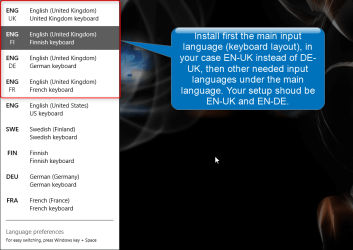
A small change I would do, change the main input language from DE-UK to EN-UK. It's the only thing I can see in your setup not 100% "kosher".

See the screenshot below. It is from Windows 8.1 but the principle is the same whatever Windows version you are running:

2014-01-22_18h42_11.png

All my Windows 7 and 8 systems have multiple user account in respective languages (using language packs), all different user profiles following the same principle. I need to switch between English, Finnish, Swedish (same layout than Finnish), German and occasional French input languages in whatever language user profile I currently am using, so all profiles have all needed input languages installed and enabled.

An example:
  • Finnish user profile
    • Default input language FI-FI
    • Other input languages:
      • FI-EN
      • FI-DE
      • FI-FR
  • German user profile
    • Default input language DE-DE
    • Other input languages:
      • DE-EN
      • DE-FI
      • DE-FR
Also remember that by default the input language can be selected independently for each application. For example, if you set input language to German in Firefox, then open Microsoft Word to type a letter using the default input language English, and later return to Firefox it's still using German input language.

Kari
 

My Computer

Computer type
Laptop
Computer Manufacturer/Model Number
HP ENVY 17-1150eg
OS
Windows 10 Pro x64 EN-GB
CPU
1.6 GHz Intel Core i7-720QM Processor
Memory
6 GB
Graphics Card(s)
ATI Mobility Radeon HD 5850 Graphics
Sound Card
Beats sound system with integrated subwoofer
Monitor(s) Displays
17" laptop display, 22" LED and 32" Full HD TV through HDMI
Screen Resolution
1600*900 (1), 1920*1080 (2&3)
Hard Drives
Internal: 2 x 500 GB SATA Hard Disk Drive 7200 rpm
External: 2TB for backups, 3TB USB3 network drive for media
Cooling
As Envy runs a bit warm, I have it on a Cooler Master pad
Keyboard
Logitech diNovo Media Desktop Laser (bluetooth)
Mouse
Logitech Performance Mouse MX
Internet Speed
50/10 Mbps VDSL
Antivirus
Windows Defender 4.3.9431.0
Browser
Maxthon 3.5.2., IE11
Kari--thanks,--but you lost me friend---you forget I'm inexperienced---haven't a clue how to to do what you suggest!!!!

Robbie
 

My Computer

Computer type
PC/Desktop
Computer Manufacturer/Model Number
Fujitsu-Siemens --Esprimo P
OS
Windows 7 Ultimate SP1 x64 build 7601
CPU
2.8 Intel Pentium D 820
Motherboard
Fujitsu Siemens D2151-A1 S26361-D2151-A1
Memory
2 Gb
Graphics Card(s)
Intel GMA 950 onboard Graphics
Hard Drives
Seagate 80Gb
Antivirus
AVG Free2014
Browser
IE10
I'll boot a Windows 7 machine up for screenshots when finished what I am doing now, I'll be back with simple instructions in an hour or so :).
 

My Computer

Computer type
Laptop
Computer Manufacturer/Model Number
HP ENVY 17-1150eg
OS
Windows 10 Pro x64 EN-GB
CPU
1.6 GHz Intel Core i7-720QM Processor
Memory
6 GB
Graphics Card(s)
ATI Mobility Radeon HD 5850 Graphics
Sound Card
Beats sound system with integrated subwoofer
Monitor(s) Displays
17" laptop display, 22" LED and 32" Full HD TV through HDMI
Screen Resolution
1600*900 (1), 1920*1080 (2&3)
Hard Drives
Internal: 2 x 500 GB SATA Hard Disk Drive 7200 rpm
External: 2TB for backups, 3TB USB3 network drive for media
Cooling
As Envy runs a bit warm, I have it on a Cooler Master pad
Keyboard
Logitech diNovo Media Desktop Laser (bluetooth)
Mouse
Logitech Performance Mouse MX
Internet Speed
50/10 Mbps VDSL
Antivirus
Windows Defender 4.3.9431.0
Browser
Maxthon 3.5.2., IE11
Thanks Kari---good timing --watching my football club Sunderland--Cup game v Man U---precarious!
 

My Computer

Computer type
PC/Desktop
Computer Manufacturer/Model Number
Fujitsu-Siemens --Esprimo P
OS
Windows 7 Ultimate SP1 x64 build 7601
CPU
2.8 Intel Pentium D 820
Motherboard
Fujitsu Siemens D2151-A1 S26361-D2151-A1
Memory
2 Gb
Graphics Card(s)
Intel GMA 950 onboard Graphics
Hard Drives
Seagate 80Gb
Antivirus
AVG Free2014
Browser
IE10
Kari--thanks,--but you lost me friend---you forget I'm inexperienced---haven't a clue how to to do what you suggest!!!!

Robbie

OK, a personalized illustrated mini tutorial for you ;). Official Seven Forums tutorials here:

I'm assuming following things:
  • You are a British ex-pat living in Germany
  • You use English Windows 7
  • Your main input language and keyboard layout should be UK English
  • You have occasional need for German keyboard layout, for instance for these difficult addresses like Lützowstraße
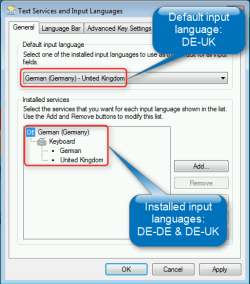
  • Your Input Language properties look at the moment like this:
    2014-01-22_21h32_47.png
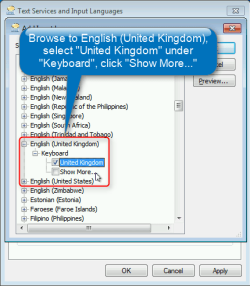
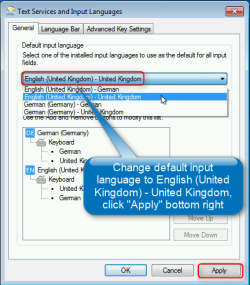
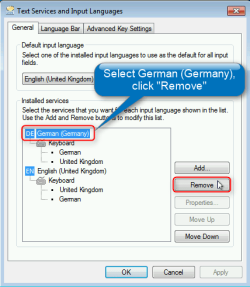
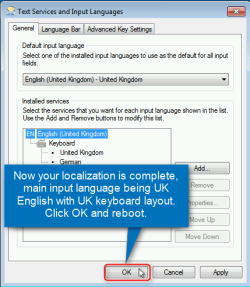
If the above is correct, do this to complete your localization. Screenshots are in order of appearance, with explanations:
  • Step 1.
    2014-01-22_21h36_55.png
  • Step 2.
    2014-01-22_21h38_40.png
  • Step 3.
    2014-01-22_21h44_10.png
  • Step 4.
    2014-01-22_21h47_12.png
  • Step 5.
    2014-01-22_21h50_25.png
  • Step 6.
    2014-01-22_22h27_00.png
Kari
 
Last edited:

My Computer

Computer type
Laptop
Computer Manufacturer/Model Number
HP ENVY 17-1150eg
OS
Windows 10 Pro x64 EN-GB
CPU
1.6 GHz Intel Core i7-720QM Processor
Memory
6 GB
Graphics Card(s)
ATI Mobility Radeon HD 5850 Graphics
Sound Card
Beats sound system with integrated subwoofer
Monitor(s) Displays
17" laptop display, 22" LED and 32" Full HD TV through HDMI
Screen Resolution
1600*900 (1), 1920*1080 (2&3)
Hard Drives
Internal: 2 x 500 GB SATA Hard Disk Drive 7200 rpm
External: 2TB for backups, 3TB USB3 network drive for media
Cooling
As Envy runs a bit warm, I have it on a Cooler Master pad
Keyboard
Logitech diNovo Media Desktop Laser (bluetooth)
Mouse
Logitech Performance Mouse MX
Internet Speed
50/10 Mbps VDSL
Antivirus
Windows Defender 4.3.9431.0
Browser
Maxthon 3.5.2., IE11
Kari---not sure if the last bit is correct, as German Keyboard is primary,with English 2nd. I work mostly in German, but English is secondary language--mostly for email and online shopping.
 

My Computer

Computer type
PC/Desktop
Computer Manufacturer/Model Number
Fujitsu-Siemens --Esprimo P
OS
Windows 7 Ultimate SP1 x64 build 7601
CPU
2.8 Intel Pentium D 820
Motherboard
Fujitsu Siemens D2151-A1 S26361-D2151-A1
Memory
2 Gb
Graphics Card(s)
Intel GMA 950 onboard Graphics
Hard Drives
Seagate 80Gb
Antivirus
AVG Free2014
Browser
IE10
OK, I got it wrong.

Still, to assure your Windows is as English as possible (this one I got right?), I would recommend changing the Input Language settings as told in my previous post, with one possible change: step 4, select the default input language English (United Kingdom) - German if that's the input language you want to have.

Main thing is, on an English Windows system I recommend using necessary keyboard languages under main input language English (United Kingdom) rather than under German (Germany).
 

My Computer

Computer type
Laptop
Computer Manufacturer/Model Number
HP ENVY 17-1150eg
OS
Windows 10 Pro x64 EN-GB
CPU
1.6 GHz Intel Core i7-720QM Processor
Memory
6 GB
Graphics Card(s)
ATI Mobility Radeon HD 5850 Graphics
Sound Card
Beats sound system with integrated subwoofer
Monitor(s) Displays
17" laptop display, 22" LED and 32" Full HD TV through HDMI
Screen Resolution
1600*900 (1), 1920*1080 (2&3)
Hard Drives
Internal: 2 x 500 GB SATA Hard Disk Drive 7200 rpm
External: 2TB for backups, 3TB USB3 network drive for media
Cooling
As Envy runs a bit warm, I have it on a Cooler Master pad
Keyboard
Logitech diNovo Media Desktop Laser (bluetooth)
Mouse
Logitech Performance Mouse MX
Internet Speed
50/10 Mbps VDSL
Antivirus
Windows Defender 4.3.9431.0
Browser
Maxthon 3.5.2., IE11
Hi Kari-- Thanks for the tutorial. The setup I entered yesterday, went haywire today---haven't a clue why!
Your assumed list isn't correct.
Ex-pat living Germany--yes
Windows 7 English--yes
My main input languge & Keyboard are German
I need both languages almost equally

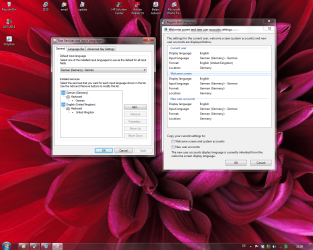
Attached is what I now have and it works. Took me a while to figure it out, but following your guidance was a big help, and I thank you for it.

Robbie


My Setup.png
 

My Computer

Computer type
PC/Desktop
Computer Manufacturer/Model Number
Fujitsu-Siemens --Esprimo P
OS
Windows 7 Ultimate SP1 x64 build 7601
CPU
2.8 Intel Pentium D 820
Motherboard
Fujitsu Siemens D2151-A1 S26361-D2151-A1
Memory
2 Gb
Graphics Card(s)
Intel GMA 950 onboard Graphics
Hard Drives
Seagate 80Gb
Antivirus
AVG Free2014
Browser
IE10
Main thing is your PC works as you want it to work.

One thing, though: I see that you have still your location set to Germany. Of course it's your decision, but it will cause also in the future for some software installing rather in German than in English. If you decide to change it to UK, see this post.

From an ex-pat in Germany to another, what's your excuse? Mine is my ailing mother-in-law, I met my German wife when both living in Rome, we had to move to Leipzig to be closer to her mother back in 2005 after her second stroke.

Kari
 

My Computer

Computer type
Laptop
Computer Manufacturer/Model Number
HP ENVY 17-1150eg
OS
Windows 10 Pro x64 EN-GB
CPU
1.6 GHz Intel Core i7-720QM Processor
Memory
6 GB
Graphics Card(s)
ATI Mobility Radeon HD 5850 Graphics
Sound Card
Beats sound system with integrated subwoofer
Monitor(s) Displays
17" laptop display, 22" LED and 32" Full HD TV through HDMI
Screen Resolution
1600*900 (1), 1920*1080 (2&3)
Hard Drives
Internal: 2 x 500 GB SATA Hard Disk Drive 7200 rpm
External: 2TB for backups, 3TB USB3 network drive for media
Cooling
As Envy runs a bit warm, I have it on a Cooler Master pad
Keyboard
Logitech diNovo Media Desktop Laser (bluetooth)
Mouse
Logitech Performance Mouse MX
Internet Speed
50/10 Mbps VDSL
Antivirus
Windows Defender 4.3.9431.0
Browser
Maxthon 3.5.2., IE11
Hi Kari---Similar but I came here to work back in '71, moved around with the job---Aircraft Tech-- met my Lady '77 here in Munich--been based here ever since,. but been all over with the contracting life. Retired 7yrs now. Have an interest in Leipzig---My hobby is genealogy, and I have German Ancestry---Memel, East Prussia,---some Records are at the Deutsche Zentralstelle für Genealogie---Käthe-Kollwitzstr---but the Russians have most of what I want---and won't give access!! Should be visiting there this Spring.
As regards Software installing in German----most stuff these days has a language option, with English being primary.
Another couple of irritations
1) I find the W7 Display Wallpaper themes poor. I would like to have my XP theme --Vortex Space --How can I install that on my W7 machine?

2) I visit the Sporting Life racing website daily - With XP I can listen to the Audio Race commentary---there are 3 buttons --Print, Audio and Video. In XP Print and Audio are ok Video greyed out, but in W7, the Audio is also greyed out---only Print button is active. What do I need to do to activate the Audio in W7?
All sounds are active in Vol Control Options, and all Devices are working normally.
Robbie
 

My Computer

Computer type
PC/Desktop
Computer Manufacturer/Model Number
Fujitsu-Siemens --Esprimo P
OS
Windows 7 Ultimate SP1 x64 build 7601
CPU
2.8 Intel Pentium D 820
Motherboard
Fujitsu Siemens D2151-A1 S26361-D2151-A1
Memory
2 Gb
Graphics Card(s)
Intel GMA 950 onboard Graphics
Hard Drives
Seagate 80Gb
Antivirus
AVG Free2014
Browser
IE10
Hi Kari---the Desktop theme Vortex Space--XP--is now on my W7 machine but it is very blurred ---is that because it is a 32 bit theme---I'm W7 64 bit. Looks poor--any way I can sharpen that?

Robbie
 

My Computer

Computer type
PC/Desktop
Computer Manufacturer/Model Number
Fujitsu-Siemens --Esprimo P
OS
Windows 7 Ultimate SP1 x64 build 7601
CPU
2.8 Intel Pentium D 820
Motherboard
Fujitsu Siemens D2151-A1 S26361-D2151-A1
Memory
2 Gb
Graphics Card(s)
Intel GMA 950 onboard Graphics
Hard Drives
Seagate 80Gb
Antivirus
AVG Free2014
Browser
IE10
I have no idea, never tried to transfer XP themes to Windows 7. You'll find our graphics and theme wizards here: Customization - Windows 7 Help Forums

About that betting site's audio and video, I checked the site but as you need to register which I did not want to do, I am unable to give you any assistance.
 

My Computer

Computer type
Laptop
Computer Manufacturer/Model Number
HP ENVY 17-1150eg
OS
Windows 10 Pro x64 EN-GB
CPU
1.6 GHz Intel Core i7-720QM Processor
Memory
6 GB
Graphics Card(s)
ATI Mobility Radeon HD 5850 Graphics
Sound Card
Beats sound system with integrated subwoofer
Monitor(s) Displays
17" laptop display, 22" LED and 32" Full HD TV through HDMI
Screen Resolution
1600*900 (1), 1920*1080 (2&3)
Hard Drives
Internal: 2 x 500 GB SATA Hard Disk Drive 7200 rpm
External: 2TB for backups, 3TB USB3 network drive for media
Cooling
As Envy runs a bit warm, I have it on a Cooler Master pad
Keyboard
Logitech diNovo Media Desktop Laser (bluetooth)
Mouse
Logitech Performance Mouse MX
Internet Speed
50/10 Mbps VDSL
Antivirus
Windows Defender 4.3.9431.0
Browser
Maxthon 3.5.2., IE11
Back
Top