W7 not updating?

Alexey2912

New member
Member
VIP
Local time
12:46 PM
Messages
1,351
Location
Honolulu
Hi,

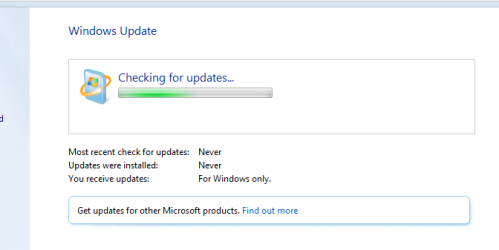
Running W7 Pro 32 bit SP1, on my lap. All was fine till last month, was getting updates on check and the check never used to take more than 10 mins. Didn't use my lap for a month, and now Windows updates keeps running for hours with none results...

Any ideas, suggestions....

Thanks.


Edit:

Am not getting any errors.
 

My Computers

System One System Two

  • Computer type
    Laptop
    Computer Manufacturer/Model Number
    Dell
    OS
    W7 Pro 32bit
    CPU
    Intel(R) Core(TM)2 CPU T7200 @ 2.00GHz
    Motherboard
    Dell Inc. 0CF456
    Memory
    4.00 GB
    Graphics Card(s)
    NVIDIA GTX 7980 512 MB
    Sound Card
    (1) HD Pro Webcam C910 (2) Bluetooth Stereo Audio (3) Si
    Hard Drives
    SSD
    Browser
    Brave
  • Computer type
    PC/Desktop
    System Manufacturer/Model Number
    Dell XPS Special Edition 8940
    OS
    W10 Pro
    CPU
    core i7 11th gen, 11700, 2.5-4.9 GHZ
    Memory
    32 GBB, 2 X16 GB @2933 MHz.
    Graphics Card(s)
    NVIDIA GeForce RTX 3070 8GB GDDR6
    Monitor(s) Displays
    Dell UltraSharp 32 4K monitor.
    Hard Drives
    1. 1TB M.2 PCIe NVMe SSD.

    2. 1TB 7200 rpm 3.5" SATA Hard Drive.
    PSU
    500W.
    Case
    Mineral White Bezel Chassis.
Hi @ThrashZone hope you are well, do I need to download and install this https://support.microsoft.com/en-us/kb/3179573 posted by Brink?

Your expert recommendation.

Best regards!


Edit:

Heard that the Aug update makes CPU idle run at plus 90 % vs 1-10% normally? :huh:
 

My Computers

System One System Two

  • Computer type
    Laptop
    Computer Manufacturer/Model Number
    Dell
    OS
    W7 Pro 32bit
    CPU
    Intel(R) Core(TM)2 CPU T7200 @ 2.00GHz
    Motherboard
    Dell Inc. 0CF456
    Memory
    4.00 GB
    Graphics Card(s)
    NVIDIA GTX 7980 512 MB
    Sound Card
    (1) HD Pro Webcam C910 (2) Bluetooth Stereo Audio (3) Si
    Hard Drives
    SSD
    Browser
    Brave
  • Computer type
    PC/Desktop
    System Manufacturer/Model Number
    Dell XPS Special Edition 8940
    OS
    W10 Pro
    CPU
    core i7 11th gen, 11700, 2.5-4.9 GHZ
    Memory
    32 GBB, 2 X16 GB @2933 MHz.
    Graphics Card(s)
    NVIDIA GeForce RTX 3070 8GB GDDR6
    Monitor(s) Displays
    Dell UltraSharp 32 4K monitor.
    Hard Drives
    1. 1TB M.2 PCIe NVMe SSD.

    2. 1TB 7200 rpm 3.5" SATA Hard Drive.
    PSU
    500W.
    Case
    Mineral White Bezel Chassis.
Hi,
I haven't installed that one
It is for me in the Optional section and I would normally not deal with them.
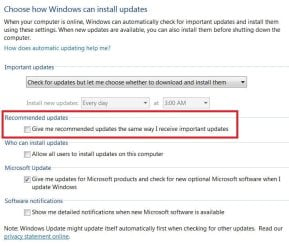
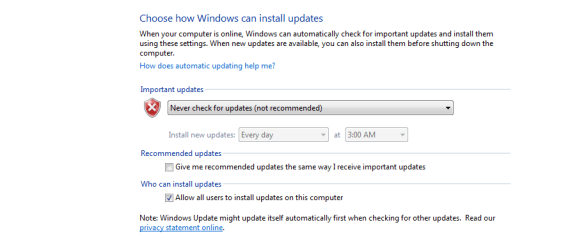
If your update settings are set like this to excluded recommended updates it will also show in the Optional section for you
update settings.JPG

So far all that is needed is KB3020369 & KB3172605
 

My Computer

Computer type
PC/Desktop
Computer Manufacturer/Model Number
Custom assembled by me :}
OS
Win-7-Pro64bit 7-H-Prem-64bit
CPU
i7-5930K 2nd i9-9940x both water blocked VRM's too
Motherboard
ASUS SABERTOOTH X99 2nd ASUS x299 Apex
Memory
Trident-z 3200C14 2nd Trident-z 3600C16
Graphics Card(s)
EVGA 1080ti ftw3 2nd Titan Xp both water blocked
Sound Card
Built-in Realtek
Monitor(s) Displays
1-AOC G2460PG 24"G-Sync 144Hz/ 2nd 1-ASUS VG248QE 24" 144Hz
Screen Resolution
1920 x 1080 144Hz
Hard Drives
2-Samsung M.2 Evo & Evo Plus
2-Samsung 850 EVO 500GB SSD's/ 3-2.5 W.D. Black 1tb-&3-1tb/3-3.5 WD Black 1tb hdd's
PSU
EVGA SuperNOVA 1000-P2 2nd 1200-P2
Case
2-Corsair Obsidian Series 450D Black ATX Mid Tower
Cooling
Custom water loops
Keyboard
Logitech G710+/ 2nd Logitech G910
Mouse
2-RedDragon M901 Perdition 16400 dpi Gaming mouse = wired
Internet Speed
Comcast Ping 19ms 89.31mbps download speed 6.12mbps upload
Antivirus
Malwarebytes Pro/ Superantispyware Pro
Browser
FireFox & Pale moon
Other Info
2nd ASUS X299 Apex/Intel i9-9940x with Custom water loop/7H-Prem-x64/Corsair 450D case/Ram Trident-z 3600C16 4x8gb / Samsung970Evo plus 500gb SSD/Dual ssd EZ swap evo/PSU EVGA SuperNova 1200w-P2 80+Platinum/GPU Titan Xp /8-ML-140 on push-pull on 2-280GTX rads
Thanks for replying, appreciate it.

Settings are as you posted.

Despite update running for hours am not getting any results.

Do I need to manually install KB3020369 & KB3172605 ??

Thanks again!
 

My Computers

System One System Two

  • Computer type
    Laptop
    Computer Manufacturer/Model Number
    Dell
    OS
    W7 Pro 32bit
    CPU
    Intel(R) Core(TM)2 CPU T7200 @ 2.00GHz
    Motherboard
    Dell Inc. 0CF456
    Memory
    4.00 GB
    Graphics Card(s)
    NVIDIA GTX 7980 512 MB
    Sound Card
    (1) HD Pro Webcam C910 (2) Bluetooth Stereo Audio (3) Si
    Hard Drives
    SSD
    Browser
    Brave
  • Computer type
    PC/Desktop
    System Manufacturer/Model Number
    Dell XPS Special Edition 8940
    OS
    W10 Pro
    CPU
    core i7 11th gen, 11700, 2.5-4.9 GHZ
    Memory
    32 GBB, 2 X16 GB @2933 MHz.
    Graphics Card(s)
    NVIDIA GeForce RTX 3070 8GB GDDR6
    Monitor(s) Displays
    Dell UltraSharp 32 4K monitor.
    Hard Drives
    1. 1TB M.2 PCIe NVMe SSD.

    2. 1TB 7200 rpm 3.5" SATA Hard Drive.
    PSU
    500W.
    Case
    Mineral White Bezel Chassis.
Hi,
I thought we already did but it's been a while since you installed windows
So yes if they do not exist please do install either one that is missing

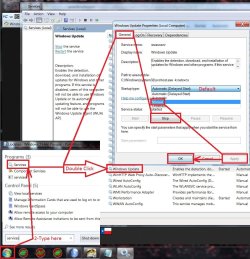
When manually installing updates you need to switch your update settings to Never check for updates and restart the machine first.
http://www.sevenforums.com/tutorials/2797-windows-update-settings-change.html
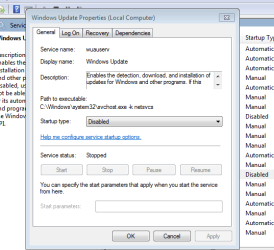
After restart confirm the windows update service is not running
If it is Stop it and switch it to manual
Once the updates are installed just switch all the settings back the way they were
service stop windows update.jpg
Make sure KB3020369 is installed if not manually install it this is the main article page with all versions,
https://support.microsoft.com/en-us/kb/3020369
These other links do prompt you to download as soon as you click on them just to give you a heads up :)

Win-7 32 bit
https://download.microsoft.com/down...B0A-35769CBBE6B0/Windows6.1-KB3020369-x86.msu
Win-7 64 bit
https://download.microsoft.com/down...020-EC41D56B074F/Windows6.1-KB3020369-x64.msu

Then manually install KB3172605 main article page with all versions,
https://support.microsoft.com/en-us/kb/3172605
KB3172605
Win-7 32 bit
https://download.microsoft.com/down...A9C-6B30C3E1735A/Windows6.1-KB3172605-x86.msu

Win-7 64 bit
https://download.microsoft.com/down...67F-C713F7821374/Windows6.1-KB3172605-x64.msu

After switch your windows update settings back to what you had prior and manually check for updates and the rest should show up shortly.
 
Last edited:

My Computer

Computer type
PC/Desktop
Computer Manufacturer/Model Number
Custom assembled by me :}
OS
Win-7-Pro64bit 7-H-Prem-64bit
CPU
i7-5930K 2nd i9-9940x both water blocked VRM's too
Motherboard
ASUS SABERTOOTH X99 2nd ASUS x299 Apex
Memory
Trident-z 3200C14 2nd Trident-z 3600C16
Graphics Card(s)
EVGA 1080ti ftw3 2nd Titan Xp both water blocked
Sound Card
Built-in Realtek
Monitor(s) Displays
1-AOC G2460PG 24"G-Sync 144Hz/ 2nd 1-ASUS VG248QE 24" 144Hz
Screen Resolution
1920 x 1080 144Hz
Hard Drives
2-Samsung M.2 Evo & Evo Plus
2-Samsung 850 EVO 500GB SSD's/ 3-2.5 W.D. Black 1tb-&3-1tb/3-3.5 WD Black 1tb hdd's
PSU
EVGA SuperNOVA 1000-P2 2nd 1200-P2
Case
2-Corsair Obsidian Series 450D Black ATX Mid Tower
Cooling
Custom water loops
Keyboard
Logitech G710+/ 2nd Logitech G910
Mouse
2-RedDragon M901 Perdition 16400 dpi Gaming mouse = wired
Internet Speed
Comcast Ping 19ms 89.31mbps download speed 6.12mbps upload
Antivirus
Malwarebytes Pro/ Superantispyware Pro
Browser
FireFox & Pale moon
Other Info
2nd ASUS X299 Apex/Intel i9-9940x with Custom water loop/7H-Prem-x64/Corsair 450D case/Ram Trident-z 3600C16 4x8gb / Samsung970Evo plus 500gb SSD/Dual ssd EZ swap evo/PSU EVGA SuperNova 1200w-P2 80+Platinum/GPU Titan Xp /8-ML-140 on push-pull on 2-280GTX rads
Hi,

Thanks genius smart man. :)


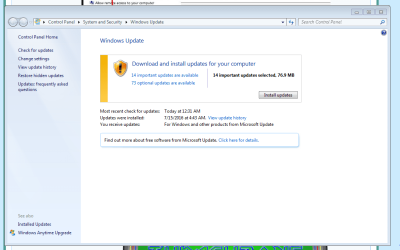
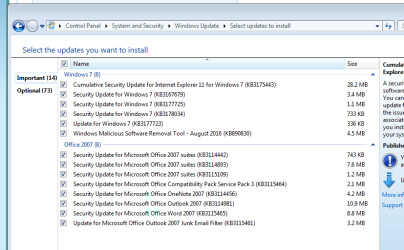
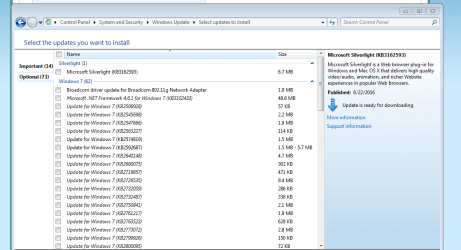
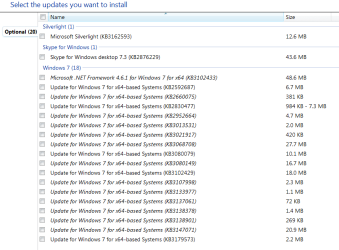
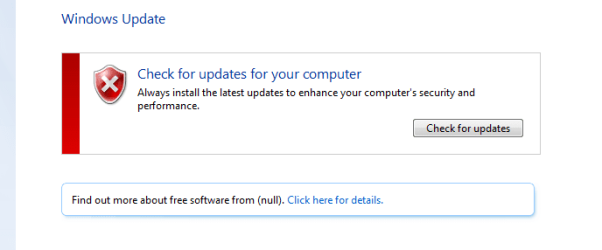
I didn't have KB3172605 installed, did it manually, now I see these 14 important and 73 optional, should I install only the important ones, in optional there is one for net framework 4.6.1?

Check for updates hardly took 5 mins, after the install.

Thanks again.

You are one expert........;)
 

Attachments

  • W7U.PNG
    W7U.PNG
    25.6 KB · Views: 3
  • W7U1.PNG
    W7U1.PNG
    36.5 KB · Views: 3
  • W7U2.PNG
    W7U2.PNG
    21.8 KB · Views: 3
  • W7U3.PNG
    W7U3.PNG
    37.4 KB · Views: 3

My Computers

System One System Two

  • Computer type
    Laptop
    Computer Manufacturer/Model Number
    Dell
    OS
    W7 Pro 32bit
    CPU
    Intel(R) Core(TM)2 CPU T7200 @ 2.00GHz
    Motherboard
    Dell Inc. 0CF456
    Memory
    4.00 GB
    Graphics Card(s)
    NVIDIA GTX 7980 512 MB
    Sound Card
    (1) HD Pro Webcam C910 (2) Bluetooth Stereo Audio (3) Si
    Hard Drives
    SSD
    Browser
    Brave
  • Computer type
    PC/Desktop
    System Manufacturer/Model Number
    Dell XPS Special Edition 8940
    OS
    W10 Pro
    CPU
    core i7 11th gen, 11700, 2.5-4.9 GHZ
    Memory
    32 GBB, 2 X16 GB @2933 MHz.
    Graphics Card(s)
    NVIDIA GeForce RTX 3070 8GB GDDR6
    Monitor(s) Displays
    Dell UltraSharp 32 4K monitor.
    Hard Drives
    1. 1TB M.2 PCIe NVMe SSD.

    2. 1TB 7200 rpm 3.5" SATA Hard Drive.
    PSU
    500W.
    Case
    Mineral White Bezel Chassis.
Hi,
Yes please only do the Important updates first and create a system image before and after
Then just exclude these from downloading and installing is what I'd do for now
updates excluded.PNG
 

My Computer

Computer type
PC/Desktop
Computer Manufacturer/Model Number
Custom assembled by me :}
OS
Win-7-Pro64bit 7-H-Prem-64bit
CPU
i7-5930K 2nd i9-9940x both water blocked VRM's too
Motherboard
ASUS SABERTOOTH X99 2nd ASUS x299 Apex
Memory
Trident-z 3200C14 2nd Trident-z 3600C16
Graphics Card(s)
EVGA 1080ti ftw3 2nd Titan Xp both water blocked
Sound Card
Built-in Realtek
Monitor(s) Displays
1-AOC G2460PG 24"G-Sync 144Hz/ 2nd 1-ASUS VG248QE 24" 144Hz
Screen Resolution
1920 x 1080 144Hz
Hard Drives
2-Samsung M.2 Evo & Evo Plus
2-Samsung 850 EVO 500GB SSD's/ 3-2.5 W.D. Black 1tb-&3-1tb/3-3.5 WD Black 1tb hdd's
PSU
EVGA SuperNOVA 1000-P2 2nd 1200-P2
Case
2-Corsair Obsidian Series 450D Black ATX Mid Tower
Cooling
Custom water loops
Keyboard
Logitech G710+/ 2nd Logitech G910
Mouse
2-RedDragon M901 Perdition 16400 dpi Gaming mouse = wired
Internet Speed
Comcast Ping 19ms 89.31mbps download speed 6.12mbps upload
Antivirus
Malwarebytes Pro/ Superantispyware Pro
Browser
FireFox & Pale moon
Other Info
2nd ASUS X299 Apex/Intel i9-9940x with Custom water loop/7H-Prem-x64/Corsair 450D case/Ram Trident-z 3600C16 4x8gb / Samsung970Evo plus 500gb SSD/Dual ssd EZ swap evo/PSU EVGA SuperNova 1200w-P2 80+Platinum/GPU Titan Xp /8-ML-140 on push-pull on 2-280GTX rads
Hi,

Have a couple of queries.

1. Since have MS Off, custom installed, with out One note, should I still install its important update?

2. Have Skype, no need for it optional update and same for net framework 4.6.1?

Thanks again, shall keep you posted.
 

My Computers

System One System Two

  • Computer type
    Laptop
    Computer Manufacturer/Model Number
    Dell
    OS
    W7 Pro 32bit
    CPU
    Intel(R) Core(TM)2 CPU T7200 @ 2.00GHz
    Motherboard
    Dell Inc. 0CF456
    Memory
    4.00 GB
    Graphics Card(s)
    NVIDIA GTX 7980 512 MB
    Sound Card
    (1) HD Pro Webcam C910 (2) Bluetooth Stereo Audio (3) Si
    Hard Drives
    SSD
    Browser
    Brave
  • Computer type
    PC/Desktop
    System Manufacturer/Model Number
    Dell XPS Special Edition 8940
    OS
    W10 Pro
    CPU
    core i7 11th gen, 11700, 2.5-4.9 GHZ
    Memory
    32 GBB, 2 X16 GB @2933 MHz.
    Graphics Card(s)
    NVIDIA GeForce RTX 3070 8GB GDDR6
    Monitor(s) Displays
    Dell UltraSharp 32 4K monitor.
    Hard Drives
    1. 1TB M.2 PCIe NVMe SSD.

    2. 1TB 7200 rpm 3.5" SATA Hard Drive.
    PSU
    500W.
    Case
    Mineral White Bezel Chassis.
Hi
Yes if it's Important I would go ahead and install it :)
Sorry did you mean "you have skype installed" ?

Net 4.6.1 I would not install
If memory serves me you have net 4.5.2 installed now if so it is good enough it's what I have.
An existing net would be listed in uninstall a program.
 

My Computer

Computer type
PC/Desktop
Computer Manufacturer/Model Number
Custom assembled by me :}
OS
Win-7-Pro64bit 7-H-Prem-64bit
CPU
i7-5930K 2nd i9-9940x both water blocked VRM's too
Motherboard
ASUS SABERTOOTH X99 2nd ASUS x299 Apex
Memory
Trident-z 3200C14 2nd Trident-z 3600C16
Graphics Card(s)
EVGA 1080ti ftw3 2nd Titan Xp both water blocked
Sound Card
Built-in Realtek
Monitor(s) Displays
1-AOC G2460PG 24"G-Sync 144Hz/ 2nd 1-ASUS VG248QE 24" 144Hz
Screen Resolution
1920 x 1080 144Hz
Hard Drives
2-Samsung M.2 Evo & Evo Plus
2-Samsung 850 EVO 500GB SSD's/ 3-2.5 W.D. Black 1tb-&3-1tb/3-3.5 WD Black 1tb hdd's
PSU
EVGA SuperNOVA 1000-P2 2nd 1200-P2
Case
2-Corsair Obsidian Series 450D Black ATX Mid Tower
Cooling
Custom water loops
Keyboard
Logitech G710+/ 2nd Logitech G910
Mouse
2-RedDragon M901 Perdition 16400 dpi Gaming mouse = wired
Internet Speed
Comcast Ping 19ms 89.31mbps download speed 6.12mbps upload
Antivirus
Malwarebytes Pro/ Superantispyware Pro
Browser
FireFox & Pale moon
Other Info
2nd ASUS X299 Apex/Intel i9-9940x with Custom water loop/7H-Prem-x64/Corsair 450D case/Ram Trident-z 3600C16 4x8gb / Samsung970Evo plus 500gb SSD/Dual ssd EZ swap evo/PSU EVGA SuperNova 1200w-P2 80+Platinum/GPU Titan Xp /8-ML-140 on push-pull on 2-280GTX rads
Hi, thanks again.

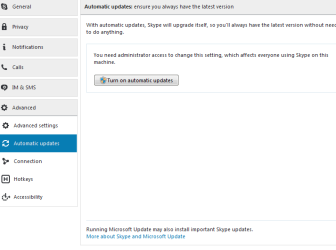
1. Correct, have Skype installed, shouldn't it update automatically.

2. Young man, your neurons are extremely sharp and firing, correct, have net framework 4.5.2 installed...you amazed an old man.

3. Would install the important one note update.

4. Backups, before and after a must...

Thanks again for all your expert assistance.
 

My Computers

System One System Two

  • Computer type
    Laptop
    Computer Manufacturer/Model Number
    Dell
    OS
    W7 Pro 32bit
    CPU
    Intel(R) Core(TM)2 CPU T7200 @ 2.00GHz
    Motherboard
    Dell Inc. 0CF456
    Memory
    4.00 GB
    Graphics Card(s)
    NVIDIA GTX 7980 512 MB
    Sound Card
    (1) HD Pro Webcam C910 (2) Bluetooth Stereo Audio (3) Si
    Hard Drives
    SSD
    Browser
    Brave
  • Computer type
    PC/Desktop
    System Manufacturer/Model Number
    Dell XPS Special Edition 8940
    OS
    W10 Pro
    CPU
    core i7 11th gen, 11700, 2.5-4.9 GHZ
    Memory
    32 GBB, 2 X16 GB @2933 MHz.
    Graphics Card(s)
    NVIDIA GeForce RTX 3070 8GB GDDR6
    Monitor(s) Displays
    Dell UltraSharp 32 4K monitor.
    Hard Drives
    1. 1TB M.2 PCIe NVMe SSD.

    2. 1TB 7200 rpm 3.5" SATA Hard Drive.
    PSU
    500W.
    Case
    Mineral White Bezel Chassis.
Hi
Thanks for the feedback :)
I don't know since I have chosen not to install skype how it updates ?
 

My Computer

Computer type
PC/Desktop
Computer Manufacturer/Model Number
Custom assembled by me :}
OS
Win-7-Pro64bit 7-H-Prem-64bit
CPU
i7-5930K 2nd i9-9940x both water blocked VRM's too
Motherboard
ASUS SABERTOOTH X99 2nd ASUS x299 Apex
Memory
Trident-z 3200C14 2nd Trident-z 3600C16
Graphics Card(s)
EVGA 1080ti ftw3 2nd Titan Xp both water blocked
Sound Card
Built-in Realtek
Monitor(s) Displays
1-AOC G2460PG 24"G-Sync 144Hz/ 2nd 1-ASUS VG248QE 24" 144Hz
Screen Resolution
1920 x 1080 144Hz
Hard Drives
2-Samsung M.2 Evo & Evo Plus
2-Samsung 850 EVO 500GB SSD's/ 3-2.5 W.D. Black 1tb-&3-1tb/3-3.5 WD Black 1tb hdd's
PSU
EVGA SuperNOVA 1000-P2 2nd 1200-P2
Case
2-Corsair Obsidian Series 450D Black ATX Mid Tower
Cooling
Custom water loops
Keyboard
Logitech G710+/ 2nd Logitech G910
Mouse
2-RedDragon M901 Perdition 16400 dpi Gaming mouse = wired
Internet Speed
Comcast Ping 19ms 89.31mbps download speed 6.12mbps upload
Antivirus
Malwarebytes Pro/ Superantispyware Pro
Browser
FireFox & Pale moon
Other Info
2nd ASUS X299 Apex/Intel i9-9940x with Custom water loop/7H-Prem-x64/Corsair 450D case/Ram Trident-z 3600C16 4x8gb / Samsung970Evo plus 500gb SSD/Dual ssd EZ swap evo/PSU EVGA SuperNova 1200w-P2 80+Platinum/GPU Titan Xp /8-ML-140 on push-pull on 2-280GTX rads
Hi,
Just want to add out of the listed Optional updates
Install the broadcom update first all by it's self it might help the rest of the updates download faster it does apply to your internet connection :)
 

My Computer

Computer type
PC/Desktop
Computer Manufacturer/Model Number
Custom assembled by me :}
OS
Win-7-Pro64bit 7-H-Prem-64bit
CPU
i7-5930K 2nd i9-9940x both water blocked VRM's too
Motherboard
ASUS SABERTOOTH X99 2nd ASUS x299 Apex
Memory
Trident-z 3200C14 2nd Trident-z 3600C16
Graphics Card(s)
EVGA 1080ti ftw3 2nd Titan Xp both water blocked
Sound Card
Built-in Realtek
Monitor(s) Displays
1-AOC G2460PG 24"G-Sync 144Hz/ 2nd 1-ASUS VG248QE 24" 144Hz
Screen Resolution
1920 x 1080 144Hz
Hard Drives
2-Samsung M.2 Evo & Evo Plus
2-Samsung 850 EVO 500GB SSD's/ 3-2.5 W.D. Black 1tb-&3-1tb/3-3.5 WD Black 1tb hdd's
PSU
EVGA SuperNOVA 1000-P2 2nd 1200-P2
Case
2-Corsair Obsidian Series 450D Black ATX Mid Tower
Cooling
Custom water loops
Keyboard
Logitech G710+/ 2nd Logitech G910
Mouse
2-RedDragon M901 Perdition 16400 dpi Gaming mouse = wired
Internet Speed
Comcast Ping 19ms 89.31mbps download speed 6.12mbps upload
Antivirus
Malwarebytes Pro/ Superantispyware Pro
Browser
FireFox & Pale moon
Other Info
2nd ASUS X299 Apex/Intel i9-9940x with Custom water loop/7H-Prem-x64/Corsair 450D case/Ram Trident-z 3600C16 4x8gb / Samsung970Evo plus 500gb SSD/Dual ssd EZ swap evo/PSU EVGA SuperNova 1200w-P2 80+Platinum/GPU Titan Xp /8-ML-140 on push-pull on 2-280GTX rads
Hi,

It went all fine, created backups, CPU usage on idle is the same 0-10%.

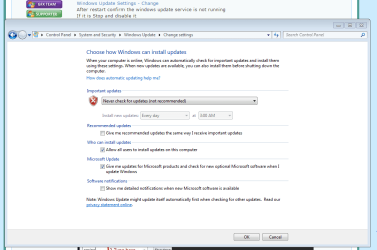
Wanted to experiment it again, restored last backup, did as you recommended, Windows update service disabled, check also set at Never, as displayed in attachments.

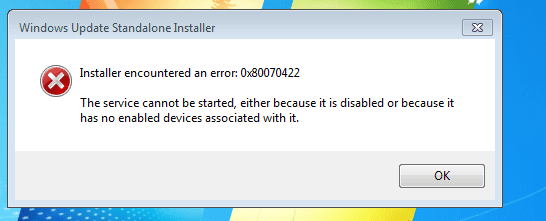
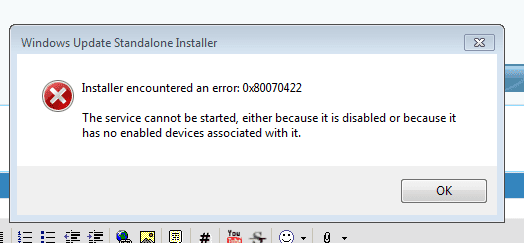
When I run the downloaded Windows6.1-KB3172605-x86 standalone installer, it won't get installed as before, an error is displayed, which am posting.

May be I messed up some service settings....though have a last created backup, care to view the attachments and identify what is wrong?

Thanks again, would appreciate it as always.
 

Attachments

  • Error 5.PNG
    Error 5.PNG
    10.5 KB · Views: 2
  • Error 4.PNG
    Error 4.PNG
    14.2 KB · Views: 12
  • Error 3.PNG
    Error 3.PNG
    7.5 KB · Views: 12
  • Error 2.PNG
    Error 2.PNG
    10.8 KB · Views: 12

My Computers

System One System Two

  • Computer type
    Laptop
    Computer Manufacturer/Model Number
    Dell
    OS
    W7 Pro 32bit
    CPU
    Intel(R) Core(TM)2 CPU T7200 @ 2.00GHz
    Motherboard
    Dell Inc. 0CF456
    Memory
    4.00 GB
    Graphics Card(s)
    NVIDIA GTX 7980 512 MB
    Sound Card
    (1) HD Pro Webcam C910 (2) Bluetooth Stereo Audio (3) Si
    Hard Drives
    SSD
    Browser
    Brave
  • Computer type
    PC/Desktop
    System Manufacturer/Model Number
    Dell XPS Special Edition 8940
    OS
    W10 Pro
    CPU
    core i7 11th gen, 11700, 2.5-4.9 GHZ
    Memory
    32 GBB, 2 X16 GB @2933 MHz.
    Graphics Card(s)
    NVIDIA GeForce RTX 3070 8GB GDDR6
    Monitor(s) Displays
    Dell UltraSharp 32 4K monitor.
    Hard Drives
    1. 1TB M.2 PCIe NVMe SSD.

    2. 1TB 7200 rpm 3.5" SATA Hard Drive.
    PSU
    500W.
    Case
    Mineral White Bezel Chassis.
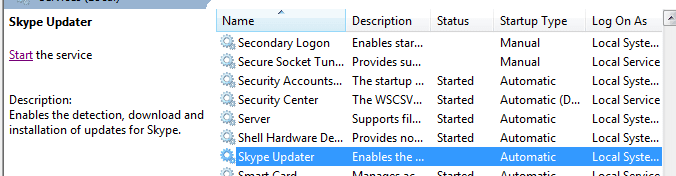
These are the Skype app and service settings that I keep. :confused:
 

Attachments

  • Skype.PNG
    Skype.PNG
    10 KB · Views: 2
  • Skype 1.PNG
    Skype 1.PNG
    7.8 KB · Views: 12

My Computers

System One System Two

  • Computer type
    Laptop
    Computer Manufacturer/Model Number
    Dell
    OS
    W7 Pro 32bit
    CPU
    Intel(R) Core(TM)2 CPU T7200 @ 2.00GHz
    Motherboard
    Dell Inc. 0CF456
    Memory
    4.00 GB
    Graphics Card(s)
    NVIDIA GTX 7980 512 MB
    Sound Card
    (1) HD Pro Webcam C910 (2) Bluetooth Stereo Audio (3) Si
    Hard Drives
    SSD
    Browser
    Brave
  • Computer type
    PC/Desktop
    System Manufacturer/Model Number
    Dell XPS Special Edition 8940
    OS
    W10 Pro
    CPU
    core i7 11th gen, 11700, 2.5-4.9 GHZ
    Memory
    32 GBB, 2 X16 GB @2933 MHz.
    Graphics Card(s)
    NVIDIA GeForce RTX 3070 8GB GDDR6
    Monitor(s) Displays
    Dell UltraSharp 32 4K monitor.
    Hard Drives
    1. 1TB M.2 PCIe NVMe SSD.

    2. 1TB 7200 rpm 3.5" SATA Hard Drive.
    PSU
    500W.
    Case
    Mineral White Bezel Chassis.
Hi,
Are you saying the 14 Important updates failed to install or the other Optional updates failed ?
 

My Computer

Computer type
PC/Desktop
Computer Manufacturer/Model Number
Custom assembled by me :}
OS
Win-7-Pro64bit 7-H-Prem-64bit
CPU
i7-5930K 2nd i9-9940x both water blocked VRM's too
Motherboard
ASUS SABERTOOTH X99 2nd ASUS x299 Apex
Memory
Trident-z 3200C14 2nd Trident-z 3600C16
Graphics Card(s)
EVGA 1080ti ftw3 2nd Titan Xp both water blocked
Sound Card
Built-in Realtek
Monitor(s) Displays
1-AOC G2460PG 24"G-Sync 144Hz/ 2nd 1-ASUS VG248QE 24" 144Hz
Screen Resolution
1920 x 1080 144Hz
Hard Drives
2-Samsung M.2 Evo & Evo Plus
2-Samsung 850 EVO 500GB SSD's/ 3-2.5 W.D. Black 1tb-&3-1tb/3-3.5 WD Black 1tb hdd's
PSU
EVGA SuperNOVA 1000-P2 2nd 1200-P2
Case
2-Corsair Obsidian Series 450D Black ATX Mid Tower
Cooling
Custom water loops
Keyboard
Logitech G710+/ 2nd Logitech G910
Mouse
2-RedDragon M901 Perdition 16400 dpi Gaming mouse = wired
Internet Speed
Comcast Ping 19ms 89.31mbps download speed 6.12mbps upload
Antivirus
Malwarebytes Pro/ Superantispyware Pro
Browser
FireFox & Pale moon
Other Info
2nd ASUS X299 Apex/Intel i9-9940x with Custom water loop/7H-Prem-x64/Corsair 450D case/Ram Trident-z 3600C16 4x8gb / Samsung970Evo plus 500gb SSD/Dual ssd EZ swap evo/PSU EVGA SuperNova 1200w-P2 80+Platinum/GPU Titan Xp /8-ML-140 on push-pull on 2-280GTX rads
Hi,

No, they installed fine.

Restored the July created back up, tried doing the same, but the KB3172605 update which was missing won't install now (earlier installed fine), displays an error.

Thanks.
 

My Computers

System One System Two

  • Computer type
    Laptop
    Computer Manufacturer/Model Number
    Dell
    OS
    W7 Pro 32bit
    CPU
    Intel(R) Core(TM)2 CPU T7200 @ 2.00GHz
    Motherboard
    Dell Inc. 0CF456
    Memory
    4.00 GB
    Graphics Card(s)
    NVIDIA GTX 7980 512 MB
    Sound Card
    (1) HD Pro Webcam C910 (2) Bluetooth Stereo Audio (3) Si
    Hard Drives
    SSD
    Browser
    Brave
  • Computer type
    PC/Desktop
    System Manufacturer/Model Number
    Dell XPS Special Edition 8940
    OS
    W10 Pro
    CPU
    core i7 11th gen, 11700, 2.5-4.9 GHZ
    Memory
    32 GBB, 2 X16 GB @2933 MHz.
    Graphics Card(s)
    NVIDIA GeForce RTX 3070 8GB GDDR6
    Monitor(s) Displays
    Dell UltraSharp 32 4K monitor.
    Hard Drives
    1. 1TB M.2 PCIe NVMe SSD.

    2. 1TB 7200 rpm 3.5" SATA Hard Drive.
    PSU
    500W.
    Case
    Mineral White Bezel Chassis.
Hi,
Hopefully you created a system image before restoring back to play around with the updates again :p
 

My Computer

Computer type
PC/Desktop
Computer Manufacturer/Model Number
Custom assembled by me :}
OS
Win-7-Pro64bit 7-H-Prem-64bit
CPU
i7-5930K 2nd i9-9940x both water blocked VRM's too
Motherboard
ASUS SABERTOOTH X99 2nd ASUS x299 Apex
Memory
Trident-z 3200C14 2nd Trident-z 3600C16
Graphics Card(s)
EVGA 1080ti ftw3 2nd Titan Xp both water blocked
Sound Card
Built-in Realtek
Monitor(s) Displays
1-AOC G2460PG 24"G-Sync 144Hz/ 2nd 1-ASUS VG248QE 24" 144Hz
Screen Resolution
1920 x 1080 144Hz
Hard Drives
2-Samsung M.2 Evo & Evo Plus
2-Samsung 850 EVO 500GB SSD's/ 3-2.5 W.D. Black 1tb-&3-1tb/3-3.5 WD Black 1tb hdd's
PSU
EVGA SuperNOVA 1000-P2 2nd 1200-P2
Case
2-Corsair Obsidian Series 450D Black ATX Mid Tower
Cooling
Custom water loops
Keyboard
Logitech G710+/ 2nd Logitech G910
Mouse
2-RedDragon M901 Perdition 16400 dpi Gaming mouse = wired
Internet Speed
Comcast Ping 19ms 89.31mbps download speed 6.12mbps upload
Antivirus
Malwarebytes Pro/ Superantispyware Pro
Browser
FireFox & Pale moon
Other Info
2nd ASUS X299 Apex/Intel i9-9940x with Custom water loop/7H-Prem-x64/Corsair 450D case/Ram Trident-z 3600C16 4x8gb / Samsung970Evo plus 500gb SSD/Dual ssd EZ swap evo/PSU EVGA SuperNova 1200w-P2 80+Platinum/GPU Titan Xp /8-ML-140 on push-pull on 2-280GTX rads
Hi,

Yes I did create an image, as you suggested, before and after installing the updates.

My question is why this update wont install on the old backup now, but did got installed yesterday?

Thanks.
 

Attachments

  • E1.PNG
    E1.PNG
    5.4 KB · Views: 8

My Computers

System One System Two

  • Computer type
    Laptop
    Computer Manufacturer/Model Number
    Dell
    OS
    W7 Pro 32bit
    CPU
    Intel(R) Core(TM)2 CPU T7200 @ 2.00GHz
    Motherboard
    Dell Inc. 0CF456
    Memory
    4.00 GB
    Graphics Card(s)
    NVIDIA GTX 7980 512 MB
    Sound Card
    (1) HD Pro Webcam C910 (2) Bluetooth Stereo Audio (3) Si
    Hard Drives
    SSD
    Browser
    Brave
  • Computer type
    PC/Desktop
    System Manufacturer/Model Number
    Dell XPS Special Edition 8940
    OS
    W10 Pro
    CPU
    core i7 11th gen, 11700, 2.5-4.9 GHZ
    Memory
    32 GBB, 2 X16 GB @2933 MHz.
    Graphics Card(s)
    NVIDIA GeForce RTX 3070 8GB GDDR6
    Monitor(s) Displays
    Dell UltraSharp 32 4K monitor.
    Hard Drives
    1. 1TB M.2 PCIe NVMe SSD.

    2. 1TB 7200 rpm 3.5" SATA Hard Drive.
    PSU
    500W.
    Case
    Mineral White Bezel Chassis.
Hi,
I believe it's just to make live more interesting :)
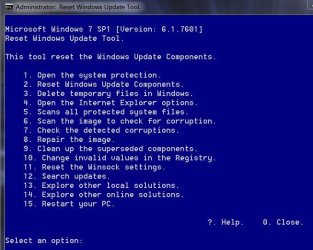
Try using this to reset the update system it's very good,
Use Option 2 on the list after right clicking it and select run as administrator
https://gallery.technet.microsoft.com/scriptcenter/Reset-Windows-Update-Agent-d824badc

Download it to your downloads folder
Right click it and select Extract all to the downloads folder.
Then right click ResetWUEng and select run as administrator
Follow the rest of the prompts
Press any key to continue
Type 2 for that Option on the list and the Enter key to reset update services..
Press y for Yes and then the Enter key I believe twice
After it has completed
Type 15 for that option and the Enter key to restart the machine.
Should say will restart in 60 seconds save your work.... press any key to continue.
After restart go to windows updates and manually check for updates shouldn't take a few minutes.
Reset win updates eng.JPG
 

My Computer

Computer type
PC/Desktop
Computer Manufacturer/Model Number
Custom assembled by me :}
OS
Win-7-Pro64bit 7-H-Prem-64bit
CPU
i7-5930K 2nd i9-9940x both water blocked VRM's too
Motherboard
ASUS SABERTOOTH X99 2nd ASUS x299 Apex
Memory
Trident-z 3200C14 2nd Trident-z 3600C16
Graphics Card(s)
EVGA 1080ti ftw3 2nd Titan Xp both water blocked
Sound Card
Built-in Realtek
Monitor(s) Displays
1-AOC G2460PG 24"G-Sync 144Hz/ 2nd 1-ASUS VG248QE 24" 144Hz
Screen Resolution
1920 x 1080 144Hz
Hard Drives
2-Samsung M.2 Evo & Evo Plus
2-Samsung 850 EVO 500GB SSD's/ 3-2.5 W.D. Black 1tb-&3-1tb/3-3.5 WD Black 1tb hdd's
PSU
EVGA SuperNOVA 1000-P2 2nd 1200-P2
Case
2-Corsair Obsidian Series 450D Black ATX Mid Tower
Cooling
Custom water loops
Keyboard
Logitech G710+/ 2nd Logitech G910
Mouse
2-RedDragon M901 Perdition 16400 dpi Gaming mouse = wired
Internet Speed
Comcast Ping 19ms 89.31mbps download speed 6.12mbps upload
Antivirus
Malwarebytes Pro/ Superantispyware Pro
Browser
FireFox & Pale moon
Other Info
2nd ASUS X299 Apex/Intel i9-9940x with Custom water loop/7H-Prem-x64/Corsair 450D case/Ram Trident-z 3600C16 4x8gb / Samsung970Evo plus 500gb SSD/Dual ssd EZ swap evo/PSU EVGA SuperNova 1200w-P2 80+Platinum/GPU Titan Xp /8-ML-140 on push-pull on 2-280GTX rads
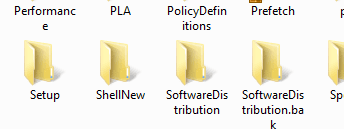
Thanks, but now have 2 Software distribution folders.......Update is running.
 

Attachments

  • SD.PNG
    SD.PNG
    2.8 KB · Views: 8
  • WU.PNG
    WU.PNG
    8.9 KB · Views: 8

My Computers

System One System Two

  • Computer type
    Laptop
    Computer Manufacturer/Model Number
    Dell
    OS
    W7 Pro 32bit
    CPU
    Intel(R) Core(TM)2 CPU T7200 @ 2.00GHz
    Motherboard
    Dell Inc. 0CF456
    Memory
    4.00 GB
    Graphics Card(s)
    NVIDIA GTX 7980 512 MB
    Sound Card
    (1) HD Pro Webcam C910 (2) Bluetooth Stereo Audio (3) Si
    Hard Drives
    SSD
    Browser
    Brave
  • Computer type
    PC/Desktop
    System Manufacturer/Model Number
    Dell XPS Special Edition 8940
    OS
    W10 Pro
    CPU
    core i7 11th gen, 11700, 2.5-4.9 GHZ
    Memory
    32 GBB, 2 X16 GB @2933 MHz.
    Graphics Card(s)
    NVIDIA GeForce RTX 3070 8GB GDDR6
    Monitor(s) Displays
    Dell UltraSharp 32 4K monitor.
    Hard Drives
    1. 1TB M.2 PCIe NVMe SSD.

    2. 1TB 7200 rpm 3.5" SATA Hard Drive.
    PSU
    500W.
    Case
    Mineral White Bezel Chassis.
Back
Top