Want Folders Not Libraries

modifier

New member
Local time
2:38 PM
Messages
12
I've been running XP Pro for a while with no issues but bought a new desktop and laptop a couple of months ago and so ended up with 7. For the most part it is fine. But one thing is driving me crazy and I don't know it is possible to go back to older style organization or not.

I had created a document with a recipe on it today and wanted to create a folder for recipes but this wasn't possible as I could see it so I had to create a library and then I still couldn't save the document in that folder until I added a folder to it. But I couldn't add a folder to it unless the folder already existed somewhere else and there wasn't a recipe folder yet. So I had to move another folder into the library then rename it in order to save the document in it. A lot of wasted time where in the past that would have all happened in a matter of seconds.

I don't know what advantage having Libraries offers but I see it as simply counter productive. I've read what Microsoft has to say about them but I really have no use for them and just want Folders to file things in.

Is there a way to get rid of Libraries completely and just have Folders in Windows 7.

If this has been addressed simply point me in the right direction.
 

My Computer

OS
Windows 7 Home Premium 64 bit
See if this helps.

Where you see a folder named "username" - look for a folder with your user name:
Edit: you might want to watch this full screened.


My Computer

Computer type
Laptop
Computer Manufacturer/Model Number
Employer provided Dell Latitude
OS
W7 Pro SP1 64bit
CPU
i7
Memory
8GB
Graphics Card(s)
Intel HD Graphics
Hard Drives
crappy SSD
Antivirus
Employer mandated Symantec Endpoint Protection
Browser
Pale Moon 64bit, IE11 64bit & Chrome 64bit
You don't have to create a library to create a subdirectory. In the Documents library, the default save location is My Documents. Any directory you create will be created there.
 

My Computer

Computer Manufacturer/Model Number
Dell XPS 15 L502x
OS
Windows 7 Ultimate x64 SP1
CPU
Core i7-2670QM
Memory
8GB DDR3 PC3-10600
Graphics Card(s)
Intel HD Graphics 3000 + GeForce GT 540M
Screen Resolution
1920x1080
Hard Drives
1TB 5400RPM Seagate
click the start menu button , the user folder shortcut (your username) is at the top, create a folder called recipes in there, its exactly the same as you would have previously done.
 

My Computer

Computer Manufacturer/Model Number
Hewlett packard/p6512uk
OS
Microsoft Windows 7 Home Premium 64-bit 7600
CPU
IIx4 amd athelon 635 processor
Motherboard
FOXCONN 2AA9
Memory
2x2gb
Graphics Card(s)
ati radeon HD 5450
Sound Card
(1) Realtek High Definition Audio (2) AMD High Definition
Monitor(s) Displays
samsung lcd tv 32"
Screen Resolution
1360x 768
Hard Drives
(1) WDC WD10 01FAES-60Z2A0 SATA Disk Device (2) Maxtor OneTouch USB Device (3) ST310003 33AS USB Device (4) WD My Book 1111 USB Device
PSU
?
Cooling
air!
Keyboard
wireless hp
Mouse
wireless Hp,optical
Internet Speed
1.10mb/s
Antivirus
MSE
Browser
Firefox
....... its exactly the same as you would have previously done.
Unless you have always used the classic start menu like tons of people did/do in XP and W2k and...

:-)
 

My Computer

Computer type
Laptop
Computer Manufacturer/Model Number
Employer provided Dell Latitude
OS
W7 Pro SP1 64bit
CPU
i7
Memory
8GB
Graphics Card(s)
Intel HD Graphics
Hard Drives
crappy SSD
Antivirus
Employer mandated Symantec Endpoint Protection
Browser
Pale Moon 64bit, IE11 64bit & Chrome 64bit
I have Windows Explorer pinned to the task bar, and that gives me instant access to all the drives, folders and files on my computer. From there it is a simple matter to create a new folder wherever I like.
 

My Computer

Computer Manufacturer/Model Number
Customized build from CyberPower
OS
Windows 7 Home Premium 64bit SP 1
CPU
Intel i5 2500k
Motherboard
Asus P8P67 Deluxe
Memory
8 gigabytes Corsair PC3-12800 DDR3
Graphics Card(s)
EVGA GeForce GTX 460 superclocked
Sound Card
Integrated
Monitor(s) Displays
ViewSonic 23" LCD
Screen Resolution
1980 x 1080
Hard Drives
120 Gb Samsung 840 Pro SSD
120 Gb Kingston Hyper X SSD
1 Tb WD Caviar Black HDD
PSU
Coolermaster 1000 watt modular
Case
Coolermaster HAF X full tower
Cooling
Coolermaster Hyper 212 plus
Keyboard
Logitech USB
Mouse
Microsoft 3 button
Internet Speed
download 1.5 Mb/sec upload 300Kb/sec
>I took too long to write this and there were some other posts in between. "That" refers to Boohah's post.

That is how I ended up creating the folder I needed this morning. But in XP if you create a document and hit save all and don't have a folder you can simply create it then save to it without having to go through Explorer. Also in Win 7 Explorer you have to go through Desktop to get to User. I've never used Desktop for anything other than stuff on the desktop in the past. I've actually never had to go through User either. At least not this way.

Another couple of questions about Win7 Explorer are: each time I open Explorer and want to view files and click on a folder it opens with all the files lined up on the left side in thumbnails. Then I have to drag the window to the right to get full screen viewing. From then on I get full screen if I open another folder until I close Explore then I have to do it again. Is there a way to set a default to always open with a full screen rather than having to do this extra step?

And finally, for the moment, if I'm looking through a folder with a lot of files in it and scrolling down through the pics to find one, either by left clicking on the down arrow to go slowly or on the space above the arrow to go one page at a time, this works for a few clicks then something automatically grabs it and it starts to auto scroll rapidly. I actually think that this would happen in XP also after an update. I don't want auto scroll. If this is a preference I can't find it?
 

My Computer

OS
Windows 7 Home Premium 64 bit
I have Windows Explorer pinned to the task bar, and that gives me instant access to all the drives, folders and files on my computer. From there it is a simple matter to create a new folder wherever I like.

I do too but that doesn't seem to help.
 

My Computer

OS
Windows 7 Home Premium 64 bit
I don't know where the problem is. It is sooo easy to create a new folder. Example here is for Documents, but works the same for Music, Pictures, etc.

Btw: Libraries are very useful for distributed folders on internal or external partitions/disks.
 

Attachments

  • 2012-03-31_2035.png
    2012-03-31_2035.png
    20.6 KB · Views: 9

My Computer

Computer Manufacturer/Model Number
HP, Dell, Gateway, Toshiba - 4 laptops and 2 desktops
OS
Vista, Windows7, Mint Mate, Zorin, Windows 8
CPU
from 1.6GHz Duo to i7
Monitor(s) Displays
2x HP w2207
Hard Drives
5x HDD, 7x SSD, 12x Externals
Keyboard
with trackball - no mices
Mouse
Trackball mice
Internet Speed
DSL 6000
Last edited by a moderator:

My Computer

Computer Manufacturer/Model Number
Customized build from CyberPower
OS
Windows 7 Home Premium 64bit SP 1
CPU
Intel i5 2500k
Motherboard
Asus P8P67 Deluxe
Memory
8 gigabytes Corsair PC3-12800 DDR3
Graphics Card(s)
EVGA GeForce GTX 460 superclocked
Sound Card
Integrated
Monitor(s) Displays
ViewSonic 23" LCD
Screen Resolution
1980 x 1080
Hard Drives
120 Gb Samsung 840 Pro SSD
120 Gb Kingston Hyper X SSD
1 Tb WD Caviar Black HDD
PSU
Coolermaster 1000 watt modular
Case
Coolermaster HAF X full tower
Cooling
Coolermaster Hyper 212 plus
Keyboard
Logitech USB
Mouse
Microsoft 3 button
Internet Speed
download 1.5 Mb/sec upload 300Kb/sec
Opps. Posting a screenshot didn't work. Guess I needed to read that prompt about how to do it.

Well what I was trying to show was that my Explorer does not look like that. I don't even have a "documents" folder available in Explorer.
 

My Computer

OS
Windows 7 Home Premium 64 bit
.......But in XP if you create a document and hit save all and don't have a folder you can simply create it then save to it without having to go through Explorer. Also in Win 7 Explorer you have to go through Desktop to get to User. I've never used Desktop for anything other than stuff on the desktop in the past. I've actually never had to go through User either. At least not this way.....
Sorry - I did not mean to imply that you had to save the doc to the desktop first - I just did not start the video from inside some document editor.

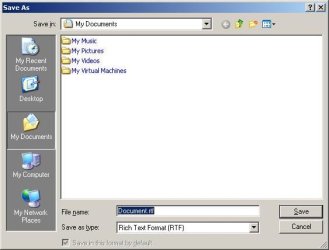
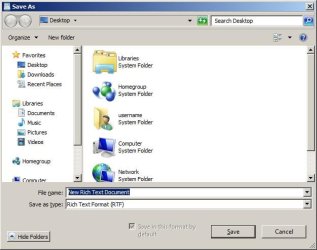
And yes, the File > Save As... dialog box is quite different between XP and W7.

xp.JPG

W7.JPG
 

My Computer

Computer type
Laptop
Computer Manufacturer/Model Number
Employer provided Dell Latitude
OS
W7 Pro SP1 64bit
CPU
i7
Memory
8GB
Graphics Card(s)
Intel HD Graphics
Hard Drives
crappy SSD
Antivirus
Employer mandated Symantec Endpoint Protection
Browser
Pale Moon 64bit, IE11 64bit & Chrome 64bit

My Computer

Computer type
Laptop
Computer Manufacturer/Model Number
Employer provided Dell Latitude
OS
W7 Pro SP1 64bit
CPU
i7
Memory
8GB
Graphics Card(s)
Intel HD Graphics
Hard Drives
crappy SSD
Antivirus
Employer mandated Symantec Endpoint Protection
Browser
Pale Moon 64bit, IE11 64bit & Chrome 64bit
Opps. Posting a screenshot didn't work. Guess I needed to read that prompt about how to do it.

Well what I was trying to show was that my Explorer does not look like that. I don't even have a "documents" folder available in Explorer.
That I want to see.
 

My Computer

Computer Manufacturer/Model Number
HP, Dell, Gateway, Toshiba - 4 laptops and 2 desktops
OS
Vista, Windows7, Mint Mate, Zorin, Windows 8
CPU
from 1.6GHz Duo to i7
Monitor(s) Displays
2x HP w2207
Hard Drives
5x HDD, 7x SSD, 12x Externals
Keyboard
with trackball - no mices
Mouse
Trackball mice
Internet Speed
DSL 6000
I don't know what advantage having Libraries offers but I see it as simply counter productive. I've read what Microsoft has to say about them but I really have no use for them and just want Folders to file things in.

Is there a way to get rid of Libraries completely and just have Folders in Windows 7.


There are tutorials on this site that show you how to remove libraries from the Explorer tree. You can also get rid of Homegroup and Network.

You can also change the default location that opens when you open Explorer. It will open to libraries normally, but it's changeable.

If you want, you can bypass the entire "user" folder structure and just save files to the location of your choice. I save directly to my D drive.
 

My Computer

Computer type
PC/Desktop
Computer Manufacturer/Model Number
Ignatz Special; 4 speed manual gearbox; factory air conditioning; one of one
OS
Windows 7 Home Premium SP1, 64-bit
CPU
Intel Skylake i5-6600K, not overclocked
Motherboard
AsRock Z170M Extreme 4, micro ATX
Memory
8 GB HyperX DDR4-2666 (2 x 4 GB)
Graphics Card(s)
none; graphics are integrated on CPU
Sound Card
onboard: Realtek ALC1150; external: USB Behringer UF0-202
Monitor(s) Displays
Dell S2340M 23 inch IPS
Screen Resolution
1600 x 900
Hard Drives
System: Crucial MX100 series SSD, 128 GB;
Data: Samsung Spinpoint 103SJ, 1 TB;
Backup: WD Caviar Green WD30EZRX-00D8PB0, 3 TB
PSU
Rosewill SilentNight 500 watt fanless, semi-modular
Case
Antec Solo II
Cooling
Noctua NH-U12S; Noctua F12 intake, Noctua S12A exhaust
Keyboard
Microsoft 200 6JH-00001 USB
Mouse
Dell or Microsoft optical wired; USB
Antivirus
Microsoft Security Essentials and Malwarebytes Premium
Browser
Pale Moon
Other Info
All fans PWM; speeds at idle: CPU circa 500 rpm; intake circa 600 rpm; exhaust circa 600 rpm; CPU temps 27 idle and 47 C load in a warm room (27 C/81 F) when running Intel Extreme Tuning Utility stress test.
I think I've got most of what I needed for the initial question except why I couldn't create a folder in path when I tried to "save as" the document w/o having to leave and go into Explore to do it. Or the other secondary questions I asked. But thanks for the help so far. :)

For posterity sake here is the screen shot of the what I see when I open Explore. If this works.

Oh well. When I uploaded it it saved it as a bat file. Don't know why. Or really care at the moment. I'll deal with that later.
 

My Computer

OS
Windows 7 Home Premium 64 bit
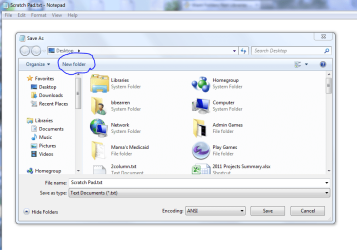
On my desktop I have a Notepad shortcut named Scratch Pad. When I want to make a quick note or copy something online, I paste it into my Scratch Pad. Then I click on File > Save as and if I want a new folder to save it in, the option is right there:

New folder.PNG

I can place that new folder anywhere I want, name it anything I want, and also rename whatever it is that I've pasted into my Scratch Pad. When I'm finished, I close Scratch Pad and when asked if I want to Save, I click on No. So Scratch Pad is always there and empty whenever I want to use it, and whatever I wanted to save is where I wanted to save it.

I also have an empty Word document shortcut on the desktop that I use in much the same way, if I need more formatting than I can get out of Notepad.

I don't use libraries at all. They are absolutely useless to me.
 

My Computer

Computer Manufacturer/Model Number
Dell Inspiron 580
OS
7 Ultimate x64/7 Home Premium x64
CPU
Intel i3 550 3.2 GHz
Motherboard
Dell/Intel H57
Memory
Corsair 16 GB DDR3 (4 X 4GB)
Graphics Card(s)
Intel HD Graphics
Sound Card
Intel P55 HD Audio
Monitor(s) Displays
LG E2360 LED
Screen Resolution
1920 X 1080
Hard Drives
Seagate 1TB X 2 Internal,
Seagate 1TB eSATA (Backup)
PSU
Dell 300W
Case
Dell Inspiron
Cooling
Dell/Intel
Keyboard
Microsoft Wireless Comfort Keyboard 5000
Mouse
Microsoft Wireless Mouse 5000
Internet Speed
4,000 Mbit DSL
Other Info
Custom Installation -
OS separate on C:
Pagefile Separate on P:
Program Files Separate on U:
Users and ProgramData separate on V:
Doh! Where are my manners? I should've welcomed you to the forums... so, Welcome :-)

'twas in too big of a hurry to get you that silly video.

When you get a chance - a screenshot of the "save as" dialog box and what you see in explorer would help us to help you.
 

My Computer

Computer type
Laptop
Computer Manufacturer/Model Number
Employer provided Dell Latitude
OS
W7 Pro SP1 64bit
CPU
i7
Memory
8GB
Graphics Card(s)
Intel HD Graphics
Hard Drives
crappy SSD
Antivirus
Employer mandated Symantec Endpoint Protection
Browser
Pale Moon 64bit, IE11 64bit & Chrome 64bit
Here is a screenshot of what I first see in Explore. I hope :o The problem last time is I used a different program to save the shot. This just shows that I don't have a "documents" folder available.
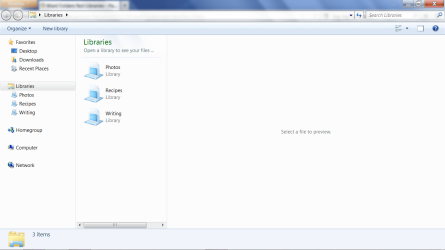
Please understand that I usually don't have trouble creating folders when I save something. It was only when I created the recipe document in Open Office then tried to save and create a new folder in process. Like I said I had to stop what I was doing then go create library then remotely create the folder then add it to the library and then I could save to it. All a pita and much more complicated than it should be.

How about someone recreate what I did and see if you have the same hang ups. I very well may simply be missing something. I don't purport to be a geek.

Also look at my screen shot and see how it opened up with all the space to the right and everything jumbled to the left. This is how it looks every time I open any folder the first time before I drag it open to view more stuff at once.

Do I need to start another thread to ask about the additional questions I have posed or do people simply not know the answers?

Oh...and thanks for the welcome. :)
 

Attachments

  • Explore screenshot.png
    Explore screenshot.png
    46.5 KB · Views: 27

My Computer

OS
Windows 7 Home Premium 64 bit
Your Explorer.exe is set to open in Libraries. I have mine set to open in My Computer; and there are other options as well. As I posted earlier, I don't use Libraries. I have my own system of organization, and Libraries don't fit into that system in any way, so I simply don't use them. And you don't have to use them either, if you'd rather not. Of course there are many here who do use and like Libraries, and I'm sure you can get plenty of help if you want to learn how the use Libraries.

As UsernameIssues suggested, could you create a sample document and click on Save As and then post a screenshot of the Save As window that pops up? Something similar to my post #17.
 

My Computer

Computer Manufacturer/Model Number
Dell Inspiron 580
OS
7 Ultimate x64/7 Home Premium x64
CPU
Intel i3 550 3.2 GHz
Motherboard
Dell/Intel H57
Memory
Corsair 16 GB DDR3 (4 X 4GB)
Graphics Card(s)
Intel HD Graphics
Sound Card
Intel P55 HD Audio
Monitor(s) Displays
LG E2360 LED
Screen Resolution
1920 X 1080
Hard Drives
Seagate 1TB X 2 Internal,
Seagate 1TB eSATA (Backup)
PSU
Dell 300W
Case
Dell Inspiron
Cooling
Dell/Intel
Keyboard
Microsoft Wireless Comfort Keyboard 5000
Mouse
Microsoft Wireless Mouse 5000
Internet Speed
4,000 Mbit DSL
Other Info
Custom Installation -
OS separate on C:
Pagefile Separate on P:
Program Files Separate on U:
Users and ProgramData separate on V:
Back
Top