First let me clarify that I don't use W7 much - I'm still on XP. I do support several people that use W7, so I have a virtual machine with W7 in it.
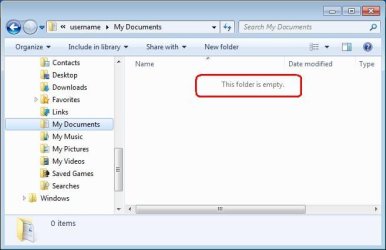
Here is a screenshot of what I first see in Explore. ~~~ This just shows that I don't have a "documents" folder available.......
There is definitely something different about your explorer window. If you follow kegobeer's link, you can probably get the documents shortcut back under Libraries - once you have done that, the file > save as dialog issue will be cured as well.
......It was only when I created the recipe document in Open Office then tried to save and create a new folder in process......
Thanks for the additional info - I was not sure how to help you since I was not sure what editor you used... I should have just asked.
.....How about someone recreate what I did and see if you have the same hang ups. I very well may simply be missing something. I don't purport to be a geek......
Now here's the thing:
I installed Open Office into my W7 VM
opened Writer
typed "test" in as some text
did a file > save as
The "save as" dialog box looks just like the one that I posted earlier. The "Libraries\
documents" folder was already selected in the save as window - so I made a new folder via right click > new > folder (then I deleted that new folder) and made another new folder via the new folder button and I put the test document in that new folder - then exited OO Writer.
I opened up explorer to see if the test folder and test file was were it was supposed to be... but I noticed a new temp folder being created in the root of C. [The type of temp file that OS patches sometimes create with lots of letters and numbers in the folder name. I figured that it was OO updating itself because OS updates are turned off. The temp file soon went away.] I mention this OO update thing because the test folder/file that I saved was nowhere to be found via explorer.
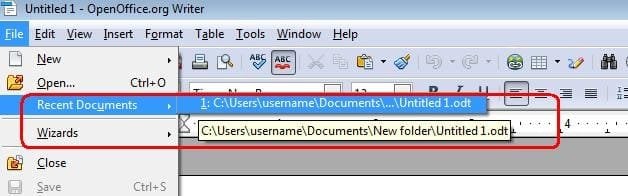
So.... I opened OO's Writer app again and did a File > save as --- only to be told that folder that I was attempting to access was no longer available. This tells me that OO took note of the most recent folder used for the save as dialog and it tried to open that for me during the second save as operation, So I was not the only entity that thought the recently created folder and test file should still be on the hard drive.


A glance at Writer's recent documents confirms the location of the file that OO & I did not find:
...and via explorer
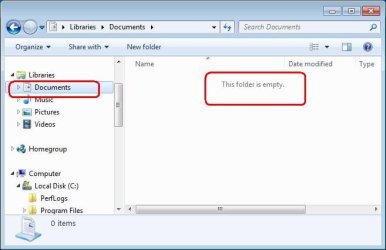
RANT
Dear MS,
I have enough trouble explaining to people where files really are on their hard drive without you calling the real "Documents" folder by an alias of "My Documents". Not all applications call your APIs - some apps use their own file access dialog boxes... thus people need to know the real path to their files.
/RANT
There; I feel better now.
.....Do I need to start another thread to ask about the additional questions I have posed or do people simply not know the answers?.....
No, we just were not clear that the explorer issue and the save as issue are related. Once you fix explorer, the save as will be fixed - we hope.
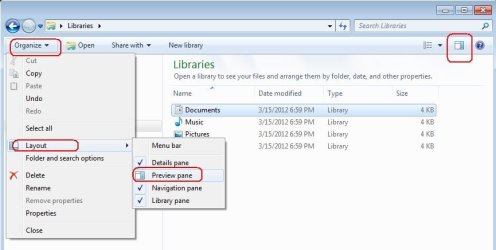
.....Also look at my screen shot and see how it opened up with all the space to the right and everything jumbled to the left. This is how it looks every time I open any folder the first time before I drag it open to view more stuff at once....
Turn off the preview pane. You can use the menus shown on the left or toggle that pane via the icon highlighted on the upper right.
I'm going to go ahead and hit "Submit Reply" for this post before the attached images disappear again. There appears to be a time out on that when a post stays in the edit mode too long. If I get the time, I'll start over on the OO install and see if the test file goes away again.






