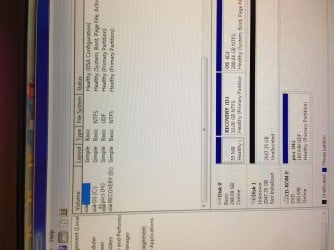
disk 1 is unknown, not initialized, unallocated

jenny123

New member
Member
Local time
6:42 AM
Messages
48
Hi

I have the same problem. when i plug in the drive, it says that its succesfully installed however it does not appear in "my computer". also when i go into system tools it says that disk 1 is unknown, not initialized, unallocated

can you please help me, i dont want to lose my data, it contain all my pics. please help
 
Last edited by a moderator:

My Computer

Computer type
PC/Desktop
OS
window 7

My Computer

Computer type
PC/Desktop
Computer Manufacturer/Model Number
Self built custom
OS
64-bit Windows 11 Pro for Workstations
CPU
Intel i7-8700K OC'd to 5 GHz
Motherboard
ASUS ROG Maximus XI Formula Z390
Memory
64 GB (4x16GB) G.SKILL TridentZ RGB DDR4 3600 MHz
Graphics Card(s)
ASUS ROG-STRIX-GTX1080TI-O11G-GAMING
Sound Card
Integrated
Monitor(s) Displays
2 x Samsung Odyssey G7 27"
Screen Resolution
2560x1440
Hard Drives
1TB Samsung 990 PRO M.2,
4TB Samsung 990 PRO PRO M.2,
TerraMaster F8 SSD Plus NAS
PSU
Seasonic Prime Titanium 850W
Case
Thermaltake Core P3
Cooling
Corsair Hydro H115i
Keyboard
Logitech wireless K800
Mouse
Logitech MX Master 4
Internet Speed
2 Gb/s Download and 100 Mb/s Upload
Antivirus
Malwarebyte Anti-Malware Premium
Browser
Google Chrome
Other Info
Logitech Z625 speaker system,
Logitech BRIO 4K Pro webcam,
HP Color LaserJet Pro MFP M477fdn,
APC SMART-UPS RT 1000 XL - SURT1000XLI,
Galaxy S23 Plus phone
Yep, I would also like to see the picture.

I think that this was moved out of another similar thread and rightly so, since in that case it showed only Unknown and not initialised. The similarity ends there. The right side of the disk did not show anything - neither the disk capacity nor the status (like unallocated) ( Also it was dropped and so a physical damage was suspected)

In your case I am sure the Disk Management will show the disk capacity, and also that it is unallocated.( you said so. :)) Since you also said it was plugged in I presume it is an external drive.

Since it is almost time for me to retire for the day, I shall post this without waiting for the screenshot.

Download and install MiniTools Partition Wizard Home Edition 7.8 (14 MB) from Free download Magic Partition Manager Software, partition magic alternative, free partition magic, partition magic Windows 7 and server partition software - Partition Wizard Online

Edit: 04 Sep 2015- MiniTool Partition Wizard Home Edition is now MiniTool Partition Wizard Free Edition. So download the Free Edition found on that page. The version on date is 9.1 (30.49MB).

Recovery with Partition Wizard:
Run Partition Wizard 7.

Your disk1 may be shown as “unallocated” and without a drive letter.


Click on Partition Recovery Wizard and Next.

In the Partition Recovery Wizard screen, select the drive to be recovered and click on Next.

Select Full Disk, and then Next.

Select Quick Scan, Next

If the partition is found select and double click on it. Does the Partition Explorer show all the files?


Close the Partition Explorer and click on Finish.

The Main Screen will show the restored Drive but may be without a drive letter.


Right click on the drive, click on Change letter and give a drive letter.

Click on Apply to execute the two pending operations.

The partition is restored and your drive will be functional as before and you can access the files and folders.
 
Last edited:

My Computer

OS
Windows 7 Home Premium 32 bit
It's a external USB drive, I try reconnecting it thru the back and it still does the same. How do I put up a screen shot?
 

Attachments

  • image.jpg
    image.jpg
    1,006.5 KB · Views: 39

My Computer

Computer type
PC/Desktop
OS
window 7
Also, since it says that there is 2 something gb, does that mean my data still there? :( pleassseeee help me. All my baby pics are in it
 

My Computer

Computer type
PC/Desktop
OS
window 7
Jenny,

While in Disk Management, right click on the actual "Disk 1" box just to the left of where it says "2047.35 GB Unallocated" in the middle pane at the bottom, then click/tap on initialize or online.

The drive is unallocated, so that means that there's currently nothing on it.


If there was something on the unallocated disk that you wanted to try and recover, then follow the steps that Jumanji posted above to recover the disk.

If there's not anything you wanted on it, then you could just create a "new simple volume" to format and assign a drive letter to the disk.
 

My Computer

Computer type
PC/Desktop
Computer Manufacturer/Model Number
Self built custom
OS
64-bit Windows 11 Pro for Workstations
CPU
Intel i7-8700K OC'd to 5 GHz
Motherboard
ASUS ROG Maximus XI Formula Z390
Memory
64 GB (4x16GB) G.SKILL TridentZ RGB DDR4 3600 MHz
Graphics Card(s)
ASUS ROG-STRIX-GTX1080TI-O11G-GAMING
Sound Card
Integrated
Monitor(s) Displays
2 x Samsung Odyssey G7 27"
Screen Resolution
2560x1440
Hard Drives
1TB Samsung 990 PRO M.2,
4TB Samsung 990 PRO PRO M.2,
TerraMaster F8 SSD Plus NAS
PSU
Seasonic Prime Titanium 850W
Case
Thermaltake Core P3
Cooling
Corsair Hydro H115i
Keyboard
Logitech wireless K800
Mouse
Logitech MX Master 4
Internet Speed
2 Gb/s Download and 100 Mb/s Upload
Antivirus
Malwarebyte Anti-Malware Premium
Browser
Google Chrome
Other Info
Logitech Z625 speaker system,
Logitech BRIO 4K Pro webcam,
HP Color LaserJet Pro MFP M477fdn,
APC SMART-UPS RT 1000 XL - SURT1000XLI,
Galaxy S23 Plus phone
It's not allowing me to initialize. There is stuff in there I want.
 

My Computer

Computer type
PC/Desktop
OS
window 7
Will Initializing the drive delete the data?
 

My Computer

Computer type
PC/Desktop
OS
window 7
In that case, go ahead and see if the steps Jumanji posted may allow you to recover the data on the drive.

How was the drive originally formatted as, and on what OS?
 

My Computer

Computer type
PC/Desktop
Computer Manufacturer/Model Number
Self built custom
OS
64-bit Windows 11 Pro for Workstations
CPU
Intel i7-8700K OC'd to 5 GHz
Motherboard
ASUS ROG Maximus XI Formula Z390
Memory
64 GB (4x16GB) G.SKILL TridentZ RGB DDR4 3600 MHz
Graphics Card(s)
ASUS ROG-STRIX-GTX1080TI-O11G-GAMING
Sound Card
Integrated
Monitor(s) Displays
2 x Samsung Odyssey G7 27"
Screen Resolution
2560x1440
Hard Drives
1TB Samsung 990 PRO M.2,
4TB Samsung 990 PRO PRO M.2,
TerraMaster F8 SSD Plus NAS
PSU
Seasonic Prime Titanium 850W
Case
Thermaltake Core P3
Cooling
Corsair Hydro H115i
Keyboard
Logitech wireless K800
Mouse
Logitech MX Master 4
Internet Speed
2 Gb/s Download and 100 Mb/s Upload
Antivirus
Malwarebyte Anti-Malware Premium
Browser
Google Chrome
Other Info
Logitech Z625 speaker system,
Logitech BRIO 4K Pro webcam,
HP Color LaserJet Pro MFP M477fdn,
APC SMART-UPS RT 1000 XL - SURT1000XLI,
Galaxy S23 Plus phone
Hi jenny123,

How to post a screen capture: http://www.sevenforums.com/tutorials/274797-disk-management-post-screen-capture-image.html You will use Windows Snipping Tool for all screen captures.

You probably removed the external drive while it was still writing something on it or some other event like an abrupt power loss interrupted the writing process. This has the potential to corrupt the partition table in the first sector and as a result Windows will be unable to see the file system. Hence it may say the drive is unallocated or RAW. All your data is still there and can be recovered by restoring the partition table in the first sector of the drive. If you try to initialise, Windows may ask you to format the drive. You will lose all data if you format. So DO NOT INITIALISE. DO NOT FORMAT.

Just follow the procedure I had outlined in post#3. If Partition Recovery is successful, Partition Wizard will rewrite the partition table in the first sector and then you will be able to access all the data as before.

You may also see the procedure outlined here http://www.sevenforums.com/software...ive-turned-raw-partition-wizard-testdisk.html under the heading Recovery with Partition Wizard: SanDisk Cruzer Blade 16GB. Perhaps it will be easier for you to scroll through the screenshots there.( For the time being, do not deviate and do not try to use Test Disk which requires caution in using.)

If you have any problems in understanding or using the procedure, stop and do not hesitate to ask
before proceeding.
 

My Computer

OS
Windows 7 Home Premium 32 bit
  • Like
Reactions: whs
Thank you so much for trying to help me.

I want to make sure. If I follow post #3 , I WILL NOT delete anything right? I want the stuff that is in the drive. Also, if the light is on and the drive is properly install in the comp, however it just can't read it, does that mean the files are still safely in there?
On a note: it is a HP simple save portable USB drive
 

My Computer

Computer type
PC/Desktop
OS
window 7
In all Hard Disk Drives - internal or external - as well as flash drives, it is the first sector in which the MBR code and partition table is written. All the data is written only in the other sectors.

The BIOS/OS will read the first sector and boot or access the partition reading the first sector. As I already told, if the first sector is corrupted the OS will fail to access the data residing in the other sectors since it does not know where to go to access the data.

Rewriting the first sector with the correct information will in no way affect the data which resides only in the other sectors. On the contrary it will only facilitate the OS to access it.

So go ahead. Stick to the instructions. If in doubt, stop and ask.
 

My Computer

OS
Windows 7 Home Premium 32 bit
You're welcome.

If everything goes as it should in post #3, then nothing else should be deleted again, and hopefully recovered.

I also found this link below at HP for SimpleSave USB drives that may help after you hopefully recover the data.

SimpleSave=
 

My Computer

Computer type
PC/Desktop
Computer Manufacturer/Model Number
Self built custom
OS
64-bit Windows 11 Pro for Workstations
CPU
Intel i7-8700K OC'd to 5 GHz
Motherboard
ASUS ROG Maximus XI Formula Z390
Memory
64 GB (4x16GB) G.SKILL TridentZ RGB DDR4 3600 MHz
Graphics Card(s)
ASUS ROG-STRIX-GTX1080TI-O11G-GAMING
Sound Card
Integrated
Monitor(s) Displays
2 x Samsung Odyssey G7 27"
Screen Resolution
2560x1440
Hard Drives
1TB Samsung 990 PRO M.2,
4TB Samsung 990 PRO PRO M.2,
TerraMaster F8 SSD Plus NAS
PSU
Seasonic Prime Titanium 850W
Case
Thermaltake Core P3
Cooling
Corsair Hydro H115i
Keyboard
Logitech wireless K800
Mouse
Logitech MX Master 4
Internet Speed
2 Gb/s Download and 100 Mb/s Upload
Antivirus
Malwarebyte Anti-Malware Premium
Browser
Google Chrome
Other Info
Logitech Z625 speaker system,
Logitech BRIO 4K Pro webcam,
HP Color LaserJet Pro MFP M477fdn,
APC SMART-UPS RT 1000 XL - SURT1000XLI,
Galaxy S23 Plus phone
I will def try Tom and will let you guys know. Hopefully it will work. I will be devastated if it doesn't! Thanks in advance.
 

My Computer

Computer type
PC/Desktop
OS
window 7
Jumanji, did you see the screen shot I posted? Was that exactly what you suspected?
 

My Computer

Computer type
PC/Desktop
OS
window 7
hi,

I don't see any screenshot. Can you explain?
 

My Computer

OS
Windows 7 Home Premium 32 bit

My Computer

Computer type
PC/Desktop
Computer Manufacturer/Model Number
Self built custom
OS
64-bit Windows 11 Pro for Workstations
CPU
Intel i7-8700K OC'd to 5 GHz
Motherboard
ASUS ROG Maximus XI Formula Z390
Memory
64 GB (4x16GB) G.SKILL TridentZ RGB DDR4 3600 MHz
Graphics Card(s)
ASUS ROG-STRIX-GTX1080TI-O11G-GAMING
Sound Card
Integrated
Monitor(s) Displays
2 x Samsung Odyssey G7 27"
Screen Resolution
2560x1440
Hard Drives
1TB Samsung 990 PRO M.2,
4TB Samsung 990 PRO PRO M.2,
TerraMaster F8 SSD Plus NAS
PSU
Seasonic Prime Titanium 850W
Case
Thermaltake Core P3
Cooling
Corsair Hydro H115i
Keyboard
Logitech wireless K800
Mouse
Logitech MX Master 4
Internet Speed
2 Gb/s Download and 100 Mb/s Upload
Antivirus
Malwarebyte Anti-Malware Premium
Browser
Google Chrome
Other Info
Logitech Z625 speaker system,
Logitech BRIO 4K Pro webcam,
HP Color LaserJet Pro MFP M477fdn,
APC SMART-UPS RT 1000 XL - SURT1000XLI,
Galaxy S23 Plus phone
Yep, I have seen it.

Why are you burning the midnight oil? Do it after a good night's sleep.

(Right now I have the same problem with my RAID drive on Desktop. Unallocated System drive.:) Trying to get it back on track. I am on my laptop now and just casually peeped in. Didn't expect you here at this time.)
 

My Computer

OS
Windows 7 Home Premium 32 bit
OK, I am back on my Desktop after a successful recovery. What is worthy to note here is by mistake (during some trials, which I will not elaborate here) I mucked up the first sector in my RAID 0 system drive and managed to repair it with nothing lost. In my case I could not use Partition Wizard since it will not detect RAID and so I used TestDisk run on DOS + Windows Install disk to repair it.

In your case since it is an external drive, you can install and use Partition Wizard.
 

My Computer

OS
Windows 7 Home Premium 32 bit
Thanks for the heads up jumanji! I will keep you updated.
After knowing what happen to my drive, I will not be able to get a good night sleep until I get it fix! :(
 

My Computer

Computer type
PC/Desktop
OS
window 7
Back
Top