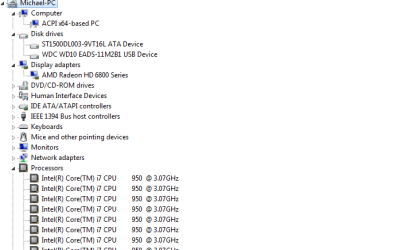
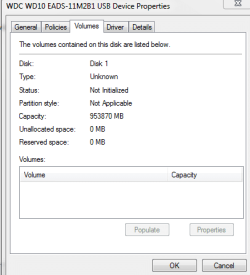
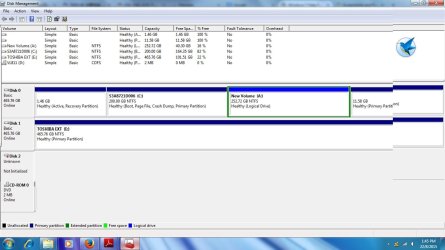
disk 1 is unknown, not initialized, unallocated

Yep, I would also like to see the picture.

I think that this was moved out of another similar thread and rightly so, since in that case it showed only Unknown and not initialised. The similarity ends there. The right side of the disk did not show anything - neither the disk capacity nor the status (like unallocated) ( Also it was dropped and so a physical damage was suspected)

In your case I am sure the Disk Management will show the disk capacity, and also that it is unallocated.( you said so. :)) Since you also said it was plugged in I presume it is an external drive.

Since it is almost time for me to retire for the day, I shall post this without waiting for the screenshot.

Download and install MiniTools Partition Wizard Home Edition 7.8 (14 MB) from Free download Magic Partition Manager Software, partition magic alternative, free partition magic, partition magic Windows 7 and server partition software - Partition Wizard Online

Recovery with Partition Wizard:
Run Partition Wizard 7.

Your disk1 may be shown as “unallocated” and without a drive letter.


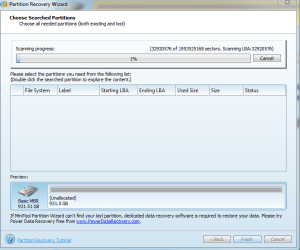
Click on Partition Recovery Wizard and Next.

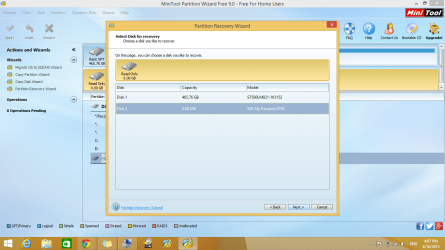
In the Partition Recovery Wizard screen, select the drive to be recovered and click on Next.

Select Full Disk, and then Next.

Select Quick Scan, Next

If the partition is found select and double click on it. Does the Partition Explorer show all the files?


Close the Partition Explorer and click on Finish.

The Main Screen will show the restored Drive but may be without a drive letter.


Right click on the drive, click on Change letter and give a drive letter.

Click on Apply to execute the two pending operations.

The partition is restored and your drive will be functional as before and you can access the files and folders.

Hi I'm having the same problem and I tried doing this but my disk drive is labelled "Bad Disk" under File System and I can't get it to find the partition. How can I resolve this problem? Please help! Thank you!
 

My Computer My Computer

Computer type
Laptop
Computer Manufacturer/Model Number
sony vaio
OS
windows vista 32 bit
Jumanji,

I tried your method with the Partition Wizard outlined in post #3, but my HDD (MyBook Essential) is not even showing up in the wizard. It also starts making a noise as soon as its plugged in. Sounds like it has a hardware malfunction. How can I verify this?
 

My Computer My Computer

OS
Windows 7 Home Premium 64 bit
Hello Jumanji,
I can't thank you enough, I did the steps and I was able to retrieve most of the data (except for data on C: which were not important).
Thanks from Egypt.
 

My Computer My Computer

Computer type
Laptop
Computer Manufacturer/Model Number
HP
OS
64
Hi didomessi,

Thanks for your compliments.

Strictly speaking, I haven't done anything great. Recovering the partition using Partition Recovery Wizard in MiniTools Partition Wizard in most simple cases where the partition Table in sector 0, the first sector gets corrupted is a well-known method known to almost everyone here. Perhaps I have only finetuned it and presented it with screenshots for the OPs to understand and execute it. :)

I still do not know what exactly is/was your problem except you used PW and were able to recover most data. You indicate "except for data in C". So I presume that it is not bootable.

In such a case you can try to access it with a Live Linux CD/pen drive.

Download Lucid Puppy (Ubuntu Compatible Build) version 5.2.8 ISO (132.6 MB) Download latest Puppy Linux release

Create your bootable pen drive using Rufus v 1.4.10 (616KB) Rufus - Create bootable USB drives the easy way

Backup all data on your pen drive before using Rufus since all that will be lost when Rufus formats it.

With your pendrive connected, run Rufus, check your correct pen drive is selected.
In "Create a bootable disk using" select ISO Image with the dropdown arrow. (Leave everything else to dlefault.)
Cick on the Disk icon next to it and select the Lucid Puppy ISO.

Click on Start and allow Rufus to complete writing the ISO to the pendrive.

Close Rufus.

Now connect an external drive on which you want to copy the recovered files and then reboot your computer.

Use the one-time boot menu and boot from the USB pendrive.

Wait for Lucid Puppy to load and you will be in the Lucid Puppy desktop.

On how to use Lucid Puppy see Lucid Puppy way to recover files from a non-bootable computer ( Read only what is under the topic Recovering files from the non-bootable Internal Drive
 

My Computer My Computer

OS
Windows 7 Home Premium 32 bit
Hey Jumanji

I got the same problem as Shayes784.
Any idea how to fix it?
 

My Computer My Computer

Computer type
PC/Desktop
OS
Windows 7 Ultimate x86
Hey Jumanji

I got the same problem as Shayes784.
Any idea how to fix it?
Sedhadi,

It's better if you start a thread of your own, rather than posting in an old thread. More members will see your new thread and contribute to the solution.

Please provide as much information as you can 'I have the same problem' isn't very helpful when troubleshooting disk issues.
 

My Computer My Computer

Computer type
Laptop
Computer Manufacturer/Model Number
HP Pavilion dv6-6c10us
OS
x64 (6.3.9600) Win8.1 Pro & soon dual boot x64 (6.1.7601) Win7_SP1 HomePrem
CPU
AMD A6-3420M APU with Radeon(tm) HD Graphics
Motherboard
Hewlett-Packard 1805
Memory
6.00 GB
Graphics Card(s)
AMD Radeon(TM) HD 6520G
Sound Card
(1) AMD High Definition Audio Device (2) IDT High Definiti
Monitor(s) Displays
HP W2072a 20" LCD (1600 x 900) @ 60 Hz
Screen Resolution
1366 x 768 x 32 bits (4294967296 colors) @ 60 Hz
Hard Drives
ST640LM0 00 HM641JI SATA Disk Device
Keyboard
Logitech k520 wireless KB
Mouse
Logitech m320 wireless mouse (bundled with KB)
Internet Speed
15/5 | 54 MB Wireless 'n'
Antivirus
Realtime: Defender or Avast | On-demand: Malwarebytes, ESET
Browser
IE 11 on Win8, IE 10 on win 7
Other Info
Media: [Gimp, Audacity, VLC] || Comm: [WEmail 2012, Skype] || Productivity: [OpenOffice,| Textpad] || Utils: [Sysinternals, cCleaner, Speccy, Defraggler]
I am also having same problem with my external hard disk (WD). I followed same steps, everything success, but I am unable to see the list of files after quick scan. what should I need to do for further? thank in advance.
 

My Computer My Computer

Computer type
PC/Desktop
OS
windows 7 b4 bit
I followed all the steps, it is not finding the partition name.. is there any way I can fix this issue? please help!
 

My Computer My Computer

Computer type
PC/Desktop
OS
windows 7 b4 bit
Hi mbsmbala,

Welcome onboard.

Please see Slartybart's post #106 above.
 

My Computer My Computer

OS
Windows 7 Home Premium 32 bit
Yesterday I made a huge post thanking you jumanji for your recommendation of Minitool Partition Wizard to recover files and explaining in details what happened, but the forum wrongly banned me for spam when I wasn't doing it.

I'm not going to rewrite everything again but I'll explain in a nutshell since this is important to people use as reference if they land in this thread when searching for a solution for a similar problem.

So, in a nutshell, I booted Parted Magic just to see how the distro looked like, I swear I didn't changed anything, just booted, looked into the menus what kind of tools it had, then rebooted. Computer won't boot anymore, corrupted ALL disks MBR, MPT and MFT that was hooked in the PC (internal 256GB SSD, external 3TB USB HDD and even the USB flash that was running Parted Magic).

After trying a few tools for quick solution with UBCD (tried a lot of things, even TestDisk failed), none worked, so I gave a chance to the MPW and after a total of 21 hours of work (7 hours of deep scan + 7 hours of backups and 7 hours to return the files to the original drive) I managed to save 90% of my files, some became corrupted but it's ok, nothing really important was lost.

Thanks jumanji!
 
Last edited:

My Computer My Computer

Computer type
PC/Desktop
Computer Manufacturer/Model Number
Custom Build
OS
Windows 8.1 X64 Update 3
CPU
Core i5-3570k
Motherboard
ASRock Z77 Pro-4
Memory
16GB (4X4GB) DDR3 1600 Crucial Ballistix Sports XT
Graphics Card(s)
ASUS GeForce GTX 660Ti OC
Sound Card
ASUS Xonar DGX + JBL Synchros S500
Hard Drives
Crucial MX100 256GB
PSU
Lepa Maxbron B-450MB
Case
Aerocool Strike-X GT
Cooling
Antec Kuhler H2O 620 + NZXT Sentry 2
Keyboard
Ducky Zero DK2108S Cherry MX Red Orange Backlit
Mouse
Logitech G400s + Razer Goliathus Control Large
Jumanji you are a lifesaver!!

1Tb worth of pics and memories being saved as we speak. Kudos for your clear, plain english instructions and link/s.

Can't thank you enough
 

Attachments

  • Capture.PNG
    Capture.PNG
    23 KB · Views: 7

My Computer My Computer

Computer type
PC/Desktop
OS
Win7 x64
Hi ToowoombaLexus,

Welcome to SevenForums.

I am literally confused.:confused:

That is long thread with 110 posts. I don't remember even a bit as to what I had written in it. I have no patience to look back into it.

Can you please tell us what exactly your problem was and what exactly you picked and used from this thread to have successfully recovered your data?

You have only posted the PRW in PW running a scan and it is just started. Even if it completes and successfully finds and writes the partitions your whole drive would have come back alive as it was before and there will be no need to save anything.

But you are saying it is saving something now.:confused:
 

My Computer My Computer

OS
Windows 7 Home Premium 32 bit
Thanks Jumanji
I have 2 x 1tb sata hardrives that were not showing up in My Computer. However, in disk management I could see the drive being labelled as "unallocated". After hours of searching forums I stumbled upon your post and followed your instructions to the letter.
I think you nailed it when you said its the first initial sector that was preventing the os from reading the drive. All my pics and movies are there but the os just couldn't read the "unallocated" drive.
By "being saved" I meant the software (PW) is doing exactly what it promises to do.
Thank you again for the great step by step guide / help.

to be more specific:
I have a sata dock which I use to access half a dozen external drives. 2 of these drives mean a lot to me. they are both 1TB WD and somewhere along the line there must have been a power failture or surge while the drives were in use. So when I plug in the dock and put drive in, I can hear the drive powering up and turning and all dock drivers etc are working fine but just could not access / see these 2 drives anywhere except in Disk Management in device manager as seen in pic. It was really pissing me off as I had never experienced this issue before and clueless (I'm less than average computer literate!)
My pc specs are faily respectable and I dont have any dodgy software and religiously run kaspersky Pure. So i couldn't see any reason why the drives would not show up in My Computer. I had never heard of this Unallocated and bad initial sector before. Previously if I had a dead hard drive, It either had no power or made clicking sound and good as a paper weight. But I knew this wasn't the case with these 2 drives so i started searching forums and came across your very helpful post/reply.
Hope that makes sense!!
 

Attachments

  • Capture 1.PNG
    Capture 1.PNG
    9.6 KB · Views: 6
  • Capture 2.PNG
    Capture 2.PNG
    8.2 KB · Views: 68

My Computer My Computer

Computer type
PC/Desktop
OS
Win7 x64
Oh! Good. Glad this thread was helpful and you could help yourself. ( I also remember that I had mentioned in one post that this thread is almost becoming a reference, though we couldn't resolve the OP's problem.)
 

My Computer My Computer

OS
Windows 7 Home Premium 32 bit
Hi,

I have a bigger problem my disk 2 shows that my total space on drive is 0.00 GB. So when i go through the partition recovery procedure nothing shows up. I would really appreciate it if anyone could help.

View attachment 368631
 

Attachments

  • hard.png
    hard.png
    161.9 KB · Views: 3

My Computer My Computer

Computer type
Laptop
Computer Manufacturer/Model Number
Dell
OS
Windows 8.1 Pro x64
Please do not tag on to an old thread. If you had picked up some useful method and that resolved your problem its OK. But if it didn't help, there could be various reasons. So you will be better off starting a new thread and presenting your problem ab-initio.

In the new thread please give all details of your problem drive Internal/external ?, manufacturer/model Number, Capacity? age? and also from when this problem started, whether it happened all of a sudden or whether it was gradually deteriorating etc.,

Also post a screenshot of Windows Disk Management and and the first screen of Partition Wizard. No overlapping screenshots that obscures the first screen.

From what I see your drive has turned Read Only. Not a good sign. You may have to run the manufacturer's diagnostic/repair utility, may be WD Datalifeguard Diagnostics for Windows and check the status of your drive.

May be since it is a WD drive, CKWD - the WD man here - can help and a new thread that starts with
" My Western Digital My passport..........." will catch his attention.
 

My Computer My Computer

OS
Windows 7 Home Premium 32 bit
Hi Jumanji,

Can I please seek your help?

My WD Elements is also shown as unknown and not initialized in my Disk Management, but I do not see the unallocated message on the right hand side.

I do not know how to post image here (how to attach pic by URL?), so please advise on this so I can post my pic.

Many thanks if you can help!
 

My Computer My Computer

Computer type
Laptop
OS
Windows 7 Home Premium 32 bit
Hi all,

I think I'm suffering the same fate as Jenny. I recently bought a Samsung 1TB M3 external HDD and now whenever I connect it, it makes a quiet clicking noise for a few seconds. The computer recognises it's being plugged in, however it doesn't appear in My Computer. When I go to Computer Management, under Device Manager it only shows as Disk Drive and in Disk Management it comes up as "Disk 1, Unknown, Not Initialized".

I've uninstalled the device, then plugged it back in. The "USB Mass Storage" driver installs but then the "Samsung Portable USB Storage" always fails.

Anyone have anything that could possibly help please? I have a lot of data on there, but it's only the pictures that I really am after!


HI Jumanji,

I just realized I am facing same problem as IraajV, but no solution has been provided to him/her.

WD hardisk.jpg

Please kindly help, thanks!
 

My Computer My Computer

Computer type
Laptop
OS
Windows 7 Home Premium 32 bit

My Computer My Computer

Computer type
PC/Desktop
Computer Manufacturer/Model Number
Custom build
OS
Windows 7 64 bit professional
MiniTool Partition Wizard Home Edition is now christened MiniTool Partition Wizard Free Edition. The link in my post #3 will still take you to the right place but don't search for Home Edition. Download the Free Edition, the very first on that page and it will download from Cnet.
 

My Computer My Computer

OS
Windows 7 Home Premium 32 bit
Back
Top