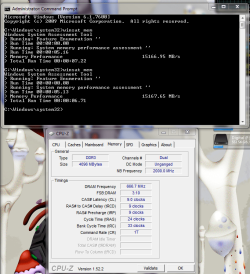
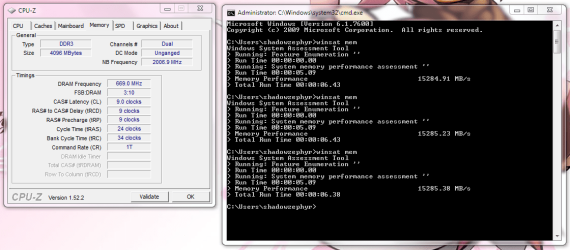
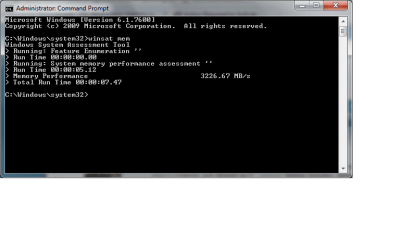
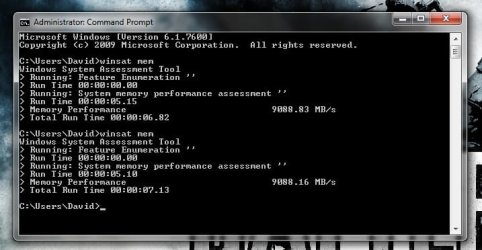
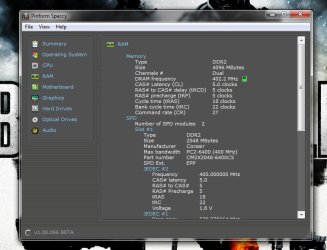
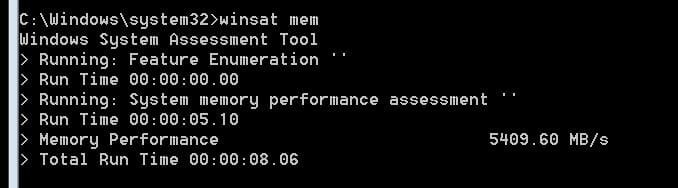
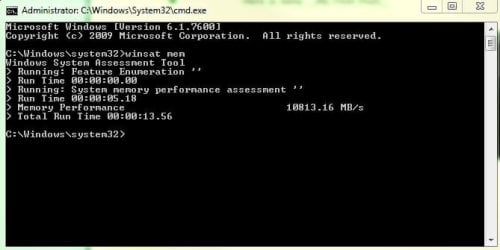
What's your memory assessment speed?

Status
Not open for further replies.
Naturally.

Higher power = higher temperature. I'm sure it's fine.

That's why performance RAM like OCZ has heat spreaders.

For the cpu???
 

My Computer My Computer

At a glance

windows 7 professional 64 bitintel core i7 920 (1366)Corsair Dominators (TR3X6G1600C8D)Sapphire 5970
OS
windows 7 professional 64 bit
CPU
intel core i7 920 (1366)
Motherboard
Asus P6T Deluxe V2
Memory
Corsair Dominators (TR3X6G1600C8D)
Graphics Card(s)
Sapphire 5970
Sound Card
on board / Asus Xonar D2
Monitor(s) Displays
lg flatron wide 22" 2x
Hard Drives
caviar black 1tb
caviar green 1tb

external western digital my book 1tb
external western my book digital 500gb
PSU
corsair 750w
Case
antec 1200
Cooling
sythek mugen - 2
Keyboard
flico maje
Mouse
g500
Internet Speed
comcast houstont x, 16mb down with boost. 2mb up
seems like i keep having crashes ive always had the hl2.exe crashing but never during game. this is weird and it also happens in modern warfare 2, i think im about to down clock.

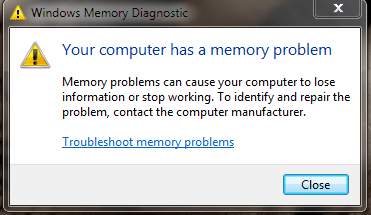
just ran the windows mem test and it said there is a problem.

is there anyway i can find out what or how thats all it tells me im about to put the speeds to stock and see if it does it.


UPDATE: put everything back to normal, and i re ran the test and this time it didnt find any errors, i wonder what am i doing wrong??? maybe i cant keep it at 1600 mhz...

UPDATE 2: put it back at 1600mhz but without the voltage this time and still says i have a ram problem on that. seems that i need to keep everything at stock for everything to be ok.
 

Attachments

  • memory problem.PNG
    memory problem.PNG
    9.6 KB · Views: 3
Last edited:

My Computer My Computer

At a glance

windows 7 professional 64 bitintel core i7 920 (1366)Corsair Dominators (TR3X6G1600C8D)Sapphire 5970
OS
windows 7 professional 64 bit
CPU
intel core i7 920 (1366)
Motherboard
Asus P6T Deluxe V2
Memory
Corsair Dominators (TR3X6G1600C8D)
Graphics Card(s)
Sapphire 5970
Sound Card
on board / Asus Xonar D2
Monitor(s) Displays
lg flatron wide 22" 2x
Hard Drives
caviar black 1tb
caviar green 1tb

external western digital my book 1tb
external western my book digital 500gb
PSU
corsair 750w
Case
antec 1200
Cooling
sythek mugen - 2
Keyboard
flico maje
Mouse
g500
Internet Speed
comcast houstont x, 16mb down with boost. 2mb up
seems like i keep having crashes ive always had the hl2.exe crashing but never during game. this is weird and it also happens in modern warfare 2, i think im about to down clock.

just ran the windows mem test and it said there is a problem.

is there anyway i can find out what or how thats all it tells me im about to put the speeds to stock and see if it does it.


UPDATE: put everything back to normal, and i re ran the test and this time it didnt find any errors, i wonder what am i doing wrong??? maybe i cant keep it at 1600 mhz...

UPDATE 2: put it back at 1600mhz but without the voltage this time and still says i have a ram problem on that. seems that i need to keep everything at stock for everything to be ok.

Hey, sorry been putting some new shock absorbers in my old ladys 300zx (PITA).

NO! LOL the DRAM BUS VOLTAGE should be at 1.65.
i just done some quick research and thats the one i found you should be adjusting for the ram. leave the rest on AUTO unless you want to overclock.

thats why your temps rose, as i think that QPI/DRAM setting has something to do with the cpu, if just overclocking ram, the cpu should NEVER suffer temp increases as they are not a part of each other.

that the only downside to the i7, you have to learn all its new terminology, like going from intel to an AMD. now the i7 has so many volt settings, its confusing.

also are your ram timings set to auto or did you set them manually?
if you set them manually, put them on auto after fixing that ram volt setting, then re-test the memory to see if its ok.

there will be a way to get it @ 1600mhz! otherwise i will be disappoint in myself! lol

oh and also, disable Speed Step (unless you want the cpu throttling its multiplier down automatically when at idle), i hate speed step, if i could disable it on my laptop i would.;)

let me know how those settings work out.
 

My Computer My Computer

At a glance

Windows 7 7600 x64 (16385) Ultimate,Windows V...Intel Quad core Q9550 [email protected](AS5 lap...2gbx4 GSkill1600MHz9/9/9/24/2T-1.8v@1677MHz9/...x2 Leadtek 9800GX2 Quad SLI(re-pasted/no case...
Computer Manufacturer/Model Number
Mad Customs #4
OS
Windows 7 7600 x64 (16385) Ultimate,Windows Vista x64 Ultimate
CPU
Intel Quad core Q9550 [email protected](AS5 lapped)(1845FSB)
Motherboard
EVGA 790i FTW DIGITAL PWM (AS5 re-pasted)
Memory
2gbx4 GSkill1600MHz9/9/9/24/2T-1.8v@1677MHz9/9/9/18/1T-1.8v
Graphics Card(s)
x2 Leadtek 9800GX2 Quad SLI(re-pasted/no cases)755/1120/1820
Sound Card
Crapative XF-i Plat
Monitor(s) Displays
Chimei22"ws(DVI)/LG32"LCD(HDMI)/Samsung 40"LCD(HDMI)
Screen Resolution
1680x1050/1360x768/1920x1080 (1080P)
Hard Drives
Seagate 1TB "40NS" 32mb sata2, Hitachi 500gb 16mb sata2 (backup storage), Sandisk 16gb micro SD (mobile storage)
PSU
Zalman 850-HP 850watt x6 12v@18A
Case
Tiled floor (nice and cold-usually 18c idle)
Cooling
fan forced 120 Xtreme (lapped)with push/pull setup
Keyboard
Logitech Di Novo Edge
Mouse
MX 1100
Internet Speed
Bigpond 17mbit/s cable=Max witnessed 2.5Mbyte/s down 30kb up
Other Info
Enzotech SLF-1+Enzotech CNB-EVGAi chipset coolers/Sunbeamtech Rheobus Extreme 30 Watt x 6 channel fan controller/Zalman ZM-MFC2 fan controller-Watt meter/Logitech G25 Racing Wheel/Logitech cordless number pad/OCZ NIA//HTPC:7600 x64/[email protected]/2x2Gb ST Proj.X DDR3 1800 9-9-9-24/Nvidia 8400GS 512Mb/Asus HDAV1.3 Delux(changed OPAmps to OPA627)/250Gb 16Mb 7200/480W PSU/Custom made cardboard box!!
ok well i did it that way, but i set the voltage at 1.64 because when i would put it at 1.65 it would auto go to a 1.66 and kept telling me its not recommended, i ran the ram test and found no problems :) so im wondering if i should leave it at 1.64. do you think 1.64 is ok? now i just need to run some games and see if they crash like they did, and cpu temps are back to normal

UPDATE on game: just played tf2 for a bit if it was going to crash it would have already, considering when i had it the other way around 10 mins in it would of crashed with the hl2.exe not responding thing. although i did have a little stutter when i came in which scared the hell out of me, cause then i thought it brought back my old problem O_O but then i kept playing and everything seem to be ok. seemed to be that my computer wasnt all the way warmed up yet.


Also on the speed step you think its no good??? i mean it ocs it self when using 1 or 2 cores to get more juice out of it... if it hurts me more then it benefits me ill disable it.
 
Last edited:

My Computer My Computer

At a glance

windows 7 professional 64 bitintel core i7 920 (1366)Corsair Dominators (TR3X6G1600C8D)Sapphire 5970
OS
windows 7 professional 64 bit
CPU
intel core i7 920 (1366)
Motherboard
Asus P6T Deluxe V2
Memory
Corsair Dominators (TR3X6G1600C8D)
Graphics Card(s)
Sapphire 5970
Sound Card
on board / Asus Xonar D2
Monitor(s) Displays
lg flatron wide 22" 2x
Hard Drives
caviar black 1tb
caviar green 1tb

external western digital my book 1tb
external western my book digital 500gb
PSU
corsair 750w
Case
antec 1200
Cooling
sythek mugen - 2
Keyboard
flico maje
Mouse
g500
Internet Speed
comcast houstont x, 16mb down with boost. 2mb up
ddr3

A-data DDR3 1600 4gb, all stock settings
 

Attachments

  • memasses.PNG
    memasses.PNG
    94.9 KB · Views: 44

My Computer My Computer

At a glance

Windows 7 Pro 64-bitAMD Phenom II X2 550 BEA-Data DDR3 1600 4gbHIS Radeon HD 4670
Computer Manufacturer/Model Number
Custom Built
OS
Windows 7 Pro 64-bit
CPU
AMD Phenom II X2 550 BE
Motherboard
ASUS M4A79XTD EVO
Memory
A-Data DDR3 1600 4gb
Graphics Card(s)
HIS Radeon HD 4670
Sound Card
VIA VT1708S (8 channel onboard)
Monitor(s) Displays
Dell 23" S2309W
Screen Resolution
1920 x 1080
Hard Drives
WD 320,750gb, Seagate 500gb External Backup
PSU
Rosewill Green Series 430W
Case
Coolermaster
Cooling
Scythe SCKTN-3000
ok well i did it that way, but i set the voltage at 1.64 because when i would put it at 1.65 it would auto go to a 1.66 and kept telling me its not recommended, i ran the ram test and found no problems :) so im wondering if i should leave it at 1.64. do you think 1.64 is ok? now i just need to run some games and see if they crash like they did, and cpu temps are back to normal

UPDATE on game: just played tf2 for a bit if it was going to crash it would have already, considering when i had it the other way around 10 mins in it would of crashed with the hl2.exe not responding thing. although i did have a little stutter when i came in which scared the hell out of me, cause then i thought it brought back my old problem O_O but then i kept playing and everything seem to be ok. seemed to be that my computer wasnt all the way warmed up yet.


Also on the speed step you think its no good??? i mean it ocs it self when using 1 or 2 cores to get more juice out of it... if it hurts me more then it benefits me ill disable it.

yeh 1.64v will be fine. the i7's for some reason have an issue with the ram voltage being too high. i dont know why this would affect the cpu though. or it could have something to do with the actual DRAM bus that gets affected by the voltage. but they do recommend not to go too high over 1.65v

its good to see that we had success! lol FTW!

speed step shouldn't hurt anything, its just it will make your cpu speed fluctuate when it gets to a certain percentage, for example, at 80% idle (20% cpu in use) it will reduce your multiplier and cpu vcore to 'save power', then once the cpu starts getting used more it will return it to full power. its more a personal preference matter, the way i see it, is if your computer has high end components, why bother trying to make it more power efficient? like a supercharged v8 and expecting to get good fuel economy?lol. with laptops, windows 7 allows you to set the minimum cpu usage, so i set it to 80% and it keeps the cpu at full speed so there is no lag between going from idle to opening a program.
and because you have the i7's turbo enabled, when at a certain cpu usage, again it will in fact increase your multiplier by x1 to give it a boost.

to me these advanced features are great for laptops (that want the battery life) and economic PC's like home theatre pc's (even though i overclock mine)

so with all that said, has your WEI increased? what about the memory assessment speed? (if your WEI did increase, dont forget to show it off on the WEI thread!)

 

My Computer My Computer

At a glance

Windows 7 7600 x64 (16385) Ultimate,Windows V...Intel Quad core Q9550 [email protected](AS5 lap...2gbx4 GSkill1600MHz9/9/9/24/2T-1.8v@1677MHz9/...x2 Leadtek 9800GX2 Quad SLI(re-pasted/no case...
Computer Manufacturer/Model Number
Mad Customs #4
OS
Windows 7 7600 x64 (16385) Ultimate,Windows Vista x64 Ultimate
CPU
Intel Quad core Q9550 [email protected](AS5 lapped)(1845FSB)
Motherboard
EVGA 790i FTW DIGITAL PWM (AS5 re-pasted)
Memory
2gbx4 GSkill1600MHz9/9/9/24/2T-1.8v@1677MHz9/9/9/18/1T-1.8v
Graphics Card(s)
x2 Leadtek 9800GX2 Quad SLI(re-pasted/no cases)755/1120/1820
Sound Card
Crapative XF-i Plat
Monitor(s) Displays
Chimei22"ws(DVI)/LG32"LCD(HDMI)/Samsung 40"LCD(HDMI)
Screen Resolution
1680x1050/1360x768/1920x1080 (1080P)
Hard Drives
Seagate 1TB "40NS" 32mb sata2, Hitachi 500gb 16mb sata2 (backup storage), Sandisk 16gb micro SD (mobile storage)
PSU
Zalman 850-HP 850watt x6 12v@18A
Case
Tiled floor (nice and cold-usually 18c idle)
Cooling
fan forced 120 Xtreme (lapped)with push/pull setup
Keyboard
Logitech Di Novo Edge
Mouse
MX 1100
Internet Speed
Bigpond 17mbit/s cable=Max witnessed 2.5Mbyte/s down 30kb up
Other Info
Enzotech SLF-1+Enzotech CNB-EVGAi chipset coolers/Sunbeamtech Rheobus Extreme 30 Watt x 6 channel fan controller/Zalman ZM-MFC2 fan controller-Watt meter/Logitech G25 Racing Wheel/Logitech cordless number pad/OCZ NIA//HTPC:7600 x64/[email protected]/2x2Gb ST Proj.X DDR3 1800 9-9-9-24/Nvidia 8400GS 512Mb/Asus HDAV1.3 Delux(changed OPAmps to OPA627)/250Gb 16Mb 7200/480W PSU/Custom made cardboard box!!
ok well i did it that way, but i set the voltage at 1.64 because when i would put it at 1.65 it would auto go to a 1.66 and kept telling me its not recommended, i ran the ram test and found no problems :) so im wondering if i should leave it at 1.64. do you think 1.64 is ok? now i just need to run some games and see if they crash like they did, and cpu temps are back to normal

UPDATE on game: just played tf2 for a bit if it was going to crash it would have already, considering when i had it the other way around 10 mins in it would of crashed with the hl2.exe not responding thing. although i did have a little stutter when i came in which scared the hell out of me, cause then i thought it brought back my old problem O_O but then i kept playing and everything seem to be ok. seemed to be that my computer wasnt all the way warmed up yet.


Also on the speed step you think its no good??? i mean it ocs it self when using 1 or 2 cores to get more juice out of it... if it hurts me more then it benefits me ill disable it.

yeh 1.64v will be fine. the i7's for some reason have an issue with the ram voltage being too high. i dont know why this would affect the cpu though. or it could have something to do with the actual DRAM bus that gets affected by the voltage. but they do recommend not to go too high over 1.65v

its good to see that we had success! lol FTW!

speed step shouldn't hurt anything, its just it will make your cpu speed fluctuate when it gets to a certain percentage, for example, at 80% idle (20% cpu in use) it will reduce your multiplier and cpu vcore to 'save power', then once the cpu starts getting used more it will return it to full power. its more a personal preference matter, the way i see it, is if your computer has high end components, why bother trying to make it more power efficient? like a supercharged v8 and expecting to get good fuel economy?lol. with laptops, windows 7 allows you to set the minimum cpu usage, so i set it to 80% and it keeps the cpu at full speed so there is no lag between going from idle to opening a program.
and because you have the i7's turbo enabled, when at a certain cpu usage, again it will in fact increase your multiplier by x1 to give it a boost.

to me these advanced features are great for laptops (that want the battery life) and economic PC's like home theatre pc's (even though i overclock mine)

so with all that said, has your WEI increased? what about the memory assessment speed? (if your WEI did increase, dont forget to show it off on the WEI thread!)

ok thank you ooo so much!!! lol may not be the right place to ask this, but i have my pci e Video card int he 2nd pci - e slot of my mobo, im wondering if thats effecting any performance as well.

o damn and yes went from a 7.4 to a 7.9
 
Last edited:

My Computer My Computer

At a glance

windows 7 professional 64 bitintel core i7 920 (1366)Corsair Dominators (TR3X6G1600C8D)Sapphire 5970
OS
windows 7 professional 64 bit
CPU
intel core i7 920 (1366)
Motherboard
Asus P6T Deluxe V2
Memory
Corsair Dominators (TR3X6G1600C8D)
Graphics Card(s)
Sapphire 5970
Sound Card
on board / Asus Xonar D2
Monitor(s) Displays
lg flatron wide 22" 2x
Hard Drives
caviar black 1tb
caviar green 1tb

external western digital my book 1tb
external western my book digital 500gb
PSU
corsair 750w
Case
antec 1200
Cooling
sythek mugen - 2
Keyboard
flico maje
Mouse
g500
Internet Speed
comcast houstont x, 16mb down with boost. 2mb up
You do have a 1x PCIe slot according to this. Make sure the video card is not using that slot. (I don't think the card can go in there anyway, but not sure since I don't own PCIe stuff.)
 

My Computer My Computer

At a glance

7600.20510 x86P4 550 3.4 GHz HT running at 3.5 GHzOCZ 2 GB(2x1GB) DDR400mHz running @ 414 mHzHIS Radeon HD 3850 IceQ 3 Turbo HDMI Dual DL-...
Computer Manufacturer/Model Number
self built
OS
7600.20510 x86
CPU
P4 550 3.4 GHz HT running at 3.5 GHz
Motherboard
MSI PM8M3-V (MS-7211 v1.x) Micro-ATX mainboard
Memory
OCZ 2 GB(2x1GB) DDR400mHz running @ 414 mHz
Graphics Card(s)
HIS Radeon HD 3850 IceQ 3 Turbo HDMI Dual DL-DVI AGP
Sound Card
MOTU Traveler firewire studio interface 192 kHz 24 bit
Monitor(s) Displays
22" widescreen Acer X223W LCD, 17" Compaq P75 CRT
Screen Resolution
1680x1050 and 1280x1024
Hard Drives
SATA I x2 WD, 400 GB and 120 GB, SATA 2 WD Caviar Black 1 TB
PSU
350W generic
Case
Cybertronpc, it glows blue
Cooling
stock cpu fan, Ice-Q 3 gpu and system, many case fans
Keyboard
Logitch Classical Keyboard 200
Mouse
Logitech Mediaplay cordless
Internet Speed
1792/448 kbits/sec
Other Info
SATA II PCI fake RAID adapter, 1 GB Readyboost, original ATI Remote Wonder (even works with WMC perfectly), Logitech Rumblepad 2 game controller x2
ok well i did it that way, but i set the voltage at 1.64 because when i would put it at 1.65 it would auto go to a 1.66 and kept telling me its not recommended, i ran the ram test and found no problems :) so im wondering if i should leave it at 1.64. do you think 1.64 is ok? now i just need to run some games and see if they crash like they did, and cpu temps are back to normal

UPDATE on game: just played tf2 for a bit if it was going to crash it would have already, considering when i had it the other way around 10 mins in it would of crashed with the hl2.exe not responding thing. although i did have a little stutter when i came in which scared the hell out of me, cause then i thought it brought back my old problem O_O but then i kept playing and everything seem to be ok. seemed to be that my computer wasnt all the way warmed up yet.


Also on the speed step you think its no good??? i mean it ocs it self when using 1 or 2 cores to get more juice out of it... if it hurts me more then it benefits me ill disable it.

yeh 1.64v will be fine. the i7's for some reason have an issue with the ram voltage being too high. i dont know why this would affect the cpu though. or it could have something to do with the actual DRAM bus that gets affected by the voltage. but they do recommend not to go too high over 1.65v

its good to see that we had success! lol FTW!

speed step shouldn't hurt anything, its just it will make your cpu speed fluctuate when it gets to a certain percentage, for example, at 80% idle (20% cpu in use) it will reduce your multiplier and cpu vcore to 'save power', then once the cpu starts getting used more it will return it to full power. its more a personal preference matter, the way i see it, is if your computer has high end components, why bother trying to make it more power efficient? like a supercharged v8 and expecting to get good fuel economy?lol. with laptops, windows 7 allows you to set the minimum cpu usage, so i set it to 80% and it keeps the cpu at full speed so there is no lag between going from idle to opening a program.
and because you have the i7's turbo enabled, when at a certain cpu usage, again it will in fact increase your multiplier by x1 to give it a boost.

to me these advanced features are great for laptops (that want the battery life) and economic PC's like home theatre pc's (even though i overclock mine)

so with all that said, has your WEI increased? what about the memory assessment speed? (if your WEI did increase, dont forget to show it off on the WEI thread!)


ok thank you ooo so much!!! lol may not be the right place to ask this, but i have my pci e Video card int he 2nd pci - e slot of my mobo, im wondering if thats effecting any performance as well.

o damn and yes went from a 7.4 to a 7.9

no probs. and thats a nice increase too!
it should be in the closest PIC-E x16 slot CLOSEST to the CPU, i dont know if it would affect performance, but for compatibility sake, thats how it should be done.

and no, it is physically impossible to fit a PCI-E x16 card in a PCI-E x1 slot, unless you destroy and modify the actual bus connector ;)
 

My Computer My Computer

At a glance

Windows 7 7600 x64 (16385) Ultimate,Windows V...Intel Quad core Q9550 [email protected](AS5 lap...2gbx4 GSkill1600MHz9/9/9/24/2T-1.8v@1677MHz9/...x2 Leadtek 9800GX2 Quad SLI(re-pasted/no case...
Computer Manufacturer/Model Number
Mad Customs #4
OS
Windows 7 7600 x64 (16385) Ultimate,Windows Vista x64 Ultimate
CPU
Intel Quad core Q9550 [email protected](AS5 lapped)(1845FSB)
Motherboard
EVGA 790i FTW DIGITAL PWM (AS5 re-pasted)
Memory
2gbx4 GSkill1600MHz9/9/9/24/2T-1.8v@1677MHz9/9/9/18/1T-1.8v
Graphics Card(s)
x2 Leadtek 9800GX2 Quad SLI(re-pasted/no cases)755/1120/1820
Sound Card
Crapative XF-i Plat
Monitor(s) Displays
Chimei22"ws(DVI)/LG32"LCD(HDMI)/Samsung 40"LCD(HDMI)
Screen Resolution
1680x1050/1360x768/1920x1080 (1080P)
Hard Drives
Seagate 1TB "40NS" 32mb sata2, Hitachi 500gb 16mb sata2 (backup storage), Sandisk 16gb micro SD (mobile storage)
PSU
Zalman 850-HP 850watt x6 12v@18A
Case
Tiled floor (nice and cold-usually 18c idle)
Cooling
fan forced 120 Xtreme (lapped)with push/pull setup
Keyboard
Logitech Di Novo Edge
Mouse
MX 1100
Internet Speed
Bigpond 17mbit/s cable=Max witnessed 2.5Mbyte/s down 30kb up
Other Info
Enzotech SLF-1+Enzotech CNB-EVGAi chipset coolers/Sunbeamtech Rheobus Extreme 30 Watt x 6 channel fan controller/Zalman ZM-MFC2 fan controller-Watt meter/Logitech G25 Racing Wheel/Logitech cordless number pad/OCZ NIA//HTPC:7600 x64/[email protected]/2x2Gb ST Proj.X DDR3 1800 9-9-9-24/Nvidia 8400GS 512Mb/Asus HDAV1.3 Delux(changed OPAmps to OPA627)/250Gb 16Mb 7200/480W PSU/Custom made cardboard box!!

My Computer My Computer

At a glance

Windows 7 Ultimate x64AMD Phenom II X4 955 Black Edition 3.2Ghz8GB DDR3 Corsair Vengeance 1600Mhz 2x4GBSapphire ATI HD5850 Toxic 1GB
Computer Manufacturer/Model Number
shadowzephyr
OS
Windows 7 Ultimate x64
CPU
AMD Phenom II X4 955 Black Edition 3.2Ghz
Motherboard
Asus M4A78T-E
Memory
8GB DDR3 Corsair Vengeance 1600Mhz 2x4GB
Graphics Card(s)
Sapphire ATI HD5850 Toxic 1GB
Sound Card
Integrated, VIA VT1708S 8-Channel
Monitor(s) Displays
Acer X223HQ 21.5"
Screen Resolution
1920 x 1080
Hard Drives
Mushkin Chronos SSD 120GB (OS)
WD Caviar Black 1TB (Main)
WD Caviar Blue 3x2TB (Anime, Games, Movie)
Maxtor Basic External HD 1TB (Games Installer)
PSU
CoolerMaster GX 750W
Case
CoolerMaster CM690 II Plus
Other Info
Speaker : Logitech X-540 5.1 ch
I must say that i am seeing alot more AMD builds than i saw last year, with that said their new technology has come a far way and proving rather good results.:)
 

My Computer My Computer

At a glance

Windows 7 7600 x64 (16385) Ultimate,Windows V...Intel Quad core Q9550 [email protected](AS5 lap...2gbx4 GSkill1600MHz9/9/9/24/2T-1.8v@1677MHz9/...x2 Leadtek 9800GX2 Quad SLI(re-pasted/no case...
Computer Manufacturer/Model Number
Mad Customs #4
OS
Windows 7 7600 x64 (16385) Ultimate,Windows Vista x64 Ultimate
CPU
Intel Quad core Q9550 [email protected](AS5 lapped)(1845FSB)
Motherboard
EVGA 790i FTW DIGITAL PWM (AS5 re-pasted)
Memory
2gbx4 GSkill1600MHz9/9/9/24/2T-1.8v@1677MHz9/9/9/18/1T-1.8v
Graphics Card(s)
x2 Leadtek 9800GX2 Quad SLI(re-pasted/no cases)755/1120/1820
Sound Card
Crapative XF-i Plat
Monitor(s) Displays
Chimei22"ws(DVI)/LG32"LCD(HDMI)/Samsung 40"LCD(HDMI)
Screen Resolution
1680x1050/1360x768/1920x1080 (1080P)
Hard Drives
Seagate 1TB "40NS" 32mb sata2, Hitachi 500gb 16mb sata2 (backup storage), Sandisk 16gb micro SD (mobile storage)
PSU
Zalman 850-HP 850watt x6 12v@18A
Case
Tiled floor (nice and cold-usually 18c idle)
Cooling
fan forced 120 Xtreme (lapped)with push/pull setup
Keyboard
Logitech Di Novo Edge
Mouse
MX 1100
Internet Speed
Bigpond 17mbit/s cable=Max witnessed 2.5Mbyte/s down 30kb up
Other Info
Enzotech SLF-1+Enzotech CNB-EVGAi chipset coolers/Sunbeamtech Rheobus Extreme 30 Watt x 6 channel fan controller/Zalman ZM-MFC2 fan controller-Watt meter/Logitech G25 Racing Wheel/Logitech cordless number pad/OCZ NIA//HTPC:7600 x64/[email protected]/2x2Gb ST Proj.X DDR3 1800 9-9-9-24/Nvidia 8400GS 512Mb/Asus HDAV1.3 Delux(changed OPAmps to OPA627)/250Gb 16Mb 7200/480W PSU/Custom made cardboard box!!
Intel I7 950 CPU
12GB ddr3 1600MHz 3 channel

21781.25 MS/s.
 
Last edited:

My Computer My Computer

At a glance

Windows 7I7 95012 GBGigabyte GeForce 9600GT 512MB Silent
Computer Manufacturer/Model Number
Puget Custom Computers - Custom
OS
Windows 7
CPU
I7 950
Motherboard
Asus P6T
Memory
12 GB
Graphics Card(s)
Gigabyte GeForce 9600GT 512MB Silent
Sound Card
MotherBoard
Monitor(s) Displays
24" ASUS LED/LCD
Screen Resolution
1900 X 1200
Hard Drives
2 Western Digital Cavair Black 640GB
2 Western Digital Cavair Black 1.0TB
PSU
Corsair HX 850W
Case
Antec P193
Cooling
Puget Hydro CL1 Liguid Cooling System 1366
Keyboard
Microsoft Internet Keyboard
Mouse
Logitic M310
Internet Speed
50 MBps
Antivirus
Bitdefender
Browser
Chrome
:huh:
 

Attachments

  • Untitled.png
    Untitled.png
    12.4 KB · Views: 39

My Computer My Computer

At a glance

windows 7dual core 2.0ghzddr2 4gbmobile intel 4 series express chipset
Computer Manufacturer/Model Number
acer aspire 4730z
OS
windows 7
CPU
dual core 2.0ghz
Memory
ddr2 4gb
Graphics Card(s)
mobile intel 4 series express chipset
Sound Card
realtek high definition
Monitor(s) Displays
1280 * 800
Hard Drives
samsung 250gb
4GB Corsair XMS2 DDR2 @ Stock.
 

Attachments

  • Corsair XMS2.jpg
    Corsair XMS2.jpg
    42.8 KB · Views: 50
  • speccy.jpg
    speccy.jpg
    54.1 KB · Views: 39

My Computer My Computer

At a glance

Windows 8.1 ProIntel Core i5-2500K8GB Corsair Vengeance DDR3Sapphire Radeon HD 7970 GHz Vapor-X Edition
Computer type
PC/Desktop
Computer Manufacturer/Model Number
Self Built
OS
Windows 8.1 Pro
CPU
Intel Core i5-2500K
Motherboard
ASRock Z77 Extreme4
Memory
8GB Corsair Vengeance DDR3
Graphics Card(s)
Sapphire Radeon HD 7970 GHz Vapor-X Edition
Sound Card
Realtek ALC898
Monitor(s) Displays
BenQ XL2411T
Screen Resolution
1920 x 1080 @ 144Hz
Hard Drives
Plextor M3 Pro 128GB
WD Caviar Blue
PSU
Seasonic G Series 650W
Case
Corsair Obsidian 650D
Cooling
Corsair H60 2013 Edition
Keyboard
Cooler Master Quick Fire Rapid
Mouse
Corsair Raptor M45
Other Info
Headphones: Sennheiser HD-515
Corsair 4GB DDR2-SDRAM PC2-5300 667MHz

4157.94 MB/s
 

My Computer My Computer

At a glance

Windows 7 Professional x64 6.1 Build 7600Intel Core 2 Quad Q9400 2.66Ghz8GB DDR3 PC3-10700H (1333Mhz)Visiontek ATI Radeon HD4850
Computer Manufacturer/Model Number
Dell XPS 430
OS
Windows 7 Professional x64 6.1 Build 7600
CPU
Intel Core 2 Quad Q9400 2.66Ghz
Motherboard
Dell Inc. 0G254H
Memory
8GB DDR3 PC3-10700H (1333Mhz)
Graphics Card(s)
Visiontek ATI Radeon HD4850
Sound Card
Intel® 7.1 channel High Definition Audio
Monitor(s) Displays
Asus VH222H 22"
Screen Resolution
1920x1080
Hard Drives
OS: Kingston SSDNow V Series SNV425-S2BD/64GB

Data: Western Digital Caviar Blue 320GB, 7200 RPM
PSU
Dell 425watt PSU
Case
Dell XPS 430
Cooling
Stock
Keyboard
Microsoft Wireless Keyboard 1000
Mouse
Microsoft Wireless Optical Mouse 2000
Internet Speed
20Mb/s Down 5Mb/s Up
Other Info
Logitech X-540 5.1 Channel Surround Sound System
Here's mine
 

Attachments

  • mem.JPG
    mem.JPG
    23.5 KB · Views: 15

My Computer My Computer

At a glance

Windows 7 Ultimate SP1 64- bitIntel Core i7-3770K @3.50ghzKingston Technology 16GB (2x 8GB) 2133MHz DDR...EVGA GTX 670 4gb SC
Computer type
PC/Desktop
Computer Manufacturer/Model Number
Home Built
OS
Windows 7 Ultimate SP1 64- bit
CPU
Intel Core i7-3770K @3.50ghz
Motherboard
EVGA Z77 FTW
Memory
Kingston Technology 16GB (2x 8GB) 2133MHz DDR3 Non-ECC
Graphics Card(s)
EVGA GTX 670 4gb SC
Sound Card
Nil
Monitor(s) Displays
Samsung 22"
Screen Resolution
1920 x 1080 60hz
Hard Drives
OCZ Vertex 4 SSD 128GB
SAMSUNG Spinpoint F3 HD502HJ 500GB 7200 RPM
PSU
Enermax Platinax EPM1000EWT Special OC Edition
Case
Cooler Master HAF Full Tower nVIDIA Edition
Cooling
CoolerMaster Hyper 212 Plus
Keyboard
HP Wireless Keyboard
Mouse
Corsair Vengeance M90
Internet Speed
20 Mb
Other Info
ASUS DRW-24B1ST/BLK/B/AS Black SATA 24X DVD Burner
See system spec. But the is a Overclocked Core I7 sysrtem with 12 gigs of Ram


attachment.php
 

Attachments

  • memspeed.jpg
    memspeed.jpg
    48.3 KB · Views: 152

My Computer My Computer

At a glance

Win 7 64 Ultimate- Win 7 Home premium 64- XP-...Intel I7 920 OC'd 3.812 gigs Dominator 16002ea Nvidia 280's SLI superclocked version
Computer Manufacturer/Model Number
HomeBuilt
OS
Win 7 64 Ultimate- Win 7 Home premium 64- XP- Adndroid 3.1 and 2.3 Ubantu- Vista Ultimate 64
CPU
Intel I7 920 OC'd 3.8
Motherboard
Asus Rampage Extreme 11
Memory
12 gigs Dominator 1600
Graphics Card(s)
2ea Nvidia 280's SLI superclocked version
Sound Card
XFI
Monitor(s) Displays
Twin HP 2745's
Hard Drives
2ea 1 TB internal Drives - 6 TB External NAS
PSU
Thermaltake toughpower 1200 watt
Case
Lain Li A70b
Cooling
Air Cooled
Internet Speed
15 down 3 up Comcast
Here is mine:

Patriot Sector 5 Memory DDR 1600Mhz.

Only auto recognizes at 1066Mhz. Trying to get software completely stable and then will attempt to overclock to get closer to 1600Mhz.

I made a mistake in buying the sector 5 brand of Patriot for my AM3 system, I should have bought their gamer edition. I might do this later and sell the Sector 5 to see if I get better performance.
 

Attachments

  • MemAssessmentSpeed-121009.JPG
    MemAssessmentSpeed-121009.JPG
    29 KB · Views: 22

My Computer My Computer

At a glance

Windows 7 x64AMD ATHLON II X4 620 - WEI 7.28GB Patriot Sector 5 DDR3 1600MHZ 9-9-9-24-38...Built in ATI HD4200 - WEI 4.6 and 5.5
Computer Manufacturer/Model Number
Custom Built
OS
Windows 7 x64
CPU
AMD ATHLON II X4 620 - WEI 7.2
Motherboard
ASUS MA4785TD-M EVO BIOS 0904
Memory
8GB Patriot Sector 5 DDR3 1600MHZ 9-9-9-24-38-1T 1.65V
Graphics Card(s)
Built in ATI HD4200 - WEI 4.6 and 5.5
Sound Card
Onboard
Monitor(s) Displays
Asus 23" LCD, Panasonic 32" LCD HDTV
Screen Resolution
1920x1080
Hard Drives
WD 500 GB HDD (OS)
WD Green Caviar 2 TB (Data)
WEI 5.6
PSU
OCZ 550 WATT MODULAR
Cooling
5 80 MM CASE FANS
Keyboard
LOGITECH WIRELESS COMBO
Mouse
LOGITECH WIRELESS COMBO
Internet Speed
12MB/1024KB
Other Info
MyBook 500 GB External USB2.0 drive
Not sure how you are posting pics on here, but my score is 9924.44 MB/s
 

My Computer My Computer

At a glance

Windows 7 Ultimate 64-bitAMD Athlon 64 X2 6400+ 3.2GHzCorsair Dominator DDR2 1066 4GBGigabyte ATI Radeon HD 4890 1GB GDDR5
Computer Manufacturer/Model Number
home built
OS
Windows 7 Ultimate 64-bit
CPU
AMD Athlon 64 X2 6400+ 3.2GHz
Motherboard
ASUS Crosshair I
Memory
Corsair Dominator DDR2 1066 4GB
Graphics Card(s)
Gigabyte ATI Radeon HD 4890 1GB GDDR5
Sound Card
on mobo
Monitor(s) Displays
Samsung SyncMaster 245BW 24" LCD
Hard Drives
(2) Western Digital Blue 80GB SATA in RAID 0
(1) Hitachi DeskStar 250GB SATA
PSU
Corsair 850W
Case
Silverstone Temjin
Cooling
lots of fans
Status
Not open for further replies.
Back
Top