where has my disc space gone?

james cullen

New member
Member
VIP
Local time
1:11 PM
Messages
102
Hello good people,

I have a question on space, space on my Operating system drive.

The drive is an ssd 120 gb, formatted it comes in at 111gb, I have fresh win 7 64 installed.

The Windows folder takes 16gb, my program folders take 5gb, the remaining folders on the os take 26gb. Total 47gb

I have no data apart from emails stored on the drive yet the drive properties show that I have 69gb used, so somewhere there is 22gb used I can't see.

Is it my Page file?

I have a dedicated drive that I have put a page file on as well as the os drive, this drive says there is 35gb used, I can't see where it is used and I'm thinking that that is the way with page files.

I have show hidden files enabled.

It's no huge deal but I'd like to know where the gb's are and if that amount can be shaved down so I can keep a good part of the drive free.

Cheers

James
 

My Computer My Computer

Computer type
PC/Desktop
OS
Win pro 64bit
CPU
i7-980X
Motherboard
X58A-UD3R
Memory
Corsair Dominator CMP12GX3M3A1600C9 9-9-9-24 X2
Graphics Card(s)
Asus Geforce GTX 560 Ti
Sound Card
none
Monitor(s) Displays
Eizo x 2
Screen Resolution
1200x1600
Hard Drives
Revo 240gb,
Samsung 840 pro OS
Samsung 840 Scratch
WD 1TB x 3.
PSU
Siverstone
Case
Corsair 700d
Cooling
Noctua 140
Hi.

Understand that what the drive is advertised as, there's always going to be slightly less in actual space. See this thread for an explanation -

http://www.sevenforums.com/hardware-devices/23890-hdds-advertized-size-vs-actual-size.html

Then you also have system restore taking up some space if you have it on.

http://www.sevenforums.com/tutorials/335-system-protection-change-disk-space-usage.html
http://www.sevenforums.com/tutorials/336-system-protection-restore-points-delete.html

This thread will give you some ideas as to why also. For instance if you never even used Hibernate or had a reason to, you could delete the file. When I did, it actually gave me 10GB back.

http://www.sevenforums.com/tutorials/336-system-protection-restore-points-delete.htmlhttp://www.sevenforums.com/tutorials/129976-hard-disk-space-free-up-recover.html

Be aware of the what those steps will do though, if you decide to implement any of them though.
 

My Computer My Computer

Computer type
PC/Desktop
Computer Manufacturer/Model Number
Airbot 2.0
OS
Windows 7 Ultimate x64 SP1
CPU
Core i7 920 (D0) @ 4Ghz, *26c idle *65c full load on air
Motherboard
Asus P6X58D Premium - Sata 6Gb/s - USB 3.0
Memory
12GB DDR3 Corsair Dominator -CMD12GX3M6A1600C8 at 1600MHz
Graphics Card(s)
Zotac Geforce GTX 770
Sound Card
ASUS Xonar D2X
Monitor(s) Displays
1 LG 24" Flatron W2453V-PF 1 Samsung 24" P2450H both 2ms RT
Screen Resolution
1920x1080@60hz
Hard Drives
1 Samsung 250GB 840 Evo SSD
1 OCZ Vertex2 180GB SSD
1 TB Samsung Spinpoint F1 7200RPM 32MB cache
2 500GB WD Caviar Blacks 7200RPM 32MB cache (WD5001AALS)

Pioneer DVD Burner DVR-S18M
PSU
Corsair HX1000W
Case
Cooler Master HAF 932
Cooling
Case Fans *3 230mm, *1 140mm/CPU - *Tuniq Tower 120 Extreme
Keyboard
Logitech Wireless MK700
Mouse
Logitech Wireless MK700
Internet Speed
DL 15 Mbps UL 0.98 Mbps
Antivirus
None
Browser
Firefox Nightly
Other Info
Processor-7.7 *RAM- 7.9 *Graphics-7.9 *Gaming Graphics- 7.9 *SSD- 7.8 W.E.I final score= 7.7
*Phone- LG Nexus 5
Airbot.

Thank you so much, that is a great list of threads you've given me and will take some time to go through it all.

I appreciate your time.

Cheers

James
 

My Computer My Computer

Computer type
PC/Desktop
OS
Win pro 64bit
CPU
i7-980X
Motherboard
X58A-UD3R
Memory
Corsair Dominator CMP12GX3M3A1600C9 9-9-9-24 X2
Graphics Card(s)
Asus Geforce GTX 560 Ti
Sound Card
none
Monitor(s) Displays
Eizo x 2
Screen Resolution
1200x1600
Hard Drives
Revo 240gb,
Samsung 840 pro OS
Samsung 840 Scratch
WD 1TB x 3.
PSU
Siverstone
Case
Corsair 700d
Cooling
Noctua 140
Thanks Airbot

I have recovered nearly 20gb, most of which came from disabling hibernation.

Thank you

James
 

My Computer My Computer

Computer type
PC/Desktop
OS
Win pro 64bit
CPU
i7-980X
Motherboard
X58A-UD3R
Memory
Corsair Dominator CMP12GX3M3A1600C9 9-9-9-24 X2
Graphics Card(s)
Asus Geforce GTX 560 Ti
Sound Card
none
Monitor(s) Displays
Eizo x 2
Screen Resolution
1200x1600
Hard Drives
Revo 240gb,
Samsung 840 pro OS
Samsung 840 Scratch
WD 1TB x 3.
PSU
Siverstone
Case
Corsair 700d
Cooling
Noctua 140
No problem.
 

My Computer My Computer

Computer type
PC/Desktop
Computer Manufacturer/Model Number
Airbot 2.0
OS
Windows 7 Ultimate x64 SP1
CPU
Core i7 920 (D0) @ 4Ghz, *26c idle *65c full load on air
Motherboard
Asus P6X58D Premium - Sata 6Gb/s - USB 3.0
Memory
12GB DDR3 Corsair Dominator -CMD12GX3M6A1600C8 at 1600MHz
Graphics Card(s)
Zotac Geforce GTX 770
Sound Card
ASUS Xonar D2X
Monitor(s) Displays
1 LG 24" Flatron W2453V-PF 1 Samsung 24" P2450H both 2ms RT
Screen Resolution
1920x1080@60hz
Hard Drives
1 Samsung 250GB 840 Evo SSD
1 OCZ Vertex2 180GB SSD
1 TB Samsung Spinpoint F1 7200RPM 32MB cache
2 500GB WD Caviar Blacks 7200RPM 32MB cache (WD5001AALS)

Pioneer DVD Burner DVR-S18M
PSU
Corsair HX1000W
Case
Cooler Master HAF 932
Cooling
Case Fans *3 230mm, *1 140mm/CPU - *Tuniq Tower 120 Extreme
Keyboard
Logitech Wireless MK700
Mouse
Logitech Wireless MK700
Internet Speed
DL 15 Mbps UL 0.98 Mbps
Antivirus
None
Browser
Firefox Nightly
Other Info
Processor-7.7 *RAM- 7.9 *Graphics-7.9 *Gaming Graphics- 7.9 *SSD- 7.8 W.E.I final score= 7.7
*Phone- LG Nexus 5
Thanks Airbot

I kept wondering why mine hd kept reducing space, excellent advice, who knew it would be that simple. Hats off to ya;)
 

My Computer My Computer

Computer Manufacturer/Model Number
HP 9720US
OS
WINDOWS 7 ULTIMATE SP1
CPU
AMD TURION 64 X2 TL-60 2.00GHZ
Memory
4GB
Dear ief1962,
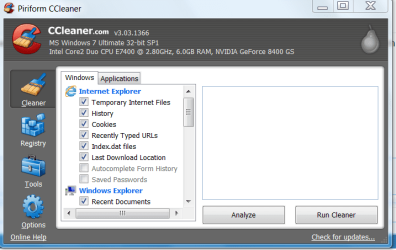
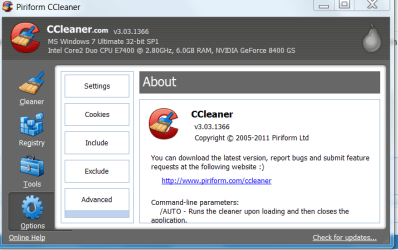
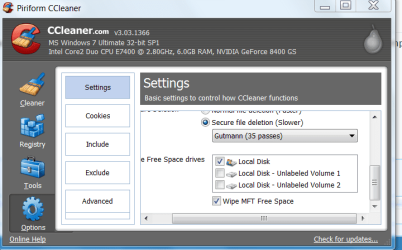
A small addition to what has been written in those excellent articles! Please download CCleaner (crap cleaner) from : piriform.com and use only the windows option! Do not bother about the registry there! Leave it ALONE! Kindly see the snaps as shown below to optimally use CCleaner IDEALLY EVERYDAY BEFORE SHUTTING DOWN THE LAPTOP FOR THE DAY!(Sorry for the bold type, it's purely for emphasis). CCleaner is a highly respected tool among all softwares to remove .temp files and i believe it is better done everyday!

Regards,
Sreedhav:)
 

Attachments

  • CCleaner-1.png
    CCleaner-1.png
    27.4 KB · Views: 17
  • CCleaner-2.png
    CCleaner-2.png
    26 KB · Views: 14
  • CCleaner-3.png
    CCleaner-3.png
    27.8 KB · Views: 14
Last edited:

My Computer My Computer

Computer Manufacturer/Model Number
Sony Vaio C series VPCCB35FN laptop
OS
MS Windows 7 Home Premium 64-bit SP1
CPU
IntelCore [email protected]; Sandy Bridge 32nm Tech.
Motherboard
Sony Vaio Version:C609NJYJ
Memory
4096Mb RAM; Single ChannelDDR3@665MHz; DRAM Freq:662MHz
Graphics Card(s)
AMD Radeon HD 6630M; GPU:Whistler;BIOS Core&mem Clock:123.36
Sound Card
REALTEK High Definition Audio Device; INTEL Display Card
Monitor(s) Displays
Generic PnP Intel HD;Resolution:1920*1040 Pixels; BPP:32bits
Screen Resolution
Current Resolution:1920*1080 Pixels; Monitor Frequency:60Hz
Hard Drives
Internal HD:TOSHIBA MK5061GSY; Real Size:488 GB;NTFS; 3 Partitions; SATA; HEADS:16

External HDD: WD Elements 1023 PORTABLE; Estimated Size: 1TB; NTFS; 3 Partitions
Cooling
Lateral Exhaust with a Cooling Pad Placed Beneath.
Keyboard
Logitech Bluetooth+ Generic Integrated K-B
Mouse
Logitech Bluetooth
Internet Speed
2MBPS
Other Info
1)Trend Micro Titanium Maximum Security Suite Version:3
2)SAS-PRO

3)MBAM--PRO


4)WATERFOX+IE9 +WOT+LINKEXTEND+ DRWEBCUREIT LINK CHECKER

5)SPYWAREBLASTER

6) WINPATROL PLUS

7) SANDBOXIE and
8) A BIT OF COMMON SENSE.
Do not bother about the registry there! Leave it ALONE!
I'm hoping to not derail this thread, but it's been well documented that the registry cleaner is useful in some cases. I use it on every system of mine, and it has helped solve some quirky issues for me. I don't want to rehash all those again, so we don't take this off topic, but let's just leave it at the fact many people were able to post examples of how it was useful. CCleaner also provides several other functions, and is free, so it is definitely a trusted and recommended app. Just don't sell it short of what it can do.
 

My Computer My Computer

OS
Windows 7 Ultimate x64 SP1
CPU
Intel Core i7-2600
Motherboard
Gigabyte GA-P67A-UD3P-B3
Memory
12 GB Patriot Extreme DDR3-1333
Graphics Card(s)
Nvidia GTX 470
Monitor(s) Displays
Dell UltraSharp 2209WA
Hard Drives
OCZ Agility3 240 GB, WD5001AALS, WD7501AALS
PSU
OCZ ModStream 700W
Case
CoolerMaster HAF 912 Advanced
Cooling
CoolerMaster Hyper 212 Plus
Dear DeaconFrost,
Quote" Just don't sell it short of what it can do. "UNquote! I loved that sentence! Worth remembering and writing it down! I only thought that"discretion is the better part of valor"!

Regards,
Sreedhav.

PS: Borrowed knowledge tells me to inform the @posters that defragging is the worst thing you can do to a SSD! It is such a disservice,you are cutting down it's lifespan!
 

My Computer My Computer

Computer Manufacturer/Model Number
Sony Vaio C series VPCCB35FN laptop
OS
MS Windows 7 Home Premium 64-bit SP1
CPU
IntelCore [email protected]; Sandy Bridge 32nm Tech.
Motherboard
Sony Vaio Version:C609NJYJ
Memory
4096Mb RAM; Single ChannelDDR3@665MHz; DRAM Freq:662MHz
Graphics Card(s)
AMD Radeon HD 6630M; GPU:Whistler;BIOS Core&mem Clock:123.36
Sound Card
REALTEK High Definition Audio Device; INTEL Display Card
Monitor(s) Displays
Generic PnP Intel HD;Resolution:1920*1040 Pixels; BPP:32bits
Screen Resolution
Current Resolution:1920*1080 Pixels; Monitor Frequency:60Hz
Hard Drives
Internal HD:TOSHIBA MK5061GSY; Real Size:488 GB;NTFS; 3 Partitions; SATA; HEADS:16

External HDD: WD Elements 1023 PORTABLE; Estimated Size: 1TB; NTFS; 3 Partitions
Cooling
Lateral Exhaust with a Cooling Pad Placed Beneath.
Keyboard
Logitech Bluetooth+ Generic Integrated K-B
Mouse
Logitech Bluetooth
Internet Speed
2MBPS
Other Info
1)Trend Micro Titanium Maximum Security Suite Version:3
2)SAS-PRO

3)MBAM--PRO


4)WATERFOX+IE9 +WOT+LINKEXTEND+ DRWEBCUREIT LINK CHECKER

5)SPYWAREBLASTER

6) WINPATROL PLUS

7) SANDBOXIE and
8) A BIT OF COMMON SENSE.
Back
Top