WIM File - Extract and Modify

How to Extract and Modify WIM Files

Sometimes when some of the dll files gets deleted somehow or certain Windows features crashes due to corrupt file then we had use system Restore or have to perform clean installation to get those files back. But while we use System Restore or we perform clean installation some or all our installed gets deleted. install.wim file in your windows 7 or windows vista DVD contains a windows image. IF we could Extract it then we could use those files it to replace the corrupted file in our Windows.
Or you can also modify the .wim file to add or delete a program or file.
This tutorial is all about how to mount or modify install.wim or any .wim file.

   Warning
Things you need:
1)ImageX.exe from the Windows Automated Installation Kit (WAIK)
2)install.wim file from you windows installation DVD.
3)More than 5GB of hdd space.


Copy the install.wim file to you local hard disk(let say i copied it to f:\).
let say you have kept imagex.exe in c:\ drive. And you are going to mount the .wim file in d:\mount.

   Note
You cannot mount .wim file directly to any drive


To mount .wim file in d:\mount at first we have to make a folder in d:\ named mount.

There are two process of mounting:
1)with read only permission(you can`t modify .wim file).
2)with read write permission(you can modify .wim file).
1) Mounting With read only permission:
Open command and go to c:\
then type: imagex /mount f:\install.wim 2 d:\mount
And install.wim will be mounted to d:\mount.
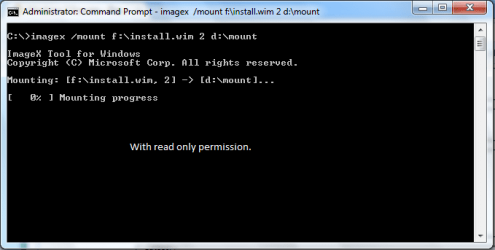
image1.png
2) Mounting with read\write permission:
Open command and go to c:\
then type

imagex /mountrw f:\install.wim 2 d:\mount
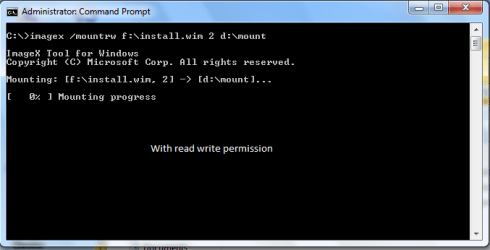
image2.png
   Note
where d:\mount is the location of the mount directory, f:\install.wim is the name and the location of the .wim file to mount, and 2 is the reference number of the specific volume in the .wim file.

Modifying an Image
After you mount an image, the directory structure becomes available from a file-management tool, such as Windows Explorer. From the file-management tool, you can review your file and folder structure and add, edit, or delete files and folders.

To view files and folders
On yourcomputer, start Windows Explorer, and then open the mounted directory. For example,

d:\mount
Review the file and folder structure, including content.
To Add Files or Folders
If you must add an application or a device, verify that you included all of the required files. Although you can add application files and folders, you cannot install applications.
To edit files or folders
On your computer, start Windows Explorer, and then open the mounted directory. For example,

d:\mount
Edit the files and the folders. Move the files and the folders within your image, or open the files and view their contents.

To delete files or folders
On your computer, start Windows Explorer, and then open the mounted directory. For example,

C:\mount
To delete a file or a folder, press SHIFT+DELETE.

   Note
You cannot delete an entire .wim file. However, you can delete all of the files contained within the image. The DELETE key alone will not delete any files or folders you have to use SHIFT+DELETE.

To Unmount an Image
On your computer, at a command prompt, open the ImageX directory(as on my computer i have kept it in c:\).

Then type: imagex /unmount /commit d:\mount

   Note
where d:\mount is the location of the mount directory. If you do not specify the parameters to unmount, this option lists all of the mounted images but does not perform the unmount action.

If you use the /unmount option without the /commit option, your changes will be discarded. To save your changes, you must mount the image by using the /mountrw option and the /commit option when unmounting the image.

Feel free to comment. And if i have done any mistake in the tutorial feel free to speak about it. Thanks for reading.
 

Attachments

Last edited by a moderator:
This is what I did wim file - Extract and Modify after this is finished How do you create a wim file after it's been modified and put it back to wim file for it to work
 

My Computer My Computer

OS
widnows 7
Modified install.wim

Hi, thanx for the tutorial. I followed the steps successfully but wanted to know where the modified install.wim is? Will it be placed back on the c drive?
 

My Computer My Computer

Computer Manufacturer/Model Number
Sager NP9280
OS
Windows 7 Ultimate x64
CPU
i7-975
Memory
6GB DDR3
Graphics Card(s)
nvidia GTX280M
Hard Drives
3
Thanks.
It worked for me.I edited boot.wim and install.wim & made changes.when i will install it i will be having everything i added.
 

My Computer My Computer

Computer Manufacturer/Model Number
lg
OS
windows 7 ultimate x64
CPU
lg
Motherboard
lg
Memory
2.50 GB
Graphics Card(s)
256 MB
Sound Card
128 MB
Monitor(s) Displays
1
Hard Drives
160 GB
PSU
----
Case
----
Cooling
fan
imagex is not recognized as internal or external command

hey ,
i do all those things which u tell to do ! then i open the command ... i enter those code and the result was ' imagex' is not recognized as an internal or external command, operable program or batch file......

although i download only the ' imagex.exe 'file from the google!!:cool::sleepy::mad::sick::devil:
 

My Computer My Computer

Computer Manufacturer/Model Number
lenovo
OS
windows 7 ultimate x32
CPU
lenovo
Motherboard
intel
Memory
4 gb
Graphics Card(s)
1 gb
Monitor(s) Displays
15.6"
Hard Drives
500 gb
Hello Sumit, and welcome to Seven Forums.

You will need to download WAIK first to get the ImageX.exe file, and then copy the ImageX.exe file to your C: drive. The red warning box at the top of the tutorial will have the download link. :)
 

My Computer My Computer

Computer type
PC/Desktop
Computer Manufacturer/Model Number
Self built custom
OS
64-bit Windows 11 Pro for Workstations
CPU
Intel i7-8700K OC'd to 5 GHz
Motherboard
ASUS ROG Maximus XI Formula Z390
Memory
64 GB (4x16GB) G.SKILL TridentZ RGB DDR4 3600 MHz
Graphics Card(s)
ASUS ROG-STRIX-GTX1080TI-O11G-GAMING
Sound Card
Integrated
Monitor(s) Displays
2 x Samsung Odyssey G7 27"
Screen Resolution
2560x1440
Hard Drives
1TB Samsung 990 PRO M.2,
4TB Samsung 990 PRO PRO M.2,
TerraMaster F8 SSD Plus NAS
PSU
Seasonic Prime Titanium 850W
Case
Thermaltake Core P3
Cooling
Corsair Hydro H115i
Keyboard
Logitech wireless K800
Mouse
Logitech MX Master 4
Internet Speed
2 Gb/s Download and 100 Mb/s Upload
Antivirus
Malwarebyte Anti-Malware Premium
Browser
Google Chrome
Other Info
Logitech Z625 speaker system,
Logitech BRIO 4K Pro webcam,
HP Color LaserJet Pro MFP M477fdn,
APC SMART-UPS RT 1000 XL - SURT1000XLI,
Galaxy S23 Plus phone
editing the .wim file

hy author:geek:,:party:

i thought i should edit the ' install.wim' file in my own way. i do the following steps:-
1) extract the content of install.wim file by using "winmount"
2)then add the 'MICROSOFT OFFICE ' to program file in filder named '1'
3) and then convert it again to wim file format by using "gimagex".
4)i replace the old install.wim file in windows 7 cd in sources folder with this new one..
5) burn it to dvd
6) boots but when i click on install it shows the message '
Windows could not display the images available for installation.'

pls help me how to install windows 7 which have preinstalled microsfot office
 

My Computer My Computer

Computer Manufacturer/Model Number
lenovo
OS
windows 7 ultimate x32
CPU
lenovo
Motherboard
intel
Memory
4 gb
Graphics Card(s)
1 gb
Monitor(s) Displays
15.6"
Hard Drives
500 gb
Not able to Modify Files

Hello i m not able to make changes to mounted files of wim
It says this :


Please Help me.
 

My Computer My Computer

Computer Manufacturer/Model Number
MICRO-STAR INTERNATIONAL CO.,LTD [Model No.- MS 7529]
OS
Windows 7 Ultimate 32bit
CPU
Pentium(R) Dual-Core CPU E5200 @ 2.50GHz
Motherboard
G31TM-P31
Memory
2 GB
Graphics Card(s)
NVIDIA GeForce 8400 GS
Sound Card
Realtek HD Audio
Monitor(s) Displays
LCD TFT 18.5 inch HCL
Screen Resolution
1366X768
Hard Drives
Western Digital Caviar Blue WD3200AAJS 320GB 7200 RPM 8MB Cache SATA
PSU
Frontech
Case
Frontech Twinkle
Cooling
Stock
Keyboard
Logitech
Mouse
Logitech
Internet Speed
2 Mb/S
Other Info
Cool System
Hello Ankur,

It looks like you will need to use OPTION THREE in the tutorial below to take ownership and "Allow" your user account "Full Control" of the file first.

Take Ownership of file - Vista Forums

Hope this helps,
Shawn
 

My Computer My Computer

Computer type
PC/Desktop
Computer Manufacturer/Model Number
Self built custom
OS
64-bit Windows 11 Pro for Workstations
CPU
Intel i7-8700K OC'd to 5 GHz
Motherboard
ASUS ROG Maximus XI Formula Z390
Memory
64 GB (4x16GB) G.SKILL TridentZ RGB DDR4 3600 MHz
Graphics Card(s)
ASUS ROG-STRIX-GTX1080TI-O11G-GAMING
Sound Card
Integrated
Monitor(s) Displays
2 x Samsung Odyssey G7 27"
Screen Resolution
2560x1440
Hard Drives
1TB Samsung 990 PRO M.2,
4TB Samsung 990 PRO PRO M.2,
TerraMaster F8 SSD Plus NAS
PSU
Seasonic Prime Titanium 850W
Case
Thermaltake Core P3
Cooling
Corsair Hydro H115i
Keyboard
Logitech wireless K800
Mouse
Logitech MX Master 4
Internet Speed
2 Gb/s Download and 100 Mb/s Upload
Antivirus
Malwarebyte Anti-Malware Premium
Browser
Google Chrome
Other Info
Logitech Z625 speaker system,
Logitech BRIO 4K Pro webcam,
HP Color LaserJet Pro MFP M477fdn,
APC SMART-UPS RT 1000 XL - SURT1000XLI,
Galaxy S23 Plus phone
hi,nice working tut. but how that commit works? my wim file is getting bigger even if i delete files... I deleted about 250MB from .wim and file is bigger about +2MB(at start 1000MB, after delete 1002MB).
 

My Computer My Computer

OS
Windows 7 Ultimate x64 SP1
It doesn't pack tightly using commit.

It will keep getting bigger.

Suggest you use Export and select max compression.

You can't export with win7 dism - use command imagex, or much easier to use Gimagex

GImageX - AutoItScript
 

My Computers My Computers

System One System Two

  • Computer type
    PC/Desktop
    OS
    7 X64
    CPU
    i5 8400
    Motherboard
    gigabyte b365m ds3h
    Memory
    2x8gb 3200mhz
    Hard Drives
    various
    PSU
    pure power 11 400w cm
    Case
    Coolermaster
    Cooling
    cryorig m9i
  • Computer type
    PC/Desktop
    OS
    7x64
    CPU
    g5400
    Motherboard
    ga b365m ds3h
    Memory
    8gb ddr4 2400
    PSU
    xfx pro 450w
thanks,thats work as charm.
so its bad for wim "integrity" to make many editations?
 

My Computer My Computer

OS
Windows 7 Ultimate x64 SP1
No, it's fine to work on as much as you like.

It just gets bigger unless you export it.
 

My Computers My Computers

System One System Two

  • Computer type
    PC/Desktop
    OS
    7 X64
    CPU
    i5 8400
    Motherboard
    gigabyte b365m ds3h
    Memory
    2x8gb 3200mhz
    Hard Drives
    various
    PSU
    pure power 11 400w cm
    Case
    Coolermaster
    Cooling
    cryorig m9i
  • Computer type
    PC/Desktop
    OS
    7x64
    CPU
    g5400
    Motherboard
    ga b365m ds3h
    Memory
    8gb ddr4 2400
    PSU
    xfx pro 450w
can you change a *.wim file to an *.iso file????

what i have been trying to do...for about a week now...is get a laptop i am working on back to the factory settings....the laptop has a D:\ drive which is RECOVERY...and inside it, it has a tools folder which contains imagex.exe, pcrestrore.exe, and some other programs...i run pcrestore will i am in windows and the program starts up and asks me if i am sure i want to format and factory restore.....i say yes...and it starts and i get an error right away....i boot the computer in command prompt and it will not start there...i bring up the repair my computer part and tried the command prompt in there to no luck and also hit some other button that says it can use images of previous installs and that does not work...i am wondering (because also in the RECOVERY drive is a *.wim file called Factory.win and it is 3.xx GB....so i'm thinking maybe i can convert that to an *iso file and maybe be able to do this after all..???? Any suggestions on if it might work or if not what else i could try.....I am not a noob....I know what i am doing...i am just stumped and it is really getting on my nerves...any help or advise would be greatly appreciated... Thank you!!! -Rich:mad:
 

My Computer My Computer

OS
Windows 7 Ultimate x64
Probably easiest to boot some kind of recovery media.

https://skydrive.live.com/#cid=B0A22789320E3247&id=B0A22789320E3247!345

d/l REP.7z from the above link. Use 7.zip to extract it and you get REP.iso burn iso image to cd ( or put on usb stick - if you can do that )

Boot it up.

If you have any data you need to save - copy it off somewhere - to another partition or to any drive you can see from the boot media you just booted up.

Find the win7 partition and quick format it.

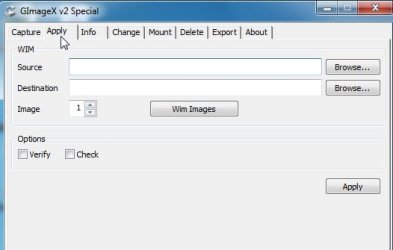
Use Gimagex >Apply Tab >SOURCE- browse to factory.wim>DESTINATION- browse to win7 partition.

Click Apply.

ggexspecial.jpg

Should only take a few minutes.

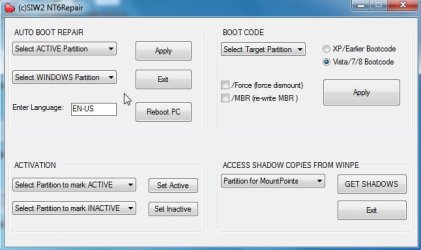
Then use NT6REPAIR Auto boot repair.

Select Active partition, Select Win7 partition, then click Apply.

nt6repair.jpg

Restart and you should be ok.
 

My Computers My Computers

System One System Two

  • Computer type
    PC/Desktop
    OS
    7 X64
    CPU
    i5 8400
    Motherboard
    gigabyte b365m ds3h
    Memory
    2x8gb 3200mhz
    Hard Drives
    various
    PSU
    pure power 11 400w cm
    Case
    Coolermaster
    Cooling
    cryorig m9i
  • Computer type
    PC/Desktop
    OS
    7x64
    CPU
    g5400
    Motherboard
    ga b365m ds3h
    Memory
    8gb ddr4 2400
    PSU
    xfx pro 450w
Probably easiest to boot some kind of recovery media.

https://skydrive.live.com/#cid=B0A22789320E3247&id=B0A22789320E3247!345

d/l REP.7z from the above link. Use 7.zip to extract it and you get REP.iso burn iso image to cd ( or put on usb stick - if you can do that )

Boot it up.

If you have any data you need to save - copy it off somewhere - to another partition or to any drive you can see from the boot media you just booted up.

Find the win7 partition and quick format it.

Use Gimagex >Apply Tab >SOURCE- browse to factory.wim>DESTINATION- browse to win7 partition.

Click Apply.

View attachment 231955

Should only take a few minutes.

Then use NT6REPAIR Auto boot repair.

Select Active partition, Select Win7 partition, then click Apply.

View attachment 231956

Restart and you should be ok.


Sooo...that first (rep.iso) i use to boot off of...then i can open gimagex and nt6repair while it's booted with rep.iso??? is it like a dos/windows that does not use the C:\ to boot???
 

My Computer My Computer

OS
Windows 7 Ultimate x64
also i looked all over....where can i find NT6REPAIR Auto Boot Repair????? google can't seem to find it...and if the *.wim i am using is a factory *.wim...should i even need to repair the boot???? just wondering?? trying to get this done asap, so a fast response would b AWESOME...Thank you so much for helping...you have no idea how much i appreciate it!!!
 

My Computer My Computer

OS
Windows 7 Ultimate x64
NT6REPAIR will be right on the desktop once you boot using the disc or flashdrive you create with the ISO.
 

My Computer My Computer

Computer type
PC/Desktop
Computer Manufacturer/Model Number
Self Built
OS
Win 10 Pro x64
CPU
Intel I5-2500K @3.3GHz
Motherboard
Asrock P67 Extreme4
Memory
16GB G.Skill Ripjaws X (4x4GB)
Graphics Card(s)
EVGA GeForce 750 Ti SC 2GB
Sound Card
ASUS Xonar DG 5.1 Channels 24-bit 96KHz PCI Interface Sound
Monitor(s) Displays
auria eq2367
Screen Resolution
1920 x 1080
Hard Drives
250GB Samsung 850 EVO SSD
1TB WD Blue
1TB Hitachi
PSU
SeaSonic X 650W 80 Plus Gold
Case
Corsair Obsidian 750D
Cooling
Corsair H60, Three 140mm case fans
Keyboard
Logitech Wireless Keyboard K520
Mouse
Logitech Wireless Mouse M310
Internet Speed
Wave Broadband ~ 100 dn 5 up
Antivirus
Windows Defender, Malwarebytes Premium
Browser
Edge, IE11, Chrome
Other Info
Laptop specs: HP g7-1365dx /
CPU: AMD A6-3420M APU with Radeon(tm) HD Graphics /
RAM: Crucial 8Gb (2x4Gb) /
SSD: Crucial M4-CT128M4SSD2 ATA Device/ FW 000F /
GFX: AMD Radeon HD 6520G /
OS: Windows 10 Pro x64
AMAZING!!!! THANK YOU!!!!

NT6REPAIR will be right on the desktop once you boot using the disc or flashdrive you create with the ISO.

Thanks so much for the quick reply...i will let you know how it goes and if for some reason i run into troubles....What i am trying to do is get my Dell XPS 1530 Service-Tag:6P3TGG1 back to the original factory condition (with all the software and etc..that originally came with the laptop....Now a question i do have....(no rush on this at all...seeing that i will be trying to use the REP disc method) is that currently i have Windows Vista HP 64-Bit on it....From the store it came with 32-bit...Will windows still activate even tho it's not the correct *version*...also i just about got every driver working with the 64-bit edition(it wasn't very easy) and i got Norton/Nero/Chrome/all the Windows Updates all already on this partition...Do you think i would just be better of leaving it as a 64-bit system or do you think i should get it back to the factory re-install(i have been trying to do this for over a week....I've had Windows 8 N, Windows 7 Ultimate, & now Windows Vista HP 64-bit...and i could not get the RECOVERY D:\ drive to get me back to my factory install....I HOPE your way will work....). The only reason I am trying to get it back to normal is b/c my friend put a "hacked" version of Windows 7 Ultimate on it...and I am trying to sell the laptop....So i do not want to sell the laptop w/ a NOT Genuine Windows Installation....That is why I am going through all this trouble....If you think it would be fine just leaving the 64-bit the way it is...let me know...if you think i should try your method and get the factory original back....give me your opinion on what you would do if it was you...also maybe the pros and cons of each...My MAIN concern is that windows will not activate with the 64-bit b/c the key on the bottom of the laptop doesn't say nothing about 32 or 64 bit...it only says "Windows Vista Home Premium OEMAct" Just figured i would ask the opinions of (in my opinion) some REALLY smart people that probably have done this before in their sleep....lol Well Thanks ALOT for reading all of this....I will appreciate ANY opinions/answers/etc.... Thank you so much everyone for accepting me into this great forum and i look forward to helping people when i have the knowledge that will give me that opportunity!!! Thanks again... -Richard Allen
 

My Computer My Computer

OS
Windows 7 Ultimate x64
gimagex....desktop??

NT6REPAIR will be right on the desktop once you boot using the disc or flash drive you create with the ISO.

Is Gimagex going to be on the desktop too???? and it's not going to be my normal desktop correct?? it'll be that boot discs own desktop which will allow me to do what i have to to my partitions/drives without them being in use...correct??? Am i understanding this right??? Thanks again for helping me out!!! I am very greatful. -Richard Allen:)
 
Last edited:

My Computer My Computer

OS
Windows 7 Ultimate x64
Burn REP.iso to cd.

Boot the cd on the sick machine.

You will get what looks like a desktop.

There is a startmenu.

In the startmenu is gimagex.

Nt6repair is on the desktop.

it'll be that boot discs own desktop which will allow me to do what i have to to my partitions/drives without them being in use...correct??

Yes.

and if the *.wim i am using is a factory *.wim...should i even need to repair the boot????

Hopefully not - it is a precautionary measure - it won't do any harm.
 

My Computers My Computers

System One System Two

  • Computer type
    PC/Desktop
    OS
    7 X64
    CPU
    i5 8400
    Motherboard
    gigabyte b365m ds3h
    Memory
    2x8gb 3200mhz
    Hard Drives
    various
    PSU
    pure power 11 400w cm
    Case
    Coolermaster
    Cooling
    cryorig m9i
  • Computer type
    PC/Desktop
    OS
    7x64
    CPU
    g5400
    Motherboard
    ga b365m ds3h
    Memory
    8gb ddr4 2400
    PSU
    xfx pro 450w
Back
Top