Win 7: Black screen on boot up, before login screen (Clean Install)?

MDRI

New member
Member
VIP
Local time
11:19 AM
Messages
163
Thanks for all providing valuable suggestions in my previous thread Win 7: Black screen on boot up, before login screen?

As I am picking the clean install option for my resolution, I am opening this new thread. :)

I reviewed the tutorials (Macrium) of this community. I found Macrium Reflect Free (Version: 6.0.753 (21 July 2015)) for download.

I downloaded/installed above Macrium to working PC. This version has an option to create Macrium Reflect rescue media on CD, DVD, or USB stick upon installing on working PC. I created a rescue media USB.

I created complete HDD image of my unbootable (Z580), before doing clean win 7 install. I am going to clean install Windows 7 Home Premium (64 bit) using my OEM KEY.

I posted the OEM DISKMAP in my previous thread Post # 90

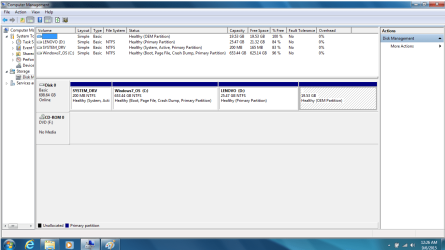
I find System (d:\) 200 MB Windows_7 (OS) ( c:\) 653.44 GB & my Lenovo_data (e:\) 25.47 GB. Lenovo says, if I change the partition configuration, it will make built-in Lenovo recovery unusable.

I like the idea of adopting infrequent system changes (adding new programs etc) and frequent data changes (growing user documents) in image backup strategy. I mean taking system partition (d:\ + c:\) image back up as and when I add new programs and taking data partition (e:\) image backup periodically.

How do I re-structure my DISKMAP to have effective periodical image backup without disrupting built-in Lenovo recovery?:geek:

Are there any Windows 7 disk partition recommendation/guidelines? :geek:


Thanks for sharing/helping.
 

My Computer My Computer

At a glance

Win 7 64 bit, 6.1.7601 Service Pack 1 Build 76011 Processor(s) Installed. [01]: Intel64 Famil...8,056 MBIntel HD 4000
Computer type
Laptop
Computer Manufacturer/Model Number
Lenovo IdeaPad Z580, x64-based PC
OS
Win 7 64 bit, 6.1.7601 Service Pack 1 Build 7601
CPU
1 Processor(s) Installed. [01]: Intel64 Family 6 Model 58 St
Memory
8,056 MB
Graphics Card(s)
Intel HD 4000
Antivirus
Windows Security Essential
Browser
FireFox, Chrome

My Computer My Computer

At a glance

Desk1 7 Home Prem / Desk2 10 Pro / Main lap A...Desk1 i5 3750K / Laptop i7 GTX 860M / Desk2 i...Desk1 8GB (1866) / Desk2 16GB (1333) / Laptop...Desk 1& 2NVidia GTX 650 & Laptops on board Intel
Computer type
PC/Desktop
Computer Manufacturer/Model Number
Own build (new) Desk1 / Asus ROG Win 7 / Desk2 1st build
OS
Desk1 7 Home Prem / Desk2 10 Pro / Main lap Asus ROG 10 Pro 2 laptop Toshiba 7 Pro Asus P2520 7 & 10
CPU
Desk1 i5 3750K / Laptop i7 GTX 860M / Desk2 i5 2500
Motherboard
Desk1 Asus P877-V / Desk2 Gigabyte H67 UD3H / Laptop ?
Memory
Desk1 8GB (1866) / Desk2 16GB (1333) / Laptop 8Gb DDR3
Graphics Card(s)
Desk 1& 2NVidia GTX 650 & Laptops on board Intel
Sound Card
Desk 1 & 2 -XONAR DG Realtek High Def audio Laptop
Monitor(s) Displays
Desk 1 Benq HD 2450 / Desk2 Philips 24" / Laptop 17.5"
Screen Resolution
1920x1080 D1 & D2 & Laptop 1
Hard Drives
Desk1 Samsung 120GB 830 SSD
Asus ROG 256GB 850 Pro SSD
Desk2 Samsung 840 256 SSD
Toshiba 120GB EVO
PSU
Desk 1 Corsair HX 1050/ Laptop ? / Desk 2 Corsair HX 650
Case
Desk 1 Cooler HAF XM ? Toshiba laptop / Desk2 Coolermaster
Cooling
Fans on all Desk1 -2 Desk2 - all Coolermasters 5 Laptop ?
Keyboard
Desk 1 MS Sidewinder X6 Desk 2 MS Sidewinder X 4
Mouse
Desk 1&2 - Gigabyte MS 900 gamer - laptop - Logitec wireless
Internet Speed
ADSL2+
Other Info
One other Desktop (tester) and spare Toshba laptop both with SSD's
Running Kaspersky 2016 ISS on all machines config'd identically
Logitec audio stereo systems on each machine (x3)
Canon MG5250MFC
Router/modem TP-Link running WPA2SK
Why do you even care about Lenovo recovery which didn't help when needed.

Instead create 2 partitions: 100GB for System and the rest for Data. OS and Programs go to System, whereas all user data (Movies, pictures, music, documents, etc.) go to Data. Macrium can't image backup files/folders with free version and can't save the image to the same partition it is imaging. This way you can image backup System (C) to Data partition. And file synchronize Data partition to an external drive.

Say, your System partition is 50 GB (50% full). A full image will take approximately 30-35 GB. Daily differential images will depend on what has changed in System but 500MB to several GB. Then, schedule a full image once every week and 6 differentials in between. Keep 2-4 generations of images (4=1 month in this setup). So you would need 200GB for backups. A small amount for peace of mind.

Ask away if anything not clear.
 

My Computer My Computer

At a glance

Windows 7 Ultimate x64 SP1AMD Phenom 2 1090T2x8GB Kingston HyperX Fury Black 1600Mhz Unga...MSI GTX 970 Gaming 4G
Computer type
PC/Desktop
Computer Manufacturer/Model Number
Custom Build
OS
Windows 7 Ultimate x64 SP1
CPU
AMD Phenom 2 1090T
Motherboard
Gigabyte GA-890FXA-UD5
Memory
2x8GB Kingston HyperX Fury Black 1600Mhz Unganged
Graphics Card(s)
MSI GTX 970 Gaming 4G
Sound Card
Realtek On-Board HD 7.1 Audio / Logitech G35
Monitor(s) Displays
3xAcer GD245HQ
Screen Resolution
1920x1080
Hard Drives
Samsung 850 Pro 512GB SSD - OS /
WD Caviar Black SATA 3 - 1 TBx2 - Dynamic RAID 0 /
WD Caviar Green SATA 2 - 640GBx2 - Dynamic RAID 0 /
WD Caviar Green SATA 2 - 640GB - Internal Backup /
Seagate Barracude SATA 3 - 3TB - External Backup/ Sync
PSU
HighPower 1000W
Case
Cooler Master HAF 932
Cooling
Noctua NH-D14
Keyboard
Logitech G19
Mouse
Logitech G500
Internet Speed
100/4 Mbit Cable (100GB quota)
Antivirus
ZoneAlarm Extreme Security / MBAM Pro / MBAE Free / SAS Free
Browser
IE 11 - Firefox - Chrome
Other Info
Logitech F710/ G27/ G940/ Z5500 // TrackIR 5 // Nvidia 3D Surround Vision
Thanks for your reply. Are you suggesting to merge (System (d:\) 200 MB Windows_7 (OS) ( c:\) 653.44 GB ) and make it as 100GB System Partition and Lenovo_data (e:\) 600+ GB?

Will the install CD allow me to do that or it has to be done using DISKPART prior to install?:geek:

Does Hiren's CD help to build this DISKMAP?:geek:

If you provide the details steps, it will help me/others.

Thanks for helping.
 
Last edited:

My Computer My Computer

At a glance

Win 7 64 bit, 6.1.7601 Service Pack 1 Build 76011 Processor(s) Installed. [01]: Intel64 Famil...8,056 MBIntel HD 4000
Computer type
Laptop
Computer Manufacturer/Model Number
Lenovo IdeaPad Z580, x64-based PC
OS
Win 7 64 bit, 6.1.7601 Service Pack 1 Build 7601
CPU
1 Processor(s) Installed. [01]: Intel64 Family 6 Model 58 St
Memory
8,056 MB
Graphics Card(s)
Intel HD 4000
Antivirus
Windows Security Essential
Browser
FireFox, Chrome
What I am saying is:
- Backup all your data - http://www.sevenforums.com/tutorials/287439-emergency-kit-save-your-files-dead-os.html or http://www.sevenforums.com/tutorials/93347-copy-paste-windows-recovery-console.html
- Clean re-install - http://www.sevenforums.com/tutorials/219487-clean-reinstall-factory-oem-windows-7-a.html#post1839164
- It will give you the option to re-partition the HDD (Step 5, 2nd paragraph), C - 100 GB, D or whatever as the rest.
- Set your backup scheme as follows:
- Set Macrium free as described in previous post (maybe more detail once you get there) - http://www.sevenforums.com/tutorials/73828-imaging-free-macrium.html
- Use FreeFileSync (or any other sync program) to sync everything on D to an external HDD.
 

My Computer My Computer

At a glance

Windows 7 Ultimate x64 SP1AMD Phenom 2 1090T2x8GB Kingston HyperX Fury Black 1600Mhz Unga...MSI GTX 970 Gaming 4G
Computer type
PC/Desktop
Computer Manufacturer/Model Number
Custom Build
OS
Windows 7 Ultimate x64 SP1
CPU
AMD Phenom 2 1090T
Motherboard
Gigabyte GA-890FXA-UD5
Memory
2x8GB Kingston HyperX Fury Black 1600Mhz Unganged
Graphics Card(s)
MSI GTX 970 Gaming 4G
Sound Card
Realtek On-Board HD 7.1 Audio / Logitech G35
Monitor(s) Displays
3xAcer GD245HQ
Screen Resolution
1920x1080
Hard Drives
Samsung 850 Pro 512GB SSD - OS /
WD Caviar Black SATA 3 - 1 TBx2 - Dynamic RAID 0 /
WD Caviar Green SATA 2 - 640GBx2 - Dynamic RAID 0 /
WD Caviar Green SATA 2 - 640GB - Internal Backup /
Seagate Barracude SATA 3 - 3TB - External Backup/ Sync
PSU
HighPower 1000W
Case
Cooler Master HAF 932
Cooling
Noctua NH-D14
Keyboard
Logitech G19
Mouse
Logitech G500
Internet Speed
100/4 Mbit Cable (100GB quota)
Antivirus
ZoneAlarm Extreme Security / MBAM Pro / MBAE Free / SAS Free
Browser
IE 11 - Firefox - Chrome
Other Info
Logitech F710/ G27/ G940/ Z5500 // TrackIR 5 // Nvidia 3D Surround Vision
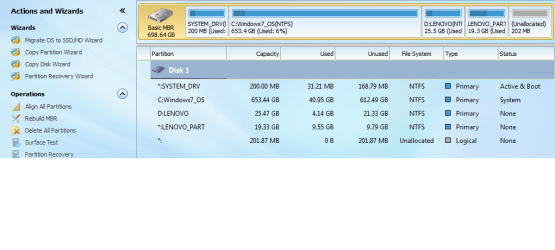
Thanks for your reply. I did save my files to USB drive. I am able to get a recovery disks from Lenovo. I used those disks do recovery on Z580. I am able get to widows 7 now. The recovery disk did not give me an opportunity to specify the partition size. Upon recovery, I find the attached DISKMAP. :(

It created 200MB System Drive, 653.44 GB Windows_OS, 25.47GB LENOVO(Data), 19.53 GB OEM.

Do I able to adjust the above spec, to adopt efficient backup strategy discussed earlier? :geek:

Am I able to adjust these sizes before restoring my backed up data? :geek:

Thanks for helping.
 

Attachments

  • LENOVODISKMAPNEW.png
    LENOVODISKMAPNEW.png
    43.2 KB · Views: 2

My Computer My Computer

At a glance

Win 7 64 bit, 6.1.7601 Service Pack 1 Build 76011 Processor(s) Installed. [01]: Intel64 Famil...8,056 MBIntel HD 4000
Computer type
Laptop
Computer Manufacturer/Model Number
Lenovo IdeaPad Z580, x64-based PC
OS
Win 7 64 bit, 6.1.7601 Service Pack 1 Build 7601
CPU
1 Processor(s) Installed. [01]: Intel64 Family 6 Model 58 St
Memory
8,056 MB
Graphics Card(s)
Intel HD 4000
Antivirus
Windows Security Essential
Browser
FireFox, Chrome
Keep the recovery disks safe :)

No need to mess with 200MB system partition. However (since you already have recovery disks in case something goes wrong), I would delete OEM and Lenovo partitions. Then shrink C with Partition Wizard to 100 GB. Make the rest another partition for data. Then you can image C as detailed earlier, whereas file sync data. Once you have an image system going, you won't need the Lenovo recovery method.
 

My Computer My Computer

At a glance

Windows 7 Ultimate x64 SP1AMD Phenom 2 1090T2x8GB Kingston HyperX Fury Black 1600Mhz Unga...MSI GTX 970 Gaming 4G
Computer type
PC/Desktop
Computer Manufacturer/Model Number
Custom Build
OS
Windows 7 Ultimate x64 SP1
CPU
AMD Phenom 2 1090T
Motherboard
Gigabyte GA-890FXA-UD5
Memory
2x8GB Kingston HyperX Fury Black 1600Mhz Unganged
Graphics Card(s)
MSI GTX 970 Gaming 4G
Sound Card
Realtek On-Board HD 7.1 Audio / Logitech G35
Monitor(s) Displays
3xAcer GD245HQ
Screen Resolution
1920x1080
Hard Drives
Samsung 850 Pro 512GB SSD - OS /
WD Caviar Black SATA 3 - 1 TBx2 - Dynamic RAID 0 /
WD Caviar Green SATA 2 - 640GBx2 - Dynamic RAID 0 /
WD Caviar Green SATA 2 - 640GB - Internal Backup /
Seagate Barracude SATA 3 - 3TB - External Backup/ Sync
PSU
HighPower 1000W
Case
Cooler Master HAF 932
Cooling
Noctua NH-D14
Keyboard
Logitech G19
Mouse
Logitech G500
Internet Speed
100/4 Mbit Cable (100GB quota)
Antivirus
ZoneAlarm Extreme Security / MBAM Pro / MBAE Free / SAS Free
Browser
IE 11 - Firefox - Chrome
Other Info
Logitech F710/ G27/ G940/ Z5500 // TrackIR 5 // Nvidia 3D Surround Vision
Thanks for your suggestion.
Keep the recovery disks safe :)

Then shrink C with Partition Wizard to 100 GB. Make the rest another partition for data. Then you can image C as detailed earlier, whereas file sync data. Once you have an image system going, you won't need the Lenovo recovery method.

How do I do the above? I do not want to mess up with disk configuration. :geek:

Do you mind sharing the steps in detail? Are there any tutorial to help in this process? :geek:

Will I face any surprises in this process? :rolleyes:

Thanks for helping.
 

My Computer My Computer

At a glance

Win 7 64 bit, 6.1.7601 Service Pack 1 Build 76011 Processor(s) Installed. [01]: Intel64 Famil...8,056 MBIntel HD 4000
Computer type
Laptop
Computer Manufacturer/Model Number
Lenovo IdeaPad Z580, x64-based PC
OS
Win 7 64 bit, 6.1.7601 Service Pack 1 Build 7601
CPU
1 Processor(s) Installed. [01]: Intel64 Family 6 Model 58 St
Memory
8,056 MB
Graphics Card(s)
Intel HD 4000
Antivirus
Windows Security Essential
Browser
FireFox, Chrome
Of course, it is pretty simple:
- install and run Partition Wizard free (PW)
- delete the OEM and Lenovo partitions
- restart to see if it boots alright
- resize C with PW (drag drop the right side of partition (best is to check PW site, they have tutorials for everything))
- create a new primary NTFS partition on the unallocated space
 

My Computer My Computer

At a glance

Windows 7 Ultimate x64 SP1AMD Phenom 2 1090T2x8GB Kingston HyperX Fury Black 1600Mhz Unga...MSI GTX 970 Gaming 4G
Computer type
PC/Desktop
Computer Manufacturer/Model Number
Custom Build
OS
Windows 7 Ultimate x64 SP1
CPU
AMD Phenom 2 1090T
Motherboard
Gigabyte GA-890FXA-UD5
Memory
2x8GB Kingston HyperX Fury Black 1600Mhz Unganged
Graphics Card(s)
MSI GTX 970 Gaming 4G
Sound Card
Realtek On-Board HD 7.1 Audio / Logitech G35
Monitor(s) Displays
3xAcer GD245HQ
Screen Resolution
1920x1080
Hard Drives
Samsung 850 Pro 512GB SSD - OS /
WD Caviar Black SATA 3 - 1 TBx2 - Dynamic RAID 0 /
WD Caviar Green SATA 2 - 640GBx2 - Dynamic RAID 0 /
WD Caviar Green SATA 2 - 640GB - Internal Backup /
Seagate Barracude SATA 3 - 3TB - External Backup/ Sync
PSU
HighPower 1000W
Case
Cooler Master HAF 932
Cooling
Noctua NH-D14
Keyboard
Logitech G19
Mouse
Logitech G500
Internet Speed
100/4 Mbit Cable (100GB quota)
Antivirus
ZoneAlarm Extreme Security / MBAM Pro / MBAE Free / SAS Free
Browser
IE 11 - Firefox - Chrome
Other Info
Logitech F710/ G27/ G940/ Z5500 // TrackIR 5 // Nvidia 3D Surround Vision
Thanks for your guidance.

Of course, it is pretty simple:
- delete the OEM and Lenovo partitions
- restart to see if it boots alright
- resize C with PW (drag drop the right side of partition (best is to check PW site, they have tutorials for everything))
- create a new primary NTFS partition on the unallocated space

In my previous thread someone said that PW Free does not allow resize etc. Am I able to do resize in FREE PW?

What to do, if it will not boot, after deleting the OEM and Lenovo partitions?

Thanks again.
 

My Computer My Computer

At a glance

Win 7 64 bit, 6.1.7601 Service Pack 1 Build 76011 Processor(s) Installed. [01]: Intel64 Famil...8,056 MBIntel HD 4000
Computer type
Laptop
Computer Manufacturer/Model Number
Lenovo IdeaPad Z580, x64-based PC
OS
Win 7 64 bit, 6.1.7601 Service Pack 1 Build 7601
CPU
1 Processor(s) Installed. [01]: Intel64 Family 6 Model 58 St
Memory
8,056 MB
Graphics Card(s)
Intel HD 4000
Antivirus
Windows Security Essential
Browser
FireFox, Chrome
MiniTool Partition Wizard Software Feature List

Resize for dynamic disks is a paid feature.

I was under the impression you used the Recovery Disks sent by Lenovo since the recovery from your HDD didn't work. You can do the same if face any issues. Of course you can also clone the HDD to a same or larger drive.

Disk Management screenshots show nothing relevant to booting on those 2 partitions so OS wise there shouldn't be any issues.
 

My Computer My Computer

At a glance

Windows 7 Ultimate x64 SP1AMD Phenom 2 1090T2x8GB Kingston HyperX Fury Black 1600Mhz Unga...MSI GTX 970 Gaming 4G
Computer type
PC/Desktop
Computer Manufacturer/Model Number
Custom Build
OS
Windows 7 Ultimate x64 SP1
CPU
AMD Phenom 2 1090T
Motherboard
Gigabyte GA-890FXA-UD5
Memory
2x8GB Kingston HyperX Fury Black 1600Mhz Unganged
Graphics Card(s)
MSI GTX 970 Gaming 4G
Sound Card
Realtek On-Board HD 7.1 Audio / Logitech G35
Monitor(s) Displays
3xAcer GD245HQ
Screen Resolution
1920x1080
Hard Drives
Samsung 850 Pro 512GB SSD - OS /
WD Caviar Black SATA 3 - 1 TBx2 - Dynamic RAID 0 /
WD Caviar Green SATA 2 - 640GBx2 - Dynamic RAID 0 /
WD Caviar Green SATA 2 - 640GB - Internal Backup /
Seagate Barracude SATA 3 - 3TB - External Backup/ Sync
PSU
HighPower 1000W
Case
Cooler Master HAF 932
Cooling
Noctua NH-D14
Keyboard
Logitech G19
Mouse
Logitech G500
Internet Speed
100/4 Mbit Cable (100GB quota)
Antivirus
ZoneAlarm Extreme Security / MBAM Pro / MBAE Free / SAS Free
Browser
IE 11 - Firefox - Chrome
Other Info
Logitech F710/ G27/ G940/ Z5500 // TrackIR 5 // Nvidia 3D Surround Vision
Thanks. I downloaded the PW Free edition. I run the PW within windows (instead of boot media). I find 201.87 MB shows as unallocated space in PW Diskmap. It was not showing in windows diskmap posted earlier. I had the same issue in my original thread.

It looks like Windows Diskmap & PW diskmap are not in sync.

Why is showing differently in PW Diskmap?


Thanks for helping.
 

Attachments

  • PWLENOVOMAP.png
    PWLENOVOMAP.png
    64.1 KB · Views: 0

My Computer My Computer

At a glance

Win 7 64 bit, 6.1.7601 Service Pack 1 Build 76011 Processor(s) Installed. [01]: Intel64 Famil...8,056 MBIntel HD 4000
Computer type
Laptop
Computer Manufacturer/Model Number
Lenovo IdeaPad Z580, x64-based PC
OS
Win 7 64 bit, 6.1.7601 Service Pack 1 Build 7601
CPU
1 Processor(s) Installed. [01]: Intel64 Family 6 Model 58 St
Memory
8,056 MB
Graphics Card(s)
Intel HD 4000
Antivirus
Windows Security Essential
Browser
FireFox, Chrome
Perhaps that was not the issue then, anyway..

When you delete D and Lenovo_Part, you will have one larger unallocated space.Then resize C etc as laid out before.
 

My Computer My Computer

At a glance

Windows 7 Ultimate x64 SP1AMD Phenom 2 1090T2x8GB Kingston HyperX Fury Black 1600Mhz Unga...MSI GTX 970 Gaming 4G
Computer type
PC/Desktop
Computer Manufacturer/Model Number
Custom Build
OS
Windows 7 Ultimate x64 SP1
CPU
AMD Phenom 2 1090T
Motherboard
Gigabyte GA-890FXA-UD5
Memory
2x8GB Kingston HyperX Fury Black 1600Mhz Unganged
Graphics Card(s)
MSI GTX 970 Gaming 4G
Sound Card
Realtek On-Board HD 7.1 Audio / Logitech G35
Monitor(s) Displays
3xAcer GD245HQ
Screen Resolution
1920x1080
Hard Drives
Samsung 850 Pro 512GB SSD - OS /
WD Caviar Black SATA 3 - 1 TBx2 - Dynamic RAID 0 /
WD Caviar Green SATA 2 - 640GBx2 - Dynamic RAID 0 /
WD Caviar Green SATA 2 - 640GB - Internal Backup /
Seagate Barracude SATA 3 - 3TB - External Backup/ Sync
PSU
HighPower 1000W
Case
Cooler Master HAF 932
Cooling
Noctua NH-D14
Keyboard
Logitech G19
Mouse
Logitech G500
Internet Speed
100/4 Mbit Cable (100GB quota)
Antivirus
ZoneAlarm Extreme Security / MBAM Pro / MBAE Free / SAS Free
Browser
IE 11 - Firefox - Chrome
Other Info
Logitech F710/ G27/ G940/ Z5500 // TrackIR 5 // Nvidia 3D Surround Vision
Thanks for your reply. I did notice that d:\ drive contains the driver files & application files. I am not sure, whether any references from registry/windows application to these items.

Is there a way to adjust the partition without deleting D:\ drive?

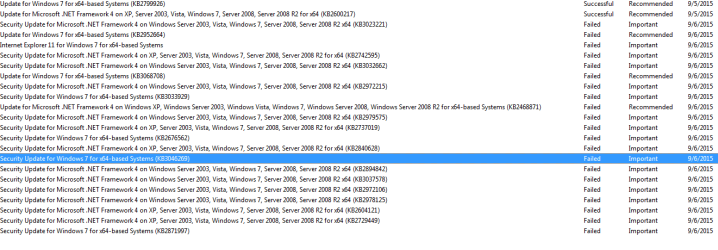
I find around 204 windows 7 updates failed. Here are some.

Update for Windows 7 for x64-based Systems (KB2952664)

Update for Windows 7 for x64-based Systems (KB3068708)

Security Update for Windows 7 for x64-based Systems (KB3033929)

Security Update for Windows 7 for x64-based Systems (KB2676562)

Security Update for Windows 7 for x64-based Systems (KB3046269)

..... list goes on

I used the (To run a Windows Update troubleshooter) FIXED IT link from MSFT. It did not work. Why did it fail?

How do I fix this issue?


Thanks for sharing.
 

My Computer My Computer

At a glance

Win 7 64 bit, 6.1.7601 Service Pack 1 Build 76011 Processor(s) Installed. [01]: Intel64 Famil...8,056 MBIntel HD 4000
Computer type
Laptop
Computer Manufacturer/Model Number
Lenovo IdeaPad Z580, x64-based PC
OS
Win 7 64 bit, 6.1.7601 Service Pack 1 Build 7601
CPU
1 Processor(s) Installed. [01]: Intel64 Family 6 Model 58 St
Memory
8,056 MB
Graphics Card(s)
Intel HD 4000
Antivirus
Windows Security Essential
Browser
FireFox, Chrome
You can try removing the drive letter from D (with Disk Management) and running your Lenovo installed programs to see if they open or not. I would guess you don't need D to run them, but never know with these OEM installs. The drivers, you can copy them to another place and point to them if you ever need. And they shouldn't be taking too much space.

Try installing few updates first. Do they install?
 

My Computer My Computer

At a glance

Windows 7 Ultimate x64 SP1AMD Phenom 2 1090T2x8GB Kingston HyperX Fury Black 1600Mhz Unga...MSI GTX 970 Gaming 4G
Computer type
PC/Desktop
Computer Manufacturer/Model Number
Custom Build
OS
Windows 7 Ultimate x64 SP1
CPU
AMD Phenom 2 1090T
Motherboard
Gigabyte GA-890FXA-UD5
Memory
2x8GB Kingston HyperX Fury Black 1600Mhz Unganged
Graphics Card(s)
MSI GTX 970 Gaming 4G
Sound Card
Realtek On-Board HD 7.1 Audio / Logitech G35
Monitor(s) Displays
3xAcer GD245HQ
Screen Resolution
1920x1080
Hard Drives
Samsung 850 Pro 512GB SSD - OS /
WD Caviar Black SATA 3 - 1 TBx2 - Dynamic RAID 0 /
WD Caviar Green SATA 2 - 640GBx2 - Dynamic RAID 0 /
WD Caviar Green SATA 2 - 640GB - Internal Backup /
Seagate Barracude SATA 3 - 3TB - External Backup/ Sync
PSU
HighPower 1000W
Case
Cooler Master HAF 932
Cooling
Noctua NH-D14
Keyboard
Logitech G19
Mouse
Logitech G500
Internet Speed
100/4 Mbit Cable (100GB quota)
Antivirus
ZoneAlarm Extreme Security / MBAM Pro / MBAE Free / SAS Free
Browser
IE 11 - Firefox - Chrome
Other Info
Logitech F710/ G27/ G940/ Z5500 // TrackIR 5 // Nvidia 3D Surround Vision
Thanks again.

Do you know any reason for OEM to keep large C:\ and small D:\? I am not sure, whether they have some hidden paging/Virtual Memory configuration for it, so it can expand dynamically.

There are some successful. I find many failures. This is my concern. How do I install few updates first?

It did installed updates automatically, but I find some were failed. Screen shot attached. Why are they failing?

Thanks for sharing.
 

Attachments

  • winupdate.png
    winupdate.png
    18.7 KB · Views: 0

My Computer My Computer

At a glance

Win 7 64 bit, 6.1.7601 Service Pack 1 Build 76011 Processor(s) Installed. [01]: Intel64 Famil...8,056 MBIntel HD 4000
Computer type
Laptop
Computer Manufacturer/Model Number
Lenovo IdeaPad Z580, x64-based PC
OS
Win 7 64 bit, 6.1.7601 Service Pack 1 Build 7601
CPU
1 Processor(s) Installed. [01]: Intel64 Family 6 Model 58 St
Memory
8,056 MB
Graphics Card(s)
Intel HD 4000
Antivirus
Windows Security Essential
Browser
FireFox, Chrome

My Computer My Computer

At a glance

Windows 7 Ultimate x64 SP1AMD Phenom 2 1090T2x8GB Kingston HyperX Fury Black 1600Mhz Unga...MSI GTX 970 Gaming 4G
Computer type
PC/Desktop
Computer Manufacturer/Model Number
Custom Build
OS
Windows 7 Ultimate x64 SP1
CPU
AMD Phenom 2 1090T
Motherboard
Gigabyte GA-890FXA-UD5
Memory
2x8GB Kingston HyperX Fury Black 1600Mhz Unganged
Graphics Card(s)
MSI GTX 970 Gaming 4G
Sound Card
Realtek On-Board HD 7.1 Audio / Logitech G35
Monitor(s) Displays
3xAcer GD245HQ
Screen Resolution
1920x1080
Hard Drives
Samsung 850 Pro 512GB SSD - OS /
WD Caviar Black SATA 3 - 1 TBx2 - Dynamic RAID 0 /
WD Caviar Green SATA 2 - 640GBx2 - Dynamic RAID 0 /
WD Caviar Green SATA 2 - 640GB - Internal Backup /
Seagate Barracude SATA 3 - 3TB - External Backup/ Sync
PSU
HighPower 1000W
Case
Cooler Master HAF 932
Cooling
Noctua NH-D14
Keyboard
Logitech G19
Mouse
Logitech G500
Internet Speed
100/4 Mbit Cable (100GB quota)
Antivirus
ZoneAlarm Extreme Security / MBAM Pro / MBAE Free / SAS Free
Browser
IE 11 - Firefox - Chrome
Other Info
Logitech F710/ G27/ G940/ Z5500 // TrackIR 5 // Nvidia 3D Surround Vision
Thanks for your suggestions. Here is the results.

Option 1 - Step 3 Windows Update - Hide or Restore Hidden Updates. Un-tick the box left of "Name" column. Then tick a few ones, click OK, and install.
I am not able to get Copy Details/Hide Update options for Failed updates.

Option 2 ==> Restore update ==> Did not bring anything.

7. If this still does not help, then run the Microsoft Fix it tool here:

How do I reset Windows Update components? ===> Fixed some.

I still find around 231 failed updates. I am not able to restore/reapply them. What to do?

Thanks for sharing.

I posted How do I reapply the failed updates upon Win 7 clean Install?
 

My Computer My Computer

At a glance

Win 7 64 bit, 6.1.7601 Service Pack 1 Build 76011 Processor(s) Installed. [01]: Intel64 Famil...8,056 MBIntel HD 4000
Computer type
Laptop
Computer Manufacturer/Model Number
Lenovo IdeaPad Z580, x64-based PC
OS
Win 7 64 bit, 6.1.7601 Service Pack 1 Build 7601
CPU
1 Processor(s) Installed. [01]: Intel64 Family 6 Model 58 St
Memory
8,056 MB
Graphics Card(s)
Intel HD 4000
Antivirus
Windows Security Essential
Browser
FireFox, Chrome
You are not supposed to hide them or copy details. I linked to it to let you know where to go to select the updates. When you are at that page just untick all and then tick a few only.
 

My Computer My Computer

At a glance

Windows 7 Ultimate x64 SP1AMD Phenom 2 1090T2x8GB Kingston HyperX Fury Black 1600Mhz Unga...MSI GTX 970 Gaming 4G
Computer type
PC/Desktop
Computer Manufacturer/Model Number
Custom Build
OS
Windows 7 Ultimate x64 SP1
CPU
AMD Phenom 2 1090T
Motherboard
Gigabyte GA-890FXA-UD5
Memory
2x8GB Kingston HyperX Fury Black 1600Mhz Unganged
Graphics Card(s)
MSI GTX 970 Gaming 4G
Sound Card
Realtek On-Board HD 7.1 Audio / Logitech G35
Monitor(s) Displays
3xAcer GD245HQ
Screen Resolution
1920x1080
Hard Drives
Samsung 850 Pro 512GB SSD - OS /
WD Caviar Black SATA 3 - 1 TBx2 - Dynamic RAID 0 /
WD Caviar Green SATA 2 - 640GBx2 - Dynamic RAID 0 /
WD Caviar Green SATA 2 - 640GB - Internal Backup /
Seagate Barracude SATA 3 - 3TB - External Backup/ Sync
PSU
HighPower 1000W
Case
Cooler Master HAF 932
Cooling
Noctua NH-D14
Keyboard
Logitech G19
Mouse
Logitech G500
Internet Speed
100/4 Mbit Cable (100GB quota)
Antivirus
ZoneAlarm Extreme Security / MBAM Pro / MBAE Free / SAS Free
Browser
IE 11 - Firefox - Chrome
Other Info
Logitech F710/ G27/ G940/ Z5500 // TrackIR 5 // Nvidia 3D Surround Vision
Thanks again. My check for updates is empty. I was reviewing my update history tab, that shows lot of failed updates. I am not able to do untick all and then tick a few only in this tab.
 

My Computer My Computer

At a glance

Win 7 64 bit, 6.1.7601 Service Pack 1 Build 76011 Processor(s) Installed. [01]: Intel64 Famil...8,056 MBIntel HD 4000
Computer type
Laptop
Computer Manufacturer/Model Number
Lenovo IdeaPad Z580, x64-based PC
OS
Win 7 64 bit, 6.1.7601 Service Pack 1 Build 7601
CPU
1 Processor(s) Installed. [01]: Intel64 Family 6 Model 58 St
Memory
8,056 MB
Graphics Card(s)
Intel HD 4000
Antivirus
Windows Security Essential
Browser
FireFox, Chrome
Back
Top