win 7 uses 1 gig of memory?

Kehool

New member
Local time
7:37 PM
Messages
26
so my freshly installed win 7 OS takes up almost 1GB of my physical memory.. is this normal? if so i hope it changes..
when i open the task manager i can't see any processes taking up that much space either
 

My Computer My Computer

At a glance

windows XP
OS
windows XP
Kehool
Welcome to SF
You running 32 bit win 7 on a laptop? Does it have seperate vram or is it shared? could you use task manager and snipping tool to get us a pic of whats using how much mem?
task manager ctrl, shift, escape. highlight process tab. snipping tool start>all programs>accesories>snipping tool.
If you need help feel free to PM me.
Ken
 

My Computer My Computer

At a glance

Win 8 Release candidate 8400[email protected]4 gigsNvidia 9600M
Computer Manufacturer/Model Number
HP Pavillion dv-7 1005 Tx
OS
Win 8 Release candidate 8400
CPU
[email protected]
Memory
4 gigs
Graphics Card(s)
Nvidia 9600M
Sound Card
HD built-in
Monitor(s) Displays
17" Wxga
Screen Resolution
1440x900
Cooling
none
Internet Speed
45Mb down 5Mb up
Windows 7, like it's predecessor Vista, is disigned to actually allocate more memory than is actually in use. This is to allow for greater performance when running applications. I read it somewhere on this forum, just can't quite remember where :p
 

My Computer My Computer

At a glance

Windows 7 Ultimate x64AMD Sempron Dual Core3GBNVIDIA GeForce 6150SE nForce 430
Computer Manufacturer/Model Number
Compaq Desktop
OS
Windows 7 Ultimate x64
CPU
AMD Sempron Dual Core
Memory
3GB
Graphics Card(s)
NVIDIA GeForce 6150SE nForce 430
Screen Resolution
1024x768
Hard Drives
150GB Sata
Capture.png


well i guess i have my answer already but almost 1 gig seems like an awful lot :/

no one else i've asked running win 7 seems to be using that much memory

and it's a 64 bit running on a desktop
 

My Computer My Computer

At a glance

windows XP
OS
windows XP
1 gig ram use???

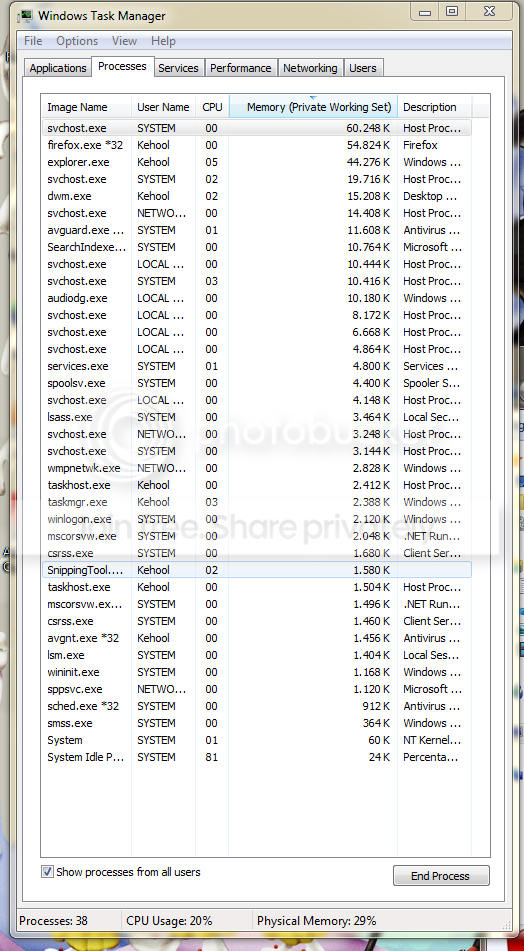
according to the tskmgr clip you sent the active apps are way under 1 gig and only 29% of memory is being used. where are you getting the 1 gig from? how much total ram is installed?
 

My Computer My Computer

At a glance

Win 8 Release candidate 8400[email protected]4 gigsNvidia 9600M
Computer Manufacturer/Model Number
HP Pavillion dv-7 1005 Tx
OS
Win 8 Release candidate 8400
CPU
[email protected]
Memory
4 gigs
Graphics Card(s)
Nvidia 9600M
Sound Card
HD built-in
Monitor(s) Displays
17" Wxga
Screen Resolution
1440x900
Cooling
none
Internet Speed
45Mb down 5Mb up
64-bit takes more RAM than 32-bit because it has actually more to run. BUT! Don't worry. If you run an apps that needs (for example) 2.25GB of RAM on your 4GB, Windows Seven (Ex: 1GB is used for Win7), will reduce its RAM usage so the software can run correctly without any hipcups. So, Win7 will drop maybe to 512MB of used RAM while the software will take from 2.25GB to 3GB of RAM.

I hope you get it.
 

My Computer My Computer

At a glance

Windows 10 Professional 64-bitRyzen 9 5900XG.Skill 3600Mhz CL16 16GB × 4EVGA GeForce RTX 3070 Ti FTW3 Ultra Gaming
Computer type
PC/Desktop
Computer Manufacturer/Model Number
Custom build
OS
Windows 10 Professional 64-bit
CPU
Ryzen 9 5900X
Motherboard
Gigabyte X570 Aorus Master
Memory
G.Skill 3600Mhz CL16 16GB × 4
Graphics Card(s)
EVGA GeForce RTX 3070 Ti FTW3 Ultra Gaming
Sound Card
On-board
Monitor(s) Displays
Dell Alienware AW3418DW
Screen Resolution
3440x1440
Hard Drives
1×Sabrent Rocket 4 Plus 2TB nvme SSD (System, internal)
2x4TB Western Digital Blue (Internal)
1x4TB HDST 7200RPM (Internal)
PSU
Seasonic Focus Plus 850W Platinum
Case
Corsair 680X
Cooling
Stock fans + 3× Corsair QL120, Corsair H100i Platinum
Keyboard
Logitech K350
Mouse
Logitech M510
Internet Speed
120Mbits dl - 20Mbits up
Antivirus
ESET NOD32 Antivirus
Browser
Firefox (latest version)
Other Info
Headphones : Audio-Technica ATH-M50x
Scanner : Canon Canoscan LiDE 220 + Plustek OptiBook 4800
64-bit takes more RAM than 32-bit because it has actually more to run................I hope you get it.

Why.

Chapter and Verse please
It's an OS -- why should it have MORE to run. What extra processes is it doing or needs to do.


Actually in theory it should run LESS processes -- since the 64 bit mode can run addresses in a "Linear address mode" you don't need a whole slew in the OS to perform Dynamic Address translation etc.

(Note I'm talking here of running a 32 BIT OS on a 64 bit CPU not a 32 bit OS on a 32 bit CPU which is a different ballgame completely).

Not trying to be nasty here but I DO know something about internal OS design so I'd really like to see some basis for your conclusions.

Cheers
jimbo
 

My Computer My Computer

At a glance

Linux CENTOS 7 / various Windows OS'es and se...Intel i7 Intel i58GB, 16GBOn Motherboard
Computer type
PC/Desktop
Computer Manufacturer/Model Number
Custom built, several laptops HP/ASUS
OS
Linux CENTOS 7 / various Windows OS'es and servers
CPU
Intel i7 Intel i5
Memory
8GB, 16GB
Graphics Card(s)
On Motherboard
Sound Card
Realtek HD audio
Monitor(s) Displays
Apple Cinema display, Samsung LCD
Screen Resolution
1920 X 1080
Hard Drives
4 X 1TB SATA
Mouse
Toshiba wireless laser
Internet Speed
> 20MB up
Abt the higher RAM usage

I believe that a 64-bit OS (Especially MS's ones) have WOW64(32-bit emulator) so 32-bit programs work fine w/o a code re-write to 64-bit. THIS is 1 of the reasons why 7 uses 1 GB RAM by itself when idle. On my 32 bit system with only 1 GB RAM after boot up it uses 50-60% RAM (500-600 MB used) then it will drop to 45%(450 MB used) then slow till 35% (350 MB used). If you want to see how little RAM 7 can live with, run a RAM intensive that will use TONS of RAM. then quit it, if the program is intensive enough 7 will use around 400-600 MB RAM only... BTW, if u really want 7 to use less RAM, remove your RAM slots (it will drop,trust me...) OR run XP. BUT your comparing with XP (i know.. hehe) coz XP doesnt eat much RAM, but VISTA loves to eat MORE RAM than 7.... You should test Vista b4 comparing...

BUT ALSO FACE THIS FACT: 64 bit eats MORE RAM than 32 bit.... I MAY BE WRONG, but I haven't run A 64-bit OS on my personal computer coz my CPU is only 32-bit compatible:cry:
 

My Computer My Computer

At a glance

Windows 7 32-bit; no 64 coz its a P4 478Pentium 4 3.00 GHZ HT Socket 478 :(1 GB Kingston DDR-400HIS X1650 PRO AGP :(
Computer Manufacturer/Model Number
Custom
OS
Windows 7 32-bit; no 64 coz its a P4 478
CPU
Pentium 4 3.00 GHZ HT Socket 478 :(
Motherboard
MSI PM8M-V
Memory
1 GB Kingston DDR-400
Graphics Card(s)
HIS X1650 PRO AGP :(
Sound Card
Intergrated Realtek AC'97
Monitor(s) Displays
17" CRT :(
Screen Resolution
Native: 1027*768 MAX: 1280*1024 :(
Hard Drives
80 GB Maxtor
500 GB Seagate (7200.11)(T.T its now RMA)
well i don't really know anything about 32 bit emulation however after running crysis with disabled page file and running out of memory (had to remove one module for that to happen tho) i can say that it doesn't free up any space :/
i guess i'll have to grin and bear it as usual with windows :P

thanks for the replies everyone
 

My Computer My Computer

At a glance

windows XP
OS
windows XP
Honestly, I'll never understand the preoccupation people have with RAM usage. That's what it's for and for as long as I can remember I've looked for ways to FORCE Windows and my applications to use more RAM. Anything to prevent the constant paging to/from disk, load it all into RAM. With the prices of RAM dropping so quickly, it's nor so much an issue now. The system I built it 2004 had 4GB or RAM and people said I was nuts, little did they know that by disabling the pagefile, I could push it hard and load anything I wanted and as much as I wanted.

32bit architecture is well over 20 years old and the efficiency of Windows has come a long way. If it uses more RAM, consider that a blessing, at least it's not thrashing on your drive.
 

My Computer My Computer

At a glance

Windows 7 Home Premium x64Intel QX9650 Extreme 4.0 GHz8GB (4x2) Corsair Dominator DDR32x Radeon R390X [8GB]
Computer type
PC/Desktop
Computer Manufacturer/Model Number
Custom Build/Mod
OS
Windows 7 Home Premium x64
CPU
Intel QX9650 Extreme 4.0 GHz
Motherboard
ASUS Rampage Extreme Rev2
Memory
8GB (4x2) Corsair Dominator DDR3
Graphics Card(s)
2x Radeon R390X [8GB]
Sound Card
SupremeFX X-Fi
Monitor(s) Displays
Dell 2408WFP 26" Panel
Screen Resolution
1920x1200
Hard Drives
4x WD 2TB (8TB+ Total)
2x Crucial SSD 128GB (RAID-0)
1x LG Blu-ray read/write
1x Phillips LightScribe DVD read/write
PSU
Corsair HX1000
Case
CoolerMaster - Cosmos S
Cooling
Custom Liquid - 320mm rad w/ 3x 80mm fans, CPU/NB/SB Blocks
Keyboard
Logitech Illuminater Pro
Mouse
Logitech
Internet Speed
Fractional T1 - 125Mbps
Antivirus
ESET Security Suite / Microsoft Security Essentials
Browser
Cyberfox Intel x64
Other Info
OC'd to 5.0GHz @ 44c under full load
it is like driving a car, you will start panicking when you notice (more like perception) the car is using more fuel when it gets below 1/2 or 1/4 tank. Often we forget our cars come with a reserve tank, giving us a grace period before our vehicle chokes on air and die on us.

People regard RAM usage like fuel in a car's tank.
 

My Computer My Computer

At a glance

Windows 7 build 7201Core 2 Quad Q6600DDR2 800Mhz 8GBnVidia 8600 GT
Computer Manufacturer/Model Number
I build this
OS
Windows 7 build 7201
CPU
Core 2 Quad Q6600
Motherboard
DFI LANPARTY DK P35-T2RS
Memory
DDR2 800Mhz 8GB
Graphics Card(s)
nVidia 8600 GT
Sound Card
inbuilt Realtek HD Audio
Monitor(s) Displays
Acer P223w
Screen Resolution
1680 x 1050
Hard Drives
2x Hitachi HDP725025GLA380 ATA 250GB
1x Maxtor Basic Desktop 500GB
PSU
ION 2
Case
CQ
Cooling
Standard
Keyboard
MS Comfort Curve Keyboard 2000
Mouse
MS Comfort Optical Mouse 3000
Internet Speed
768Kb/8000Kb
Other Info
5.1 CREATIVE Speakers
Brother MFC885CW
OP - The reason for the 'extra' memory usage is 7 has a toned down version of Vista's "Superfetch" routine. It loads programs it feels you may use into RAM for fast launching - and yes, over time it does learn what you do and don't use and when. Memory used in this manner is treated as available for an active process and surrendered on demand.

If you like, you can download and install Process Explorer and retrieve more detailed information as to what exactly is being used: Process Explorer


As remarked above - I am also of the opinion that system resources which aren't being utilized are essentially wasted. Used or not, it still has to be powered, after all. May as well do something with it.


***

{edit} Adding a link to an explanation of (Vista's) Superfetch. My current understanding of 7's implementation is that it's much less aggressive on start up - Preferring to work quietly in the background and using the HDD less. Ask the Performance Team : Windows Vista - SuperFetch & ReadyBoost
 
Last edited:

My Computer My Computer

At a glance

Windows 7 (x64)Intel Core i7 960 @ 3.8GHz (3.2GHz stock)6GB OCZ DDR3 1600Powercolor AX5870 (ATI 5870 w/improved cooling)
Computer Manufacturer/Model Number
Home Built
OS
Windows 7 (x64)
CPU
Intel Core i7 960 @ 3.8GHz (3.2GHz stock)
Motherboard
EVGA E758 X-58
Memory
6GB OCZ DDR3 1600
Graphics Card(s)
Powercolor AX5870 (ATI 5870 w/improved cooling)
Sound Card
Omega Claro+
Monitor(s) Displays
1. Acer P243W (24") 2. Samsung T260 HD HDMI HDTV/Monitor
Screen Resolution
1920 x 1200 x 2
Hard Drives
(1) 128GB Kingston SNVP325-S2 SSD for OS/Games
(2) 500GB WD Caviar Black - Storage
PSU
Corsair CMPSU-850HX
Case
Lian Li PC-K60WB
Cooling
Thermalright Venemous-X
Keyboard
Microsoft Natural keyboard 4000
Mouse
Microsoft Sidewinder
Internet Speed
Cable
Other Info
165 bclk, 23 Multi
not quite sure if you understood what i was saying earlier
i (deliberately)let crysis run out of memory with disabled pagefile and windows rather let it run out of memory than freeing up memory for it to use (3GB of memory in total 1GB occupied by windows)
win7 memory usage didn't change throughout the process (by now well over 1GB without anything out of the ordinary running in the background)
i don't mind utilization of resources that are idle and available either but i do mind applications occupying more resources than they have to
i only have so much memory
while it's enough to let windows run without page file i don't know if it will always stay that way with 1/4th of it preoocupied by the OS
perhaps i'll have a look at the process explorer to see where my memory is being hogged
thanks scott
 

My Computer My Computer

At a glance

windows XP
OS
windows XP
while it's enough to let windows run without page file i don't know if it will always stay that way with 1/4th of it preoocupied by the OS


Help me understand: Enabling or disabling the Page File has zero effect on memory usage. Why would this be a consideration for your current problem?
 
Last edited:

My Computer My Computer

At a glance

Windows 7 (x64)Intel Core i7 960 @ 3.8GHz (3.2GHz stock)6GB OCZ DDR3 1600Powercolor AX5870 (ATI 5870 w/improved cooling)
Computer Manufacturer/Model Number
Home Built
OS
Windows 7 (x64)
CPU
Intel Core i7 960 @ 3.8GHz (3.2GHz stock)
Motherboard
EVGA E758 X-58
Memory
6GB OCZ DDR3 1600
Graphics Card(s)
Powercolor AX5870 (ATI 5870 w/improved cooling)
Sound Card
Omega Claro+
Monitor(s) Displays
1. Acer P243W (24") 2. Samsung T260 HD HDMI HDTV/Monitor
Screen Resolution
1920 x 1200 x 2
Hard Drives
(1) 128GB Kingston SNVP325-S2 SSD for OS/Games
(2) 500GB WD Caviar Black - Storage
PSU
Corsair CMPSU-850HX
Case
Lian Li PC-K60WB
Cooling
Thermalright Venemous-X
Keyboard
Microsoft Natural keyboard 4000
Mouse
Microsoft Sidewinder
Internet Speed
Cable
Other Info
165 bclk, 23 Multi
the relation to my current problem is that a memory usage that is too high would force me to reenable the page file
 

My Computer My Computer

At a glance

windows XP
OS
windows XP
OK - But understand that the pagefile has is no effect on memory usage. And very little on general performance. It's merely there to facilitate swapping should that be needed. So IMHO, you are distracting yourself by playing with it.


Now, help me to understand the source: Are you experiencing actual issues centered around memory usage? Or have you simply decided you don't like the number you are seeing?

Because as explained already, (with a link to more detailed info provided), Win 7 uses memory as cache for faster launcing of applications. And memory used in that manner is surrendered to active apps just as if it were empty. Understand that XP also caches. Just that 7's implementation is a couple generations more sophisticated: Apps used and then shut down in XP stay in memory and launch faster the second time around. In 7, the start up routines get pre-loaded and the OS is sophisticated enough to know that you use (Office, SAP, and Outlook) during work hours. And then game on the weekends. And will alter which programs it caches according to your general schedule. Now, given that a certain amount of memory really is needed to run the OS, using some additional amount for caching purposes does result in a higher 'usage' number. But this is normal and intended behavior, and there to keep your machine as responsive as practicable. If it's jsut a number on the screen that's bothering you then IMHO, you're not going to get very far in trying to "Fix" it, because it's not broken.

 

My Computer My Computer

At a glance

Windows 7 (x64)Intel Core i7 960 @ 3.8GHz (3.2GHz stock)6GB OCZ DDR3 1600Powercolor AX5870 (ATI 5870 w/improved cooling)
Computer Manufacturer/Model Number
Home Built
OS
Windows 7 (x64)
CPU
Intel Core i7 960 @ 3.8GHz (3.2GHz stock)
Motherboard
EVGA E758 X-58
Memory
6GB OCZ DDR3 1600
Graphics Card(s)
Powercolor AX5870 (ATI 5870 w/improved cooling)
Sound Card
Omega Claro+
Monitor(s) Displays
1. Acer P243W (24") 2. Samsung T260 HD HDMI HDTV/Monitor
Screen Resolution
1920 x 1200 x 2
Hard Drives
(1) 128GB Kingston SNVP325-S2 SSD for OS/Games
(2) 500GB WD Caviar Black - Storage
PSU
Corsair CMPSU-850HX
Case
Lian Li PC-K60WB
Cooling
Thermalright Venemous-X
Keyboard
Microsoft Natural keyboard 4000
Mouse
Microsoft Sidewinder
Internet Speed
Cable
Other Info
165 bclk, 23 Multi
yes i did experience issues

after a while of running win 7 it started using more and more memory (namely one of the svc hosts) so some games did actually start to run out of memory

call me a liar but i also have issues while using a swap file
for some reason win 7 would write to the swap file even tho the memory wasn't full yet and it was naturally very noticeable

and, sorry but i'm kinda getting tired of explaining it so i'm just going to quote my earlier post

i (deliberately)let crysis run out of memory with disabled pagefile and windows rather let it run out of memory than freeing up memory for it to use (3GB of memory in total 1GB occupied by windows)
win7 memory usage didn't change throughout the process (by now well over 1GB without anything out of the ordinary running in the background)
that's how i experienced the win7 prefetch feature
 

My Computer My Computer

At a glance

windows XP
OS
windows XP
svchost is a generic process and could be any number of things. Please download the Process Explorer linked above to see what is the real source. Until you do this, it will be impossible to locate the actual source of the trouble.


Now - This sounds like 32 bit behaviour: You also understand that application space in 32 bit windows is 2GB, correct? And that when you're running a (32 bit app) in 32 bit Windows, that application is therefore limited to only 2GB maximum and will use the swap file, right?
 

My Computer My Computer

At a glance

Windows 7 (x64)Intel Core i7 960 @ 3.8GHz (3.2GHz stock)6GB OCZ DDR3 1600Powercolor AX5870 (ATI 5870 w/improved cooling)
Computer Manufacturer/Model Number
Home Built
OS
Windows 7 (x64)
CPU
Intel Core i7 960 @ 3.8GHz (3.2GHz stock)
Motherboard
EVGA E758 X-58
Memory
6GB OCZ DDR3 1600
Graphics Card(s)
Powercolor AX5870 (ATI 5870 w/improved cooling)
Sound Card
Omega Claro+
Monitor(s) Displays
1. Acer P243W (24") 2. Samsung T260 HD HDMI HDTV/Monitor
Screen Resolution
1920 x 1200 x 2
Hard Drives
(1) 128GB Kingston SNVP325-S2 SSD for OS/Games
(2) 500GB WD Caviar Black - Storage
PSU
Corsair CMPSU-850HX
Case
Lian Li PC-K60WB
Cooling
Thermalright Venemous-X
Keyboard
Microsoft Natural keyboard 4000
Mouse
Microsoft Sidewinder
Internet Speed
Cable
Other Info
165 bclk, 23 Multi
You reallllllyyyy should'ntttt have disabled the page file..... Never ever......... Although you have 4 GB RAM... if 8 GB then you should maybe REDUCE (NOT DISABLE) the page file.... to maybe 3 GB????
 

My Computer My Computer

At a glance

Windows 7 32-bit; no 64 coz its a P4 478Pentium 4 3.00 GHZ HT Socket 478 :(1 GB Kingston DDR-400HIS X1650 PRO AGP :(
Computer Manufacturer/Model Number
Custom
OS
Windows 7 32-bit; no 64 coz its a P4 478
CPU
Pentium 4 3.00 GHZ HT Socket 478 :(
Motherboard
MSI PM8M-V
Memory
1 GB Kingston DDR-400
Graphics Card(s)
HIS X1650 PRO AGP :(
Sound Card
Intergrated Realtek AC'97
Monitor(s) Displays
17" CRT :(
Screen Resolution
Native: 1027*768 MAX: 1280*1024 :(
Hard Drives
80 GB Maxtor
500 GB Seagate (7200.11)(T.T its now RMA)
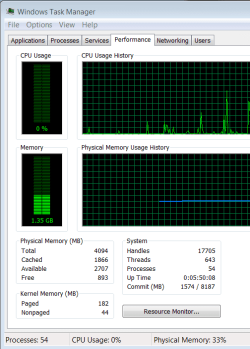
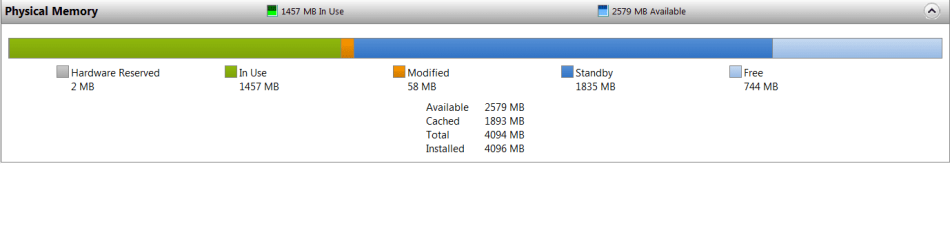
Well my 64Bit is using 1.35G 33% off 4G physical system Ram.
pic below,I also used Start-->All Programs-->Accessories-->System Tools-->Resource Monitor-->Memory Tab


Brains.
 

Attachments

  • Ram.png
    Ram.png
    13.3 KB · Views: 45
  • Ram2.png
    Ram2.png
    7.4 KB · Views: 48
Last edited:

My Computer My Computer

At a glance

Windows 7 (6.1) Ultimate Edition x64 (Build 7...Intel(R) Core(TM)2 Duo CPU E84004G Dual (2G DDR2(Kingston) PC2-5300 (333 MHz)...GeForce 9600 GT 512 MB PCI Express x16
OS
Windows 7 (6.1) Ultimate Edition x64 (Build 7100) "6.1.7100.0"
CPU
Intel(R) Core(TM)2 Duo CPU E8400
Motherboard
Gigabyte EP35-DS3L Intel P35/G33/G31 rev. A2
Memory
4G Dual (2G DDR2(Kingston) PC2-5300 (333 MHz) + 2G PC2-6400
Graphics Card(s)
GeForce 9600 GT 512 MB PCI Express x16
Sound Card
onboard
Monitor(s) Displays
22" Chimei
Screen Resolution
1680 * 1050 75mhz
Hard Drives
WDC 300G,
ST3160913AS 149G ATA
Back
Top