Solved Win Def Offline - no access to results, no log created

UberGoober

New member
Local time
6:29 PM
Messages
44
Following the instructions in this Tutorial, I tried cleaning out an infection (name unknown, but sorta a super Poweliks). It came up clean after running all 3 types of scans.

I know that's impossible. The hidden, evil :devil: X: virtual drive (installed within the C: partition space by the virus) was even listed as a choice for Custom Scan, along with Local Disk C: and System Reserved D:!

When I clicked "View Details", a box popped up saying, "You must be the Administrator Security to view these files."

I tried navigating to the location given in the tutorial, but no WDO folder was created at C:\Windows.

What can I try next?
 

My Computer My Computer

At a glance

Windows 7 Pro 64 bitAthlon II X2 B248 GBIntegrated Radeon HD4200
Computer type
PC/Desktop
Computer Manufacturer/Model Number
HP Pro 6005 SFF refurbished by Joy
OS
Windows 7 Pro 64 bit
CPU
Athlon II X2 B24
Motherboard
HP 3047-h
Memory
8 GB
Graphics Card(s)
Integrated Radeon HD4200
Hard Drives
GB0750C8047
Seagate Barracuda 7200.9 250GB
Browser
IE 11

My Computer My Computer

At a glance

Windows 10 Pro. 64/ version 1709 Windows 7 Pr...Intel i7-6800K @ 4.3Corsair Platinum 16 gig @2400EVGA GTX 1070 OC
Computer type
PC/Desktop
Computer Manufacturer/Model Number
Home made Desktop
OS
Windows 10 Pro. 64/ version 1709 Windows 7 Pro/64
CPU
Intel i7-6800K @ 4.3
Motherboard
ASUS X-99 Deluxe II
Memory
Corsair Platinum 16 gig @2400
Graphics Card(s)
EVGA GTX 1070 OC
Monitor(s) Displays
Asus 27" LED LCD/VE278Q
Screen Resolution
1920-1080 or 1280-720 HDMI
Hard Drives
INTEL SSD 730-240 Gb Sata 3.0/
PSU
EVGA Platium 1200W
Case
Phanteks Luxe Tempered Glass 8 fans/ one radiator
Cooling
XSPC/ Water Cooled CPU
Keyboard
Das 4 Professional
Mouse
Logitech M705/MX Anywhere 2-S
Internet Speed
100 mbits
Antivirus
Microsoft Security Essentials/ Malwarebytes Premium 3.0/ SAS
Browser
I.E. 11 default/Firefox/ ISP Time Warner Cable/Spectrum
Other Info
LG BluRay Burner/
Sound system-KLipsch-THX/
Icy Dock ssd Hot Swap bays.
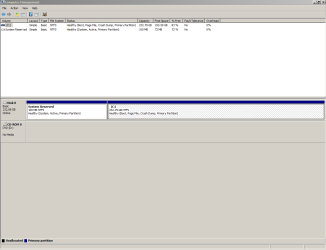
Thanks for replying, Layback Bear. Glad to have your help. The image you requested is attached.
DskMgmt.PNG

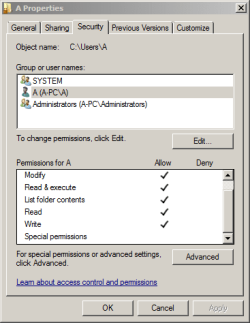
My "C:/Users/A" account is a member of the Administrators group.

UserAcctPermissions.PNG

NoSpecialPermissions.PNG

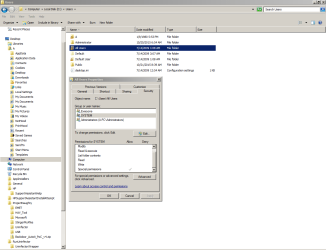
However, I may be blocked from actually affecting settings by the virus...

AllUsers.PNG

"System Reserved D:" is weird cuz it never has a drive letter that I've seen before. But the choices for a Custom Scan in WOD listed it exactly that way. Also listed were "Local Disk C:", my DVD drive as "E:", and the VM where the virus installed XP as "X:".

I've used Parted Magic, Partition Wizard, Bart's PE, Macrium Reflect, Seagate's Acronis Free. HP's hard drive manager, Paragon, D-Ban, Daricks Boot and Nuke. None ever gave System Reserved a drive letter, but once the VM was listed as "V:"; another time as "h:". Sorry I didn't write down which app showed what, but both wipers failed to touch the VM located within partition "C:".
 

My Computer My Computer

At a glance

Windows 7 Pro 64 bitAthlon II X2 B248 GBIntegrated Radeon HD4200
Computer type
PC/Desktop
Computer Manufacturer/Model Number
HP Pro 6005 SFF refurbished by Joy
OS
Windows 7 Pro 64 bit
CPU
Athlon II X2 B24
Motherboard
HP 3047-h
Memory
8 GB
Graphics Card(s)
Integrated Radeon HD4200
Hard Drives
GB0750C8047
Seagate Barracuda 7200.9 250GB
Browser
IE 11
You will find that some 3rd party programs will change partition letters and drive numbers around.

What I do is change the name of each drive and partition so when a program changes the partition letters or drive numbers I can use the name to make sure I know which one is which.

The computer I'm on now has Systems also with all check marks, (Full Control).

I have also ran Windows Defender Offline and never got a log I could find. I always thought that if WDO didn't give any other instruction when it was completed; it didn't find any problems. I do not remember how I got that idea.

Are you able to run sfc /scannow?
If so what results do you get?
 

My Computer My Computer

At a glance

Windows 10 Pro. 64/ version 1709 Windows 7 Pr...Intel i7-6800K @ 4.3Corsair Platinum 16 gig @2400EVGA GTX 1070 OC
Computer type
PC/Desktop
Computer Manufacturer/Model Number
Home made Desktop
OS
Windows 10 Pro. 64/ version 1709 Windows 7 Pro/64
CPU
Intel i7-6800K @ 4.3
Motherboard
ASUS X-99 Deluxe II
Memory
Corsair Platinum 16 gig @2400
Graphics Card(s)
EVGA GTX 1070 OC
Monitor(s) Displays
Asus 27" LED LCD/VE278Q
Screen Resolution
1920-1080 or 1280-720 HDMI
Hard Drives
INTEL SSD 730-240 Gb Sata 3.0/
PSU
EVGA Platium 1200W
Case
Phanteks Luxe Tempered Glass 8 fans/ one radiator
Cooling
XSPC/ Water Cooled CPU
Keyboard
Das 4 Professional
Mouse
Logitech M705/MX Anywhere 2-S
Internet Speed
100 mbits
Antivirus
Microsoft Security Essentials/ Malwarebytes Premium 3.0/ SAS
Browser
I.E. 11 default/Firefox/ ISP Time Warner Cable/Spectrum
Other Info
LG BluRay Burner/
Sound system-KLipsch-THX/
Icy Dock ssd Hot Swap bays.
Reply inserted into your quote in purple text. Thanks again!

You will find that some 3rd party programs will change partition letters and drive numbers around. I've noticed that, but this is a Windows program.

What I do is change the name of each drive and partition so when a program changes the partition letters or drive numbers I can use the name to make sure I know which one is which. Good idea. I hadn't worried about it since the whole disk is one partition used just to find out how to get rid of this infection. Done now, though, Layback!

The computer I'm on now has Systems also with all check marks, (Full Control). That's not what I'm seeing. If you look at attachment 375091, only "Special permissions" is checked

I have also ran Windows Defender Offline and never got a log I could find. I always thought that if WDO didn't give any other instruction when it was completed; it didn't find any problems. I must be getting really paranoid after months of fighting this thing! I always assume the infection has done something nefarious when a 7 Forums tutorial says I'll have a log and I don't. :mad: I do not remember how I got that idea.

Are you able to run sfc /scannow? I did - it said no problems.

But remember, it is scanning the Windows 7 drive "C:" that the VM XP OS installs whether I insert a Windows 2000 Pro, XP Home, Windows 7 Universal install disc, or the Windows 7 disc shipped with the PC!
If so what results do you get? Text file attached.
 

Attachments

My Computer My Computer

At a glance

Windows 7 Pro 64 bitAthlon II X2 B248 GBIntegrated Radeon HD4200
Computer type
PC/Desktop
Computer Manufacturer/Model Number
HP Pro 6005 SFF refurbished by Joy
OS
Windows 7 Pro 64 bit
CPU
Athlon II X2 B24
Motherboard
HP 3047-h
Memory
8 GB
Graphics Card(s)
Integrated Radeon HD4200
Hard Drives
GB0750C8047
Seagate Barracuda 7200.9 250GB
Browser
IE 11
Sometimes the oddest things can trigger an idea for an experienced person like you, Layback. I found the following really odd...

One thing this infection does is allow hundreds of "Authenticated Users" to log onto my PC remotely, so I decided to look into that. To save lots of future clicks, I decided to make Brink's shortcut.

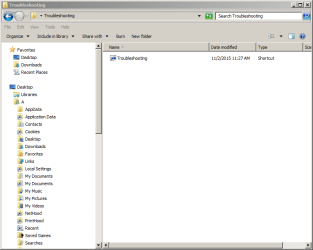
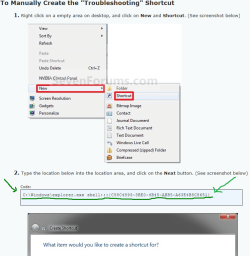
I used Option One, the downloaded zip file. When I double-click the Troubleshooting desktop icon, it sends me to this target:
IconTarget.PNG

When I double-click "Troubleshooting" there, I get:
IconInstall.PNG

That didn't seem right, so I signed back in to 7 Forums and went back to Brink's instructions for manual creation of the shortcut.

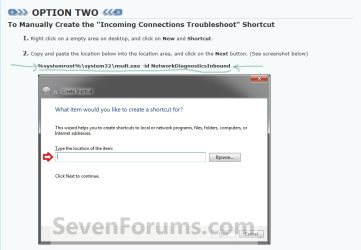
Notice that Brink specifies "%systemroot%\system32\msdt.exe -id NetworkDiagnosticsInbound" as the shortcut's target.
VirusBehavior1.PNG

This is the page the virus redirected me to as if it were 7 Forums, with the target location changed!
VirusBehavior2.PNG
 
Last edited by a moderator:

My Computer My Computer

At a glance

Windows 7 Pro 64 bitAthlon II X2 B248 GBIntegrated Radeon HD4200
Computer type
PC/Desktop
Computer Manufacturer/Model Number
HP Pro 6005 SFF refurbished by Joy
OS
Windows 7 Pro 64 bit
CPU
Athlon II X2 B24
Motherboard
HP 3047-h
Memory
8 GB
Graphics Card(s)
Integrated Radeon HD4200
Hard Drives
GB0750C8047
Seagate Barracuda 7200.9 250GB
Browser
IE 11
You obviously have admin privileges because sfc /scannow worked for you.

Some times when you can't find something on your system this free program will.
Everything Search.

Everything Search Engine
 

My Computer My Computer

At a glance

Windows 10 Pro. 64/ version 1709 Windows 7 Pr...Intel i7-6800K @ 4.3Corsair Platinum 16 gig @2400EVGA GTX 1070 OC
Computer type
PC/Desktop
Computer Manufacturer/Model Number
Home made Desktop
OS
Windows 10 Pro. 64/ version 1709 Windows 7 Pro/64
CPU
Intel i7-6800K @ 4.3
Motherboard
ASUS X-99 Deluxe II
Memory
Corsair Platinum 16 gig @2400
Graphics Card(s)
EVGA GTX 1070 OC
Monitor(s) Displays
Asus 27" LED LCD/VE278Q
Screen Resolution
1920-1080 or 1280-720 HDMI
Hard Drives
INTEL SSD 730-240 Gb Sata 3.0/
PSU
EVGA Platium 1200W
Case
Phanteks Luxe Tempered Glass 8 fans/ one radiator
Cooling
XSPC/ Water Cooled CPU
Keyboard
Das 4 Professional
Mouse
Logitech M705/MX Anywhere 2-S
Internet Speed
100 mbits
Antivirus
Microsoft Security Essentials/ Malwarebytes Premium 3.0/ SAS
Browser
I.E. 11 default/Firefox/ ISP Time Warner Cable/Spectrum
Other Info
LG BluRay Burner/
Sound system-KLipsch-THX/
Icy Dock ssd Hot Swap bays.
Thanks, buddy Bear - I'll try that.
 

My Computer My Computer

At a glance

Windows 7 Pro 64 bitAthlon II X2 B248 GBIntegrated Radeon HD4200
Computer type
PC/Desktop
Computer Manufacturer/Model Number
HP Pro 6005 SFF refurbished by Joy
OS
Windows 7 Pro 64 bit
CPU
Athlon II X2 B24
Motherboard
HP 3047-h
Memory
8 GB
Graphics Card(s)
Integrated Radeon HD4200
Hard Drives
GB0750C8047
Seagate Barracuda 7200.9 250GB
Browser
IE 11
No joy with Everything, LB. The Naughty VM still successfully hides itself.Is there a program out that truly wipes the whole HDD, ignoring partitions?Thanks again, UG
 

My Computer My Computer

At a glance

Windows 7 Pro 64 bitAthlon II X2 B248 GBIntegrated Radeon HD4200
Computer type
PC/Desktop
Computer Manufacturer/Model Number
HP Pro 6005 SFF refurbished by Joy
OS
Windows 7 Pro 64 bit
CPU
Athlon II X2 B24
Motherboard
HP 3047-h
Memory
8 GB
Graphics Card(s)
Integrated Radeon HD4200
Hard Drives
GB0750C8047
Seagate Barracuda 7200.9 250GB
Browser
IE 11

My Computer My Computer

At a glance

Windows 7 Ultimate 32bit SP1Intel(R) Core(TM)2 Quad CPU @ 2.40GHz, 2400 MHz4 GBATI Radeon HD 2600 Pro
Computer type
PC/Desktop
Computer Manufacturer/Model Number
Bruce ... somewhere in his 40's
OS
Windows 7 Ultimate 32bit SP1
CPU
Intel(R) Core(TM)2 Quad CPU @ 2.40GHz, 2400 MHz
Motherboard
INTEL/D975XBX2
Memory
4 GB
Graphics Card(s)
ATI Radeon HD 2600 Pro
Monitor(s) Displays
Samsung SyncMaster 914v
Screen Resolution
1280 x 1024
Hard Drives
2/500GB each ... ST3500630AS ATA Device.
One is not connected
PSU
Rocketfish 700 W
Case
G.Skill Gigabyte Chassis
Keyboard
Standard PS/2 Keyboard
Mouse
Microsoft PS/2 Mouse
Internet Speed
DSL
Antivirus
Avira Internet Security
Browser
IE 11
Other Info
ATI HDMI Audio
UberGoober I recommend following Jacee's instruction.
She is one of our security experts.
 

My Computer My Computer

At a glance

Windows 10 Pro. 64/ version 1709 Windows 7 Pr...Intel i7-6800K @ 4.3Corsair Platinum 16 gig @2400EVGA GTX 1070 OC
Computer type
PC/Desktop
Computer Manufacturer/Model Number
Home made Desktop
OS
Windows 10 Pro. 64/ version 1709 Windows 7 Pro/64
CPU
Intel i7-6800K @ 4.3
Motherboard
ASUS X-99 Deluxe II
Memory
Corsair Platinum 16 gig @2400
Graphics Card(s)
EVGA GTX 1070 OC
Monitor(s) Displays
Asus 27" LED LCD/VE278Q
Screen Resolution
1920-1080 or 1280-720 HDMI
Hard Drives
INTEL SSD 730-240 Gb Sata 3.0/
PSU
EVGA Platium 1200W
Case
Phanteks Luxe Tempered Glass 8 fans/ one radiator
Cooling
XSPC/ Water Cooled CPU
Keyboard
Das 4 Professional
Mouse
Logitech M705/MX Anywhere 2-S
Internet Speed
100 mbits
Antivirus
Microsoft Security Essentials/ Malwarebytes Premium 3.0/ SAS
Browser
I.E. 11 default/Firefox/ ISP Time Warner Cable/Spectrum
Other Info
LG BluRay Burner/
Sound system-KLipsch-THX/
Icy Dock ssd Hot Swap bays.
Thanks so much for that link, Jacee! Gonna do it now. I'll mark the thread solved if it succeeds.

LB, those 3 brain cells are some powerful! Could I borrow one? Thanks for hanging in here with me.

UG
 
Last edited:

My Computer My Computer

At a glance

Windows 7 Pro 64 bitAthlon II X2 B248 GBIntegrated Radeon HD4200
Computer type
PC/Desktop
Computer Manufacturer/Model Number
HP Pro 6005 SFF refurbished by Joy
OS
Windows 7 Pro 64 bit
CPU
Athlon II X2 B24
Motherboard
HP 3047-h
Memory
8 GB
Graphics Card(s)
Integrated Radeon HD4200
Hard Drives
GB0750C8047
Seagate Barracuda 7200.9 250GB
Browser
IE 11
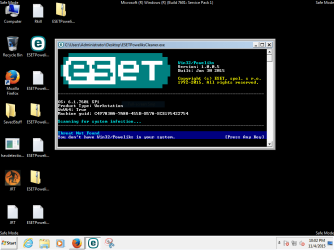
Doggone it, ESET didn't work either. Tried it 3 times, and this is the screen that comes up immediately after double-clicking the exe icon.

eset.PNG

Here are the 3 log files. Does this tool really do its work in a millisecond?

Any other suggestions?

Thanks again, UG
 

Attachments

My Computer My Computer

At a glance

Windows 7 Pro 64 bitAthlon II X2 B248 GBIntegrated Radeon HD4200
Computer type
PC/Desktop
Computer Manufacturer/Model Number
HP Pro 6005 SFF refurbished by Joy
OS
Windows 7 Pro 64 bit
CPU
Athlon II X2 B24
Motherboard
HP 3047-h
Memory
8 GB
Graphics Card(s)
Integrated Radeon HD4200
Hard Drives
GB0750C8047
Seagate Barracuda 7200.9 250GB
Browser
IE 11
I'd like you to scan your machine with ESET OnlineScan
  1. Hold down Control and click on the following link to open ESET OnlineScan in a new window.
    ESET OnlineScan
  2. Click the
    esetOnline.png
    button.
  3. For alternate browsers only: (Microsoft Internet Explorer users can skip these steps)
    1. Click on
      esetSmartInstall.png
      to download the ESET Smart Installer. Save it to your desktop.
    2. Double click on the
      esetSmartInstallDesktopIcon.png
      icon on your desktop.
  4. Check
    esetAcceptTerms.png
  5. Click the
    esetStart.png
    button.
  6. Accept any security warnings from your browser.
  7. Check
    esetScanArchives.png
  8. Push the Start button.
  9. ESET will then download updates for itself, install itself, and begin scanning your computer. Please be patient as this can take some time.
  10. When the scan completes, push
    esetListThreats.png
  11. Push
    esetExport.png
    , and save the file to your desktop using a unique name, such as ESETScan. Include the contents of this report in your next reply.
  12. Push the
    esetBack.png
    button.
  13. Push
    esetFinish.png
 

My Computer My Computer

At a glance

Windows 7 Ultimate 32bit SP1Intel(R) Core(TM)2 Quad CPU @ 2.40GHz, 2400 MHz4 GBATI Radeon HD 2600 Pro
Computer type
PC/Desktop
Computer Manufacturer/Model Number
Bruce ... somewhere in his 40's
OS
Windows 7 Ultimate 32bit SP1
CPU
Intel(R) Core(TM)2 Quad CPU @ 2.40GHz, 2400 MHz
Motherboard
INTEL/D975XBX2
Memory
4 GB
Graphics Card(s)
ATI Radeon HD 2600 Pro
Monitor(s) Displays
Samsung SyncMaster 914v
Screen Resolution
1280 x 1024
Hard Drives
2/500GB each ... ST3500630AS ATA Device.
One is not connected
PSU
Rocketfish 700 W
Case
G.Skill Gigabyte Chassis
Keyboard
Standard PS/2 Keyboard
Mouse
Microsoft PS/2 Mouse
Internet Speed
DSL
Antivirus
Avira Internet Security
Browser
IE 11
Other Info
ATI HDMI Audio
OK...ESET OnlineScan came up "No threats found", so there was no "List of found threats" button to push. I could not complete steps 10 - 13.

If a log exists anyway, I'll zip it up and send it if you can tell me where it is.

Thanks so much, Jacee

UG
 
Last edited:

My Computer My Computer

At a glance

Windows 7 Pro 64 bitAthlon II X2 B248 GBIntegrated Radeon HD4200
Computer type
PC/Desktop
Computer Manufacturer/Model Number
HP Pro 6005 SFF refurbished by Joy
OS
Windows 7 Pro 64 bit
CPU
Athlon II X2 B24
Motherboard
HP 3047-h
Memory
8 GB
Graphics Card(s)
Integrated Radeon HD4200
Hard Drives
GB0750C8047
Seagate Barracuda 7200.9 250GB
Browser
IE 11
Okay, let's run AdwCleaner:

Download AdwCleaner by Xplode and save to your Desktop.


Step 1
  • Double click on AdwCleaner.exe to run the tool.
    Vista/Windows 7/8 users right-click and select Run As Administrator.
  • Click on the Scan button.
  • AdwCleaner will begin...be patient as the scan may take some time to complete.
  • After the scan has finished, click on the Report button...a logfile (AdwCleaner[R#].txt) will open in Notepad for review (where the largest value of # represents the most recent report).
  • The contents of the log file may be confusing. Unless you see a program name that you know should not be removed, don't worry about it. If you see an entry you want to keep, let me know about it.
  • Copy and paste the contents of that logfile in your next reply.
  • A copy of all logfiles are saved in the C:\AdwCleaner folder which was created when running the tool.
Step 2
Using AdwCleaner: Scan & Clean

This time click on the Clean button.
Press OK when asked to close all programs and follow the onscreen prompts.
Press OK again to allow AdwCleaner to restart the computer and complete the removal process.
After rebooting, a logfile report (AdwCleaner[S#].txt) will open automatically (where the largest value of # represents the most recent report).
Copy and paste the contents of that logfile in your next reply.
A copy of that logfile will also be saved in the C:\AdwCleaner folder

******Post both .txt logs
 

My Computer My Computer

At a glance

Windows 7 Ultimate 32bit SP1Intel(R) Core(TM)2 Quad CPU @ 2.40GHz, 2400 MHz4 GBATI Radeon HD 2600 Pro
Computer type
PC/Desktop
Computer Manufacturer/Model Number
Bruce ... somewhere in his 40's
OS
Windows 7 Ultimate 32bit SP1
CPU
Intel(R) Core(TM)2 Quad CPU @ 2.40GHz, 2400 MHz
Motherboard
INTEL/D975XBX2
Memory
4 GB
Graphics Card(s)
ATI Radeon HD 2600 Pro
Monitor(s) Displays
Samsung SyncMaster 914v
Screen Resolution
1280 x 1024
Hard Drives
2/500GB each ... ST3500630AS ATA Device.
One is not connected
PSU
Rocketfish 700 W
Case
G.Skill Gigabyte Chassis
Keyboard
Standard PS/2 Keyboard
Mouse
Microsoft PS/2 Mouse
Internet Speed
DSL
Antivirus
Avira Internet Security
Browser
IE 11
Other Info
ATI HDMI Audio
AdwCleaner scan ran for less than 1 minute.

LOG:
# AdwCleaner v5.018 - Logfile created 06/11/2015 at 07:12:00
# Updated 05/11/2015 by Xplode
# Database : 2015-11-03.2 [Server]
# Operating system : Windows 7 Professional Service Pack 1 (x64)
# Username : A - A-PC
# Running from : C:\Users\A\Desktop\AdwCleaner.exe
# Option : Scan
# Support : Forum - ToolsLib

***** [ Services ] *****


***** [ Folders ] *****


***** [ Files ] *****


***** [ DLL ] *****


***** [ Shortcuts ] *****


***** [ Scheduled tasks ] *****


***** [ Registry ] *****


***** [ Web browsers ] *****

[C:\Users\A\AppDAtA\RoAming\MozillA\Firefox\Profiles\ht2l8yt0.default\prefs.js] [Preference] Found : user_pref("browser.search.defaultenginename.US", "Ixquick - English");
[C:\Users\A\AppDAtA\RoAming\MozillA\Firefox\Profiles\ht2l8yt0.default\prefs.js] [Preference] Found : user_pref("browser.startup.homepage", "hxxps://ixquick.com/do/mypage.pl?prf=487259a80fb2c3b412bd42d2dab01976");

########## EOF - C:\AdwCleaner\AdwCleaner[S1].txt - [957 bytes] ##########

Nothing to keep, but I'd love to block all syncing. I don't want a roaming profile even when the PC gets back to normal. This malware installs on whatever machine I'm using if I log onto my ISP webmail.

I wonder if I was presented a substitute by the malware - there wasn't a "Report" button.

NoReportButton.PNG

Oh, and I found the ESET log. The scanner never appeared to run - think these times are bogus.

ESETSmartInstaller@High as downloader log:
all ok
# product=EOS
# version=8
# OnlineScannerApp.exe=1.0.0.1
# EOSSerial=918e60685d3fde40b3d6a8be7889f5dc
# end=init
# utc_time=2015-11-05 07:00:15
# local_time=2015-11-05 02:00:15 (-0500, Eastern Standard Time)
# country="United States"
# osver=6.1.7601 NT Service Pack 1
Update Init
Update Download
Update Finalize
Updated modules version: 26584
# product=EOS
# version=8
# OnlineScannerApp.exe=1.0.0.1
# EOSSerial=918e60685d3fde40b3d6a8be7889f5dc
# end=updated
# utc_time=2015-11-05 07:02:38
# local_time=2015-11-05 02:02:38 (-0500, Eastern Standard Time)
# country="United States"
# osver=6.1.7601 NT Service Pack 1
# product=EOS
# version=8
# OnlineScannerApp.exe=1.0.0.1
# OnlineScanner.ocx=1.0.0.7777
# api_version=3.1.1
# EOSSerial=918e60685d3fde40b3d6a8be7889f5dc
# engine=26584
# end=finished
# remove_checked=true
# archives_checked=true
# unwanted_checked=true
# unsafe_checked=true
# antistealth_checked=true
# utc_time=2015-11-05 07:34:14
# local_time=2015-11-05 02:34:14 (-0500, Eastern Standard Time)
# country="United States"
# lang=1033
# osver=6.1.7601 NT Service Pack 1
# compatibility_mode_1=''
# compatibility_mode=5893 16776573 100 94 0 198295504 0 0
# scanned=102169
# found=0
# cleaned=0
# scan_time=1896

Sending this on since I've done it and the PC has to restart, so I'd have a do-over. Cleaning log to follow.
 
Last edited:

My Computer My Computer

At a glance

Windows 7 Pro 64 bitAthlon II X2 B248 GBIntegrated Radeon HD4200
Computer type
PC/Desktop
Computer Manufacturer/Model Number
HP Pro 6005 SFF refurbished by Joy
OS
Windows 7 Pro 64 bit
CPU
Athlon II X2 B24
Motherboard
HP 3047-h
Memory
8 GB
Graphics Card(s)
Integrated Radeon HD4200
Hard Drives
GB0750C8047
Seagate Barracuda 7200.9 250GB
Browser
IE 11
Cleaning log

# AdwCleaner v5.018 - Logfile created 06/11/2015 at 07:41:48
# Updated 05/11/2015 by Xplode
# Database : 2015-11-03.2 [Server]
# Operating system : Windows 7 Professional Service Pack 1 (x64)
# Username : A - A-PC
# Running from : C:\Users\A\Desktop\AdwCleaner.exe
# Option : Cleaning
# Support : Forum - ToolsLib

***** [ Services ] *****


***** [ Folders ] *****


***** [ Files ] *****


***** [ DLLs ] *****


***** [ Shortcuts ] *****


***** [ Scheduled tasks ] *****


***** [ Registry ] *****


***** [ Web browsers ] *****

[-] [C:\Users\A\AppDAtA\RoAming\MozillA\Firefox\Profiles\ht2l8yt0.default\prefs.js] [Preference] Deleted : user_pref("browser.search.defaultenginename.US", "Ixquick - English");
[-] [C:\Users\A\AppDAtA\RoAming\MozillA\Firefox\Profiles\ht2l8yt0.default\prefs.js] [Preference] Deleted : user_pref("browser.startup.homepage", "hxxps://ixquick.com/do/mypage.pl?prf=487259a80fb2c3b412bd42d2dab01976");

*************************

:: "Tracing" keys removed
:: Winsock settings cleared

########## EOF - C:\AdwCleaner\AdwCleaner[C1].txt - [1061 bytes] ##########

I got hijacked back to the Mozilla Start page as Home from IXQuick. I see "/do/" in lots of URLs, which change from what I type in.

Appreciate all your help so much, Jacee! UG
 

My Computer My Computer

At a glance

Windows 7 Pro 64 bitAthlon II X2 B248 GBIntegrated Radeon HD4200
Computer type
PC/Desktop
Computer Manufacturer/Model Number
HP Pro 6005 SFF refurbished by Joy
OS
Windows 7 Pro 64 bit
CPU
Athlon II X2 B24
Motherboard
HP 3047-h
Memory
8 GB
Graphics Card(s)
Integrated Radeon HD4200
Hard Drives
GB0750C8047
Seagate Barracuda 7200.9 250GB
Browser
IE 11
Okay good, now download TFC by Old Timer TFC - Temp File Cleaner by OldTimer Download - Geeks to Go Forum and save it to your desktop.
Save any unsaved work. TFC will close ALL open programs including your browser! This will also hide all desktop shortcuts, so just be aware! They will come back after rebooting. ;)

Using Vista/Windows 7 right-click on the file and choose Run As Administrator.
Click the Start button to begin the cleaning process and let it run uninterrupted to completion.

Important! Manually reboot the machine to ensure a complete clean.

Tell me how your computer is acting now.
 

My Computer My Computer

At a glance

Windows 7 Ultimate 32bit SP1Intel(R) Core(TM)2 Quad CPU @ 2.40GHz, 2400 MHz4 GBATI Radeon HD 2600 Pro
Computer type
PC/Desktop
Computer Manufacturer/Model Number
Bruce ... somewhere in his 40's
OS
Windows 7 Ultimate 32bit SP1
CPU
Intel(R) Core(TM)2 Quad CPU @ 2.40GHz, 2400 MHz
Motherboard
INTEL/D975XBX2
Memory
4 GB
Graphics Card(s)
ATI Radeon HD 2600 Pro
Monitor(s) Displays
Samsung SyncMaster 914v
Screen Resolution
1280 x 1024
Hard Drives
2/500GB each ... ST3500630AS ATA Device.
One is not connected
PSU
Rocketfish 700 W
Case
G.Skill Gigabyte Chassis
Keyboard
Standard PS/2 Keyboard
Mouse
Microsoft PS/2 Mouse
Internet Speed
DSL
Antivirus
Avira Internet Security
Browser
IE 11
Other Info
ATI HDMI Audio
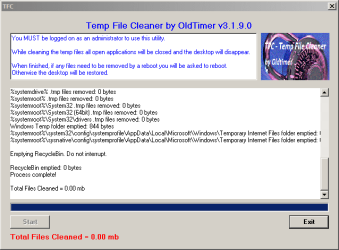
TFC never hid the desktop icons. Here's what it showed it cleaned.

View attachment TempFileCleanerLog.txt

I ran it a second time after restarting because I wanted you to see there wasn't a "Restart" button presented after the scan in the log, and this is what it looked like.

TFCbyOT.PNG

I'll have to spend some time using the PC in the morning to report its behavior. UG
 
Last edited:

My Computer My Computer

At a glance

Windows 7 Pro 64 bitAthlon II X2 B248 GBIntegrated Radeon HD4200
Computer type
PC/Desktop
Computer Manufacturer/Model Number
HP Pro 6005 SFF refurbished by Joy
OS
Windows 7 Pro 64 bit
CPU
Athlon II X2 B24
Motherboard
HP 3047-h
Memory
8 GB
Graphics Card(s)
Integrated Radeon HD4200
Hard Drives
GB0750C8047
Seagate Barracuda 7200.9 250GB
Browser
IE 11
Back
Top