Solved Win Def Offline - no access to results, no log created

Uninstall every Java version that you can find in Programs and Features. You will probably never miss it. If you do find something that needs it, create a new thread and let's discuss then need vs. the risk.

~~~
I wonder if the SSV architecture is 32-bit because the OS of the VM the malware installed in my C: partition is XP. It's controlled from a remote server, so they might need the Java stuff. I certainly don't want any Browser Helper Objects.
~~~
I'm still not seeing any evidence of a VM. The Documents and Settings folder is a part of Windows 7. It is not evidence of a 32-bit XP VM (in case that is what you were thinking).
 

My Computer My Computer

At a glance

W7 Pro SP1 64biti78GBIntel HD Graphics
Computer type
Laptop
Computer Manufacturer/Model Number
Employer provided Dell Latitude
OS
W7 Pro SP1 64bit
CPU
i7
Memory
8GB
Graphics Card(s)
Intel HD Graphics
Hard Drives
crappy SSD
Antivirus
Employer mandated Symantec Endpoint Protection
Browser
Pale Moon 64bit, IE11 64bit & Chrome 64bit
PC booted to "X:/v::", Windows XP Pro on a hidden, virtual HDD
This makes me think Mac OS X on a Windows PC. VMware on OSx86......

See why: Vmware - OSx86

I can be of no help here!

I think it is something structured like the OS X or Sub Virt. But UsernameIssues has some stuff for me to work on, so I'll go get started.

Thanks a million anyway, Jacee. I really appreciate your effort to help. All the best, UG
 

My Computer My Computer

At a glance

Windows 7 Pro 64 bitAthlon II X2 B248 GBIntegrated Radeon HD4200
Computer type
PC/Desktop
Computer Manufacturer/Model Number
HP Pro 6005 SFF refurbished by Joy
OS
Windows 7 Pro 64 bit
CPU
Athlon II X2 B24
Motherboard
HP 3047-h
Memory
8 GB
Graphics Card(s)
Integrated Radeon HD4200
Hard Drives
GB0750C8047
Seagate Barracuda 7200.9 250GB
Browser
IE 11
Wow, UsernameIssues! (May I call you UNI?) You have spent a lot of time already looking into this for me. I thank you very much!

"Can you take a picture of what you see via the custom scan drive selection dialog box?" (Post #32)

Here it is, operating from my User Account "A", a member of the Administrators Group:

WDODrives.PNG
 
Last edited:

My Computer My Computer

At a glance

Windows 7 Pro 64 bitAthlon II X2 B248 GBIntegrated Radeon HD4200
Computer type
PC/Desktop
Computer Manufacturer/Model Number
HP Pro 6005 SFF refurbished by Joy
OS
Windows 7 Pro 64 bit
CPU
Athlon II X2 B24
Motherboard
HP 3047-h
Memory
8 GB
Graphics Card(s)
Integrated Radeon HD4200
Hard Drives
GB0750C8047
Seagate Barracuda 7200.9 250GB
Browser
IE 11
My replies in purple
~~~
However, I may be blocked from actually affecting settings by the virus...

375091d1446501669t-win-def-offline-no-access-results-no-log-created-allusers.png
What you show in that screenshot is normal.
Why is "A" locked? I haven't seen that in other W7 installations.

Note the "Date Modified" on my user account "A" - 1/09/1980! The last clean custom reinstall of W7 I did was in early October, I think.

The malware had set a password for entering Setup, so I couldn't change the date & time in CMOS. If there is no hidden VM, where did the ability to do that come from? I was able to use Date & Time in the OS after installation.

Where is Guest user? And I've never seen a user called Default, Default User, or Public before. I didn't set them up - it was Deus ex Machina, I think :D !

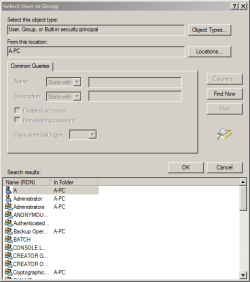
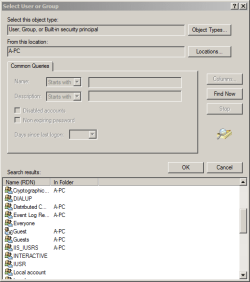
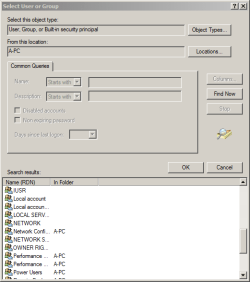
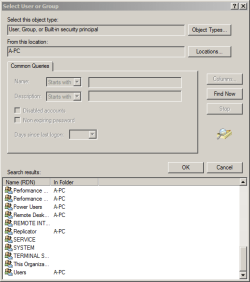
Lemme show you the real list of All Users (4 snips)

AllUsersGroups1.PNG

AllUsersGroups2.PNG

AllUsersGroups3.PNG

AllUsersGroups4.PNG

Are they all normally set up by Windows?


~~~
"System Reserved D:" is weird cuz it never has a drive letter that I've seen before. But the choices for a Custom Scan in WOD listed it exactly that way. Also listed were "Local Disk C:", my DVD drive as "E:", and the VM where the virus installed XP as "X:".

I've used Parted Magic, Partition Wizard, Bart's PE, Macrium Reflect, Seagate's Acronis Free. HP's hard drive manager, Paragon, D-Ban, Daricks Boot and Nuke. None ever gave System Reserved a drive letter, but once the VM was listed as "V:"; another time as "h:". Sorry I didn't write down which app showed what, but both wipers failed to touch the VM located within partition "C:".

It is normal for some of those tools to assign a drive letter to the system reserve partition. Judging from the folders in the X drive shown in WDO, that drive seems to be where the WDO scanner is operating from.
OK, UNI, let me put in the WDO disk and see what I get for drives now. Back later...and thanks again, so much! UG
 

My Computer My Computer

At a glance

Windows 7 Pro 64 bitAthlon II X2 B248 GBIntegrated Radeon HD4200
Computer type
PC/Desktop
Computer Manufacturer/Model Number
HP Pro 6005 SFF refurbished by Joy
OS
Windows 7 Pro 64 bit
CPU
Athlon II X2 B24
Motherboard
HP 3047-h
Memory
8 GB
Graphics Card(s)
Integrated Radeon HD4200
Hard Drives
GB0750C8047
Seagate Barracuda 7200.9 250GB
Browser
IE 11
You are welcome.

Sure, UNI is fine/simpler.

re: post #43:
I was looking for a picture (probably taken with a camera) of the Custom Scan dialog box from Windows Defender Offline; not Windows Defender while Windows is running from your user account "A". Such a picture should show the X drive that you mention in your original post.
 

My Computer My Computer

At a glance

W7 Pro SP1 64biti78GBIntel HD Graphics
Computer type
Laptop
Computer Manufacturer/Model Number
Employer provided Dell Latitude
OS
W7 Pro SP1 64bit
CPU
i7
Memory
8GB
Graphics Card(s)
Intel HD Graphics
Hard Drives
crappy SSD
Antivirus
Employer mandated Symantec Endpoint Protection
Browser
Pale Moon 64bit, IE11 64bit & Chrome 64bit
re: post #44:
I have read that the lock icon on a folder indicates that the folder has access restrictions. A non-admin user should not be able to navigate into your "A" folder. To a non-admin user, the All Users folder will be restricted to read-only access.

Were you ever able to get into BIOS on this computer? Did you update the BIOS firmware at some point? This info might help you get rid of that password. I would try option 2.

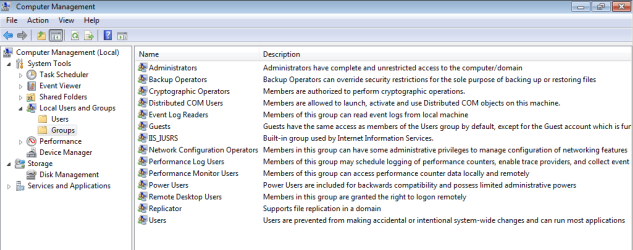
The Guest user account and the Guests user group are built into Windows 7.

The folder named Default is also normal. It contains some of the default files and folders that are used by Windows when creating a new user account folder. By default, these folders are not shown to a user (so you might not have seen them before). You are not using the default settings within Windows (file) Explorer; so, you are seeing folders and files that are designed to be hidden. (e.g. the Documents and Settings folder that we discussed earlier.)

If you were using the default settings for Windows (file) Explorer; you would still see the user folder named Public. This folder is normal. It is where files and folders so that are shared between users... even users on other computers - if sharing is setup that way.


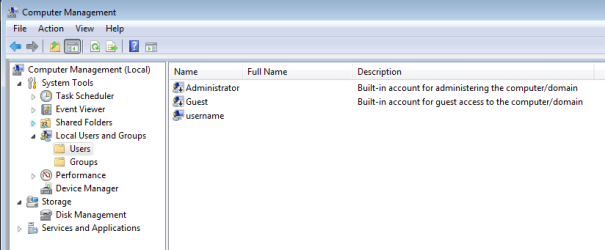
When you install Windows 7, you are asked to pick a username for one account. In the screenshots below, that username is username. Here are the normal/default user accounts (as far as I know):

USERS:

users.PNG


GROUPS:

groups.PNG

You can get to the Computer Management console by right clicking on Computer and selecting Manage from the context menu. There might be a Computer shortcut/icon on your desktop. There is a Computer object in the navigation pane of Windows (file) Explorer and on the right pane of the Start Menu.
 

My Computer My Computer

At a glance

W7 Pro SP1 64biti78GBIntel HD Graphics
Computer type
Laptop
Computer Manufacturer/Model Number
Employer provided Dell Latitude
OS
W7 Pro SP1 64bit
CPU
i7
Memory
8GB
Graphics Card(s)
Intel HD Graphics
Hard Drives
crappy SSD
Antivirus
Employer mandated Symantec Endpoint Protection
Browser
Pale Moon 64bit, IE11 64bit & Chrome 64bit
Purple again...
You are welcome.

Sure, UNI is fine/simpler.

re: post #43:
I was looking for a picture (probably taken with a camera) of the Custom Scan dialog box from Windows Defender Offline; not Windows Defender while Windows is running from your user account "A". OOPS! Such a picture should show the X drive that you mention in your original post. Yes, it does. Unfortunately, I can't send the camera pix I took :mad: . Windows isn't trying to install drivers for the USB camera card adapter I inserted!
 

My Computer My Computer

At a glance

Windows 7 Pro 64 bitAthlon II X2 B248 GBIntegrated Radeon HD4200
Computer type
PC/Desktop
Computer Manufacturer/Model Number
HP Pro 6005 SFF refurbished by Joy
OS
Windows 7 Pro 64 bit
CPU
Athlon II X2 B24
Motherboard
HP 3047-h
Memory
8 GB
Graphics Card(s)
Integrated Radeon HD4200
Hard Drives
GB0750C8047
Seagate Barracuda 7200.9 250GB
Browser
IE 11
Purple again...
You are welcome.

Sure, UNI is fine/simpler.

re: post #43:
I was looking for a picture (probably taken with a camera) of the Custom Scan dialog box from Windows Defender Offline; not Windows Defender while Windows is running from your user account "A". OOPS! Such a picture should show the X drive that you mention in your original post. Yes, it does. Unfortunately, I can't send the camera pix I took :mad: . Windows isn't trying to install drivers for the USB camera card adapter I inserted!
Okay - at least you can see that the X drive is not some evil VM. It is normal :-)
 

My Computer My Computer

At a glance

W7 Pro SP1 64biti78GBIntel HD Graphics
Computer type
Laptop
Computer Manufacturer/Model Number
Employer provided Dell Latitude
OS
W7 Pro SP1 64bit
CPU
i7
Memory
8GB
Graphics Card(s)
Intel HD Graphics
Hard Drives
crappy SSD
Antivirus
Employer mandated Symantec Endpoint Protection
Browser
Pale Moon 64bit, IE11 64bit & Chrome 64bit
Green this time.

Your reply to Layback Bear asking, "Are you able to run sfc /scannow?" was: "I did - it said no problems."

Then you went on to totally confuse me with:
~~~
But remember, it is scanning the Windows 7 drive "C:" that the VM XP OS installs whether I insert a Windows 2000 Pro, XP Home, Windows 7 Universal install disc, or the Windows 7 disc shipped with the PC!
~~~

Could you please restate that info another way? OK. I had wiped the HDD with the newest version of DBAN and was able to see the VM still within the C: partition using one of my bootable partition tool CDs (can't remember for sure, but probably PartedMagic). All actions the program could have taken were grayed out and did nothing when clicked, so I could not delete, shrink, expand, move to another partition, relabel or anything else.

"X:/v::" was the designation (label?). Are the 2 colons after v significant? I removed the CD and rebooted. The machine booted to XP Pro, which I don't even have a copy of! My user account wasn't there, and I couldn't get rights to create one.


I rebooted into the hidden admin account. Then I could view the contents of some folders. Trying to change anything popped up a dialogue box saying I had to have the permission of Trusted Installer, or immediately "disappeared" the folder.

A "low-level format" was recommended by several techs/geeks, so I inserted my Windows 2000 Pro disc to use tools on there and rebooted. The CD drive whirred, but what came up was the Windows 7 Pro install screen! Switched to each of the other OS discs I have, but the malware installed its modified copy of the CD.


I know, UNI - seems impossible...but I've been working with this for several months now, and I was able to see a folder that held copies of every disc I'd run, with copious Power Shell scripts added. I wish I had been more systematic and gotten screen shots back then. Little did I know that every secret thing I was able to access would disappear, never to be found again!

The links to Parts 1 - 4 in my post #28 explain what I'm seeing better than I can. It's asking an awful lot for your time to read them, but you might be able to add your skills to the efforts to find a solution to this world-wide invasion!

After some research I concluded that "X:/v::" was some type of virtual machine installed by malware. "SYSTEM" resides there, but the malware makes it appear as though it's in my W7 installation. When I get the camera going, I'll show you what I think is bogus.

Were you running the SFC scan from WinRE (like this)? Yes, I was following that exact tutorial, Method Two.


Dang it! I just clicked the "Submit Reply" button after making sure I was still logged in and got redirected to a sign-in page.

This has happened before, so I had copied my post to Notepad. I'm not able to do anything with the post unless I sign in on that page while I'm already signed in on the reply page. Then I'm brought back to the reply page, but all my input is gone.

Let's try that again...

Curses!
View attachment 375700
 
Last edited:

My Computer My Computer

At a glance

Windows 7 Pro 64 bitAthlon II X2 B248 GBIntegrated Radeon HD4200
Computer type
PC/Desktop
Computer Manufacturer/Model Number
HP Pro 6005 SFF refurbished by Joy
OS
Windows 7 Pro 64 bit
CPU
Athlon II X2 B24
Motherboard
HP 3047-h
Memory
8 GB
Graphics Card(s)
Integrated Radeon HD4200
Hard Drives
GB0750C8047
Seagate Barracuda 7200.9 250GB
Browser
IE 11
Thank you for taking the time to write that out again. I somehow missed your post #28 on page 3 where you give similar details. I have never used DBAN. My cure for persistent infections is buying a new hard drive.

It is odd that you have to log into this forum multiple times to make a post.

re: post #28:
The "DO" in the URL is normal.


I'm not sure what the "X:\V::" could be or where the XP OS is coming from. Let's see if Jacee or other forum members know of tools that might wipe the drive better.
 

My Computer My Computer

At a glance

W7 Pro SP1 64biti78GBIntel HD Graphics
Computer type
Laptop
Computer Manufacturer/Model Number
Employer provided Dell Latitude
OS
W7 Pro SP1 64bit
CPU
i7
Memory
8GB
Graphics Card(s)
Intel HD Graphics
Hard Drives
crappy SSD
Antivirus
Employer mandated Symantec Endpoint Protection
Browser
Pale Moon 64bit, IE11 64bit & Chrome 64bit
Back to purple.
Thank you for taking the time to write that out again. I somehow missed your post #28 on page 3 where you give similar details. I have never used DBAN. My cure for persistent infections is buying a new hard drive. Because folks give me "broken" computers in exchange for wiping the drives, I have used 7 SATA drives I knew to be clean.

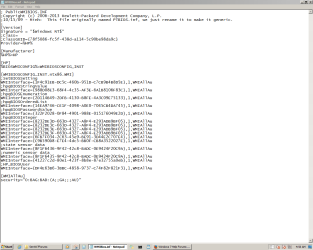
I need to try the BIOS password clearer you linked to. I have the HP BIOS downloaded on a clean computer to a new flash drive. However, I've run across PowerShell XML scripts that appear to force reboot as soon as you attempt to flash BIOS with a shocking error message screen right before it restarts. They simply rewrite the BIOS to their stored settings, as shown in this screen shot..

WMIBIOS_inf.PNG

It is odd that you have to log into this forum multiple times to make a post. It is a redirection in an attempt to key-log my password. So far my copy post, sign out, close Firefox, open Firefox, sign in, paste post strategy has worked.

re: post #28:
The "DO" in the URL is normal.


I'm not sure what the "X:\V::" could be or where the XP OS is coming from. Let's see if Jacee or other forum members know of tools that might wipe the drive better. That would be wonderful! In the meantime, I need to work on clearing out the substitute BIOS and my cable modem (no router). I'm working through your posts as I have time.

REALLY, REALLY appreciate your help, UNI! UG
 

My Computer My Computer

At a glance

Windows 7 Pro 64 bitAthlon II X2 B248 GBIntegrated Radeon HD4200
Computer type
PC/Desktop
Computer Manufacturer/Model Number
HP Pro 6005 SFF refurbished by Joy
OS
Windows 7 Pro 64 bit
CPU
Athlon II X2 B24
Motherboard
HP 3047-h
Memory
8 GB
Graphics Card(s)
Integrated Radeon HD4200
Hard Drives
GB0750C8047
Seagate Barracuda 7200.9 250GB
Browser
IE 11
Adding to my post #51

UNI, I tried clearing the BIOS/CMOS using Method 2 here as you recommended in your post#46. I've tried the other 2 ways numerous times without success.

Failing to enter the Setup Password 3 times did not give me the code I needed (surprise,surprise - NOT!). The PC simply proceeded to boot successfully (for the baddies, I guess).

Could we take the info in that "WMIBIOS.inf" Notepad document and do anything with it to clear BIOS? I notice an entry for "hpqBIOSPasswordValue" and "HPBIOSUser". What about that security code at the end?

Thanks, UNI, for any insight you might have.


My Computer My Computer

At a glance

Windows 7 Pro 64 bitAthlon II X2 B248 GBIntegrated Radeon HD4200
Computer type
PC/Desktop
Computer Manufacturer/Model Number
HP Pro 6005 SFF refurbished by Joy
OS
Windows 7 Pro 64 bit
CPU
Athlon II X2 B24
Motherboard
HP 3047-h
Memory
8 GB
Graphics Card(s)
Integrated Radeon HD4200
Hard Drives
GB0750C8047
Seagate Barracuda 7200.9 250GB
Browser
IE 11
Maybe I'm not understanding what you are saying:
You mentioned running across PowerShell XML scripts and then you show a WMIBIOS.inf file opened in notepad. The contents of that INF file are not in the XML format* and the contents do not form a PowerShell script**. The INF file might be used by a PowerShell script, but the file itself is not a script. Think of that file as an answer file. Something that is used to tell a generic app info that it needs to do a specific series of tasks.


*Scroll down a bit for the sample XML file.
https://technet.microsoft.com/en-us/library/ms191234(v=sql.105).aspx

** Scan this website for sample PowerShell scripts:
https://technet.microsoft.com/en-us/magazine/hh551144.aspx


The WMIBIOS.inf file seems to be for a 32bit app. Maybe that is not a problem or maybe you need a WMIBIOS.inf file that has the answers for a 64bit BIOS update app. I'm just guessing at this point - since the BIOS update app just reboots the computer without updating BIOS. I would not know how to make use of any of the info in that WMIBIOS.inf file - other than to use if with the app that it was written for.


If you cannot get a Windows based app to update BIOS, can you find a BIOS update app/tool on the HP website that works with Linux? If so, then maybe you could boot to a Linux CD and update BIOS from there.
 

My Computer My Computer

At a glance

W7 Pro SP1 64biti78GBIntel HD Graphics
Computer type
Laptop
Computer Manufacturer/Model Number
Employer provided Dell Latitude
OS
W7 Pro SP1 64bit
CPU
i7
Memory
8GB
Graphics Card(s)
Intel HD Graphics
Hard Drives
crappy SSD
Antivirus
Employer mandated Symantec Endpoint Protection
Browser
Pale Moon 64bit, IE11 64bit & Chrome 64bit
Thanks for more good info, UNI.

Maybe I'm not understanding what you are saying:
You mentioned running across PowerShell XML scripts and then you show a WMIBIOS.inf file opened in notepad. I might be using the nomenclature incorrectly. Also, XMLs try to open in IE and thee page remains blank. For some reason I was able to right click the file and "Open with" Notepad - better than nothing. I'll try to reinstall PowerShell under my user account and see if I can show you some of the XMLs. The contents of that INF file are not in the XML format* and the contents do not form a PowerShell script**. The INF file might be used by a PowerShell script, but the file itself is not a script. Think of that file as an answer file. Something that is used to tell a generic app info that it needs to do a specific series of tasks. That makes sense to me despite my ignorance of any kind of coding/scripting/command line syntax (I can copy & paste!), etc.

Looking closely at the 3rd line of WMIBIOS.inf, who do you suppose our friend Minh might be?


*Scroll down a bit for the sample XML file.
https://technet.microsoft.com/en-us/library/ms191234(v=sql.105).aspx

** Scan this website for sample PowerShell scripts:
https://technet.microsoft.com/en-us/magazine/hh551144.aspx


The WMIBIOS.inf file seems to be for a 32bit app. Wouldn't that make sense if SYSTEM is really within the XP installation on the virtual drive? Maybe that is not a problem or maybe you need a WMIBIOS.inf file that has the answers for a 64bit BIOS update app. I'm just guessing at this point - since the BIOS update app just reboots the computer without updating BIOS. I would not know how to make use of any of the info in that WMIBIOS.inf file - other than to use if with the app that it was written for. Am I right that those long alphanumerics in {} are registry keys? I don't mind fooling around in the registry since this has become a junk PC anyhow, it appears.


If you cannot get a Windows based app to update BIOS, can you find a BIOS update app/tool on the HP website that works with Linux? If so, then maybe you could boot to a Linux CD and update BIOS from there. I have tried booting from Ubuntu 14 CD. The W7 install screen comes up :confused: !

Going to do some tasks - back when I've got the info.

Thanks again,UNI
 
Last edited:

My Computer My Computer

At a glance

Windows 7 Pro 64 bitAthlon II X2 B248 GBIntegrated Radeon HD4200
Computer type
PC/Desktop
Computer Manufacturer/Model Number
HP Pro 6005 SFF refurbished by Joy
OS
Windows 7 Pro 64 bit
CPU
Athlon II X2 B24
Motherboard
HP 3047-h
Memory
8 GB
Graphics Card(s)
Integrated Radeon HD4200
Hard Drives
GB0750C8047
Seagate Barracuda 7200.9 250GB
Browser
IE 11
You can manually open notepad...
...set it to wrap text (Format > Word Wrap)
...drag/drop any file that you want into notepad.

If you happen to drag/drop an EXE or DLL file into notepad, ignore the gibberish and scroll thru to read any plain text that there might be. I've found command line switches by doing that. If the file won't open because it is in use by another process, opening a copy of the file of interest sometimes helps (e.g. C:\Windows\Logs\CBS\CBS.log). If the file is too big for notepad, Wordpad might be able to handle it. I've opened 1GB+ text CBS log files in WordPad.


Minh works for HP in some capacity. That line is a changelog.


The alphanumeric items within those brackets are WmiClassGUID. You can read about them in this MS Word doc:
download.microsoft.com/download/9/c/5/9c5b2167-8017-4bae-9fde-d599bac8184a/wmi_security.doc Skip to pages 7 and 8.

You mentioned the registry. I think that you were thinking of a Class-GUID. The WmiClassGUID that you see in that INF file are longer than a Class-GUID. You can read about Class-GUIDs here: https://technet.microsoft.com/en-us/library/cc957340.aspx


If you can run a 64bit app, then you are on a 64bit OS. XP can be 64bit too.


To boot to a Linux CD, bring up the boot options menu. For HP, you repeatedly tap F9 during a reboot or force the menu by incorrectly powering down the computer.
 

My Computer My Computer

At a glance

W7 Pro SP1 64biti78GBIntel HD Graphics
Computer type
Laptop
Computer Manufacturer/Model Number
Employer provided Dell Latitude
OS
W7 Pro SP1 64bit
CPU
i7
Memory
8GB
Graphics Card(s)
Intel HD Graphics
Hard Drives
crappy SSD
Antivirus
Employer mandated Symantec Endpoint Protection
Browser
Pale Moon 64bit, IE11 64bit & Chrome 64bit
BEEPASQUILLRAOOOOOBEEP! ALARM! SYNAPSE OVERLOAD! SHUT DOWN UBERGOOBER'S BRAIN IMMEDIATELY TO PREVENT FATAL ERROR! :shock:

I'm going to explore what you provided over the next 2 or 3 days, UNI.


You can manually open notepad...
...set it to wrap text (Format > Word Wrap)
...drag/drop any file that you want into notepad.

If you happen to drag/drop an EXE or DLL file into notepad (Didn't know you could do that!), ignore the gibberish and scroll thru to read any plain text that there might be. I've found command line switches by doing that (if I do, might you be willing to help me interpret them?). If the file won't open because it is in use by another process, opening a copy of the file of interest sometimes helps (e.g. C:\Windows\Logs\CBS\CBS.log). If the file is too big for notepad, Wordpad might be able to handle it. I've opened 1GB+ text CBS log files in WordPad.


Minh works for HP in some capacity. That line is a changelog.


The alphanumeric items within those brackets are WmiClassGUID. You can read about them in this MS Word doc:
download.microsoft.com/download/9/c/5/9c5b2167-8017-4bae-9fde-d599bac8184a/wmi_security.doc Skip to pages 7 and 8.

You mentioned the registry. I think that you were thinking of a Class-GUID. The WmiClassGUID that you see in that INF file are longer than a Class-GUID. You can read about Class-GUIDs here: https://technet.microsoft.com/en-us/library/cc957340.aspx


If you can run a 64bit app, then you are on a 64bit OS. XP can be 64bit too.


To boot to a Linux CD, bring up the boot options menu. Ubuntu CD asked for "any key to boot from CD", which I did. F9 still works, too. I have CD/USB/HDD order just in hopes I'll always be able to boot from something. I'm talking about the problem mentioned in posts 28 and 49 where W2000, XPHome & Vista install CD's just trigger loading of the malware's version Of W7. Did it to Ubuntu, too. For HP, you repeatedly tap F9 during a reboot or force the menu by incorrectly powering down the computer.

Gonna get some brain food! Thanks again, UNI. UG
 

My Computer My Computer

At a glance

Windows 7 Pro 64 bitAthlon II X2 B248 GBIntegrated Radeon HD4200
Computer type
PC/Desktop
Computer Manufacturer/Model Number
HP Pro 6005 SFF refurbished by Joy
OS
Windows 7 Pro 64 bit
CPU
Athlon II X2 B24
Motherboard
HP 3047-h
Memory
8 GB
Graphics Card(s)
Integrated Radeon HD4200
Hard Drives
GB0750C8047
Seagate Barracuda 7200.9 250GB
Browser
IE 11
So sorry to have left this hanging, UNI. Had a health problem.

Wanted to provide these attachments for folks who might be figuring out whether they have this malware or not. If you have the time and inclination, please look them over and let us know of any ideas they spark.

Again, I thank you very much for all the time and effort you put in to helping me. UG

View attachment usbinfcopy.txt

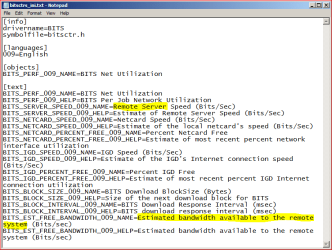
RemoteServerBitsINI.PNG

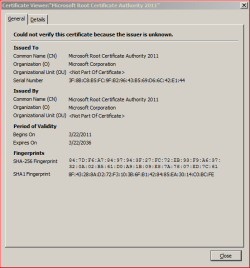
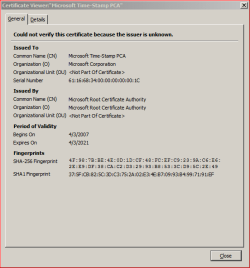
BadRootCert.PNG

BadCert.PNG

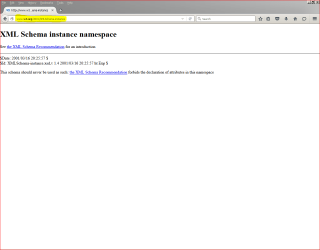
ForbiddenSchema.PNG

schema.PNG

schema2.PNG

schema3.PNG
 

My Computer My Computer

At a glance

Windows 7 Pro 64 bitAthlon II X2 B248 GBIntegrated Radeon HD4200
Computer type
PC/Desktop
Computer Manufacturer/Model Number
HP Pro 6005 SFF refurbished by Joy
OS
Windows 7 Pro 64 bit
CPU
Athlon II X2 B24
Motherboard
HP 3047-h
Memory
8 GB
Graphics Card(s)
Integrated Radeon HD4200
Hard Drives
GB0750C8047
Seagate Barracuda 7200.9 250GB
Browser
IE 11
I see nothing wrong with the usbinfcopy text file that you attached and the file that you show via Notepad is normal. The remote server being talked about there is a Windows Update server. A server that sends you OS patches.

I'm not sure what you are attempting to convey with the other screenshots. You will need to provide some context of how you got the them.
 

My Computer My Computer

At a glance

W7 Pro SP1 64biti78GBIntel HD Graphics
Computer type
Laptop
Computer Manufacturer/Model Number
Employer provided Dell Latitude
OS
W7 Pro SP1 64bit
CPU
i7
Memory
8GB
Graphics Card(s)
Intel HD Graphics
Hard Drives
crappy SSD
Antivirus
Employer mandated Symantec Endpoint Protection
Browser
Pale Moon 64bit, IE11 64bit & Chrome 64bit
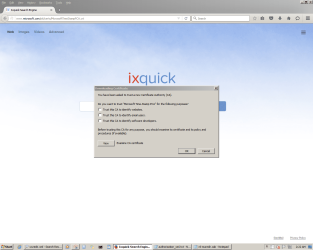
ixquick is a 'proxy' search page ... https://en.wikipedia.org/wiki/Ixquick

Ixquick.com is not safe to use. As a matter of fact, it is a malicious website that pretends to be a real search website but actually it aims to promote advertisements and its associate websites by redirecting users to where they want. Apart from that, this website may also collect some sensitive data while you are using it.

More here: How to Remove Ixquick.com Redirect (Ixquick.com Search Hijacking Removal Guide)- AnviSoft
Don't install anything. Follow manual instructions
 

My Computer My Computer

At a glance

Windows 7 Ultimate 32bit SP1Intel(R) Core(TM)2 Quad CPU @ 2.40GHz, 2400 MHz4 GBATI Radeon HD 2600 Pro
Computer type
PC/Desktop
Computer Manufacturer/Model Number
Bruce ... somewhere in his 40's
OS
Windows 7 Ultimate 32bit SP1
CPU
Intel(R) Core(TM)2 Quad CPU @ 2.40GHz, 2400 MHz
Motherboard
INTEL/D975XBX2
Memory
4 GB
Graphics Card(s)
ATI Radeon HD 2600 Pro
Monitor(s) Displays
Samsung SyncMaster 914v
Screen Resolution
1280 x 1024
Hard Drives
2/500GB each ... ST3500630AS ATA Device.
One is not connected
PSU
Rocketfish 700 W
Case
G.Skill Gigabyte Chassis
Keyboard
Standard PS/2 Keyboard
Mouse
Microsoft PS/2 Mouse
Internet Speed
DSL
Antivirus
Avira Internet Security
Browser
IE 11
Other Info
ATI HDMI Audio
Back
Top