Solved Win Def Offline - no access to results, no log created

RecycleBin emptied: 63597 bytes
Process complete!

Total Files Cleaned = 411.00 mb
Looks like TFC got rid of a lot of temporary files!

Run the computer for a bit, then let me know what's going on with it.
 

My Computer My Computer

At a glance

Windows 7 Ultimate 32bit SP1Intel(R) Core(TM)2 Quad CPU @ 2.40GHz, 2400 MHz4 GBATI Radeon HD 2600 Pro
Computer type
PC/Desktop
Computer Manufacturer/Model Number
Bruce ... somewhere in his 40's
OS
Windows 7 Ultimate 32bit SP1
CPU
Intel(R) Core(TM)2 Quad CPU @ 2.40GHz, 2400 MHz
Motherboard
INTEL/D975XBX2
Memory
4 GB
Graphics Card(s)
ATI Radeon HD 2600 Pro
Monitor(s) Displays
Samsung SyncMaster 914v
Screen Resolution
1280 x 1024
Hard Drives
2/500GB each ... ST3500630AS ATA Device.
One is not connected
PSU
Rocketfish 700 W
Case
G.Skill Gigabyte Chassis
Keyboard
Standard PS/2 Keyboard
Mouse
Microsoft PS/2 Mouse
Internet Speed
DSL
Antivirus
Avira Internet Security
Browser
IE 11
Other Info
ATI HDMI Audio
Yep. It appears to me the scum hides a lot of its instructions and net logon info to allow hundreds of connections in there. I'm sure TFC got a bunch I never could see.

Still being redirected in Firefox; wasn't hijacked from IXQuick to another home page, but my settings won't hold.

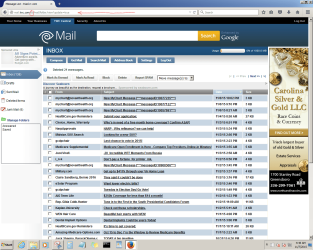
Logging in to my ISP webmail, these were exposed:

PageHijack.png

View attachment Hijack.txt

r_search_yahoo.PNG

View attachment r.search.yahoo.com.txt

TWCWebmail.PNG

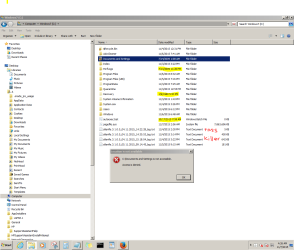
I find this folder structure suspect, too.

Explore.PNG

Thanks for all your time and effort helping me, Jacee. UG
 
Last edited:

My Computer My Computer

At a glance

Windows 7 Pro 64 bitAthlon II X2 B248 GBIntegrated Radeon HD4200
Computer type
PC/Desktop
Computer Manufacturer/Model Number
HP Pro 6005 SFF refurbished by Joy
OS
Windows 7 Pro 64 bit
CPU
Athlon II X2 B24
Motherboard
HP 3047-h
Memory
8 GB
Graphics Card(s)
Integrated Radeon HD4200
Hard Drives
GB0750C8047
Seagate Barracuda 7200.9 250GB
Browser
IE 11
Looks like the scan report of that URL shows malware site. https://www.virustotal.com/en/url/9...030b7204f5a2f6ce31591e0f3e485fccae3/analysis/

Flush the DNS cache and restore MS's Hosts file.

Copy and paste these lines in Note pad.

@Echo on
pushd\windows\system32\drivers\etc
attrib -h -s -r hosts
echo 127.0.0.1 localhost>HOSTS
attrib +r +h +s hosts
popd
ipconfig /release
ipconfig /renew
ipconfig /flushdns
netsh winsock reset all
netsh int ip reset all
shutdown -r -t 1
del %0


Save as flush.bat to your desktop.
Right click on the flush.bat file to run it as Administrator. Your computer will reboot itself.

Now look in these browsers and disable any browser add-ons:
How to disable add-ons/extensions in your browser?

Reset your home page.
 

My Computer My Computer

At a glance

Windows 7 Ultimate 32bit SP1Intel(R) Core(TM)2 Quad CPU @ 2.40GHz, 2400 MHz4 GBATI Radeon HD 2600 Pro
Computer type
PC/Desktop
Computer Manufacturer/Model Number
Bruce ... somewhere in his 40's
OS
Windows 7 Ultimate 32bit SP1
CPU
Intel(R) Core(TM)2 Quad CPU @ 2.40GHz, 2400 MHz
Motherboard
INTEL/D975XBX2
Memory
4 GB
Graphics Card(s)
ATI Radeon HD 2600 Pro
Monitor(s) Displays
Samsung SyncMaster 914v
Screen Resolution
1280 x 1024
Hard Drives
2/500GB each ... ST3500630AS ATA Device.
One is not connected
PSU
Rocketfish 700 W
Case
G.Skill Gigabyte Chassis
Keyboard
Standard PS/2 Keyboard
Mouse
Microsoft PS/2 Mouse
Internet Speed
DSL
Antivirus
Avira Internet Security
Browser
IE 11
Other Info
ATI HDMI Audio
Thanks, Jacee

Ran the batch file. Mozilla seems OK. Should I accept version 42 I'm being offered?

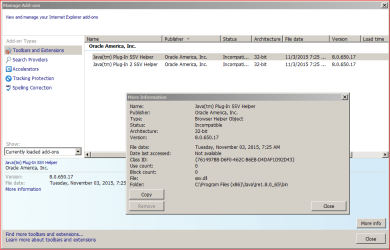
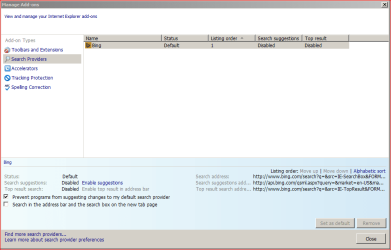
IE is still under the control of the malware, I think.

IE_NoRemove.PNG

IE_NoRemove2.PNG

BingIE_NoRemove.PNG
 

My Computer My Computer

At a glance

Windows 7 Pro 64 bitAthlon II X2 B248 GBIntegrated Radeon HD4200
Computer type
PC/Desktop
Computer Manufacturer/Model Number
HP Pro 6005 SFF refurbished by Joy
OS
Windows 7 Pro 64 bit
CPU
Athlon II X2 B24
Motherboard
HP 3047-h
Memory
8 GB
Graphics Card(s)
Integrated Radeon HD4200
Hard Drives
GB0750C8047
Seagate Barracuda 7200.9 250GB
Browser
IE 11
Updating Java:
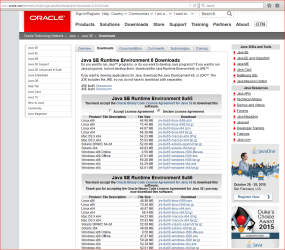
  • Download the latest version of Java SE Runtime Environment 8 - Downloads.
  • Scroll down to where it says "Java Runtime Environment (JRE) 8u66 allows end-users to run Java applications".
  • Click the "Download" button to the right.
  • Check the box that says: "Accept License Agreement".
  • The page will refresh.
  • Click on the link to download Windows Offline Installation with or without Multi-language and save to your desktop.
  • Close any programs you may have running - especially your web browser.
  • Go to Start > Control Panel double-click on Programs and Features programs and remove all older versions of Java.
  • Check any item with Java Runtime Environment (JRE or J2SE) in the name.
  • Click the Remove or Change/Remove button.
  • Repeat as many times as necessary to remove each Java versions.
  • Reboot your computer once all Java components are removed.
  • Then from your desktop double-click on
    Windows x6454.38 MB jre-8u66-windows-x64.exe to install the newest version.
You need to read this about enabling Java SSV plug-in Tech ARP - ED#143 : Java Plug-In SSV Helper - Should It Stay Or Should It Go? Rev. 3.0
 

My Computer My Computer

At a glance

Windows 7 Ultimate 32bit SP1Intel(R) Core(TM)2 Quad CPU @ 2.40GHz, 2400 MHz4 GBATI Radeon HD 2600 Pro
Computer type
PC/Desktop
Computer Manufacturer/Model Number
Bruce ... somewhere in his 40's
OS
Windows 7 Ultimate 32bit SP1
CPU
Intel(R) Core(TM)2 Quad CPU @ 2.40GHz, 2400 MHz
Motherboard
INTEL/D975XBX2
Memory
4 GB
Graphics Card(s)
ATI Radeon HD 2600 Pro
Monitor(s) Displays
Samsung SyncMaster 914v
Screen Resolution
1280 x 1024
Hard Drives
2/500GB each ... ST3500630AS ATA Device.
One is not connected
PSU
Rocketfish 700 W
Case
G.Skill Gigabyte Chassis
Keyboard
Standard PS/2 Keyboard
Mouse
Microsoft PS/2 Mouse
Internet Speed
DSL
Antivirus
Avira Internet Security
Browser
IE 11
Other Info
ATI HDMI Audio
Before I follow your instructions, I'd like to make sure the malware isn't messing in our business.

The page with the article keeps trying to redirect, but Firefox doesn't allow it. The Java page doesn't match your description. Is this what you saw?
JavaSnip.PNG

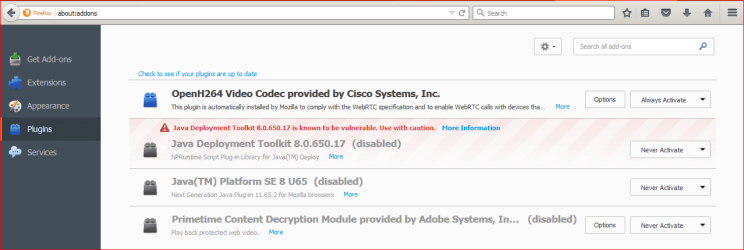
Here are the settings I see in Firefox now for plug-ins. There's nothing in Extensions, Appearance or Services.
AddOns.PNG

I wonder if the SSV architecture is 32-bit because the OS of the VM the malware installed in my C: partition is XP. It's controlled from a remote server, so they might need the Java stuff. I certainly don't want any Browser Helper Objects.

Should I uninstall Java 6 Update 65, reboot and reinstall it? That's the only Java thing in Add/Remove Programs.

Do you recommend having JRE anyway?

Thanks, UG
 

My Computer My Computer

At a glance

Windows 7 Pro 64 bitAthlon II X2 B248 GBIntegrated Radeon HD4200
Computer type
PC/Desktop
Computer Manufacturer/Model Number
HP Pro 6005 SFF refurbished by Joy
OS
Windows 7 Pro 64 bit
CPU
Athlon II X2 B24
Motherboard
HP 3047-h
Memory
8 GB
Graphics Card(s)
Integrated Radeon HD4200
Hard Drives
GB0750C8047
Seagate Barracuda 7200.9 250GB
Browser
IE 11
I wonder if the SSV architecture is 32-bit because the OS of the VM the malware installed in my C: partition is XP. It's controlled from a remote server, so they might need the Java stuff. I certainly don't want any Browser Helper Objects.

Should I uninstall Java 6 Update 65, reboot and reinstall it? That's the only Java thing in Add/Remove Programs.

Please forgive me, but I don't understand/follow what you're saying.
Are you double booting both Windows7 Pro (X64) and Windows XP (X32)? :confused: I'm not sure how that's possible.

Java 6 Update 65 is way, way out of date!
 

My Computer My Computer

At a glance

Windows 7 Ultimate 32bit SP1Intel(R) Core(TM)2 Quad CPU @ 2.40GHz, 2400 MHz4 GBATI Radeon HD 2600 Pro
Computer type
PC/Desktop
Computer Manufacturer/Model Number
Bruce ... somewhere in his 40's
OS
Windows 7 Ultimate 32bit SP1
CPU
Intel(R) Core(TM)2 Quad CPU @ 2.40GHz, 2400 MHz
Motherboard
INTEL/D975XBX2
Memory
4 GB
Graphics Card(s)
ATI Radeon HD 2600 Pro
Monitor(s) Displays
Samsung SyncMaster 914v
Screen Resolution
1280 x 1024
Hard Drives
2/500GB each ... ST3500630AS ATA Device.
One is not connected
PSU
Rocketfish 700 W
Case
G.Skill Gigabyte Chassis
Keyboard
Standard PS/2 Keyboard
Mouse
Microsoft PS/2 Mouse
Internet Speed
DSL
Antivirus
Avira Internet Security
Browser
IE 11
Other Info
ATI HDMI Audio
Oh, boy, did I mess that up! And hit "submit" without checking it over well.

Mis-typed Java "6" - should be "8". Installed 11/3.
View attachment 375474

As the article you linked to said, these Java SSV Browser Helper Objects are automatically included with the Java updates so network administrators in domains using old Java applications can easily change all domain computers' Java settings with one click. I just remove them (don't always remember to immediately.)

The SSV BHOs were removable in Firefox, but not IE, where the option is greyed out. I think this is malware behavior.
View attachment 375475

Here are 4 blog posts at InfoSec describing mechanisms this malware uses for stealth and persistence. I've seen symptoms of each. I don't feel competent to follow their procedures, though.

Part 1 File Associations Hijacking and BITS Backdoor
Part 2 Program.exe and Service Failure Recovery Startups
Part 3 Service Triggers based on ETW and Attach a debugger with ImageFileExecutionOptions
Part 4 Winlogon Events and Scheduled Tasks

So...

I bought this PC refurbished. It had only the 100MB "System Reserved" Partition and W7 Pro on the rest of the HDD. I never set up a virtual machine or drive on it. I never added another OS to dual boot.

My local tech said that Time Warner Cable's redirect (when you mistype a URL and it takes you to their website) leaves open a backdoor vulnerability that was exploited by the malware I have now. It locked me out of my modem with a new password, reconfigured it to allow hundreds of remote users to connect, messed with IP addresses and DHCP.

The first symptom was a glitchy mouse - I actually threw away a perfectly good USB optical mouse. PS/2 drivers had been substituted within the USB serial bus controllers somehow. I physically removed the serial adapter and uninstalled it, but it's still listed in device manager as active and working fine!

Long story shorter (but not much, I'm afraid:(), I DBANed the HDD since a W7Pro disc came with the PC. Then I booted without any disc or USB device. The PC booted to "X:/v::", Windows XP Pro on a hidden, virtual HDD (not just a hidden partition within C:)!

This XP installation is SYSTEM, Trusted Installer, etc. It wouldn't let me do anything to it without being an Authenticated User, the Group that's allowed remote access to take every document, piece of media, and visited webpage on my PC.

I reinstalled clean from my W7Pro disc to get online to research the problem. The virtual drive was obviously still in control. I couldn't override it with the hidden admin account turned on through lusrmgr.msc command.

Later I tried booting from a 2000 Pro disc to get low-level format. The malware simply installed its cached altered version of my W7 Pro! The DVD drive whirred - I think they were copying it. Certainly 2000 didn't become available. Same with Vista Business and XP Pro. Tried Ubuntu - it appeared to begin installation, but some fake "fatal error" forced a reboot.

Every boot, whether a cable is connected to the modem or not, is PXE through HP (was Intel, but they changed it when I tried HP Support) Boot Agent. I'm locked out of BIOS setup (the HP procedure to clear CMOS and passwords doesn't work). Of course there are lots more symptoms I won't go into here.

This why I keep asking (in several other posts/threads) if there's another way to wipe the whole HDD while this VM is hiding on it.

I realize this is intensive and time-consuming, Jacee. I can't tell you how much I appreciate the attention you've been able to give this. Hope I've cleared up the confusion.

Thanks much, UG

UH-oh!!! Look at the "do" in the URL for the page I'm on...
http://www.sevenforums.com/newreply.php?do=newreply&noquote=1&p=3172809
It shows up in hijacked page URLs I get sent to. I'm showing as logged in on this page, but it sent me to the login page when I pressed "Submit Reply".


My Computer My Computer

At a glance

Windows 7 Pro 64 bitAthlon II X2 B248 GBIntegrated Radeon HD4200
Computer type
PC/Desktop
Computer Manufacturer/Model Number
HP Pro 6005 SFF refurbished by Joy
OS
Windows 7 Pro 64 bit
CPU
Athlon II X2 B24
Motherboard
HP 3047-h
Memory
8 GB
Graphics Card(s)
Integrated Radeon HD4200
Hard Drives
GB0750C8047
Seagate Barracuda 7200.9 250GB
Browser
IE 11
I think you should talk to the person you bought the computer from. The one who refurbished it should have an idea, as to if it was updated from Windows XP to Windows 7 pro, and what media they used.
 

My Computer My Computer

At a glance

Windows 7 Ultimate 32bit SP1Intel(R) Core(TM)2 Quad CPU @ 2.40GHz, 2400 MHz4 GBATI Radeon HD 2600 Pro
Computer type
PC/Desktop
Computer Manufacturer/Model Number
Bruce ... somewhere in his 40's
OS
Windows 7 Ultimate 32bit SP1
CPU
Intel(R) Core(TM)2 Quad CPU @ 2.40GHz, 2400 MHz
Motherboard
INTEL/D975XBX2
Memory
4 GB
Graphics Card(s)
ATI Radeon HD 2600 Pro
Monitor(s) Displays
Samsung SyncMaster 914v
Screen Resolution
1280 x 1024
Hard Drives
2/500GB each ... ST3500630AS ATA Device.
One is not connected
PSU
Rocketfish 700 W
Case
G.Skill Gigabyte Chassis
Keyboard
Standard PS/2 Keyboard
Mouse
Microsoft PS/2 Mouse
Internet Speed
DSL
Antivirus
Avira Internet Security
Browser
IE 11
Other Info
ATI HDMI Audio
I bought it through Newegg, refurbished by Joy Systems. The old HP sticker is Windows 7 so it came with that, and Joy had to change the license # "For Authentication Only."

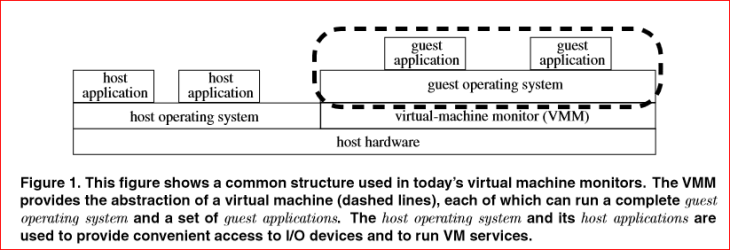
Sub Virt is probably what's controlling my PC, Jacee.

U.Mich and Microsoft Research published a paper about it in 2006. (web.eecs.umich.edu/virtual/papers/king06.pdf) Here's a simple description
VMmalware.PNG

Does Microsoft have any solutions yet? If I could break the VM's armor that keeps disk wipers from removing it, that should do the trick, huh? Know of anything?

Thanks again! UG
 

My Computer My Computer

At a glance

Windows 7 Pro 64 bitAthlon II X2 B248 GBIntegrated Radeon HD4200
Computer type
PC/Desktop
Computer Manufacturer/Model Number
HP Pro 6005 SFF refurbished by Joy
OS
Windows 7 Pro 64 bit
CPU
Athlon II X2 B24
Motherboard
HP 3047-h
Memory
8 GB
Graphics Card(s)
Integrated Radeon HD4200
Hard Drives
GB0750C8047
Seagate Barracuda 7200.9 250GB
Browser
IE 11
PC booted to "X:/v::", Windows XP Pro on a hidden, virtual HDD
This makes me think Mac OS X on a Windows PC. VMware on OSx86......

See why: Vmware - OSx86

I can be of no help here!
 

My Computer My Computer

At a glance

Windows 7 Ultimate 32bit SP1Intel(R) Core(TM)2 Quad CPU @ 2.40GHz, 2400 MHz4 GBATI Radeon HD 2600 Pro
Computer type
PC/Desktop
Computer Manufacturer/Model Number
Bruce ... somewhere in his 40's
OS
Windows 7 Ultimate 32bit SP1
CPU
Intel(R) Core(TM)2 Quad CPU @ 2.40GHz, 2400 MHz
Motherboard
INTEL/D975XBX2
Memory
4 GB
Graphics Card(s)
ATI Radeon HD 2600 Pro
Monitor(s) Displays
Samsung SyncMaster 914v
Screen Resolution
1280 x 1024
Hard Drives
2/500GB each ... ST3500630AS ATA Device.
One is not connected
PSU
Rocketfish 700 W
Case
G.Skill Gigabyte Chassis
Keyboard
Standard PS/2 Keyboard
Mouse
Microsoft PS/2 Mouse
Internet Speed
DSL
Antivirus
Avira Internet Security
Browser
IE 11
Other Info
ATI HDMI Audio
Following the instructions in this Tutorial, I tried cleaning out an infection (name unknown, but sorta a super Poweliks). It came up clean after running all 3 types of scans.

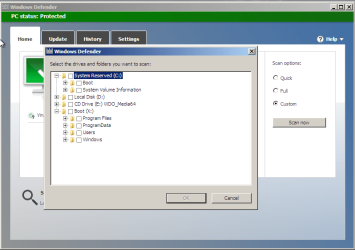
I know that's impossible. The hidden, evil :devil: X: virtual drive (installed within the C: partition space by the virus) was even listed as a choice for Custom Scan, along with Local Disk C: and System Reserved D:!

When I clicked "View Details", a box popped up saying, "You must be the Administrator Security to view these files."

I tried navigating to the location given in the tutorial, but no WDO folder was created at C:\Windows.

What can I try next?
Can you take a picture of what you see via the custom scan drive selection dialog box?

This is what I see:

Capture.PNG
 

My Computer My Computer

At a glance

W7 Pro SP1 64biti78GBIntel HD Graphics
Computer type
Laptop
Computer Manufacturer/Model Number
Employer provided Dell Latitude
OS
W7 Pro SP1 64bit
CPU
i7
Memory
8GB
Graphics Card(s)
Intel HD Graphics
Hard Drives
crappy SSD
Antivirus
Employer mandated Symantec Endpoint Protection
Browser
Pale Moon 64bit, IE11 64bit & Chrome 64bit
~~~
However, I may be blocked from actually affecting settings by the virus...

375091d1446501669t-win-def-offline-no-access-results-no-log-created-allusers.png
What you show in that screenshot is normal.


~~~
"System Reserved D:" is weird cuz it never has a drive letter that I've seen before. But the choices for a Custom Scan in WOD listed it exactly that way. Also listed were "Local Disk C:", my DVD drive as "E:", and the VM where the virus installed XP as "X:".

I've used Parted Magic, Partition Wizard, Bart's PE, Macrium Reflect, Seagate's Acronis Free. HP's hard drive manager, Paragon, D-Ban, Daricks Boot and Nuke. None ever gave System Reserved a drive letter, but once the VM was listed as "V:"; another time as "h:". Sorry I didn't write down which app showed what, but both wipers failed to touch the VM located within partition "C:".
It is normal for some of those tools to assign a drive letter to the system reserve partition. Judging from the folders in the X drive shown in WDO, that drive seems to be where the WDO scanner is operating from.
 

My Computer My Computer

At a glance

W7 Pro SP1 64biti78GBIntel HD Graphics
Computer type
Laptop
Computer Manufacturer/Model Number
Employer provided Dell Latitude
OS
W7 Pro SP1 64bit
CPU
i7
Memory
8GB
Graphics Card(s)
Intel HD Graphics
Hard Drives
crappy SSD
Antivirus
Employer mandated Symantec Endpoint Protection
Browser
Pale Moon 64bit, IE11 64bit & Chrome 64bit
~~~
The computer I'm on now has Systems also with all check marks, (Full Control).
~~~
You were probably checking the Security tab of the Properties dialog box for the root of the OS drive. Take a look at the OP's screenshot again:
375091d1446501669t-win-def-offline-no-access-results-no-log-created-allusers.png


While the "C" drive is highlighted in the left navigation pane, the All Users folder is highlighted in the right pane. The Properties dialog box shown in the foreground is for the folder named All Users. You can see All Users Properties as the title of that dialog box.
 

My Computer My Computer

At a glance

W7 Pro SP1 64biti78GBIntel HD Graphics
Computer type
Laptop
Computer Manufacturer/Model Number
Employer provided Dell Latitude
OS
W7 Pro SP1 64bit
CPU
i7
Memory
8GB
Graphics Card(s)
Intel HD Graphics
Hard Drives
crappy SSD
Antivirus
Employer mandated Symantec Endpoint Protection
Browser
Pale Moon 64bit, IE11 64bit & Chrome 64bit
Your reply to Layback Bear asking, "Are you able to run sfc /scannow?" was: "I did - it said no problems."

Then you went on to totally confuse me with:
~~~
But remember, it is scanning the Windows 7 drive "C:" that the VM XP OS installs whether I insert a Windows 2000 Pro, XP Home, Windows 7 Universal install disc, or the Windows 7 disc shipped with the PC!
~~~

Could you please restate that info another way?
Were you running the SFC scan from WinRE (like this)?
 

My Computer My Computer

At a glance

W7 Pro SP1 64biti78GBIntel HD Graphics
Computer type
Laptop
Computer Manufacturer/Model Number
Employer provided Dell Latitude
OS
W7 Pro SP1 64bit
CPU
i7
Memory
8GB
Graphics Card(s)
Intel HD Graphics
Hard Drives
crappy SSD
Antivirus
Employer mandated Symantec Endpoint Protection
Browser
Pale Moon 64bit, IE11 64bit & Chrome 64bit
~~~
I used Option One, the downloaded zip file. When I double-click the Troubleshooting desktop icon, it sends me to this target:
View attachment 375122

When I double-click "Troubleshooting" there, I get:
375123d1446550422t-win-def-offline-no-access-results-no-log-created-iconinstall.png


That didn't seem right, so...


The screenshot shown in the quote above is normal...
...if you fail to unblock the LNK file via step 4:

59090d1267950459-incoming-connections-troubleshoot-shortcut-create-unblock.jpg
 

My Computer My Computer

At a glance

W7 Pro SP1 64biti78GBIntel HD Graphics
Computer type
Laptop
Computer Manufacturer/Model Number
Employer provided Dell Latitude
OS
W7 Pro SP1 64bit
CPU
i7
Memory
8GB
Graphics Card(s)
Intel HD Graphics
Hard Drives
crappy SSD
Antivirus
Employer mandated Symantec Endpoint Protection
Browser
Pale Moon 64bit, IE11 64bit & Chrome 64bit
No joy with Everything, LB. The Naughty VM still successfully hides itself.Is there a program out that truly wipes the whole HDD, ignoring partitions?Thanks again, UG
I'm not convinced that there is a VM - naughty or otherwise - when you boot to your W7 OS.

There is not much that I can say about the virus redirecting you (mentioned at the end of post #6). Do you still have the shortcut? If yes, can you please post a screenshot of the Properties > Shortcut tab?
 

My Computer My Computer

At a glance

W7 Pro SP1 64biti78GBIntel HD Graphics
Computer type
Laptop
Computer Manufacturer/Model Number
Employer provided Dell Latitude
OS
W7 Pro SP1 64bit
CPU
i7
Memory
8GB
Graphics Card(s)
Intel HD Graphics
Hard Drives
crappy SSD
Antivirus
Employer mandated Symantec Endpoint Protection
Browser
Pale Moon 64bit, IE11 64bit & Chrome 64bit
~~~
This malware installs on whatever machine I'm using if I log onto my ISP webmail.
~~~
What makes you think that?
What evidence of infection do you see?
What antivirus app are you using?


~~~
I wonder if I was presented a substitute by the malware - there wasn't a "Report" button.

375307d1446812923-win-def-offline-no-access-results-no-log-created-noreportbutton.png

~~~
No. You were presented with the latest version.
Jacee's instructions are just old.
The Report button has been renamed.
 

My Computer My Computer

At a glance

W7 Pro SP1 64biti78GBIntel HD Graphics
Computer type
Laptop
Computer Manufacturer/Model Number
Employer provided Dell Latitude
OS
W7 Pro SP1 64bit
CPU
i7
Memory
8GB
Graphics Card(s)
Intel HD Graphics
Hard Drives
crappy SSD
Antivirus
Employer mandated Symantec Endpoint Protection
Browser
Pale Moon 64bit, IE11 64bit & Chrome 64bit
~~~
Still being redirected in Firefox; wasn't hijacked from IXQuick to another home page, but my settings won't hold.
Which settings won't hold? You will need to be more specific than that.

~~~
Logging in to my ISP webmail, these were exposed:

375369d1446909095t-win-def-offline-no-access-results-no-log-created-pagehijack.png

~~~
The first tab seems to indicate that you searched Yahoo for twc email. The second tab is presented to you from a Yahoo server. There is no evidence that this is the result of a hijack, infection or redirect. However, I have no idea what you clicked on in Yahoo's search returns to get to there.


~~~
I find this folder structure suspect, too.

375374d1446909448-win-def-offline-no-access-results-no-log-created-explore.png
There is nothing wrong with being denied access to the Documents and Setting folder. That is supposed to be that way. There is nothing wrong with the date/time stamp on the folder named PerLogs. The date/time stamp on the folder named Recovery might have been changed by one of the tools that you booted to for offline scans.

There are a few reasons why the autoexec.bat file might have been created. It is not hurting anything.
 

My Computer My Computer

At a glance

W7 Pro SP1 64biti78GBIntel HD Graphics
Computer type
Laptop
Computer Manufacturer/Model Number
Employer provided Dell Latitude
OS
W7 Pro SP1 64bit
CPU
i7
Memory
8GB
Graphics Card(s)
Intel HD Graphics
Hard Drives
crappy SSD
Antivirus
Employer mandated Symantec Endpoint Protection
Browser
Pale Moon 64bit, IE11 64bit & Chrome 64bit
Thanks, Jacee

Ran the batch file. Mozilla seems OK. Should I accept version 42 I'm being offered?

IE is still under the control of the malware, I think.
~~~
Again, what makes you think that? What are IE's symptoms?
 

My Computer My Computer

At a glance

W7 Pro SP1 64biti78GBIntel HD Graphics
Computer type
Laptop
Computer Manufacturer/Model Number
Employer provided Dell Latitude
OS
W7 Pro SP1 64bit
CPU
i7
Memory
8GB
Graphics Card(s)
Intel HD Graphics
Hard Drives
crappy SSD
Antivirus
Employer mandated Symantec Endpoint Protection
Browser
Pale Moon 64bit, IE11 64bit & Chrome 64bit
Back
Top