Win7: Enabling HPET, bcdedit /set useplatformclock true (command)

ECH

Banned
Local time
11:54 PM
Messages
63
Win7: Enabling HPET

Hello,

I would like some help to understand a few things about win7+ HPET and Bios+ HPET. To start it was my understanding that if you enabled HTEP in the bios win7 would automatically be using HTEP. However, I'm reading that it does not and will still use the Time Stamp Counter (TSC). So I'm not sure what point it would be enabling it from the bios.

2ndly, using the command bcdedit /set useplatformclock true (then reboot) is said to enable HPET using Win 7. While bcdedit /deletevalue useplatformclock (then reboot) is said to remove it. To test to see if it's working or not you have to use either:
A.
Timer Function Performance (run the program before and after the tweak to see if the QueryPerformanceFrequency() freq value increased or not)
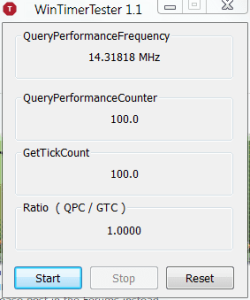
B. WinTimerTester_1.1 (from UncleWebb to see if you have a 1.0000 ratio at or near 100 seconds)
To see if it improves anything or not. From Unclewebbs post he addresses the use of SetFSB. From another point of view it helps improve slow connections when using this application from here.

Should we be using Win7's HPET or stick to TSC for everyday use and gaming?
 
Last edited:

My Computer

OS
Win7
Can someone help me with this one?
 

My Computer

OS
Win7

My Computer

Computer type
PC/Desktop
Computer Manufacturer/Model Number
Home Built Desktop By DataTech
OS
Windows 7 Ultimate X64 SP1
CPU
Intel i5-2550K, Differing ~4.4-4.8GHz No built in GPU
Motherboard
ASUS P8Z68-V PRO/GEN3
Memory
16GB G.Skill Sniper 1866MHz @ 2133MHz 2x8GB
Graphics Card(s)
ASUS GTX650TIB-DC2OC-2GD5, (650TI Boost)
Sound Card
Onboard Realtek 5-1
Monitor(s) Displays
Samsung P2570HD
Screen Resolution
1920x1080
Hard Drives
Samsung 840 Pro 256GB SSD for OS, 500GB Seagate Constellation (Enterprise drive) for Data
PSU
Corsair HX650W
Case
Inwin Dragon Rider
Cooling
Hyper 212 EVO w/two Noctua fans, push-pull, @1300 RPM
Keyboard
E-Z Eyes, bright yellow keys with large characters
Mouse
steelseries SENSEI Laser Pro Gaming
Internet Speed
48-51Mbs Mbs down, 11 Mbs up Xfinity Cable
Antivirus
Norton Internet Security 2013
Browser
IE 10, Opera, Pale Moon if needed
Other Info
4 case fans, LG BluRay-RE, ASUS DVD-RW, Mr. Fusion power supply, 1.21 gigawatts.
Just tried it on my system (running W8 7989 64-bit), and you can see the difference.

Code:
[B]Before[/B]

Report file for timing the various timers.

*** Key number is the avg time.
    The smaller this number, the faster the timer.


QueryPerformanceFrequency() freq  = 0  2458572 


method 0:
  QueryPerfCntr..()  100 times
  tot:   0 10
  avg:   0.100000
  avg time:             4.0674e-008
method 0:
  QueryPerfCntr..()  500 times
  tot:   0 49
  avg:   0.098000
  avg time:             3.98605e-008
method 0:
  QueryPerfCntr..()  1000 times
  tot:   0 98
  avg:   0.098000
  avg time:             3.98605e-008
method 0:
  QueryPerfCntr..()  10000 times
  tot:   0 977
  avg:   0.097700
  avg time:             3.97385e-008


method 1:
  GetTickCount()  100 times
  tot:   0 2
  avg:   0.020000
  avg time:             8.1348e-009
method 1:
  GetTickCount()  500 times
  tot:   0 10
  avg:   0.020000
  avg time:             8.1348e-009
method 1:
  GetTickCount()  1000 times
  tot:   0 19
  avg:   0.019000
  avg time:             7.72806e-009
method 1:
  GetTickCount()  10000 times
  tot:   0 185
  avg:   0.018500
  avg time:             7.52469e-009


method 2:
  TimeGetTime()  100 times
  tot:   0 31
  avg:   0.310000
  avg time:             1.26089e-007
method 2:
  TimeGetTime()  500 times
  tot:   0 46
  avg:   0.092000
  avg time:             3.74201e-008
method 2:
  TimeGetTime()  1000 times
  tot:   0 92
  avg:   0.092000
  avg time:             3.74201e-008
method 2:
  TimeGetTime()  10000 times
  tot:   0 918
  avg:   0.091800
  avg time:             3.73387e-008


method 3:
  Pentium internal high-freq cntr()  100 times
  tot:   0 8
  avg:   0.080000
  avg time:             3.25392e-008
method 3:
  Pentium internal high-freq cntr()  500 times
  tot:   0 37
  avg:   0.074000
  avg time:             3.00988e-008
method 3:
  Pentium internal high-freq cntr()  1000 times
  tot:   0 74
  avg:   0.074000
  avg time:             3.00988e-008
method 3:
  Pentium internal high-freq cntr()  10000 times
  tot:   0 734
  avg:   0.073400
  avg time:             2.98547e-008
Code:
[B]After[/B]

Report file for timing the various timers.

*** Key number is the avg time.
    The smaller this number, the faster the timer.


QueryPerformanceFrequency() freq  = 0  14318180 


method 0:
  QueryPerfCntr..()  100 times
  tot:   0 1652
  avg:   16.520000
  avg time:             1.15378e-006
method 0:
  QueryPerfCntr..()  500 times
  tot:   0 8169
  avg:   16.338000
  avg time:             1.14107e-006
method 0:
  QueryPerfCntr..()  1000 times
  tot:   0 16310
  avg:   16.310000
  avg time:             1.13911e-006
method 0:
  QueryPerfCntr..()  10000 times
  tot:   0 163254
  avg:   16.325400
  avg time:             1.14019e-006


method 1:
  GetTickCount()  100 times
  tot:   0 28
  avg:   0.280000
  avg time:             1.95556e-008
method 1:
  GetTickCount()  500 times
  tot:   0 70
  avg:   0.140000
  avg time:             9.77778e-009
method 1:
  GetTickCount()  1000 times
  tot:   0 119
  avg:   0.119000
  avg time:             8.31111e-009
method 1:
  GetTickCount()  10000 times
  tot:   0 1099
  avg:   0.109900
  avg time:             7.67556e-009


method 2:
  TimeGetTime()  100 times
  tot:   0 105
  avg:   1.050000
  avg time:             7.33333e-008
method 2:
  TimeGetTime()  500 times
  tot:   0 287
  avg:   0.574000
  avg time:             4.00889e-008
method 2:
  TimeGetTime()  1000 times
  tot:   0 546
  avg:   0.546000
  avg time:             3.81333e-008
method 2:
  TimeGetTime()  10000 times
  tot:   0 5362
  avg:   0.536200
  avg time:             3.74489e-008


method 3:
  Pentium internal high-freq cntr()  100 times
  tot:   0 56
  avg:   0.560000
  avg time:             3.91111e-008
method 3:
  Pentium internal high-freq cntr()  500 times
  tot:   0 224
  avg:   0.448000
  avg time:             3.12889e-008
method 3:
  Pentium internal high-freq cntr()  1000 times
  tot:   0 441
  avg:   0.441000
  avg time:             3.08e-008
method 3:
  Pentium internal high-freq cntr()  10000 times
  tot:   0 4613
  avg:   0.461300
  avg time:             3.22178e-008

Capture.png

I managed to stop the clock on 100.0 seconds. The ratio initially fluctuated between 0.9998 and 1.0002, but eventually settled to 1.0000 as shown, with only the occasional ±0.0001 deviation. :D
 

My Computer

Computer type
PC/Desktop
Computer Manufacturer/Model Number
Dwarf Dwf/11/2012 r09/2013
OS
Windows 8.1 Pro RTM x64
CPU
Intel Core-i5-3570K 4-core @ 3.4GHz (Ivy Bridge) (OC 4.4GHz)
Motherboard
ASRock Z77 Extreme4-M
Memory
4 x 4GB DDR3-1600 Corsair Vengeance CMZ8GX3M2A1600C9B (16GB)
Graphics Card(s)
MSI GeForce GTX770 Gaming OC 2GB
Sound Card
Realtek High Definition on board solution (ALC 898)
Monitor(s) Displays
ViewSonic VA1912w Widescreen (VGA)
Screen Resolution
1440x900
Hard Drives
OCZ Agility 3 SSD 120GB SATA III x2 (RAID 0)
Samsung HD501LJ 500GB SATA II x2
Hitachi HDS721010CLA332 1TB SATA II
Iomega 1.5TB Ext USB 2.0
WD 2.0TB Ext USB 3.0
PSU
XFX Pro Series 850W Semi-Modular
Case
Gigabyte IF233
Cooling
1 x 120mm Front Inlet 1 x 120mm Rear Exhaust
Keyboard
Microsoft Comfort Curve Keyboard 3000 (USB)
Mouse
Microsoft Comfort Mouse 3000 for Business (USB)
Internet Speed
NetGear DG834Gv3 ADSL Modem/Router (Ethernet) ~4.0 Mb/s (O2)
Antivirus
Avast! 8.0.1497
Browser
IE 11
Other Info
Optical Drive: HL-DT-ST BD-RE BH10LS30 SATA Bluray
Lexmark S305 Printer/Scanner/Copier (USB)
WEI Score: 8.1/8.1/8.5/8.5/8.25
Asus Eee PC 1011PX Netbook (Windows 7 x86 Starter)
Any information as to why HPET isn't enabled by default for win7?
 

My Computer

OS
Win7
Hi,
Sorry in advance for reviving this old (dead) thread. Since you guys seem to know what you are talking about I'll ask this question:

Whenever I start up my system it gives me the error that HPET could not be enabled because of a BIOS Problem (ID 1). I checked my bios and saw that HPET was set to 32 bit although I am running Windows 7 Pro 64 bit. I changed the value and tried the command line to enable HPET. I rebooted and ran both of the aforementioned tests.

Win Timer Tester 1.1 gives me a stable 1.0001 after about 30 seconds.
Time Function Performance doesn't have significantly different values.

I ran each test several times and it always gives me the same results whether I manually try to turn HPET on or off.

I conclude that this means that for some reason Windows isn't able to start HPET and uses a different (but working) Timecode instead. Now I am totally puzzled about why this happens.

I have a Gigabyte Mainboard Bios Version "Award Software FG" (23.11.2007).

Small sidenote: All my programs etc. work fine, the reason I originally stumbled across the whole HPET thing was that I read that it can cause internet connection drops which I am experiencing randomly from time to time and that don't seem to be related to the ISP or my router settings.
 

My Computer

OS
Windows 7 Professional 64 bit
Back
Top