Windows 7 Blue Task Manager

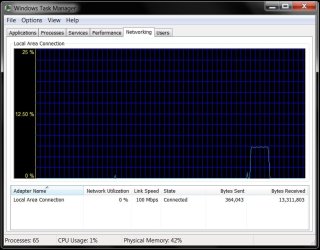
This is indeed 64-Bit compatible. Look at the my screenshot:

Thanks for the verification.

Ok I think that one problem is that the person who made failed to insert this into his readme file, lucky it was added on the web site, also I added it to the OP.

Note: For build 7068 and up (7264, 7600 etc...) use the 7068 version

I don't know why it wants to go to syswow64 folder, they way I did it was use the Take Control Tool with Admin Privilege and not the reg keys following each step carefully. Make sure you use the taskmng from the 7068, I don't know which one you are using since the readme file doesn't say.

Again I'm sorry you are having trouble with this.

@johngalt this works for me on 64 bit Win 7 also

Sammy, thanks for the clarification. I'll make sure to do this when I get done DLing and installing the RTM. hell, I might even make the one I requested myself (using RGB 158/180/255).

I see by your screen shot that it is indeed 64bit compatable Klaw .. why then will my blue taskmgr.exe not paste into the system32 folder instead it pastes into the syswow64 folder. Anyone with any suggestions I'd love to hear from you. I am using the 7066 version Sammy. I did not use the reistry option either I merely took control of the file.

Thanks everyone for your input, I have discovered why it was behaving strangely. By default i am using teracopy to copy files and as soon as I changed that to use the inbuilt filecopy it worked and I now have a blue task manager

Yikes - good to know. I use a third party file manager called Xplorer^2
xplorer² Windows File Manager (Explorer replacement) and it has a build in extended file copy process as well - now that I know this I'll be sure to use Windows Explorer for this.

Edit well I'm glad that you now have blue taskmgr, I was running out of things to try.

Well enjoy the Blue, I know I do.

No I am using version 7264 .. still downloading the RTM from TECHNET it is coming down very slowly :(

Worth the wait. I am still using RC for one more day.....
 

My Computers

System One System Two

  • Computer type
    PC/Desktop
    Computer Manufacturer/Model Number
    The Beast Model A (homebrew)
    OS
    Windows 11 21H2 Current build
    CPU
    AMD Ryzen 9 3950X
    Motherboard
    MSI MEG X570 GODLIKE
    Memory
    4 * 32 GB - Corsair Vengeance 3600 MHz
    Graphics Card(s)
    EVGA GeForce RTX 3080 Ti XC3 ULTRA GAMING (12G-P5-3955-KR)
    Sound Card
    Realtek® ALC1220 Codec
    Monitor(s) Displays
    2x Eve Spectrum ES07D03 4K Gaming Monitor (Matte) | Eve Spec
    Screen Resolution
    3x 3840 x 2160
    Hard Drives
    3x Samsung 980 Pro NVMe PCIe 4 M.2 2 TB SSD (MZ-V8P2T0B/AM) } 3x Sabrent Rocket NVMe 4.0 1 TB SSD
    PSU
    PC Power & Cooling’s Silencer Series 1050 Watt, 80 Plus Plat
    Case
    Fractal Design Define 7 XL Dark ATX Full Tower Case
    Cooling
    SteelSeries Apex Pro Wired Gaming Keyboard
    Keyboard
    SteelSeries Apex Pro
    Mouse
    Logitech MX Master 3S | MX Master 3 for business
    Internet Speed
    AT&T LightSpeed Gigabit Duplex Ftth
    Antivirus
    Windows Defender + MB 3
    Browser
    Nightly (default) + Firefox (stable),Chrome, Edge
  • Computer type
    PC/Desktop
    System Manufacturer/Model Number
    Dell Latitude E5470
    OS
    ChromeOS Flex Dev Channel (current)
    CPU
    Intel(R) Core(TM) i5-6300U CPU @ 2.40GHz, 2501 Mhz, 2 Core(s), 4 Logical Processor(s)
    Motherboard
    Dell
    Memory
    16 GB
    Graphics Card(s)
    Intel(R) HD Graphics 520
    Sound Card
    Intel(R) HD Graphics 520 + RealTek Audio
    Monitor(s) Displays
    Dell laptop display 15"
    Screen Resolution
    1920 * 1080
    Hard Drives
    Toshiba 128GB M.2 22300 drive
    INTEL Cherryville 520 Series SSDSC2CW180A 180 GB SATA III SSD
    PSU
    Dell
    Case
    Dell
    Cooling
    Dell
    Keyboard
    Dell
    Mouse
    Logitech MX Master 3S (shared w. Sys 1) | Dell TouchPad
    Internet Speed
    AT&T LightSpeed Gigabit Duplex Ftth
Windows Task manager

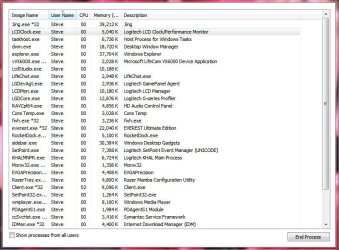
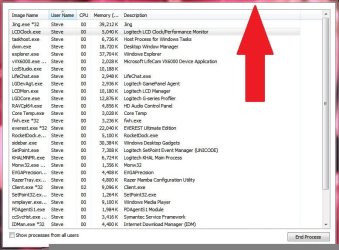
I installed the blue task manager and it worked perfectly however when i booted up today this is all I get when I start my task manager. Hopefully someone has some idea what is going on. I am running windows 7 version 7264
 

Attachments

  • 2009-08-09_1119.jpg
    2009-08-09_1119.jpg
    100.1 KB · Views: 230

My Computer

Computer Manufacturer/Model Number
Own Build
OS
Windows 7 7600 SP1 64 Bit dual boot Windows 8 CP
CPU
i7-2600k currently running @ 4.8 ghz
Motherboard
GA-Z68X-UD5-B3
Memory
8 gig Corsair Dominator 1600 DDR3
Graphics Card(s)
Gigabyte GTX 680
Sound Card
Onboard
Monitor(s) Displays
Dell Ultrasharp U3011
Screen Resolution
2560 x 1600
Hard Drives
1 x 256gb Crucial M4 SSD
2 x 1tb Western Digital Caviar Black
1 x 2tb Western Digital Caviar Green
1 x 2Tb Samsung Story USB 3
1 Ready NAS NV+ with 4x2Tb Drives
PSU
Enermax MAXREVO 1350 Watts
Case
Antec Lanboy Air Case with NZXT Sentry LXE Controller
Cooling
Antec Kuhler 920 with 120 mm Noctua NF-P12 PWM fans
Keyboard
Roccat Isku
Mouse
Roccat Kova Plus
Internet Speed
12000 kbs
Other Info
Brother 6490CW Multifunction Printer
Brother 2170W Laser Printer
Fritz Box 7390 Modem / Router
Logitech Webcam 500
Logitech G25 Racing Wheel
XBox 360 Controller
Logitech Z4 Speakers
WD TV Live
You can double click it just about anywhere other than the area shown in your pic. This has been true of TaskMan for a long time and has caused countless re-installs due to undetectable malware.
 
Thanks Antman it worked ... no idea what causes it???:confused:
 

My Computer

Computer Manufacturer/Model Number
Own Build
OS
Windows 7 7600 SP1 64 Bit dual boot Windows 8 CP
CPU
i7-2600k currently running @ 4.8 ghz
Motherboard
GA-Z68X-UD5-B3
Memory
8 gig Corsair Dominator 1600 DDR3
Graphics Card(s)
Gigabyte GTX 680
Sound Card
Onboard
Monitor(s) Displays
Dell Ultrasharp U3011
Screen Resolution
2560 x 1600
Hard Drives
1 x 256gb Crucial M4 SSD
2 x 1tb Western Digital Caviar Black
1 x 2tb Western Digital Caviar Green
1 x 2Tb Samsung Story USB 3
1 Ready NAS NV+ with 4x2Tb Drives
PSU
Enermax MAXREVO 1350 Watts
Case
Antec Lanboy Air Case with NZXT Sentry LXE Controller
Cooling
Antec Kuhler 920 with 120 mm Noctua NF-P12 PWM fans
Keyboard
Roccat Isku
Mouse
Roccat Kova Plus
Internet Speed
12000 kbs
Other Info
Brother 6490CW Multifunction Printer
Brother 2170W Laser Printer
Fritz Box 7390 Modem / Router
Logitech Webcam 500
Logitech G25 Racing Wheel
XBox 360 Controller
Logitech Z4 Speakers
WD TV Live
Haha I remember when that happened to me first time, I think I was on XP and I double clicked the frame and all of a sudden, everything disappears except the list. Figured I'd double click again and voila, it comes back haha.
 

My Computer

Computer Manufacturer/Model Number
Custom Built
OS
Microsoft Windows 7 Ultimate 64-Bit (Build 7600)
CPU
Core2Quad Q6600 G0 3.60Ghz OC
Motherboard
Gigabyte EP45-UD3R
Memory
4x 1GB Corsair XMS2 800 PC2-6400
Graphics Card(s)
EVGA GeForce GTX 285 1GB 512Bit
Sound Card
Creative X-FI FATAL1TY Gamer Champion Edition
Monitor(s) Displays
2x Samsung SyncMaster 2053BWX
Hard Drives
2x 150GB WD Raptor (RAID0)
4x 500GB SAMSUNG
2x 640GB WD Caviar
PSU
Corsair HX-620
Case
Antec Nine Hundred
Cooling
XIGMATEK Dark Knight
I believe it is called small footprint mode - not sure why anyone would want to use that feature.
 

My Computers

System One System Two

  • Computer type
    PC/Desktop
    OS
    7 X64
    CPU
    i5 8400
    Motherboard
    gigabyte b365m ds3h
    Memory
    2x8gb 3200mhz
    Hard Drives
    various
    PSU
    pure power 11 400w cm
    Case
    Coolermaster
    Cooling
    cryorig m9i
  • Computer type
    PC/Desktop
    OS
    7x64
    CPU
    g5400
    Motherboard
    ga b365m ds3h
    Memory
    8gb ddr4 2400
    PSU
    xfx pro 450w
Yeah I find it pretty useless. I guess one of the developers that wrote taskmgr was just bored and decided to waste his time with this and nobody cared about it.
 

My Computer

Computer Manufacturer/Model Number
Custom Built
OS
Microsoft Windows 7 Ultimate 64-Bit (Build 7600)
CPU
Core2Quad Q6600 G0 3.60Ghz OC
Motherboard
Gigabyte EP45-UD3R
Memory
4x 1GB Corsair XMS2 800 PC2-6400
Graphics Card(s)
EVGA GeForce GTX 285 1GB 512Bit
Sound Card
Creative X-FI FATAL1TY Gamer Champion Edition
Monitor(s) Displays
2x Samsung SyncMaster 2053BWX
Hard Drives
2x 150GB WD Raptor (RAID0)
4x 500GB SAMSUNG
2x 640GB WD Caviar
PSU
Corsair HX-620
Case
Antec Nine Hundred
Cooling
XIGMATEK Dark Knight
Good find Sammy, thanks :D
 

My Computer

Computer Manufacturer/Model Number
HP Touchsmart IQ771.uk
OS
Windows 7 Ultimate x64
CPU
AMD Turion(tm) 64 X2 Mobile Technology TL-56
Motherboard
ASUS Pheonix
Memory
3GB Nanya PC2-6400 DDR2-SDRAM SO-DIM (400MHz)
Graphics Card(s)
NVIDIA GeForce Go 7600 256MB GDDR3 SDRAM
Sound Card
High Definition Intergrated NVIDIA MCP51
Monitor(s) Displays
46" Sony Bravia HDTV
Screen Resolution
1600x1200
Hard Drives
1.5TB Samsug
320GB Seagate ST3320820AS - SATA 3Gb/s 8MB
500GB Maxtor Basics STM305003EHD301-RK
Internet Speed
↓6.32 Mb/s ↑0.35 Mb/s ↔26ms
Other Info
BIOS - American Megatrends Inc. 5.07
Ethernet Port - NVIDIA nForce 10/100/1000 Mbps
DVD Drive - TSSTcorp DVDR/RW TS-T632L
I found this Windows 7 Blue Task Manager by ~xandir112 on deviantART if you like blue like I do you will like this & I'm just passing this along. Make a restore point first to be safe and follow the directions in the winrar file.

This will work on the 7600 build

Edited added System Requirements
- Windows 7 Builds
- Build 7000
- Build 7022
- Build 7068
- Build 7100 RC
- Build 7127, 7137, 7201, 7229, 7231, 7232, 7260, 7264 pre-RTM
- Build 7600.16384 RTM
- Build 7600.16385 RTM Sign Off
- x86/32 bit
- x64/64 bit
Note: For build 7068 and up (7264, 7600 etc...) use the 7068 version

Thanks Sammy for finding this as I already have the blue Vista one, just needed one for Windows 7! :p
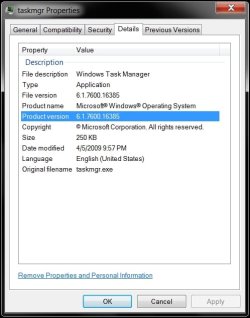
Works perfectly...btw, I edited the details of it using Resource Hacker so it reads the correct version now... :geek:
 

Attachments

  • taskmgr-1.jpg
    taskmgr-1.jpg
    289.5 KB · Views: 14
  • taskmgr-2.jpg
    taskmgr-2.jpg
    260.7 KB · Views: 12
  • taskmgr-info.jpg
    taskmgr-info.jpg
    138.7 KB · Views: 17

My Computer

Computer Manufacturer/Model Number
ABS Tech Ultimate X9
OS
Windows® 7 Ultimate x64 SP1
CPU
Intel Core 2 Duo E8400 (E0) @ 4.0GHz
Motherboard
ASUS P5Q Pro Turbo / 1780 FSB
Memory
G.SKILL-F2-8500CL5D-4GBPK (2x2Gbs) (5-5-5-15) @ 1067Mhz
Graphics Card(s)
EVGA GTX 470 SC (845/1690/2000) 160Gbs
Sound Card
VIA HD Audio / Boston Acoustics
Monitor(s) Displays
Acer X222W HD 22" LCD 2500:1 / 5ms
Screen Resolution
1680x1050
Hard Drives
Seagate Barracuda SATAII 2 x 320GB
Seagate Barracuda SATAII 1Tb
Intel® Rapid Storage Technology v10.1.0.1008
AHCI-NCQ Enabled
PSU
Silent Pro GOLD 80 PLUS 800w /95% efficiency / SLI-Crossfire
Case
ABS Stealth Black-Custom
Cooling
CoolerMaster V6GT 6 Heatpipe 200w CPU Cooler
Keyboard
Logitech G15 Gaming Keyboard (Old Style Blue!)
Mouse
Logitech MX518 Gaming Mouse
Internet Speed
1Mbs-up/ 6Mbs-down
Back
Top