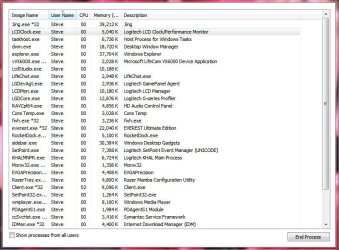
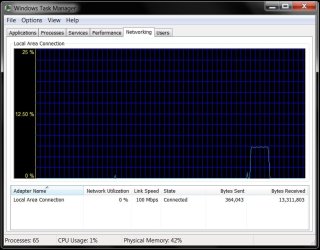
This is indeed 64-Bit compatible. Look at the my screenshot:


Thanks for the verification.
Ok I think that one problem is that the person who made failed to insert this into his readme file, lucky it was added on the web site, also I added it to the OP.
Note: For build 7068 and up (7264, 7600 etc...) use the 7068 version
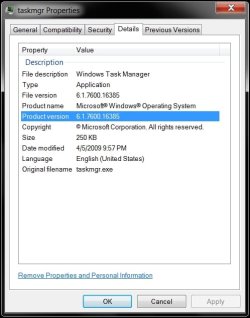
I don't know why it wants to go to syswow64 folder, they way I did it was use the Take Control Tool with Admin Privilege and not the reg keys following each step carefully. Make sure you use the taskmng from the 7068, I don't know which one you are using since the readme file doesn't say.
Again I'm sorry you are having trouble with this.
@johngalt this works for me on 64 bit Win 7 also
Sammy, thanks for the clarification. I'll make sure to do this when I get done DLing and installing the RTM. hell, I might even make the one I requested myself (using RGB 158/180/255).
I see by your screen shot that it is indeed 64bit compatable Klaw .. why then will my blue taskmgr.exe not paste into the system32 folder instead it pastes into the syswow64 folder. Anyone with any suggestions I'd love to hear from you. I am using the 7066 version Sammy. I did not use the reistry option either I merely took control of the file.
Thanks everyone for your input, I have discovered why it was behaving strangely. By default i am using teracopy to copy files and as soon as I changed that to use the inbuilt filecopy it worked and I now have a blue task manager
Yikes - good to know. I use a third party file manager called Xplorer^2
xplorer² Windows File Manager (Explorer replacement) and it has a build in extended file copy process as well - now that I know this I'll be sure to use Windows Explorer for this.
Edit well I'm glad that you now have blue taskmgr, I was running out of things to try.
Well enjoy the Blue, I know I do.
No I am using version 7264 .. still downloading the RTM from TECHNET it is coming down very slowly
Worth the wait. I am still using RC for one more day.....
My Computers
-
At a glance
Windows 11 21H2 Current buildAMD Ryzen 9 3950X4 * 32 GB - Corsair Vengeance 3600 MHzEVGA GeForce RTX 3080 Ti XC3 ULTRA GAMING (12...- Computer type
- PC/Desktop
- Computer Manufacturer/Model Number
- The Beast Model A (homebrew)
- OS
- Windows 11 21H2 Current build
- CPU
- AMD Ryzen 9 3950X
- Motherboard
- MSI MEG X570 GODLIKE
- Memory
- 4 * 32 GB - Corsair Vengeance 3600 MHz
- Graphics Card(s)
- EVGA GeForce RTX 3080 Ti XC3 ULTRA GAMING (12G-P5-3955-KR)
- Sound Card
- Realtek® ALC1220 Codec
- Monitor(s) Displays
- 2x Eve Spectrum ES07D03 4K Gaming Monitor (Matte) | Eve Spec
- Screen Resolution
- 3x 3840 x 2160
- Hard Drives
- 3x Samsung 980 Pro NVMe PCIe 4 M.2 2 TB SSD (MZ-V8P2T0B/AM) } 3x Sabrent Rocket NVMe 4.0 1 TB SSD
- PSU
- PC Power & Cooling’s Silencer Series 1050 Watt, 80 Plus Plat
- Case
- Fractal Design Define 7 XL Dark ATX Full Tower Case
- Cooling
- SteelSeries Apex Pro Wired Gaming Keyboard
- Keyboard
- SteelSeries Apex Pro
- Mouse
- Logitech MX Master 3S | MX Master 3 for business
- Internet Speed
- AT&T LightSpeed Gigabit Duplex Ftth
- Antivirus
- Windows Defender + MB 3
- Browser
- Nightly (default) + Firefox (stable),Chrome, Edge
-
At a glance
ChromeOS Flex Dev Channel (current)Intel(R) Core(TM) i5-6300U CPU @ 2.40GHz, 250...16 GBIntel(R) HD Graphics 520- Computer type
- PC/Desktop
- System Manufacturer/Model Number
- Dell Latitude E5470
- OS
- ChromeOS Flex Dev Channel (current)
- CPU
- Intel(R) Core(TM) i5-6300U CPU @ 2.40GHz, 2501 Mhz, 2 Core(s), 4 Logical Processor(s)
- Motherboard
- Dell
- Memory
- 16 GB
- Graphics Card(s)
- Intel(R) HD Graphics 520
- Sound Card
- Intel(R) HD Graphics 520 + RealTek Audio
- Monitor(s) Displays
- Dell laptop display 15"
- Screen Resolution
- 1920 * 1080
- Hard Drives
- Toshiba 128GB M.2 22300 drive
INTEL Cherryville 520 Series SSDSC2CW180A 180 GB SATA III SSD
- PSU
- Dell
- Case
- Dell
- Cooling
- Dell
- Keyboard
- Dell
- Mouse
- Logitech MX Master 3S (shared w. Sys 1) | Dell TouchPad
- Internet Speed
- AT&T LightSpeed Gigabit Duplex Ftth