Windows 7 dual boot 8.1 installation problem.

muzo

New member
Local time
1:40 AM
Messages
11
Hey guys,

So i have Windows 7 installed on my system and to create Windows Phone apps, i need to install Visual Studio 2013 on Windows 8 or higher.

So I've downloaded Windows 8.1 as an ISO-file and created a partition for it.

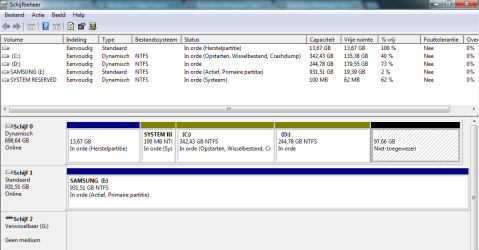
I shrinked my D: volume and created a simple volume, see attachment
The Samsung Volume is my External Harddisk so do not pay attention to that :)

Anyway, when i start the installation, i cannot select the volume I've created. It gives me a error saying that "Windows cannot be installed to this hard disk space. The partition contains one or more dynamic volumes that are not supported for installation."

So i went back to Disk Management and noticed that all my Volumes, in fact my whole Disk 0, is a Dynamic drive.

What do i do now?

I need Windows 8.1 so i wanted it to install it as a dual boot even though i am not a fan of Windows 8.

Thank you in advance :)
 

Attachments

  • Disk Management.png
    Disk Management.png
    67.3 KB · Views: 2

My Computer

Computer type
PC/Desktop
Computer Manufacturer/Model Number
Acer
OS
Windows 7 Home Premium 64bit
CPU
Intel Quad Core Q8300
Motherboard
dig43l agreyhound
Memory
4Gb ddr3 ram
Graphics Card(s)
AMD Radeon HD
Keyboard
Razer Deathstalker Expert Gamingboard
Mouse
Logitech G500
Apparently you failed to notice when trying to create a new Primary partition in Disk Mgmt that it warned that you already had reached the limit of four and were converting the disk to Dynamic, except for the Recovery partition which is protected. The solution to convert it back non-destructively is to use Option One of Convert a Dynamic Disk to a Basic Disk.

Since you can have a total of four Primary partitions or three Primary and unlimited contiguous (adjacent) Logical, what I would then do is convert D to a Logical Partition following How to set partition as Primary or Logical with Partition Wizard so that you can add as many adjacent Logicals as you want using Partition Wizard Create Partition - Video Help
 
Hi Gregrocker,

Thanks for helping me! :)

So I've added the Unallocated partition to D: again and downloaded Partition Wizard 4.2 as in Brinks post.
And opened the software, right clicked at Disk 1 and clicked on "Convert dynamic disk to Basic Disk".

Where i now see all my partition volumes, however when i right click on my D: volume, the "Set partition as Logical" option appears grey..

I've downloaded the latest version of Partition Wizard and It still appears the same on there.

So what do i do now?

-Muzo
 

My Computer

Computer type
PC/Desktop
Computer Manufacturer/Model Number
Acer
OS
Windows 7 Home Premium 64bit
CPU
Intel Quad Core Q8300
Motherboard
dig43l agreyhound
Memory
4Gb ddr3 ram
Graphics Card(s)
AMD Radeon HD
Keyboard
Razer Deathstalker Expert Gamingboard
Mouse
Logitech G500
So if i set my whole Harddrive from dynamic to basic, i can convert my D: drive to Logical?

Hmm, but is that ok though? setting my Harddrive to basic instead of dynamic. if basic is better why wasn't it basic to begin with?
 

My Computer

Computer type
PC/Desktop
Computer Manufacturer/Model Number
Acer
OS
Windows 7 Home Premium 64bit
CPU
Intel Quad Core Q8300
Motherboard
dig43l agreyhound
Memory
4Gb ddr3 ram
Graphics Card(s)
AMD Radeon HD
Keyboard
Razer Deathstalker Expert Gamingboard
Mouse
Logitech G500
The hard drive is Basic to begin with, as a Dynamic disk is only meant to span a data partition across multiple hard drives. That's why I said you must have missed the warning box that it was about to convert to Dynamic.

It must be converted back soon to Basic or it could stop booting.
 
Okay, so I've applied it, and my PC just restarted, then in the latest version of PW I've converted D: drive to a Logical Volume.
And just now I've shrinked D: volume and made a simple volume of it. My Disk Manager sais that both my D: volume and my new partition is a logical volume. So i should be able to install Windows 8.1 on my new partition right?
 

My Computer

Computer type
PC/Desktop
Computer Manufacturer/Model Number
Acer
OS
Windows 7 Home Premium 64bit
CPU
Intel Quad Core Q8300
Motherboard
dig43l agreyhound
Memory
4Gb ddr3 ram
Graphics Card(s)
AMD Radeon HD
Keyboard
Razer Deathstalker Expert Gamingboard
Mouse
Logitech G500
It may be good to see another disk management screenshot now
 

My Computer

Computer type
PC/Desktop
Computer Manufacturer/Model Number
Pauly Special
OS
Win7 Ultimate X64
CPU
Intel i5 3570K
Motherboard
Gigabyte Z77X-DS3H
Memory
8GB DDR3 1600
Graphics Card(s)
Onboard
Sound Card
Onboard
Screen Resolution
1280x1024
Hard Drives
Samsung 840 Evo SSD (OS)
1TB Spinner (Data)
PSU
800W Arctic
Case
Cooler Master
Cooling
3x120mm Fans
Keyboard
MS Wireless
Mouse
MS Wireless
Internet Speed
20M
Hey Pauly,

Sorry for the late reply :)

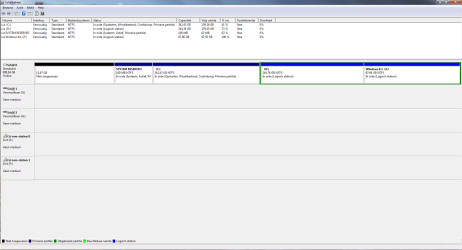
Here is the latest Disk Management screenshot :)

As I've said, I've managed to convert my drive to a basic drive and convert D: volume from dynamic to a Logical volume.

So i should be able to install Dual boot Windows 8.1 on it, right?

Oh and also, can i just mount the ISO and run the installation from there instead of burning it to a DVD?

Thanks in advance,:)

-Muzo
 

Attachments

  • disk manager.png
    disk manager.png
    87.7 KB · Views: 4

My Computer

Computer type
PC/Desktop
Computer Manufacturer/Model Number
Acer
OS
Windows 7 Home Premium 64bit
CPU
Intel Quad Core Q8300
Motherboard
dig43l agreyhound
Memory
4Gb ddr3 ram
Graphics Card(s)
AMD Radeon HD
Keyboard
Razer Deathstalker Expert Gamingboard
Mouse
Logitech G500
Yes 8 should configure a Dual Boot but if not post back another picture of DM.
 
Back
Top