Windows 7 Extremely Slow Startup

videocrafters

New member
Local time
9:16 AM
Messages
6
this computer has been working fine.
today the it stalls at "starting windows" for about 9 minutes before it starts. Then the computer works fine.

I loaded the latest bios. I disconnected all usb devices. I disabled all startup services in msconfig. I had windows look for any system errors and found none. I used the windows install disk to repair and update the os

asus p6x58d-e
windows 7 64bit
24 gig ram
i7 950
GTX-470 latest drivers
antec 1000 watt power supply
nec pa271w monitor
no other cards or devices

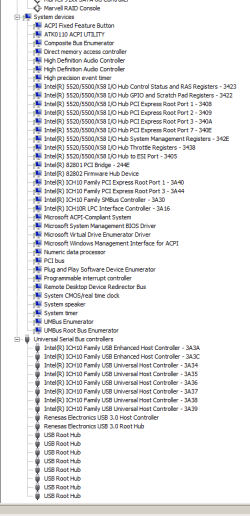
Attached are all the details in device manager (2 files)
 

Attachments

  • Capture1.PNG
    Capture1.PNG
    16.7 KB · Views: 108
  • Capture2.PNG
    Capture2.PNG
    16.1 KB · Views: 72

My Computer

OS
windows 7 64
Be very careful with disabling services...that can have some very bad negative effects. Hopefully, you just meant you shut down some of the start up applications instead. I'm also thinking that it isn't related to the BIOS, or memory checking, as it seems to be getting past that part. Is your HDD light active at all during those 9 minutes?
 

My Computer

OS
Windows 7 Ultimate x64 SP1
CPU
Intel Core i7-2600
Motherboard
Gigabyte GA-P67A-UD3P-B3
Memory
12 GB Patriot Extreme DDR3-1333
Graphics Card(s)
Nvidia GTX 470
Monitor(s) Displays
Dell UltraSharp 2209WA
Hard Drives
OCZ Agility3 240 GB, WD5001AALS, WD7501AALS
PSU
OCZ ModStream 700W
Case
CoolerMaster HAF 912 Advanced
Cooling
CoolerMaster Hyper 212 Plus
Yes the hdd light is active
Correct I just turned off start up services in msconfig
 

My Computer

OS
windows 7 64
That tells me something is chewing away the computer's resources. Just to confirm...you shouldn't be messing with services...just the start up applications. Those are two separate things in msconfig. Don't change things on the Services tab in msconfig. That could lead to all kinds of issues. Only worry about unnecessary items on the Startup tab.
 

My Computer

OS
Windows 7 Ultimate x64 SP1
CPU
Intel Core i7-2600
Motherboard
Gigabyte GA-P67A-UD3P-B3
Memory
12 GB Patriot Extreme DDR3-1333
Graphics Card(s)
Nvidia GTX 470
Monitor(s) Displays
Dell UltraSharp 2209WA
Hard Drives
OCZ Agility3 240 GB, WD5001AALS, WD7501AALS
PSU
OCZ ModStream 700W
Case
CoolerMaster HAF 912 Advanced
Cooling
CoolerMaster Hyper 212 Plus
Try running a clean boot: How to Troubleshoot a Problem by Performing a Clean Startup in Windows 7 or Vista

Win7 Troubleshooting Fundamentals

If you have another hung startup, run a boot trace to see exactly what's hanging it: http://www.msfn.org/board/topic/140247-trace-windows-7-bootshutdownhibernatestandbyresume-issues/

Also if you're running RAID be aware that we see a lot of issues with Win7 and RAID. An SSD will get you better performance, and with built-in drive imaging the second HD can be used for better purposes than having no redundancy.
 
Last edited by a moderator:
Thank you.
I did the clean start up and it still hung for 9 minutes.

I'm afraid the boot trace looks to be beyond my skills.

I do have a RAID for my video disks. I am a video editor. RAID 0

Being that this was working fine, maybe I should just start from scratch and rebuild with a clean install of the os and drivers.
 

My Computer

OS
windows 7 64
I've always heard that the Users who can really benefit from RAID are video editors.

You might work through some of the other troubleshooting tips linked earlier as a last resort before reinstall.

Here are tips for getting a purrfect clean reinstall based on hundreds done here - use the ones which apply: http://www.sevenforums.com/installation-setup/125874-re-install-windows-7-a.html#post1086729

It's especially important to wipe the HD of all code as boot sector corruption cannot be ruled out. Reinstall is also a good time to test your HD's and RAM using tools listed earlier.
 
I have discovered that if I unplug the drives to the Marvell Raid Controller, then startup is normal.
I have tried these things:
clean install of os
update bios
update marvell
check to make sure i have the latest chip driver

other than the startup issue the computer is working fine.

would like to solve this!
 

My Computer

OS
windows 7 64
Does it work without RAID enabled? Honestly, there is some very minor performance gains in video editing, but they are very minor and only in some situations. If you ditched RAID0 and just used a fast hard drive, you probably wouldn't notice. I have several friends who have done just that and not one has noticed or complained about a loss of performance. RAID0 was overhyped like mad, but it has long since died off on mechanical drives. If you insist on using RAID0 for whatever reason, consider getting a dedicated controller with a better chipset. Marvell anything is generally less than desirable quality.
 

My Computer

OS
Windows 7 Ultimate x64 SP1
CPU
Intel Core i7-2600
Motherboard
Gigabyte GA-P67A-UD3P-B3
Memory
12 GB Patriot Extreme DDR3-1333
Graphics Card(s)
Nvidia GTX 470
Monitor(s) Displays
Dell UltraSharp 2209WA
Hard Drives
OCZ Agility3 240 GB, WD5001AALS, WD7501AALS
PSU
OCZ ModStream 700W
Case
CoolerMaster HAF 912 Advanced
Cooling
CoolerMaster Hyper 212 Plus
Back
Top