
Solved Windows 7 Installation

The memtest86 CD will continue running passes until you stop it. I would run at least 5-6 passes, or overnight to really stress test the RAM good.

What happened when you tried to get into Device Manager using steps in tutorial?

Have you looked over the rest of Dave's posts? Follow his guidance closely.

I was able to get into W7 Device Manager. My system may work just a bit different but I got there. Now that I know I can, I will go back to document the sequence so that I can do it like I knew how.

Right now I have the memory test running. It appears to have completed one test with no errors. I need to watch it for a while to make certain that I am reading the score board results correctly.

While doing that, I will study yours and others recommendations - making a to-do list as I go.

I was in error when I reported that I had run a memory test. I did a test but not this one. I think the one I had run was a test made available by the W7 installation disc.
 

My Computer

Computer Manufacturer/Model Number
Polywell
OS
Windows 7x32 Home Premium & XP SP3 x86
CPU
Athlon 64FX
Motherboard
ASUS M2N32SLI Delux
Memory
Corsair CM2X1024-8500C5
Graphics Card(s)
GeForce 7950X2 (Dual)
Monitor(s) Displays
ViewSonic A90f+ (Two)
Screen Resolution
1280x1024
Hard Drives
WD1500ADFD-00NLR1 (Originally Raid5)

Changed to three individual drives after HD crashed. May return to RAID5 if I locate a suitable HD.
PSU
TurboColl 1KW
Case
Polywell
Cooling
Cool'n'Quiet (Questionable Operation)
Keyboard
Logitech
Mouse
Logitech
Internet Speed
1GHertz (I think)
Other Info
Sony CD-RW CRX320EE

HP DVD Writer 1140d (may need to replace??)
Were there any Devices in error (marked by an ! mark?) in Device Manager? What driver did Display have?

If it failed while loading drivers, uninstalling the Device which is failing or suspected to be failing can allow the installation to complete the desktop where you can install the needed driver.

That said, the unprecedented delay in your install hasn't preceded any case I remember with drivers failing to load in final drivers-loading phase. So hardware should be prime focus now and Dave has given you some good leads and also will follow through if you interact with him.
 
You can download your motherboard manual from here:
M2N32-SLI Deluxe User's Manual for English Edtion(E2697)

This manual shows the two yellow RAM slots closest to the CPU, the two black slots on the outside.
If this is the same as your motherboard, this manual you need to use.
If you have a manual that shows yellow-black-yellow-black RAM slots and your motherboard isn't configured that way, it is the wrong manual.

You can install your RAM cards in the two yellow RAM slots, they should be together and closest to the CPU.
When running memtest86+ you can put a single RAM card in any slot for the test. It is best to test with the slots that you are using now.

I recommend running memtest86+ with both RAM cards installed, in slots A1 and B1.
It is best to run the test for a full 7 passes, overnight is the easiest.
If you get any errors you can stop the test.


If the tests has no errors or does not stop by itself, that means it has passed this test.

If you get any errors in the first test, then follow the instructions below.

For the single RAM card test:
Take the RAM card out of slot B1, test the RAM card that is in slot A1.
It is best to run the test for a full 7 passes, overnight is the easiest.
If you get any errors you can stop the test.

Pass or fail, take the RAM card out of slot A1 and put the other RAM card into slot B1 and run memtest86+ again, same as above.


Have you checked you CPU core temperatures recently?

Are you installing Windows 7 32 bit or Windows 7 64bit?

I am running the memory test right now with a pair of RAM sticks installed in A1 and B1. Two tests have been completed with no errors. It will continue to run at least until I retire this evening (or it fails).

I have not checked the CPU core temperatures in the last few days but the system normally runs cool.

I am installing Windows 7 32 bit. I have a disc for the 64 bit configuration. Are there any compelling reasons for why I should install 64 bit.
 

My Computer

Computer Manufacturer/Model Number
Polywell
OS
Windows 7x32 Home Premium & XP SP3 x86
CPU
Athlon 64FX
Motherboard
ASUS M2N32SLI Delux
Memory
Corsair CM2X1024-8500C5
Graphics Card(s)
GeForce 7950X2 (Dual)
Monitor(s) Displays
ViewSonic A90f+ (Two)
Screen Resolution
1280x1024
Hard Drives
WD1500ADFD-00NLR1 (Originally Raid5)

Changed to three individual drives after HD crashed. May return to RAID5 if I locate a suitable HD.
PSU
TurboColl 1KW
Case
Polywell
Cooling
Cool'n'Quiet (Questionable Operation)
Keyboard
Logitech
Mouse
Logitech
Internet Speed
1GHertz (I think)
Other Info
Sony CD-RW CRX320EE

HP DVD Writer 1140d (may need to replace??)
Were there any Devices in error (marked by an ! mark?) in Device Manager? What driver did Display have?

If it failed while loading drivers, uninstalling the Device which is failing or suspected to be failing can allow the installation to complete the desktop where you can install the needed driver.

That said, the unprecedented delay in your install hasn't preceded any case I remember with drivers failing to load in final drivers-loading phase. So hardware should be prime focus now and Dave has given you some good leads and also will follow through if you interact with him.

There were two errors and I did not check for the installed driver.

I will answer those questions after the memory test is completed.
 

My Computer

Computer Manufacturer/Model Number
Polywell
OS
Windows 7x32 Home Premium & XP SP3 x86
CPU
Athlon 64FX
Motherboard
ASUS M2N32SLI Delux
Memory
Corsair CM2X1024-8500C5
Graphics Card(s)
GeForce 7950X2 (Dual)
Monitor(s) Displays
ViewSonic A90f+ (Two)
Screen Resolution
1280x1024
Hard Drives
WD1500ADFD-00NLR1 (Originally Raid5)

Changed to three individual drives after HD crashed. May return to RAID5 if I locate a suitable HD.
PSU
TurboColl 1KW
Case
Polywell
Cooling
Cool'n'Quiet (Questionable Operation)
Keyboard
Logitech
Mouse
Logitech
Internet Speed
1GHertz (I think)
Other Info
Sony CD-RW CRX320EE

HP DVD Writer 1140d (may need to replace??)
You can download your motherboard manual from here:
M2N32-SLI Deluxe User's Manual for English Edtion(E2697)

This manual shows the two yellow RAM slots closest to the CPU, the two black slots on the outside.
If this is the same as your motherboard, this manual you need to use.
If you have a manual that shows yellow-black-yellow-black RAM slots and your motherboard isn't configured that way, it is the wrong manual.

You can install your RAM cards in the two yellow RAM slots, they should be together and closest to the CPU.
When running memtest86+ you can put a single RAM card in any slot for the test. It is best to test with the slots that you are using now.

I recommend running memtest86+ with both RAM cards installed, in slots A1 and B1.
It is best to run the test for a full 7 passes, overnight is the easiest.
If you get any errors you can stop the test.

If the tests has no errors or does not stop by itself, that means it has passed this test.

If you get any errors in the first test, then follow the instructions below.

For the single RAM card test:
Take the RAM card out of slot B1, test the RAM card that is in slot A1.
It is best to run the test for a full 7 passes, overnight is the easiest.
If you get any errors you can stop the test.

Pass or fail, take the RAM card out of slot A1 and put the other RAM card into slot B1 and run memtest86+ again, same as above.


Have you checked you CPU core temperatures recently?

Are you installing Windows 7 32 bit or Windows 7 64bit?

Thanks Dave for the input.

I have the test running now. So far there have been 6 tests complete with no errors. I am testing two memory sticks (2GB) in A1 and B1.

I have not checked temperatures recently but before I started to install W7 I checked regularly. This system runs cool. I will get some specific temperatures after this memory test.

I have been attempting to install the 32 bit version.
 

My Computer

Computer Manufacturer/Model Number
Polywell
OS
Windows 7x32 Home Premium & XP SP3 x86
CPU
Athlon 64FX
Motherboard
ASUS M2N32SLI Delux
Memory
Corsair CM2X1024-8500C5
Graphics Card(s)
GeForce 7950X2 (Dual)
Monitor(s) Displays
ViewSonic A90f+ (Two)
Screen Resolution
1280x1024
Hard Drives
WD1500ADFD-00NLR1 (Originally Raid5)

Changed to three individual drives after HD crashed. May return to RAID5 if I locate a suitable HD.
PSU
TurboColl 1KW
Case
Polywell
Cooling
Cool'n'Quiet (Questionable Operation)
Keyboard
Logitech
Mouse
Logitech
Internet Speed
1GHertz (I think)
Other Info
Sony CD-RW CRX320EE

HP DVD Writer 1140d (may need to replace??)
You can download your motherboard manual from here:
M2N32-SLI Deluxe User's Manual for English Edtion(E2697)

This manual shows the two yellow RAM slots closest to the CPU, the two black slots on the outside.
If this is the same as your motherboard, this manual you need to use.
If you have a manual that shows yellow-black-yellow-black RAM slots and your motherboard isn't configured that way, it is the wrong manual.

You can install your RAM cards in the two yellow RAM slots, they should be together and closest to the CPU.
When running memtest86+ you can put a single RAM card in any slot for the test. It is best to test with the slots that you are using now.

I recommend running memtest86+ with both RAM cards installed, in slots A1 and B1.
It is best to run the test for a full 7 passes, overnight is the easiest.
If you get any errors you can stop the test.


If the tests has no errors or does not stop by itself, that means it has passed this test.

If you get any errors in the first test, then follow the instructions below.

For the single RAM card test:
Take the RAM card out of slot B1, test the RAM card that is in slot A1.
It is best to run the test for a full 7 passes, overnight is the easiest.
If you get any errors you can stop the test.

Pass or fail, take the RAM card out of slot A1 and put the other RAM card into slot B1 and run memtest86+ again, same as above.


Have you checked you CPU core temperatures recently?

Are you installing Windows 7 32 bit or Windows 7 64bit?

Thanks Dave for the input.

I am running the memory test right now with a pair of RAM sticks installed in A1 and B1. Two tests have been completed with no errors. It will continue to run at least until I retire this evening (or it fails).

I have not checked the CPU core temperatures in the last few days but the system normally runs cool.

I am installing Windows 7 32 bit. I have a disc for the 64 bit configuration. Are there any compelling reasons for why I should install 64 bit.

You're welcome.


Testing with both RAM sticks installed will tell you if there are any faults with both RAM sticks, the RAM sticks can be tested separately if you get errors with both installed.

Memtest86+ will run until you stop it.
If it does stop itself, that means a fatal error.

To run 7 full passes will take several hours, depending on your RAM and computer.
You can let it run overnight, while you sleep, if it hasn't reached 7 passes by the time you retire.


Issues with CPU cooling can cause problems, especially during installation.
Make sure the CPU cooler is clean from dust build up, the fan is clean and rotating properly.

I asked about the Windows 7 version, 32bit or 64bit, because you mentioned you might get 4GB or 8GB RAM if there was a RAM problem.
Windows 7 32bit will only allow between 3.25 to 3.75GB RAM due to it's basic structure.
You can install 4GB RAM, it won't cause any problems, but will only be able to use 3.25-3.75GBs.

Windows 7 64bit will be limited to your motherboard max of 8GB.

Windows 7 64bit Ultimate max RAM is 192GB, motherboard limits will be much lower.

I wouldn't worry about the 32bit vs 64bit RAM limits now.
This can be looked at after Windows 7 is installed.


Take one step at a time and ask any questions that you have.
Let us know your progress.
 

My Computer

Computer type
PC/Desktop
Computer Manufacturer/Model Number
76~2.0
OS
Windows 7 Ult x64 - SP1/ Windows 8 Pro x64
CPU
Intel Core i5-3570K 4.6GHz
Motherboard
Gigabyte GA-Z77X UD3H, f18
Memory
8GB (2X4GB) DDR3 1600 Corsair Vengeance CL8 1.5v
Graphics Card(s)
Sapphire HD 7770 Vapor-X OC 1GB DDR5
Sound Card
Onboard VIA VT2021
Monitor(s) Displays
22" LCD Dell
Screen Resolution
1680x1050
Hard Drives
Samsung 840Pro 128GB SSD,
Seagate Barracuda 500GB SATA2 7200rpm 32MB cache, Seagate Barracuda 1TB SATA2 7200rpm 32MB cache,
PSU
Corsair HX650W
Case
Cooler Master Storm Scout
Cooling
Corsair H80 2x12cm Noctua NF P12 , 2x14cm case fans
Keyboard
Logitech Wave
Mouse
CM Sentinel
Internet Speed
Dismal
Antivirus
Avast
Browser
Opera Next
Other Info
Haswell laptop: HP Envy 17t-j, i7-4700MQ, GeForce 740M 2GB DDR3, 17.3" Full HD 1920x1080, 16GB RAM, Samsung 840 Pro 128GB, 1TB Hitachi 7200 HDD,
Desktop: eSATA ports,
External eSATA Seagate 500GB SATA2 7200rpm,
External WD USB 500GB
Thanks for that clarification. With that knowledge, I won't even bother to increase to 4GB. I had one stick fail a while back and haven't replaced it. Now I know why I never missed it.


Progress report: Just rebooted after an overnight successful memory test, 20 tests completed with 0 errors. CPU temperature is 49-50 degrees and MOBO temperature is 44 degrees. CPU Fan speed is 3375rpm

Answer to Previous Question: In device manager there are two items with alerts that have been disabled. They are 3D Video and Video Controller (VGA Compatible).

Observation: Don't understand While browsing through the BIOS I noticed Chipset - "NiVidia GPU (Disabled)" - Is this consistent with the fact that I am using a GeForce GPU.
 
Last edited:

My Computer

Computer Manufacturer/Model Number
Polywell
OS
Windows 7x32 Home Premium & XP SP3 x86
CPU
Athlon 64FX
Motherboard
ASUS M2N32SLI Delux
Memory
Corsair CM2X1024-8500C5
Graphics Card(s)
GeForce 7950X2 (Dual)
Monitor(s) Displays
ViewSonic A90f+ (Two)
Screen Resolution
1280x1024
Hard Drives
WD1500ADFD-00NLR1 (Originally Raid5)

Changed to three individual drives after HD crashed. May return to RAID5 if I locate a suitable HD.
PSU
TurboColl 1KW
Case
Polywell
Cooling
Cool'n'Quiet (Questionable Operation)
Keyboard
Logitech
Mouse
Logitech
Internet Speed
1GHertz (I think)
Other Info
Sony CD-RW CRX320EE

HP DVD Writer 1140d (may need to replace??)
That is good news.

What was the outcome of the last Windows 7 installation?
Did it finally install?
Did you stop the installation?

Did you get the motherboard manual from my link?

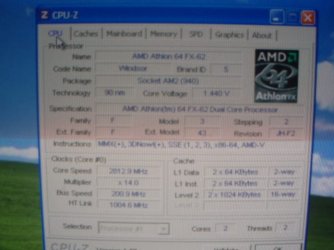
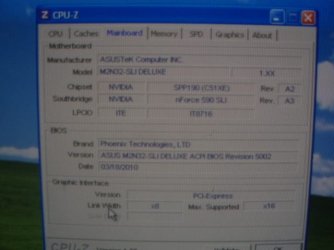
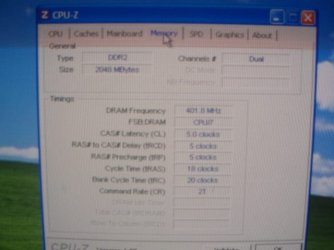
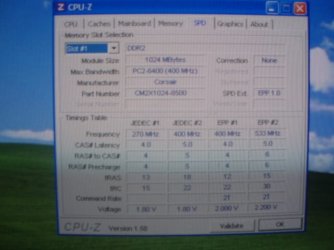
D/L CPUZ(<-Link) and post a snip of the CPU, Mainboard, Memory, and SPD tabs.
For posting the information , enter 'Snipping tool' in the Start button > Search box, hit enter. Select the area you want to post and save to a convenient place.

How to Post a Screenshot in Seven Forums


After you post the CPUZ information, download the Western Digital hard drive diagnostic program.
Western Digital Lifeguard – run both Quick Test and Extended Test.
If your OS (Operating System) is not working you can download the Data Lifeguard Diagnostic for DOS (CD). Follow the instructions on the website to burn it to a CD, it will run like the memtest86+ program did.
 
Last edited:

My Computer

Computer type
PC/Desktop
Computer Manufacturer/Model Number
76~2.0
OS
Windows 7 Ult x64 - SP1/ Windows 8 Pro x64
CPU
Intel Core i5-3570K 4.6GHz
Motherboard
Gigabyte GA-Z77X UD3H, f18
Memory
8GB (2X4GB) DDR3 1600 Corsair Vengeance CL8 1.5v
Graphics Card(s)
Sapphire HD 7770 Vapor-X OC 1GB DDR5
Sound Card
Onboard VIA VT2021
Monitor(s) Displays
22" LCD Dell
Screen Resolution
1680x1050
Hard Drives
Samsung 840Pro 128GB SSD,
Seagate Barracuda 500GB SATA2 7200rpm 32MB cache, Seagate Barracuda 1TB SATA2 7200rpm 32MB cache,
PSU
Corsair HX650W
Case
Cooler Master Storm Scout
Cooling
Corsair H80 2x12cm Noctua NF P12 , 2x14cm case fans
Keyboard
Logitech Wave
Mouse
CM Sentinel
Internet Speed
Dismal
Antivirus
Avast
Browser
Opera Next
Other Info
Haswell laptop: HP Envy 17t-j, i7-4700MQ, GeForce 740M 2GB DDR3, 17.3" Full HD 1920x1080, 16GB RAM, Samsung 840 Pro 128GB, 1TB Hitachi 7200 HDD,
Desktop: eSATA ports,
External eSATA Seagate 500GB SATA2 7200rpm,
External WD USB 500GB
That is good news.

What was the outcome of the last Windows 7 installation?
Did it finally install?
Did you stop the installation?

Did you get the motherboard manual from my link?

D/L CPUZ(<-Link) and post a snip of the CPU, Mainboard, Memory, and SPD tabs.
For posting the information , enter 'Snipping tool' in the Start button > Search box, hit enter. Select the area you want to post and save to a convenient place.

How to Post a Screenshot in Seven Forums


After you post the CPUZ information, download the Western Digital hard drive diagnostic program.
Western Digital Lifeguard – run both Quick Test and Extended Test.
If your OS (Operating System) is not working you can download the Data Lifeguard Diagnostic for DOS (CD). Follow the instructions on the website to burn it to a CD, it will run like the memtest86+ program did.

The W7 installation advanced (very slowly) to "Completing Installation" and never went further. Gave it hours to do so. I finally shut down.

Yes, I have a copy of the proper ASUS MOBO Manual.

Western Digital Lifeguard is running the extended test at this moment.

Will D/L and run CPUZ next.
 

My Computer

Computer Manufacturer/Model Number
Polywell
OS
Windows 7x32 Home Premium & XP SP3 x86
CPU
Athlon 64FX
Motherboard
ASUS M2N32SLI Delux
Memory
Corsair CM2X1024-8500C5
Graphics Card(s)
GeForce 7950X2 (Dual)
Monitor(s) Displays
ViewSonic A90f+ (Two)
Screen Resolution
1280x1024
Hard Drives
WD1500ADFD-00NLR1 (Originally Raid5)

Changed to three individual drives after HD crashed. May return to RAID5 if I locate a suitable HD.
PSU
TurboColl 1KW
Case
Polywell
Cooling
Cool'n'Quiet (Questionable Operation)
Keyboard
Logitech
Mouse
Logitech
Internet Speed
1GHertz (I think)
Other Info
Sony CD-RW CRX320EE

HP DVD Writer 1140d (may need to replace??)
Ok, sorry to hear the installation is still not completing.

Let us know the results of the hard drive test.


Before your next installation, disable 'Cool'n Quiet' in your BIOS.
This is known to cause problems with Windows 7 installation on Asus motherboards.
In your BIOS, 'Advanced' tab, 'CPU Configuration', 'AMD Cool 'N' Quiet function' change to 'disable'. Page 4-23 and 4-26 of your motherboard manual.
You can enable this after the installation is completed.

Another thing that has helped a lot of people complete the Windows 7 installation is to have only one RAM card installed. Even with only 1GB RAM the installation will work, this has been done by many other members.
This has worked before, so let's try it on your next install.

As you mentioned previously, install your other graphics card, have only one graphics card installed.

Check that no other device is installed that is not absolutely necessary for the computer to run.
Only one hard drive installed.
No USB devices, hubs, etc.
One monitor connected.
No printer connected.
Only one CD/DVD device connected.

All these things can be reconnected after the installation is finished.

Ask any questions you have.
 

My Computer

Computer type
PC/Desktop
Computer Manufacturer/Model Number
76~2.0
OS
Windows 7 Ult x64 - SP1/ Windows 8 Pro x64
CPU
Intel Core i5-3570K 4.6GHz
Motherboard
Gigabyte GA-Z77X UD3H, f18
Memory
8GB (2X4GB) DDR3 1600 Corsair Vengeance CL8 1.5v
Graphics Card(s)
Sapphire HD 7770 Vapor-X OC 1GB DDR5
Sound Card
Onboard VIA VT2021
Monitor(s) Displays
22" LCD Dell
Screen Resolution
1680x1050
Hard Drives
Samsung 840Pro 128GB SSD,
Seagate Barracuda 500GB SATA2 7200rpm 32MB cache, Seagate Barracuda 1TB SATA2 7200rpm 32MB cache,
PSU
Corsair HX650W
Case
Cooler Master Storm Scout
Cooling
Corsair H80 2x12cm Noctua NF P12 , 2x14cm case fans
Keyboard
Logitech Wave
Mouse
CM Sentinel
Internet Speed
Dismal
Antivirus
Avast
Browser
Opera Next
Other Info
Haswell laptop: HP Envy 17t-j, i7-4700MQ, GeForce 740M 2GB DDR3, 17.3" Full HD 1920x1080, 16GB RAM, Samsung 840 Pro 128GB, 1TB Hitachi 7200 HDD,
Desktop: eSATA ports,
External eSATA Seagate 500GB SATA2 7200rpm,
External WD USB 500GB
I have images from CPUZ that hopefully I can post. Nope. Wrong Format. Back to the books.

These are not typical of what I see here on this forum but I hope you can view them well enough to interpret.

CPU.JPG

Mainboard.JPG

Memory.JPG

SPD Slot#1.JPG

The two hard drive tests were also completed satisfactorily.
 
Last edited:

My Computer

Computer Manufacturer/Model Number
Polywell
OS
Windows 7x32 Home Premium & XP SP3 x86
CPU
Athlon 64FX
Motherboard
ASUS M2N32SLI Delux
Memory
Corsair CM2X1024-8500C5
Graphics Card(s)
GeForce 7950X2 (Dual)
Monitor(s) Displays
ViewSonic A90f+ (Two)
Screen Resolution
1280x1024
Hard Drives
WD1500ADFD-00NLR1 (Originally Raid5)

Changed to three individual drives after HD crashed. May return to RAID5 if I locate a suitable HD.
PSU
TurboColl 1KW
Case
Polywell
Cooling
Cool'n'Quiet (Questionable Operation)
Keyboard
Logitech
Mouse
Logitech
Internet Speed
1GHertz (I think)
Other Info
Sony CD-RW CRX320EE

HP DVD Writer 1140d (may need to replace??)
It appears you do have onboard video chip you can use to try install instead of card:

Observation: Don't understand While browsing through the BIOS I noticed Chipset - "NiVidia GPU (Disabled)" - Is this consistent with the fact that I am using a GeForce GPU.

You would need to disable card when enabling the onboard chipset. There should be a way in BIOS but if not you can just unplug it, since reinstalling card is one of the troubleshooting steps when GPU is indicated.

It's possible that the 3D video element showing in error in Device Manager is hanging install, or something else about the card whose driver is apparently not loading in final drivers-loading phase which is why it shows in error in Device manager.

What do you think, Dave?
 
Last edited:
I agree, from the descriptions in the previous posts, there is a graphics card driver or card problem.

Using the onboard graphics is the best way to proceed.


dustywoodworker, everything in the CPUZ snips looks ok.
Good to hear the hard drives passed the tests.
 

My Computer

Computer type
PC/Desktop
Computer Manufacturer/Model Number
76~2.0
OS
Windows 7 Ult x64 - SP1/ Windows 8 Pro x64
CPU
Intel Core i5-3570K 4.6GHz
Motherboard
Gigabyte GA-Z77X UD3H, f18
Memory
8GB (2X4GB) DDR3 1600 Corsair Vengeance CL8 1.5v
Graphics Card(s)
Sapphire HD 7770 Vapor-X OC 1GB DDR5
Sound Card
Onboard VIA VT2021
Monitor(s) Displays
22" LCD Dell
Screen Resolution
1680x1050
Hard Drives
Samsung 840Pro 128GB SSD,
Seagate Barracuda 500GB SATA2 7200rpm 32MB cache, Seagate Barracuda 1TB SATA2 7200rpm 32MB cache,
PSU
Corsair HX650W
Case
Cooler Master Storm Scout
Cooling
Corsair H80 2x12cm Noctua NF P12 , 2x14cm case fans
Keyboard
Logitech Wave
Mouse
CM Sentinel
Internet Speed
Dismal
Antivirus
Avast
Browser
Opera Next
Other Info
Haswell laptop: HP Envy 17t-j, i7-4700MQ, GeForce 740M 2GB DDR3, 17.3" Full HD 1920x1080, 16GB RAM, Samsung 840 Pro 128GB, 1TB Hitachi 7200 HDD,
Desktop: eSATA ports,
External eSATA Seagate 500GB SATA2 7200rpm,
External WD USB 500GB
theog, I had some problems with that. I have been told to do that before. I'll work out my limitations.

Dave, et al
When you say to use the onboard graphics are you speaking of onboard the MOBO.

If so, where do I attach the video cable?

OOpps, dumb question I'll bet.

Do you mean to disable the GeForce Graphics card? If so, that is where I attach the video cable.
 

My Computer

Computer Manufacturer/Model Number
Polywell
OS
Windows 7x32 Home Premium & XP SP3 x86
CPU
Athlon 64FX
Motherboard
ASUS M2N32SLI Delux
Memory
Corsair CM2X1024-8500C5
Graphics Card(s)
GeForce 7950X2 (Dual)
Monitor(s) Displays
ViewSonic A90f+ (Two)
Screen Resolution
1280x1024
Hard Drives
WD1500ADFD-00NLR1 (Originally Raid5)

Changed to three individual drives after HD crashed. May return to RAID5 if I locate a suitable HD.
PSU
TurboColl 1KW
Case
Polywell
Cooling
Cool'n'Quiet (Questionable Operation)
Keyboard
Logitech
Mouse
Logitech
Internet Speed
1GHertz (I think)
Other Info
Sony CD-RW CRX320EE

HP DVD Writer 1140d (may need to replace??)
Observation: Don't understand While browsing through the BIOS I noticed Chipset - "NiVidia GPU (Disabled)" - Is this consistent with the fact that I am using a GeForce GPU.

At this screen?
Check screen.PNG
 

My Computer

OS
ME/XP/Vista/Win7

My Computer

Computer Manufacturer/Model Number
Polywell
OS
Windows 7x32 Home Premium & XP SP3 x86
CPU
Athlon 64FX
Motherboard
ASUS M2N32SLI Delux
Memory
Corsair CM2X1024-8500C5
Graphics Card(s)
GeForce 7950X2 (Dual)
Monitor(s) Displays
ViewSonic A90f+ (Two)
Screen Resolution
1280x1024
Hard Drives
WD1500ADFD-00NLR1 (Originally Raid5)

Changed to three individual drives after HD crashed. May return to RAID5 if I locate a suitable HD.
PSU
TurboColl 1KW
Case
Polywell
Cooling
Cool'n'Quiet (Questionable Operation)
Keyboard
Logitech
Mouse
Logitech
Internet Speed
1GHertz (I think)
Other Info
Sony CD-RW CRX320EE

HP DVD Writer 1140d (may need to replace??)
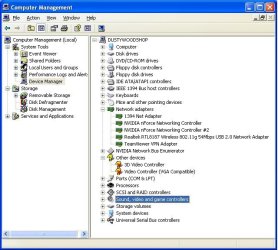
Observation: Don't understand While browsing through the BIOS I noticed Chipset - "NiVidia GPU (Disabled)" - Is this consistent with the fact that I am using a GeForce GPU.
At this screen?
View attachment 171757

I don't know what I was talking about now.

No, at that location I have exactly what you show. The options at that location do not even include (enable/disable).

Sorry for the goose chase.

I replaced the GPU with another GeForce 7950 GX2 and brought the system up. When I checked the Device Manager I found two entries for Video Controller (VGA Compatible) with Question Marks. The 3D Video entry shown in the snip above is gone.

With New GPU.JPG
Who said you can't teach an old dog.

Device Manager is presently searching for a driver.
 
Last edited:

My Computer

Computer Manufacturer/Model Number
Polywell
OS
Windows 7x32 Home Premium & XP SP3 x86
CPU
Athlon 64FX
Motherboard
ASUS M2N32SLI Delux
Memory
Corsair CM2X1024-8500C5
Graphics Card(s)
GeForce 7950X2 (Dual)
Monitor(s) Displays
ViewSonic A90f+ (Two)
Screen Resolution
1280x1024
Hard Drives
WD1500ADFD-00NLR1 (Originally Raid5)

Changed to three individual drives after HD crashed. May return to RAID5 if I locate a suitable HD.
PSU
TurboColl 1KW
Case
Polywell
Cooling
Cool'n'Quiet (Questionable Operation)
Keyboard
Logitech
Mouse
Logitech
Internet Speed
1GHertz (I think)
Other Info
Sony CD-RW CRX320EE

HP DVD Writer 1140d (may need to replace??)
If you have a listing in your BIOS saying "Chipset: NVIDIA GPU (Disabled)" it normally means you have onboard video chip installed on your mobo that has been disabled to use a video card. You would enable it, then disable video card to try install. No cable needs to be attached to the onboard chip.

I understand you have now changed video cards and are in the Device manager seeing if it will install video card. But weren't you only able to enter Device manager using the workaround for when install fails? Is the install recommencing now? If not, I would try reinstall from booted installer using the new card or onboard video.
 
If you have a listing in your BIOS saying "Chipset: NVIDIA GPU (Disabled)" it normally means you have onboard video chip installed on your mobo that has been disabled to use a video card. You would enable it, then disable video card to try install. No cable needs to be attached to the onboard chip.

I understand you have now changed video cards and are in the Device manager seeing if it will install video card. But weren't you only able to enter Device manager using the workaround for when install fails? Is the install recommencing now? If not, I would try reinstall from booted installer using the new card or onboard video.

Yes, that was the case in W7. I am now up in XP to work these other issues.

I have not yet reattempted the install. I have been working off the home work assignment that you, Dave and theog gave me.:)

I do believe that it is getting close, however. This video driver discussion and disabling Cool'and'Quiet are about the only outstanding assignments.
 

My Computer

Computer Manufacturer/Model Number
Polywell
OS
Windows 7x32 Home Premium & XP SP3 x86
CPU
Athlon 64FX
Motherboard
ASUS M2N32SLI Delux
Memory
Corsair CM2X1024-8500C5
Graphics Card(s)
GeForce 7950X2 (Dual)
Monitor(s) Displays
ViewSonic A90f+ (Two)
Screen Resolution
1280x1024
Hard Drives
WD1500ADFD-00NLR1 (Originally Raid5)

Changed to three individual drives after HD crashed. May return to RAID5 if I locate a suitable HD.
PSU
TurboColl 1KW
Case
Polywell
Cooling
Cool'n'Quiet (Questionable Operation)
Keyboard
Logitech
Mouse
Logitech
Internet Speed
1GHertz (I think)
Other Info
Sony CD-RW CRX320EE

HP DVD Writer 1140d (may need to replace??)
Back
Top