Progress report: Just rebooted after an overnight successful memory test, 20 tests completed with 0 errors. CPU temperature is 49-50 degrees and MOBO temperature is 44 degrees. CPU Fan speed is 3375rpm
Are these temps with your computer running at Idle (minimum programs opened)?
If that is at idle, then the temps are high.
When installing an OS(Operating System) the OS functions are not running, Cool 'n Quiet (an Operating System function) will lower the frequency and voltage letting the system run cooler, this won't be running during the OS installation.
When Windows 7 is installing the CPU is running at maximum settings as set in the BIOS, this will cause more CPU heat and if it gets hot enough it will throttle down the frequency and voltage, to protect the CPU from being damaged.
This fluctuation in CPU speed can cause the installation to stall and/or fail.
I recommend to resolve this CPU temperature issue before trying to install Win7 again.
1) You need to ensure the CPU cooler and fan are clean from any dust buildup.
2) Remove CPU heat sink.
3) Clean top of CPU and bottom of CPU cooler with alcohol and a clean lint free cloth, a coffee filter works well for this.
4) Apply thermal paste, Arctic Silver 5 is recommended. Too much thermal paste can result in much less cooling, apply a very thin layer.
5) Install CPU cooler.
Thermal paste application instructions.
Artic Silver Instructions
Best Thermal Paste Application Methods
I'll try to find a good video of how to do this.
You are receiving good advice from the senior members here.
I think you should clean/wipe the partition before the next install.
When the CPU thermal paste has been re-applied, check that these are done before you start the installation.
As you mentioned previously, install your other graphics card.
1) Have only one graphics card installed.
2) Check that no other devices are installed that is not absolutely necessary for the computer to run.
3) Only one hard drive installed.
4) No USB devices, hubs, etc.
5) One monitor connected.
6) No printer connected.
7) Only one CD/DVD device connected.
All these things can be reconnected after the installation is finished.
Hi Dusty. Sorry if these questions are redundant, but this is a very long thread.....
1. Could you tell me how many physical hard disk drives are installed inside the case of this computer?
2. If I read your specs correctly you have 2 optical drives connected-
- The HP DVD 1140d
- and a Sony CD-RW CRX320EE
Is this correct?
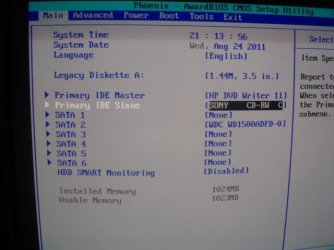
3. In your BIOS Settings > On the MAIN Tab > Under "Storage Configuration" > what does it say?
There are 4 HDs however, one has been disconnected. I started with a RAID5 on four HDs. I experienced a crash and rebuilt with three individual drives. Right now I have two of those disconnected to isolate them from what I have been doing. So, I guess the short answer to your questions is ONE.
Yes, those are the the two optical drives.
There is no category titled "Storage"
This is an image of "Main"
View attachment 171986
Looks like my system time needs to be reset.