Solved Windows 7 Installation

My Computer

Computer Manufacturer/Model Number
Polywell
OS
Windows 7x32 Home Premium & XP SP3 x86
CPU
Athlon 64FX
Motherboard
ASUS M2N32SLI Delux
Memory
Corsair CM2X1024-8500C5
Graphics Card(s)
GeForce 7950X2 (Dual)
Monitor(s) Displays
ViewSonic A90f+ (Two)
Screen Resolution
1280x1024
Hard Drives
WD1500ADFD-00NLR1 (Originally Raid5)

Changed to three individual drives after HD crashed. May return to RAID5 if I locate a suitable HD.
PSU
TurboColl 1KW
Case
Polywell
Cooling
Cool'n'Quiet (Questionable Operation)
Keyboard
Logitech
Mouse
Logitech
Internet Speed
1GHertz (I think)
Other Info
Sony CD-RW CRX320EE

HP DVD Writer 1140d (may need to replace??)
Hi Dusty. Sorry if these questions are redundant, but this is a very long thread.....

1. Could you tell me how many physical hard disk drives are installed inside the case of this computer?

2. If I read your specs correctly you have 2 optical drives connected-

  • The HP DVD 1140d
  • and a Sony CD-RW CRX320EE
Is this correct?

3. In your BIOS Settings > On the MAIN Tab > Under "Storage Configuration" > what does it say?

There are 4 HDs however, one has been disconnected. I started with a RAID5 on four HDs. I experienced a crash and rebuilt with three individual drives. Right now I have two of those disconnected to isolate them from what I have been doing. So, I guess the short answer to your questions is ONE.

Yes, those are the the two optical drives.

There is no category titled "Storage"

This is an image of "Main" View attachment 171986

Looks like my system time needs to be reset.

I'd like you to do a simple test.

First, Disconnect the Sony CD-RW. Either remove the power connector, the data connector, or both. (Tip: leave this optical drive disconnected for now - you do not need it to install W7. It is best to install the OS on a "simple system" - just the minimal devices need to run)

Done

Second, Disconnect the one hard disk (zero hard disks connected)

Done

Boot the computer. Note what you get for messages. You will get either a black screen with just a blinking cursor, or a "no operating system found" message, or something similar. Let us know what it says.

"Disk Boot Failure, Insert System Disk and Press Enter".

While the computer is still on, put the W7 installation DVD disk in the HP DVD drive and then reboot the computer using the reset button on the front of your case.

Done

You should get the "press any key..." message. Press any key and see if the installer will start. It won't go far if it can't find a hard drive, but that's OK.

I did not get the "Press any key" message. With no action from me - I am in the Windows 7 Installation dialog (the scripted diagog). It is waiting for me to press the Install key on the "Language Selected" screen.

In other words, it has "Booted from disk".


Shut down, reconnect the hard drive, and post back anything that happened, including any messages.

I received the "Press any Key" message but failed to do so in a timely manner. It then went to the "Windows Boot Manager" screen where it sits now.

I did that again but this time it went to a B/W screen with a scroll bar on the bottom stating "Windows is loading files". After a moment, it went into the W& installation dialog where it again sets at the "Language Selection" screen.

I don't have time right now to stick with an installation so I am going to leave it where it is until I hear from you again.

I am so tempted.

Please explain your conclusions from what has just occurred.

I have no patience what so ever and I am weak. I clicked "Next". It advanced to the next scripted page "Install Now" and waits.

As shall I.
 
Last edited:

My Computer

Computer Manufacturer/Model Number
Polywell
OS
Windows 7x32 Home Premium & XP SP3 x86
CPU
Athlon 64FX
Motherboard
ASUS M2N32SLI Delux
Memory
Corsair CM2X1024-8500C5
Graphics Card(s)
GeForce 7950X2 (Dual)
Monitor(s) Displays
ViewSonic A90f+ (Two)
Screen Resolution
1280x1024
Hard Drives
WD1500ADFD-00NLR1 (Originally Raid5)

Changed to three individual drives after HD crashed. May return to RAID5 if I locate a suitable HD.
PSU
TurboColl 1KW
Case
Polywell
Cooling
Cool'n'Quiet (Questionable Operation)
Keyboard
Logitech
Mouse
Logitech
Internet Speed
1GHertz (I think)
Other Info
Sony CD-RW CRX320EE

HP DVD Writer 1140d (may need to replace??)
Reboot the PC, & keep a eye out for "Press any key".
 

My Computer

OS
ME/XP/Vista/Win7
OK. So we have determined that the HP DVD works and the W7 installation disk works also. We can cross that possible cause off the list and move on.

You might want to perform the same test with the Sony optical drive too. Only the Sony - on the Primary controller connection.

As TheOG says, you need to watch for that "Press any key" message in a timely manner. It sounds like it is all OK and you are just missing it, but let's check to be sure you can get into the installation with the hard drive connected.

One thing that makes this difficult for folks is the BIOS is set to do a "Quick Boot" or similar. Normally this is fine. But when installing an OS, and particularly if you are having issues with installation, it is best to be able to see everything going on during the boot process. You want to go slow and see all the BIOS screens as it goes through it's routine.
 

My Computer

Computer type
PC/Desktop
Computer Manufacturer/Model Number
Home Built - Jan 2013
OS
Windows 7 64 Bit Home Premium SP1
CPU
i7-3820
Motherboard
Asus P9X79-PRO - Bios 4608
Memory
GSkill F3-14900CL9Q - 16GB
Graphics Card(s)
EVGA GeForce GTX660 - Driver 352.86
Sound Card
On board Realtek ALC898
Monitor(s) Displays
Acer S271HL
Screen Resolution
1920 x 1080
Hard Drives
#1- Samsung 840 Pro Series
#2- Western Digital WD1002FAEX Sata3 Black
#3- Western Digital WD1002FAEX Sata3 Black
PSU
Corsair CMPSU-850TX-V2 - 850 watt (by Seasonic)
Case
Corsair Obsidian 550D
Cooling
Standard 3 120mm case fans, Cooler Master Hyper 212 EVO
Keyboard
MS KC-0405
Mouse
Intellimouse 5-button
Internet Speed
56 Mbits/Sec (on a good day)
Antivirus
Avast & Malwarebytes
Browser
Firefox
Other Info
Asus DVD - DRW-24B1ST 24X
Disable the floppy drive in BIOS. Then physically unplug it.

If you're going to try booting from the DVD, remove USB from boot order list so that only DVD followed by HD is in the list.

If your going to try booting from the USB stick, remove DVD drive from boot order so that USB stick is first followed by HD.

Plug in only one HD which has been wiped using Diskpart: SSD - HDD Optimize for Windows Reinstallation

Now boot the installer which should autostart anyway if it doesn't prompt to Press any key.
 
OK. So we have determined that the HP DVD works and the W7 installation disk works also. We can cross that possible cause off the list and move on.

You might want to perform the same test with the Sony optical drive too. Only the Sony - on the Primary controller connection.

As TheOG says, you need to watch for that "Press any key" message in a timely manner. It sounds like it is all OK and you are just missing it, but let's check to be sure you can get into the installation with the hard drive connected.

One thing that makes this difficult for folks is the BIOS is set to do a "Quick Boot" or similar. Normally this is fine. But when installing an OS, and particularly if you are having issues with installation, it is best to be able to see everything going on during the boot process. You want to go slow and see all the BIOS screens as it goes through it's routine.

"Quick Boot" - is a BIOS option, Right?
 

My Computer

Computer Manufacturer/Model Number
Polywell
OS
Windows 7x32 Home Premium & XP SP3 x86
CPU
Athlon 64FX
Motherboard
ASUS M2N32SLI Delux
Memory
Corsair CM2X1024-8500C5
Graphics Card(s)
GeForce 7950X2 (Dual)
Monitor(s) Displays
ViewSonic A90f+ (Two)
Screen Resolution
1280x1024
Hard Drives
WD1500ADFD-00NLR1 (Originally Raid5)

Changed to three individual drives after HD crashed. May return to RAID5 if I locate a suitable HD.
PSU
TurboColl 1KW
Case
Polywell
Cooling
Cool'n'Quiet (Questionable Operation)
Keyboard
Logitech
Mouse
Logitech
Internet Speed
1GHertz (I think)
Other Info
Sony CD-RW CRX320EE

HP DVD Writer 1140d (may need to replace??)
Yes. It it under the BOOT tab.
Quick Boot skips certain BIOS tests, like RAM count-up. It is not really necessary to see these tests. You could just leave Quick Boot enabled. Or experiment - can't hurt, might help.

But some BIOS settings have something similar, like "Silent Boot", that skips all the BIOS screens entirely. That is the one you are checking for. My AMI BIOS does not have it. Yours might.
 

My Computer

Computer type
PC/Desktop
Computer Manufacturer/Model Number
Home Built - Jan 2013
OS
Windows 7 64 Bit Home Premium SP1
CPU
i7-3820
Motherboard
Asus P9X79-PRO - Bios 4608
Memory
GSkill F3-14900CL9Q - 16GB
Graphics Card(s)
EVGA GeForce GTX660 - Driver 352.86
Sound Card
On board Realtek ALC898
Monitor(s) Displays
Acer S271HL
Screen Resolution
1920 x 1080
Hard Drives
#1- Samsung 840 Pro Series
#2- Western Digital WD1002FAEX Sata3 Black
#3- Western Digital WD1002FAEX Sata3 Black
PSU
Corsair CMPSU-850TX-V2 - 850 watt (by Seasonic)
Case
Corsair Obsidian 550D
Cooling
Standard 3 120mm case fans, Cooler Master Hyper 212 EVO
Keyboard
MS KC-0405
Mouse
Intellimouse 5-button
Internet Speed
56 Mbits/Sec (on a good day)
Antivirus
Avast & Malwarebytes
Browser
Firefox
Other Info
Asus DVD - DRW-24B1ST 24X
Dave,

Those temperatures were taken almost immediately after the memory test which ran for about 9-10 hours.

The CPU temp right now is 43-44°C and the M/B is 39-40°C.

I have the sides off of the case and did have during the memory test. I wonder if that might be a bad practice. It would certainly alter the directed air flow.

What temperatures are considered ideal?

PS I put the sides on to see if there was a change. Room temperature where the computer is located is about 74° F.

After running any stressful program the CPU should cool down quickly.
AMD CPUs normally run cool, if your room temp is 74°F= 23°C, then those temps are still a bit high. Better than 49-50°C.
Should be in the 25-30°C range.

Under stress, full load, your CPU temps might be going too high and throttling your CPU, causing your installation issues.

I still recommend to re-apply the CPU thermal paste.
 

My Computer

Computer type
PC/Desktop
Computer Manufacturer/Model Number
76~2.0
OS
Windows 7 Ult x64 - SP1/ Windows 8 Pro x64
CPU
Intel Core i5-3570K 4.6GHz
Motherboard
Gigabyte GA-Z77X UD3H, f18
Memory
8GB (2X4GB) DDR3 1600 Corsair Vengeance CL8 1.5v
Graphics Card(s)
Sapphire HD 7770 Vapor-X OC 1GB DDR5
Sound Card
Onboard VIA VT2021
Monitor(s) Displays
22" LCD Dell
Screen Resolution
1680x1050
Hard Drives
Samsung 840Pro 128GB SSD,
Seagate Barracuda 500GB SATA2 7200rpm 32MB cache, Seagate Barracuda 1TB SATA2 7200rpm 32MB cache,
PSU
Corsair HX650W
Case
Cooler Master Storm Scout
Cooling
Corsair H80 2x12cm Noctua NF P12 , 2x14cm case fans
Keyboard
Logitech Wave
Mouse
CM Sentinel
Internet Speed
Dismal
Antivirus
Avast
Browser
Opera Next
Other Info
Haswell laptop: HP Envy 17t-j, i7-4700MQ, GeForce 740M 2GB DDR3, 17.3" Full HD 1920x1080, 16GB RAM, Samsung 840 Pro 128GB, 1TB Hitachi 7200 HDD,
Desktop: eSATA ports,
External eSATA Seagate 500GB SATA2 7200rpm,
External WD USB 500GB
Yes. It it under the BOOT tab.
Quick Boot skips certain BIOS tests, like RAM count-up. It is not really necessary to see these tests. You could just leave Quick Boot enabled. Or experiment - can't hurt, might help.

But some BIOS settings have something similar, like "Silent Boot", that skips all the BIOS screens entirely. That is the one you are checking for. My AMI BIOS does not have it. Yours might.

Thanks

I took it out of the "Quick Boot" mode.
 
Last edited:

My Computer

Computer Manufacturer/Model Number
Polywell
OS
Windows 7x32 Home Premium & XP SP3 x86
CPU
Athlon 64FX
Motherboard
ASUS M2N32SLI Delux
Memory
Corsair CM2X1024-8500C5
Graphics Card(s)
GeForce 7950X2 (Dual)
Monitor(s) Displays
ViewSonic A90f+ (Two)
Screen Resolution
1280x1024
Hard Drives
WD1500ADFD-00NLR1 (Originally Raid5)

Changed to three individual drives after HD crashed. May return to RAID5 if I locate a suitable HD.
PSU
TurboColl 1KW
Case
Polywell
Cooling
Cool'n'Quiet (Questionable Operation)
Keyboard
Logitech
Mouse
Logitech
Internet Speed
1GHertz (I think)
Other Info
Sony CD-RW CRX320EE

HP DVD Writer 1140d (may need to replace??)
Dave,

Those temperatures were taken almost immediately after the memory test which ran for about 9-10 hours.

The CPU temp right now is 43-44°C and the M/B is 39-40°C.

I have the sides off of the case and did have during the memory test. I wonder if that might be a bad practice. It would certainly alter the directed air flow.

What temperatures are considered ideal?

PS I put the sides on to see if there was a change. Room temperature where the computer is located is about 74° F.

After running any stressful program the CPU should cool down quickly.
AMD CPUs normally run cool, if your room temp is 74°F= 23°C, then those temps are still a bit high. Better than 49-50°C.
Should be in the 25-30°C range.

Under stress, full load, your CPU temps might be going too high and throttling your CPU, causing your installation issues.

I still recommend to re-apply the CPU thermal paste.

I will do that. All I need to do is locate my tube of paste.:( Found it, right where I put it.:D

Right now I have an extra fan on the MOBO and I am wiping the HD partition where W7 will be.
 
Last edited:

My Computer

Computer Manufacturer/Model Number
Polywell
OS
Windows 7x32 Home Premium & XP SP3 x86
CPU
Athlon 64FX
Motherboard
ASUS M2N32SLI Delux
Memory
Corsair CM2X1024-8500C5
Graphics Card(s)
GeForce 7950X2 (Dual)
Monitor(s) Displays
ViewSonic A90f+ (Two)
Screen Resolution
1280x1024
Hard Drives
WD1500ADFD-00NLR1 (Originally Raid5)

Changed to three individual drives after HD crashed. May return to RAID5 if I locate a suitable HD.
PSU
TurboColl 1KW
Case
Polywell
Cooling
Cool'n'Quiet (Questionable Operation)
Keyboard
Logitech
Mouse
Logitech
Internet Speed
1GHertz (I think)
Other Info
Sony CD-RW CRX320EE

HP DVD Writer 1140d (may need to replace??)
The boot sector will not be wiped if you wipe only the partition for Win7, and wiping the boot sector of possible corruption is the only known benefit of a Secure Erase wipe for install failures.

If you have three HD's why are you trying to manage a Dual Boot with XP on the same HD? For the third time now, plug in one of the other HD's and wipe it Secure Erase to try install: SSD - HDD Optimize for Windows Reinstallation

Then you will finally have completed the very first step we gave you pages ago.
 
Last edited:
The boot sector will not be wiped if you wipe only the partition for Win7, and wiping the boot sector of possible corruption is the only known benefit of a Secure Erase wipe.

If you have three HD's why are you trying to manage a Dual Boot with XP on the same HD? For the third time now, plug in one of the other HD's and wipe it Secure Erase to try install: SSD - HDD Optimize for Windows Reinstallation

Then you will finally have completed the very first step we gave you pages ago.

Last question first: I have documentation on those two HDs that I do not want to relocate and do not want on the same HD as the operating system (s). This HD will be restricted to OS (s) and possibly some applications.

I do not understand your comments on the boot sector. Please remember, I am not a power user. I am an old dog learning new tricks.

Are you telling me that I should redo the wipe and select the "Power Erase" option to finish the job?

Another Question (Indication of Ignorance): I now have entries in the Master Boot Manager that are more confusing than before. It reads as follows:

Master Boot Manager
Earlier Version of Windows (I have been selecting to enter XP)
Windows 7
Windows 7
Windows 7
Windows Setup Rollback

Someone please explain.

I am very sorry that this has been such a chore for you guys. Please realize that I am most appreciative of all your times and efforts. I am much more knowledgeable than before. Obviously not a GURU and probably never will be. Hopefully, one day soon, I will at least be a Windows 7 User.
 
Last edited:

My Computer

Computer Manufacturer/Model Number
Polywell
OS
Windows 7x32 Home Premium & XP SP3 x86
CPU
Athlon 64FX
Motherboard
ASUS M2N32SLI Delux
Memory
Corsair CM2X1024-8500C5
Graphics Card(s)
GeForce 7950X2 (Dual)
Monitor(s) Displays
ViewSonic A90f+ (Two)
Screen Resolution
1280x1024
Hard Drives
WD1500ADFD-00NLR1 (Originally Raid5)

Changed to three individual drives after HD crashed. May return to RAID5 if I locate a suitable HD.
PSU
TurboColl 1KW
Case
Polywell
Cooling
Cool'n'Quiet (Questionable Operation)
Keyboard
Logitech
Mouse
Logitech
Internet Speed
1GHertz (I think)
Other Info
Sony CD-RW CRX320EE

HP DVD Writer 1140d (may need to replace??)
Wiping the HD sometimes solves installation failures. This is why it was first suggested and we assumed you had done it already.

The known benefit of this is to clear the boot sector of corruption, which cannot be done with a partition-specific wipe. You need to wipe the entire HD using the tutorial posted repeatedly.

Can you consolidate your data onto one HD or to the XP HD, so that you can use one to try install after wiping it first?
 
Disable the floppy drive in BIOS. Then physically unplug it.

Done

If you're going to try booting from the DVD, remove USB from boot order list so that only DVD followed by HD is in the list.

There is no reference to USB in my Boot Sequence unless there is a SSD installed.

If your going to try booting from the USB stick, remove DVD drive from boot order so that USB stick is first followed by HD.

Understand

Plug in only one HD which has been wiped using Diskpart: SSD - HDD Optimize for Windows Reinstallation

I wiped the HD Partition using MiniTool Partition Wizard 6.0 (which I think I was told to do somewhere in this thread. There is no other way that I would even have it on my computer).

Now boot the installer which should autostart anyway if it doesn't prompt to Press any key.

I have not yet done this since I wiped the HD. I am no longer certain that I am ready. I need to rewrite and recheck the master"TO-DO LIST"
 

My Computer

Computer Manufacturer/Model Number
Polywell
OS
Windows 7x32 Home Premium & XP SP3 x86
CPU
Athlon 64FX
Motherboard
ASUS M2N32SLI Delux
Memory
Corsair CM2X1024-8500C5
Graphics Card(s)
GeForce 7950X2 (Dual)
Monitor(s) Displays
ViewSonic A90f+ (Two)
Screen Resolution
1280x1024
Hard Drives
WD1500ADFD-00NLR1 (Originally Raid5)

Changed to three individual drives after HD crashed. May return to RAID5 if I locate a suitable HD.
PSU
TurboColl 1KW
Case
Polywell
Cooling
Cool'n'Quiet (Questionable Operation)
Keyboard
Logitech
Mouse
Logitech
Internet Speed
1GHertz (I think)
Other Info
Sony CD-RW CRX320EE

HP DVD Writer 1140d (may need to replace??)
I don't know exactly how it happened but I think I know what happened.

I no longer have XP on the HD that I have been using. I fact, I no longer have two partitions.

I guess this is suppose to make it easier; we'll see. Later.

I am going to take a short break from this routine before I stomp on something else that I cannot afford to loose.

Thank you everyone who has contributed to my getting here. I have learned an awful lot; even if the current status doesn't leave that impression.
 
Last edited:

My Computer

Computer Manufacturer/Model Number
Polywell
OS
Windows 7x32 Home Premium & XP SP3 x86
CPU
Athlon 64FX
Motherboard
ASUS M2N32SLI Delux
Memory
Corsair CM2X1024-8500C5
Graphics Card(s)
GeForce 7950X2 (Dual)
Monitor(s) Displays
ViewSonic A90f+ (Two)
Screen Resolution
1280x1024
Hard Drives
WD1500ADFD-00NLR1 (Originally Raid5)

Changed to three individual drives after HD crashed. May return to RAID5 if I locate a suitable HD.
PSU
TurboColl 1KW
Case
Polywell
Cooling
Cool'n'Quiet (Questionable Operation)
Keyboard
Logitech
Mouse
Logitech
Internet Speed
1GHertz (I think)
Other Info
Sony CD-RW CRX320EE

HP DVD Writer 1140d (may need to replace??)
Be sure to keep us posted here when you decide to pick it up again.
 

My Computer

Computer Manufacturer/Model Number
* BFK Customs *
OS
W 7 64-bit Ultimate
CPU
Intel Q9550 Yorkfield
Motherboard
ASUS P5Q Pro
Memory
8GB Dominator 8500C5D
Graphics Card(s)
ATI : XFX 5870
Sound Card
Realtek HD Audio 7-1
Monitor(s) Displays
1x 47" LCD HDMI & 3x 26" LCD HDMI
Screen Resolution
1920x1080P & 1920x1200
Hard Drives
1x 80GB Intel X25-M G2 SSD : 1x 500GB & 1x 640GB WD Caviar Black(s)
PSU
Corsair 620HX
Case
Cooler Master RC-690
Cooling
Tuniq Tower 120, 2x 140mm and 3x 120mm case fans
Keyboard
Microsoft 500
Mouse
Razer Diamondback 3G
Internet Speed
14 Mb/s
Other Info
1x Koutech 3Gb/s SATA HDD Hot Swap Rack
It looks like you are ready to go now Dusty.

In layman's terms, the boot sector is a small file on the hard disk that keeps track of the important operating system boot information for all of the operating systems installed on your computer. Yours seemed to have been seriously messed up.

It sounds like you wiped the entire hard disk, not just the one W7 partition. That is OK, provided you don't mind losing the XP installation. But you will have nothing to worry about in terms of conflicting boot sector files.

During the Windows 7 installation, if you choose a custom install, you will be given the opportunity to create a new partition for W7, should you feel the need for a second partition for XP.

Just remember to install W7 with just one hard disk and one optical (DVD) drive connected.
Don't miss the "Press any key" message.
And re-read the tutorial for installation again before you start. I actually like to print it out beforehand.

Good Luck!
 

My Computer

Computer type
PC/Desktop
Computer Manufacturer/Model Number
Home Built - Jan 2013
OS
Windows 7 64 Bit Home Premium SP1
CPU
i7-3820
Motherboard
Asus P9X79-PRO - Bios 4608
Memory
GSkill F3-14900CL9Q - 16GB
Graphics Card(s)
EVGA GeForce GTX660 - Driver 352.86
Sound Card
On board Realtek ALC898
Monitor(s) Displays
Acer S271HL
Screen Resolution
1920 x 1080
Hard Drives
#1- Samsung 840 Pro Series
#2- Western Digital WD1002FAEX Sata3 Black
#3- Western Digital WD1002FAEX Sata3 Black
PSU
Corsair CMPSU-850TX-V2 - 850 watt (by Seasonic)
Case
Corsair Obsidian 550D
Cooling
Standard 3 120mm case fans, Cooler Master Hyper 212 EVO
Keyboard
MS KC-0405
Mouse
Intellimouse 5-button
Internet Speed
56 Mbits/Sec (on a good day)
Antivirus
Avast & Malwarebytes
Browser
Firefox
Other Info
Asus DVD - DRW-24B1ST 24X
Be sure to keep us posted here when you decide to pick it up again.

Be sure, I will not give up on this.

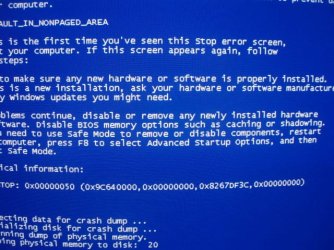
I had made another attempt to install and it was nearing the end. Completing Installation and then this happened.

P8250068.JPG

I shut down.
 

My Computer

Computer Manufacturer/Model Number
Polywell
OS
Windows 7x32 Home Premium & XP SP3 x86
CPU
Athlon 64FX
Motherboard
ASUS M2N32SLI Delux
Memory
Corsair CM2X1024-8500C5
Graphics Card(s)
GeForce 7950X2 (Dual)
Monitor(s) Displays
ViewSonic A90f+ (Two)
Screen Resolution
1280x1024
Hard Drives
WD1500ADFD-00NLR1 (Originally Raid5)

Changed to three individual drives after HD crashed. May return to RAID5 if I locate a suitable HD.
PSU
TurboColl 1KW
Case
Polywell
Cooling
Cool'n'Quiet (Questionable Operation)
Keyboard
Logitech
Mouse
Logitech
Internet Speed
1GHertz (I think)
Other Info
Sony CD-RW CRX320EE

HP DVD Writer 1140d (may need to replace??)
Can you browse in using this method to see if there is a C:/Windows/minidump file you can copy out, zip up and post back for analysis? Copy & Paste - in Windows Recovery Console

Right off the bat it looks like a memory problem.

It appears that I can browse but I don't exactly know what I am looking at or looking for.

I was not able to find C:/Windows/minidump or any other file that might be a dump.
 

My Computer

Computer Manufacturer/Model Number
Polywell
OS
Windows 7x32 Home Premium & XP SP3 x86
CPU
Athlon 64FX
Motherboard
ASUS M2N32SLI Delux
Memory
Corsair CM2X1024-8500C5
Graphics Card(s)
GeForce 7950X2 (Dual)
Monitor(s) Displays
ViewSonic A90f+ (Two)
Screen Resolution
1280x1024
Hard Drives
WD1500ADFD-00NLR1 (Originally Raid5)

Changed to three individual drives after HD crashed. May return to RAID5 if I locate a suitable HD.
PSU
TurboColl 1KW
Case
Polywell
Cooling
Cool'n'Quiet (Questionable Operation)
Keyboard
Logitech
Mouse
Logitech
Internet Speed
1GHertz (I think)
Other Info
Sony CD-RW CRX320EE

HP DVD Writer 1140d (may need to replace??)
Back
Top