windows 7 lost after duo installation

I dont' think the Factory image partition should be deleted as it can still likely be used to recover your Win7 computer. Did you make the Recovery disks? Try doing that now using instructions in Manual or browsing Recovery options. Then see if Recovery will run using key(s) given on first boot screen or Manual for Start Recovery. It might not be a bad idea to consider full factory recovery to see if it sets it up the same way - back up your files!

It isn't necessary to delete System Reserved 100mb either since you can have 4 Primary Partitions and only have 3 now. If it causes problems with the dual boot once Serv2003 is correctly installed to a Primary partition, we can consider deleting it then. It could possibly mess up the System MBR which has somehow landed on Factory Image partition - do you know how that happened? It normally only becomes marked Active when Recovery is run.

Since you can have four Primary Partitions, I'd use Disk Mgmt to create a new one in the unallocated space for Server2003.

If you want it to be larger, use Disk Mgmt to shrink C some.

Once installed, use EasyBCD 2.0 beta to add it by Name, type and drive letter.

Post back a screenshot of Easy listings if there are any problems.

Use Method Two here as it applies to Server2003 as well: http://www.sevenforums.com/tutorials/8057-dual-boot-installation-windows-7-xp.html
 
Thanks for your help gregrocker .. happy not to delete them but I have problem creating new primary partition on Disk Management ... saying disk contains maximum numbers of partition etc..
I don't understand why my system can't let me create another primary partition? 1 HD allowed only 6 partitions?? I really don't know now!:cry:


If I can do the another primary partition then I will try install the 2003 server with that tutorial..
I've already have EasyBCD and dotnetfix so hopefully it will turn out perfect!

I don't know what I did having System MBR on System Factory Part.. Most likely of what I did on repair for win 7..Can I move back to right place? Under C?? or leave it like that??

Thanks for helping me...& God bless you:)
 

My Computer My Computer

At a glance

windows 7interl R, celeron r CPU e3200 2.4 ghz2.96 ghz
Computer Manufacturer/Model Number
HP,
OS
windows 7
CPU
interl R, celeron r CPU e3200 2.4 ghz
Memory
2.96 ghz
Greg;

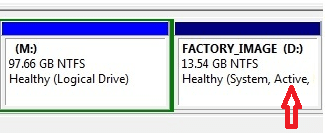
Looks to me like the Factory partition, D:, is now the "Active" partition.

factory_partition_01.png

Would it help, at least temporarily, to get stuff straitened out to mark the "Reserved" partition active and run "Startup Repair" again from the CD if 7 will not boot form the "Reserved" partition?

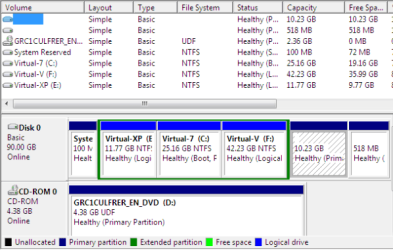
I had no trouble booting to these OSs in "Logical" partitions when I kept the "Reserved" partition as my "Primary" partition:

four_os_01.PNG

Cheers!
Robert
 

My Computer My Computer

At a glance

...
OS
...
Robert-

If he is going to keep the Recov since it shouuld still be functional, then I'm myself hesitant to advise him to remove the System MBR from there to Sys Reserved partition where one would think it should be.

The only reason I can figure that Startup Repair would re-route MBR to Factory Image partition is if it was somehow marked Active, but am not sure how that would have happened since he didn't run Recov. Would System have been placed there at factory? Why then is there Sys Reserved 100mb?

Besides the option of returning Sys MBR to 100mb SysReserv partition, there is also the poss of deleting 100mb to recover MBR into Win7. Do you think it would manage 2003 better in SysReserv?

I was going by XP when postulating that 2003 can't be installed to Logical. If it can, I believe he already has it on one of his logical parts. Maybe you can guide him through attempts to add it now to Dual Boot. I believe he has tried using Easy 2.0, so maybe some help there might make it worik?
 
Robert-

If he is going to keep the Recov since it shouuld still be functional, then I'm myself hesitant to advise him to remove the System MBR from there to Sys Reserved partition where one would think it should be.

The only reason I can figure that Startup Repair would re-route MBR to Factory Image partition is if it was somehow marked Active, but am not sure how that would have happened since he didn't run Recov. Would System have been placed there at factory? Why then is there Sys Reserved 100mb?

Besides the option of returning Sys MBR to 100mb SysReserv partition, there is also the poss of deleting 100mb to recover MBR into Win7. Do you think it would manage 2003 better in SysReserv?

I was going by XP when postulating that 2003 can't be installed to Logical. If it can, I believe he already has it on one of his logical parts. Maybe you can guide him through attempts to add it now to Dual Boot. I believe he has tried using Easy 2.0, so maybe some help there might make it worik?
As you and I have said many times, the 100MB "System Reserved" partition is not a requirement, we can get along without it. Even the Windows RE can be put in the Windows partition, if MS is to be believed.

The only advantage I can see of keeping the "System Reserved" partition is that changes (even mistakes) to the other partitions will not break the boot loader (and you can boot to as many logical drives as there are letters in the alphabet). If the Windows 7 partition is to be the "Active" partition and something happens to it, how do you boot to the other partitions? And if Windows 7 has to be reinstalled or repaired what happens to the boot code?

I would think EasyBCD2 would have no problem adding the NTLDR entry to the Windows 7 bootmgr. How is he booting to Win XP, drive J:, now?

After creating the NTLDR entry with bcdedit, I was able to edit the XP boot.ini in the Windows 7 bootmgr to include both XP and 2000. If he is already booting to XP he should be able to add the server 2003 to the boot.ini? All the necessary files (boot.ini, NTLDR, and NTDETECT.COM) must be added to whichever partition is going to be the "Active" one, either Windows 7, or "System Reserved".

http://www.sevenforums.com/installation-setup/58188-added-xp-7-but-now-wont-boot.html

BTW, I was surprised to see that the Vista / 7 bootmgr would boot to XP in a logical partition. Must be the new windows boot manager?

Cheers!
Robert
 

My Computer My Computer

At a glance

...
OS
...
I think that is an old XP part he is using for data now.

So looking at his earlier screenshots of SysReserved and Factory Image partitions, do you see any problem with marking Factory inactive, Sys Reserved active and then recovering MBR to Sys Reserved by running Startup Repair 3 times?

Am I understanding you correctly that Server2003 can be installed to Logical Partition? Then config'd with Easy to boot via SysReserved?

I wonder why Disk Mgmt will not allow him to create a fourth Primary for 2003? Should he try Partition Wizard as I suggested?
 
I think that is an old XP part he is using for data now.

So looking at his earlier screenshots of SysReserved and Factory Image partitions, do you see any problem with marking Factory inactive, Sys Reserved active and then recovering MBR to Sys Reserved by running Startup Repair 3 times?

Am I understanding you correctly that Server2003 can be installed to Logical Partition? Then config'd with Easy to boot via SysReserved?

I wonder why Disk Mgmt will not allow him to create a fourth Primary for 2003? Should he try Partition Wizard as I suggested?
I do not see a problem there. You could have him mark the "System Reserved" active and see if it will boot to 7 before doing the repair, then if needed ...

I think the reason he can not make a fourth primary partition is because the "Extended" partition is the fourth partition.

And yes, if I can manually move the files and create the NTLDR entry with bcdedit, you should be able to guide him through using Easybcd2 to make the same entry.

Cheers!
 

My Computer My Computer

At a glance

...
OS
...
There are sevral possible solutions.

If you don't mind keeping F as the system partition - all you need to do is add an entry for ntldr to the 7 boot menu.

If you would prefer C as the system partition:

1. Copy and paste all the files ( not the folders ) from F directly onto C.

2. D/l this .zip ( as usual , rt click it>properties>unblock>apply>ok ).

Unzip it , then just rt click and run as admin the sispar.cmd file.

View attachment sispar.zip

To release a partition slot - I would delete the 100mb partition. You will then need to edit the boot.ini entries, of course.

Worth finding out what is on the Recovery partition. You may find you can create a bootable.iso from the contents ( there may even be one on there already - which you can just burn to dvd ).

Have a look at the recovery partition using the Paragon File Transfer Wizard, available free in the Paragon Backup & Recovery 10 Free Edition.
 

My Computers My Computers

  • At a glance

    7 X64i5 84002x8gb 3200mhz
    Computer type
    PC/Desktop
    OS
    7 X64
    CPU
    i5 8400
    Motherboard
    gigabyte b365m ds3h
    Memory
    2x8gb 3200mhz
    Hard Drives
    various
    PSU
    pure power 11 400w cm
    Case
    Coolermaster
    Cooling
    cryorig m9i
  • At a glance

    7x64g54008gb ddr4 2400
    Computer type
    PC/Desktop
    OS
    7x64
    CPU
    g5400
    Motherboard
    ga b365m ds3h
    Memory
    8gb ddr4 2400
    PSU
    xfx pro 450w
thank you all for your help..

let me work on them
 

My Computer My Computer

At a glance

windows 7interl R, celeron r CPU e3200 2.4 ghz2.96 ghz
Computer Manufacturer/Model Number
HP,
OS
windows 7
CPU
interl R, celeron r CPU e3200 2.4 ghz
Memory
2.96 ghz
Finally, It's completed!!:D

Special thanks to gregrocker for your help and advise.. and being patient for me..:rolleyes:..not getting there straight away..

This is what I did, I create new primary partition by using wizard you describe on here.. I deleted 3 extended partition and create new primary one...

Install win sever 2003, boot into Server OS and installed Easybcd with .netframe.exe and windows installer 3.1 which are required for one after another.. to run Easybcd 2.0...

Then create New entry for Windows Server 2003 connect to System Reversed Partition..
Write MBR on Easybcd Then restart (I noticed that win 7 entry is already there on EasyBCD)

Wow-la.. here is the beautiful boot menu with two operating system...

if i choose win 7 straight to load up Win 7 OS..
if I choose win server then load up another boot menu to choose for win server OS or wait for default to load up by itself..in 30 sec..
but later I changed in win sever boot.ini for time 30 sec to 0..So no problemo..:D

Now if I want to install another OS for XP, I think I definitely have to delete that Factory Image Partition for space..but I tried run XP before Server OS, installation Set Up end up with Blue Screen of Death ... I think My PC Hardware not really compatible with XP for some reasons...

Anyway, I got what I was looking for now, so very happy today..

Once Again, Thank you for your help... your advice, tutorials and others utility program are so amazing... I honestly look up to you, guys..:)
 

My Computer My Computer

At a glance

windows 7interl R, celeron r CPU e3200 2.4 ghz2.96 ghz
Computer Manufacturer/Model Number
HP,
OS
windows 7
CPU
interl R, celeron r CPU e3200 2.4 ghz
Memory
2.96 ghz
Back
Top