Windows 7 No Go!!

Amadeus

Senior Geezer
Local time
2:43 PM
Messages
15
Location
The rainy city in the PNW
Running 32 bit Win 7 RC1 on a dual core 4GB box with 250+ GB HD, ATI Radeon Saphire 4770, Samsung 906BW.

Ran a CHKDSK /r because of error messages in Win 7 System log. Windows was operating sort of OK at that point (the reason for checking logs and implementing CHKDSK).

Now boots to blank screen with cursor which will move around using the mouse. Indicates some part of windows is loading. :(

Cannot get to safe mode.

Tried repair function from RC install disk. All results normal with last message indicating windows booted successfully.

Tried Restore function from RC install disk. Even though there ‘were’ set points, none are found.

See boot screens up until selection of OS. The only OS loaded is Win 7.

Third party utilities allow me to see files on drive.

Downloaded Hirens Boot CD. With one of the utilities I can see the file system but cannot open any programs. I am able to run ‘small XP’ from the CD.

One thought is the MBR is corrupted. However, if so I would think the Boot Repair would have noted that.

My next thought was to see if I could do a SFC. Cannot run it.

In Win 7 is there still the ability to get into the console via the command prompt to attempt a repair? I've repaired XP systems in the past. Not sure if those commands would work under Win 7.

Open to logical and non-logical suggestions.

Short of a clean install of Win 7 what suggestions come to mind?

Thanks.

Mike
 

My Computer

Computer Manufacturer/Model Number
Dell XPS 410
OS
Windows 7
CPU
2.4 GHz dual core
Memory
4 GB
Graphics Card(s)
ATI Radeon Saphire 4770
Monitor(s) Displays
Samsung 906BW
Hard Drives
250GB - 60% free
PSU
Yes
Case
Yes
Cooling
Lots
In Win 7 is there still the ability to get into the console via the command prompt to attempt a repair?
Your post implies one physical HDD with only one partition.
If anything else, post otherwise, and do not attempt these instructions.
And do not use any XP stuff, unless you have dual-boot, not mentioned.

The problem may well be the mbr-code, boot sector, bootmgr, etc...

The solution should be to boot from your W7 install DVD.
This will get 'W7-code' into the box, probably to the "Install W7" screen...

Now you need to get to a "command prompt", which in Win7,
is to hit "Shift F10" which brings up an 'Admin Cmd prompt'. (the 'DOS-box')

(Now you have to find out the 'letter' of your DVD, and HDD.)
type: diskpart
then: list volume -- Note the letters of DVD (D:?) and boot HDD (C:?)
type: EXIT to get out of 'diskpart' and back to the cmd prompt.

type: D: (D:? for your DVD letter)

type: CD boot
type: bootsect /nt60 C: /mbr (C:? for your boot HDD)...
--- He should say "Success" ---

type: EXIT to get out of 'Command Prompt' and back to Win7 Setup.

That ought to do it. Cancel out of Setup, and reboot.
If that doesn't do it, there may be something else to go at.

If w7 can't boot, how are you running these "Third party utilities" ?
Have they made any modifications to your HDD ?

(Amadeus is a well-known first-name...)
 

My Computer

Computer Manufacturer/Model Number
Gateway GT5056
OS
XP_Pro, W7_7201, W7RC.vhd, SciLinux5.3, Fedora12, Fedora9_2x, OpenSolaris_09-06
CPU
AMD 64x2
Motherboard
Yes
Memory
1 gig
Graphics Card(s)
Dunno
Sound Card
Realtek something
Monitor(s) Displays
Samsung SyncMaster 940MW w/TV
Screen Resolution
1280x1024
Hard Drives
250 GB WD, USB Seagate Freedesk 1.5 T
Internet Speed
Cable modem
Other Info
1 + 1 = 10b,
7 + 7 = 16o,
a + b = 15h.
i actually think i had this problem. black screen cursor before logging in?
dont have any idea how i fixed it, i think i left it for a few hours and a logon screen came up, but it was still very sluggish. Finally managed to load a desktop, then logged off and shutdown and all fine since
 

My Computer

Computer Manufacturer/Model Number
Dell Inspiron 1545
OS
Windows 7 build 7100 x86
CPU
Intel Core 2 Duo 2.1GHz
Motherboard
GM45 chipset
Memory
3GB
Graphics Card(s)
Intel(TM) Graphics Media Accelerator X4500HD
Sound Card
Realtek HD
Monitor(s) Displays
15.6" WLED 720p
Screen Resolution
1366x768
Hard Drives
320GB 5400rpm hard drive
ChuckR - The 'procedure' worked well. Thanks for that. However, the 'outcome' unfortunately, did not change.
The system boots up to the 'select operating system' screen with Windows 7 highlighted (it is the only OS on this box). Pressing enter produces a blank screen. A few seconds later the small blue dashes appear in the upper left hand corner of the screen for a few more seconds. Then the cursor appears in the middle of the screen. The cursor is movable with the mouse. And, there it sits.
Only one partition. I've thought about trying to partition the drive and loading Win 7 on the new partition. Haven't thought that through yet.
As for third party utilities - from the install screen of Windows 7 a command prompt is accessible from which the DIR of C: is visible. A third party set of DOS utilities also allows for booting to an X: which get me to C: also. From the X: the utilities have not made any changes.
Any further suggestions are greatly appreciated.
 

My Computer

Computer Manufacturer/Model Number
Dell XPS 410
OS
Windows 7
CPU
2.4 GHz dual core
Memory
4 GB
Graphics Card(s)
ATI Radeon Saphire 4770
Monitor(s) Displays
Samsung 906BW
Hard Drives
250GB - 60% free
PSU
Yes
Case
Yes
Cooling
Lots
The system boots up to the 'select operating system' screen with Windows 7 highlighted (it is the only OS on this box). Pressing enter produces a blank screen. A few seconds later the small blue dashes appear in the upper left hand corner of the screen for a few more seconds. Then the cursor appears in the middle of the screen. The cursor is movable with the mouse. And, there it sits.
A "quick" reply, during 'morning' coffee:
'antt's post seems like a good idea - I've seen other posts that said leaving it alone for a while, finally brought it up.
But that was usually after a new install.

"Select OS" would be the 'Boot Manager' screen saying that the MBR, bootsector, and bootmgr executable are all OK.
From this screen, you should be able to hit the 'Tab' key to select 'Memory Diagnostics' at the bottom of the page.
It would also be a good idea to run this for a while (30 minutes?).
Once in Memy Diag, I would select the "Advanced" option and let it run for several passes.

The fact that the "small blue dashes appear in the upper left hand corner of the screen" indicates (to me) that there could be a video problem, video memory problem, etc.
These blue dashes should be 'centered' and at the lower part of the screen.
Unfortunately I don't know exactly whats going on during the dashes.
Obviously, w7 is loading something and the blue dashes are a 'Please wait' type of message.

The 'chkdsk /r' is what apparently "goofed-up" your running installation.
I have read posts that said more that one run is necessary to "fix" disk problems. Perhaps 3 or 4?
This might be able to be done from: boot DVD, Shift F10, for cmd prompt.
___C:
___CD windows/system32
___chkdsk /r etc.
Not sure about this, but the file should exist there, and be executable (launched).

Only one partition. I've thought about trying to partition the drive and loading Win 7 on the new partition. Haven't thought that through yet.
That is indeed a possible solution, which should work.
However that will leave you with a useless install on C:, and a theoretically new working install on the D:? new partition.
Unless you have 'valuable' data on the current C:, a new clean install, with formatting the C: might be the wiser choice.

As for third party utilities - from the install screen of Windows 7 a command prompt is accessible from which the DIR of C: is visible.
"Third party" generally refers to not-Microsoft = Some other vendor's software.
The cmd prompt is Microsoft and is Win 7 code, not third-party.
I assume Shift F10 gets you to that cmd prompt, to do the DIR.

A third party set of DOS utilities also allows for booting to an X: which get me to C: also. From the X: the utilities have not made any changes.
Here I assume you're referring to that 'Hiren CD', which I have also read is an illegal distribution of MS Windows XP software...
My assumption is that it is a form of "BartPE" rescue CD.
I wouldn't use that unless I were really "down in the mud", but I have my own legal BartPE CD with my favorite tools for troubleshooting.
XP may not "fix" things the "w7 way", especially the important things.

In the meantime, try the Memory test, Chkdsk, and antt's suggestion to just let 'er be.
The fact that you started with a running system implies (to me) that Chkdsk 'repairs' are the culprit.

There's a lot of w7 experts on SevenForums and I'm sure there will be many other suggestions for "plan of attack" or fixes.
 

My Computer

Computer Manufacturer/Model Number
Gateway GT5056
OS
XP_Pro, W7_7201, W7RC.vhd, SciLinux5.3, Fedora12, Fedora9_2x, OpenSolaris_09-06
CPU
AMD 64x2
Motherboard
Yes
Memory
1 gig
Graphics Card(s)
Dunno
Sound Card
Realtek something
Monitor(s) Displays
Samsung SyncMaster 940MW w/TV
Screen Resolution
1280x1024
Hard Drives
250 GB WD, USB Seagate Freedesk 1.5 T
Internet Speed
Cable modem
Other Info
1 + 1 = 10b,
7 + 7 = 16o,
a + b = 15h.
Thanks Chuck.
As for letting it sit as 'aant' suggested is now a time tested theory that did not work as this box had its last successful display of Win 7 on Aug. 18.
Even thought I don't think the memory would be a culprit in this instance I will give it a try. Not a problem to let it run for as long as it takes.
The blue dashes have always appeared on the upper left hand corner when the system was functioning. I am assuming that is the time the system is loading drivers (like the mouse and CD/DVD). What may not be loading is a video driver. I tried booting with the low resolution option. No change. Running the ATI 4770 card.
I've run two or three instances of CHKDSK /f but never hurts to try another one.
Yes, I do get to C:> with Shift + F10 at Win 7 install screen.
Also have BartPE disk. Not updated. Hiren's CD was a quick and dirty download for the utilities. Not impressed with it. Will update my BartPE to see if there is anything in it that might help.
Yes, I could reformat the HDD and reinstall. However, it is my nature to find a way to fix it first. Aside from the satisfaction if it does work it is also a great learning process. Something I picked up from my work on cars! My daughter said I've graduated from building car engines for speed to computers! Although, I still work on the cars...when the computers are working well.
 

My Computer

Computer Manufacturer/Model Number
Dell XPS 410
OS
Windows 7
CPU
2.4 GHz dual core
Memory
4 GB
Graphics Card(s)
ATI Radeon Saphire 4770
Monitor(s) Displays
Samsung 906BW
Hard Drives
250GB - 60% free
PSU
Yes
Case
Yes
Cooling
Lots
I tried booting with the low resolution option.
Is that a switch on the card?

Yes, I do get to C:> with Shift + F10 at Win 7 install screen.
Good.
Since its a win 7 problem, the 'proper' solution should be done by using only win 7 tools/utils, which I don't know much about...
You have everything on C: from your w7 install. It just ain't workin' right.
Almost everything is in \system32. Some good stuff is on DVD.

My next thought was to see if I could do a SFC. Cannot run it.
What does "Cannot run it" show as error msge?
Did you try SFC this way:
___C:
___CD windows/system32
___sfc /SCANNOW (to verify and repair files) etc.

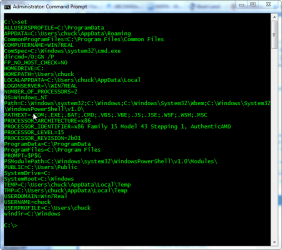
At C:> type SET
and post that. May be a hint in there.
Should look something like this:

Yes, I could reformat the HDD and reinstall. However, it is my nature to find a way to fix it first. Aside from the satisfaction if it does work it is also a great learning process.
Right... Then you have the patience to 'play around', and a 2nd computer.
And, full comprehension that things could 'get worse', with reformat/reinstall as the final solution.

Edit:
Since you have one drv, 1 partition, you should have the 100 MB partition, also.
Type: diskpart
then: list disk
then: list volume
then: exit
See if the 100 MB partition shows anything of significance, or even if he's listed.
I still work on the cars...when the computers are working well.
How about a clutch on a 74 Alfa Romeo Spider ? :D
 

Attachments

  • SET_Win7.png
    SET_Win7.png
    27.6 KB · Views: 294

My Computer

Computer Manufacturer/Model Number
Gateway GT5056
OS
XP_Pro, W7_7201, W7RC.vhd, SciLinux5.3, Fedora12, Fedora9_2x, OpenSolaris_09-06
CPU
AMD 64x2
Motherboard
Yes
Memory
1 gig
Graphics Card(s)
Dunno
Sound Card
Realtek something
Monitor(s) Displays
Samsung SyncMaster 940MW w/TV
Screen Resolution
1280x1024
Hard Drives
250 GB WD, USB Seagate Freedesk 1.5 T
Internet Speed
Cable modem
Other Info
1 + 1 = 10b,
7 + 7 = 16o,
a + b = 15h.
Tried the SFC /scannnow from c:\ and c:\windows\system32. Interesting response in both instances. "There is a system repair pending which requires reboot to complete. Restart Windows and run SFC again."
Now the question is how do I initiate the repair? Rebooted four times with no change.

As for the Alfa clutch, should be about as easy as fixing a non-booting computer. Current project is finishing up a '96 SHO after an engine rebuild and upgraded trans.
 

My Computer

Computer Manufacturer/Model Number
Dell XPS 410
OS
Windows 7
CPU
2.4 GHz dual core
Memory
4 GB
Graphics Card(s)
ATI Radeon Saphire 4770
Monitor(s) Displays
Samsung 906BW
Hard Drives
250GB - 60% free
PSU
Yes
Case
Yes
Cooling
Lots
Tried the SFC /scannnow from c:\ and c:\windows\system32. Interesting response in both instances. "There is a system repair pending which requires reboot to complete. Restart Windows and run SFC again."
Now the question is how do I initiate the repair? Rebooted four times with no change.
Found this, and the way I interpret it is:
When you booted from DVD, you were not booting a 'real' w7 installation --
you are "booting" an image-file. ie, like a Zip file, that has to be "unpacked" to
execute w7 commands.
The Cmd-prompt is one of those unpacked cmds, run from the image-file.

When you attempted to run C:\win\sys32\sfc.exe, the 'unpacked-cmd-prompt' KNOWS that it is running from a .wim image-file,
i.e.:
You cannot use the System File Checker tool to verify or to repair Windows Vista if Windows Vista is in a mounted image file or in a bootable WIM file
You cannot use the System File Checker tool to verify or to repair ...
This process will take some time. There is a system repair pending which requires reboot to complete. Restart Windows and run sfc again.
So much for that.

This also implies that the only 'trusted' programs (running from the .wim image file) are those found on DVD, or, if booted successfully to the bootmgr screen (Select an OS), those manually put on C:\Recovery for that express purpose.
------------------------------------------------
The recovery tools put on C:\Recovery are not automatically placed on that menu.
Which brings us to Antman's link, posted above, and siw2's write-up on how this is done.
Once accomplished, it will simply be a copy of the recovery-tools on the DVD, but loaded from the C: HDD instead.
Since none of these worked for you from the DVD, there's not much sense in putting a menu entry in bootmgr to accomplish the same thing.
The menu entry is surely "booted" from an image-file also, like the DVD.
------------------------------------------------

Unless others who have "been-there, done-that" could jump in here, I'd try the DVD repair/restore functions another time or two from DVD, then go for the format/install route. I'd NOT do a 'Quick' format, though...

I would personally also try a thing or 2, 'off-the-wall' (and quasi-rational) such as running BCDEdit,
and say, change the displayed 'label' by putting the identical same entry where it currently is,
in the hopes that he'll write exactly what he began with, with the original being saved as a .BAK file. This way, the "new" BCD-store file will be on a different physical place on the disk.

Or, because I sometimes do stuff like this, is use 'diskpart' to create a 30 GB .vhd file and install w7 (ULTIMATE only) into that. There's an excellent tutorial on "installing to a vhd" on this board.
This takes time to format the .vhd, install, etc. but I just might do it, just for grins.
This would leave you with still only 1 partition, but with 2 installations: the bad one in C:\Windows and another in a .vhd file.
Theoretically, the .vhd would be bootable as the first entry in Bootmgr with the bad install as the second entry.
OTOH, it might not work...
The only thing you could gain from this is to have a "real" functional bootable Win7 (vice .wim image file), I think, which might allow you to do troubleshooting on the misfit C:\Windows.
Sort of a "BartPE" on the same HDD, contained as a single .vhd file...
Kind of gutsy, and, wandering into the unknown... Also, there are some limitations on vhd installations.

There's still the option to 'squeeze' the one partition down, creating new space for a 2nd partition, and a 2nd installation put there, as you were pondering before.

Sorry Mike.
 
Last edited:

My Computer

Computer Manufacturer/Model Number
Gateway GT5056
OS
XP_Pro, W7_7201, W7RC.vhd, SciLinux5.3, Fedora12, Fedora9_2x, OpenSolaris_09-06
CPU
AMD 64x2
Motherboard
Yes
Memory
1 gig
Graphics Card(s)
Dunno
Sound Card
Realtek something
Monitor(s) Displays
Samsung SyncMaster 940MW w/TV
Screen Resolution
1280x1024
Hard Drives
250 GB WD, USB Seagate Freedesk 1.5 T
Internet Speed
Cable modem
Other Info
1 + 1 = 10b,
7 + 7 = 16o,
a + b = 15h.
One thing I've learned is there is always an answer. It may ultimately be to reinstall. but, until then there may be something short of that. It is this process that helps my learning. Good thing I have two other computers here :)

Here is what I've learned about SFC so far. It hasn't quite worked but I think it is on the right track.

I boot up to the screen to select the OS (Win 7 in my case), F8 to options, Repair, enter password for Admin., select command prompt from menu for the C:>. for there SFC /scannow /offbootdir=c:\/offwindir=c:\windows
This generates the screen for MS Resource Checker Version 6.0 and all the possible options for use with SFC.

No time to experiment further. Each time I enter a new variation it repeats the screen dump of info.
 

My Computer

Computer Manufacturer/Model Number
Dell XPS 410
OS
Windows 7
CPU
2.4 GHz dual core
Memory
4 GB
Graphics Card(s)
ATI Radeon Saphire 4770
Monitor(s) Displays
Samsung 906BW
Hard Drives
250GB - 60% free
PSU
Yes
Case
Yes
Cooling
Lots
Was able to run SFC.

Result:
"unspecified changes to system configuration might have caused the problem.
Repair Action: System files integrity check and repair
Result: failed. Error Code=0x490"

Next ran the Repair function from the DVD. This is after running the MBR suggestion yesterday. This is the result:
"Startup repair cannot repair this computer automatically. (then options to send or not send data to MS).
Problem Signatures:
Event Name: Startup repair offline
Signature 01: 6.1.7100.0
Signature 02: 6.1.7100.0
Signature 03: unknown
Signature 04: 21201225
Signature 05: external media
Signature 06: 5
Signature 07: NoBootFailure
OS Version: 6.1.7100.2.0.0.256.1
Local ID: 1033
Windows Resource Protection found corrupt files but was unable to fix some of them. See the CBS.log file"

Needless to say there is no updated CBS.log file.

c:\windows\logs\recoverydisk\ and c:\windows\logs\systemrestore - is there any help in these?

Appreciate the help.

Mike
 

My Computer

Computer Manufacturer/Model Number
Dell XPS 410
OS
Windows 7
CPU
2.4 GHz dual core
Memory
4 GB
Graphics Card(s)
ATI Radeon Saphire 4770
Monitor(s) Displays
Samsung 906BW
Hard Drives
250GB - 60% free
PSU
Yes
Case
Yes
Cooling
Lots
One thing I've learned is there is always an answer. It may ultimately be to reinstall. but, until then there may be something short of that. It is this process that helps my learning. Good thing I have two other computers here :)
Right, but an answer is quite different from a 'solution'.
The solution is the more difficult, and usually gets stonewalled by not knowing exactly what any Windows does, given the circumstances.
MS documentation is pretty good, but the 'nitty-gritty' that I look for is never there.
One has to 'put it together' by observing the behavior and maybe pick up a detail or two, as you're doing now.
Your current process is helping my learning too. (And a few thousand forum readers.)

Here is what I've learned about SFC so far. It hasn't quite worked but I think it is on the right track.
1. I boot up to the screen to [using HDD, not DVD]
2. select the OS (Win 7 in my case), [W7_Real for me]
3. F8 to options,
4. Repair,
5. enter password for Admin.,
6. select command prompt from menu
7. for the C:>. [typing C: to get to partition]
8. for there SFC /scannow /offbootdir=c:\/offwindir=c:\windows

This generates the screen for MS Resource Checker Version 6.0 and all the possible options for use with SFC.
Excellent catch, with the /Off options!

I went ahead and immediately tried this sequence, with a slight mod.
Your 'generates screen' implies a 'window' pops up...
My try had everything in the same DOS-box.

Here's what I got, from my functioning system: (cutting out a lot)
X:\windows\system32>c:

C:\>set
Path=X:\windows\system32;X:\windows;X:\windows\System32\Wbem
PATHEXT=.COM;.EXE;.BAT;.CMD;.VBS;.VBE;.JS;.JSE;.WSF;.WSH;.MSC
SystemDrive=X:
SystemRoot=X:\windows
windir=X:\windows

C:\>diskpart
Microsoft DiskPart version 6.1.7201
DISKPART> list volume

Volume ### Ltr Label Fs Type Size Status Info
---------- --- ----------- ----- ---------- ------- ---------
Volume 0 G GRMCULFRER_ UDF DVD-ROM 2384 MB Healthy
Volume 1 C C_NewGW_90G NTFS Partition 88 GB Healthy
Volume 4 F R_W7_Real NTFS Partition 16 GB Healthy
DISKPART> exit
Leaving DiskPart...

C:\>sfc /scannow /offbootdir=F:\ /offwindir=F:\windows

Beginning system scan. This process will take some time.


Windows Resource Protection did not find any integrity violations.

C:\>
C:\>
Took about 5-8 mins, while I grabbed another cuppa..
Note (from SET) that he's booted and using an image file here, too.
What's in core is not the real C:\Windows installation,
and he's executing X:\windows\system32\sfc.exe
No time to experiment further. Each time I enter a new variation it repeats the screen dump of info.
If you got anything other than the above, that should be starting you down the 'fix' path, I believe.
I don't think the other variations are of any importance - you want the 'replace' the bad guys.
Since you say your screen dump shows something, it looks like he's trying (or wanting) to fix something - surely bad system files.
It's my understanding (from XP) that when a bad sysfile is encountered, he copies a good one from the 'Install CD' and puts it into \sys32\cache or something, while also replacing the (bad) \sys32 version...

Let 'er rip and replace. Maybe that'll be the 'solution'.
There just might be a connection between the "chkdsk /r fixup" and your \Win system files.
And remember, you're working with RC_32, I'm working with 7201_32, and others probably got (a free) RTM_64.
 

My Computer

Computer Manufacturer/Model Number
Gateway GT5056
OS
XP_Pro, W7_7201, W7RC.vhd, SciLinux5.3, Fedora12, Fedora9_2x, OpenSolaris_09-06
CPU
AMD 64x2
Motherboard
Yes
Memory
1 gig
Graphics Card(s)
Dunno
Sound Card
Realtek something
Monitor(s) Displays
Samsung SyncMaster 940MW w/TV
Screen Resolution
1280x1024
Hard Drives
250 GB WD, USB Seagate Freedesk 1.5 T
Internet Speed
Cable modem
Other Info
1 + 1 = 10b,
7 + 7 = 16o,
a + b = 15h.
Thanks. No pop up just bad syntax :) It all appears in one DOS box. The next post shows the results of SFC and running the repair option again. Digging deeper.
 

My Computer

Computer Manufacturer/Model Number
Dell XPS 410
OS
Windows 7
CPU
2.4 GHz dual core
Memory
4 GB
Graphics Card(s)
ATI Radeon Saphire 4770
Monitor(s) Displays
Samsung 906BW
Hard Drives
250GB - 60% free
PSU
Yes
Case
Yes
Cooling
Lots
Thanks. No pop up just bad syntax :) It all appears in one DOS box. The next post shows the results of SFC and running the repair option again. Digging deeper.
A 'quick' one:
Since you're working with the dos-box, thought you might make some use of this:

http://www.sevenforums.com/tutorials/21874-command-prompt-copy-clipboard-2.html#post237881

Lotta people didn't know...

Works OK w/boot from .wim image file, so you can cut n paste from dos and

drop it into C:\>notepad <Enter>.... (which gets loaded from X:\ etc.)
 
Last edited:

My Computer

Computer Manufacturer/Model Number
Gateway GT5056
OS
XP_Pro, W7_7201, W7RC.vhd, SciLinux5.3, Fedora12, Fedora9_2x, OpenSolaris_09-06
CPU
AMD 64x2
Motherboard
Yes
Memory
1 gig
Graphics Card(s)
Dunno
Sound Card
Realtek something
Monitor(s) Displays
Samsung SyncMaster 940MW w/TV
Screen Resolution
1280x1024
Hard Drives
250 GB WD, USB Seagate Freedesk 1.5 T
Internet Speed
Cable modem
Other Info
1 + 1 = 10b,
7 + 7 = 16o,
a + b = 15h.
Was able to run SFC.
Result:
"unspecified changes to system configuration might have caused the problem.
Repair Action: System files integrity check and repair
Result: failed. Error Code=0x490"
This 'looks like' you ran SFC under the auspices of a Repair function, because of the "Repair action" label.

Next ran the Repair function from the DVD.
Try to do only 1 thing at a time, it seems he could get confused when there's more than one 'pending' task, either at Shutdown and/or at Startup.
Have you tried running SFC exactly the same as your first post, shutting down, then boot again from HDD, selecting the Win 7 single entry in BootMgr screen, F8, then Safe mode?
i.e.:
1. I boot up to the BootMgr screen [using HDD, not DVD]
2. Select the OS (Win 7 in my case)
3. F8 for 'Advanced options', *** Didya try SAFE mode after F8 ? ***
4. Select 'Repair computer'.
5. Enter password for Admin.,
6. Select 'Command prompt' from menu.
7. Then type C: to get to prompt C:\> ______v___ = Space in here
8. Then, typing: SFC /scannow /offbootdir=C:\ /offwindir=C:\windows
At this point, he should finish running SFC and end up with the cmd prompt C:\>
What has happened, at this point ? Error msge? the CBS file thing?
(Your results should show what I posted above, in red, if no error msge.)
1. Type EXIT, to leave DOS.
2. Click: Shutdown for full pwr-off. "Restart" might get him confused, or even leave open a possibility for Win7 to goof something up.
3. Boot HDD and try (minimal) Safe-mode, now.
This is after running the MBR suggestion yesterday.
You don't need to do this any more - just the one time yesterday.

------------------------------------------------------------------
This is the result:
"Startup repair cannot repair this computer automatically. (then options to send or not send data to MS).
Problem Signatures:
Event Name: Startup repair offline
Signature 01: 6.1.7100.0
Signature 02: 6.1.7100.0
Signature 03: unknown
Signature 04: 21201225
Signature 05: external media
Signature 06: 5
Signature 07: NoBootFailure
OS Version: 6.1.7100.2.0.0.256.1
Local ID: 1033
Windows Resource Protection found corrupt files but was unable to fix some of them. See the CBS.log file"
Needless to say there is no updated CBS.log file.
I have a: R:\Windows\Logs\CBS\CBS.log, with the latest entries appended to the Bottom of the file.
Unfortunately, all entries are in Microsoft-ese, so that normal people cannot interpret whats in there.
Unless you're a programmer: (Here's the entry for my 02:11 time-mark)
2009-08-27 02:11:55, Info CBS Reboot mark refs incremented to: 1
2009-08-27 02:11:56, Info CBS Scavenge: Starts
2009-08-27 02:11:56, Info CSI 00000009@2009/8/27:08:11:56.044 CSI Transaction @0xdd608 initialized for deployment engine {d16d444c-56d8-11d5-882d-0080c847b195} with flags 00000002 and client id [10]"TI6.0_0:0/"

2009-08-27 02:11:56, Info CBS Scavenge: Begin CSI Store
2009-08-27 02:11:56, Info CSI 0000000a Performing 1 operations; 1 are not lock/unlock and follow:
Scavenge (8): flags: 00000017
2009-08-27 02:11:56, Info CSI 0000000b Store coherency cookie matches last scavenge cookie, skipping scavenge.
2009-08-27 02:11:56, Info CSI 0000000c ICSITransaction::Commit calling IStorePendingTransaction::Apply - coldpatching=FALSE applyflags=7
2009-08-27 02:11:56, Info CSI 0000000d Creating NT transaction (seq 2), objectname [6]"(null)"
2009-08-27 02:11:56, Info CSI 0000000e Created NT transaction (seq 2) result 0x00000000, handle @0x1fc
2009-08-27 02:11:56, Info CSI 0000000f@2009/8/27:08:11:56.832 CSI perf trace:
CSIPERF:TXCOMMIT;289271
2009-08-27 02:11:56, Info CBS Scavenge: Completed, disposition: 0X1
2009-08-27 02:11:56, Info CSI 00000010@2009/8/27:08:11:56.841 CSI Transaction @0xdd608 destroyed
2009-08-27 02:11:57, Info CBS Reboot mark refs: 0
2009-08-27 02:11:57, Info CBS Idle processing thread terminated normally
2009-08-27 02:11:57, Info CBS Ending the TrustedInstaller main loop.
2009-08-27 02:11:57, Info CBS Starting TrustedInstaller finalization.
2009-08-27 02:11:57, Info CBS Ending TrustedInstaller finalization.
------------------------------------------------------------------
Now I have to say a few words about my opinion of the MS Win7 'Recovery' process, on my computer.
My computer is 100% functional with ALL Win7 installations, save for the 2 USB entries, which are specifically for testing bootup from USB HDD/Thumbdrive.
And, I have a COPY of the R:\Windows directory, specifically for testing, and does not show on the BootMgr startup screen.
Here is his proposed fix:
(Ran this afternoon, specifically to paste here)

The following startup option will be repaired: __100% OK
Name: Windows Boot Manager
Identifier: {9DEA862C-5CDD-4E70-ACC1-F32B344D4795}

The following startup options will be deleted:

Name: Hana - Win7E_J.vhd <--- 100% OK, vhd boot
Identifier: {66CA788F-3A3C-11DE-AB10-9155F4246F0C}
Windows Device: Partition=Not found

Name: Boulders - Win7_I.vhd <--- 100% OK, vhd boot
Identifier: {66CA7895-3A3C-11DE-AB10-9155F4246F0C}
Windows Device: Partition=Not found

Name: USB Hammer_2 - NG <--- USB HDD boot testing
Identifier: {8FA6F7BE-4D09-11DE-A025-0015581F6A93}
Windows Device: Partition=Not found

Name: USB (Q: ) - NG <--- USB stick boot testing
Identifier: {66CA7899-3A3C-11DE-AB10-9155F4246F0C}
Windows Device: Partition=Not found


The following startup options will be added:
Name: Windows 7 Ultimate (recovered)
Path: Win_7I_copy\Windows <--- Copy, for testing
Windows Device: Partition=D: (78269 MB)

A copy of the current boot configuration data will be saved as: C:\Boot\BCD.Backup.0002
I can understand the 2 USB entries, because there's no HDD or 'stick' plugged in.
I can understand him wanting to add-in my "Copy-for-tesing",
But, I believe the MS "Fixer-upper" has -no clue- about his own MS .vhd installations.
Could be some surprised people if they allow "Automatic Repair" of their computer!!!

c:\windows\logs\recoverydisk\ and c:\windows\logs\systemrestore - is there any help in these?
I don't have the \recoverydisk\ folder.
My \systemrestore\ folder has 4 files in it, RestoreUI.0.etl through ~.3.etl
They're compressed, quite tightly.
These may be the ones he can't find, to 'restore' to a previous time...
OTOH, they might not... :D
 

My Computer

Computer Manufacturer/Model Number
Gateway GT5056
OS
XP_Pro, W7_7201, W7RC.vhd, SciLinux5.3, Fedora12, Fedora9_2x, OpenSolaris_09-06
CPU
AMD 64x2
Motherboard
Yes
Memory
1 gig
Graphics Card(s)
Dunno
Sound Card
Realtek something
Monitor(s) Displays
Samsung SyncMaster 940MW w/TV
Screen Resolution
1280x1024
Hard Drives
250 GB WD, USB Seagate Freedesk 1.5 T
Internet Speed
Cable modem
Other Info
1 + 1 = 10b,
7 + 7 = 16o,
a + b = 15h.
Chuck, FWIW, attached is the CBS.log file when I try running SFC from X:\ after booting into the HDD.
Looks like the failure SxS and a failed send of an error file to MS might be part of the problem. Thoughts?

Mike
 

My Computer

Computer Manufacturer/Model Number
Dell XPS 410
OS
Windows 7
CPU
2.4 GHz dual core
Memory
4 GB
Graphics Card(s)
ATI Radeon Saphire 4770
Monitor(s) Displays
Samsung 906BW
Hard Drives
250GB - 60% free
PSU
Yes
Case
Yes
Cooling
Lots
Here is the file. Forgot to change the extension.
 

My Computer

Computer Manufacturer/Model Number
Dell XPS 410
OS
Windows 7
CPU
2.4 GHz dual core
Memory
4 GB
Graphics Card(s)
ATI Radeon Saphire 4770
Monitor(s) Displays
Samsung 906BW
Hard Drives
250GB - 60% free
PSU
Yes
Case
Yes
Cooling
Lots
Chuck, FWIW, attached is the CBS.log file when I try running SFC from X:\ after booting into the HDD.
Looks like the failure SxS and a failed send of an error file to MS might be part of the problem. Thoughts?
Mike
This is all Guess and Opinion, no official blessings from Anybody.
Had a look, couldn't get much.
I doubt the 'send to MS' has anything to do with the error, therefore all lines with "SQM:" can be ignored.
You either phone-home or not, and I believe that the 'flag' Windows opt-in being cleared to 'False'
(since you opted for NoSend) lets him do a little 'garbage-collection' and end with a "Warning", not an Error.
Warning being, he didn't phone-home.

The real error, I believe, begins at:
CBS ** Failed to load SxsStore.dll [HRESULT = 0x8007007e - ERROR_MOD_NOT_FOUND] <===<
CBS ** Failed to initialize SxS. [HRESULT = 0x8007007e - ERROR_MOD_NOT_FOUND]
and this is probably because of the X:\ .wim winimage thing, a few posts prior.
Having no idea of what CBS or CSI are, or what they do, I would guess that the SFC is actually these sw modules
(Almost has to be - theres no SFC anywhere in there)

I notice that it took 10 minutes (while he was theoretically doing something) between the major log entries.
Did it, in fact, take about 10 minutes for the ordeal? Just for info...

There's other 'bits and pieces' in there, like disabling registry and kernel stuff,
time-stamps as local, but entries are GMT, etc. but nothing really important.

So, you're back to Square-1:
All conventional wisdom says 'Clean install', get back on the air.
You were thinking 'partition and fresh-install', for possibly (but not necessarily) learning more about the original problem.
I really don't know if one w7 install can "Check/Verify/Troubleshoot" a different, idle w7 install.
Maybe somebody can say...

It just seems strange that what was supposed to fix a problem (chkdsk /r) actually created the real problem.
Was this the w7 chkdsk, or run from a Hirens CD, BartPE, etc ???
Just read something that said they're different.
Strikes me as a magnetic media problem...

When you boot BartPE, can you see, and access 'folders', and files (Rclk, Properties) ???

Another alternative, and probably the best, is to go for a thorough "HDD scrub", then reinstall, here:

http://www.sevenforums.com/hardware-devices/22827-hard-drive-mbr-corrupt-3.html#post246992

(saving your data first, of course.)

Where's all the other guys? No opinions, options, info?
Can one live w7 install, check another 'dead' installation, on the same HDD? :o
 

My Computer

Computer Manufacturer/Model Number
Gateway GT5056
OS
XP_Pro, W7_7201, W7RC.vhd, SciLinux5.3, Fedora12, Fedora9_2x, OpenSolaris_09-06
CPU
AMD 64x2
Motherboard
Yes
Memory
1 gig
Graphics Card(s)
Dunno
Sound Card
Realtek something
Monitor(s) Displays
Samsung SyncMaster 940MW w/TV
Screen Resolution
1280x1024
Hard Drives
250 GB WD, USB Seagate Freedesk 1.5 T
Internet Speed
Cable modem
Other Info
1 + 1 = 10b,
7 + 7 = 16o,
a + b = 15h.
Chuck,

Away from the box on a business trip.

CBS.log is normally at c:\windows\logs\cbs\

Yes, it took about 10 minutes to run SFC with the offboot - ect. switches.

CHKDSK /r was started in Win 7 because of errors showing in log files. It was on reboot that it would not get to the login screen.

I can see files just by going to a C:\> through the repair function of the install disk or with F8 booting to the 'select OS' page.

Understand the 'clean install' but not ready to give up yet.

Before leaving on this trip I was looking for my old video card to swap out to see if that helped. May also try onboard video if it is there. Can't recall if the MB has that or not. Easy to check. There is an update to the ATI driver that posted two weeks ago and is specifically for Win 7 and Vista. Can't quite get it to install from the C:\> on the box.

Appreciate your suggestions. Helps.
 

My Computer

Computer Manufacturer/Model Number
Dell XPS 410
OS
Windows 7
CPU
2.4 GHz dual core
Memory
4 GB
Graphics Card(s)
ATI Radeon Saphire 4770
Monitor(s) Displays
Samsung 906BW
Hard Drives
250GB - 60% free
PSU
Yes
Case
Yes
Cooling
Lots
Back
Top