Windows 7 not detecting my GPU.

Parker

New member
Member
VIP
Local time
6:00 PM
Messages
108
Location
Sydney, Australia.
Windows 7 not detecting my 9500GT.

Hey, I'm having problems with getting my GPU to work with Windows 7, I'm dual booting with Windows XP x86 (32bit) and with XP it's working perfectly.

I've done a CPU-Z report and uploaded the details via my website, you can check out the specs here. I've done the majority of troubleshooting steps that I've found via google, MSN, general bulletin board lurking and so on, I've yet to find the answer.

I'm running Windows 7 x64.
64bit.jpg


CPU-Z report on Windows 7 x64.
cpuz1.png


The error I'm currently recieving.
errror.png


I've tried getting the drivers via the Windows Update tool.
updatesk.png


I've tried going through the Device Management and locating the "nv_disp.inf" file, but I couldn't do it via that way, only goes to the "English" folder and no further.
prob1m.jpg


I've also tried doing the same as above except going to "show compatiable hardware" unticking that, then clicking "Nvidia", then locating the 9500GT from the list and then trying that way but it does not work either.
asdasd1.png
 
Last edited:

My Computer

Computer Manufacturer/Model Number
Custom Build
OS
Windows 7 x64 Ultimate
CPU
AMD Phenom II X4 955 @ 3.72GHz
Motherboard
Gigabyte GA-MA770T-UD3P
Memory
Patriot 8GB DDR3 1333MHz
Graphics Card(s)
NVIDIA GTX560
Sound Card
-
Monitor(s) Displays
LG 23" W2343T
Screen Resolution
1920 x 1080
Hard Drives
256GB Crucial M4 SSD - OS/program files
250GB - Internal HDD - User files
500GB - Internal HDD - Storage #1
1.5TB - Internal HDD - Storage #2
500GB - External HDD - Portable Storage #1
2TB - External HDD - Portable Storage #2
PSU
TT450W
Case
Thermaltake V3
Cooling
Blue Orb II
Keyboard
Compaq.
Mouse
Logitech MX518
Internet Speed
7Mbps.
Other Info
Cooling (couldn't fit it above).
2 x 120mm LED Blue Fan
1 x Blue Orb II [CPU Cooler]
Forgive me for reviving this thread, but I really need some assistance :(
 

My Computer

Computer Manufacturer/Model Number
Custom Build
OS
Windows 7 x64 Ultimate
CPU
AMD Phenom II X4 955 @ 3.72GHz
Motherboard
Gigabyte GA-MA770T-UD3P
Memory
Patriot 8GB DDR3 1333MHz
Graphics Card(s)
NVIDIA GTX560
Sound Card
-
Monitor(s) Displays
LG 23" W2343T
Screen Resolution
1920 x 1080
Hard Drives
256GB Crucial M4 SSD - OS/program files
250GB - Internal HDD - User files
500GB - Internal HDD - Storage #1
1.5TB - Internal HDD - Storage #2
500GB - External HDD - Portable Storage #1
2TB - External HDD - Portable Storage #2
PSU
TT450W
Case
Thermaltake V3
Cooling
Blue Orb II
Keyboard
Compaq.
Mouse
Logitech MX518
Internet Speed
7Mbps.
Other Info
Cooling (couldn't fit it above).
2 x 120mm LED Blue Fan
1 x Blue Orb II [CPU Cooler]
Try removing the previous install, and folder(s)
C:>NVIDIA>DisplayDriver>_______ , then reboot

Install latest driver is 191.07 x64 Win 7
for your GeForce 9500GT
 

My Computer

Computer Manufacturer/Model Number
custom of course...built by grimreaper
OS
Windows 7 Ultimate X64
CPU
Intel Core 2 Quad Q9650 3.0GHz (3.6GHz 24/7) maxed 4.05GHz
Motherboard
EVGA 790i Ultra SLi Model#132-CK-NF79-A1 BIOS P10
Memory
8GB OCZ DDR3 PC3-14400 @ 1800MHz NVIDIA SLi-Ready
Graphics Card(s)
2XBFG GeForce GTX 280 OC Edition SLi'd
Sound Card
SoundBlaster X-Fi Titanium Fatal1ty Pro Series
Monitor(s) Displays
Samsung 52" 1080P LCD HDTV (LN52B550)
Screen Resolution
1920X1080 @ 60Hz
Hard Drives
3xWestern Digital WD1001FALS Caviar Black 1TB Hard Drive(s) RAID 0 x2 encased in 3xMasscool KuFormula SHF1 HDD Cooler(s)
PSU
ThermalTake ToughPower 1200W P/N:W0133RU Modularized
Case
ThermalTake P/N: VH6000BWS Armor Full-Tower
Cooling
ThermalTake SpinQ P/N: P0466 CPU Cooler
Keyboard
Logitech cordless Y-RAJ56A piece of ****
Mouse
Logitech G7 Laser Cordless mouse black
Internet Speed
10 Mbps DL-1Mbps UL wirelessly DWA-552 extreme N
Other Info
1XSamsung DVD burner SH-S223Q/BEBN SATA
1XSamsung DVD burner SH-S223L/BEBN SATA
1XLG GGW-H20L Blu-Ray burner
4XCooler Master 120mm Blue LED SickleFlow 2000 RPM
1XBelkin UPS F6C1500TWRK) backup power supply
Try removing the previous install, and folder(s)
C:>NVIDIA>DisplayDriver>_______ , then reboot

Install latest driver is 191.07 x64 Win 7
for your GeForce 9500GT
It didn't work :cry:

damndidntwork.png


I really think that it's not DETECTING the hardware not that the drivers don't work? BUT the 9500 works with XP.

Edit; these errors seem to be contradicting themselves?
annoying.png
 
Last edited:

My Computer

Computer Manufacturer/Model Number
Custom Build
OS
Windows 7 x64 Ultimate
CPU
AMD Phenom II X4 955 @ 3.72GHz
Motherboard
Gigabyte GA-MA770T-UD3P
Memory
Patriot 8GB DDR3 1333MHz
Graphics Card(s)
NVIDIA GTX560
Sound Card
-
Monitor(s) Displays
LG 23" W2343T
Screen Resolution
1920 x 1080
Hard Drives
256GB Crucial M4 SSD - OS/program files
250GB - Internal HDD - User files
500GB - Internal HDD - Storage #1
1.5TB - Internal HDD - Storage #2
500GB - External HDD - Portable Storage #1
2TB - External HDD - Portable Storage #2
PSU
TT450W
Case
Thermaltake V3
Cooling
Blue Orb II
Keyboard
Compaq.
Mouse
Logitech MX518
Internet Speed
7Mbps.
Other Info
Cooling (couldn't fit it above).
2 x 120mm LED Blue Fan
1 x Blue Orb II [CPU Cooler]
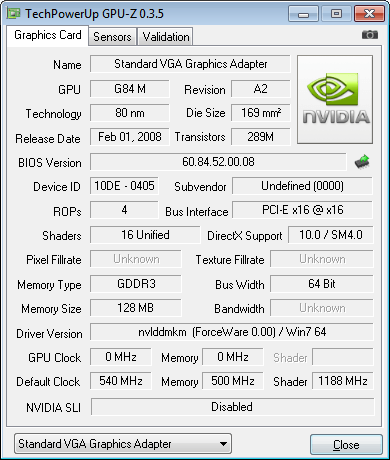
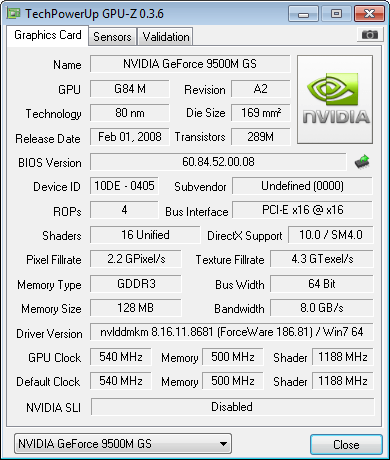
This isn't going to solve your problem but if you download GPU-z and run it will provide more information on your card something is definetly heenky. I know this must be very frustrating, but sometimes and I mean only sometines if you unseat the card then reseat it, this wiil cause windows to search for the driver upon reboot. GPU-Z Video card GPU Information Utility Aslso check out this thread it talks about down grading the graphic driver in the last post their is a reference to another thread having to do with the 9500gt. good Luck. Fabe
 

My Computer

Computer Manufacturer/Model Number
Self Built
OS
Windows 7 ultimate 64 bit / XP Home sp3
CPU
intel Core 2 Duo E8400 3.0ghz
Motherboard
Asus P5ND bios 1401
Memory
8 gigs 1066 OCZ Fata1ty
Graphics Card(s)
EVGA GTX 580 Call of Duty Black Ops Edition
Sound Card
Creative Soundblaster Audigy 2zs
Monitor(s) Displays
Asus 24in LCD's 2MS X2
Screen Resolution
1920x1080p @60Hz
Hard Drives
WD Caviar 500 Black/ WD Caviar 200 Blue
PSU
OCZ 700W GameXtreme
Case
NZXT Apollo
Cooling
Corsair H50 CPU/120mm x3 /60mm x2 /Corsair Dominator Ram
Keyboard
Logitech Bluetooth Wireless MX5000
Mouse
Logitech Bluetooth Wireless MX1000
Internet Speed
Download 19.83 Upload 0.97
Other Info
Logitech Z2300 Speakers/ Bose Noise Cancelling Headphones/Avermedia PCI-e Hybrid TV Bravo/Epson NX415 all in one/ 4 Port Powered USB Hub/ LG 10x Bluray Burner /TSST Corp DVDRW External
have you tried letting nvidia detected the drivers for you via the website.

open IE8
Code:
http://www.nvidia.com/Download/index.aspx?lang=en-us

Select
Graphics Drivers under Option 2:

worth a try.
 

My Computer

OS
Windows 7 Pro x64
CPU
Intel Core 2 Quad Q6600 [2.4Ghz] OC speeds 3.2Ghz
Motherboard
ASUS P5QL-E
Memory
Kingston HyperX KHX8500D2K2-4G 1066Mhz 8GB (2GB*4)
Graphics Card(s)
ASUS GeForce GTX 550 Ti
Sound Card
OnBoard
Monitor(s) Displays
Samsung SyncMaster T220
Screen Resolution
1680*1050
Hard Drives
Intel SSD 320 Series 80GB
PSU
Corsair TX750W
Case
CM 690 II
Cooling
Cooler Master Hyper 212+
Keyboard
Logitech G510
Mouse
Logitech G400
Internet Speed
50Mb :D
are all the motherboard devices installed ?

when you go to device manager is there anything with a question mark or exclamation mark ?

what happens if you right click unninstall your device in device manager then reeboot or "scan for changes" ?

can you please fill out your system spec here on this forum :p
 

My Computer

Computer Manufacturer/Model Number
built my own
OS
win7 ultimate / virtual box
CPU
Intel Core i7 3770K,1155, Ivy Bridge
Motherboard
MSI Z77A-G43
Memory
GSkill Ripjaws Z Series 1600 CL 9.0 16GB
Graphics Card(s)
KFA2 GeForce GTX 670 EX OC 2048MB GDDR5 PCI-E gfx card
Sound Card
onboard Nvidia HDMI audio
Monitor(s) Displays
ASUS VK222H 22" widescreen LCD monitor
Screen Resolution
1680x1050
Hard Drives
Kingston 128gb SSD
OCZ Vertex 90gb SSD
500GB WDCaviar 16mb 5000KS
320GB WDCaviar 16mb 3200AAKS sata 2
1TB Samsung 16mb HD103SJ sata 2
PSU
Corsair HX 750W ATX2.2 Modular
Cooling
Antec 25 Kuhler H2O 620
Keyboard
logitech
Mouse
logitech MX518
Internet Speed
7mb adsl
This isn't going to solve your problem but if you download GPU-z and run it will provide more information on your card something is definetly heenky. I know this must be very frustrating, but sometimes and I mean only sometines if you unseat the card then reseat it, this wiil cause windows to search for the driver upon reboot. GPU-Z Video card GPU Information Utility Aslso check out this thread it talks about down grading the graphic driver in the last post their is a reference to another thread having to do with the 9500gt. good Luck. Fabe
Forgot to post that! :P
Not sure what thread you're talking about? Do you mean "W7 not detecting my 9800gtx+ "?

Also

Windows XP GPU Report
gpu.gif


Windows 7 GPU Report
fc2.png

have you tried letting nvidia detected the drivers for you via the website.

open IE8
Code:
http://www.nvidia.com/Download/index.aspx?lang=en-us

Select
Graphics Drivers under Option 2:

worth a try.
Did that when I first put Windows 7 on, it gave me notebook drivers, never the less I downloaded and installed and to no avail I received the same error.
smartscan.png

are all the motherboard devices installed ?

when you go to device manager is there anything with a question mark or exclamation mark ?

what happens if you right click unninstall your device in device manager then reeboot or "scan for changes" ?

can you please fill out your system spec here on this forum :p
Yep everthing works perfectly except for sound (did I mention that the GPU works with x32 visit? ~ tried it ages ago and it worked), anyway I'll give the uninstalling and rebooting a try.


I got a giggle from..
annoying.png
 

My Computer

Computer Manufacturer/Model Number
Custom Build
OS
Windows 7 x64 Ultimate
CPU
AMD Phenom II X4 955 @ 3.72GHz
Motherboard
Gigabyte GA-MA770T-UD3P
Memory
Patriot 8GB DDR3 1333MHz
Graphics Card(s)
NVIDIA GTX560
Sound Card
-
Monitor(s) Displays
LG 23" W2343T
Screen Resolution
1920 x 1080
Hard Drives
256GB Crucial M4 SSD - OS/program files
250GB - Internal HDD - User files
500GB - Internal HDD - Storage #1
1.5TB - Internal HDD - Storage #2
500GB - External HDD - Portable Storage #1
2TB - External HDD - Portable Storage #2
PSU
TT450W
Case
Thermaltake V3
Cooling
Blue Orb II
Keyboard
Compaq.
Mouse
Logitech MX518
Internet Speed
7Mbps.
Other Info
Cooling (couldn't fit it above).
2 x 120mm LED Blue Fan
1 x Blue Orb II [CPU Cooler]
Hi there
whilst in general I would recommend a Clean install this might be one of the instances where an "Upgrade" install would pay dividends.

What I would do here is a "Half way house".

1) Install a CLEAN version of 64 bit VISTA. You don't have to activate it if you've got a full install W7 disk.

2) add all the necessary drivers etc from the nvidia site. Don't add any other apps other than the mobo drivers etc. Get ALL these working -- no exclamation marks against any devices in the device manager list.

3) now run a Windows 7 UPGRADE. W7 will keep the existing drivers if it can't find a W7 version and it will "adjust" the compatability so you won't get the installer saying it doesn't recognize the OS.

Doing an upgrade this way gives you the best of both worlds - it's essentially a CLEAN install but preserves hard to find or non existant drivers.

It's just possible that the W7 compatability check before it does the upgrade might sling out the video driver -- unlikely as the code for video won't have changed much. If it does I'm afraid you are screwed until nvidia fix their stuff for W7.

Cheers
jimbo
 

My Computer

Computer type
PC/Desktop
Computer Manufacturer/Model Number
Custom built, several laptops HP/ASUS
OS
Linux CENTOS 7 / various Windows OS'es and servers
CPU
Intel i7 Intel i5
Memory
8GB, 16GB
Graphics Card(s)
On Motherboard
Sound Card
Realtek HD audio
Monitor(s) Displays
Apple Cinema display, Samsung LCD
Screen Resolution
1920 X 1080
Hard Drives
4 X 1TB SATA
Mouse
Toshiba wireless laser
Internet Speed
> 20MB up
Hi there
whilst in general I would recommend a Clean install this might be one of the instances where an "Upgrade" install would pay dividends.

What I would do here is a "Half way house".

1) Install a CLEAN version of 64 bit VISTA. You don't have to activate it if you've got a full install W7 disk.

2) add all the necessary drivers etc from the nvidia site. Don't add any other apps other than the mobo drivers etc. Get ALL these working -- no exclamation marks against any devices in the device manager list.

3) now run a Windows 7 UPGRADE. W7 will keep the existing drivers if it can't find a W7 version and it will "adjust" the compatability so you won't get the installer saying it doesn't recognize the OS.

Doing an upgrade this way gives you the best of both worlds - it's essentially a CLEAN install but preserves hard to find or non existant drivers.

It's just possible that the W7 compatability check before it does the upgrade might sling out the video driver -- unlikely as the code for video won't have changed much. If it does I'm afraid you are screwed until nvidia fix their stuff for W7.

Cheers
jimbo
I don't have Windows Vista, dual booting with XP.
 

My Computer

Computer Manufacturer/Model Number
Custom Build
OS
Windows 7 x64 Ultimate
CPU
AMD Phenom II X4 955 @ 3.72GHz
Motherboard
Gigabyte GA-MA770T-UD3P
Memory
Patriot 8GB DDR3 1333MHz
Graphics Card(s)
NVIDIA GTX560
Sound Card
-
Monitor(s) Displays
LG 23" W2343T
Screen Resolution
1920 x 1080
Hard Drives
256GB Crucial M4 SSD - OS/program files
250GB - Internal HDD - User files
500GB - Internal HDD - Storage #1
1.5TB - Internal HDD - Storage #2
500GB - External HDD - Portable Storage #1
2TB - External HDD - Portable Storage #2
PSU
TT450W
Case
Thermaltake V3
Cooling
Blue Orb II
Keyboard
Compaq.
Mouse
Logitech MX518
Internet Speed
7Mbps.
Other Info
Cooling (couldn't fit it above).
2 x 120mm LED Blue Fan
1 x Blue Orb II [CPU Cooler]
is it an HP? i'm looking at the CPU-Z report and it says the subsystem vendor ID is 103C which is HP, I believe. in any case, can you run dxdiag and save the report and attach it?
 

My Computer

Computer Manufacturer/Model Number
Dell XPS One 24 (A2420)
OS
Windows 7 RTM Ultimate x64
CPU
Intel Core 2 Quad Q8200 @ 2.33 GHz
Motherboard
Intel P45 Express Chipset
Memory
4 GB Dual Channel DDR2 SDRAM @ 800MHz
Graphics Card(s)
512MB NVIDIA GeForce 9600M GT
Sound Card
Realtek ALC262 Integrated HD Audio
another thing, your cpu-z report indicates you have a G84 gpu with a model id of 405, which indicates that you actually have a 9500M GS card, not a 9500 GT card. this would mean you are attempting to install the incorrect driver package, you need the mobile device driver package from nvidia.
 

My Computer

Computer Manufacturer/Model Number
Dell XPS One 24 (A2420)
OS
Windows 7 RTM Ultimate x64
CPU
Intel Core 2 Quad Q8200 @ 2.33 GHz
Motherboard
Intel P45 Express Chipset
Memory
4 GB Dual Channel DDR2 SDRAM @ 800MHz
Graphics Card(s)
512MB NVIDIA GeForce 9600M GT
Sound Card
Realtek ALC262 Integrated HD Audio

My Computer

Computer Manufacturer/Model Number
Gateway GT5692
OS
Windows 7 Ulti. x64
CPU
AMD Phenom 8450 triple-core 2.10 ghz
Memory
4GB
Graphics Card(s)
ATI Radion HD 3200
Monitor(s) Displays
Gateway FPD1775W
Screen Resolution
1280x720
Hard Drives
465.6613 Gibibytes
another thing, your cpu-z report indicates you have a G84 gpu with a model id of 405, which indicates that you actually have a 9500M GS card, not a 9500 GT card. this would mean you are attempting to install the incorrect driver package, you need the mobile device driver package from nvidia.

is it an HP? i'm looking at the CPU-Z report and it says the subsystem vendor ID is 103C which is HP, I believe. in any case, can you run dxdiag and save the report and attach it?
That's what I was thinking at first but this card works in win7 x32?

edit; so basically there is no windows 7 x64 drivers for my GPU?

edit 2; tried the drivers that are supposed to work "186.81_notebook_win7_winvista_64bit_international_whql", no luck :(

x64.png
 

Attachments

Last edited:

My Computer

Computer Manufacturer/Model Number
Custom Build
OS
Windows 7 x64 Ultimate
CPU
AMD Phenom II X4 955 @ 3.72GHz
Motherboard
Gigabyte GA-MA770T-UD3P
Memory
Patriot 8GB DDR3 1333MHz
Graphics Card(s)
NVIDIA GTX560
Sound Card
-
Monitor(s) Displays
LG 23" W2343T
Screen Resolution
1920 x 1080
Hard Drives
256GB Crucial M4 SSD - OS/program files
250GB - Internal HDD - User files
500GB - Internal HDD - Storage #1
1.5TB - Internal HDD - Storage #2
500GB - External HDD - Portable Storage #1
2TB - External HDD - Portable Storage #2
PSU
TT450W
Case
Thermaltake V3
Cooling
Blue Orb II
Keyboard
Compaq.
Mouse
Logitech MX518
Internet Speed
7Mbps.
Other Info
Cooling (couldn't fit it above).
2 x 120mm LED Blue Fan
1 x Blue Orb II [CPU Cooler]
i'm guessing you have a Compaq Presario SR5060AN Desktop PC with onboard graphics and you added the video card to a PCI-E slot later. based on the DxDiag.txt file, it is definitely a 9500M GS card and the 186.81 mobile drivers are the ones you want. replace the NVAM.INF file in the "Display" directory where the setup file extracted the files with the one attached (remove the ".txt" extension, and then re-run the setup.exe in the directory up one from the "Display" directory. do not re-run the "186.81_notebook_win7_winvista_64bit_international_whql.exe" file as this will re-extract the files and overwrite all the files back to the original ones.

View attachment NVAM.INF.txt
 

My Computer

Computer Manufacturer/Model Number
Dell XPS One 24 (A2420)
OS
Windows 7 RTM Ultimate x64
CPU
Intel Core 2 Quad Q8200 @ 2.33 GHz
Motherboard
Intel P45 Express Chipset
Memory
4 GB Dual Channel DDR2 SDRAM @ 800MHz
Graphics Card(s)
512MB NVIDIA GeForce 9600M GT
Sound Card
Realtek ALC262 Integrated HD Audio
i'm guessing you have a Compaq Presario SR5060AN Desktop PC with onboard graphics and you added the video card to a PCI-E slot later. based on the DxDiag.txt file, it is definitely a 9500M GS card and the 186.81 mobile drivers are the ones you want. replace the NVAM.INF file in the "Display" directory where the setup file extracted the files with the one attached (remove the ".txt" extension, and then re-run the setup.exe in the directory up one from the "Display" directory. do not re-run the "186.81_notebook_win7_winvista_64bit_international_whql.exe" file as this will re-extract the files and overwrite all the files back to the original ones.

View attachment 31507
You sir are a legend! :D

Worked perfectly as far as I can tell, what exactly was different in the two different files by the way?

6rx.png
 

My Computer

Computer Manufacturer/Model Number
Custom Build
OS
Windows 7 x64 Ultimate
CPU
AMD Phenom II X4 955 @ 3.72GHz
Motherboard
Gigabyte GA-MA770T-UD3P
Memory
Patriot 8GB DDR3 1333MHz
Graphics Card(s)
NVIDIA GTX560
Sound Card
-
Monitor(s) Displays
LG 23" W2343T
Screen Resolution
1920 x 1080
Hard Drives
256GB Crucial M4 SSD - OS/program files
250GB - Internal HDD - User files
500GB - Internal HDD - Storage #1
1.5TB - Internal HDD - Storage #2
500GB - External HDD - Portable Storage #1
2TB - External HDD - Portable Storage #2
PSU
TT450W
Case
Thermaltake V3
Cooling
Blue Orb II
Keyboard
Compaq.
Mouse
Logitech MX518
Internet Speed
7Mbps.
Other Info
Cooling (couldn't fit it above).
2 x 120mm LED Blue Fan
1 x Blue Orb II [CPU Cooler]
glad i could help!

i took the device key text for the graphics card out of the dxdiag.txt file that you provided and replaced the entries in the NVAM.INF file with it. the important part is the device id and subsystem id, which in your case was "DEV_0405&SUBSYS_00000000". this is how your system identifies your card and the hardware-specific "address" of it. unfortunately, there was no entry exactly like that in any of the INF files that NVIDIA provided, so i just tweaked the file to match.

i had to do this for my system because i had the exact same problem as you, so i am very familiar with this whole process by now. the key is getting the right INF file to modify, that's why i needed specifics about your system. NVAM.INF is for ASUS, and your PC has an ASUS motherboard so that's the one i modified.
 

My Computer

Computer Manufacturer/Model Number
Dell XPS One 24 (A2420)
OS
Windows 7 RTM Ultimate x64
CPU
Intel Core 2 Quad Q8200 @ 2.33 GHz
Motherboard
Intel P45 Express Chipset
Memory
4 GB Dual Channel DDR2 SDRAM @ 800MHz
Graphics Card(s)
512MB NVIDIA GeForce 9600M GT
Sound Card
Realtek ALC262 Integrated HD Audio
this may not be a problem for you, but i was never able to get the sleep or hibernate to work properly with the nvidia drivers (i too am using the 186.81 drivers with the NVAM.INF modified file). my computer would always freeze or blue screen when coming back from sleep or hibernate. so i just turned them both off in the power settings.
 

My Computer

Computer Manufacturer/Model Number
Dell XPS One 24 (A2420)
OS
Windows 7 RTM Ultimate x64
CPU
Intel Core 2 Quad Q8200 @ 2.33 GHz
Motherboard
Intel P45 Express Chipset
Memory
4 GB Dual Channel DDR2 SDRAM @ 800MHz
Graphics Card(s)
512MB NVIDIA GeForce 9600M GT
Sound Card
Realtek ALC262 Integrated HD Audio
glad i could help!

i took the device key text for the graphics card out of the dxdiag.txt file that you provided and replaced the entries in the NVAM.INF file with it. the important part is the device id and subsystem id, which in your case was "DEV_0405&SUBSYS_00000000". this is how your system identifies your card and the hardware-specific "address" of it. unfortunately, there was no entry exactly like that in any of the INF files that NVIDIA provided, so i just tweaked the file to match.

i had to do this for my system because i had the exact same problem as you, so i am very familiar with this whole process by now. the key is getting the right INF file to modify, that's why i needed specifics about your system. NVAM.INF is for ASUS, and your PC has an ASUS motherboard so that's the one i modified.
Posted this on the forums that I requested help at thanks :P
this may not be a problem for you, but i was never able to get the sleep or hibernate to work properly with the nvidia drivers (i too am using the 186.81 drivers with the NVAM.INF modified file). my computer would always freeze or blue screen when coming back from sleep or hibernate. so i just turned them both off in the power settings.
Oh well, it's working now, I don't really make my PC sleep it's not on that often only really use it to play Battlefield 2 :P
 

My Computer

Computer Manufacturer/Model Number
Custom Build
OS
Windows 7 x64 Ultimate
CPU
AMD Phenom II X4 955 @ 3.72GHz
Motherboard
Gigabyte GA-MA770T-UD3P
Memory
Patriot 8GB DDR3 1333MHz
Graphics Card(s)
NVIDIA GTX560
Sound Card
-
Monitor(s) Displays
LG 23" W2343T
Screen Resolution
1920 x 1080
Hard Drives
256GB Crucial M4 SSD - OS/program files
250GB - Internal HDD - User files
500GB - Internal HDD - Storage #1
1.5TB - Internal HDD - Storage #2
500GB - External HDD - Portable Storage #1
2TB - External HDD - Portable Storage #2
PSU
TT450W
Case
Thermaltake V3
Cooling
Blue Orb II
Keyboard
Compaq.
Mouse
Logitech MX518
Internet Speed
7Mbps.
Other Info
Cooling (couldn't fit it above).
2 x 120mm LED Blue Fan
1 x Blue Orb II [CPU Cooler]
Did you pre-load your Drivers?

Hey, I'm having problems with getting my GPU to work with Windows 7, I'm dual booting with Windows XP x86 (32bit) and with XP it's working perfectly.

I've done a CPU-Z report and uploaded the details via my website, you can check out the specs here. I've done the majority of troubleshooting steps that I've found via google, MSN, general bulletin board lurking and so on, I've yet to find the answer.

I'm running Windows 7 x64.


64bit.jpg


CPU-Z report on Windows 7 x64.
cpuz1.png


The error I'm currently recieving.
errror.png


I've tried getting the drivers via the Windows Update tool.
updatesk.png


I've tried going through the Device Management and locating the "nv_disp.inf" file, but I couldn't do it via that way, only goes to the "English" folder and no further.
prob1m.jpg


I've also tried doing the same as above except going to "show compatiable hardware" unticking that, then clicking "Nvidia", then locating the 9500GT from the list and then trying that way but it does not work either.
asdasd1.png

Did you pre-load your Drivers?

That should work.
 

My Computer

OS
Windows 7 RTM 7127
Back
Top