Windows 7 not detecting my GPU.

*BUMP*
This is to check if NitroNate is still active or not? I wanted to ask a query regarding the same issue and was unable to PM him for some odd reason.
 

My Computer

OS
Windows 7
GPU is still fixed; though I built a new rig and don't use the old PC as much but it's still running fine, once again thanks NitroNate, you got me addicted to Bf2 again! :P
 

My Computer

Computer Manufacturer/Model Number
Custom Build
OS
Windows 7 x64 Ultimate
CPU
AMD Phenom II X4 955 @ 3.72GHz
Motherboard
Gigabyte GA-MA770T-UD3P
Memory
Patriot 8GB DDR3 1333MHz
Graphics Card(s)
NVIDIA GTX560
Sound Card
-
Monitor(s) Displays
LG 23" W2343T
Screen Resolution
1920 x 1080
Hard Drives
256GB Crucial M4 SSD - OS/program files
250GB - Internal HDD - User files
500GB - Internal HDD - Storage #1
1.5TB - Internal HDD - Storage #2
500GB - External HDD - Portable Storage #1
2TB - External HDD - Portable Storage #2
PSU
TT450W
Case
Thermaltake V3
Cooling
Blue Orb II
Keyboard
Compaq.
Mouse
Logitech MX518
Internet Speed
7Mbps.
Other Info
Cooling (couldn't fit it above).
2 x 120mm LED Blue Fan
1 x Blue Orb II [CPU Cooler]
hello friends,

I have hp dv6899ee when I upgraded from vista to 7 my notebook couldn't recognize my graphic card

I tried to download many drives but they are not working

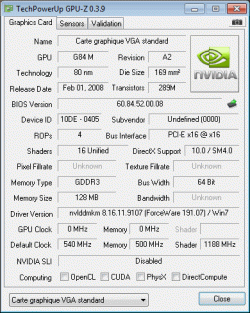
her is GPU-Z report

373.png
 

My Computer

OS
windows 7
not working either

got a geforce 9500 gt
here's my gpu-z report
what should i do?
 

Attachments

  • a.gif
    a.gif
    15.5 KB · Views: 11

My Computer

OS
win 7 32bit
I'm very sorry for bringing life to this dead topic but I need some help. I am having the exact same issue as the people above after installing nVidia driver 285.62 and have found nvam.inf but cannot locate where I am supposed to put my hardware ID. I have a nVidia 355m with hardware ID: PCI\VEN_10DE&DEV_0CAF&SUBSYS_14221043
I have tried to find where I should put that line of code but I cannot locate it. Please if anybody knows where I should put this please reply.
 

Attachments

My Computer

OS
Windows 7 Home Premium 64bit
Pdqman, welcome to the Seven Forums.

One very god reason for the reference Nvidia not installing, your laptop also has and uses the Intel graphics (which is actually shown as the installed display device), which is unsupported in the reference driver. This feature is also known as switchable graphics/hybrid power or as Nvidia likes to call their latest version of it "Optimus Technology".

In any case as a result of this the only driver for it that will install is whatever is available from Dell/Alienware. I also just downloaded the latest Nvidia driver for your model,

Drivers and Downloads

which has the necessary Intel driver included/integrated into it. The only way that adding the DevID from yours to the reference driver is if there is some way to disable the Intel graphics in the bios, and even then it may still not install/work properly.
 

My Computer

Computer type
PC/Desktop
Computer Manufacturer/Model Number
Me
OS
Win 7 Ultimate x64
CPU
FX-8350 @ 4.6 GHz so far
Motherboard
Asus M5A97 EVO
Memory
ADATA XPG V1 Series Black 8GB DDR3 1600
Graphics Card(s)
Sapphire R9 270x Dual-X
Sound Card
Xonar DGX w/ Corsair Vengence 1300
Monitor(s) Displays
Acer S232HL Abid
Screen Resolution
1920x1080
Hard Drives
120 GB OCZ Vertex 3
500 GB Seagate 7200.12
PSU
Antec Earthwatts 650W Green
Case
Antec Three Hundred
Cooling
Cooler Master 212 EVO
Keyboard
Logitech G510
Mouse
Logitech G500s
Internet Speed
35000/3000
Thanks for your help but now my computer is very messed up. So I downloaded drivers but when I attempted to install them it would come up as "Installation Failed" no more info. Then I hoped that a clean sweep would do good to my graphics card, it uninstalled nVidia 3D and nVidia control panel and then needed a reboot. Once rebooted I realized I had 800x600 resolution, I open up drivers to finish clean sweep and it failed. I then realized that I now have no graphics card compared to the one I had before. I really messed things up and need help. My current specs from DirectX are below along with a copy of my nvam.inf (.txt for posting reasons) Thanks for all the help.
 

Attachments

My Computer

OS
Windows 7 Home Premium 64bit

My Computer

Computer type
Laptop
Computer Manufacturer/Model Number
DELL Alienware Mx11 R2
OS
Windows 7 Home Premium X64
CPU
Intel i7 4 core
Motherboard
ALIENWARE BASE SYSTEMS
Memory
6 GB
Graphics Card(s)
GT 335M
Hard Drives
C
Antivirus
AVAST 5
Browser
MOZILLA
Back
Top