Windows 7 not starting at all

MrZork, make it simple. You now want to repair your computer and in worst scenario, reinstall Win 7.
Just add the MVMe driver to boot.wim (index 1 and 2) and to Install.wim (index 2 = HP). Don't create an iso.
Copy the files from the folder to a FAT32 USB flash disk. Insert the USB flash disk to a USB2.0 at the back plate.
During post launch boot menu (F8?).
Select UEFI flash disk.
 

My Computers My Computers

System One System Two

  • Computer type
    PC/Desktop
    Computer Manufacturer/Model Number
    custom build
    OS
    Windows 7 HP 64
    CPU
    i5 6600K - 800MHz to 4200MHz
    Motherboard
    GA-Z170-HD3P
    Memory
    4+4G GSkill DDR4 3000
    Graphics Card(s)
    IG - Intel 530
    Monitor(s) Displays
    Samsung 226BW
    Screen Resolution
    1680x1050
    Hard Drives
    (1) -1 SM951 – 128GB M.2 AHCI PCIe SSD drive for Windows 7 and Lubuntu
    (2) -1 WD SATA 3 - 1T for Data
    (3) -1 WD SATA 3 - 1T for backup
    PSU
    Thermaltake 450W TR2 gold
    Keyboard
    Old and good Chicony mechanical keyboard
    Mouse
    Logitech mX performance - 9 buttons (had to disable some)
    Internet Speed
    500Mb/s
    Browser
    Firefox 64
    Other Info
    TinyWall firewall
  • Computer type
    Laptop
    System Manufacturer/Model Number
    Asus Q550LF
    OS
    Windows 7 Pro
    CPU
    i7-4500U 800MHz to 3.0GHz
    Motherboard
    Asus Q550LF
    Memory
    (4+4)G DDR3 1600
    Graphics Card(s)
    IG intel 4400 + NVIDIA GeForce GT 745M
    Sound Card
    Realtek
    Monitor(s) Displays
    LG Display LP156WF4-SPH1
    Screen Resolution
    1920 x 1080
    Hard Drives
    BX500 120G SSD for Windows and programs +
    1T HDD for data
    Internet Speed
    500 Mb/s
    Browser
    Firefox
    Other Info
    TinyWall firewall
Is the maximum file size for FAT32 2 GB? I ask because I just finished downloading the correct ISO, and I see that sources/install.wim is 2.8 GB.
 

My Computer My Computer

Computer type
PC/Desktop
Computer Manufacturer/Model Number
custom
OS
Windows 7 Home Premium 64bit SP 1 (Version 6.1.7601)
CPU
Intel i7-5820K
Motherboard
ASUS X99-A (BIOS 3505)
Memory
16 GB
Graphics Card(s)
NVidia GeForce GTX 970
Sound Card
MB default (Crystal Sound 2)
Monitor(s) Displays
Dell 2408 WFP
Screen Resolution
1920x1280
Hard Drives
C:
Samsung 960 PRO 2 TB SSD
D:
Crucial M4 512GB SSD
PSU
Thermaltake Toughpower 750 W

My Computers My Computers

System One System Two

  • Computer type
    PC/Desktop
    Computer Manufacturer/Model Number
    custom build
    OS
    Windows 7 HP 64
    CPU
    i5 6600K - 800MHz to 4200MHz
    Motherboard
    GA-Z170-HD3P
    Memory
    4+4G GSkill DDR4 3000
    Graphics Card(s)
    IG - Intel 530
    Monitor(s) Displays
    Samsung 226BW
    Screen Resolution
    1680x1050
    Hard Drives
    (1) -1 SM951 – 128GB M.2 AHCI PCIe SSD drive for Windows 7 and Lubuntu
    (2) -1 WD SATA 3 - 1T for Data
    (3) -1 WD SATA 3 - 1T for backup
    PSU
    Thermaltake 450W TR2 gold
    Keyboard
    Old and good Chicony mechanical keyboard
    Mouse
    Logitech mX performance - 9 buttons (had to disable some)
    Internet Speed
    500Mb/s
    Browser
    Firefox 64
    Other Info
    TinyWall firewall
  • Computer type
    Laptop
    System Manufacturer/Model Number
    Asus Q550LF
    OS
    Windows 7 Pro
    CPU
    i7-4500U 800MHz to 3.0GHz
    Motherboard
    Asus Q550LF
    Memory
    (4+4)G DDR3 1600
    Graphics Card(s)
    IG intel 4400 + NVIDIA GeForce GT 745M
    Sound Card
    Realtek
    Monitor(s) Displays
    LG Display LP156WF4-SPH1
    Screen Resolution
    1920 x 1080
    Hard Drives
    BX500 120G SSD for Windows and programs +
    1T HDD for data
    Internet Speed
    500 Mb/s
    Browser
    Firefox
    Other Info
    TinyWall firewall
Just add the MVMe driver to boot.wim (index 1 and 2) and to Install.wim (index 2 = HP).
I am fine with not creating an ISO.

Do I add those NVMe drivers using SIW2's tool? (I am not sure how to add drivers to a wim file otherwise.) That is what I am currently doing. Once it finishes, I will copy the whole install tree to a FAT32 USB drive. That is, assuming the sources/install.wim file is now small enough to fit.
 

My Computer My Computer

Computer type
PC/Desktop
Computer Manufacturer/Model Number
custom
OS
Windows 7 Home Premium 64bit SP 1 (Version 6.1.7601)
CPU
Intel i7-5820K
Motherboard
ASUS X99-A (BIOS 3505)
Memory
16 GB
Graphics Card(s)
NVidia GeForce GTX 970
Sound Card
MB default (Crystal Sound 2)
Monitor(s) Displays
Dell 2408 WFP
Screen Resolution
1920x1280
Hard Drives
C:
Samsung 960 PRO 2 TB SSD
D:
Crucial M4 512GB SSD
PSU
Thermaltake Toughpower 750 W

My Computer My Computer

Computer type
PC/Desktop
Computer Manufacturer/Model Number
custom
OS
Windows 7 Home Premium 64bit SP 1 (Version 6.1.7601)
CPU
Intel i7-5820K
Motherboard
ASUS X99-A (BIOS 3505)
Memory
16 GB
Graphics Card(s)
NVidia GeForce GTX 970
Sound Card
MB default (Crystal Sound 2)
Monitor(s) Displays
Dell 2408 WFP
Screen Resolution
1920x1280
Hard Drives
C:
Samsung 960 PRO 2 TB SSD
D:
Crucial M4 512GB SSD
PSU
Thermaltake Toughpower 750 W

My Computer My Computer

Computer type
Laptop
Computer Manufacturer/Model Number
Fujitsu LIFEBOOK
OS
Win 7 HP SP1 64-bit Vista HB SP2 32-bit Linux Mint 18.3
CPU
Intel(R) Pentium(R) CPU P6200 @ 2.13GHz
Motherboard
FUJITSU FJNBB06
Memory
4.00 GB
Graphics Card(s)
Intel(R) Graphics Media Accelerator HD
Sound Card
[1] Realtek High Definition Audio [2] Intel(R) Display Audio
Screen Resolution
1366 x 768 x 32 bits (4294967296 colors) @ 59 Hz
Hard Drives
TOSHIBA MK5076GSX
Antivirus
AVG FREE
Extract the files from the iso with 7zip to a Win7 folder. Don't use spaces or special characters on the folder name. Just Win7
Put the MVMe driver files on 7UPDATERv5\Drivers\Bootx64 and 7UPDATERv5\Drivers\Installx64
Run SIW2 tool. Browse to Win7 folder. Follow the instructions. Skip the updater.

It will take some time. Be patient.

It's time for Dinner.
 

My Computers My Computers

System One System Two

  • Computer type
    PC/Desktop
    Computer Manufacturer/Model Number
    custom build
    OS
    Windows 7 HP 64
    CPU
    i5 6600K - 800MHz to 4200MHz
    Motherboard
    GA-Z170-HD3P
    Memory
    4+4G GSkill DDR4 3000
    Graphics Card(s)
    IG - Intel 530
    Monitor(s) Displays
    Samsung 226BW
    Screen Resolution
    1680x1050
    Hard Drives
    (1) -1 SM951 – 128GB M.2 AHCI PCIe SSD drive for Windows 7 and Lubuntu
    (2) -1 WD SATA 3 - 1T for Data
    (3) -1 WD SATA 3 - 1T for backup
    PSU
    Thermaltake 450W TR2 gold
    Keyboard
    Old and good Chicony mechanical keyboard
    Mouse
    Logitech mX performance - 9 buttons (had to disable some)
    Internet Speed
    500Mb/s
    Browser
    Firefox 64
    Other Info
    TinyWall firewall
  • Computer type
    Laptop
    System Manufacturer/Model Number
    Asus Q550LF
    OS
    Windows 7 Pro
    CPU
    i7-4500U 800MHz to 3.0GHz
    Motherboard
    Asus Q550LF
    Memory
    (4+4)G DDR3 1600
    Graphics Card(s)
    IG intel 4400 + NVIDIA GeForce GT 745M
    Sound Card
    Realtek
    Monitor(s) Displays
    LG Display LP156WF4-SPH1
    Screen Resolution
    1920 x 1080
    Hard Drives
    BX500 120G SSD for Windows and programs +
    1T HDD for data
    Internet Speed
    500 Mb/s
    Browser
    Firefox
    Other Info
    TinyWall firewall
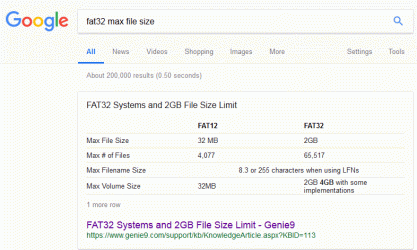
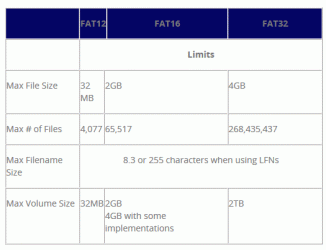
Ok. Got it. LOL, I should have known better than to trust the Google summary of the source web page without clicking through.
Google's summary:

GoogleMaxFAT32FileSize.gif
Source page:
SourceMaxFAT32FileSize.gif
 

My Computer My Computer

Computer type
PC/Desktop
Computer Manufacturer/Model Number
custom
OS
Windows 7 Home Premium 64bit SP 1 (Version 6.1.7601)
CPU
Intel i7-5820K
Motherboard
ASUS X99-A (BIOS 3505)
Memory
16 GB
Graphics Card(s)
NVidia GeForce GTX 970
Sound Card
MB default (Crystal Sound 2)
Monitor(s) Displays
Dell 2408 WFP
Screen Resolution
1920x1280
Hard Drives
C:
Samsung 960 PRO 2 TB SSD
D:
Crucial M4 512GB SSD
PSU
Thermaltake Toughpower 750 W
Thank you, Megahertz07. I will get that set up then. Any advice on what I should do when I can boot from the USB stick? Should I run through the Repair Install? Since things are booting up now, I am a little uncertain what I should be looking for in terms of preventing future non-boot situations.

I have to leave my PC for a while shortly. I will report back later tonight or tomorrow with results and/or more questions. Thanks to both of you for all your help with this.
 

My Computer My Computer

Computer type
PC/Desktop
Computer Manufacturer/Model Number
custom
OS
Windows 7 Home Premium 64bit SP 1 (Version 6.1.7601)
CPU
Intel i7-5820K
Motherboard
ASUS X99-A (BIOS 3505)
Memory
16 GB
Graphics Card(s)
NVidia GeForce GTX 970
Sound Card
MB default (Crystal Sound 2)
Monitor(s) Displays
Dell 2408 WFP
Screen Resolution
1920x1280
Hard Drives
C:
Samsung 960 PRO 2 TB SSD
D:
Crucial M4 512GB SSD
PSU
Thermaltake Toughpower 750 W
You are very welcome MrZork, I am off to bed now as it is 12:30 AM here in the UK. I hope it all goes well!
 

My Computer My Computer

Computer type
Laptop
Computer Manufacturer/Model Number
Fujitsu LIFEBOOK
OS
Win 7 HP SP1 64-bit Vista HB SP2 32-bit Linux Mint 18.3
CPU
Intel(R) Pentium(R) CPU P6200 @ 2.13GHz
Motherboard
FUJITSU FJNBB06
Memory
4.00 GB
Graphics Card(s)
Intel(R) Graphics Media Accelerator HD
Sound Card
[1] Realtek High Definition Audio [2] Intel(R) Display Audio
Screen Resolution
1366 x 768 x 32 bits (4294967296 colors) @ 59 Hz
Hard Drives
TOSHIBA MK5076GSX
Antivirus
AVG FREE
As I already wrote, Repair Install must be launched from running windows, and as you said, you can't boot into windows. So the option should be to repair windows from the win 7 installation disk.
 

My Computers My Computers

System One System Two

  • Computer type
    PC/Desktop
    Computer Manufacturer/Model Number
    custom build
    OS
    Windows 7 HP 64
    CPU
    i5 6600K - 800MHz to 4200MHz
    Motherboard
    GA-Z170-HD3P
    Memory
    4+4G GSkill DDR4 3000
    Graphics Card(s)
    IG - Intel 530
    Monitor(s) Displays
    Samsung 226BW
    Screen Resolution
    1680x1050
    Hard Drives
    (1) -1 SM951 – 128GB M.2 AHCI PCIe SSD drive for Windows 7 and Lubuntu
    (2) -1 WD SATA 3 - 1T for Data
    (3) -1 WD SATA 3 - 1T for backup
    PSU
    Thermaltake 450W TR2 gold
    Keyboard
    Old and good Chicony mechanical keyboard
    Mouse
    Logitech mX performance - 9 buttons (had to disable some)
    Internet Speed
    500Mb/s
    Browser
    Firefox 64
    Other Info
    TinyWall firewall
  • Computer type
    Laptop
    System Manufacturer/Model Number
    Asus Q550LF
    OS
    Windows 7 Pro
    CPU
    i7-4500U 800MHz to 3.0GHz
    Motherboard
    Asus Q550LF
    Memory
    (4+4)G DDR3 1600
    Graphics Card(s)
    IG intel 4400 + NVIDIA GeForce GT 745M
    Sound Card
    Realtek
    Monitor(s) Displays
    LG Display LP156WF4-SPH1
    Screen Resolution
    1920 x 1080
    Hard Drives
    BX500 120G SSD for Windows and programs +
    1T HDD for data
    Internet Speed
    500 Mb/s
    Browser
    Firefox
    Other Info
    TinyWall firewall
Hi MrZork, how did you get on?
 

My Computer My Computer

Computer type
Laptop
Computer Manufacturer/Model Number
Fujitsu LIFEBOOK
OS
Win 7 HP SP1 64-bit Vista HB SP2 32-bit Linux Mint 18.3
CPU
Intel(R) Pentium(R) CPU P6200 @ 2.13GHz
Motherboard
FUJITSU FJNBB06
Memory
4.00 GB
Graphics Card(s)
Intel(R) Graphics Media Accelerator HD
Sound Card
[1] Realtek High Definition Audio [2] Intel(R) Display Audio
Screen Resolution
1366 x 768 x 32 bits (4294967296 colors) @ 59 Hz
Hard Drives
TOSHIBA MK5076GSX
Antivirus
AVG FREE
Not successfully.

I was able to create an installation USB stick, per Megahertz07's instructions. However, when I first tried to boot with it, I got an error that it was not a bootable disc (or something to that effect). But, it seemed to boot anyway. I have no idea what that means.

Booting from that USB stick takes me to what looks like the start of the Win 7 install process... Pick a keyboard country and then on to the installation start screen. Beneath the "Install now" button are two clickable links. One for "What to know before installing Windows".

The other link is to "Repair your computer", which certainly sounds like the correct thing. But, when I choose that option, I get an error widget that says, ""This version of System Recovery Options is not compatible with the version of Windows you are trying to repair. Try using a recovery disc that is compatible with this version of Windows."

I am not sure where to go from there. I have to leave again in a little while, but I was going to do a bit of searching.

BTW, I see that according to the Repair Install tutorial, I should actually choose to "Install now". But, it looks like that takes me through the process of re-installing Windows. All I want to do is to fix whatever broken/missing/misconfigured bootup files are preventing my PC from booting. I don't want to reset Windows from the ground up and I especially do NOT want to reinstall all of my software. It seems like the Repair Install is too drastic. Am I wrong?
 

My Computer My Computer

Computer type
PC/Desktop
Computer Manufacturer/Model Number
custom
OS
Windows 7 Home Premium 64bit SP 1 (Version 6.1.7601)
CPU
Intel i7-5820K
Motherboard
ASUS X99-A (BIOS 3505)
Memory
16 GB
Graphics Card(s)
NVidia GeForce GTX 970
Sound Card
MB default (Crystal Sound 2)
Monitor(s) Displays
Dell 2408 WFP
Screen Resolution
1920x1280
Hard Drives
C:
Samsung 960 PRO 2 TB SSD
D:
Crucial M4 512GB SSD
PSU
Thermaltake Toughpower 750 W
Hi MrZork,

This version of System Recovery Options is not compatible with the version of Windows you are trying to repair. Try using a recovery disc that is compatible with this version of Windows.
I know that this might sound like a silly question, but are you using the right bit type?
 

My Computer My Computer

Computer type
Laptop
Computer Manufacturer/Model Number
Fujitsu LIFEBOOK
OS
Win 7 HP SP1 64-bit Vista HB SP2 32-bit Linux Mint 18.3
CPU
Intel(R) Pentium(R) CPU P6200 @ 2.13GHz
Motherboard
FUJITSU FJNBB06
Memory
4.00 GB
Graphics Card(s)
Intel(R) Graphics Media Accelerator HD
Sound Card
[1] Realtek High Definition Audio [2] Intel(R) Display Audio
Screen Resolution
1366 x 768 x 32 bits (4294967296 colors) @ 59 Hz
Hard Drives
TOSHIBA MK5076GSX
Antivirus
AVG FREE
I have the 64 bit version of Windows 7 installed and the link Megahertz07 sent was to Win7_HomePrem_SP1_English_x64.iso. I assume that they are the same bit type.
 

My Computer My Computer

Computer type
PC/Desktop
Computer Manufacturer/Model Number
custom
OS
Windows 7 Home Premium 64bit SP 1 (Version 6.1.7601)
CPU
Intel i7-5820K
Motherboard
ASUS X99-A (BIOS 3505)
Memory
16 GB
Graphics Card(s)
NVidia GeForce GTX 970
Sound Card
MB default (Crystal Sound 2)
Monitor(s) Displays
Dell 2408 WFP
Screen Resolution
1920x1280
Hard Drives
C:
Samsung 960 PRO 2 TB SSD
D:
Crucial M4 512GB SSD
PSU
Thermaltake Toughpower 750 W
Hi MrZork,

I have the 64 bit version of Windows 7 installed and the link Megahertz07 sent was to Win7_HomePrem_SP1_English_x64.iso. I assume that they are the same bit type.

Yes it is.

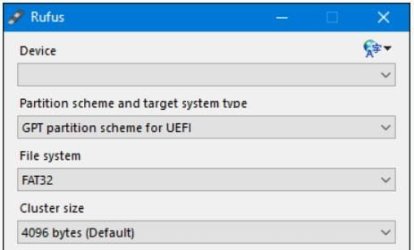
I just found this which might be of use for anybody creating a UEFI - GPT ISO for re-installation with Rufus.

Rufus.jpg
 

My Computer My Computer

Computer type
Laptop
Computer Manufacturer/Model Number
Fujitsu LIFEBOOK
OS
Win 7 HP SP1 64-bit Vista HB SP2 32-bit Linux Mint 18.3
CPU
Intel(R) Pentium(R) CPU P6200 @ 2.13GHz
Motherboard
FUJITSU FJNBB06
Memory
4.00 GB
Graphics Card(s)
Intel(R) Graphics Media Accelerator HD
Sound Card
[1] Realtek High Definition Audio [2] Intel(R) Display Audio
Screen Resolution
1366 x 768 x 32 bits (4294967296 colors) @ 59 Hz
Hard Drives
TOSHIBA MK5076GSX
Antivirus
AVG FREE
BTW, here is the current state of the PC...

  • I start it up with no USB stick inserted, no recovery DVD inserted, etc.
  • The BIOS splash screen comes up for a couple seconds and then the screen goes blank.
  • The cursor flashes near the upper-left corner for a few seconds and then I am taken to the BIOS settings page.
  • I click "Save and Exit". I get a note that I have not changed anything and I confirm that I want to save changes & reset.
  • The machine reboots.
  • BIOS screen flashes.
  • Cursor in upper-left corner.
  • The Windows Error Recovery screen comes up. "Windows failed to start. A recent hardware or software...". My choices are "Launch Startup Repair" or "Start Windows Normally".
    • If I choose the former (and I can do this many times with the same result), the screen goes blank for a second or two and I come back to the same Windows Error Recovery screen.
    • If I choose the latter, it looks like Windows is starting and "Starting Windows" appears near the bottom. Then, I am taken back to the BIOS settings.
 

My Computer My Computer

Computer type
PC/Desktop
Computer Manufacturer/Model Number
custom
OS
Windows 7 Home Premium 64bit SP 1 (Version 6.1.7601)
CPU
Intel i7-5820K
Motherboard
ASUS X99-A (BIOS 3505)
Memory
16 GB
Graphics Card(s)
NVidia GeForce GTX 970
Sound Card
MB default (Crystal Sound 2)
Monitor(s) Displays
Dell 2408 WFP
Screen Resolution
1920x1280
Hard Drives
C:
Samsung 960 PRO 2 TB SSD
D:
Crucial M4 512GB SSD
PSU
Thermaltake Toughpower 750 W
Thank you for that note on the Rufus option. However, the USB stick that I was able to create is bootable and takes me to the Windows installation screen I mentioned earlier ( after choosing a keyboard, I am at the same screen shown in Step 8 of the Repair Install tutorial).

So, I think I have a bootable USB stick. The problem is that the "Repair your computer" option is incompatible somehow and I don't know if the more drastic option of the full Repair Install (per the tutorial) is overkill.

I would really like to get the "Repair your computer" option to work.
 

My Computer My Computer

Computer type
PC/Desktop
Computer Manufacturer/Model Number
custom
OS
Windows 7 Home Premium 64bit SP 1 (Version 6.1.7601)
CPU
Intel i7-5820K
Motherboard
ASUS X99-A (BIOS 3505)
Memory
16 GB
Graphics Card(s)
NVidia GeForce GTX 970
Sound Card
MB default (Crystal Sound 2)
Monitor(s) Displays
Dell 2408 WFP
Screen Resolution
1920x1280
Hard Drives
C:
Samsung 960 PRO 2 TB SSD
D:
Crucial M4 512GB SSD
PSU
Thermaltake Toughpower 750 W
"The problem is that the "Repair your computer" option is incompatible somehow and I don't know if the more drastic option of the full Repair Install (per the tutorial) is overkill"

As I wrote before, to repair (or install on) a UEFI - GPT disk, you must boot the installation disk as UEFI. You're not booting the flash drive as UEFI. You're booting as Legacy-MBR
During post, launch the the boot menu (F8).
You must see an option UEFI - USB disk
 

My Computers My Computers

System One System Two

  • Computer type
    PC/Desktop
    Computer Manufacturer/Model Number
    custom build
    OS
    Windows 7 HP 64
    CPU
    i5 6600K - 800MHz to 4200MHz
    Motherboard
    GA-Z170-HD3P
    Memory
    4+4G GSkill DDR4 3000
    Graphics Card(s)
    IG - Intel 530
    Monitor(s) Displays
    Samsung 226BW
    Screen Resolution
    1680x1050
    Hard Drives
    (1) -1 SM951 – 128GB M.2 AHCI PCIe SSD drive for Windows 7 and Lubuntu
    (2) -1 WD SATA 3 - 1T for Data
    (3) -1 WD SATA 3 - 1T for backup
    PSU
    Thermaltake 450W TR2 gold
    Keyboard
    Old and good Chicony mechanical keyboard
    Mouse
    Logitech mX performance - 9 buttons (had to disable some)
    Internet Speed
    500Mb/s
    Browser
    Firefox 64
    Other Info
    TinyWall firewall
  • Computer type
    Laptop
    System Manufacturer/Model Number
    Asus Q550LF
    OS
    Windows 7 Pro
    CPU
    i7-4500U 800MHz to 3.0GHz
    Motherboard
    Asus Q550LF
    Memory
    (4+4)G DDR3 1600
    Graphics Card(s)
    IG intel 4400 + NVIDIA GeForce GT 745M
    Sound Card
    Realtek
    Monitor(s) Displays
    LG Display LP156WF4-SPH1
    Screen Resolution
    1920 x 1080
    Hard Drives
    BX500 120G SSD for Windows and programs +
    1T HDD for data
    Internet Speed
    500 Mb/s
    Browser
    Firefox
    Other Info
    TinyWall firewall
I think I am doing that.

  • I am booting the USB stick with the Windows installation that I made via the process you described earlier.
  • I interrupt at the BIOS screen to choose the boot option.
  • I choose "UEFI: SanDisk Ultra 1.26 [that's the USB stick] Partition 1 (15,287 MB)"
  • The PC boots from the USB stick and Windows boots.
  • I choose a US keyboard.
  • The Install Screen comes up with the "Install Now" button, then the links to "What to know..." and "Repair your computer". I choose "Repair your computer"
  • I get the error I mentioned before that "This version of System Recovery Options is not compatible..."
What am I doing wrong?
 

My Computer My Computer

Computer type
PC/Desktop
Computer Manufacturer/Model Number
custom
OS
Windows 7 Home Premium 64bit SP 1 (Version 6.1.7601)
CPU
Intel i7-5820K
Motherboard
ASUS X99-A (BIOS 3505)
Memory
16 GB
Graphics Card(s)
NVidia GeForce GTX 970
Sound Card
MB default (Crystal Sound 2)
Monitor(s) Displays
Dell 2408 WFP
Screen Resolution
1920x1280
Hard Drives
C:
Samsung 960 PRO 2 TB SSD
D:
Crucial M4 512GB SSD
PSU
Thermaltake Toughpower 750 W
Back
Top